

In this Notion review 2026, we tested the platform in real workflows including project management, CRM databases, and content pipelines.
This guide covers:
• Notion features
• pricing plans
• pros and cons
• best alternatives like Obsidian and Evernote
If you are wondering whether Notion is worth it for teams or solo productivity, this review breaks down everything you need to know.
Look, running a business—or even just managing your personal tasks—used to mean juggling a dozen different subscriptions. You paid for Trello for kanban boards, used Google Docs for writing, hoarded chaotic lists in Apple Notes, and tried to duct-tape it all together with messy spreadsheets. Today, modern software promises to consolidate all of these functions into one centralized hub.
The real problem? Most apps that try to do everything end up doing nothing well. They become bloated, sluggish, and incredibly frustrating to roll out to a team.
For the past few years, Notion has positioned itself as the absolute leader in the SaaS market, claiming to be the ultimate all in one workspace for serious teams, startups, and solo entrepreneurs. But with competitors like Obsidian and Microsoft Loop aggressively stepping up their game, does it still justify the steep learning curve required to master it this year? We got our hands dirty by building a full-scale corporate wiki, a CRM system, and an editorial calendar to push its limits.
In this exhaustive Notion review 2026, we are cutting through the promotional noise, analyzing the real Notion pricing plans, and figuring out if it is truly the best productivity app your business can buy today.
We are reader-supported. When you buy through links on our site, we may earn an affiliate commission at no extra cost to you.
⚖️ Is Notion Worth It in 2026?
Is Notion worth it in 2026? For most teams and freelancers, the answer is yes.
Notion combines note-taking, project management, and relational databases into one workspace. Instead of using multiple tools like Trello, Google Docs, and Asana, you can manage everything inside one platform.
⚡ Quick Verdict: Is Notion Worth It?
If you are just looking for a free digital notepad to quickly jot down a grocery list or copy-paste a recipe, Notion is going to feel incredibly overwhelming and entirely overkill. There are much simpler solutions for that.
But if you manage a marketing department, run a scaling startup, maintain a complex client database, or want to figure out how to organize your life with Notion from top to bottom, this tool remains in a completely untouchable league of its own. It is less of a simple “note-taking app” and more of a digital Lego set for your information. You literally build the software that perfectly fits your exact business operations.
The learning curve is notoriously steep due to its relational databases. However, the sheer amount of money you save by canceling your redundant subscriptions to Asana, Evernote, and Monday.com makes the ROI undeniable for serious professionals. And yes, if you are asking is Notion worth it for small business, the answer is a resounding yes.
👍 What We Love
- ✅ Unmatched Flexibility: You can build anything from a daily habit tracker to a complex enterprise CRM using relational databases.
- ✅ Native AI Integration: It doesn’t just write text; Notion AI can analyze your tables, summarize long meeting transcripts, and automatically populate database properties.
- ✅ Massive Template Ecosystem: If you don’t want to build a system from scratch, there are thousands of free and premium templates available for every conceivable use case.
- ✅ Real-Time Collaboration: Flawless multiplayer document editing without lag or version conflicts.
👎 Where It Falls Short
- ❌ Offline Mode: Despite recent updates, working without an internet connection is still a glaring weak point. The mobile app can take forever to load if you have spotty cell service.
- ❌ Too Much Freedom: The blank page syndrome is real. Without the right architecture, your workspace can quickly turn into a massive graveyard of lost documents.
- ❌ Notification Clutter: The notification system for large, enterprise-level teams can get chaotic and requires heavy manual filtering.
🏆 OVERALL RATING: ⭐⭐⭐⭐⭐ 4.7 / 5
Best For: Startups, marketing agencies, project managers, developers, and productivity enthusiasts needing a single source of truth.
🏗️ What is Notion?
Let’s skip the marketing jargon. Notion is not just a place to store text. It is an enterprise-grade knowledge management platform.
Unlike basic applications that force you into a rigid hierarchy of folders and files, Notion uses a “block” system. Every paragraph, image, table row, or checklist is an individual block that can be dragged, dropped, transformed, and linked to other pages.
Under the hood, Notion is powered by robust relational databases. This means you can create a database of all your employees, link it to your active projects database, and link that to your daily tasks database. In short: it is a dedicated digital architect designed to turn a chaotic mess of scattered files into a highly structured, automated machine. This structural depth is exactly why we are conducting this Notion review 2026 to see if it holds up under real agency pressure.
🖥️ Ease of Use & The User Interface
When it comes to onboarding, this is usually where beginners hit a brick wall. Logging into the platform for the first time does not feel intuitive if you are expecting a rigid, traditional app structure.
You are handed a completely blank page. For agencies and remote teams, this freedom can initially become a massive headache because every employee starts creating and organizing pages in their own unique (and often messy) way.
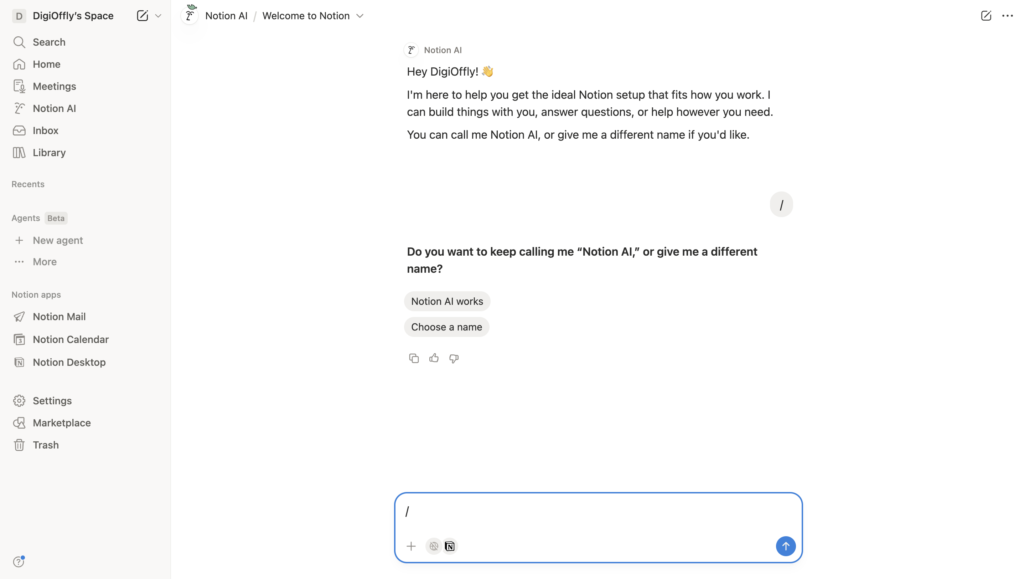
However, the interface is deceptively minimalistic. The core magic hides behind the forward slash /. Typing it brings up a command menu that lets you insert anything: from a simple table to a Kanban board, a code snippet, or an embedded Figma file. Once you understand the core logic (that everything is a block, and any page can house a database), the interface stops being intimidating and becomes incredibly fast to navigate.
⚙️ Key Features That Actually Work
Most SaaS platforms boast about having hundreds of tools, but in reality, you only end up using two or three. During our testing, we ignored the vanity features and focused strictly on the tools that actually save hours of manual administrative labor. Here is what makes Notion stand out from the noise.
Databases and Views
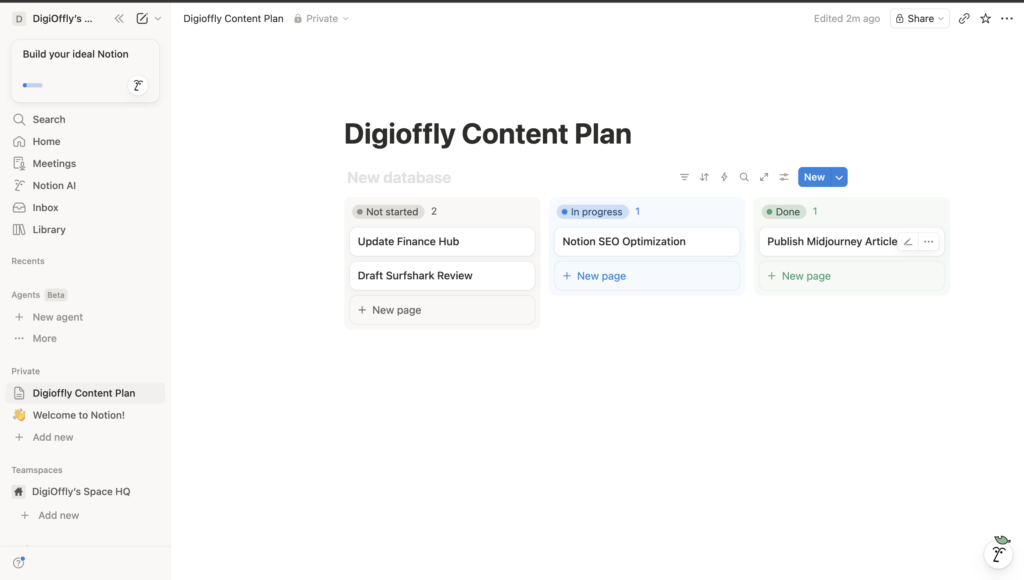
This is the beating heart of the platform. Unlike a static Excel spreadsheet, a Notion database allows you to look at the exact same data from multiple angles. If you are a content marketer, you can create a master list of articles. You can then view that list as a Kanban board (to track status: “Draft,” “Editing,” “Published”), as a Calendar (to see publishing dates), or as a Gallery (to view the article cover images). You never have to duplicate data.
Deep AI Integration
Artificial intelligence here is baked directly into the workflow. Highlight text, and the AI can rewrite it, change the tone, translate it, or summarize it. More importantly, the AI can interact with databases: it can automatically read a massive page of meeting notes, extract the specific Action Items, and populate them directly into your project tracker.
Synced Blocks
An absolute game-changer for businesses. If you have a navigation menu, a company policy, or a pricing tier that needs to live on 50 different pages, you use a Synced Block. You edit it in one place, and it instantly updates across all 50 pages. This completely eliminates outdated, conflicting information in your corporate wiki.
🥊 Notion vs. Free Productivity Apps
You might be wondering: “Why pay for a premium subscription or spend weeks setting up a workspace when basic tools like Google Keep or Apple Notes are completely free?”
It all comes down to scalability and relationships. Free apps rely on primitive tagging and folder systems. If you just need a quick memo, they work flawlessly. However, they consistently fail when it comes to managing complex deliverables, assigning tasks to team members, or building automated relationships between different company departments.
An all in one workspace gives you granular access control (who can see or edit what), allows for massive file uploads, and unifies your documentation and task management under a single roof.
⚠️ Performance Issues (The Reality Check)
To keep this review brutally honest: no digital tool is flawless.
If you are expecting instant, millisecond loading times on a database holding 10,000 rows with dozens of complex rollups and relation formulas, you will be disappointed. The platform can get a bit sluggish when processing massive amounts of data, especially on older hardware.
The second major issue is offline mode. Notion caches pages you have recently visited, but if you board a flight without Wi-Fi and try to open a deeply buried sub-page you haven’t loaded in a month, you are out of luck. It is primarily a cloud-based tool, and you need to build your workflow with that reality in mind.
💰 Pricing Plans & Real ROI
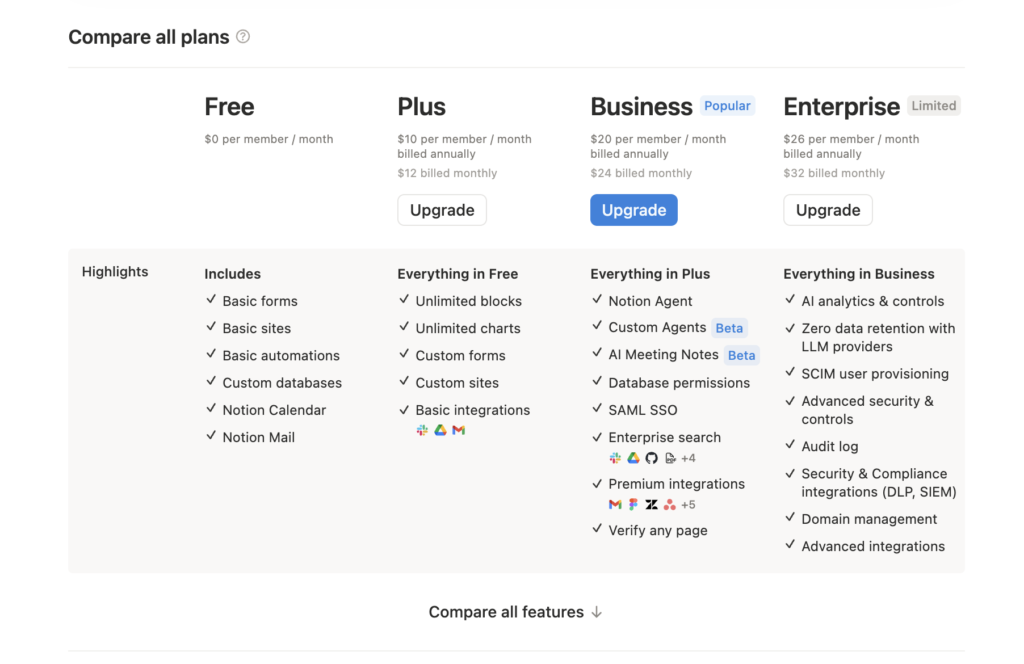
A deep dive into the Notion pricing plans reveals that while it is not entirely free for scaling teams, it is an incredibly cheap premium investment for professionals. The tiers are designed to scale alongside your business.
- Free Plan: Perfect for solo users. You get unlimited pages and blocks. The catch is the file upload limit (5MB) and page history (only 7 days). For teams, there is a strict block limit, meaning the free tier is useless for a legitimate business.
- Plus Plan: Roughly $8-$10 per user/month. Removes file upload limits, provides 30 days of version history, and allows unlimited blocks for teams.
- Business Plan: Roughly $15-$18 per user/month. When looking at a direct Notion Plus vs Business plan comparison, the Business tier is mandatory for larger agencies. It unlocks SAML SSO for security, allows you to export your entire workspace as a PDF, and offers advanced page analytics to see exactly which employees are reading your internal docs.
- Enterprise Plan: Custom pricing. Advanced security, audit logs, and a dedicated success manager.
If you are a freelancer, the free plan will easily last you for years. If you are a startup, the ROI pays for the annual Plus subscription within the first month, simply by allowing you to cancel your third-party task trackers and documentation host.
🛑 The Catch with Limits and AI
A crucial warning in our review: many beginners are tempted by the free account, but you must read the fine print. The moment you invite even a single coworker into a free workspace, your “unlimited” space turns into a hard limit of a few hundred blocks. You will burn through that limit in two days of active documentation.
Also, be aware that Notion AI is not included in the standard tiers for free forever. It is an add-on that typically costs an extra $8-$10 per month on top of your base plan. If you plan on heavily utilizing neural networks to write copy inside your databases, budget for it accordingly.
🎯 Who Should Use Notion?
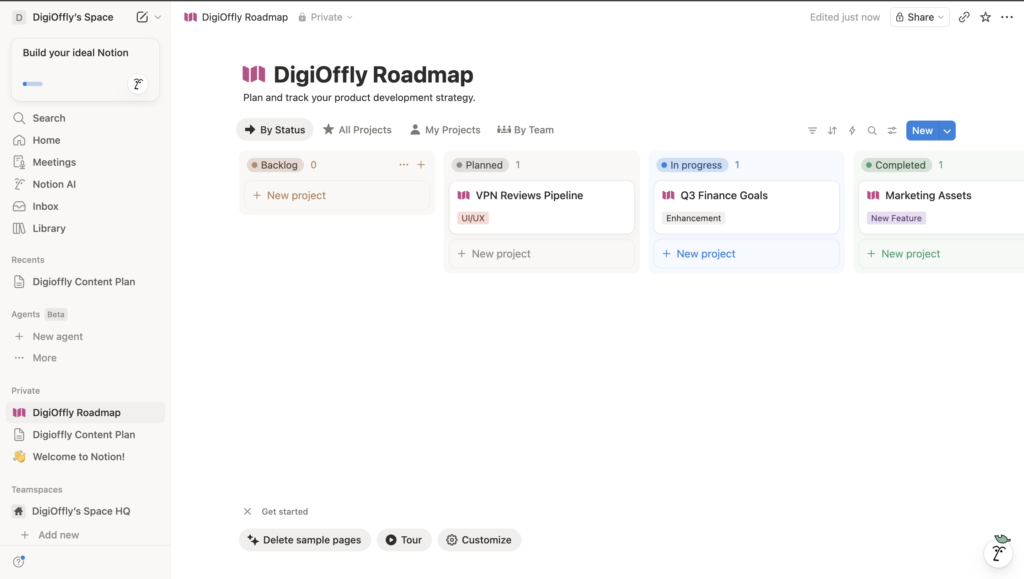
A core takeaway from this review is that the platform is built for operational scale.
Founders constantly ask: is Notion worth it for small business? The answer is an absolute yes. Instead of wasting hours hunting for a specific client contract scattered across fragmented Google Drive folders, your core team can create standardized operating procedures (SOPs) and track client deals in a single browser tab.
It is the ultimate tool for product teams managing roadmaps, web design agencies needing sprint trackers, and publishers who need to scale their visual and text content without losing control of their processes.
🔄 Notion Alternatives
The productivity market is incredibly crowded, but only a few platforms actually compete at the enterprise level. In the ongoing Notion vs Evernote debate, the choice often depends on whether you need relational databases or just a convenient digital filing cabinet for receipts and quick notes.
Evernote excels at fast data capture (via its legendary Web Clipper) and optical character recognition (OCR) inside PDFs. But it completely fails if you want to know how to use Notion for project management, because Evernote does not have true databases.
Here is a quick breakdown of the best Notion alternatives for note taking and project tracking:
| Feature | Notion | Evernote | Obsidian | Asana |
| Best For | All-in-one workspaces, databases | Fast note capture, document scanning | Local storage, privacy, graph linking | Complex project and deadline management |
| Interface | Block-based, blank canvas | Traditional notebooks | Markdown editor | Task lists, boards, timelines |
| Databases | Exceptional (Relational) | None | Limited (requires heavy plugins) | Great (but strictly for tasks) |
| Offline Mode | Weak (Cache-dependent) | Excellent | Flawless (Local files) | Average |
🔬 How We Tested Notion
To write this review, we didn’t just read the marketing brochure. As a digital software analyst, I (Alex Wright) personally signed up for the platform, migrated a massive chunk of Digioffly’s backend architecture into the software, and put it through its paces in real-world scenarios.
- Mini workflow we actually ran:
- A “Leads” database (company, contact, stage, source, next step, owner)
- A “Content pipeline” board linked to each lead (brief → draft → edit → publish)
- A weekly dashboard that shows: leads needing follow-ups, content due this week, and a simple SOP checklist for onboarding.
- This setup made it obvious whether Notion would stay clean under daily use—not just look good as a template.
We generated a full CRM system to track affiliate leads, tested the relational consistency between tables, pushed the limits on data exports, and actively ran a Notion Plus vs Business plan comparison. I found that the page analytics on the Business tier are absolutely critical for figuring out if your employees are actually reading your internal SOPs. The insights you read throughout this review are based on my own active dashboard and real, hands-on experience managing agency content, not just aggregated internet opinions.
🏆 Final Verdict: Time to Upgrade Your Workflow
After testing Notion in real workflows (docs, databases, and a small CRM setup), it’s clear who it’s for: teams and solo builders who want one place for notes + projects + structured data.
If you only need quick note capture, it may feel like overkill at first. But if you’re juggling clients, SOPs, and ongoing projects, Notion can replace a few separate tools and make your system easier to run.
The main trade-offs are the learning curve and imperfect offline use—so it’s best if you’re willing to set up a simple structure and stick to it.

Frequently Asked Questions
How to use Notion for project management?
Start by creating a master database (Table view). Add specific properties: Task Name, Status (To Do, In Progress, Done), Assignee, and Deadline. Next, add a new database view as a Kanban Board. This allows you to visually drag and drop project cards as they move through your pipeline, creating a classic Agile workflow directly inside your document without needing a separate Jira subscription.
Is my proprietary business data private?
Yes. By default, any page you create in a private workspace is entirely hidden. No one can find it on the internet or read it until you explicitly hit the “Share” button and invite an email address or publish it to the web. Data is encrypted both in transit (TLS) and at rest (AES-256).
What are the best Notion alternatives for note taking?
If you need raw speed, simplicity, and offline reliability, look at Apple Notes or Google Keep. If you are deeply concerned about privacy, want local storage on your own hard drive, and love the Markdown format, Obsidian is the absolute best alternative on the market. For corporate web clipping and receipt scanning, Evernote still holds strong.
What is the core difference in the Notion Plus vs Business plan comparison?
The main difference lies in employee control and security. The Business plan gives you Single Sign-On (SAML SSO) for enterprise-level security, the ability to bulk-export your entire workspace as a PDF for legal backups, and advanced page analytics showing exactly who on your team has opened and read specific pages. The Plus plan is perfect for lean startups that don’t need rigid corporate bureaucracy.
Is there a free trial for teams?
You can create a workspace and invite your team for free, but you will be hit with a strict 1,000-block limit. For a growing company, you will hit this limit in a matter of days while building your internal wiki. After that, you are forced to upgrade to a paid tier. For solo users, there is no block limit.
Is Notion really that helpful?
Yes, provided you actually take the time to build a system. If you are actively asking is Notion worth it for small business, the ROI is undeniable because it acts as a true all in one workspace. It eliminates the need to pay for Asana, Google Workspace, and Trello separately. Whether you are scaling a remote startup or just trying to figure out how to organize your life with Notion, it centralizes your chaotic data into one highly actionable hub.
Why are people leaving Notion?
Usually, it comes down to the steep learning curve and a lack of true offline support. As we mentioned earlier in this guide, the “blank canvas” approach can be paralyzing. When beginners try to figure out how to use Notion for project management from scratch without using templates, they often get overwhelmed and retreat to simpler, rigid tools. Furthermore, its reliance on cloud servers frustrates digital nomads who frequently travel without reliable Wi-Fi.
What are the downsides of Notion?
The main downsides are sluggish performance with massive relational databases and creeping costs. While it is widely considered the best productivity app on the market, the Notion pricing plans can get expensive for rapidly scaling agencies. If you run a direct Notion Plus vs Business plan comparison, you quickly realize that critical corporate features—like advanced page analytics and SAML SSO—are locked behind those higher-tier paywalls.
Who is Notions’ biggest competitor?
It depends entirely on your specific workflow. In the classic Notion vs Evernote debate, Evernote still holds an edge for rapid receipt scanning and web clipping. However, if you are strictly searching for the best Notion alternatives for note taking with flawless offline storage and deep data privacy, Obsidian is its fiercest competitor. For enterprise-level deadline tracking, Asana remains a strong rival.
Is Notion free?
Yes, Notion has a free plan for individuals with unlimited pages and blocks. However, teams will quickly hit limits and may need to upgrade to the Plus plan.
🌐 Explore More on Digioffly
If you found this Notion guide helpful, check out our other guides on scaling your digital marketing and creative workflows:
- Featured Digital Deals: Return to our homepage to explore the absolute highest-rated software discounts and exclusive tech tools for 2026.
- Top VPN Services & Privacy Deals: Stop leaving your corporate data exposed. Compare the fastest, most secure VPNs to protect your remote team and bypass geo-blocks.
- Explore All AI & Tech Categories & Guides: Dive into our full library of software reviews and growth strategies.
- The Ultimate B2B Growth Stack: Discover our curated list of the best software for management, SEO, and productivity in 2026.
- Best Financial Software Deals: Learn how to automate your bookkeeping and tax reporting so you can free up more time to use your new productivity tools.