

Pricing and specifications checked on 9 October 2026: US annual pricing shown: Pro $144/year per person; Business $250/year per person. Pro includes 100GB cloud storage and Canva Offline. Official vendor pricing.
Canva is one of the most popular design platforms for startups, marketing teams, and creators in 2026.
In this Canva review 2026, we tested its AI tools, Canva pricing plans, collaboration features, and business workflows to see whether it is still the best graphic design software for modern teams.
Creating visual assets for a growing business used to mean juggling too many tools at once.
One person handled social graphics in one app, another edited video somewhere else, and brand files were usually scattered across folders with names like “final-final-v2”. Just a few years ago, your creative pipeline probably required a hefty Adobe Creative Cloud license for your lead designer, a complicated video editing suite for social media clips, and a labyrinth of disorganized Google Drive folders holding three different (and slightly wrong) versions of your company logo. Ensuring brand consistency across a remote team often felt like a full-time job in itself.
That’s exactly why browser-based design platforms became so popular. They promised one place to manage design, video, brand assets, and collaboration without forcing every team member to learn Adobe-level tools. However, the harsh reality of “all-in-one” visual platforms is that they frequently sacrifice professional depth for beginner-friendly convenience. Many tools on the market end up being glorified template farms—far too basic for serious marketing agencies, yet somehow still sluggish when loaded with heavy 4K video files and complex vector graphics.
Canva has been the default recommendation for years whenever a founder, marketer, or small team needs to create visual content quickly.
The big question in 2026 is whether it still deserves that position now that Adobe Express, Figma, and other AI-powered tools have become much more competitive. But the digital landscape is shifting dramatically. With legacy giants launching their own incredibly powerful generative AI features, we have to ask: is Canva resting on its laurels, or does it still command its spot at the top of the tech stack?
To find out, we completely bypassed the marketing brochures and integrated the platform directly into our daily agency operations. Our team built out a strict corporate brand architecture, automated a multi-platform social media video pipeline, and designed a heavy, interactive investor pitch deck just to push the platform’s limits. In this brutally honest Canva review 2026, we are unpacking the reality of their new AI tools, evaluating the true ROI of the Canva pricing plans, and definitively answering if this is the best graphic design software your business can invest in right now.
We are reader-supported. When you buy through links on our site, we may earn an affiliate commission at no extra cost to you.
⚡ Quick Verdict: The TL;DR on Canva in 2026
If you are wondering whether Canva Pro is worth it in 2026, the short answer is yes for most businesses, creators, and marketing teams.
If you are a founder, a marketing director, or an agency owner, you are likely asking: is Canva Pro worth it right now? For the vast majority of digital-first businesses, marketing teams, and content creators, the answer is an absolute, resounding yes.
If you are just looking for a free digital app to quickly slap some text on a family photo, create a one-off birthday invitation, or make a quick meme for a group chat, the free version of Canva is perfectly fine. It will handle those tasks flawlessly. But if you manage a marketing department, run a scaling startup, or maintain complex, strict client branding across multiple platforms, the paid versions of Canva still offer one of the most practical all-in-one workflows for business design work.
It is no longer just a simple social media design tool. For many teams, it now functions as a shared workspace for brand assets, presentations, social content, and lightweight video production. You literally build and store the visual assets that perfectly fit your exact business operations. Furthermore, the sheer amount of capital you save by canceling redundant, expensive subscriptions to basic video editors, premium stock photo websites, and standalone AI image generators makes the Return on Investment (ROI) undeniable for serious professionals.
👍 What We Love
- ✅ The Brand Hub: A centralized, locked-down command center where your company’s exact fonts, hex codes, and SVG logos are securely stored, ensuring no employee ever goes off-brand or uses the wrong color blue again.
- ✅ Magic Studio (Native AI): It doesn’t just resize images. Does Canva have AI image generation? Yes, and it seamlessly generates photorealistic images, flawlessly expands cropped backgrounds, and intelligently rewrites your ad copy directly inside the design canvas.
- ✅ Massive Premium Ecosystem: You gain instant access to a library of over 100 million premium stock photos, vector graphics, licensed audio tracks, and high-converting templates. You will likely never need to purchase a standalone stock photo license again.
- ✅ Real-Time Collaboration: Flawless multiplayer document, whiteboard, and presentation editing without any of the lag or version-control conflicts found in older desktop software.
👎 Where It Falls Short
- ❌ Not for Advanced Vector Illustration: If you need to design complex, mathematically perfect, scalable vector logos from absolute scratch using advanced bezier pen tools, Canva is not a replacement for Adobe Illustrator.
- ❌ The Generic Template Trap: Because millions of people use the platform daily, relying strictly on unedited, popular templates can make your brand look identical to your competitors. You still need a human eye to customize the layouts.
- ❌ Messy File Organization: Without a strictly enforced folder architecture and naming convention, your team’s workspace can very quickly turn into a massive, unnavigable graveyard of lost documents and “Untitled Design (1)” files.
🏆 OVERALL RATING: ⭐⭐⭐⭐⭐ 4.8 / 5
Best For: Startups, digital marketing agencies, project managers, educators, and content creators needing a single source of truth for all visual communication.
🧠 What Is Canva in 2026 and How Does It Work?
Let’s skip the standard marketing jargon. Canva is not just a place to make Instagram posts. To view it that way in 2026 is to fundamentally misunderstand its utility. At its core, Canva is a cloud-based design platform that allows teams to create presentations, social media graphics, videos, documents, whiteboards, and brand assets inside one shared workspace.
Unlike basic mobile applications or heavy, localized desktop software that force you into rigid, unforgiving workflows, Canva operates fluidly in your web browser or via its surprisingly lightweight desktop app. It allows you to create an astonishing variety of assets: from multi-page responsive websites and heavily formatted PDF lead magnets, to highly engaging TikTok videos, automated data charts, and infinite interactive whiteboards for remote team brainstorming.
Under the hood, Canva is powered by an incredibly robust library of drag-and-drop assets combined with state-of-the-art machine learning algorithms. This means you can pull a high-quality, 4K stock video of a bustling city, drop it into a mobile-first portrait template, automatically remove the background from a specific subject within that video, and use AI to generate a professional voiceover – all without ever leaving the current browser tab.
In short: In practice, Canva works best as a central visual workspace that helps teams organize content creation instead of jumping between five separate tools. This structural depth is exactly why we are conducting this comprehensive Canva review 2026 to see if it holds up under real, unforgiving agency pressure where deadlines are tight and clients are demanding.
💼 How to Use Canva for Business Effectively
The best way to use Canva for business is to treat it as a shared brand and content system, not just a one-off design editor.
In practice, that means setting up your Brand Hub first, creating reusable templates for recurring tasks, and organizing folders before the team starts producing content at scale.
For small businesses and agencies, Canva becomes much more useful when it is used for repeatable workflows like ad creatives, blog graphics, presentations, video snippets, and internal brand documents.
🖥️ How Easy Is Canva to Use for Teams and Beginners?
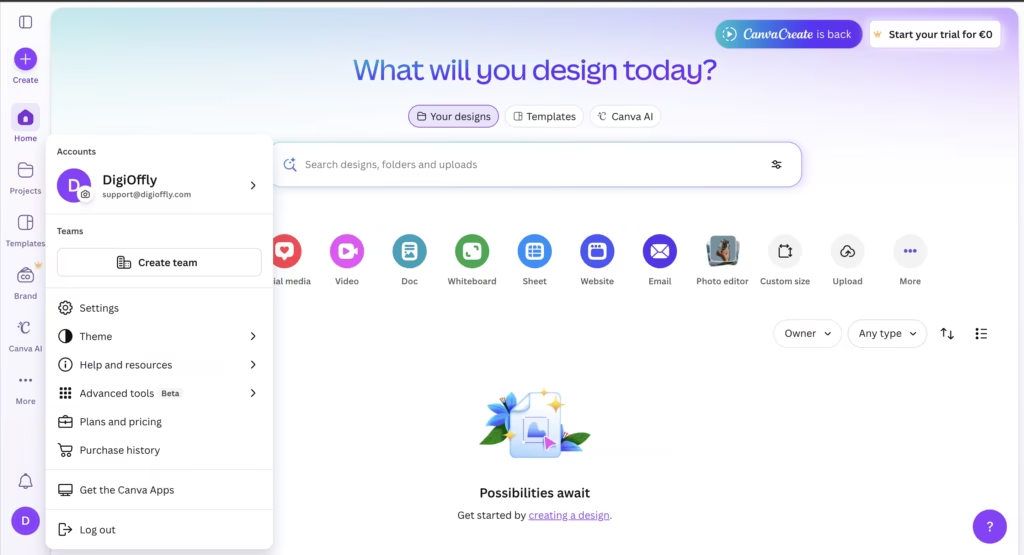
When it comes to onboarding professional-grade design software, beginners and non-technical staff usually hit a massive brick wall. Traditional tools require weeks of dedicated tutorials just to understand how layers, clipping masks, and adjustment layers function. This learning curve costs businesses thousands of dollars in onboarding time.
Canva handles this much better than most traditional design software. Logging into the platform for the first time feels incredibly intuitive, almost deceptively so. You are handed a clean, distraction-free dashboard asking you a simple question: “What will you design today?” alongside a search bar.
However, the interface is deceptively minimalistic. The core magic hides within the left-hand sidebar of the editor. From there, you can drag and drop elements, access the powerful Magic Studio AI tools, integrate third-party apps (like Google Drive or Typeform), or pull directly from your company’s official Brand Hub.
Once you understand the core logic of the platform—that absolutely everything on the canvas is an editable block that can be grouped, animated, or resized with a single click – the interface looks simple at first, but most of the useful business features sit inside the left sidebar and workspace settings. For remote, distributed teams, the ability to leave highly specific comments directly on individual design elements (e.g., tagging a copywriter to say “@John rewrite this headline”) is an absolute game-changer for asynchronous approval processes. It eliminates the need to send endless “V2_Final_ActuallyFinal.pdf” files back and forth over email.
⚙️ Key Features That Actually Drive Business ROI
Most SaaS platforms boast about having hundreds of niche tools, but in reality, you only end up using two or three on a daily basis. During our extensive testing for this review, we actively ignored the vanity features and focused strictly on the core tools that actually save hours of manual administrative and design labor. Here is what makes this platform stand out from the noise in the current market.
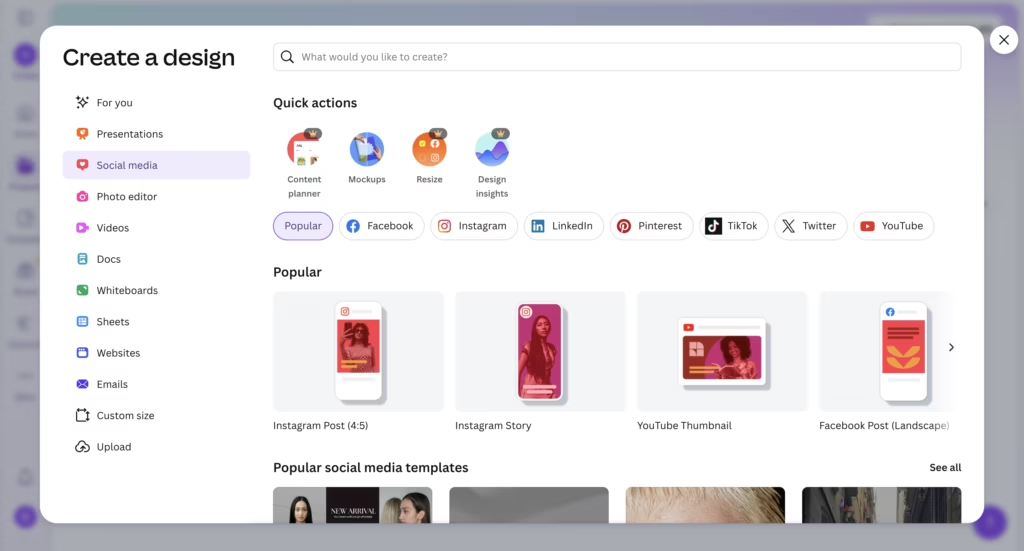
🪄 Magic Studio (Deep & Seamless AI Integration)
Artificial intelligence is no longer a gimmick; it is baked directly into the modern workflow. In 2026, you simply cannot evaluate design software without rigorously testing its native AI capabilities. Canva’s Magic Studio is a veritable powerhouse.
If you have a fantastic photo of a product, but the aspect ratio is entirely wrong for a vertical Instagram Story, the “Magic Expand” tool seamlessly analyzes the image and generates the rest of the background with terrifying accuracy. Need to remove a messy coffee cup or distracting background person from a corporate team photo? “Magic Eraser” achieves this flawlessly in roughly three seconds without leaving any smudged pixels.
Furthermore, the AI can automatically read a short text prompt and generate a highly specific, commercially usable image. It can also utilize “Magic Switch” to instantly translate your entire 50-page presentation into 15 different languages with one click, preserving all formatting and layout structures. This feature alone saves localization teams hundreds of hours per quarter.
🛡️ The Corporate Brand Hub
This is an absolute game-changer for businesses and the primary reason agencies upgrade to paid tiers. If you want to know how to use Canva for business effectively and maintain a professional image, the Brand Hub is the master key.
You upload your official, approved brand colors (by exact HEX code), typography, and transparent SVG logos into a centralized hub. From then on, any employee creating a document within the company workspace is heavily guided to use only those approved assets. As an administrator, you can even “Lock” specific elements on a master template—meaning junior staff or freelancers can edit the text of an ad, but they physically cannot accidentally move your logo, change the corporate font, or alter the core design layout. This completely eliminates outdated, conflicting information and off-brand visuals across your entire company ecosystem.
🤖 Does Canva Have AI Image Generation?
Yes, Canva now includes native AI image generation inside Magic Studio.
You can generate images from text prompts, expand backgrounds, remove unwanted elements, and apply AI-assisted editing directly inside the editor without switching tools.
For many business users, this is one of Canva’s biggest advantages because the AI tools are built into the normal design workflow instead of being separated into another platform.
🔄 Magic Switch & Cross-Platform Resizing
In the modern omnichannel marketing environment, this feature alone pays for the entire monthly subscription. If you spend an hour meticulously designing the perfect YouTube thumbnail, you no longer need to start from scratch on a blank canvas to make an accompanying Twitter post or an Instagram Reel cover.
You simply hit “Magic Switch,” select your desired output formats from a massive list of pre-set dimensions, and Canva’s algorithm intelligently resizes, rearranges, and scales your design to fit the new dimensions perfectly in mere seconds. It identifies the focal point of your design and ensures it isn’t cropped out during the transition.
🎬 A Surprisingly Robust Built-in Video Suite
While no professional will argue that Canva will replace Adobe Premiere Pro or DaVinci Resolve for editing feature-length Hollywood films, Canva’s timeline-based video editor is incredibly robust for B2B use cases, social media marketing, and internal corporate communications.
You can easily split clips, add cinematic transitions, auto-generate highly accurate captions, and sync your background audio tracks perfectly to the visual cuts using their “Beat Sync” AI technology. It exports smoothly in crisp 4K resolution, making it the perfect tool for generating daily TikTok, YouTube Shorts, or LinkedIn video content without needing a dedicated video editing rig.
📉 Performance Issues (The Necessary Reality Check)
To keep this Canva review 2026 brutally honest and objective: no digital tool is flawless, and it is vital to understand the platform’s limitations before migrating your entire company to it.
Canva is still a cloud-first service, but Canva Offline now allows selected designs and essential edits without Wi-Fi. Availability depends on the application, features, and designs made available offline; changes sync after reconnecting.
The second major issue is strict, professional print formatting. While Canva has significantly improved its CMYK export capabilities over the years, highly professional, traditional print shops often require extremely strict bleed lines, highly specific localized color profiles, and true vector output for massive physical banners. Canva does export SVGs and “Print-ready” PDFs, but it entirely lacks the granular, microscopic control over typography (such as manual kerning, leading, and tracking nodes) that professional print designers heavily rely on in traditional software like Adobe InDesign.
Finally, performance can occasionally get a bit sluggish. When you are processing massive amounts of data—such as dealing with a 100-page presentation heavily loaded with massive 4K video files, complex animations, and numerous high-resolution embedded graphics—the browser-based editor can begin to stutter, especially on older hardware or laptops with limited RAM.
💰 Canva Pricing Plans 2026: Free vs Pro vs Teams
A thorough deep dive into the Canva pricing plans reveals that while the platform is not entirely free for scaling corporate teams, it represents an incredibly cheap premium investment for modern professionals. The subscription tiers are highly logical and designed to scale seamlessly alongside your business growth.
If you are comparing Canva pricing plans in 2026, the main difference is not just access to templates. The real value comes from Brand Hub, Magic Studio, premium assets, resizing tools, and collaboration controls.
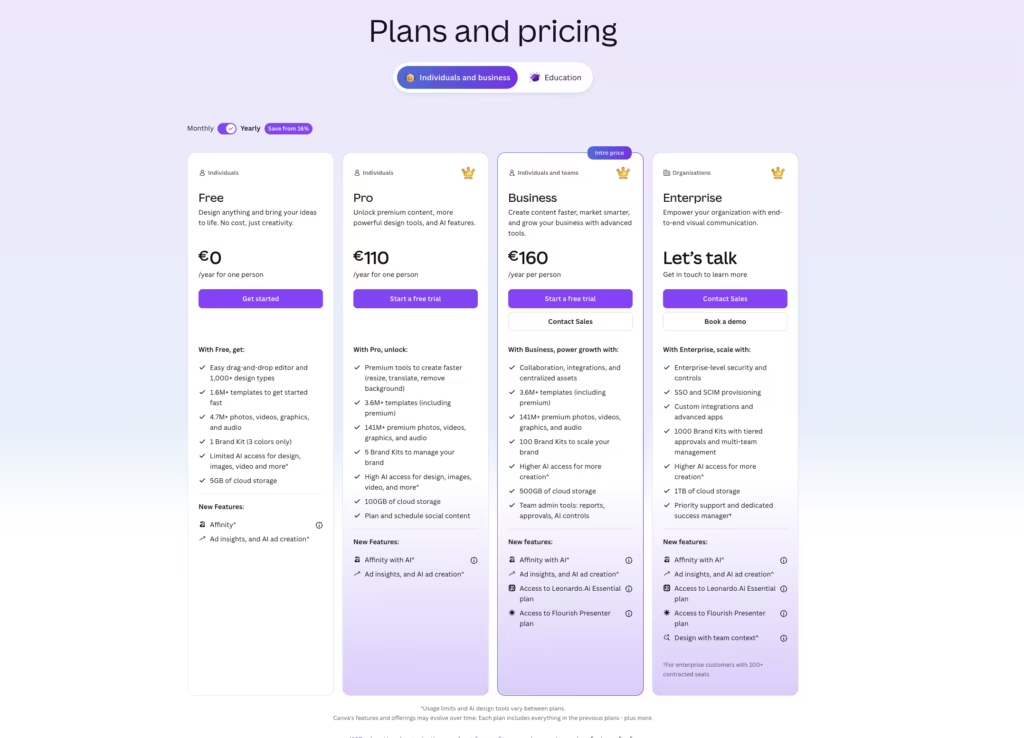
Let’s do a direct and honest Canva free vs Pro comparison so you know exactly what you are paying for:
- Canva Free: This tier is perfect for solo users, hobbyists, or students needing basic tools. You get full access to the core drag-and-drop editor and a few thousand decent templates. The catch? There is a strict, frustrating limitation on assets. You do not get the AI Background Remover, you cannot use the Magic Switch (resize) tool, and you are locked out of the 100+ million premium stock photos and graphics. If you use Canva weekly for business, the free tier will quickly become an exercise in frustration as you constantly hit paywalls for the best graphics.
- Canva Pro: The official US annual price shown at this check was $144 per person. Pro offers 100GB of cloud storage, Brand Kits, premium assets, background removal, and expanded AI usage. Features and taxes vary by region.
- Canva Business: The current US annual price shown was $250 per person. It adds team administration, approval workflows, a larger AI allowance and 500GB of cloud storage. It is priced per person rather than a five-person flat bundle.
- Canva Enterprise: Custom pricing based on volume. To have the Canva enterprise features explained: this tier is built specifically for massive, multinational corporations. It includes advanced, enterprise-grade security, SAML SSO integration, dedicated account management, indemnification guarantees for AI generation, and bulk deployment controls across thousands of global employees.
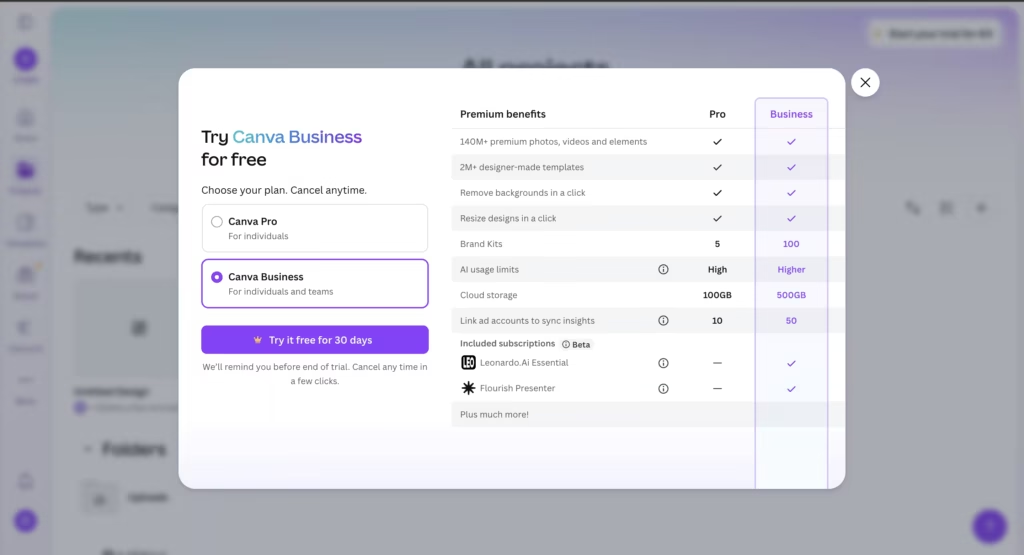
The financial takeaway? If you are a freelancer, the Pro plan will save you hundreds of dollars annually on stock photography alone. If you are a startup, the ROI pays for the annual Teams subscription within the first 30 days, simply by allowing you to confidently cancel your expensive third-party video editors, font licenses, and stock asset subscriptions.
⚖️ Canva Free vs Pro Comparison
The free version is enough for occasional personal use, but Canva Pro becomes the better option as soon as you need brand consistency, premium stock assets, faster resizing, AI editing tools, or reusable business templates.
For freelancers and small teams, the jump from Free to Pro is usually less about “extra features” and more about removing workflow friction.
💎 Is Canva Pro Worth It in 2026?
For most freelancers, startups, and marketing teams, Canva Pro is worth it if you create visual content every week.
The biggest reasons are simple: faster production, easier brand consistency, premium assets, and access to AI tools that remove repetitive design work.
If you only need occasional personal graphics, the free plan is enough. But for business use, Pro pays for itself surprisingly quickly.
⚔️ Best Canva Alternatives for Agencies and Business Teams
The visual productivity and design market is incredibly crowded, but only a few platforms actually have the infrastructure to compete at the true enterprise level. Here is a breakdown of the best Canva alternatives for agencies in 2026:
🥊 Canva vs Adobe Express
In the ongoing and heated Canva vs Adobe Express debate, the ultimate choice often depends entirely on your existing corporate ecosystem. Adobe Express is undeniably the fiercest rival on the market right now. It utilizes Adobe’s incredible Firefly AI generation engine and integrates completely seamlessly with existing Illustrator and Photoshop files. If your agency is already deeply entrenched in the Adobe ecosystem, Express is a logical choice. However, Canva’s user interface remains vastly superior for non-designers, its learning curve is practically non-existent, and its template library is noticeably larger, more diverse, and more modern. Adobe is built for traditional creatives transitioning to social; Canva is built natively for fast-moving marketing teams.
If your team already lives inside Adobe products, Adobe Express makes sense. But for most business users, Canva remains easier to learn, faster to deploy across teams, and better suited for high-volume content production.
📐 Canva vs Figma
Figma is an exceptional, industry-standard tool for UI/UX design, prototyping, and wireframing mobile apps. But it completely fails if you want to know how to quickly create an engaging social media video, a printable flyer, or an animated pitch deck. Figma is structurally and fundamentally built for product design teams, not for producing daily marketing collateral. They serve two entirely different purposes in a tech stack.
📊 Canva vs Visme
Visme is a very strong contender strictly for B2B data visualization. If your entire business model revolves around creating incredibly complex, data-heavy infographics, corporate reports, and interactive charts, Visme has slightly better, more granular native charting tools. However, for a true, versatile all-in-one workspace encompassing video, AI, print, and social media, Canva wins easily and offers significantly more value for the price.
| Design Software | Best For | Main Strength |
| Canva | Marketing teams and fast-moving startups | All-in-one design workflow & Magic Studio AI |
| Adobe Express | Traditional Adobe-based design teams | Firefly AI and seamless Adobe integration |
| Figma | Product, app development, and UI/UX teams | Interface design and interactive wireframing |
| Visme | Data-heavy B2B reports and presentations | Advanced charts and incredible infographic depth |
🔬 How We Tested the Platform for This Review
To write this review, we absolutely refused to just read the marketing brochure or watch a promotional YouTube video. As DigiOffly’s lead reviewer, I (Alex Wright) personally signed up for the platform, migrated a massive chunk of Digioffly’s visual architecture into the Canva software, and put it through its paces in highly demanding, real-world agency scenarios.
The Agency Mini-Workflow We Actually Ran:
- Strict Brand Hub Setup: We uploaded Digioffly’s exact brand hex codes, custom licensed web fonts, and transparent vector logos to create a locked, immutable Brand Kit.
- The High-Volume Content Pipeline: We designed a complex master template for our YouTube thumbnails and affiliate blog banners. We then utilized the powerful “Bulk Create” tool, connecting a massive CSV file containing 50 distinct article titles and variables. Canva automatically generated 50 unique, perfectly formatted graphics in under two minutes without a single crash.
- The AI Stress Test: We aggressively pushed the Magic Studio to its breaking point by using complex text-to-image generation for surreal blog headers, and heavily used the Magic Eraser to clean up messy software screenshots for our tutorials.
This test quickly showed where Canva works extremely well in daily operations – and where the platform still feels limited once projects become too large or too print-specific. The insights you read throughout this review are heavily based on my own active dashboard and real, hands-on experience managing our agency’s content, not just aggregated internet opinions.
One thing we noticed surprisingly early was that Canva feels strongest when the team uses repeatable templates and shared brand assets. Without that structure, even a powerful workspace can become messy very quickly.
🏁 Final Verdict: Time to Upgrade Your Visual Workflow
After testing the platform in real, demanding workflows (building pitch decks, editing video timelines, and powering a high-volume social media content engine), the conclusion of this Canva review 2026 is clear. We know exactly who this software is for: modern teams, founders, and solo builders who desperately want one unified place for all their visual communication.
If you are actively asking “is it the best graphic design software for my small business?”, tthe ROI is strong because it combines multiple design and content tasks inside one relatively simple workflow. It entirely eliminates the frustrating need to pay for stock photo libraries, basic video editing software, and separate AI image generators.
The main trade-offs to carefully consider are the lack of deep, node-based vector illustration tools and the highly imperfect offline use scenario. Therefore, it’s best if you’re willing to set up a simple internal organizational structure and rely on a strong, consistent internet connection. Whether you are scaling a lean remote startup or just trying to figure out how to finally organize your chaotic brand identity, Canva helps centralize brand assets, recurring templates, and content production into one place that is much easier for teams to manage.

Frequently Asked Questions
How to Use Canva for Business Without Creating a Mess?
The ultimate secret to enterprise efficiency is setting up the Brand Hub first, before any employee designs a single graphic. Upload your exact logos, color palettes, and fonts. Then, create 5-10 master templates for your most common daily tasks (Instagram posts, blog headers, weekly client reports). Crucially, use the “Lock” feature on these templates so your junior team members can change the text copy but cannot physically ruin the core design layout or move the logo.
Canva Free vs Pro Comparison: What Is the Real Difference?
The free version functions as a fantastic trial, but it lacks the core, automated tools needed for actual business speed. Canva Pro gives you the essential Background Remover, the Magic Switch (for instant resizing across platforms), full access to 100+ million premium stock assets, and the entire Magic Studio AI suite. Ultimately, Pro saves you hours of labor; Free costs you massive amounts of time searching for non-watermarked assets on Google.
Does Canva Have AI Image Generation Built In?
Yes, it is deeply integrated. Through Canva’s Magic Studio, you have instant access to incredibly powerful text-to-image generative AI. You simply type exactly what you want to see (e.g., “a futuristic laptop sitting on a neon-lit desk in cyberpunk style”), choose an artistic style (watercolor, 3D, photorealistic film), and Canva generates multiple variations directly onto your canvas. Enterprise users also receive enhanced commercial indemnification for AI use.
In the battle of Canva vs Adobe Express, which is actually better for a startup?
If your company employs dedicated graphic designers who already heavily use Photoshop and Illustrator, Adobe Express integrates beautifully with those complex source files. However, for 90% of lean marketing teams, social media managers, and busy founders who lack formal design training, Canva is the significantly better choice. This is due to its superior, frictionless user interface, vastly larger template library, and incredibly smooth real-time collaboration tools.
What Are the Best Canva Alternatives for Agencies?
If Canva simply isn’t fitting your strict workflow, the absolute top alternatives on the market are Adobe Express (best for social media and general marketing tied to Adobe’s ecosystem), Figma (the undisputed king for UI/UX and web product design teams), and Visme (the best choice for B2B agencies that specialize in incredibly complex infographics, whitepapers, and heavy data visualization reports).
Canva Enterprise Features Explained
Yes, Canva Enterprise is structurally built for massive corporate scale and compliance. It offers highly advanced administrative and IT controls that the Pro and Teams tiers simply do not possess. This includes mandatory Single Sign-On (SAML SSO), SCIM user provisioning for IT departments, advanced security audit logs, and the granular ability to control exactly which regional departments have access to specific brand assets across thousands of global employees.
Can I realistically cancel my other software subscriptions if I buy Canva Pro?
In the vast majority of modern business use cases, yes. Many scaling businesses find that Canva Pro effectively and completely replaces their need for expensive paid stock photo subscriptions (like Shutterstock or Getty), basic video editors (like Filmora), entirely separate background removal tools, and standalone AI image generators (like Midjourney). It successfully consolidates all of these wildly different software costs into one predictable subscription chosen from Canva’s current pricing.
Can Canva Replace Adobe for Most Business Teams?
For many startups, content teams, and agencies, yes.
Canva will not replace Illustrator, InDesign, or Premiere Pro for every advanced design case, but it can replace a surprising number of everyday tools used for social media, presentations, simple video editing, internal brand assets, and business graphics.
🚀 Explore More on Digioffly
If you found this in-depth Canva guide highly actionable and helpful, check out our other comprehensive guides and specific tool teardowns to scale your digital marketing and creative workflows:
- Organize Your Agency: Visuals are only half the battle. Read our definitive Notion Review 2026 to learn how to build a centralized corporate wiki and project management tracker for your new design assets.
- Scale with Generative AI: Need to train custom AI models for highly specific brand imagery? Check out our exclusive deals on Leonardo AI, or explore our AI category to automate your copywriting with tools like Jasper AI.
- Top VPN Services & Privacy Deals: Stop leaving your sensitive corporate data and unreleased client designs exposed on public Wi-Fi. Compare the fastest VPNs on the market, or dive directly into our verified discounts for industry leaders like Surfshark and NordVPN.
- Explore All AI & Tech Categories: Dive deep into our full, exhaustive library of software reviews, productivity app teardowns, and modern B2B growth strategies.
- Featured Digital Deals: Return to our Digioffly homepage to explore the absolute highest-rated software discounts, lifetime SaaS deals, and exclusive tech tools verified for this month.