

Pricing and specifications checked on 9 October 2026: Annual billing: Hobbyist $16, Creator $24, Business $50 per editor/month. Media limits are 10/30/40 hours respectively. Official vendor pricing.
Descript is one of the most popular AI tools for podcast and video editing in 2026.
In this Descript review 2026, we tested its text-based editor, pricing, voice cloning, screen recording, and podcast workflow features to see whether it is still the best AI video editor for creators.
This guide covers:
- Descript pricing
- Descript vs Premiere Pro
- Overdub voice cloning
- screen recording features
- whether Descript is worth it for podcasting
Look, traditional video and podcast editing is a grueling, time-consuming process. Scaling content production used to mean spending hours staring at a complex timeline, manually cutting out every “umm,” “uh,” and awkward silence while desperately trying to keep the audio synced with the video. You either burned your weekends doing it yourself or burned thousands of dollars hiring professional editors.
Today, AI tools promise to solve this problem.
But in practice, many of them only automate captions and a few basic cleanup tasks.
They do not fundamentally improve the editing workflow.
Descript positions itself entirely differently. It is not just another timeline editor; it is a platform that allows you to edit audio and video exactly like a Microsoft Word document. You delete a word in the text, and it automatically cuts that section out of the video. It sounds like magic, but considering how advanced classic NLEs (Non-Linear Editors) have become, does this tool actually justify moving your entire team to a new ecosystem?
To find out, we loaded the platform with gigabytes of raw interviews, tested its Overdub voice cloning feature, and pushed its rendering workflow through our actual agency use cases.
In this Descript review 2026, we break down real Descript pricing, screen recording tools, podcast editing features, and overall workflow performance to see whether it is truly one of the best AI video editors for creators.
We are reader-supported. When you buy through links on our site, we may earn an affiliate commission at no extra cost to you.
⚡ Quick Verdict: Is Descript Worth It?
If you are a VFX artist creating highly complex music videos with heavy color grading, 3D tracking, and multi-layered cinematic effects, Descript is absolutely not for you. For those tasks, you still need traditional heavyweights like Premiere Pro or DaVinci Resolve.
But if you record podcasts, webinars, online courses, talking-head YouTube videos, or corporate presentations—this tool changes the rules of the game forever. It is a full-scale ai podcast editor that eliminates 90% of the routine technical grunt work.
The ability to remove filler words with a single click and magically enhance terrible microphone audio pays for the subscription cost on the very first day you use it.
👍 What We Love
- ✅ Text-Based Editing: A revolutionary paradigm shift. You read the auto-generated transcript, highlight the boring sentences, and hit Backspace. The video cuts itself instantly and seamlessly.
- ✅ Studio Sound: Even if you recorded a podcast on a cheap laptop microphone in an echoing room, one click pushes the audio through a neural network, making you sound like you are sitting in a $10,000 professional studio.
- ✅ Overdub Voice Cloning: Messed up a word during filming? You don’t need to do a retake. Just type the correct word into the transcript, and your AI digital clone will speak it in your exact voice.
- ✅ Filler Word Removal: The system instantly finds every “umm” and stutter, stripping them from both the audio and video without ruining the lip-sync.
👎 Where It Falls Short
- ❌ Lag on Heavy Projects: When handling massive 4K video files that are over 2 hours long, the Electron-based desktop app can start to stutter and lag.
- ❌ Transcription Limits: The AI is excellent at standard English, but heavily accented audio or highly technical B2B terminology still requires manual text correction.
- ❌ Basic Color Correction: The visual effects and color grading tools are incredibly primitive compared to industry-standard software.
🏆 OVERALL RATING: ⭐⭐⭐⭐⭐ 4.8 / 5
Best For: Podcasters, YouTube creators, content marketers, course creators, and agencies where speed of publishing is more important than Hollywood-level VFX.
🎬 Is Descript the Best AI Video Editor in 2026?
Descript is not designed to replace high-end editing software like Premiere Pro or DaVinci Resolve for cinematic work, advanced effects, or professional color grading.
However, for creators working with podcasts, interviews, webinars, educational content, and talking-head videos, it is one of the strongest AI video editors available today.
Its text-based editing workflow, filler word removal, voice cloning, and screen recording tools make it especially valuable for teams that prioritize speed, clarity, and publishing efficiency over advanced visual effects.
🧠 What is Descript Exactly?
Let’s skip the marketing jargon. Descript is a text-first audio and video production studio.
Unlike traditional editors where you stare at audio waveforms trying to visually guess where a sentence ends, Descript makes transcription the core of your workflow. The moment you drag your raw video into the platform, the AI transcribes it. Your screen splits into two halves: on the left is a text document, and on the right is your video preview.
You do not cut clips on a timeline. You edit words. This is a massive shift that makes video editing accessible to copywriters and marketers who have never opened a complex editing program in their lives.
🎯 What Is Descript Used For?
Descript is primarily used for editing spoken-word content such as podcasts, interviews, webinars, YouTube talking-head videos, and online courses.
Because the platform converts audio and video into a text transcript, creators can edit recordings by deleting words and sentences instead of manually cutting clips on a timeline.
This makes Descript especially useful for podcasters, educators, content marketers, and teams that need to publish spoken content quickly without relying on traditional video editing software.
🖥️ Ease of Use & The User Interface
One of the main reasons creators abandon classic software is the overwhelming interface. Descript solves this elegantly.
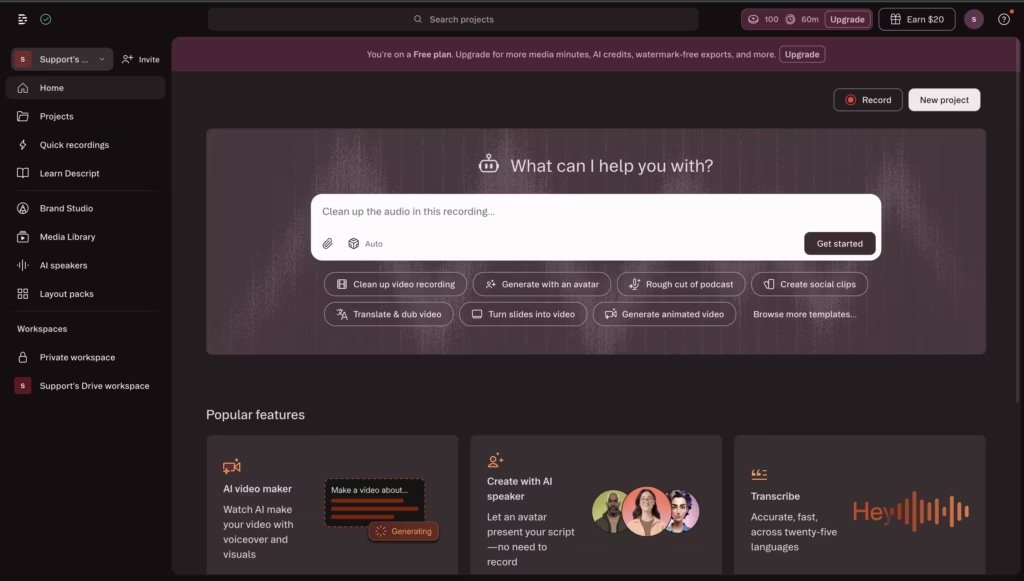
When you create a new project, you are not intimidated by hundreds of tiny buttons, tracks, and layers. You simply drop your media file onto the canvas. The system asks how many speakers are in the recording (it automatically identifies different voices) and gives you a clean text script within minutes.
To add B-roll, you highlight a sentence and click the image icon. To add dynamic captions, you select the text and apply a template. The AI automatically synchronizes the text animation with your speech. When we were learning how to use descript for video editing, the initial onboarding took us about 15 minutes—the learning curve is remarkably flat for beginners.
🛠️ How to Use Descript for Video Editing
Using Descript is much easier than learning a traditional timeline editor.
First, upload your raw video or audio file. Descript automatically transcribes the recording and turns it into editable text.
Then you review the transcript, remove filler words, delete unwanted sections, and apply tools like Studio Sound, captions, or screen recording edits.
For beginners, the biggest mindset shift is simple: instead of editing clips, you edit the transcript.
⚙️ Key Features That Actually Work
During our testing, we ignored the vanity features and focused strictly on the tools that save our agency real billable hours. Here is what makes the platform stand out.
Why Descript Is One of the Best AI Podcast Editors
For podcasters, the biggest advantage of Descript is how much routine editing it removes from the workflow.
Instead of manually cutting filler words, syncing transcripts, cleaning background noise, and exporting clips in separate tools, Descript combines all of that into one editing environment.
For creators publishing spoken-word content regularly, that makes it one of the most practical AI podcast editors available in 2026.
1. Text Editing & Filler Word Removal
You no longer have to listen to your own podcast at 2x speed hunting for mistakes. Click the “Remove Filler Words” button, and the AI finds every sigh, stutter, and crutch word. You can delete them all in one click. The video automatically stitches itself together using a smooth “Morph Cut,” so the viewer rarely even notices the jump.
2. Studio Sound (Audio Magic)
This is the platform’s absolute killer feature. We uploaded audio recorded in a noisy cafe with a humming air conditioner in the background. Studio Sound completely isolated the voice, removed the background noise, and added rich, broadcast-quality EQ. You no longer need a degree in audio engineering to use compressors and noise gates.
3. Voice Cloning (Overdub)
A lot of creators are curious about how Overdub actually works, so descript overdub voice cloning explained deserves a simple answer.
You read a short training script into your microphone, and the platform builds a digital version of your voice that can be used to replace or correct short sections of audio.
4. Built-in Screen Recorder
Many users overlook Descript screen recording features, but they are one of the most practical parts of the platform for creators, educators, and remote teams.
For many workflows, they can reduce or even replace the need for separate tools like Loom or Camtasia.
⚠️ Performance Issues (The Reality Check)
To keep this review brutally honest, we must address the limitations.
First, Descript is a cloud-desktop hybrid. The app runs on your computer, but files actively sync to the cloud for AI processing. If you are working from an airport or a hotel with terrible Wi-Fi, uploading and transcribing massive 4K source files is going to be incredibly frustrating.
Second, while a traditional timeline does exist at the bottom of the screen, it feels secondary. If you need to precisely cut a montage to the exact downbeat of a music track or layer dozens of complex sound effects, the text-first interface actually gets in the way. It is not built for surgical audio-design.
💳 Pricing Plans & The New “Credit” Reality
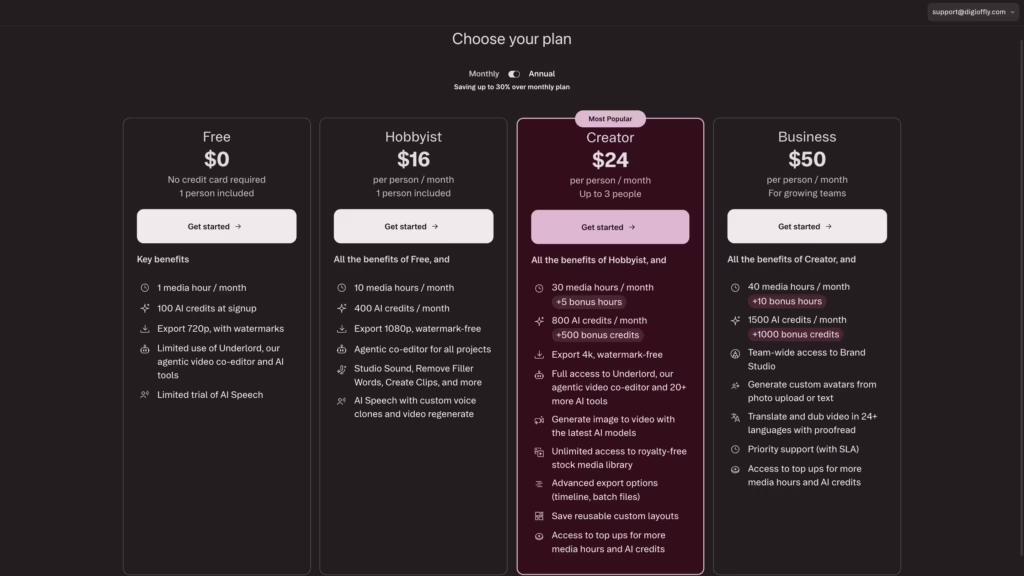
Descript completely overhauled its pricing model recently, moving away from simple “transcription hours” to a much stricter metered system. Let’s break down the real Descript pricing for 2026.
- Free Plan: An excellent sandbox, but highly limited. You get 60 Media Minutes a month, watermarked 720p exports, and a one-time grant of 100 AI Credits. It is unusable for commercial publishing.
- Hobbyist Plan: (Around $16/month billed annually). The new entry-level tier. Gives you 600 Media Minutes and 400 AI Credits per month, unlocking watermark-free 1080p exports.
- Creator Plan: (Around $24/month billed annually). The sweet spot for active YouTubers. Unlocks 4K exports, 1,800 Media Minutes, and 800 AI Credits.
- Business Plan: (Around $50/month billed annually). Built for agencies. You get 2,400 Media Minutes, 1,500 AI credits, brand kits, and priority support.
The Reality Check on AI Credits: You must manage your allowance carefully. Every time you use a premium feature, it costs you. For example, running Studio Sound costs 10 credits per use, Eye Contact costs 10 credits, and Dubbing costs 15 credits per minute. If you are a heavy user who applies AI features to dozens of clips a day, you can burn through your monthly credits faster than expected.
🎯 Who Should Use This Tool?
A common question in creator communities is: is descript worth it for podcasting? The answer is an absolute yes—it is arguably the best investment an audio creator can make.
- Video and Audio Podcasters: The ability to edit multi-track recordings, automatically switch cameras to the active speaker, and clean up terrible audio makes it the 2026 industry standard.
- Course Creators & Educators: If you record long educational modules, you will inevitably stumble over your words. Descript lets you delete those bad takes like a typo in an email.
- Content Marketers (Repurposing): Drop a 1-hour webinar into the platform, highlight the 3 best quotes, hit a button, and the AI automatically turns them into 3 vertical shorts with dynamic captions for TikTok and Instagram.
🔄 Descript vs. Competitors
The editing market is massive. How does this platform compare to the legacy giants?
Descript vs Premiere Pro
In the ultimate descript vs premiere pro debate, there is no loser—only a division of labor. Adobe Premiere Pro is a heavyweight. If you need flawless color grading, complex masking, or cinematic compositing, Premiere wins. However, for cutting a 2-hour interview, Premiere is agonizingly slow. Descript destroys it in rough-cut speed. The smartest agencies today do their “A-cut” (rough assembly and audio cleanup) in Descript, and then export an XML file into Premiere Pro for the final color polish.
Descript vs Other AI Video Editors
| Tool | Best For | Main Strength |
| Descript | Podcasts, webinars, spoken content | Text-based editing & Audio cleanup |
| Premiere Pro | Professional video production | Advanced timeline, VFX & Color grading |
| CapCut (Pro) | Short-form social content (TikTok, Reels) | Fast edits, viral-style templates & effects |
| Riverside.fm | Remote podcast recording | High-quality 4K guest capture |
The Best Alternatives
If the text-based interface isn’t for you, here are the best descript alternatives for creators:
- CapCut (Pro): The absolute winner for fast, trendy TikTok and Reels editing, packed with native transitions and effects, though its audio tools are weaker.
- Riverside.fm: Perfect for recording remote podcast guests in 4K studio quality. It has a built-in text editor, but it lacks Descript’s deep timeline control.
- Adobe Podcast (Enhance Speech): A free web-based tool from Adobe that rivals Studio Sound, but it only fixes audio—it is not a full video editor.
🔬 How We Tested the Platform
At DigiOffly, we don’t just rewrite marketing copy. To write this review, I (Alex Wright) took a real 45-minute episode of our B2B podcast, intentionally recorded in a room with terrible acoustics.
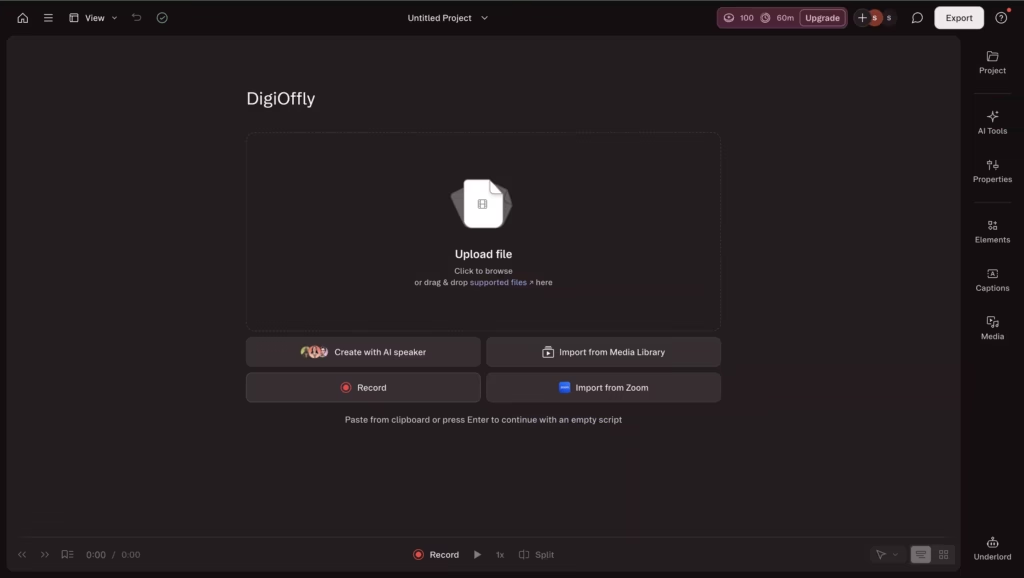
We dropped the raw files into Descript. The transcription took exactly 3 minutes. We ran the filler word removal, which identified 84 “umms” and “ahhs” in 10 seconds. We deleted them in one click. We applied Studio Sound (which completely killed the room echo) and generated three 60-second vertical clips with auto-captions from the best moments. The entire process—from import to exporting four finished media files—took 35 minutes. In Premiere Pro, this would have taken our team nearly 3 hours.
🏆 Final Verdict: Time to Accelerate Your Production
After testing the platform in real production workflows, the conclusion is fairly clear: Descript is one of the most efficient editing tools available for spoken-word content.
If your business relies on spoken-word content—interviews, podcasts, corporate training, or YouTube talking heads—refusing to use this tool means voluntarily burning your own time. Its ability to combine highly accurate transcription, audio enhancement magic, and seamless text-based editing easily secures its title as the best ai video editor for creators in 2026.
If your workflow depends on podcasts, interviews, webinars, or talking-head videos, Descript can save a significant amount of editing time and make content production easier to manage.

Frequently Asked Questions
How exactly does the new Descript pricing handle limits?
When evaluating Descript pricing in 2026, you must understand the dual-limit system. “Media Minutes” are consumed the moment you upload or record a video (this covers transcription). “AI Credits” are consumed when you actively use AI features (like generating a voice clone or applying Studio Sound). Unused minutes and credits do not roll over to the next month, meaning you need to pick a plan that matches your actual monthly publishing volume.
Is Descript worth it for podcasting if I already use Audacity?
Absolutely. When beginners ask is descript worth it for podcasting, we point directly to the multi-track editing and Studio Sound. Audacity is free, but it is entirely manual. Descript acts as an ai podcast editor that cleans your audio, removes stutters, and gives you a readable script for show notes all in one pass.
Is there a steep learning curve for how to use Descript for video editing?
No. The secret to mastering how to use descript for video editing is to stop thinking like a video editor. Treat it like a Word document. Read the transcript, highlight the boring paragraphs, and delete them. The platform handles the video cuts automatically.
Is it safe to use the voice cloning? (Descript Overdub voice cloning explained)
Security is a major concern, which is why having the descript overdub voice cloning explained is important. You cannot clone a celebrity or a politician. The system forces you to read a highly specific, randomized consent script into the microphone to verify your “Live Voice ID” before it allows the AI to generate any cloned audio.
Can I capture webinars using the Descript screen recording features?
Yes. The platform provides incredibly stable descript screen recording features. The lightweight desktop app allows you to record your screen, system audio, and webcam simultaneously. The moment you finish recording, the file is already transcribed and waiting in your dashboard.
What are the best Descript alternatives for creators focusing on short-form?
If your entire business model is 15-second hyper-edited videos, the best descript alternatives for creators is CapCut Pro. It offers much more dynamic text animations, trendy transitions, and built-in viral audio libraries that Descript does not focus on.
Who actually wins in the Descript vs Premiere Pro matchup?
In the professional descript vs premiere pro workflow, they are complementary, not mutually exclusive. Descript wins the drafting phase—it is the fastest way to turn 3 hours of rambling footage into a tight 20-minute narrative. Premiere Pro wins the finishing phase—color grading, B-roll layering, and complex audio mixing.
Is Descript Good for Video Editing?
Yes, Descript is very good for video editing when the project is built around spoken content such as podcasts, webinars, interviews, tutorials, and talking-head videos.
It is less suitable for cinematic editing, advanced visual effects, and professional color work, but for speed-based production workflows it is one of the strongest editing tools available.
What Is Descript Best For?
Descript works best for podcast editing, interview cleanup, webinar editing, educational videos, and any workflow built around spoken content.
Its biggest strength is speed: it allows creators to edit transcripts, clean audio, and publish faster without dealing with the complexity of a traditional timeline editor.
🌐 Explore More on Digioffly
If you found this Descript review 2026 helpful, check out our other guides on scaling your digital marketing and creative workflows:
- Featured Digital Deals & Top Services: Return to our homepage to explore the absolute highest-rated software discounts and exclusive B2B tech tools we’ve verified for 2026.
- Top VPN Services & Privacy Deals: Stop leaving your agency’s unreleased video files exposed. Compare the fastest, most secure VPN subscriptions to protect your remote team.
- HeyGen Review 2026: Is It Truly the Best AI Video Generator? — Take your video production to the next level. Learn how to generate photorealistic AI avatars to present the audio you just edited in Descript.
- Copy.ai Review 2026: The Best AI Copywriting Tool? — Stop staring at a blank page. Learn how to generate high-converting YouTube scripts and podcast outlines before you even hit record.
- Explore All AI & Tech Categories & Guides: Dive into our full library of artificial intelligence software reviews.
- The Ultimate B2B Growth Stack: Discover our curated list of the best software for project management, SEO, and team productivity (including our brutal breakdown of Notion).