

Editorial note (October 2026): This Hostinger review examines publicly documented service terms, official plan details, support guides and the practical decisions involved in running a WordPress website. It does not claim that DigiOffly performed controlled uptime benchmarks, purchased every tier or obtained a paid comparison account. Vendor prices and eligibility vary by billing term, country and promotion. Our figures below reference Hostinger’s publicly displayed US-dollar 48-month offer at the time of research, not a promise of future checkout prices.
Hostinger Review 2026: The Answer Before the Features
Hostinger occupies an interesting position in the hosting market. It is often presented as a convenient and affordable way to put a website online, yet its product range now covers considerably more than a basic shared server. A new buyer can encounter managed WordPress features, an all-in-one AI website builder, Node.js support, cloud resources, domain registration and bundled email in one storefront. That breadth is attractive when you want to launch quickly. It also means that an apparently straightforward comparison—Hostinger versus another hosting company—can become the wrong question.
The more productive question is which Hostinger workflow are you buying, and what will that workflow cost after the first promotional period? A solo blogger installing WordPress, a consultant creating a five-page company website, an agency hosting several client installations and a business maintaining a transaction-heavy WooCommerce shop should not start with the same checklist. They may not even need the same category of service.
Our short verdict: Hostinger deserves consideration when you want a managed onboarding experience, a unified account dashboard and an option to grow without immediately operating your own VPS. But its promotional monthly price should never be interpreted as an ordinary, cancellable monthly subscription. The heavily advertised rates can be tied to a 48-month purchase paid in advance. Renewal is a separate financial decision. The difference is significant enough that it should appear near the top of any serious review, rather than inside a small-print disclaimer.
As of our October 2026 review of the official Hostinger pricing page, the main Websites category for individual and business buyers shows Premium, Unlimited and Cloud Startup. Some older guides and regional catalogs use other names, including Business. This article uses the live lineup observed during its preparation. Regional versions can differ, and historic screenshots should not override the plan names printed at your checkout.
That distinction extends to the product itself. A hosted WordPress installation is a content management system running on hosting infrastructure. Hostinger’s website builder is a different publishing environment. They can share an account and some marketing language without offering identical access to plugins, themes, databases or exported site structure. Our evaluation treats these differences as operational realities rather than minor technicalities.
Who should shortlist Hostinger? People starting WordPress sites, small organizations consolidating routine administration, creators who need their own site alongside content platforms and businesses prepared to manage a realistic renewal budget. Who should pause? Buyers demanding contract-specific infrastructure guarantees, developers expecting unrestricted root-level server control on a shared tier, or teams assuming a hosted site builder can be lifted into an unrelated platform without rebuilding anything.
The rest of the review examines each decision in order: pricing, administrative interface, backups and security, resources, performance claims, migration, builder boundaries, alternatives and the less obvious costs that emerge after launch.
Hostinger Pricing in 2026: The Four-Year Offer Is Not a Monthly Bill
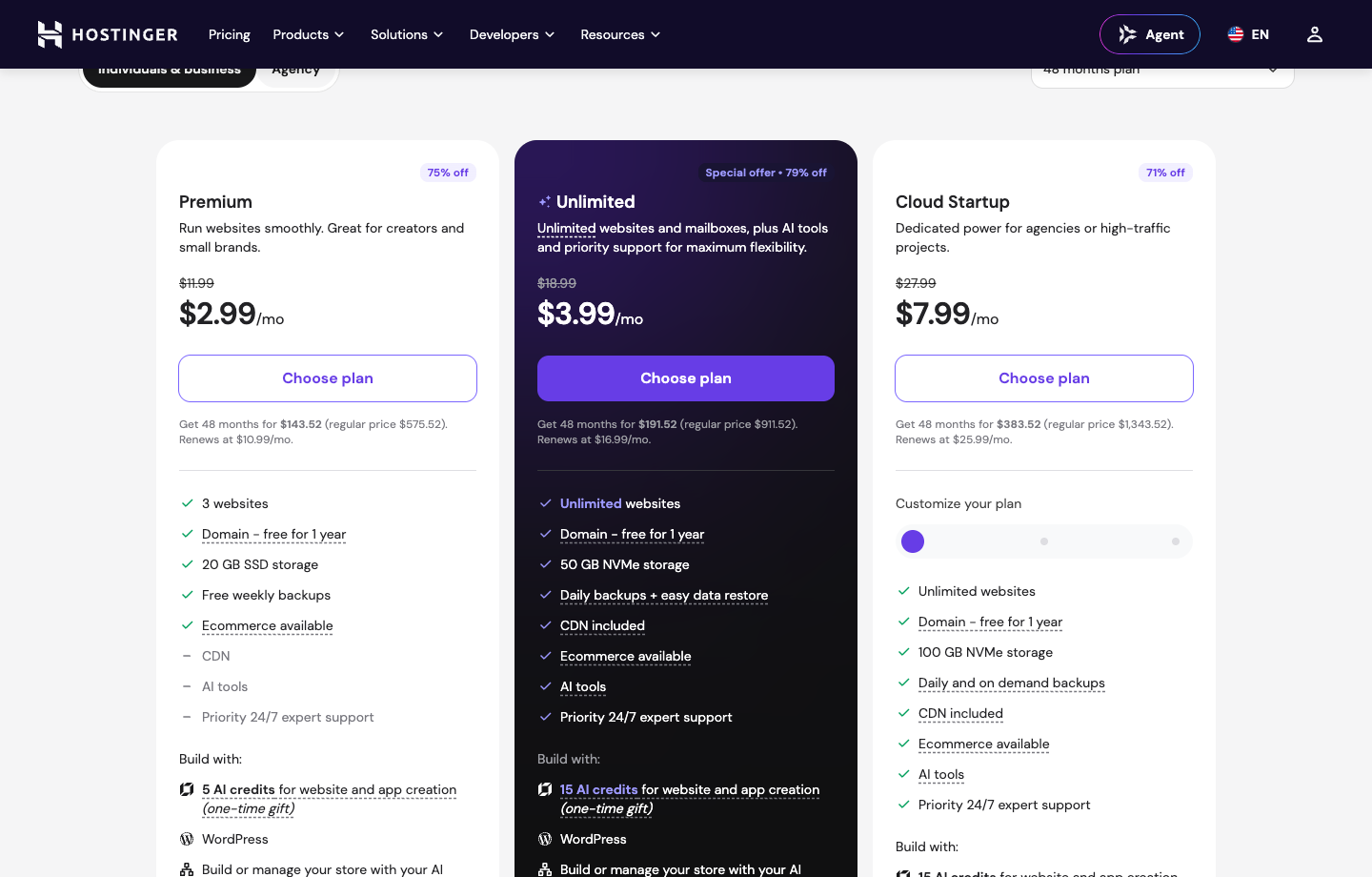
A hosting provider can truthfully advertise a low price per month while asking the customer to pay years in advance. Neither part is inherently deceptive if it is communicated clearly, but buyers often compare it with a competitor’s genuine month-to-month invoice as though both commitments were equivalent. Hostinger’s currently displayed long-term prices make this mistake particularly easy. We use the USD plan table here because mixing prices from different currencies would create a misleading comparison.
The official Websites pricing page we checked presented these 48-month promotional rates: Premium at $2.99 per month, Unlimited at $3.99 per month, and Cloud Startup at $7.99 per month. It stated initial totals of $143.52, $191.52 and $383.52, respectively, for the four-year term. Those are amounts associated with the specific advertised selection, before any differences in tax, account eligibility or checkout extras.
It also showed renewal rates of $10.99, $16.99 and $25.99 per month, respectively. Treat these as time-stamped displayed figures, not guaranteed future contract terms. The page also presents separate product groupings; the same provider can show different packages for agencies, VPS hosting or regional campaigns. Confirm the precise product title in the basket before drawing conclusions from this article.
Hostinger Premium: An Entry Plan, Not a Universal Baseline
On that pricing page, Premium included three websites, 20 GB SSD storage, weekly backups, a domain included for one year under eligible conditions, WordPress support and two mailboxes per website free for a year. The exact feature table matters because people routinely interpret the phrase “hosting plan” as though every tier receives identical restoration tools, storage characteristics and access allowances.
Premium can be a reasonable starting place for a personal portfolio, a new blog or a small company site with modest technical demands. There is no reason to buy enterprise-style infrastructure for a static brochure site merely because a promotional comparison describes the more expensive product as faster. The practical questions are how many installs you intend to run, whether daily backups are important, how you will restore a broken site and whether a domain or mailbox will start costing more after the introductory allowance expires.
There is also a classification issue. Hosting three websites is not the same as operating three high-traffic stores, and an included mailbox for a year does not turn business email into a permanent free service. You should decide which services are essential after the promotion, calculate them separately and revisit the cost before renewal.
Hostinger Unlimited: More Than a Different Storage Figure
The next featured Websites plan on the observed page was Unlimited. Its advertised promotional rate was $3.99 per month on the 48-month term, with a displayed renewal of $16.99 per month. Hostinger described it as supporting unlimited websites and mailboxes, with 50 GB NVMe storage, daily backups and straightforward restore options. It also referred to an acceptable-use or fair-usage policy for features described as unlimited.
That is a meaningful shift from Premium, but the word “unlimited” should not end the analysis. Storage size, CPU allocation, PHP workers, database allowances, inode quotas and abuse safeguards still determine what a shared hosting account can realistically do. One organization running many lightweight content sites has very different needs from a store processing busy product imports or frequent uncached transactions.
NVMe storage is a technology feature, not proof that your actual pages will load a particular number of milliseconds faster. A crowded theme, a slow external API, third-party tags and uncached PHP work can all dominate the visitor’s experience. Daily backups may be more immediately valuable to a nontechnical site owner than a storage marketing label, especially when one broken update can stop a site from functioning.
The Unlimited tier is worth evaluating when you have several small-to-medium websites, want a more comfortable backup workflow or expect to keep projects under a single administrative account. Before paying, inspect whether the chosen plan and region include staging, object caching and delegated collaboration. Do not borrow a feature from Cloud Startup merely because it appears elsewhere on the provider’s sales page.
Cloud Startup: A Different Resource Profile
Cloud Startup has a noticeably different starting point. The pricing page displayed $7.99 per month for 48 months and a $25.99 monthly equivalent at renewal. The separate Hostinger cloud hosting page specified a Cloud Startup resource example including 4 CPU cores, 4 GB RAM, 100 GB NVMe storage, a dedicated IP and higher-capacity PHP worker allowances. These are stated plan specifications, not measurements we generated.
A product team maintaining a customer-facing application or a business that has outgrown modest shared allocations may find that profile relevant. The additional administration and scaling features can be useful, but higher numerical allocations do not eliminate the need to monitor resource usage, caching, plugin behavior or traffic peaks. The plan will not fix inefficient application code automatically.
Cloud Startup also raises a different financial decision: would a company be better served by a managed WordPress specialist or managed cloud provider with clearer per-resource billing and control boundaries? That question is especially important when the business has dedicated development capacity. A convenient dashboard can justify a price premium for one organization and add very little for another.
What counts as an appropriate upgrade trigger? Recurring CPU or memory pressure, measurable PHP bottlenecks, operational demands around staging and recovery, or a predictable growth in site count are stronger signals than a vague feeling that a premium plan must perform better. Investigate the specific bottleneck first, then buy the resource or workflow that addresses it.
The Renewal Math: First Term Versus the Next Four Years
For comparison, consider the promotion illustrated above: a buyer purchases 48 months upfront, maintains a broadly similar plan and later faces the displayed monthly-equivalent renewal. A first-term comparison based solely on $2.99 versus $3.99 makes Unlimited look just one dollar more expensive each month. Over four years, that dollar is $48—not irrelevant, but unlikely to decide the overall economics of a business website.
The renewal gap is larger. If the published renewal equivalents remain unchanged and the provider renews a full 48-month term on that basis, Premium’s illustrative extension would be 48 × $10.99 = $527.52, Unlimited would be 48 × $16.99 = $815.52, and Cloud Startup would be 48 × $25.99 = $1,247.52. These figures are mathematical scenarios, not confirmation that a specific 48-month renewal option will be available or priced that way years from now.
Add each illustration to its original promotional term and you get an eight-year thought experiment: Premium $671.04, Unlimited $1,007.04, and Cloud Startup $1,631.04 in hosting charges alone. That excludes domains, taxes, email renewals, optional security services, backup supplements, external CDN charges and any change in plan or billing terms. A reader should not mistake the long timeframe for a reliable forecast; its only purpose is to expose the difference between introductory and standard pricing.
A simpler one-year renewal illustration may be more useful. At the same monthly-equivalent figures, twelve months would represent $131.88, $203.88 and $311.88 respectively. Again, that assumes the listed rate is applicable to the purchase term you select. The vendor’s checkout, not a reviewer’s calculation, establishes the actual invoice.
When comparing providers, create a small spreadsheet with separate columns for the amount billed today, initial term length, the disclosed renewal amount, domain renewal, email renewal, backup add-ons and the cost of time spent maintaining the site. The buyer who calculates only hosting cost can be surprised later by the subscriptions needed to run a complete business.
We recommend capturing your checkout screen as a dated record, reading the renewal section of the order confirmation and setting a reminder well ahead of the next billing event. The important reminder is not that a subscription exists, but that a long promotional term can expire years after the original website decision was made by someone who may no longer work on the project.
Hostinger Plan Comparison: What Each Tier Actually Buys
| Buying question | Premium | Unlimited | Cloud Startup |
|---|---|---|---|
| Observed promo (USD / mo; 48-month term) | $2.99 | $3.99 | $7.99 |
| Observed prepaid 48-month total | $143.52 | $191.52 | $383.52 |
| Observed displayed renewal equivalent | $10.99/mo | $16.99/mo | $25.99/mo |
| Illustrative 12-month renewal at same rate | $131.88 | $203.88 | $311.88 |
| Websites shown | 3 | Unlimited; fair usage applies | Unlimited; fair usage applies |
| Storage shown | 20 GB SSD | 50 GB NVMe | 100 GB NVMe |
| Backups shown | Weekly | Daily and easy restore | Daily and on demand |
| Buyer profile | Small personal / business site | Multiple sites; frequent backup need | Higher-resource managed hosting |
A practical comparison should acknowledge that the tier names and inclusions reflect a specific region, billing duration and observation date. We therefore group the plans around buying decisions instead of inventing performance ratings or assigning precise limits not printed in the official pricing material.
The comparison table immediately below separates the current displayed USD price and the renewal, the number of websites, the specified storage and backup cadence. A second table later in this review places Hostinger alongside other ways of launching a site. These comparisons are editorial tools, not claims that every service is technologically identical.
For a solo WordPress blogger, the critical difference might be whether Premium’s weekly backups are adequate and whether the 20 GB allowance is sufficient once media files and backups grow. For a consultant managing several client sites, Unlimited may offer a simpler starting arrangement, but resource limits and access separation matter more than the absence of a website-count cap. For a commerce operation, Cloud Startup’s capacity can matter; however, actual PHP worker behavior, database workloads and recovery time still deserve investigation.
One lesson emerges across all three: the cheapest plan capable of meeting your requirements is not necessarily the plan with the smallest introductory sticker price. A cheaper tier that requires a fragile backup workaround, an urgent migration or expensive emergency support may cost more in practice. Conversely, a very small and uncomplicated site gains little from unused cloud resources.
Official reference: Hostinger pricing and plan feature grid. Editorial snapshot: October 2026. If the live page now shows another tier lineup, that live information supersedes the snapshot.
Hostinger Dashboard in 2026: What hPanel Actually Lets You Control
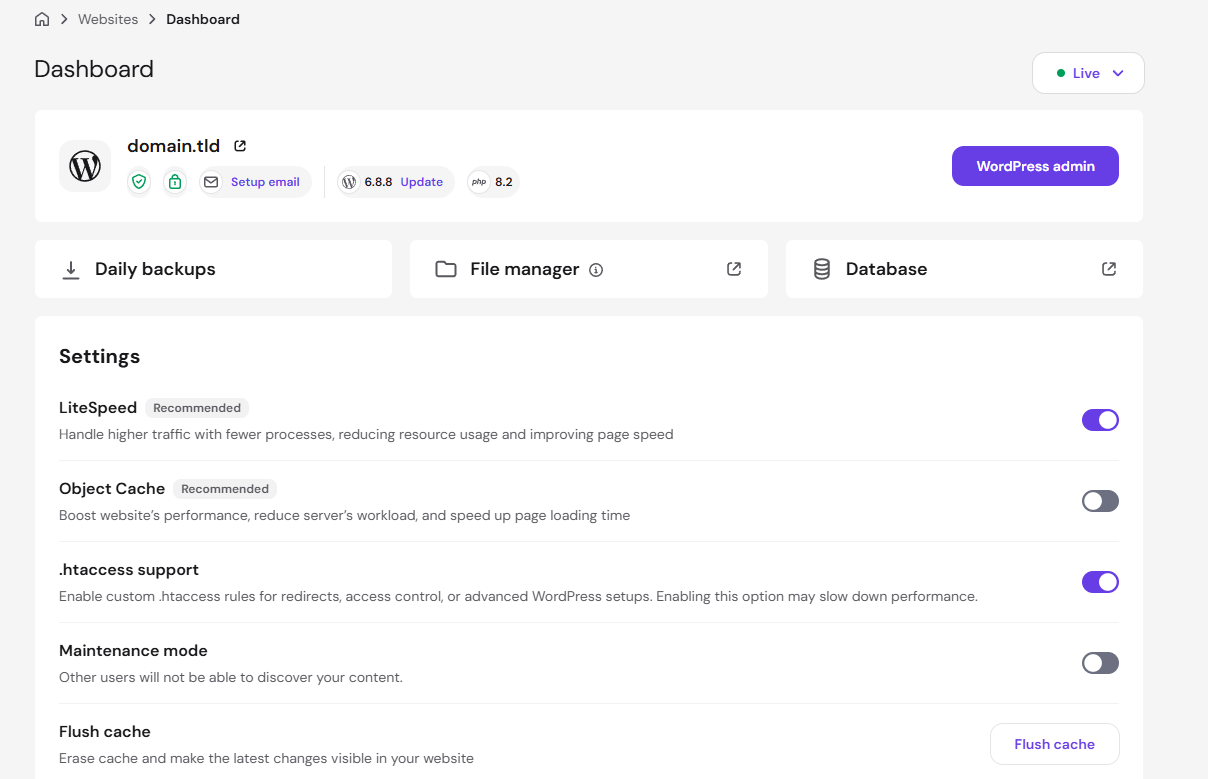
The control panel is one of Hostinger’s stronger reasons to be on a shortlist, provided you distinguish convenience from a guarantee that every operation will be effortless. The current official dashboard guide describes an account interface for websites, domains, email, billing, hosting products and support. Within an individual site’s dashboard, management shortcuts expose hosting resources and WordPress-related settings. This helps nontechnical owners avoid memorizing separate administrative URLs.
When you manage several online assets, organization is a real feature. Finding the correct domain, active plan, backup area and application environment quickly reduces the risk of an accidental edit to the wrong website. The interface still requires care: a staging installation is not a production installation, a password-reset operation is not the same as user-account permissions, and a DNS change can affect email as well as web pages.
Hostinger’s website hosting dashboard documentation lists areas for site health, file management, databases, plan resource usage, performance tools, access to WordPress admin and clearing caches. The displayed tools can differ according to account type, plan and whether the website uses WordPress, a PHP application or the provider’s AI website builder. A screenshot of a particular customer interface is not a contractual feature matrix.
That last difference deserves emphasis. A website built in Hostinger’s all-in-one builder may not offer the same conventional PHP hosting controls as a WordPress site. If you need file-level access, application-specific configuration or a particular server-side integration, confirm that the website type you create exposes those tools before purchasing. Choosing a plan with a familiar brand name is not a substitute for choosing the correct application environment.
A useful hPanel walkthrough begins with the Websites list. Locate the domain and open its dashboard; examine the reported site status, plan, WordPress version, PHP version and maintenance controls. Only then move into backups, file manager or database management. Resist changing caching switches solely because an online optimization checklist says they improve performance. Cache behavior is application-dependent, and a mistake can hide a newly published change or display stale personalized content.
For instance, a reviewer can observe that a flush-cache control exists and describe what it is for without claiming a measured improvement in page load time. The action invalidates a cache; it does not guarantee that a page becomes faster, nor does it repair an application-level bug. In our editorial process, we treat the documented functionality separately from any numerical speed claims, which would require a controlled test and a disclosed methodology.
The official dashboard illustration inserted in this review shows administrative controls rather than an invented generic server panel. That matters because it lets a reader recognize options such as backups, file management, WordPress shortcuts, LiteSpeed settings and cache flushing. Individual layouts can change as the product evolves, so use it as orientation, not as instructions to click fixed screen coordinates.
WordPress Overview: A Shortcut, Not a Replacement for WordPress
Hostinger’s WordPress Overview support guide describes controls associated with core settings, security, themes and plugins, version management and staging on qualifying tiers. Some tasks open your site’s own WordPress administrative area; others operate through the hosting dashboard. These boundaries are useful to understand before giving a team member access.
A host can streamline updates and basic operations, but WordPress remains a separate application ecosystem. An outdated plugin can conflict with another plugin, a theme may contain heavy front-end scripts, and a failed import can still require a database restore. Those issues cannot be resolved by a modern dashboard alone. Someone needs responsibility for applying updates, checking backups, assessing compatibility and monitoring the site after material changes.
The documentation also notes cases in which WordPress Overview needs to be enabled manually, especially after a manual installation or migration. A missing menu item is therefore not necessarily evidence that a purchased plan lacks WordPress support. Look up the relevant Hostinger support procedure before changing plans in frustration.
Business websites often have a second administrative layer: a freelancer or agency handles technical tasks, while the owner controls billing, domains and primary credentials. In that situation, delegated permissions and an exit plan matter at least as much as a visually appealing control panel. Document which party owns the Hostinger account, who can reset access, where backups are stored and who is notified before a domain expires.
Domain Management and the Hidden Price of Administrative Simplicity
Buying the domain, hosting and email from one company can feel efficient. It reduces the number of logins and invoices, and the provider may simplify initial DNS configuration. The trade-off is concentration: one suspended account, compromised login or billing interruption can affect several critical services at once.
For a low-stakes portfolio, that may be a sensible compromise. For a growing company, we prefer a documented separation of responsibilities, reliable two-factor authentication and a clear inventory of DNS records. The domain is a core business asset. A hosting renewal or migration should not leave you uncertain about where the nameservers point or who controls the registrar.
A “free domain for one year” offer is an initial promotion with eligibility rules, not a promise that domain ownership or renewal will remain free. The exact extension, terms and renewal price can differ. Domain registration, hosting and email should occupy separate lines in the budget even if they appear together in an initial bundle.
The same applies to business email. An included mailbox is convenient when launching a small site, but pay attention to the length of the included period, mailbox capacity and what will be required to keep historical messages if you migrate hosting. A domain’s mail exchange records must continue to point to the active mail provider; changing website hosting does not automatically migrate email messages.
WordPress Performance: What Hostinger Can and Cannot Promise
Hostinger’s sales and support pages discuss caching, content delivery, storage hardware, PHP resources and data centers. These features influence the hosting environment, yet none can be translated into a single trustworthy “Hostinger loads in X milliseconds” statement without specifying the website, location, caching state, software stack and measurement period.
Consider two websites on the same tier. One uses a lightweight theme and carefully sized images; the other loads a large page builder, several advertising tags, multiple custom fonts and a poorly optimized database query. The second may perform considerably worse, even if both use the same hosting hardware. The decisive bottleneck can live outside the host’s infrastructure.
For a content-led WordPress website, begin with a baseline. Record Core Web Vitals on representative URLs, distinguish anonymous visits from logged-in admin behavior, inspect Time to First Byte separately from Largest Contentful Paint, and note whether caches are warm. Measure the same pages more than once, from more than one geography if international traffic matters. An isolated synthetic score does not represent the entire audience.
Hostinger mentions LiteSpeed-related caching tools in its WordPress documentation. Caching can reduce repeated server work for suitable public pages. It requires correct exclusions for carts, personalized sessions and authenticated dashboards. A cache configured too aggressively may seem fast while serving out-of-date or inappropriate content. Treat configuration as an engineering task with regression checks, especially for ecommerce.
A CDN can improve distribution of static resources to distant visitors. It is not a universal remedy for slow database queries, large JavaScript bundles or payment-service delays. Check which plans include a CDN, what it caches and how the provider handles invalidation. CDN inclusion in a marketing chart also does not establish that every origin response will reach visitors with the same latency.
Premium’s published SSD allowance, Unlimited’s NVMe allowance and Cloud Startup’s larger NVMe allocation provide one category of information. Disk technology matters, but the right performance question depends on what a site actually does. A database-heavy import process might be CPU- or worker-limited; a gallery might face image-processing and storage pressures; a global static site may need better caching rather than bigger server resources.
There is also a distinction between performance and reliability. An uptime promise is contractual language, while actual availability is observed over time. Verify the precise service-level terms of the product you purchase, including exclusions and any credits available after qualifying failures. We have not run a continuous, independent uptime monitor of all three tiers and therefore do not assign numerical uptime scores to them.
A useful pre-purchase evaluation requires a real workload. Make a small staging site or use a temporary installation if the plan permits, import representative pages and measure editorial operations as well as visitor-facing content. Watch for errors during media uploads, plugin updates and backup restoration. A successful homepage load tells you little about how the site behaves under business-critical tasks.
Backups and Recovery: Frequency Matters Less Than a Tested Restore
Hosting reviews often count whether a company displays a backup icon. That is necessary information, but it is not enough. A backup has value only if it captures what you need, can be restored within an acceptable timeframe and remains available when the main site or account is inaccessible.
On the observed Hostinger pricing page, Premium listed weekly backups, Unlimited listed daily backups with easier restore access and Cloud Startup described daily and on-demand backups. Those differences can change the appropriate plan more than a small promotional price gap. A website updated once a month may tolerate more potential data loss than an ecommerce store receiving orders every hour.
Daily backups do not automatically provide a one-day recovery point under every failure scenario. The timing of a snapshot, retention limits, manual changes made after the last snapshot and the location of backup copies all matter. Even if the system can restore files and the database, you may need to reapply legitimate transactions created between the recovery point and the incident.
For a business-critical WordPress site, define two quantities before buying hosting: the recovery point objective, which is how much recent work you can afford to lose, and the recovery time objective, which is how quickly the site needs to return. They are business requirements, not vendor marketing features. If losing four hours of paid orders would be unacceptable, a daily full-site snapshot alone is not a complete continuity strategy.
A stronger recovery approach includes testing a restore into staging, maintaining an independent copy of essential assets and documenting where domain and DNS credentials are stored. It also includes understanding which backups are controlled by the hosting service and which must be configured within WordPress or another application. A plugin-based backup stored on the same account can fail together with the account itself.
Before upgrading only for backups, compare alternatives fairly. An independent backup service may be appropriate for a small site. On another site, the operational simplicity of a built-in daily restore may justify a higher hosting tier. The key is not collecting duplicate backup subscriptions without understanding what each one protects.
Staging is another part of this workflow. The official WordPress Overview documentation identifies staging as a feature on qualifying tiers. Treat staging as a protected test environment, not a substitute for a recoverable backup. Changes made in staging can still introduce problems when promoted to production; customer data may have changed in the meantime.
Security: Hosting Features and Customer Responsibilities
Many Hostinger plans advertise SSL, security tools and managed WordPress conveniences. These features help establish a baseline, but a hosting provider cannot remove every risk created by WordPress, third-party plugins, poor account security or a compromised developer laptop. A useful security review should separate what the host operates from what the site owner must do.
First, enforce two-factor authentication for account-level access where available, store recovery methods securely and use separate credentials for staff or contractors. An account that controls billing, domains, backups and website files is too powerful to share through a single informal password. Consider how quickly privileges can be revoked if a contractor leaves.
Second, treat application updates as a recurring operating task. WordPress core updates, plugin updates and theme changes should be scheduled, backed up and tested according to the site’s importance. Automatic updates can reduce exposure but can also introduce compatibility problems. The right policy balances risk, review capacity and reliable restoration.
Third, be cautious with “one-click optimization” services. A performance tool can affect cookies, scripts, payment flows and login sessions. Similarly, security or malware scanning does not guarantee that every vulnerability will be detected. Organizations should have a response plan and know who is permitted to act during an incident.
Fourth, inspect access separation when several websites share an account. A single owner hosting personal experiments beside a company’s storefront may create unnecessary operational coupling. A higher tier can improve resource allocations without necessarily providing all the isolation or administrative boundaries a client-services business requires.
Finally, remember that SSL certificates protect connections, not the correctness of the application behind them. A site with HTTPS can still expose sensitive data through an insecure plugin or mishandled access token. Security is a system property, not a badge on the pricing page.
The resulting editorial assessment is positive but qualified: Hostinger offers a broad collection of documented management tools, and it can simplify routine WordPress operations. The buyer still owns decisions about backups, access, updates, third-party extensions and incident recovery. Any review suggesting otherwise would set unrealistic expectations.
Migration Into Hostinger: Free Assistance Has Eligibility Rules
Moving an existing site is where marketing convenience meets operational detail. A new WordPress installation contains no legacy orders, search rankings or customer bookmarks to protect. A migration must preserve all of them, or at least account for the components that cannot be transferred automatically. Hostinger provides documented migration workflows, but they are not universal for every site-building product.
The company’s website migration documentation describes assisted migration eligibility for external sites built with qualifying open-source content management systems. WordPress is an example. A site built with a proprietary hosted builder is a different case: the files and database may not be available in a conventional transferable format, and the owner may have to recreate it.
A migration request also has a boundary. Hostinger’s guide lists items such as DNS records, cron jobs, custom SSL configurations and FTP accounts as outside the ordinary transferred website files and database. In other words, the content migration can succeed while the operational migration remains incomplete. A background task may stop running, transactional email may use the wrong DNS record, or an analytics service may still point to the old domain configuration.
We would plan an external WordPress migration in five phases. First, create a current independent backup and record active plugins, PHP requirements, cron jobs, DNS records and mail routing. Second, verify destination resources, domain permissions and any special modules used by the site. Third, request or perform the migration with a method supported by the specific plan. Fourth, inspect the transferred website using a staging or temporary address before changing public DNS. Finally, verify canonical URLs, redirects, forms, media, checkout flows, tracking and email deliveries after cutover.
This is not a process to rush at the end of a discount period. Search engines may see redirects or duplicate pages during a poorly managed migration; users may encounter checkout failures that are invisible in a static screenshot. We recommend choosing a quiet operating window and keeping the original environment available until the new installation passes a documented checklist.
There is a separate distinction between moving into Hostinger from another provider and moving between Hostinger plans or accounts. The current internal migration guidance identifies paid automated moves for certain WordPress transfers between web and cloud plans. It also distinguishes agency packages and different approaches for AI Builder sites. A free external migration offer should never be treated as proof that every later internal transfer is free.
That detail matters to agencies whose business model relies on moving a staging website into a client’s own account. Check the current ownership-transfer conditions and clarify who will control the final hosting login. The provider’s support materials indicate plan-specific eligibility and, for some transfers, an additional purchase. If you expect to repeat the action for every client, calculate it as part of your delivery cost.
Editorial recommendation: Decide whether the site should be portable before designing it. If portability is important, standard WordPress with accessible files, database, media and documented integrations offers a more familiar exit path than a proprietary visual-builder project. Portability is never completely effortless, but the ability to take a conventional backup changes the risk.
Hostinger Website Builder and WordPress Are Not Interchangeable
The AI website builder can be appealing for someone who wants a simple web presence without choosing a theme, managing WordPress plugins or thinking about server settings. For a basic restaurant landing page, local-services brochure or promotional portfolio, that convenience may be more valuable than a long list of technical features.
Problems begin when a buyer assumes the builder is only a different editing interface on top of ordinary WordPress. It is not. Hostinger’s builder-to-WordPress export guide explicitly describes export limitations. Regular content such as supported pages, text and images can be transferred using the relevant process, but layouts, store functions, forms, collected submissions, integrations and SEO settings do not simply reappear in WordPress unchanged.
This has commercial consequences. A local business that later needs a complex booking integration may discover that its marketing pages must be rebuilt. An ecommerce business might need to migrate products, customers and order history through a separate process—or replace functions that have no direct equivalent. A beautiful launch template becomes less persuasive if replacing the platform would create substantial downtime or development work.
The right response is not to reject all hosted builders. Many businesses benefit from delegating technical maintenance. Instead, classify the site’s likely next two years: will it remain a brochure or portfolio, or is it likely to add specialized subscriptions, multilingual content, custom search, protected client areas or sophisticated commerce? The answer should influence whether a builder or WordPress is the safer starting point.
If you anticipate frequent experiments with third-party extensions, WordPress can be a more adaptable platform. If you want a managed experience and expect limited customization, Hostinger’s builder may remain entirely suitable. Evaluating those paths separately is more honest than giving every Hostinger product one overall star rating.
DNS, Email and SEO During a Move
A website migration changes hosting infrastructure, but a domain and its mail service are independent concerns. Before changing nameservers or DNS records, export the existing DNS zone and identify MX, SPF, DKIM, DMARC and verification entries. It is possible to move a WordPress site successfully and still interrupt business email if an unrelated DNS record is discarded.
Search visibility requires its own checks. Preserve page addresses where practical, create permanent redirects for changed paths, check canonical tags and confirm that robots directives do not accidentally block production pages. Update sitemap references and monitor crawl errors after cutover. A site’s search performance is not simply a setting that can be transferred in a hosting control panel.
Analytics deserves the same discipline. Ensure a rebuilt theme still loads the expected tags, cookie consent integration and defined conversion events. Do not assume a pageview event validates checkout or lead generation. Perform a controlled test submission and confirm that the real destination receives it. If you operate a paid campaign, consider whether temporary changes should be scheduled away from an expensive launch window.
None of these tasks is uniquely a Hostinger deficiency. They are fundamental to changing website environments. The service becomes more valuable when it gives owners enough visibility to recognize those dependencies rather than simply promising “one-click migration” for every possible application.
Resource Limits: Why Website Count Is Only One Number
The word “unlimited” makes comparison tables look simple. Real web hosting has more dimensions. Hostinger’s plan parameters guide describes CPU, RAM, inode, disk, database and PHP-related limits, with plan-specific values available through the dashboard. A buyer who reads only the number of websites may misunderstand how many real workloads the account can sustain.
An inode is roughly a filesystem entry used for a file or directory. WordPress creates them through themes, plugins, images, cache files, logs, generated thumbnails and temporary data. An account can approach an inode quota without using its full advertised gigabytes if it contains enormous numbers of small files. The official inode guide describes this limit and how to inspect usage.
That matters for prolific publishers. Uploading a thousand original images can create several thousand derivative files if WordPress produces multiple thumbnail sizes. Backup plugins and caching layers can also create files rapidly. Before upgrading because storage seems abundant but an inode limit is near, investigate unnecessary backups and generated files. Deleting random files from an unfamiliar installation is not a safe remedy.
A PHP worker is another resource that a simple storage comparison hides. Dynamic requests need server-side execution capacity. An anonymous cached landing page might require very little backend work, while personalized carts, account pages and uncached searches can demand much more. Raising the storage allowance will not necessarily address a saturated PHP worker pool.
The Hostinger resource-usage support guide explains that dashboard statistics can aggregate resources for all websites on a hosting plan. That is useful for account-level capacity decisions but can complicate diagnosis when one installation consumes most of the shared allowance. Document which sites share the plan before deciding a particular site needs an upgrade.
A practical monitoring approach is to look at traffic patterns and resource peaks together. Did CPU rise after a new plugin deployment? Did inodes grow after a backup schedule change? Did slow admin requests begin when an external API became unreliable? Those correlations are more informative than upgrading every time a user reports “the website feels slow.”
For an agency, the model also affects client accountability. If twenty unrelated customer sites occupy one shared resource pool, a demanding client may affect the others. Check whether the selected product offers the operational separation you need, and avoid offering contractual uptime promises to clients that are stronger than those supported by your own infrastructure design.
When a VPS Is a Better Conversation
Hostinger also sells VPS products, but those should not be folded into a direct comparison with Premium or Unlimited. A VPS changes responsibility. You may gain more control over the operating environment while taking on system administration, security patches, monitoring, configuration and recovery work that managed hosting handles differently.
VPS should enter the shortlist when your application requires infrastructure-level changes or resource boundaries that an ordinary managed web plan cannot provide. It should not be selected merely because it sounds more professional. A business with no infrastructure engineer might find the management burden costs more than the subscription difference.
For a well-supported WordPress business, managed cloud or managed WordPress may be an acceptable middle ground. For custom applications, background workers or unusual software versions, VPS can offer flexibility. The right choice depends on the application and the team maintaining it, not a blanket hierarchy of product labels.
Customer Support: What to Verify Before Depending on It
Hostinger advertises ongoing support and higher-tier priority treatment in the published plan material. Those descriptions are relevant, but they do not establish that every question will be solved in a specific number of minutes, nor do they mean that a support agent will debug arbitrary third-party application code on demand.
Before purchasing hosting for a business, create a support scenario based on an incident you could realistically experience. Will the provider help diagnose a DNS misconfiguration, explain how to restore a snapshot or direct you to an appropriate WordPress setting? Which issues fall outside the support scope and require a developer? Those boundaries matter more than a generic “24/7” label.
We would also review the provider’s published help-center material for freshness. Hostinger has detailed guides for WordPress Overview, resource usage, file management and migration, and several pages display relatively recent revisions. Written documentation can be valuable when support queues are busy because it allows repeatable procedures and clear delegation. The reader should still verify whether a particular guide describes their plan and interface version.
A support escalation strategy is part of operating a serious website. For a client project, document account ownership, access permissions, backup locations, contact routes and incident responsibility. If checkout transactions stop, someone must know who is authorized to act immediately. Support availability is only one component of that readiness.
We have not placed an independent series of timed support inquiries across Hostinger’s tiers. Consequently, we do not present a response-time ranking or claim that one provider consistently has better agents. Such a claim would require repeatable test cases, a meaningful sample and a clear distinction between first reply and actual resolution.
The Refund Promise and Its Important Exceptions
Hostinger advertises a 30-day money-back guarantee for relevant services. It is tempting to interpret this as a blanket right to purchase every connected product risk-free, but the official refund policy has exclusions. Domain renewals, various premium add-ons and several types of purchases can be nonrefundable. Certain domain registrations have much shorter windows or different rules.
In particular, a hosting refund can be reduced by the price of a domain that was supplied free with the purchase. The customer may retain ownership of the domain through the registration period, but the refund amount need not equal every cent initially charged. That is a meaningful difference for someone treating the guarantee as a way to trial a project with absolutely no financial exposure.
Read the current policy before purchase and keep an order-level breakdown. An invoice that mixes hosting with a domain, email and optional services should be inspected line by line. If you need to test a deployment, understand which specific product is eligible for reimbursement and what happens to the website and domain after cancellation.
A refund also creates an operational problem if you deploy production content during the test period. The service may be terminated when a refund is processed. Ensure you retain a usable copy of files, database and media before requesting cancellation. A money-back promise is not a data-retention guarantee.
The editorial takeaway is deliberately unglamorous: understand both the promotional subscription and the exit terms. An inexpensive first four years is not an advantage if the chosen environment turns out to be unsuitable and the project lacks a viable migration path.
Hostinger vs SiteGround, Cloudways, Kinsta and Website Builders
| Buying question | Hostinger | SiteGround | Cloudways | Kinsta | Wix / Squarespace |
|---|---|---|---|---|---|
| Core role | WordPress hosting + separate builder offering | WordPress-oriented web hosting | Managed cloud infrastructure | Specialized managed WordPress | Hosted visual website builder |
| What to budget | Intro vs renewal, domain, email | Intro vs renewal, backup plan | Cloud resources and add-ons | Managed WP plan and allowances | Site plan plus commerce/email add-ons |
| Key control distinction | WordPress files and database on eligible plans | WP-oriented hosting environment | Cloud hosting control model | WP-focused operations | Portable content may not include design |
| Good evaluation test | Migrate + restore WordPress | Staging and recovery workflow | Scale dynamic application | Managed maintenance response | Edit/export and rebuild scenario |
| High-risk assumption | Unlimited means no resource caps | Promo price stays forever | Every resource included in one fee | No overages or usage rules | Builder is ordinary WordPress |
The competitors a reviewer chooses say a great deal about the question being asked. Comparing Hostinger Premium with a dedicated managed cloud instance simply because both are marketed as hosting can obscure more than it explains. Our second comparison table therefore focuses on the service model and operational trade-offs instead of making up a one-size-fits-all winner.
SiteGround is an important comparison for WordPress-focused businesses looking at managed workflows, recovery and support. Its introductory and renewal pricing should be investigated with exactly the same discipline applied to Hostinger. A reviewer who compares Hostinger’s four-year discount with another vendor’s single-month standard price is not offering a fair comparison. Equivalent billing terms and required features must be the baseline.
Cloudways operates in the managed-cloud space, which may be attractive to developers or teams who prefer to reason explicitly about infrastructure resources and cloud provider choices. Its billing model and management boundary are different from a bundled shared WordPress package. A small company may appreciate the additional control—or may view it as operational complexity with no business benefit.
Kinsta targets managed WordPress workflows and business needs that can justify a more specialized hosting environment. Teams should check plans based on installs, bandwidth or other usage allowances, incident procedures and a realistic site count. Premium branding does not prove that a specific WordPress site will perform better on a specific day. Independent benchmarks would be required for such a comparison.
Wix and Squarespace should not be dismissed as inferior hosting competitors; they are different classes of publishing environment. A restaurant owner who does not want to maintain WordPress may prefer a cohesive managed builder, even when it is less extensible. Conversely, a company with specialized integrations or a strong WordPress publishing workflow may find the builder’s convenience less compelling than portability and plugin flexibility.
Webflow and Framer answer yet another design question. Their models can appeal to designers and marketing teams seeking direct control over visual layouts and CMS publishing without constructing a conventional WordPress stack. Cost estimation needs to include workspace, editor and site-plan considerations where relevant, not simply the cheapest printed site subscription.
A useful shortlist is therefore specific: Hostinger versus SiteGround for an approachable managed WordPress workflow; Hostinger Cloud Startup versus managed cloud or specialized WordPress hosting for increasing operational demands; Hostinger’s builder versus Wix or Squarespace for a simpler site; and WordPress plus a designed theme versus Webflow or Framer for a marketing project that relies on custom design.
A buyer comparing providers should choose three actual tasks to evaluate. For example: publish a blog post with metadata and a featured image, restore a broken page from a backup, and move the site to a temporary address while preserving redirects. Give each task a required outcome. A feature list that looks impressive can fail the practical workflow, and a less complicated service may win because the team can actually manage it.
The DigiOffly Hosting & Websites directory introduces all eight platforms. Its decision filters are meant to narrow categories; they are not a substitute for checking individual billing and operating requirements.
Three Hostinger Buying Scenarios That Lead to Different Answers
Scenario One: A Solo Writer Launching a WordPress Publication
Imagine an independent writer publishing two carefully prepared articles per week, with a contact form, a handful of images and an email newsletter managed elsewhere. The site does not process customer payments and the owner can tolerate a limited maintenance window. In that case, the writer should begin by evaluating Premium rather than presuming that an advanced cloud plan will somehow improve the editorial strategy.
The deciding questions are whether the storage allowance fits expected media growth, whether weekly backups meet the recovery requirement and how the owner plans to handle updates. If the writer starts accepting paid memberships or adds a large plugin stack, those assumptions may change. The original decision should be revisited at actual milestones, not on a fixed upgrade schedule.
The writer also needs to distinguish web publishing from email communication. A free mailbox for the initial year should not determine which platform is used for a newsletter whose subscriber database and deliverability needs are separate. Outsourcing newsletter sending while keeping a domain mailbox for replies can be a clean division of responsibilities.
Scenario Two: A Freelancer Managing Several Local Business Sites
A freelancer builds websites for several clients: a therapist, a home-repair company, a small educational service and a consultant. Those sites may individually be modest, yet the freelancer’s business risk grows with each additional client. Backup frequency, access delegation, domain ownership and recovery procedures now matter more than the original price of a single website.
Unlimited may be worth comparing because of its multi-site flexibility and daily backup features, but the freelancer must still examine resource limits, fair usage and whether each client’s data can be transferred cleanly. Hosting all projects in one account simplifies some administrative work while concentrating operational risk. At a certain scale, separate accounts or a purpose-built agency workflow may be wiser.
The most important business practice is to document ownership and handoff. A client should not discover later that the site’s only administrator, domain registrar and email recovery address belong to a freelancer who is unavailable. Technical convenience is not a reason to blur business ownership.
Scenario Three: A Growing WooCommerce Store
A store adds products regularly, processes online orders and depends on its account and checkout pages to remain correct. Here, the evaluation changes. Dynamic requests, third-party integrations, transaction records, plugin reliability, backup recovery and peak-time resources become central. The ability to rebuild a checkout flow after an incident has immediate financial value.
Cloud Startup can be considered because its resource profile differs from the entry tiers. But a store should not jump to a larger hosting plan before evaluating caching exclusions, database queries, image sizes and extensions. A problematic plugin might consume additional resources on any host. A WordPress specialist or managed cloud option could be appropriate as well; the choice requires project-specific investigation.
The store’s recovery point objective may be measured in hours or minutes rather than days. A scheduled daily backup is only part of the story. Orders created after the snapshot must be addressed during a restore; payment provider records and customer communication may require reconciliation. It is sensible to prepare an incident workflow long before the first serious outage.
Hostinger Pros, Cons and a Practical Pre-Purchase Checklist
👍 What We Love
- ✅ Single management environment: Hosting, website settings, resources and WordPress tools can be reached from the Hostinger dashboard.
- ✅ Multiple service options: Premium, Unlimited and Cloud Startup address distinct site and resource requirements.
- ✅ Clear backup differences: Weekly, daily and on-demand options let buyers match recovery expectations to tier.
- ✅ Documented migration: Qualifying WordPress moves and internal transfers have defined procedures and limitations.
👎 Where It Falls Short
- ❌ Long introductory commitments: The lowest published monthly equivalents require a multi-year prepayment.
- ❌ Renewal cost step-up: The displayed post-promotion rate is materially higher than the entry promotion.
- ❌ Resource ceilings remain: PHP workers, CPU, inode allowances and fair usage can matter even with unlimited site count.
- ❌ Builder portability is limited: Proprietary builder layouts, forms and stores do not simply export into WordPress.

Hostinger — Editorial Buying Snapshot
Good fit: WordPress site owners seeking a manageable hosting dashboard and documented recovery tools. Reconsider: unlimited resources, guaranteed future renewal prices or effortless proprietary builder export.
Official-documentation research, with genuine vendor screenshots. No independently measured uptime or paid laboratory comparison is claimed.
Our positives are centered on documented workflow rather than unverified numerical performance. First, Hostinger presents a unified account and website management interface that can reduce administrative friction. Second, the current product lineup gives a buyer different starting points without requiring an immediate move to a self-managed server. Third, features like a WordPress overview, backups and guided migration have real practical value when the exact plan supports them. Fourth, current documentation makes many routine actions discoverable.
The cautions are equally concrete. Promotional rates can require a very long prepaid commitment, and the difference between first-term and renewal rates is substantial. “Unlimited” wording coexists with resource and acceptable-use limits. The hosted builder has a different migration path from WordPress. Some operations, including particular internal transfers or premium extras, can entail separate charges. Finally, a modern interface does not mean application maintenance and incident planning disappear.
Before placing an order, write down the plan and exact billing duration shown in your basket. Save the total due today and the renewal terms. Check whether the domain is eligible for an initial free period, whether business email carries a future charge, which restore options are available and whether any advertised feature depends on the higher plan. For WordPress, record the expected PHP, database, staging and plugin requirements.
If another company or contractor will maintain the site, decide who owns billing and domain credentials. Confirm whether collaborator permissions match your workflow. If ecommerce is involved, document the recovery requirements and run a test of checkout behavior on a staging installation. If portability is important, verify that you can obtain the files and database required to leave the provider.
Finally, examine the refund policy with the planned basket in mind. A refund window is useful, but some bundled products and domains have exceptions. Keep a copy of the relevant terms and an independent backup before cancellation.
There is no need to chase every promotional feature. A site that earns revenue consistently is better served by a dependable operational process and transparent cost structure than by unused AI credits or a bigger resource figure chosen without measurement.
❓ Frequently Asked Questions About Hostinger
Is Hostinger worth it in 2026 for a new WordPress website?
Hostinger is a credible shortlist option if you want a managed onboarding workflow, a unified hosting dashboard and a plan that meets your site’s actual requirements. The appropriate tier depends on website count, storage, backup frequency, resource needs and the person responsible for updates. Its low displayed introductory rates are often tied to a long prepaid term. Compare the full upfront cost and the disclosed renewal before purchasing, and do not treat a marketing uptime claim as a measured benchmark of your own website.
What is the difference between Hostinger Premium and Unlimited?
On the USD Websites pricing page examined for this review, Premium advertised three websites, 20 GB SSD storage and weekly backups; Unlimited advertised unlimited website count under fair-usage terms, 50 GB NVMe storage and daily backups. The plan-specific resource and mailbox allowances also differ. Unlimited’s promotional and renewal rates were higher. The best fit depends on how you manage backups, how many sites share the account and their actual workload—not on storage wording alone.
How much does Hostinger cost after the promotional period?
For the October 2026 USD 48-month pricing view checked here, the displayed monthly-equivalent renewal rates were $10.99 for Premium, $16.99 for Unlimited and $25.99 for Cloud Startup, compared with promotional rates of $2.99, $3.99 and $7.99. These amounts are an observed snapshot rather than a guarantee of future terms. Plan duration, location, tax, domain renewal, email and add-ons can change the invoice. Verify your specific checkout and renewal confirmation.
Does Hostinger include a free domain forever?
No. The observed packages advertised an eligible domain free for one year, not indefinitely. Renewal pricing, extension eligibility and registrar terms must be checked separately. A website owner should retain control of domain settings and save DNS records before changing hosting. An included domain can also affect refund economics: Hostinger’s published policy explains that a domain’s standard price may be deducted from an eligible refunded hosting bundle.
Are daily backups included with every Hostinger plan?
No. The publicly displayed comparison distinguished Premium’s weekly backups from daily backups on Unlimited and daily/on-demand options on Cloud Startup. These labels also do not confirm that every backup includes every external integration or meets a store’s strict recovery objective. Check retention and restore access, maintain independent copies of essential business data and test your restore process before you need it during an incident.
Is Hostinger Website Builder the same as WordPress?
No. Hostinger’s builder is a managed website-creation environment, whereas WordPress is a separate content management system that can run on eligible hosting packages. The builder-to-WordPress export documentation identifies significant exclusions, including design/layout, certain forms, store functionality, integrations and SEO settings. If future portability or custom plugin access matters, decide on the application environment before creating the site rather than assuming everything transfers without redevelopment.
Can Hostinger migrate an existing WordPress site for free?
The provider documents assisted external migrations for eligible open-source CMS sites, including WordPress, subject to plan and site conditions. That does not mean every transfer is free. Moves between Hostinger plans or user accounts can have different methods and, in some cases, added costs. Domain DNS, email, scheduled jobs and special configuration still need their own checklist. Preserve an independent backup and inspect the migrated site before moving production traffic.
Is Hostinger Cloud Startup faster than Premium in every situation?
Cloud Startup has a different advertised CPU, memory and storage resource profile, which can help suitable workloads. It does not guarantee faster loading on every WordPress page. Poorly optimized images, external scripts, plugin conflicts, uncached database operations or distant third-party APIs can be the primary bottleneck. A fair comparison requires testing the same application and workflow under controlled conditions. This review does not claim original tier-by-tier speed benchmarks.
Does unlimited websites mean unlimited server resources?
No. Plan labels describing unlimited websites are subject to acceptable-use conditions and technical constraints. CPU, RAM, PHP workers, databases, disk size and inode quotas still matter. The number of lightweight sites you can manage is not the same as the number of high-traffic stores you can operate without resource pressure. Use the provider’s resource-usage dashboard and identify bottlenecks before deciding an upgrade is required.
Does Hostinger offer a 30-day money-back guarantee on everything?
Hostinger advertises a 30-day guarantee for relevant qualifying products, but the current refund policy lists exceptions and special terms. Domain renewals, certain add-ons, some payment methods and particular purchases may be nonrefundable. A domain provided free alongside hosting may have its price deducted from a qualifying refund. Check the policy for the exact items in your basket, and make sure you have copied essential website data before cancelling the service.
Should I choose Hostinger, SiteGround, Cloudways or Kinsta?
Start by defining the operational model. Hostinger and SiteGround may suit buyers looking for an approachable managed WordPress workflow. Cloudways can be relevant to teams evaluating managed cloud resources, and Kinsta to businesses seeking more specialized managed WordPress services. Compare equal contract periods, backup and staging provisions, resource limits, support scope, migration costs and ongoing maintenance obligations. The right provider is the one that meets your documented needs at an acceptable total cost.
Final Verdict: Should You Buy Hostinger in 2026?
Hostinger makes a strong case for a certain type of buyer: someone who wants a manageable WordPress hosting environment and is prepared to plan beyond the initial discount. The account dashboard, published support resources, plan range and integrated operations can make website administration more approachable. Its main weakness as a buying proposition is not that low prices are unavailable, but that the most visible prices require context: long commitments, renewal increases, differentiated backups, finite resources and optional services.
For a small, uncomplicated WordPress site, evaluate Premium first and ask whether weekly backups and the listed storage are enough. For multiple sites and a stronger recovery workflow, compare Unlimited, including resource ceilings and fair usage. For more demanding workloads, Cloud Startup deserves consideration, but it should compete against the relevant managed cloud and WordPress alternatives rather than be treated as an inevitable upgrade.
We would not choose a host solely on an unverified “fastest” label, an AI feature that might never be used or an artificially precise performance score. We would choose it based on measurable needs, recoverability, access control, portable data and the actual renewal invoice. Those factors will affect your website long after the promotional landing page has changed.
If you are ready to compare the broader category, begin with our Hosting & Websites overview and use the DigiOffly Software Finder to distinguish hosting from visual site-building tools. For budgeting across your software stack, the Software Cost Calculator can support the conversation, but verify term-specific hosting details with the provider.
Editorial methodology: This independently written review uses public Hostinger pricing, service documentation and a dated visual capture of the official pricing page. The screenshots are sourced from Hostinger’s own website and help center. No claim of an independent benchmark, privately accessed customer account or undisclosed endorsement is made. All plan information is subject to change.
EXPLORE NEXT ON DIGIOFFLY
Explore More After This Hostinger Review
Before selecting website hosting, check renewal rates, WordPress portability, backup recoverability and the other software your site needs.
Explore hosting and website options
- Explore Hosting & Websites — Compare hosting providers and visual website builders.
- Browse the Software Directory — Find a wider set of tools for running a business.
Budget software and renewal costs
- Calculate Software Costs — Budget the subscriptions surrounding your website.
- Compare Software — Review adjacent platform choices side by side.
Find complementary software
- Use the Software Finder — Narrow tools according to their purpose.
- Review Growth Software — Choose SEO, outreach and analytics services for your site.
- Explore Automation Tools — Connect your website with efficient workflows.
Published plan references change. Confirm usage, annual billing, hosting, domain renewals, email, backups and software services directly with the vendor.