
Pricing and specifications checked on 9 October 2026: Free: up to 3 one-minute videos/month; Creator $29/month with 600 credits, Pro from $49/month, Business $149/month. Official vendor pricing.
Founder of Digioffly and a digital software analyst. With a passion for cybersecurity and SaaS efficiency, Our editorial process separates hands-on tests from verified product documentation; individual reviews explain what was and was not tested. My mission is to help users navigate the digital market and find the best deals without marketing fluff.
Look, generating a talking head video used to mean spending $2,000 on camera gear, renting a studio, and doing fifty takes just to get a usable 30-second clip. Today, AI platforms promise to do it all with a single text prompt.
The real problem? Getting that AI avatar to look human, blink naturally, and sync its lips perfectly without creeping out your audience.
For the past year, HeyGen has positioned itself as the premium solution for serious marketers, educators, and content teams. But with dozens of cheaper alternatives flooding the market, does it still justify the subscription cost? We got our hands dirty with the latest updates, pushed its voice cloning capabilities to the limit, and tested its workflow.
In this complete HeyGen review 2026, we’ll cut through the promotional fluff, analyze the real HeyGen pricing, and find out if it is truly the best AI video generator your business can buy.
We are reader-supported. When you buy through links on our site, we may earn an affiliate commission at no extra cost to you.
🤖 What is HeyGen AI?
HeyGen is an AI video generator that allows users to create realistic talking-head videos using digital avatars and voice cloning technology.
Instead of filming traditional videos with cameras and actors, users can generate fully narrated videos from text scripts.
The platform is widely used by marketers, educators, and YouTube creators who want to produce scalable video content without a physical studio.
⏱️ Quick Verdict: Is HeyGen Worth It?
If you are just looking for a free tool to make funny memes or brainstorm basic video ideas, HeyGen is going to be overkill. But if you manage YouTube channels, run an agency, or need to create professional training modules at scale, HeyGen remains in a league of its own.
It’s less of a simple novelty app and more of a complete video production studio that genuinely understands micro-expressions and voice intonation. The learning curve is surprisingly gentle, though the entry price for high-resolution video isn’t the cheapest on the market. However, the sheer amount of time and money you save by skipping camera setups, lighting, and video editing makes the ROI undeniable for serious professionals.
✅ What We Love
- ✅ Incredible Realism: It actually mimics natural human movements, breathing, and blinking, so your avatars do not look like rigid robots.
- ✅ Instant Voice Cloning: The absolute best feature for creators who want their AI content to sound exactly like them in over 40 languages.
- ✅ Canva & ChatGPT Integrations: Turn a simple text prompt or a Canva presentation into a fully narrated video with one click.
- ✅ Data Privacy: Paid enterprise plans do not use your proprietary business data or custom faces to train their public models.
❌ Where It Falls Short
- ❌ Credit-Based System: The monthly price tag is tied to a strict credit limit; it’s built for businesses with a marketing budget, not casual users making endless drafts.
- ❌ Custom Avatar Processing Time: Getting a high-fidelity Custom Avatar approved and rendered takes time and requires strict adherence to their recording guidelines.
- ❌ Emotion Control: While voice intonation is great, manually forcing a specific facial emotion (like extreme sadness or explosive anger) can still feel slightly unnatural.
🏆 OVERALL RATING: ⭐⭐⭐⭐⭐ 4.9 / 5
Best For: Anyone looking for the best AI video generator, scalable agency workflows, corporate training, and faceless YouTube channels.
🧠 What is HeyGen?
Let’s skip the marketing jargon. As the best AI video generator on the market, HeyGen is an enterprise-grade platform built specifically for marketers, educators, and sales teams. Unlike basic AI image animators that just stretch a static photo’s mouth up and down, HeyGen is strictly business.
Under the hood, HeyGen’s engine doesn’t just synthesize voice. It dynamically maps audio phonemes to precise facial muscle movements, ensuring high-quality, up-to-date lip-syncing that rarely drops a frame. In short: it is a dedicated virtual studio designed to turn a blank text document into a ready-to-publish, photorealistic video presentation. This high level of precision is exactly why we are conducting this HeyGen review 2026 to see if it holds up under pressure.
In simple terms, HeyGen turns written scripts into realistic AI-presented videos without cameras, actors, or editing software.
How Does HeyGen Technology Work?
HeyGen technology works by combining several advanced AI systems that synchronize voice, facial animation, and video rendering in real time.
First, the platform converts a written script into speech using AI voice synthesis or voice cloning. This audio is then analyzed by HeyGen’s animation engine, which maps phonemes (individual speech sounds) to precise facial muscle movements. Instead of simply animating a mouth, the system controls multiple facial elements including lips, cheeks, eyes, and head motion.
This process allows HeyGen avatars to produce natural micro-expressions such as blinking, subtle head tilts, and realistic lip-syncing that closely matches the generated speech.
In simple terms, HeyGen transforms a text script into a fully animated talking-head video by synchronizing AI-generated voice with a digital avatar that reacts like a real presenter.
🛡️ Is HeyGen Safe to Use?
One of the most common questions users ask is whether HeyGen is safe.
HeyGen follows enterprise-grade security practices and does not use customer data to train public AI models. Paid plans also provide additional privacy protections for business users.
However, like most cloud-based AI platforms, users should avoid uploading sensitive internal company data unless working within enterprise agreements.
💳 Is HeyGen Free or Paid?
HeyGen offers a free plan, but it comes with strict limitations.
The free account allows users to generate a small number of videos with watermarks and lower export quality. To unlock higher resolution videos, longer content, and custom avatars, users need to upgrade to Creator or Business plans.
For professional creators and marketing teams, the paid plans provide significantly more value and flexibility.
🖱️ Ease of Use & The User Interface
Logging into HeyGen for the first time feels incredibly intuitive. As the best AI video generator, the platform focuses on making high-end production accessible to everyone by replacing overwhelming timeline editors with a dashboard that looks more like Canva or Google Slides.
If you are a beginner, the easiest way to start is by selecting a pre-made template. You simply pick an avatar, type your script into the text box below the scene, and click play to preview the audio. For agencies, the organization tools are a massive lifesaver. You can separate your video assets, brand kits, and custom voices into specific folders, meaning you won’t have to scroll through endless drafts to find that one TikTok ad you generated three weeks ago.
To give you a real sense of the workflow, here is a look inside our active DigiOffly workspace. Notice how clean the left navigation panel is—everything from your saved avatars to your Brand System is just one click away. The central prompt box allows you to bypass complex setups, describe your video idea, and jump straight into generation without needing a tutorial.
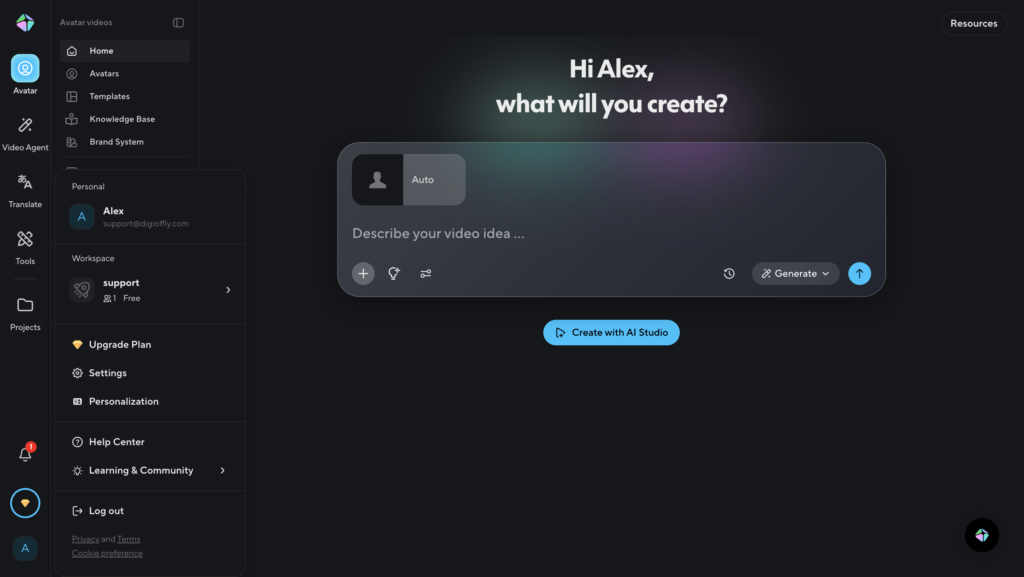
As you can see in our HeyGen review 2026 workspace screenshot, the layout is designed for speed.
⚙️ Key Features That Actually Work
Our HeyGen review 2026 testing focused on the features that actually move the needle for businesses. Most AI video platforms boast about having hundreds of tools, but in reality, you only end up using two or three. During our testing, we ignored the vanity features and focused strictly on the tools that actually save hours of manual filming and editing. Here is what makes HeyGen AI avatars and workflows stand out from the noise of basic tools.
👤 Customizing Your HeyGen AI Avatars
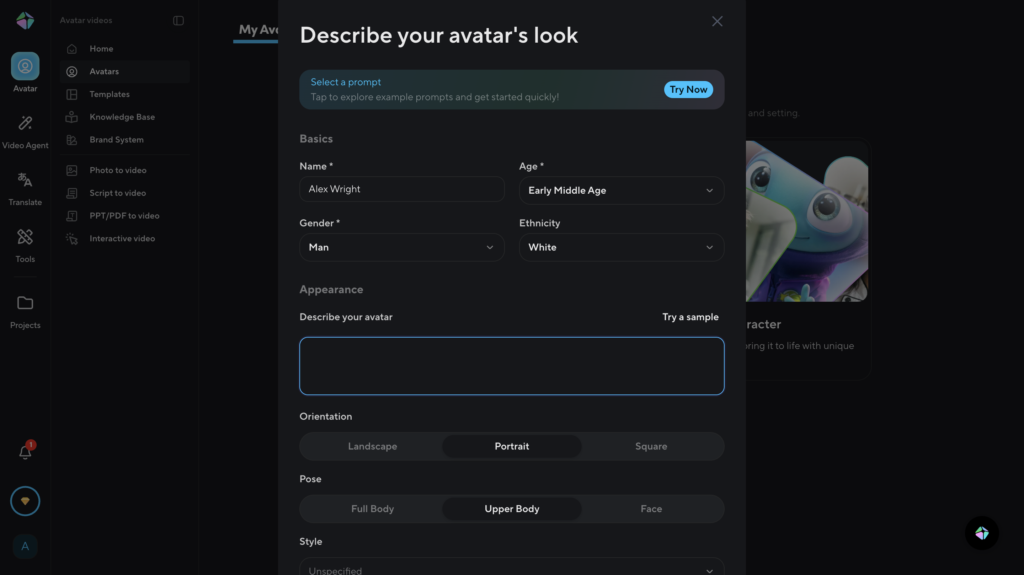
The realism of HeyGen AI avatars solves the biggest issue with AI-generated video: those stiff, lifeless stock models staring blankly at the camera. You simply upload a 2-minute webcam video of yourself speaking naturally in a well-lit room. The AI analyzes your facial expressions, head movements, and unique voice signature. Once saved, you simply type your script into the dashboard, and your digital twin will deliver the presentation. It completely eliminates the need to set up lights, a microphone, and a camera every time you need to record a quick weekly update for your team or a YouTube intro.
🎭 The Reality Check: How Realistic Are HeyGen Avatars?
If your goal is to drive engagement or build trust, this is the most critical question. A talking head video is completely useless if the “Uncanny Valley” effect creeps out your audience. So, how realistic are HeyGen avatars, really? The short answer is: astonishingly close to human. The engine dynamically maps the audio phonemes to precise micro-expressions. You will notice subtle head tilts, natural blinking, and lip-syncing that matches the exact cadence of the voiceover. While it might not fool a Hollywood VFX artist analyzing it frame-by-frame, for corporate training modules, social media ads, and B2B marketing, it easily passes the eye test for 99% of viewers.
🌍 1-Click Video Translation (The Scalability Engine)
This is where HeyGen shifts from a simple novelty app to a global marketing team. Instead of hiring foreign voice actors and video editors to dub your content for international markets, you use the Video Translation feature. You input a single video recorded in English. With one click, HeyGen translates the script, clones the original speaker’s exact voice tone in the new language, and—most importantly—alters the visual lip movements to perfectly match the translated audio. You can seamlessly scale your content into Spanish, German, French, or Japanese without losing the emotion of the original performance.
🤖 HeyGen vs. Basic Free Avatar Generators
You might be wondering: “Why pay for HeyGen when apps like CapCut or basic Canva plugins offer free AI avatars?” It all comes down to processing power, lip-sync accuracy, and commercial rights.
Free AI animators often use simple 2D image warping—they just stretch a static photo’s mouth up and down like a digital puppet. HeyGen uses advanced 3D modeling of the face, meaning the jaw, cheeks, and eyes move in tandem with the speech. Furthermore, HeyGen is built for enterprise privacy; your custom face and voice data are strictly protected and never used to train public models, whereas free apps often claim ownership of whatever media you upload to their servers.
🎥 Video Quality & Rendering Glitches (The Reality Check)
Let’s be brutally honest: no AI video tool is flawless, and HeyGen is no exception. If you are expecting a magic button that generates a flawless Super Bowl commercial with zero human oversight, you will be disappointed. Because HeyGen relies on text and audio cues to drive facial movements, a poorly paced script will result in an unnaturally fast or robotic performance. It doesn’t “hallucinate” fake facts like a text generator, but it can occasionally suffer from rendering glitches—especially around the teeth, or when trying to replicate complex hand gestures. The reality check is this: HeyGen is an incredible digital presenter, but you still need a human in the loop to write a natural-sounding script with proper commas and pauses to give the avatar room to “breathe.”
💰 Pricing Plans & Real ROI
HeyGen now uses feature-dependent credits; different models and generation operations consume credits at different rates. The main plans include Free, Creator, Pro, Business and Enterprise. Creator currently includes 600 credits/month at $29/month.
⚠️ The Catch with HeyGen Free & Creator Plan Limits
Many beginners are tempted by the Free account or the cheapest Creator tier, but you need to read the fine print. The entry-level limits are quite strict and designed mostly for hobbyists testing the waters. On the Free plan, your videos will carry a visible watermark, and your generations are capped at lower resolutions. Even on the basic paid tiers, your monthly credits burn quickly—and every typo or re-render costs you a credit. Furthermore, while you get access to a massive library of public faces, the high-fidelity HeyGen custom avatar cost is often billed as a separate add-on or requires a higher-tier annual commitment for the true “Studio” version. If you manage a faceless YouTube channel or produce regular training modules, underestimating your credit usage is a rookie mistake. For serious users, budgeting for the Business plan is the only way to scale without constant interruptions.
🎯 Who Should Use HeyGen?
HeyGen is built for scale. If you are a casual creator looking to render a single funny TikTok video a month, this platform is overkill and probably too expensive for your needs. However, it becomes an absolute necessity for high-volume content creators. Specifically, people constantly ask: is HeyGen worth it for agencies? The answer is a resounding yes. Instead of hiring a rotating roster of freelance actors and constantly renting studio space, your core team can produce consistent, brand-aligned video presentations across dozens of client accounts simultaneously using the custom avatars and voice cloning features. It is the ultimate tool for B2B marketers, in-house enterprise teams, and serious educators who need to scale their output without sacrificing visual quality.
⚔️ HeyGen Alternatives
The AI video generation landscape is crowded, but only a few platforms actually compete at the enterprise level. In the ongoing HeyGen vs Synthesia debate, the choice often depends on whether you need high-end marketing realism or corporate training stability. While both are excellent tools, they serve slightly different purposes. Synthesia is fantastic for highly structured corporate training modules and has an interface that feels slightly easier for complete beginners to pick up. HeyGen, however, wins hands-down for photorealistic custom avatars, dynamic micro-expressions, and managing complex, multi-language marketing campaigns with its one-click video translation.
When comparing HeyGen vs Synthesia, the difference mainly comes down to use cases and avatar realism.
HeyGen is generally better for marketing videos, multilingual content, and realistic avatar presentations. Its AI avatars show more natural facial expressions, smoother lip-syncing, and stronger voice cloning capabilities, making it ideal for content creators, agencies, and YouTube automation workflows.
Synthesia, on the other hand, focuses more on corporate environments. Many companies use it for structured training videos, onboarding materials, and internal documentation. Its interface is slightly simpler for beginners, but the avatars tend to feel more rigid compared to HeyGen.
If your goal is to create engaging marketing content or scalable video campaigns with realistic AI presenters, HeyGen is usually the stronger option. However, for strictly corporate training workflows and internal communication, Synthesia remains a solid alternative.
Here is a quick breakdown of how HeyGen compares to its top rivals:
| Feature | HeyGen | Synthesia | Basic Avatar Apps |
| Best For | Realistic Avatars & Marketing | Corporate Training & Docs | Social Media Memes |
| Custom Avatars | Highly Photorealistic | Good, but slightly stiffer | Basic 2D Warping |
| Voice Cloning | Exceptional (Built-in) | Very Good | Robotic / None |
| Data Privacy | Enterprise-grade | Enterprise-grade | Claims ownership of data |
In short, HeyGen wins for avatar realism and marketing flexibility, while Synthesia is better suited for structured corporate training videos.
🔬 How We Tested HeyGen
To write this review, we didn’t just read the marketing brochure. As a digital software analyst, I (Alex Wright) personally signed up for the platform, connected it to my own workspace (DigiOffly), and put it through its paces in real-world scenarios. I recorded and generated a full custom AI avatar to test the rendering limits, trained the voice cloning feature on my actual microphone data, and actively pushed the limits of the video translator to see where the lip-syncing would start breaking down. The screenshots you see throughout this review are from my own active dashboard, ensuring that our recommendations are based on real, hands-on experience, not just aggregated internet opinions.
🏁 Final Verdict of Our HeyGen Review 2026: Is It Worth the Money?
After thoroughly testing the platform, the verdict is clear: HeyGen is not a novelty toy for casual users; it is an enterprise-grade video production studio. If you are struggling to maintain a consistent publishing schedule, spending thousands of dollars on freelance actors, or failing to localize your content for global audiences, HeyGen pays for itself within the first week of use. Its ability to map precise facial micro-expressions and seamlessly lip-sync in over 40 languages makes it the undisputed king of AI video generation. If you are ready to scale your marketing efforts, localize your campaigns, and leave the expensive camera gear in the closet, it is time to take it for a spin.

Frequently Asked Questions
Does HeyGen offer a free trial?
The current HeyGen Free plan lists three videos per month, up to one minute each, with feature and export limitations. Consult current plan rules before signing up.
Can I use HeyGen for YouTube videos?
Absolutely. Many creators wonder, can I use HeyGen for YouTube videos without getting penalized by the algorithm? Yes, you can. HeyGen is perfect for creating faceless YouTube channels, producing talking-head tutorials, or running long-form educational content. Since you retain the commercial rights to the videos you generate on paid plans, you can fully monetize your content on the platform.
Will YouTube demonetize my AI avatar?
This is the video equivalent of the “AI detector” fear for SEOs. The short answer is: YouTube does not demonetize a video simply because it uses an AI avatar. YouTube penalizes low-quality, repetitious, or spammy content. If you use HeyGen to deliver a highly valuable, well-researched script that keeps viewers engaged, your channel will be perfectly safe. The AI is just the presenter; the value comes from your human-written script.
Who owns the copyright to the content generated by HeyGen?
You do. On paid plans, HeyGen does not claim any ownership or copyright over the final video content you generate using their platform. You are free to publish, sell, run ads with, or distribute the videos as your own proprietary assets.
Can I easily cancel my HeyGen subscription?
Yes. If you decide the platform isn’t the right fit for your workflow, you can cancel your subscription directly from the “Billing” section in your workspace settings with just a few clicks to prevent the next billing cycle.
Can HeyGen translate my videos into other languages?
Yes, and this is one of its most powerful features for global growth. HeyGen’s Video Translate tool allows you to upload an existing video, and the AI will automatically translate the script into one of 40+ languages. It doesn’t just provide a voiceover; it clones your original voice and tone, then adjusts your lip movements (lip-syncing) to match the new language perfectly. This allows you to scale your content for international audiences without hiring foreign actors or expensive dubbing studios.
Is it possible to integrate HeyGen with other tools like Canva or ChatGPT?
Absolutely. HeyGen offers a seamless integration with Canva, allowing you to drag and drop your AI avatars directly into your designs and presentations. Furthermore, you can use the HeyGen ChatGPT plugin or Zapier integrations to automate your video production workflow. For example, you can set up a system where a new blog post in WordPress automatically triggers HeyGen to generate a summary video with your custom avatar, saving you hours of manual work every week.
How much does the HeyGen custom avatar cost?
The HeyGen custom avatar cost depends on the plan, but usually, high-fidelity Studio avatars are available as a paid add-on or included in annual Business/Enterprise plans.
🔍 Explore More on DigiOffly
If you found this review helpful, check out our other guides on scaling your digital marketing:
- Explore All AI Marketing Categories & Guides
- Top Trending AI Services & Tools for Video Creators
- Bypass Geo-Restrictions: The Best VPNs for Unlocking Global AI Tools
- The Ultimate AI Tools Hub — Discover our curated list of the best AI software for marketing, SEO, and productivity in 2026.
- Jasper AI Review: Still the Best for Copywriting? — Read our deep dive into the industry-leading AI writing assistant and how it compares to HeyGen’s workflow.
- Descript Review: Edit Existing Videos & Podcasts — Compare HeyGen’s avatar-led video creation with a workflow focused on editing recorded audio and video.