
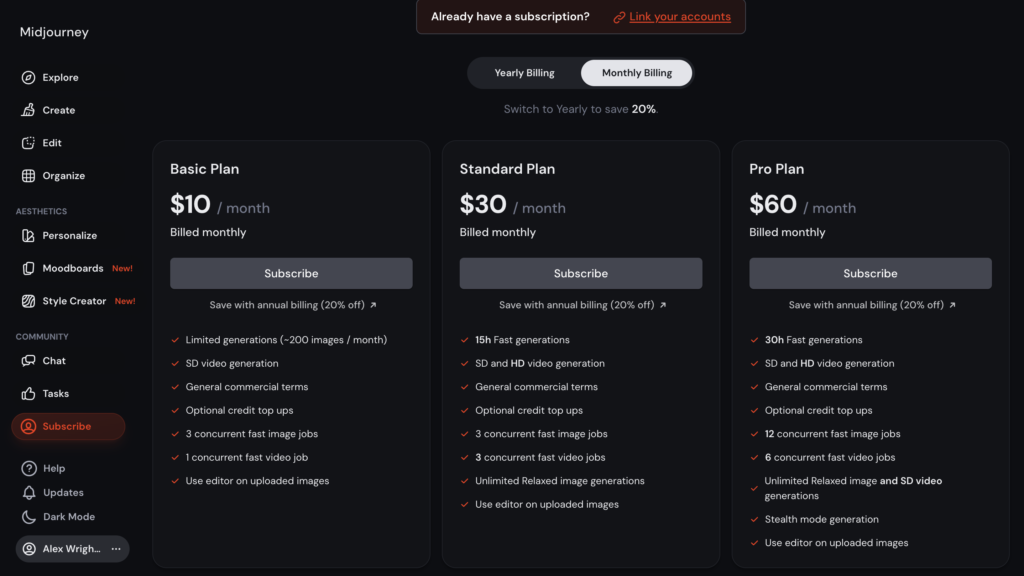
Pricing and specifications checked on 9 October 2026: Basic $10/month, Standard $30, Pro $60, Mega $120; annual billing provides a lower effective monthly cost. Official vendor pricing.
Look, sourcing high-quality visuals used to mean spending thousands of dollars annually on premium stock photo subscriptions, fighting copyright claims, or waiting two weeks for a freelance illustrator to deliver a single concept draft. Today, AI platforms promise to generate breathtaking, photorealistic art with a simple text prompt.
The real problem? Getting that AI to actually understand your vision without generating characters with seven fingers, horrifying facial deformities, or mangled, unreadable text in the background.
For the past few years, Midjourney has positioned itself as the undisputed king of AI art, catering to serious designers, concept artists, and marketing agencies. But with tools like Adobe Firefly and OpenAI stepping up their game, does it still justify the subscription cost and the notoriously steep learning curve? We got our hands dirty with the v6 and v7 models, pushed its prompt engineering to the limit, and tested its commercial workflow.
In this complete Midjourney review 2026, we will cut through the promotional fluff, analyze the real Midjourney pricing, and find out if it is truly the best AI image generator your business can buy today.
October 2026 product update: Midjourney lists V8.2 as its current default model (released July 24, 2026). Alex Wright’s first-person image and workflow tests below document V6/V7, not a new V8.2 benchmark. Version-specific tools have changed, including a newer Edit Model. See the official version history.
We are reader-supported. When you buy through links on our site, we may earn an affiliate commission at no extra cost to you.
📊 Midjourney Review Summary
In this Midjourney review, we tested the platform across multiple real-world scenarios including marketing campaigns, blog graphics, and concept design.
The goal was to evaluate image quality, ease of use, pricing, and real business value. Based on our testing, Midjourney delivers some of the most realistic AI-generated visuals available today.
However, it also comes with a learning curve and requires a paid subscription, which may not suit every user.
⚡ Quick Verdict: Is Midjourney Worth It in 2026?
Yes, Midjourney is worth it for professionals who regularly create visual content.
Instead of paying for expensive stock photo subscriptions or hiring freelance designers for every project, users can generate unlimited concepts within minutes.
For businesses running ad campaigns, blogs, or social media content, Midjourney can significantly reduce design costs and production time. However, casual users who only need images occasionally may find the subscription unnecessary.
🎨 Is Midjourney the Best AI Art Generator in 2026?
Many users wonder whether Midjourney is still the best AI art generator in 2026.
After testing multiple platforms including DALL-E 3 and Adobe Firefly, Midjourney still leads in several critical areas. The platform delivers unmatched photorealism, cinematic lighting, and artistic style control that other tools struggle to replicate.
However, Midjourney is not always the easiest tool for beginners. The interface and prompt system require some learning compared to simpler generators.
Overall, for designers, marketers, and agencies that need high-quality visuals, Midjourney remains one of the best AI image generators available today.
👍 What We Love
- ✅ Unmatched Photorealism: It actually understands skin textures, film grain, and cinematic lighting. It does not look like “AI plastic.”
- ✅ Style Consistency: The new Style Reference (
--sref) and Character Reference (--cref) parameters allow you to keep the same look or person across multiple generations. - ✅ Text Rendering: Finally, the latest models can generate legible, correctly spelled text on signs, logos, and products.
- ✅ Data Privacy: Paid “Pro” and “Mega” plans offer Stealth Mode, keeping your proprietary business concepts off the public gallery.
👎 Where It Falls Short
- ❌ Learning Curve: Advanced prompts, model settings, and editing controls still take practice, even on the website.
- ❌ No Free Tier: They completely eliminated the permanent free trial; you must pay to play.
- ❌ Complex Prompting: Getting the exact image you want requires learning a specific syntax (parameters, weights, aspect ratios) rather than just talking to it naturally.
🏆 OVERALL RATING: ⭐⭐⭐⭐⭐ 4.9 / 5
Best For: Creative agencies, UI/UX designers, concept artists, and marketers needing premium visual assets.
🧠 What Is Midjourney AI Image Generator?
Let’s skip the marketing jargon. As the best AI image generator on the market, Midjourney is an enterprise-grade artificial intelligence platform built specifically for visual professionals. Unlike basic AI image generators that just slap filters on existing photos or produce cartoonish, low-resolution results, Midjourney is strictly business.
Under the hood, Midjourney’s proprietary diffusion model doesn’t just guess what an apple looks like. It understands the physics of light passing through that apple, the macro lens used to photograph it, and the exact artistic style of a 19th-century oil painting. In short: it is a dedicated creative co-pilot designed to turn a blank prompt box into a ready-to-publish, hyper-realistic masterpiece. This high level of visual fidelity is exactly why we are conducting this Midjourney review 2026 to see if it holds up under real-world agency pressure.
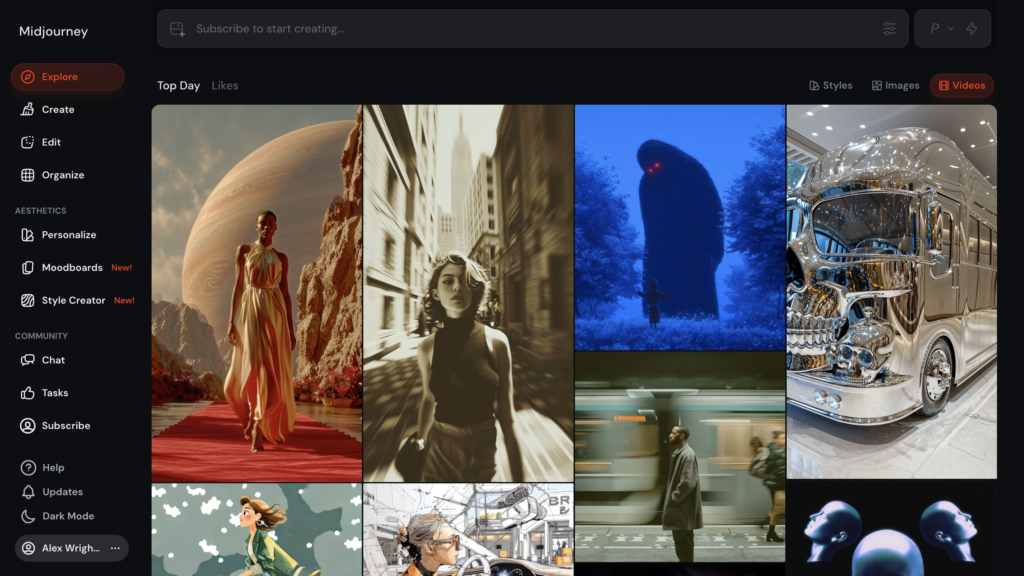
Midjourney’s website offers a visual alternative to creating images through Discord.
🖥️ Ease of Use & The User Interface
When it comes to how to use Midjourney, this is usually where beginners hit a brick wall. Logging into Midjourney for the first time does not feel intuitive if you are expecting a clean, Canva-like dashboard.
Traditionally, Midjourney has lived entirely inside Discord (a chat app for gamers). You had to join a server, type /imagine in a crowded public chat room, and watch your images generate alongside thousands of other users. For agencies, this public, chaotic workflow was a massive headache.
A major part of our Midjourney review 2026 is the browser-based creation workspace. With a Midjourney subscription, you can create images on the website or through Discord; prior Discord activity is not required to unlock the web experience. On the website, you can browse and organize generations, adjust visual settings, and edit images without scrolling through a Discord chat. See Midjourney’s official web-versus-Discord guide.
🧭 How to Use Midjourney for Beginners
Getting started with Midjourney is surprisingly simple once you understand the basic workflow. The platform generates images from text prompts, allowing you to describe the exact scene or style you want to create.
Here is a quick step-by-step overview of how beginners typically use Midjourney:
1. Create an account and access the platform
Visit the official Midjourney website and sign in with your Discord account. Many users now also have access to the newer web interface, which makes generating images much easier.
2. Write a prompt describing your image
In Midjourney, images are created using prompts. A prompt can describe the subject, environment, lighting, camera style, and artistic look you want to achieve.
Example Midjourney Prompt:
modern office workspace, cinematic lighting, ultra realistic, 35mm lens, 16:9
3. Generate and refine the image
Once Midjourney generates the images, you can upscale them, create variations, or modify specific parts of the image to improve the final result.
4. Download and use the image
After refining the generation, you can download the image and use it for websites, marketing materials, or creative projects depending on your plan’s commercial rights.
For beginners, the key to getting great results is experimenting with prompts and gradually learning how different styles, lighting descriptions, and parameters influence the final image.
🛠️ Key Features That Actually Work
Most AI platforms boast about having hundreds of tools, but in reality, you only end up using two or three. During our Midjourney review 2026 testing, we ignored the vanity features and focused strictly on the tools that actually save hours of manual design labor. Here is what makes Midjourney stand out from the noise.
📸 Photorealism and V6/V7 Text Rendering
The biggest giveaway of AI-generated content used to be that overly smoothed, glossy look and absolute gibberish when it tried to write words. The latest Midjourney engines completely eliminate this problem. If you ask it to generate a neon sign that says “DigiOffly,” it will accurately spell it out with the correct lighting reflections. It understands the difference between a Kodak 35mm film shot and an iPhone 15 Pro photo.
🎭 Style and Character Consistency
In the past, generating a children’s book or a consistent brand campaign was impossible because the AI would change the character’s face in every shot. Midjourney solved this. By using the Character Reference parameter, you can feed the AI an image of your character, and it will keep their face, hair, and clothing consistent across new prompts, angles, and environments. This is a game-changer for digital marketing agencies.
🖼️ Inpainting (Vary Region) and Outpainting (Zoom Out)
Writing a good prompt is only half the battle; editing is the other half. The ‘Vary (Region)’ tool allows you to highlight a specific part of an image (like a character’s hand or a coffee cup) and regenerate only that specific area. ‘Zoom Out’ acts like a virtual wide-angle lens, extending the borders of your generated image seamlessly without losing the original quality.
🖼️ Midjourney vs. Free AI Image Generators
You might be wondering: “Why pay for Midjourney when basic tools like Canva AI or Bing are completely free?” It all comes down to artistic control and commercial rights.
Free AI image generators often rely on heavily filtered, basic models. If you need a quick graphic for a school project, they work fine. However, they consistently fail at rendering realistic human skin, cinematic lighting, or correct typography.
Midjourney, on the other hand, is built for professional fidelity. It gives you granular control over camera lenses, aspect ratios, and character consistency across multiple shots. Paid Midjourney plans generally allow commercial use under the service terms, but companies with more than $1 million in annual gross revenue must use Pro or Mega for their company assets. Copyright and third-party rights require separate consideration.
👾 Image Quality & Rendering Glitches (The Reality Check)
To keep this Midjourney review 2026 brutally honest: no AI visual tool is flawless, and Midjourney is no exception. If you are expecting a magic button that generates a flawless, complex infographic with zero human oversight, you will be disappointed.
Because Midjourney is a diffusion model, it can occasionally suffer from rendering glitches—especially when trying to replicate highly complex, interconnected objects (like a person riding a bicycle while holding a guitar). Hands and fingers have drastically improved, but you will still occasionally catch a six-fingered anomaly if the prompt is too vague. The reality check: Midjourney is an incredible digital artist, but you still need a human in the loop to Photoshop out minor artifacts and perfect the final 10%.
💰 Pricing Plans & Real ROI
A deep dive into Midjourney pricing reveals that while it is not a free tool, it is an incredibly cheap premium investment for professionals who intend to monetize their content. Midjourney operates on a tiered subscription model: Basic, Standard, Pro, and Mega.
The monthly fee might seem like an extra expense if you are used to free chatbots. However, if this platform replaces a $200/month Shutterstock subscription, hiring a concept artist on Upwork, and waiting days for revisions, the ROI (Return on Investment) pays for the annual subscription within the first two commercial campaigns.
The Standard Plan is usually the sweet spot. It gives you 15 hours of “Fast GPU” time (where images generate in seconds) and unlimited “Relaxed GPU” time (where you queue in the background).
⚠️ The Catch with Midjourney Limits
A crucial warning in our Midjourney review 2026: many beginners are tempted by the Basic account, but you need to read the fine print. The entry-level limits are quite strict (roughly 200 image generations per month). If you are testing prompts, upscaling images, and making variations, you will burn through that limit in a few days.
Midjourney is public by default. Pro and Mega subscriptions include Stealth Mode, which hides selected work from the website’s public gallery. However, Stealth Mode does not hide images generated in public Discord channels. For sensitive client campaigns or work under an NDA, review the terms and your client’s policies, and use Stealth Mode in the web Create workspace or a private Discord setting as appropriate.
🎯 Who Should Use Midjourney?
A core takeaway from this Midjourney review 2026 is that the platform is built for high-level creative scale. If you are a casual user looking to make a quick avatar for your gaming profile once a month, this platform is overkill.
However, it becomes an absolute necessity for visual content creators. Specifically, people constantly ask: is Midjourney worth it for commercial use? The answer is a resounding yes. Instead of spending hours hunting for the perfect stock photo that your competitors are also using, your core team can produce consistent, brand-aligned visual presentations across dozens of client accounts. It is the ultimate tool for ad agencies, web designers needing custom hero images, and publishers who need to scale their visual output without sacrificing quality.
⚖️ Midjourney Alternatives
The AI image generation landscape is crowded, but only a few platforms actually compete at the enterprise level. In the ongoing Midjourney vs Dall-E 3 debate, the choice often depends on whether you need high-end artistic realism or simple, conversational prompting.
While both are excellent tools, they serve slightly different purposes. Dall-E 3 (integrated into ChatGPT) is fantastic for highly structured infographics, exact prompt adherence, and has an interface that feels much easier for complete beginners to pick up. Midjourney, however, wins hands-down for photorealistic lighting, artistic styling, and professional image manipulation.
Midjourney vs Stable Diffusion
When comparing Midjourney vs Stable Diffusion, the main difference comes down to control versus convenience.
Midjourney is a fully managed AI image generator that delivers exceptional photorealism and cinematic lighting straight out of the box. It requires no installation and is ideal for designers, marketers, and agencies that want high-quality visuals without managing complex software.
Stable Diffusion, on the other hand, is an open-source model that offers far more customization. Advanced users can run it locally, modify the models, and integrate it into custom workflows. However, setting it up often requires technical knowledge and powerful hardware.
In short, Midjourney is better for ease of use and image quality, while Stable Diffusion is better for flexibility and full control over the generation process.
Here is a quick breakdown of how Midjourney compares to its top rivals:
| Feature | Midjourney | Dall-E 3 (ChatGPT Plus) | Adobe Firefly |
| Best For | Photorealism, Art, Agencies | Quick concepts, exact prompt matching | Safe commercial use, Typography |
| Interface | Website / Discord | Chat-based (Simple) | Web / Photoshop Native |
| Image Quality | Exceptional (Cinematic) | Very Good (Can look cartoonish) | Good (Highly polished) |
| Prompt Style | Parameter-heavy (--ar, --v) | Conversational | UI Sliders & Menus |
🧪 How We Tested Midjourney
To write this Midjourney review 2026, we didn’t just read the marketing brochure. As a digital software analyst, I (Alex Wright) personally signed up for the platform, connected it to my own workspace (DigiOffly), and put it through its paces in real-world scenarios.
I generated a full “Summer Launch Campaign” to test the --cref character consistency, pushed the limits of the v6 text rendering by generating custom logos, and actively compared the Fast and Relaxed GPU generation times. The insights you read throughout this review are based on my own active dashboard and real, hands-on experience managing agency-level content, not just aggregated internet opinions.
🏆Final Verdict of Our Midjourney Review 2026: Is It Worth the Money?
After thoroughly testing the platform, the verdict is clear: Midjourney is not a toy for casual users; it is an enterprise-grade digital art studio. If you are struggling to maintain a consistent visual brand identity, spending thousands of dollars on stock assets, or failing to bring your creative concepts to life quickly, Midjourney pays for itself within the first week of use.
Its ability to understand complex artistic styles, maintain character consistency, and generate breathtaking photorealism makes it the undisputed king of AI image generation. If you are ready to scale your marketing visuals and leave generic stock photos in the past, it is time to take it for a spin.
Frequently Asked Questions
Can I use Midjourney without Discord?
Yes. A Midjourney subscription lets you generate images on midjourney.com or through Discord. You do not need a history of Discord generations to use the web creation workspace. The two interfaces offer largely similar capabilities, with some differences in tools.
How to write the best Midjourney prompts?
Start with a clear description of your subject, scene, setting, and style. Short, specific phrases usually work well; add only details that matter, such as lighting or camera look. If you need a specific aspect ratio, put a parameter such as --ar 16:9 at the end of your prompt.
Does Midjourney have a free trial?
No, it does not. Many users search online asking, does Midjourney have a free trial, hoping for a 7-day pass. Midjourney officially ended its permanent free tier due to server overload and abuse. To generate even a single image today, you must subscribe to at least the $10/month Basic plan.
Is Midjourney worth it for commercial use?
The Standard plan costs $30/month and generally allows commercial use under Midjourney’s terms. A company grossing over $1 million USD annually needs Pro or Mega to use its assets commercially. Copyright, third-party rights, and your client’s license requirements remain separate issues.
Who owns the copyright to Midjourney images?
This is a complex legal area. So, who owns the copyright to Midjourney images? According to the US Copyright Office rules as of 2026, purely AI-generated images cannot be copyrighted by a human because they lack “human authorship.” While Midjourney gives you the commercial right to use the images freely, you cannot traditionally copyright the raw output to prevent others from using it, unless you significantly alter it in Photoshop yourself.
Can I upload my own images to Midjourney?
Yes. You can upload your photos, sketches, or other reference images. V6 introduced Character Reference (--cref) and V7 used Omni Reference, but Midjourney V8.2 has a newer Edit Model for editing images and using up to four reference images. Choose the reference workflow supported by your model version.
Are my Midjourney images private?
Not by default. Pro and Mega offer Stealth Mode to hide creations from the public web gallery. But images generated in public Discord channels remain visible to channel members even with Stealth Mode enabled. Use a web Create page or private Discord environment for appropriately private work; review confidentiality and legal requirements separately.
🔍 Explore More on DigiOffly
If you found this Midjourney review 2026 helpful, check out our other guides on scaling your digital marketing and creative workflows:
Want the head-to-head verdict? Our Midjourney vs Leonardo AI comparison covers V8.2 editing, the real difference between GPU time and tokens, current pricing, privacy and commercial rights.
- Explore All AI & Tech Categories & Guides — Dive into our full library of software reviews and growth strategies.
- The Ultimate AI Tools Hub — Discover our curated list of the best AI software for marketing, SEO, and productivity in 2026.
- Jasper AI Review: Still the Best for Copywriting? — Read our deep dive into the industry-leading AI writing assistant to pair your new visuals with perfect SEO copy.
- HeyGen Review 2026: Is It Truly the Best AI Video Generator? — Learn how to turn your static AI avatars into highly realistic, talking-head videos.
- Leonardo AI Review: Another AI Image Generator — Compare image-generation approaches, editing options and pricing before choosing a platform.