

Pricing and specifications checked on 9 October 2026: Free: 150 fast tokens/day; Essential $12/month for 8,500 fast tokens, Premium $30 for 25,000, Ultimate $60 for 60,000. Official vendor pricing.
Let’s be honest: building a brand’s visual identity used to be a massive financial drain. You were either bleeding thousands of dollars on generic stock photo subscriptions, risking copyright nightmares, or waiting weeks for freelance illustrators to nail a single concept.
Fast forward to today, and AI platforms promise to solve all of that with a single text prompt. But any seasoned designer knows the dark reality: most AI tools still struggle with basic human anatomy, generate absolute gibberish for text, and force you to work inside clunky, chaotic chat interfaces that completely derail a professional workflow.
For a long time, Midjourney was the undisputed heavyweight champion of the AI art world. But the landscape has shifted dramatically. What started as a niche tool for indie game developers has aggressively expanded into an enterprise-grade creative suite.
With the launch of their proprietary foundational models, the industry is buzzing with one massive question: is there finally a definitive Midjourney alternative? And more importantly, does it actually make financial sense for your business?
To find out, I (Alex Wright) tested Leonardo AI in real creative workflows, including ad creatives, YouTube graphics, and brand asset generation. We also evaluated the Leonardo Phoenix model, custom model training, and the platform’s pricing structure for commercial use.
In this Leonardo AI review 2026, we break down Leonardo AI pricing, image quality, workflow tools, and commercial value to see whether it is one of the best AI image generators available for designers, creators, and agencies.
We are reader-supported. When you buy through links on our site, we may earn an affiliate commission at no extra cost to you.
📊 Leonardo AI Review Summary
In this comprehensive review, we tested the platform across multiple real-world scenarios including marketing campaigns, YouTube content creation, and conceptual brand design. The goal was to evaluate image quality, workflow efficiency, pricing structures, and real business value.
Based on our rigorous testing, Leonardo AI delivers an unprecedented level of creative control. Unlike platforms that act as a “black box” where you type a prompt and pray for a good result, Leonardo acts like a true digital canvas.
However, its token-based economy can be slightly confusing for newcomers, and high-end video generation features can deplete your monthly allowance faster than expected.
🚀 Quick Verdict: Is Leonardo AI Worth It in 2026?
Yes, absolutely. When asking is Leonardo AI worth it for commercial use, the answer is a resounding yes for professionals who need high-volume, brand-consistent visual content.
Instead of paying for expensive stock photo subscriptions or hiring freelance designers for every minor social media post, users can generate, edit, and upscale unlimited concepts within minutes. For businesses running ad campaigns, blogs, or social media content, the platform’s ability to train custom models on your own branding significantly reduces design costs and production time.
Casual users will love the generous daily free tokens, but serious agencies will find the paid tiers incredibly cost-effective.
💼 Is Leonardo AI Worth It for Commercial Use?
For commercial teams, Leonardo AI makes the most sense when consistency and speed matter more than one-off artistic experimentation.
Because the platform supports custom model training, project organization, editing workflows, and better prompt control, it fits commercial use cases far better than many casual AI art tools. Agencies, in-house marketing teams, and creators producing repeat visual assets will usually get much more value from Leonardo than hobby users.
🏆 Is Leonardo AI the Best AI Image Generator in 2026?
Many users wonder whether this platform has finally dethroned its biggest rival. After testing multiple platforms, including DALL-E 3 and Midjourney, Leonardo AI leads in several critical areas—specifically UI/UX and granular image manipulation.
While Midjourney might still hold a microscopic edge in raw, out-of-the-box cinematic aesthetics, Leonardo’s new Leonardo Phoenix model closes that gap significantly while offering a vastly superior web interface and editing canvas.
Overall, for designers and agencies that need strong image quality, better editing control, and a more practical workflow than chat-based tools, Leonardo AI is one of the strongest AI image generators available in 2026.
⚖️ What We Love & Where It Falls Short
👍 What We Love
- ✅ The Leonardo Phoenix Model: Their proprietary foundational model is a game-changer. It boasts exceptional prompt adherence and coherent text rendering. You can finally generate a billboard in your image with perfectly spelled, stylized text.
- ✅ Unmatched UI and Workflow: No Discord required. The web app features a beautiful, dedicated dashboard, a Real-Time Canvas for sketching-to-image, and organized asset management.
- ✅ Custom Model Training: You can upload 10-20 images of your own product, character, or brand style, and train a bespoke AI model to generate new scenes that perfectly match your brand guidelines.
- ✅ Generous Free Tier: Unlike competitors that killed their free trials, Leonardo still offers a robust daily token allowance that lets you genuinely test the platform before committing.
👎 Where It Falls Short
- ❌ The Token Economy Can Be Confusing: You don’t just pay a flat fee for “generations.” Every action (upscaling, motion, high-res generation) costs a different amount of “Fast Tokens,” requiring you to budget your usage.
- ❌ Video Generation is Expensive: Generating short video clips (Motion or Veo features) costs a massive amount of tokens, which can wipe out a lower-tier plan’s monthly budget very quickly.
- ❌ Overwhelming Options for Beginners: The sheer amount of toggles, sliders, models (Kino XL, Vision XL, Phoenix), and elements can paralyze a user who just wants a quick, simple image.
🏆 OVERALL RATING: ⭐⭐⭐⭐⭐ 4.8 / 5
Best For: Creative agencies, YouTubers, game developers, UI/UX designers, and marketers needing premium visual assets and granular control over their workflow.
🧠 What Is Leonardo AI?
Let’s skip the marketing jargon. Leonardo AI is an enterprise-grade artificial intelligence platform built specifically for visual professionals who demand control.
Unlike basic AI image generators that just slap filters on existing photos or operate as a simple chatbot interface, Leonardo is a comprehensive creative suite. Originally gaining fame among game developers for creating isometric assets and textures, the platform has expanded aggressively.
In the great debate of Leonardo AI vs Midjourney 2026, the core difference lies in their philosophy. Midjourney wants to be the artist; you give it a prompt, and it gives you its interpretation. Leonardo AI wants you to be the artist, giving you the AI as a highly responsive brush.
Under the hood, the platform hosts a variety of specialized models (like Kino XL for cinematic shots, or Vision XL for photography). But their crown jewel in 2026 is the Leonardo Phoenix model. Built from the ground up as a foundational architecture, it understands complex, multi-sentence instructions and delivers ultra-high resolution outputs up to 5 megapixels.
🎯 Who Should Use Leonardo AI?
Leonardo AI is best suited for creators and teams that need more than just one-click image generation.
It works especially well for:
- designers who need more layout and editing control,
- YouTubers creating thumbnails and channel visuals,
- agencies producing branded campaign assets,
- game developers building concept art and environment variations,
- marketers who need fast, repeatable visual production.
For casual hobby users, the free tier is enough to explore the platform. For agencies and commercial teams, the paid plans are where Leonardo becomes much more useful.
🖥️ Ease of Use & The User Interface
When it comes to how to use these tools, interface is everything. This is where Leonardo absolutely obliterates some of its older competitors.
Logging into Midjourney traditionally required navigating the chaotic, gamer-centric Discord app—a massive headache for corporate agencies. Leonardo, however, has always operated via a sleek, standalone web interface.
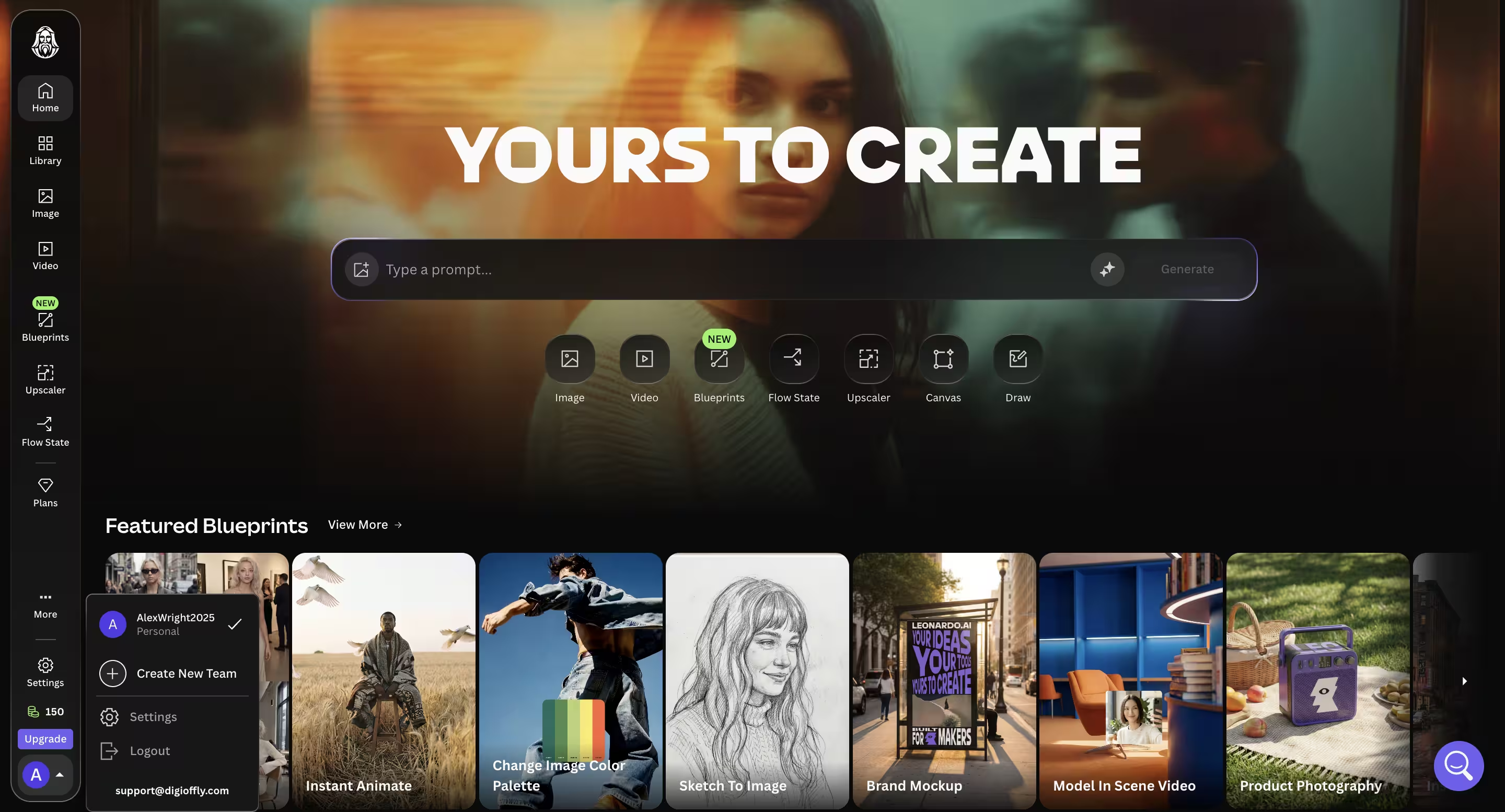
The dashboard layout keeps all key tools visible. On the left, you have your navigation: Image Generation, Real-Time Canvas, Canvas Editor, and Motion. The center acts as your community feed and personal generation history.
For agencies, this web interface is a massive lifesaver. You can easily switch between models, visually adjust aspect ratios with simple sliders (no need to memorize --ar 16:9 syntax), and organize your generated assets into specific projects.
How to Use Leonardo AI for Beginners
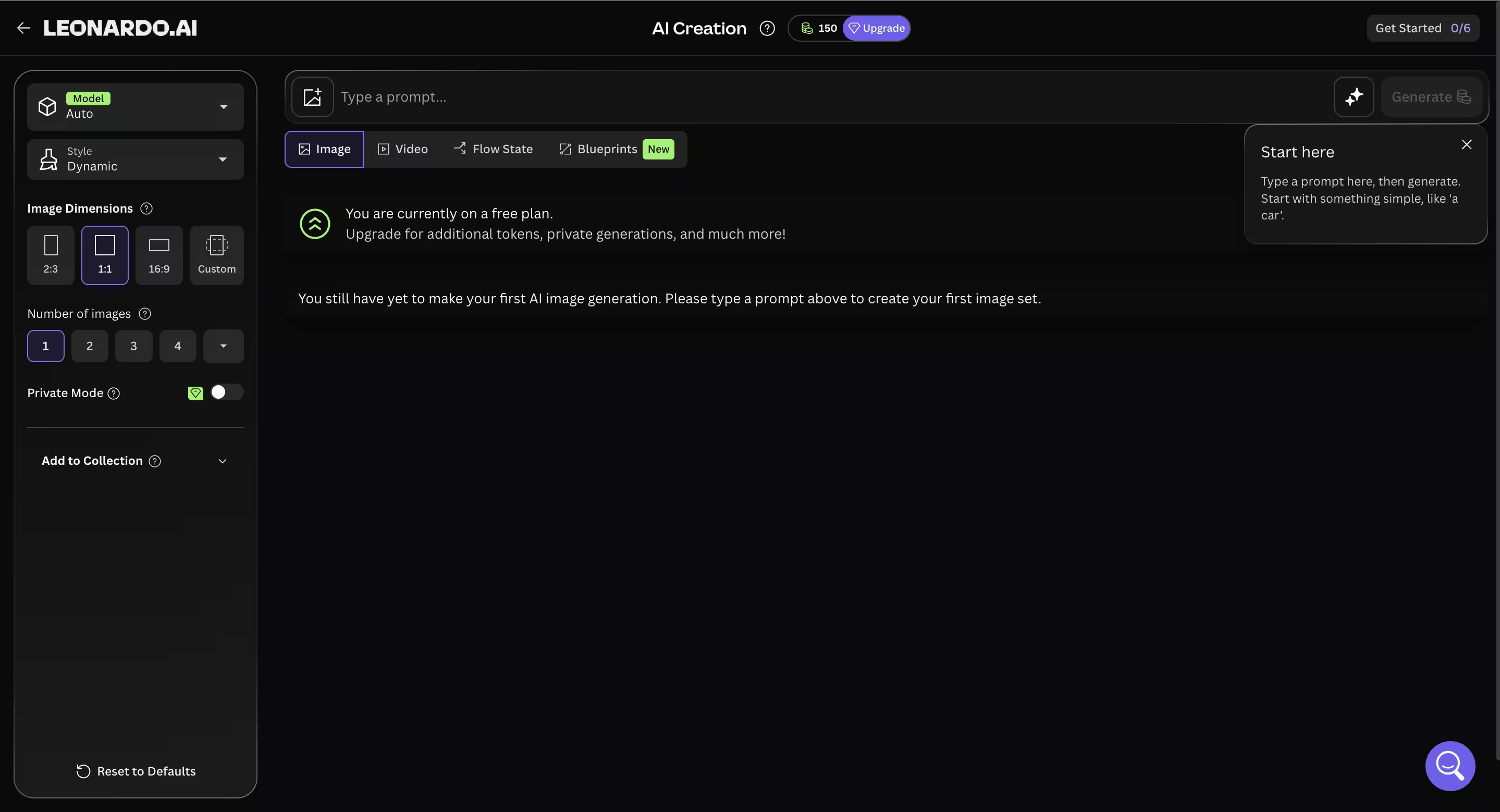
Getting started is highly intuitive, even if the sheer number of options seems daunting at first glance. Here is a quick step-by-step overview:
- Create an account: Sign up on the official website. You instantly get access to your daily free tokens.
- Select your tool: Navigate to the “Image Generation” tab.
- Choose your model: From the dropdown, select the Leonardo Phoenix model for the best overall quality and text rendering, or a specialized model if you want a specific anime or cinematic look.
- Write your prompt: Describe your scene. Because Phoenix has high prompt adherence, you can be highly descriptive. (e.g., A sleek, futuristic coffee machine on a marble countertop, cinematic lighting, shallow depth of field, the machine has a digital screen displaying the word “BREW” in sharp neon blue text).
- Generate and refine: Hit generate. From there, you can use the built-in upscalers, remove the background with one click, or take it to the Canvas Editor to paint in new details.
🖼️ How to Use Leonardo AI for Thumbnails
Leonardo AI is especially useful for thumbnail creation because it gives creators more layout control than many competing image generators.
The most effective workflow is to start with a rough composition in Real-Time Canvas, define where the subject, product, or visual hook should appear, and then generate variations around that structure. After that, you can refine the image with inpainting, improve clarity with upscaling, and export visuals for YouTube or social media use.
For creators who care about click-through rate, Leonardo is much better suited to thumbnail experimentation than tools that only generate one polished but unpredictable artistic result.
✨ Key Features That Actually Work
Most AI platforms boast about having hundreds of tools, but in reality, you only end up using two or three. During our review testing, we ignored the vanity features and focused strictly on the tools that actually save hours of manual design labor.
1. The Phoenix 1.0 Foundational Model
The biggest giveaway of AI-generated content used to be absolute gibberish when it tried to write words, and a tendency to ignore the second half of a long prompt. The Phoenix model solves this.
It features exceptional prompt adherence. If you describe a specific camera angle, a lighting setup, and a complex scene layout, Phoenix delivers exactly that. Furthermore, its coherent in-image text rendering is phenomenal. Creating a product hero shot with your brand name on the packaging is finally reliable, making it an invaluable tool for marketers.
2. Real-Time Canvas
This feature feels like actual magic. You get a split screen: on the left, a basic drawing board; on the right, the AI output. As you draw a crude green circle and a brown stick on the left, the AI instantly, in real-time, generates a photorealistic tree on the right. If you want to know how to use Leonardo AI for thumbnails, this is your secret weapon. You can quickly block out the composition, colors, and layout of your YouTube thumbnail, and let the AI render the high-quality details over your rough sketch.
3. Custom Model Training
In the past, generating a consistent brand campaign was nearly impossible because the AI would change the aesthetic slightly in every shot. Leonardo solved this for professional teams. You can upload a small dataset of your own images (10-20 photos) and train the AI to understand your specific product or art style. Once trained, you can generate endless new scenes featuring your specific product, maintaining strict brand consistency across all marketing channels.
🔍 Image Quality & The Reality Check
To keep this review brutally honest: no AI visual tool is entirely flawless.
If you are expecting a magic button that generates a flawless, complex, multi-character interaction with zero human oversight, you will be disappointed. While the Phoenix model is incredibly advanced, diffusion models can still occasionally suffer from minor rendering glitches—especially when dealing with highly complex hand gestures or chaotic backgrounds.
The practical result: Leonardo AI can generate appealing images, but any success-rate percentage depends on prompt choice and evaluation method. We cannot substantiate an exact first-attempt success rate from a published methodology.
💳 Pricing Plans & Real ROI
Leonardo AI pricing is built around a token-based system rather than a simple unlimited image subscription.
That model gives the platform more flexibility for power users, but it also means creators need to understand how different actions consume tokens before choosing a plan.
A deep dive into Leonardo AI pricing reveals a complex but highly scalable freemium model. Instead of a flat subscription, they use a “Token Economy.” Every action costs tokens.
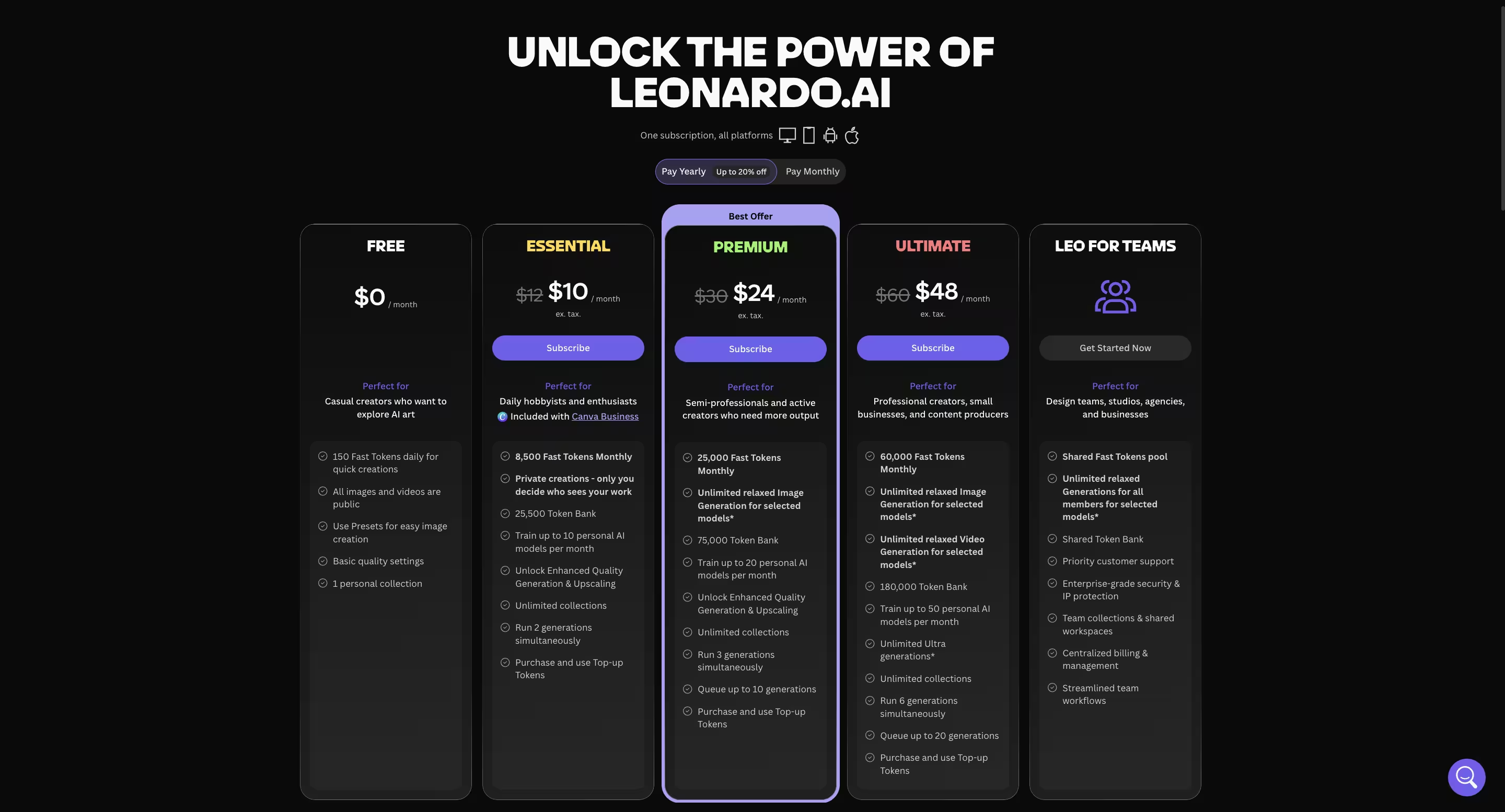
Here is the breakdown of the current plans:
- Free Plan ($0/month): Gives you 150 “Fast Tokens” daily. This is ideal for testing the waters, but your generations are public, and you lack access to the highest-end professional tools.
- Essential Plan ($12/month): Includes 8,500 fast tokens/month, private generations and limited personal AI model training.
- Premium Plan ($30/month): Includes 25,000 fast tokens/month and relaxed generation on supported image models, subject to availability and queue limits.
- Ultimate Plan ($60/month): Includes 60,000 fast tokens/month and broader relaxed image/video generation on supported models, subject to model restrictions.
The Token Catch
While 8,500 tokens on the $12 plan sounds like a lot (a basic image costs about 5-8 tokens), you need to be careful with video. Generating a high-quality AI video using their advanced motion integrations can cost over 2,000 tokens for a single short clip. If you are doing heavy video work, you will need the higher-tier plans.
However, if this platform replaces a $200/month stock subscription and saves your design team 20 hours a week, the ROI (Return on Investment) pays for the annual Maestro subscription within the first few days.
🆓 Leonardo AI Free Plan Limits
The Leonardo AI free plan is one of the better entry points in the AI image space, but it does come with practical limitations.
Users receive 150 fast tokens per day, which is enough for testing prompts, experimenting with models, and generating a modest number of standard images. However, free generations are public, advanced workflows are more limited, and heavier tasks like video or more demanding generation settings can consume tokens quickly.
For casual users, the free plan is enough to evaluate the platform. For commercial workflows, private brand assets, or agency work, a paid plan makes much more sense.
🥊 The Alternatives: Leonardo AI vs The Giants
The AI image generation landscape is crowded, but only a few platforms actually compete at the enterprise level.
| Feature | Leonardo AI | Midjourney v6/v7 | DALL-E 3 (ChatGPT) |
| Best For | Total control, custom training, workflows | Raw artistic cinematic output | Quick, conversational infographic concepts |
| Interface | Advanced Web Dashboard | Discord / Web Alpha | Chat-based |
| Pricing Model | Token-based (Freemium available) | Flat Subscription (No free tier) | Included in ChatGPT Plus ($20) |
| Text Generation | Excellent (Phoenix Model) | Very Good | Excellent |
| Editing Tools | Real-time Canvas, Inpainting, Outpainting | Vary Region, Zoom Out | Basic conversational editing |
When comparing Leonardo AI vs Midjourney 2026, the main difference comes down to control versus convenience. Midjourney is excellent if you just want to type a prompt and get a beautiful result with minimal effort. Leonardo AI is the superior choice if you need to strictly control the composition, sketch out ideas, train your own brand models, and utilize a traditional software interface.
| Feature | Leonardo AI | Midjourney |
| Interface | Standalone web app | Discord / limited web workflow |
| Best for | Designers, agencies, structured workflows | Fast cinematic image generation |
| Text rendering | Strong with Phoenix | Improved, but less workflow-focused |
| Editing tools | Real-Time Canvas, inpainting, outpainting | More limited editing flow |
| Custom model training | Yes | No equivalent workflow focus |
🏁 Final Verdict of Our Leonardo AI Review 2026
After thoroughly testing the platform, the verdict is clear: Leonardo AI is no longer just a cool alternative; it has matured into an essential, enterprise-grade digital art studio.
If you regularly produce branded visuals, ad creatives, thumbnails, or concept assets, Leonardo AI can significantly improve both speed and consistency in your workflow. Its ability to understand complex artistic styles via the Phoenix model, maintain brand consistency through custom training, and offer unparalleled editing control makes it a powerhouse.
For creators, marketers, and design teams that need more control than prompt-only tools usually provide, Leonardo AI is clearly worth considering in 2026.

Frequently Asked Questions
Is Leonardo AI free to use?
Yes, it operates on a generous freemium model. When looking at the Leonardo AI free plan limits, users receive 150 “Fast Tokens” every single day. This is typically enough to generate a few dozen standard images daily, making it perfect for beginners wanting to learn prompt engineering without financial commitment. However, free plan generations are public, and you will need a paid plan for private workflows and heavy usage.
Can I use Leonardo AI generated images for commercial purposes?
Absolutely. One of the biggest questions is is Leonardo AI worth it for commercial use, and the answer is yes. Even on the free tier, Leonardo generally allows commercial use of the images you generate, provided you adhere to their terms of service. However, upgrading to paid plans like the Artisan tier is highly recommended for businesses to ensure your assets remain private and off the public community feed.
How does the Leonardo Phoenix model compare to Midjourney v6?
The Leonardo Phoenix model is a proprietary foundational architecture designed specifically to rival Midjourney. While Midjourney v6 is famous for its default cinematic aesthetic, Phoenix excels in strict prompt adherence and coherent text rendering. If you need a billboard to accurately say “Summer Sale,” Phoenix handles this with much greater consistency than older models, making it a formidable Midjourney alternative.
What is the best Leonardo AI pricing plan for a small marketing agency?
For most small to medium agencies, the Artisan (Premium) plan at $30/month is the optimal choice. It provides a robust 25,000 monthly tokens, which is plenty for daily image generation and upscaling. More importantly, it includes unlimited “Relaxed” generations, meaning your creative team will never be completely locked out of generating static images if they blow through their fast tokens experimenting with video.
How to use Leonardo AI for thumbnails on YouTube?
Leonardo is incredibly powerful for YouTube creators. The best method is to use the “Real-Time Canvas” feature. You can sketch out the rough composition of your thumbnail (e.g., a person on the left, a glowing product on the right) and let the AI generate the high-quality assets over your sketch in real-time. You can then use the text-generation capabilities of the Phoenix model to add bold, legible 3D text directly into the image.
Can I train my own custom models on Leonardo AI?
Yes, and this is why it is considered a top AI art generator for designers and agencies. Available on paid plans, you can upload a dataset of 10 to 20 images of a specific subject—like your company’s physical product, a specific brand mascot, or a unique illustration style. Leonardo will train a custom AI model on these images, allowing you to generate endless new scenarios featuring your exact brand elements.
How do I fix bad hands or weird artifacts in my generated images?
While AI has improved, errors still happen. Instead of throwing away the whole image and spending more tokens on a new generation, use Leonardo’s Canvas Editor. You can bring the image into the editor, use the masking tool to highlight the bad hand or glitch, and prompt the AI to regenerate only that specific highlighted area. This iterative editing saves tokens and perfects the final image.
Is Leonardo AI Better Than Midjourney for Professional Work?
Leonardo AI is usually the better option for professional workflows that require editing control, project organization, and more predictable visual iteration.
Midjourney still has strong default aesthetics, but Leonardo is often more practical for teams that need repeatable output and a cleaner production workflow.
🌐 Explore More on DigiOffly
If you found this Leonardo AI review 2026 helpful, check out our other guides on scaling your digital marketing and creative workflows:
Still choosing between generators? Read our Midjourney vs Leonardo AI comparison for a side-by-side look at editing, private generation, pricing, video and which tool fits each creative workflow.
- 📂 Explore All AI & Tech Categories & Guides – Dive into our full library of software reviews, SaaS discounts, and growth strategies.
- 🎨 Midjourney Review 2026: Is It Truly the Best AI Image Generator? – Read our deep dive into Leonardo’s biggest rival to see which tool truly fits your agency’s aesthetic needs.
- 🖌️ Canva Pro Review 2026: Is the Brand Hub Worth It? – Discover how Canva’s Magic Studio and ecosystem compare to dedicated, hardcore AI art generators.
- ✍️ Jasper AI Review: Still the Best for Copywriting? – Learn how to pair your stunning new Leonardo AI visuals with perfect, high-converting SEO copy.
- 🎥 HeyGen Review 2026: Is It Truly the Best AI Video Generator? – Take your marketing to the next level by turning your static AI avatars into highly realistic, talking-head videos.
- 🔒 Top VPN Deals for 2026 – Generating proprietary assets for clients? Secure your remote workflow, bypass geo-restrictions on AI tools, and protect your data with our exclusive VPN discounts.
- 🏠 Return to the DigiOffly Homepage – Looking for more ways to optimize your workflow? Head back to our main hub for the latest SaaS reviews, exclusive VPN deals, and brutally honest AI growth strategies.