
Software tools for smarter decisions.
Start with the work you need to do. These software tools help you narrow a shortlist, compare recurring costs and check a vendor’s offer before making a commitment.

Find, compare, calculate.
Not sure where to begin? Search the catalog, compare your shortlist and check what your chosen billing cycle really costs.
Software Directory
Know the category but not the brand? Browse the catalog and filter by use case, free plan and other documented product details.
Browse all softwareAI Software Finder
Answer a few questions about your work, budget and non-negotiables. See which catalog entries fit and why others fall short.
Find a matchCompare Software
Already choosing between two products? Put their features and payment models next to each other before deciding.
Compare productsSoftware Cost Calculator
Add your seats and billing periods to see estimated monthly and yearly spend. Annual-equivalent pricing stays distinct from cash paid upfront.
Estimate my costsStart with the Finder or browse the Directory.
Review features, limitations and billing models side by side.
Use the Calculator and verify the provider’s terms before purchasing.
The Software Finder, at a glance
Wondering where to start? In this example, the Finder uses the VPN category to show a shortlist built from available catalog evidence. You can change the requirements to reflect your own needs before reading the full reviews.
Open the Software Finder →Screenshot captured from DigiOffly. Example results are not guaranteed recommendations, and provider terms may change.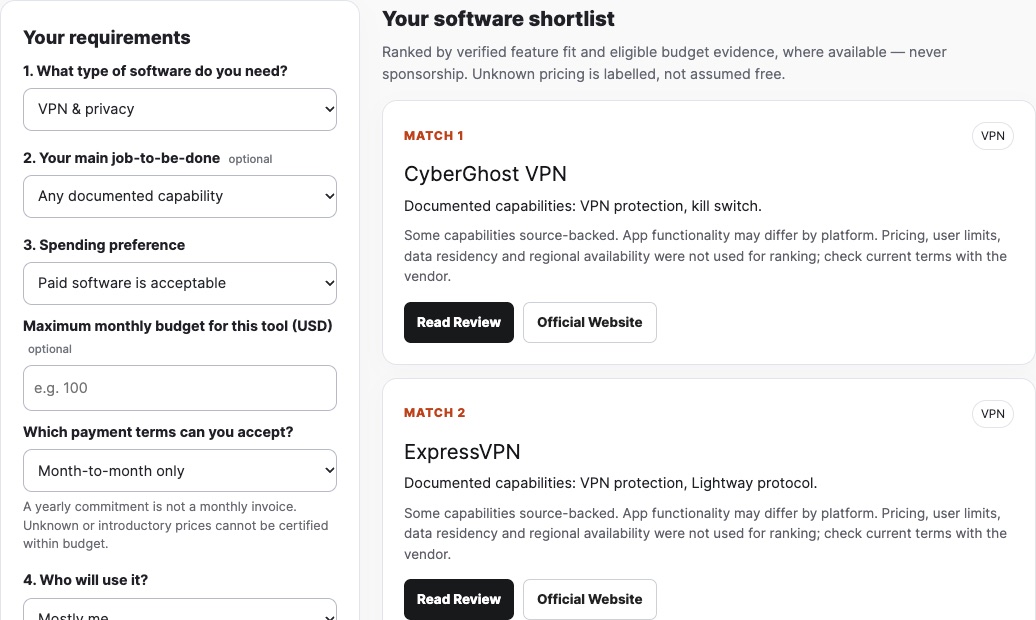
Choose with more context.
Need a second opinion? Explore curated stacks and guides that explain the trade-offs.
Best Value Advisor
Check whether a lower-cost plan covers your task, or whether its limits make the upgrade more sensible.
Evaluate plan valueReady-Made Software Stacks
A video team and an SEO agency rarely need the same subscriptions. Start from a working stack, then remove anything redundant.
Explore software stacksBest Software Guides
See how each recommendation earns its place, where it struggles and which full review is worth reading next.
Read buying guidesKnow what’s worth checking.
Explore existing offers and choose whether you want editorial updates by email.
Software Deals Hub
Distinguish an ongoing free tier from a trial or time-limited promotion, then check the provider’s conditions.
Explore software dealsDeal Alerts
Choose a product, a category or everything. Sunday alerts are sent only when matching offers have been verified and approved.
Set up deal alertsWeekly Software Newsletter
Prefer one digest? Follow newly published guides, practical comparisons and verified offers, where available.
Explore the newsletterOn verified deals: These software tools never turn an ordinary list price into a promotional claim. Deal Alerts sends only approved vendor-backed offers to confirmed subscribers; an empty week can mean no promotional email.
Before starting a trial, check renewal dates and cancellation conditions. The FTC subscription guide explains common automatic-renewal issues; EU readers can consult Your Europe’s consumer contract guidance. Provider terms and local rules may differ.
Prefer to browse by topic?
Go directly to a DigiOffly software review category.
Software tools: common questions
What to know before comparing subscriptions and acting on prices.
Which tool should I open first?
If you know your goal but not the product, use the AI Software Finder. If you already have a shortlist, open Compare Software. For expected subscription costs, start with the Cost Calculator.
Do I need an account to use the decision tools?
These software tools are available directly on DigiOffly, with no account required to browse or compare. Email alerts are optional and require confirmation of the address you provide.
Are prices and savings guaranteed?
No. Vendor prices can vary by currency, location, billing period, taxes and eligibility. The tools explain known assumptions; check the provider’s latest checkout terms before you buy. Unverified price changes are not presented as verified discounts.
Are the suggestions influenced by affiliate commissions?
Our tools aim to explain product fit and available data, rather than treating affiliate status as a hidden ranking signal. Some outbound links may earn DigiOffly a commission; see the individual reviews and disclosures for details.
EXPLORE NEXT ON DIGIOFFLY
Take the next step with confidence
Choosing between software tools rarely ends with a single answer. Use the related tools below to check what a plan includes, understand the true billing commitment and find other options before checkout.
Start with your shortlist
- Search the full software directory — Browse 69 cataloged products before narrowing your search to the features you need.
- Try the software finder — Choose a workflow and see which documented tools suit the budget and requirements.
- Explore ready-made stacks — Find a practical starter combination without buying overlapping subscriptions.
- Read our editorial method — See how DigiOffly handles source material and verification limits.
- Browse Finance software — Review all 12 published finance assessments.
Compare plans before paying
- Compare two products — Put competing features and billing models on the same screen.
- Use the Best Value Advisor — Find a plan fit and examine whether a free option covers your task.
- Calculate the full software cost — Separate annual commitments, seat counts and estimated monthly spend.
- Browse editorial buying guides — Understand which situations call for a different type of tool.
- Review recurring billing costs — Compare billing fees before subscribing.
Keep your options open
- Look through software deals — Review free plans, trials and offers with stated source limitations.
- Subscribe to Deal Alerts — Choose a product or category for Sunday updates on approved promotions.
- Read the weekly software newsletter — Follow new reviews and useful software comparisons, if a new issue is available.
- Review hosting and website tools — Compare website builders and hosting plans before committing to infrastructure.
DigiOffly does not promise savings that a vendor has not confirmed. Final prices and availability depend on the provider’s current terms.