

Software deal alerts worth knowing about.
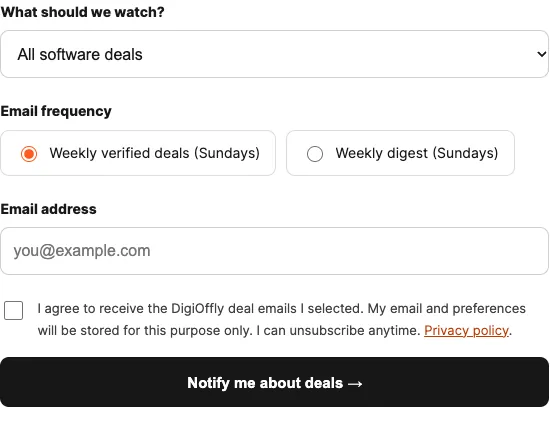
Get a Sunday email with newly verified software promotions. Follow a favorite product, a category, or all deals — without checking prices yourself.
Email preferences
Choose an action to continue.
Get Deal Alerts
No account needed. Enter your email, choose what interests you, and confirm your address.
How DigiOffly Software Deal Alerts Work
Software subscriptions can look cheaper than they really are when a promotion uses a long prepayment period, excludes essential features, or renews at a higher rate. DigiOffly Deal Alerts are designed to make those conditions easier to spot. Choose one reviewed product, follow an entire software category, or receive updates across the catalog. Each alert starts with an official vendor offer that has been reviewed for its terms, rather than a guessed price change.
Choose a topic and frequency
Following a specific product means messages should only concern that software. Choosing a category broadens coverage to comparable tools, while the all-deals option includes every supported category. You can select notifications for newly confirmed promotions or a weekly roundup. Signing up requires an email address and explicit consent; your subscription does not become active until you confirm the link sent to your inbox.
Check the offer before you buy
A legitimate promotion has a traceable vendor source and defined eligibility. We distinguish temporary reductions from permanent free tiers, ordinary list prices, trials, and annual-billed monthly equivalents. Some suppliers show regional pricing, require advance payment, or increase the price at renewal. Always check the final amount and conditions on the official checkout page before subscribing.
No verified promotion? No marketing blast.
We do not manufacture discounts to fill a mailing schedule. If there is no newly verified offer matching your preferences, there may be nothing to send. Deal Alerts are separate from the broader DigiOffly Weekly newsletter, and joining one does not automatically subscribe you to the other. Every promotion email contains an unsubscribe link. You can also use our Software Deals directory to research currently documented offers or visit the Software Cost Calculator for a longer-term view of subscription expenses.
What qualifies as a real software promotion?
A genuine promotion should be traceable to the software provider, apply to a specific plan, and offer an advantage beyond that plan’s standard terms. Trial access, an ongoing free tier and an annual subscription’s monthly equivalent can all be useful, but they should not automatically be presented as limited-time discounts. DigiOffly separates those different offer types so an alert does not make a regular price look like a special saving. When eligibility, region or billing conditions cannot be confirmed from an official source, we avoid describing the offer as verified.
Compare the introductory price with renewal terms
Software subscriptions sometimes display an appealing monthly rate only when a customer pays for twelve months or longer upfront. Promotional periods and renewal prices can be different, and essential features may require higher tiers or additional user seats. For a fair comparison, check the billing interval, actual amount due today, refund rules and plan limits. Official vendor references such as Wix pricing and Webflow pricing illustrate how website tools separate subscriptions and entitlements. Read the terms for your own country before buying.
Use Deal Alerts alongside independent reviews
Receiving a notification is not a recommendation to purchase immediately. Open the related DigiOffly review, check the features you actually need, and compare the product with its alternatives. Then visit the vendor’s official checkout page to verify that the offer is still active for your location. Promotional rates can expire or become unavailable between the time we verify them and the moment you read the message. You can stop following a product or category using the unsubscribe link in each email. The objective is fewer decisions made under artificial urgency and more informed software subscriptions.
Software Deal Alerts: FAQ
How often will DigiOffly send deal alerts?
Both options send once a week on Sundays: deal alerts highlight newly verified vendor promotions, while the digest summarizes matching offers. If there are no eligible deals, there may be no email.
Can I follow just one software product?
Yes. Choose a specific published software product, a category such as Hosting & Websites, or all deals. Each choice requires email confirmation.
Are all listed software discounts guaranteed?
No. DigiOffly reviews official vendor sources and explains restrictions, but prices, eligibility, taxes and availability may change before checkout.
How can I unsubscribe?
Every promotion email includes an unsubscribe link that stops that alert subscription. The separate DigiOffly Weekly newsletter uses its own preferences.
An example of what deserves a weekly alert
Imagine a cloud software provider announces a temporary offer for first-time accounts. A useful notification should identify the affected product, the eligible plan, the period during which the terms apply, and a link to the official offer. It should also distinguish the promotional rate from the regular renewal cost and state when verification is incomplete. This is an illustrative scenario, not a claim that a particular vendor currently offers a discount.
By contrast, a product that always has a limited free tier has not necessarily launched a new promotion. Likewise, a standard free trial advertised again is not automatically a price reduction. Keeping these categories distinct avoids encouraging unnecessary purchases.
What to check when the email arrives
Confirm the eligibility rules and final price in the provider checkout before acting. Note whether the offer is available only to new customers, requires a fixed annual term, excludes certain countries or has minimum team seats. Watch for usage overages, tax treatment and bundled credits. An advertised discount may be irrelevant if the included features do not meet your requirements.
The notification is a prompt to investigate, not an instruction to buy. If the discounted product duplicates an existing subscription, calculate the switching cost and weigh that against the realistic renewal bill. For a growing team, check whether the lower tier supports the number of users you expect next year.
Manage the subscription without missing important changes
Choose product or category preferences that match current priorities instead of subscribing to every topic. The DigiOffly schedule is weekly on Sunday for checking and sending, so a time-sensitive promotion may start or end between checks. You should not rely on these emails as continuous price monitoring.
The email confirmation step protects against accidental subscriptions. Keep the unsubscribe link accessible, and revisit preferences when your software stack changes. A missed email or an offer that has expired is not evidence that an advertised price will still be honored by the vendor.
Deal alerts: review the offer before signing up
Deal alerts are a way to receive a digest about relevant software offers, not a promise that every notification contains a discount. The DigiOffly form lets you choose a product or category; the digest is scheduled weekly, and consent can be withdrawn. Before acting on an offer, distinguish an ongoing free plan from a free trial and a limited promotion. Check renewal price, billing interval, eligibility, cancellation timing and whether a credit card is needed. The US Federal Trade Commission’s consumer guidance on trials and auto-renewals provides a practical checklist. The vendor’s checkout terms remain the final source.
EXPLORE NEXT ON DIGIOFFLY
More Ways to Find the Right Software Deal
Deal alerts are a starting point, not a purchasing decision. Compare verified vendor terms, explore alternatives, and check full subscription costs before you commit.
Check the real price
- Estimate your actual software spend — Model seats, billing cadence, and annual cash outlay instead of judging the headline price.
- Compare software side by side — Check competing product limits before assuming the listed offer is better.
Compare before buying
- Find tools for your workflow — Filter the catalog by the work you need to do.
- Browse the full software directory — See alternatives that may offer a permanent free tier or a different feature mix.
- Explore ready-made software stacks — Build a coherent toolkit instead of buying disconnected apps.
- Compare ordinary costs before chasing a deal — Review ongoing subscription terms and free alternatives before checkout.
Follow verified resources
- See current public software offers — Browse no-cost plans, trials and vendor-backed promotions in one place.
- Read the weekly software brief — Receive practical comparisons and source-checked offers when available.
- Read our editorial methodology — Understand how we separate catalog-listed offers from independently verified promotions.
- Check automation software free plans and pricing — Review vendor references and avoid confusing trials with ongoing free allowances.
- Review Creator Software Free Plans — Read the limitations behind eight creator-tool free and limited offers.
- Research Hosting & Website Deals — Compare introductory prices, renewal terms and available free trials before subscribing.