

Shopify Order Automation with Make and Airtable
Shopify order automation should make an order easier to operate, not create a second, conflicting storefront. This guide uses Make to read a Shopify order event, maintain a compact operations record in Airtable and alert staff in Slack when an exception needs attention. The proposed Shopify order automation never automatically fulfills, refunds, cancels or changes stock; Shopify remains the authoritative commercial record.
By Alex Wright, DigiOffly · November 14, 2026 · Source-led implementation blueprint. We checked official connector and billing documentation; no paid-account integration or live automation benchmark is claimed.
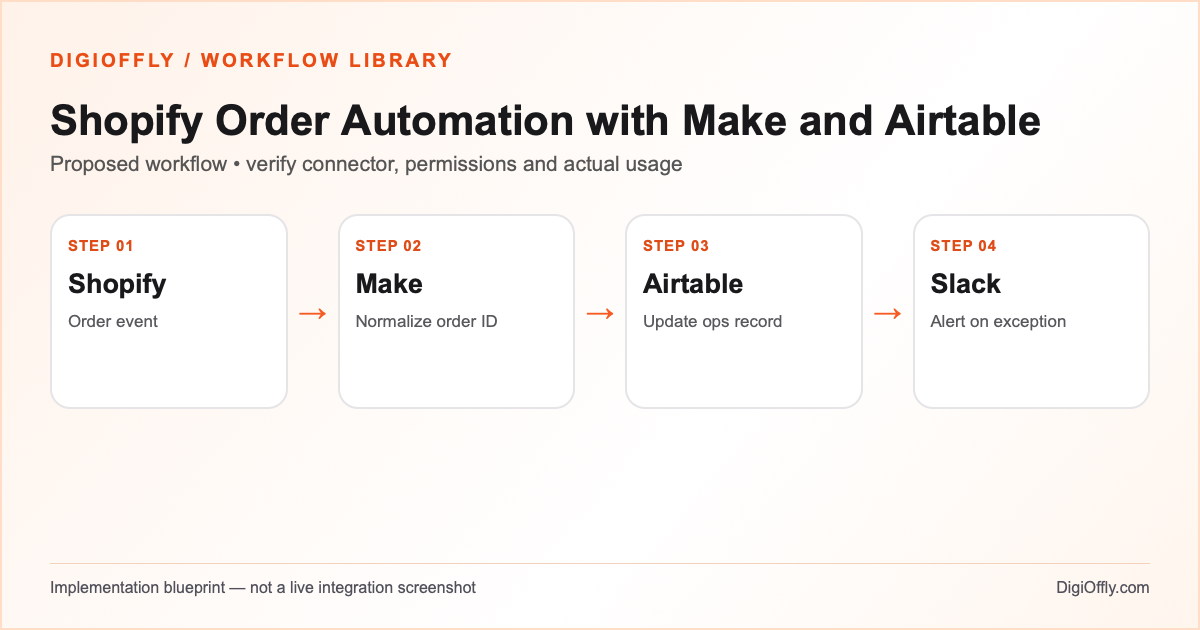
Shopify order automation: what you will build
An order has one internal operations record keyed to the store and order ID. Updated events refresh the relevant fields. Exceptions reach a human queue without changing payment or fulfillment status in Shopify.
Use this Shopify order automation if a small store needs a shared operations dashboard across fulfillment or customer service. If Shopify’s own admin and native automation already cover the workflow, start there. Airtable is useful for internal coordination, but it should not become another inventory master.
Decide whether an order needs an operations record
For Shopify order automation, choose a boundary between commercial truth and internal work. Shopify controls payment state, fulfillment and cancellations. The Shopify order automation register may use a separate operational status such as Review needed or Ready for handoff. A staff member can update that status without implying a change to the order itself. Keep the external key immutable even if the display order number changes.
A Shopify order automation design should also distinguish the full order from the unit of work. If most orders contain one item, an order-level row may be enough. If the warehouse needs each SKU separately, use related item rows and count the extra writes. That decision affects both reliability and the Make credit estimate.
Software and prerequisites for Shopify order automation
Shopify
Storefront & order source
Make
Orchestration
Airtable
Operations register
Slack
Exception notification
Before connecting any production account, confirm access, the exact connector event and action, supported plan and test environment. Treat the following field names as your own design; adjust them to the actual source and destination schema.
Shopify order automation: data mapping
| Source | Destination | Mapping rule |
|---|---|---|
| Store ID + order ID | Airtable external order key | Composite key distinguishes stores; do not use a display order number alone. |
| Order event ID / timestamp | Processing log | Retain the event key and relevant version or update time. |
| Payment state | Review status field | Distinguish created, paid and refunded; do not treat created as paid. |
| Currency and total | Amount and currency columns | Keep currency explicit; do not combine totals across currencies. |
| SKU and item count | Compact order summary or related records | Preserve order-item identity; count repeat item operations separately. |
| Order URL / exception reason | Slack alert | Send link and reason only; avoid addresses, card information and personal details. |
How to set up Shopify order automation
1. Choose a precise Shopify event
Decide whether the operation starts when an order is created or when payment is confirmed. These are distinct business events. Shopify’s webhook documentation explains event-driven updates; configure the exact event supported by your Make connection and plan. The Make Shopify connector requires a paid Shopify account. For development, use an appropriate test environment or test order rather than experimenting on live customer orders.
2. Connect Shopify and the operations base
Create one approved Make connection to the intended store. Make warns that duplicate connections using the same store and app combination can overwrite available scopes. For Airtable, select OAuth or a restricted personal access token and grant only the target base. Create an Orders table with external key, payment state, operational status, last event time and exception reason. Configure a private Slack channel for the operations team.
3. Build the order processing workflow
Start with the chosen order event in a draft scenario. Normalize the store identifier and order ID into an external key. Write the minimum order summary required for the team. Search Airtable by that key, then use a controlled update or create action. Ensure the status fields are distinct: a row marked Ready for review does not establish that Shopify has received payment or authorized fulfillment.
4. Handle duplicate webhooks and ordering
Shopify events may be delivered more than once or arrive in a different order from the underlying updates. Store an event identifier when available and keep the latest relevant source timestamp or version. If an older event would replace a newer status, skip the destructive change or retrieve the current order state. Serialize writes or design a safe uniqueness mechanism; a lookup alone is not a concurrency lock.
5. Process multiple line items safely
For an order with three line items, decide whether Airtable needs a single order summary or a related item table. A per-item loop can execute downstream operations several times. If you store separate rows, use a composite order-and-item identifier and reconcile the item count. Do not assume an order with more items has the same automation cost as a one-item purchase.
6. Notify staff and reconcile
Send a concise Slack notification for exceptions such as missing SKU mapping, an unrecognized state or a failed database write. A normal order can appear in the operations register without an alert. Compare a sample of Shopify orders with Airtable after the scenario runs. Include cancellations, refunds, unpaid orders and multi-item events, but do not make the scenario initiate any of those actions.
Shopify order automation: test cases before launch
These are acceptance criteria for your pilot, not test results. Record the source event ID and the destination ID in each test. Compare the intended outcome with the actual one before enabling the scenario.
| Test case | Expected result |
|---|---|
| New paid order | One operations row; correct currency and paid state. |
| Order created but unpaid | State stays unpaid; no fulfillment request. |
| Duplicate order webhook | Same external key; no duplicate row or exception message. |
| Older update follows a newer one | Latest valid source state is preserved. |
| Three items with an unknown SKU | All intended items represented; human review of missing mapping. |
| Airtable failure or refund event | Failure is recoverable; Shopify remains unchanged. |
Shopify order automation: failure recovery
Use a failure register with the store/order key, last completed stage and a reason. A Slack alert is not a durable ledger: if Airtable write fails, keep the event available for replay. Make incomplete executions can help retain partial work when enabled, but their storage capacity and behavior are plan-dependent. Reconcile the source regularly even when webhook deliveries appear healthy.
Security and ownership in Shopify order automation
Restrict the Shopify connection to read access and required events for this design. Do not request refund, payment or inventory-write privileges solely for an operations view. Minimize customer data and never copy card information. Confirm retention rules, customer deletion propagation and access to both Airtable and Slack. Rotate or revoke credentials through the platforms rather than pasting them into the scenario documentation.
Shopify order automation: usage and pricing
The starter estimate uses 500 orders per month, five credits per order and a 20% reserve: 3,000 monthly credits. This is an illustrative average covering the trigger, lookup, record write and possible supporting operations. If each order has multiple item-level writes, calculate the average across realistic order sizes. A scheduled check can consume a credit even when no order arrives; include those checks separately.
The calculator can evaluate the Make Core reference against this demand, alongside Shopify, Airtable and Slack. Shopify has its own subscription and possible transaction-related costs; Airtable team access and record capacity depend on the selected plan. Those costs are not determined by the number of Make credits. Verify payment, currency conversion, shipping and extension fees independently.
Calculate Shopify order automation cost
Illustrative workload, not measured consumption. Change each input for your design.
3,000 estimated credits / month
Calculate stack cost & optimizeMake normally charges ordinary module operations; some modules are exempt or use other rates. Polling, multiple bundles, AI and code can change demand. The calculator applies the catalog’s documented plans, not a vendor invoice.
Measure Shopify order automation after rollout
Measure time from an eligible order event to a valid operations row, exceptions per 100 orders, duplicate rows, missing item mappings and reconciliation differences. Compare operational status to Shopify; a decrease in manual updates is not success if the second system drifts from the source.
Shopify order automation: frequently asked questions
What is Shopify order automation?
It is the transfer and processing of order events into an operational workflow. This blueprint maintains an Airtable record and internal Slack alerts while leaving Shopify as the authoritative order system.
Can I connect Shopify to Make?
Make documents a Shopify connector for orders and other store objects. It requires a paid Shopify account for use; choose the exact authorized connection and event supported by your environment.
How does the Shopify Airtable integration avoid duplicate orders?
Use the store and order ID as a stable external key and update matching rows. Test overlapping executions, replayed events and uniqueness behavior rather than assuming a lookup guarantees it.
Should I trigger on order creation or payment?
Choose according to the business purpose. An order may be created before payment is confirmed. A fulfillment-related workflow must not treat every created order as paid.
Can the ecommerce automation workflow update stock?
This starter deliberately does not write stock, refunds or fulfillment. Inventory automation requires a separate source-of-truth design, permission review and tests.
How many credits does Shopify order automation consume?
The example estimates five credits per order plus 20% headroom. Measure actual module calls, item loops, empty polling and retries; some events require more operations.
Do I need Airtable if Shopify already has an order dashboard?
Not necessarily. Add Airtable only when the team has a separate coordination need that Shopify alone cannot cover economically.
What if Shopify webhooks arrive twice?
Store event identity and order identity, and make downstream writes idempotent. Duplicate delivery should not create duplicate records or uncontrolled notifications.
Can the workflow handle refunds?
It can be designed to reflect refund events in an internal record. This blueprint does not execute refunds or automatically modify order state.
Can Zapier replace Make in this order processing workflow?
Potentially, if the required Shopify and Airtable actions are supported by your plan. Calculate the actual billable tasks separately.
Where can I estimate the subscription budget?
Import the four apps and monthly credit estimate below. Select each vendor plan and verify fees not covered by the catalog.
Official sources for Shopify order automation
Vendor documentation checked on November 14, 2026. The workflow design, sample field mapping, acceptance tests and budget arithmetic are DigiOffly editorial examples. Verify your exact account entitlements, current modules and actual operation counts before enabling production. No automation has been installed or executed by this guide.
- Shopify connector
- Shopify webhook documentation
- Airtable connector
- Slack connector
- Make credit consumption rules
- Make error handling
After Shopify order automation: related workflow guides
- Workflow Library — compare all four practical blueprints.
- Lead Capture Automation with Make and HubSpot
- Notion to ClickUp Automation with Make
- Zendesk Ticket Escalation Automation with Make
- Software Finder — choose tools for another workflow.
- Software Cost Calculator and Stack Optimizer — compare annual billing and alternatives.
- Make vs Zapier — compare the two automation platforms.
- Software Stacks — plan the rest of your business software.
- QuickBooks Invoice Automation: Approval and Reconciliation