

Product features and pricing checked: October 22, 2026. This ChatGPT review uses OpenAI’s current pricing page, official Pro plan documentation, Business plan documentation and release notes. Prices are USD reference prices before regional taxes and possible currency adjustments. Plan limits and rollouts change.
ChatGPT can draft a decent email in seconds. That alone is not a reason to add another subscription. The real test comes after the first answer: how much time did you save once you fixed the spreadsheet, checked the citations and put the result to work?
The confusing part is the price ladder. Free, Go, Plus, three Pro tiers and Business seats can look like interchangeable upgrades, but they serve different needs. We explain the trade-offs and show what two small hands-on tests revealed—and what they cannot prove.
Best for: Individuals, writers, researchers, developers and small teams needing a versatile AI workspace. Start here: Try Free with your regular tasks; move to Plus ($20/month) if limits repeatedly interrupt them. Before upgrading: Check whether higher limits or managed seats solve a problem worth paying for. Primary drawback: Fluent answers can still be wrong, and availability of tools/models differs by plan.
What we checked: OpenAI’s published plan details and two reproducible ChatGPT examples. We did not benchmark paid Pro tiers.
📊 ChatGPT Review Summary
| Category | What you should know |
|---|---|
| Product | ChatGPT, a general-purpose AI workspace by OpenAI |
| Current model changes | GPT-6 and Intelligent UI began rolling out in October 2026 |
| Free plan | Available with more limited advanced-tool allowances |
| Go & Plus | Go is a lower-cost step; Plus costs $20/month in the United States |
| Pro levels | $100, $200 or $500/month, with differing capacity and Ultrafast access |
| Business | Standard $20 per seat/month annually or $25 monthly; Premium $100 annually or $125 monthly; minimum two paid seats |
| Best fit | Mixed knowledge work: drafting, research, file analysis and problem-solving |
| What to check before paying | Model availability, usage caps, seat count, taxes and whether the task is repeatable |
🏆 Is ChatGPT Worth It in 2026?
A subscription is easier to justify when the same tool handles different jobs in your week. ChatGPT’s advantage is breadth, not a single must-have feature. It can help rewrite a client email, analyze a CSV, explain a spreadsheet formula, compare public product documentation, sketch a presentation and review a code sample without forcing you into a separate specialist app for each task.
The uncomfortable part is checking the work. One wrong contract clause or invented citation can wipe out the time saved on a draft. Pay for more capacity only when a cheaper plan gets in the way. Verify client-facing figures and citations before reusing them.
If you use AI a few times a week, start on Free. If your work regularly involves files, complex follow-ups, search and revisions, Plus is the natural next comparison. Heavy Pro spending only makes sense when measurable workloads justify additional model access or allowances. For occasional drafting, we would not pay Pro prices.
🧠 What Is ChatGPT, and What Changed With GPT-6?
ChatGPT is the consumer and business application; GPT-6 is a model family it can use. This distinction matters because ChatGPT features, model eligibility and even the visible model picker are not identical across every account. The official model availability guide explicitly warns that rollouts and workspace permissions affect access.
On October 7, 2026 OpenAI announced GPT-6 and Intelligent UI. Instead of only generating paragraphs, GPT-6 interactive charts, diagrams and forms can make a comparison easier to inspect, where the feature is supported. The Pro reasoning option remains separate and does not necessarily display the same interactive UI.
An interactive budget chart is easier to inspect than a wall of text. But the chart still inherits the assumptions you typed into ChatGPT. Check those numbers before sharing it with your team.
🖥️ User Experience: Simple Chat, Complicated Choices
The entry point remains straightforward: describe the result you need, add constraints and iterate. A beginner can ask for a meeting agenda in ordinary language. An analyst can attach a spreadsheet and ask for discrepancies. A developer can paste a failing test and discuss likely causes.
What becomes confusing is the growing number of models, reasoning levels, connected tools and usage allowances. Two people both saying “I use ChatGPT” may be using different limits and completely different features. We suggest documenting the plan, model selection and test date whenever you compare ChatGPT with another software product.
🛠️ ChatGPT Features: What Actually Matters
Writing, editing and problem-solving
The strongest everyday use case is iterative drafting. ChatGPT can help you turn rough notes into a clear outline, shorten a paragraph without losing important qualifications, organize interview questions or critique the logic of a proposal. It works better with a sample, a named audience and a clear word or formatting limit than with a vague request to “make this amazing.”
A polished first draft can still sound interchangeable with a dozen other articles. Replace broad promises with examples, cut repeated transitions, and check any claim a client might act on.
What is ChatGPT deep research?
ChatGPT Search can locate recent information, while ChatGPT deep research can help organize a more involved source review on eligible plans. This helps discover official documents and compare arguments. For pricing research, verify the vendor page yourself: a “per month” figure can refer to a twelve-month commitment, which changes the real cash outlay.
For our software comparisons, we keep a short evidence log: vendor terms, the date checked and any conflicting details. It helps catch a citation that looks credible but does not support the claim beside it.
Files, spreadsheets and data
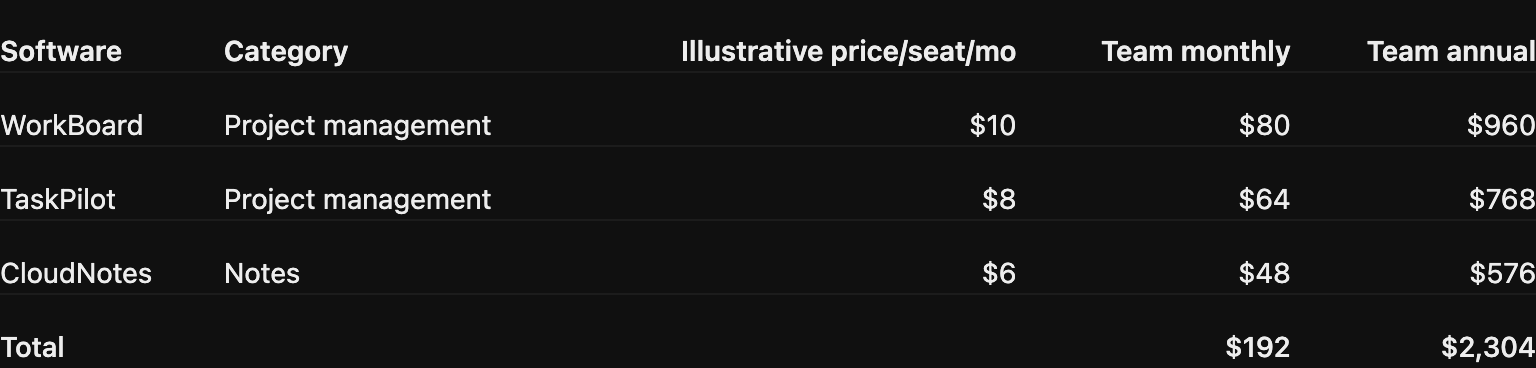
ChatGPT file analysis for spreadsheets and PDFs is useful when you need to inspect duplicate rows, conflicting units or formula assumptions. Useful tasks include cleaning a list of duplicate items, identifying inconsistent units, drafting formulas and checking whether two proposals describe the same services under different names. ChatGPT can often explain a calculation more accessibly than a specialist spreadsheet manual.
Still, do not treat generated numbers as a replacement for the original ledger. Recalculate totals in the source file. If a file contains personal or customer data, decide whether it should be uploaded at all before you consider time savings.
Coding and technical workflows
ChatGPT is useful for explaining code, designing test cases, summarizing error messages and suggesting a structured debugging approach. It is less dependable when asked to infer a private deployment environment it cannot inspect. Code that looks correct in a chat may fail because of configuration, package versions or security constraints.
For ChatGPT coding help, use a real repository with a small test suite. Count the fixes needed after the first suggestion and compare that effort across plans; a benchmark headline is not a substitute for this check.
Voice, images and interactive answers
Voice support, image creation and the new Intelligent UI expand ChatGPT beyond typing. Visual answers are particularly useful for explanations and choices that benefit from side-by-side comparisons. Limitations are not just technical: generated images need brand and rights checks, and a helpful-looking chart still needs accurate input data.
Model and Voice availability may vary across plans and apps. Consult OpenAI’s change log for the specific release rather than assuming an old screenshot reflects today’s experience.
Projects, Work and connected services
Projects help organize related context, while eligible accounts provide longer work-oriented experiences and connected apps. This can make ChatGPT useful for multi-step research, document creation and recurring operational work, but connecting external services introduces new considerations around permissions, access and approvals.
If you are evaluating ChatGPT Business, pay special attention to managed accounts, seat assignment, organizational controls and employee data handling—not just the raw model name.
ChatGPT Slides for presentations: OpenAI’s October 16 release notes describe ChatGPT Slides for creating and collaboratively editing presentations in Space. The feature is rolling out to eligible Pro, Business and Enterprise users with Space access, not every Free or Plus account. ChatGPT for slides could save time copying text into a deck, but only if you can edit and export the result. Can ChatGPT make a PowerPoint file in your account? Check the actual file and editing controls before replacing your presentation tool.
💰 ChatGPT Pricing 2026: Free, Go, Plus and Pro
How much does ChatGPT Pro cost? It is no longer one universal $200 monthly option: the U.S. reference lineup offers Pro 100, Pro 200 and Pro 500 with different included capacities. These figures are a snapshot of published terms, not a promise that every country uses the same checkout price.
| Individual plan | Reference price (USD) | Intended buyer | Important qualification |
|---|---|---|---|
| Free | $0 | Curious or occasional users | Advanced tools and capacity are limited |
| Go | $8/month U.S. launch price | Regular everyday use on a tighter budget | Regional pricing and allowances vary; verify checkout |
| Plus | $20/month | Individuals needing wider model/tool limits | Subject to rate caps and changing eligible features |
| Pro 100 | $100/month | High-intensity professional work | Pro models and higher allowance; limits still apply |
| Pro 200 | $200/month | Professionals needing more included capacity | Usage allowance differs from Pro 100; legacy terms can differ |
| Pro 500 | $500/month | Highest-volume eligible use | Ultrafast model option, with separate usage economics |
OpenAI’s Plus help page confirms $20/month and that API usage is a separate service. The official Pro guide documents the three Pro options and model-specific limits. ChatGPT Plus vs ChatGPT Pro matters when Plus limits interrupt your workflow. The $100, $200 and $500 Pro tiers have different allowances, and older subscriptions may retain different terms. OpenAI’s Go announcement introduced the $8 U.S. launch reference price. ChatGPT Go vs Plus comes down to the features you use and how quickly you hit the limits—not only the $8 and $20 U.S. reference prices.
ChatGPT Business Pricing: Standard vs Premium
| Business seat | Annual commitment, per month | Month-to-month | Notes |
|---|---|---|---|
| Standard | $20/user | $25/user | Shared workspace, admin controls and baseline included capacity |
| Premium | $100/user | $125/user | Higher included work/Codex capacity |
| Enterprise | Custom quote | Custom quote | Organization-specific contracts and controls |
ChatGPT Business minimum seats: a workspace requires at least two paid seats. That makes the practical starting monthly bill at least $50 for two Standard seats on month-to-month billing, or $40 per month equivalent with annual commitment, before taxes. Premium seats increase the minimum substantially. See OpenAI’s Business overview for the current seat definitions.
Do not compare one Business seat with one personal Plus account as if they solve the same problem: Business is a managed workspace purchase, not simply a faster chat subscription.
💡 How to Use ChatGPT for Real Work
Example 1: Compare two SaaS subscriptions without mixing billing terms
A useful prompt is: “Compare these two pricing pages. Build a table showing the effective monthly rate, actual annual prepayment, seat minimums, usage caps, cancellation terms and what remains unknown. Do not fill missing values from memory.”
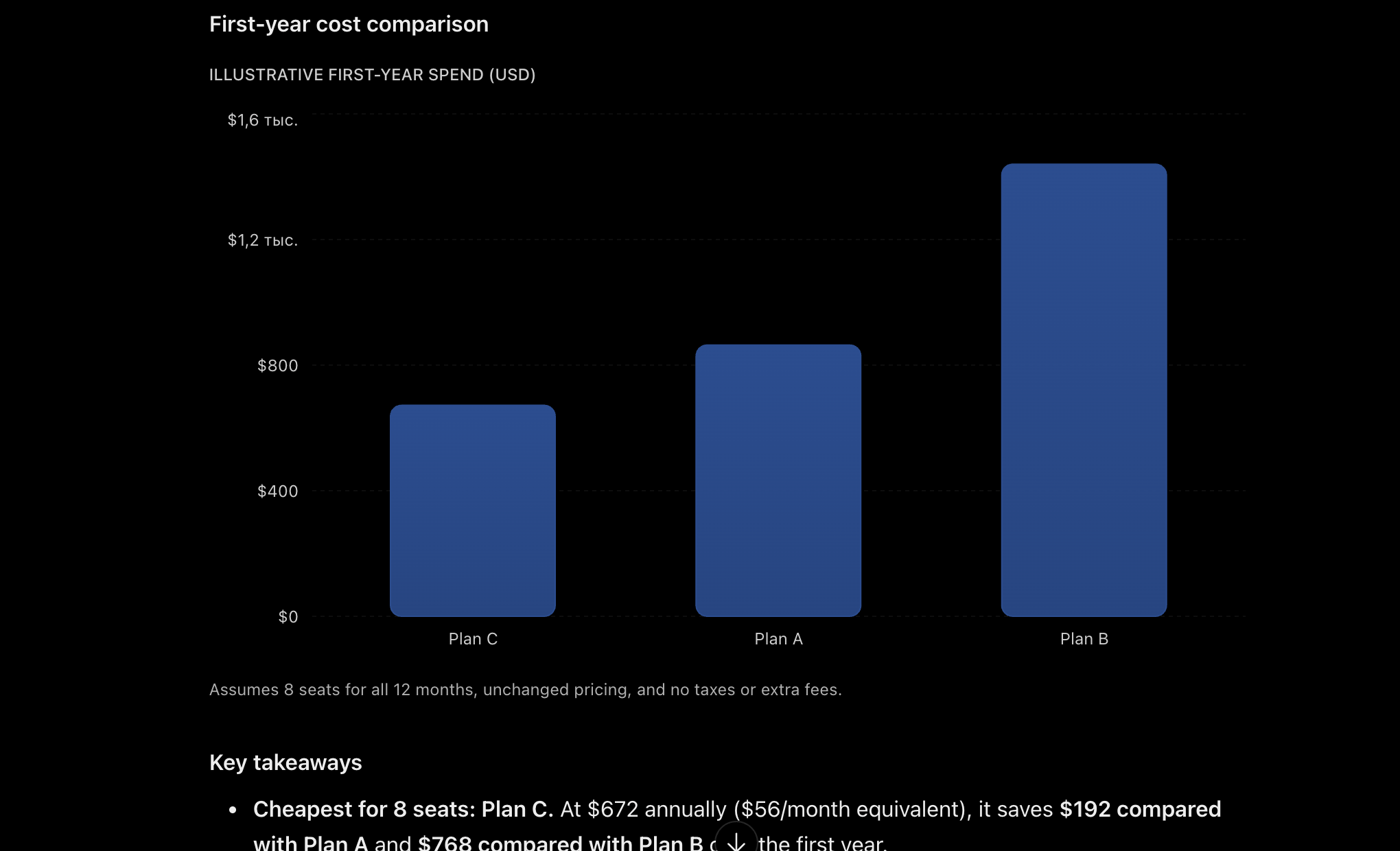
A reliable comparison separates annual prepayment from month-to-month charges. In our own illustrative ChatGPT run with eight seats, the generated table correctly showed $864 for an $9-per-seat monthly plan, $1,440 for a $120 flat monthly plan, and $672 upfront for a $7-per-seat annual plan. These are fictional input values, not prices of real software; they show the difference between annual cash cost and monthly equivalent.
Example 2: Turn messy research notes into a decision brief
Ask ChatGPT to organize supplied notes into “confirmed facts,” “open questions,” “risks” and “recommendation.” Then have a reviewer approve the final conclusions. This is more dependable than asking the assistant to produce an executive recommendation before you give it evidence.
Example 3: Analyze a spreadsheet and verify the outcome
Provide a CSV stripped of unnecessary personal data, ask for a concise list of inconsistencies, then replicate the calculations in the original spreadsheet. The test of success is not how polished the analysis sounds; it is whether another person can reproduce each result.
⚠️ The Reality Check: Limits and Risks
- Hallucinations: plausible citations, dates and prices can still be wrong. Verify consequential claims against original documents.
- Dynamic limits: model options, tool capacity, reset windows and eligible features can change without making every plan identical.
- Privacy: personal and business workspaces have different default data-handling choices; avoid uploading unnecessary private records.
- Prompt sensitivity: poorly specified tasks produce inconsistent answers; a repeatable checklist often helps more than a higher tier.
- Integration friction: connected workflows can require permissions and maintenance; evaluate total setup effort.
- Not every workflow needs AI: deterministic arithmetic, regulated approvals and repeatable database queries may belong in ordinary software.
🔐 ChatGPT Privacy: Personal vs Business Accounts
ChatGPT privacy for business teams starts with the account type: personal accounts may permit model improvement using eligible conversations depending on user settings. Users can review their Data Controls. OpenAI states that data submitted through ChatGPT Business, Enterprise and the API is not used for model training by default unless the organization explicitly opts in. This difference can matter more than model speed for a team handling confidential information.
ChatGPT data privacy needs a practical checklist: classify what employees may upload, approve connected apps, define retention rules and test offboarding before a company-wide rollout. See OpenAI’s data-usage FAQ for the current policy.
✅ ChatGPT Pros and Cons
👍 What We Like
- One conversational workspace for many different tasks.
- Easy iterative drafting and explanation.
- Search, documents, coding and visual workflows under one product.
- Free entry point before a paid commitment.
- Managed-workspace options for teams.
👎 Where It Falls Short
- Confident mistakes still need human review.
- Several Pro tiers complicate plan comparison.
- Usage and access vary by feature and rollout.
- Privacy decisions require deliberate settings.
- Specialist apps can outperform generic prompting for structured production work.
🥊 ChatGPT vs Claude, Gemini and Perplexity
When comparing ChatGPT alternatives for small teams, decide first whether you need an all-round assistant, a Google-first workspace or a research tool. For ChatGPT versus Claude, test the same document or coding task rather than judging from brand reputation. For example, ChatGPT vs Perplexity for research comes down to whether you need a source-discovery workflow or a broader set of work tools. The table below is a buying framework, not a claimed hands-on speed benchmark.
| Tool | Why consider it | Where to be careful |
|---|---|---|
| ChatGPT | Broad mix of chat, research, files, creative tools and connected work | Check which capabilities and usage limits your plan actually grants |
| Claude | Consider when long-form writing, document reasoning or coding workflows are central | Validate current context limits, tool access and enterprise terms |
| Gemini | Consider if your team is deeply integrated with Google services | Workspace policy, product boundaries and privacy need separate evaluation |
| Perplexity | Consider for a search-first research and source-discovery workflow | Citation links still require manual checking; may not replace an end-to-end workspace |
For a realistic ChatGPT alternatives comparison, choose three identical tasks and document which service produces the most useful verifiable result, how often it must be corrected and what it costs. Do not score alternatives from marketing claims alone.
🎯 Who Should Choose Each ChatGPT Plan?
- Free: students and occasional writers evaluating ChatGPT Free plan limits. The ChatGPT free features offer a way to try basic drafting before paying for more capacity.
- Go: price-sensitive users who mainly want more room for everyday work and eligible tools.
- Plus: regular individual users testing whether ChatGPT Plus vs Pro delivers enough research, file and writing capacity for their workload.
- Pro: professional workloads that are repeatedly constrained by included capacity or model availability, with a documented return on the higher monthly spend.
- Business: teams that need central billing, managed seats, access control and suitable business data arrangements.
- None of the above: organizations needing a domain-specific audited workflow that ChatGPT cannot support without extensive manual checking.
🧪 How We Evaluated ChatGPT: Scope and Limitations
We checked OpenAI’s October 2026 pricing and documentation, compared personal with Business plans, and ran the two illustrative prompts shown in our screenshots. We did not buy Pro for a head-to-head comparison or measure response times. The calculations are reproducible; they are not performance benchmarks.
We captured these screenshots while testing two illustrative prompts in ChatGPT. The SaaS plan names and amounts shown are fictional examples, not current vendor prices or independent benchmarks of model performance. We checked the example arithmetic against the stated inputs and did not claim a paid Pro-tier comparison that we did not perform.
🏁 Final Verdict: Should You Subscribe?
Try Free on a task you repeat each week. If the limits become a problem, check what Plus changes before subscribing. Pro makes sense only when its added capacity justifies $100–$500 a month; none of these subscriptions should be assumed to provide unlimited access. For teams, evaluate Business as an administrative and privacy decision as much as a model decision.
ChatGPT is versatile, but its practical value depends on the cost of checking the output. A plan is worth keeping if it cuts measurable work from your week without adding unacceptable error or governance risk.

Frequently Asked Questions
Is ChatGPT free in 2026?
Yes. A Free plan remains available. Advanced models and tools can have stricter allowances than paid tiers; current access depends on your account and region.
How much is ChatGPT Plus per month?
OpenAI currently lists Plus at $20/month in USD. Local currency, taxes and app-store billing can affect the checkout total.
Is ChatGPT Go available worldwide?
OpenAI has announced worldwide Go availability where ChatGPT is supported. Its $8 U.S. launch reference price should not be treated as a guaranteed local price.
What does ChatGPT Pro cost in October 2026?
The official help center lists Pro 100 at $100, Pro 200 at $200 and Pro 500 at $500 per month. Capabilities and usage allowances differ.
Is ChatGPT Pro unlimited?
Do not assume so. OpenAI documents separate model allowances and safeguards even for Pro plans; compare your workload with the eligible tier.
Can ChatGPT browse the internet?
ChatGPT Search can use fresh web sources. Availability and limits can vary; verify the source, date and facts before relying on an answer.
What is GPT-6 Intelligent UI?
It is a 2026 update that can combine plain language with visual or interactive elements. The feature’s rollout depends on model, plan, app version and workspace eligibility.
Does ChatGPT Plus include the OpenAI API?
No. ChatGPT subscriptions and API usage are separately billed products. A personal subscription does not include production API credits.
How much does ChatGPT Business cost?
Standard seats are $20 per user monthly on annual billing or $25 on monthly billing; Premium seats are $100 annually or $125 monthly. At least two paid seats are required.
Is ChatGPT safe for confidential business data?
It depends on the workspace and data governance. Business defaults differ from personal accounts; review retention, access controls and current OpenAI privacy documentation.
Which is better, ChatGPT or Claude, Gemini and Perplexity?
There is no universal winner. ChatGPT is broad, while alternatives may better fit specific writing, Google-centered or search-first workflows. Run the same real tasks before purchasing.
📚 Official Sources and Verification Dates
Checked 22 October 2026. ChatGPT Plus pricing · ChatGPT Pro tiers · Business seat pricing · ChatGPT Go launch · GPT-6 model eligibility · Intelligent UI announcement · October 16 Slides rollout · Data handling. Check current feature eligibility and checkout totals before you subscribe.
EXPLORE NEXT ON DIGIOFFLY
Continue Your Software Research
Compare ChatGPT with adjacent software tools, check subscription math and explore related workflows before upgrading.
Explore AI tools
- AI & Tech Reviews — our current product research.
- Copy.ai Review — a more focused AI marketing workflow.
- Writesonic Review — compare AI search visibility and content operations.
Make the comparison
- Compare Software — see products side by side.
- AI Software Finder — narrow a shortlist by workflow.
- Best Value Advisor — consider your real budget.
Plan your next step
- Software Cost Calculator — model users and billing terms.
- Software Directory — browse current categories.
- Ready-Made Stacks — avoid overlapping subscriptions.