

Pricing and specifications checked on 9 October 2026: Unlimited $7/user/month billed yearly ($10 billed monthly); Business $12 billed yearly ($19 monthly). Official vendor pricing.
ClickUp has spent the last few years selling itself as the “everything app” for work. In theory, that sounds ideal: tasks, docs, whiteboards, dashboards, automations, and now AI, all in one place.
In practice, tools like this usually break in one of two ways. They either feel too shallow to replace specialist apps, or they become so feature-heavy that most teams never configure them properly.
To see where ClickUp actually lands in 2026, we tested the latest ClickUp 3.0 workspace and ClickUp Brain in real agency-style workflows, including task management, reporting, documentation, and internal collaboration.
We tested ClickUp 3.0 and ClickUp Brain in real team workflows, including campaign planning, content production, reporting, and internal documentation. We also stress-tested automations, workload visibility, and how usable the platform feels once a workspace becomes genuinely busy.
In this complete ClickUp review 2026, we will cut through the promotional fluff, analyze the real ClickUp pricing, and find out if it is truly the best project management tool for agencies and growing businesses today.
(We are reader-supported. When you buy through links on our site, we may earn an affiliate commission at no extra cost to you.)
📊 ClickUp Review Summary
In this comprehensive review, we tested the platform across multiple real-world business scenarios, including marketing campaigns, software development sprints, and creative concept design workflows.
The goal was to evaluate interface responsiveness, feature depth, ease of use, pricing structures, and real business value.
Based on our intensive testing, ClickUp delivers one of the most powerful, highly customizable workspaces available on the market today. It legitimately has the capability to replace 4 or 5 different paid subscriptions if configured correctly.
However, this immense power also comes with an undeniable learning curve that requires a dedicated internal champion to set up properly, which may not suit every fast-moving, casual team.
⚖️ ClickUp Review 2026: Quick Verdict
If you are asking, “is ClickUp worth it?”, If you are asking whether ClickUp is worth it in 2026, the answer is yes for agencies, operations teams, and growing businesses that need more structure than a basic task manager can offer.
Instead of paying for a disjointed mess of task trackers, document editors, and time-tracking apps, users can build out highly specific, automated workflows within a single ecosystem. For businesses managing multiple client accounts, complex development sprints, or content marketing pipelines, ClickUp can significantly reduce software bloat and overhead costs.
However, casual users, solo freelancers who only need a basic to-do list, or teams resistant to learning new software may find the sheer volume of features unnecessary and overwhelming.
🏆 Is ClickUp the Best Project Management Tool in 2026?
If your team needs more than a simple task board, ClickUp is still one of the strongest project management platforms in 2026. It stands out most in agency workflows, operations-heavy teams, and environments where docs, automations, and reporting need to live in one place.
After testing multiple platforms, ClickUp still leads in several critical areas—namely, customization depth and feature consolidation. The platform delivers an unmatched variety of workspace views, integrated document management, and natively built AI tools that other project management apps struggle to replicate without third-party integrations.
However, ClickUp is not always the easiest tool for absolute beginners. The interface, while drastically improved in recent updates, still presents a staggering amount of toggles, menus, and custom fields compared to simpler Kanban boards.
Overall, for digital agencies, product teams, and scaling startups that demand deep organizational control, ClickUp remains the best project management tool for agencies available today.
What We Love & Where It Falls Short
❤️ What We Love
- ✅ Ultimate Consolidation: It actually replaces Jira, Trello, Google Docs, and Miro. You can attach a fully-fledged SOP document directly to a task, draw out a mind map, and track time—all without leaving the window.
- ✅ Deep Customization: Custom statuses, custom fields, and granular user permissions mean you can bend the software to fit your exact workflow, rather than changing your workflow to fit the software.
- ✅ ClickUp Brain (AI): The native AI doesn’t just write emails; it reads your entire workspace context to generate project updates, summarize long comment threads, and create subtasks automatically.
- ✅ Value for Money: The sheer amount of functionality packed into their lower-tier plans makes it one of the most cost-effective enterprise tools on the market.
❌ Where It Falls Short
- ❌ The Overwhelm Factor: New users often suffer from “feature shock.” Setting up a clean workspace requires restraint, otherwise, you end up with too many unused fields and cluttered views.
- ❌ Occasional Sluggishness: While ClickUp 3.0 drastically improved speed, loading massive dashboards with thousands of tasks and complex dependencies can still occasionally cause minor lag.
- ❌ Mobile App Clutter: Trying to navigate the immense architecture of ClickUp on a small smartphone screen can feel cramped and less intuitive than on a desktop.
🏆 OVERALL RATING: ⭐⭐⭐⭐⭐ 4.7 / 5
In our ClickUp Review 2026, the platform proved strongest for agencies, ops teams, and fast-scaling startups.
🏢 What Is ClickUp?
Let’s skip the marketing jargon. ClickUp is a cloud-based, enterprise-grade work operating system built specifically to bring all your company’s work into one place.
Unlike basic to-do list apps that just let you check off a box, ClickUp is strictly business. Under the hood, it operates on a deeply hierarchical structure: Workspace > Space > Folder > List > Task > Subtask. This means it doesn’t just hold your grocery list; it can hold an international corporation’s entire Q3 marketing strategy, categorized by department, client, and individual contributor capacity.
In short: it is a dedicated operational hub designed to turn chaotic Slack messages and lost Google Sheets into a predictable, trackable, and automated machine. This high level of structural fidelity is exactly why we are conducting this review—to see if it holds up under real-world agency pressure.
🖥️ ClickUp Ease of Use 2026 & The User Interface
When it comes to ClickUp ease of use 2026, this is usually where teams have the most polarized opinions.
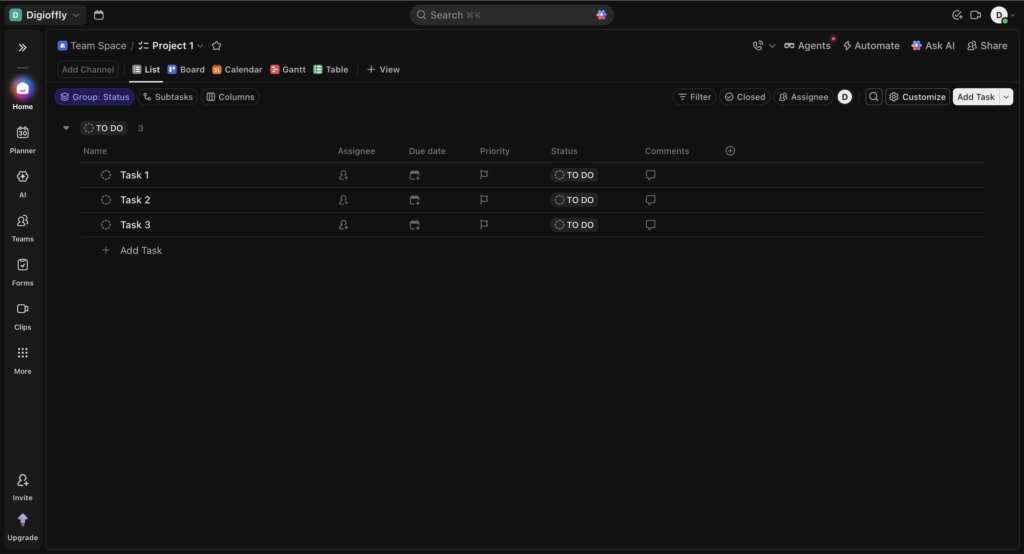
Logging into ClickUp for the first time is like sitting in the cockpit of a commercial airliner. If you are expecting a minimalist, two-button dashboard, you will be initially overwhelmed. There are sidebars, top bars, view toggles, and settings menus everywhere.
However, the rollout of the ClickUp 3.0 interface drastically modernized the experience. The design is now significantly cleaner, utilizing better whitespace and a more logical universal search function.
For agencies, the ability to build custom “Views” is a massive lifesaver. You can set up a “Manager View” that shows a high-level Gantt chart of all projects, and a “Developer View” that only shows a simple Kanban board of tasks due today. You won’t have to scroll through an endless spreadsheet to find the one asset you need for a Facebook ad campaign. The interface becomes exactly as complex or as simple as you design it to be.
🎓 How to Use ClickUp for Beginners
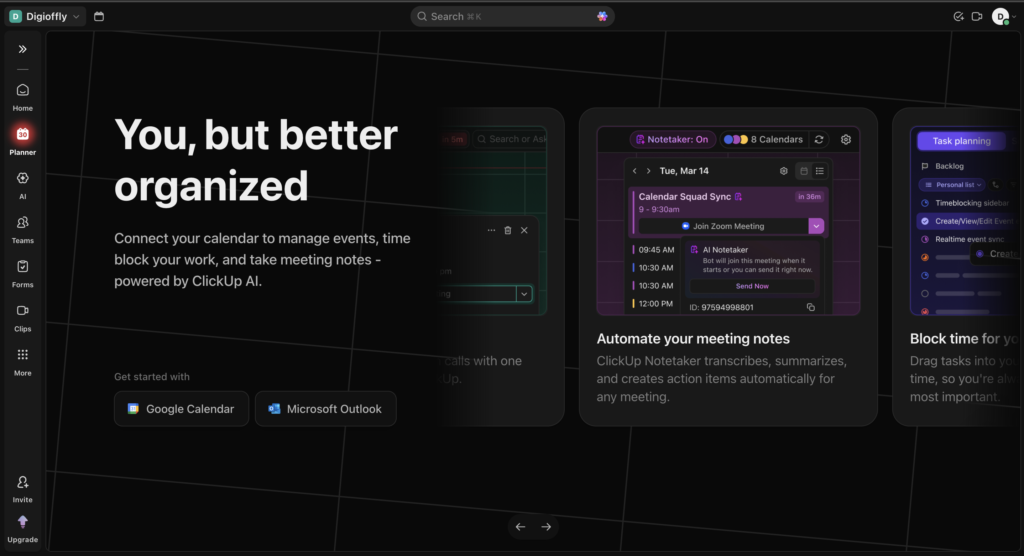
Getting started with this platform can be intimidating, which is why understanding how to use ClickUp for beginners is crucial to avoid early abandonment.
The platform generates its value from structure. Here is a quick step-by-step overview of how beginners should approach it:
1. Create your Workspace and embrace Templates Don’t try to build everything from scratch. When you sign up, visit the ClickUp Template Center. Whether you need a CRM, an Agile sprint tracker, or an editorial calendar, load a pre-built template to see how the experts structure their folders.
2. Understand the Hierarchy This is the golden rule.
- Workspace: Your entire company.
- Space: Departments (e.g., Marketing, HR, Engineering).
- Folder: Broad projects or clients (e.g., “Client X Website Redesign”).
- List: Specific phases or sprints (e.g., “Phase 1: Wireframing”).
- Task: The actual action item (e.g., “Design homepage hero image”).
3. Use the “Me” Mode For everyday employees, the interface can be loud. By toggling on “Me Mode” at the top of the screen, all noise disappears, and the user only sees tasks specifically assigned to them.
4. Start Simple, Add Complexity Later A common mistake is adding 15 custom fields (budget, client mood, phase, URL, etc.) on day one. Start with basic statuses (To Do, In Progress, Review, Done). Add custom fields and automations only when you actually feel the pain of needing them.
If you are learning how to use ClickUp for beginners, ignore dashboards and advanced automations for the first week.
⚙️ Key Features That Actually Work
Most productivity platforms boast about having hundreds of tools, but in reality, you only end up using two or three. During our testing, we ignored the vanity features and focused strictly on the tools that actually save hours of manual management labor. Here is what makes ClickUp stand out from the noise.
Over 15 Native Views
You aren’t locked into a list. With one click, you can transform your task list into a Board (Kanban), a Calendar, a Timeline, a Gantt chart, a Map, or a Workload view. The Workload view is phenomenal for managers, allowing you to instantly see if your lead designer is booked for 50 hours this week while a junior designer only has 10 hours of assigned work.
Native Docs and Whiteboards
The biggest workflow killer is context switching. ClickUp Docs allows you to build beautiful, wiki-style documents (similar to Notion) right alongside your tasks. You can write a Standard Operating Procedure (SOP) and link it directly to a recurring task. The built-in Whiteboards allow teams to visually map out user flows or brainstorm campaigns, and then highlight a sticky note and instantly turn it into an actionable, assigned task.
ClickUp Brain (Contextual AI)
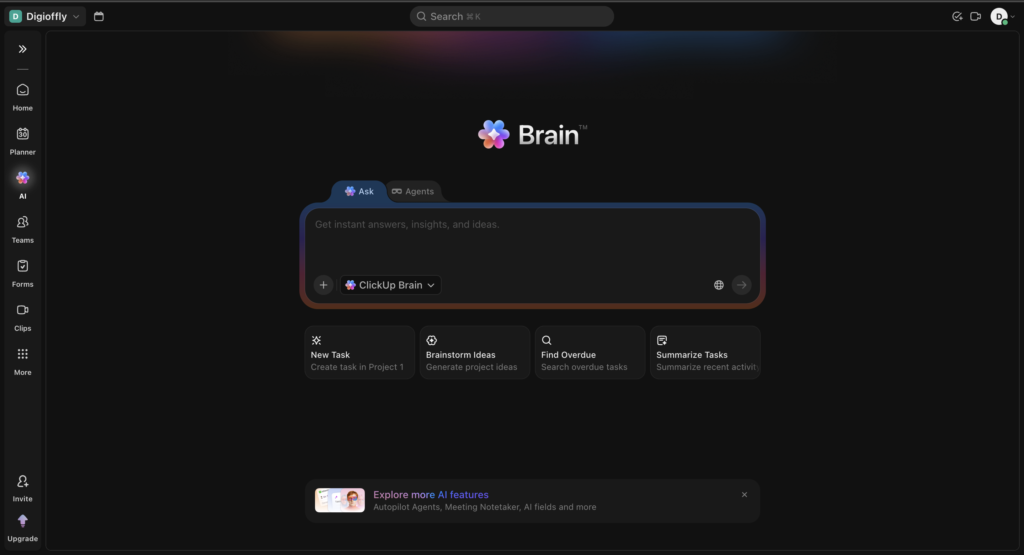
This isn’t just a basic ChatGPT wrapper. ClickUp Brain is deeply integrated into your company’s data. You can ask it, “What is the status of the DigiOffly rebrand?” and it will read all tasks, comments, and docs related to that project and generate a perfect summary. It can instantly generate subtasks for a complex project, auto-fill project updates, and check your spelling.
Powerful Automations
Why manually drag tasks around? You can set up “If This, Then That” rules natively. For example: When a task status changes to “Ready for Review”, automatically assign it to the Creative Director, change the due date to 2 days from now, and send a notification in the Slack #marketing channel. —
💸 ClickUp Pricing Plans & Real ROI
ClickUp pricing is aggressive compared with Monday, Asana, and Notion if you actually use Docs, Dashboards, and Automations in one stack.
A deep dive into ClickUp pricing reveals that it is an incredibly aggressive competitor, offering enterprise-level features at startup prices.
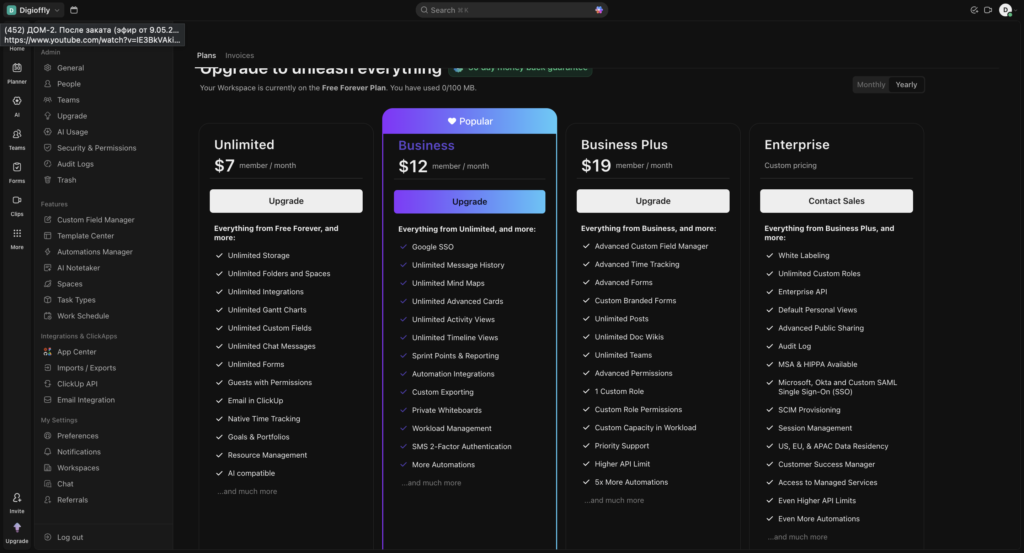
Does ClickUp have a free plan? Yes, and it is remarkably generous. The “Free Forever” plan allows unlimited tasks, unlimited free plan members, and gives you access to Docs and Whiteboards. It is genuinely enough for solo freelancers or very small teams to run their operations without spending a dime.
However, if you are a serious business, you will quickly hit the limits on custom fields, automations, and advanced reporting.
Here is the breakdown of paid tiers:
- Unlimited ($7/user/month, billed annually): Unlocks unlimited storage, unlimited dashboards, and guest permissions. Ideal for small teams.
- Business ($12/user/month, billed annually): The sweet spot for agencies. Unlocks advanced time tracking, workload management, advanced automations, and custom exporting.
- Enterprise (Custom): For massive organizations needing white-labeling, advanced permissions, and dedicated success managers.
(Pricing note: ClickUp Brain AI currently starts at about $9 per user per month with annual billing; exact billing terms and other AI usage tiers differ.)
If this platform replaces your Asana ($10/mo), Monday ($10/mo), Notion ($8/mo), and basic time trackers, the ROI pays for the annual subscription within the first month by simply eliminating redundant software subscriptions.
For most agencies, the Business plan is where ClickUp pricing starts making real operational sense.
⚠️ The Catch with ClickUp Limits
To keep this review brutally honest: no platform is flawless.
A crucial warning for our readers: many teams fail at ClickUp because they try to use every feature at once. Because you can create a custom status for every micro-step of a process, teams often do. This leads to a bloated workspace where employees spend more time updating task statuses than actually doing the work.
Furthermore, while the Free plan is great, it strictly limits uses of advanced features like Automations (100/month) and Custom Fields (100 uses). If you rely on data-heavy project tracking, you will be forced to upgrade to the Business plan relatively quickly.
🎯 Who Should Use ClickUp?
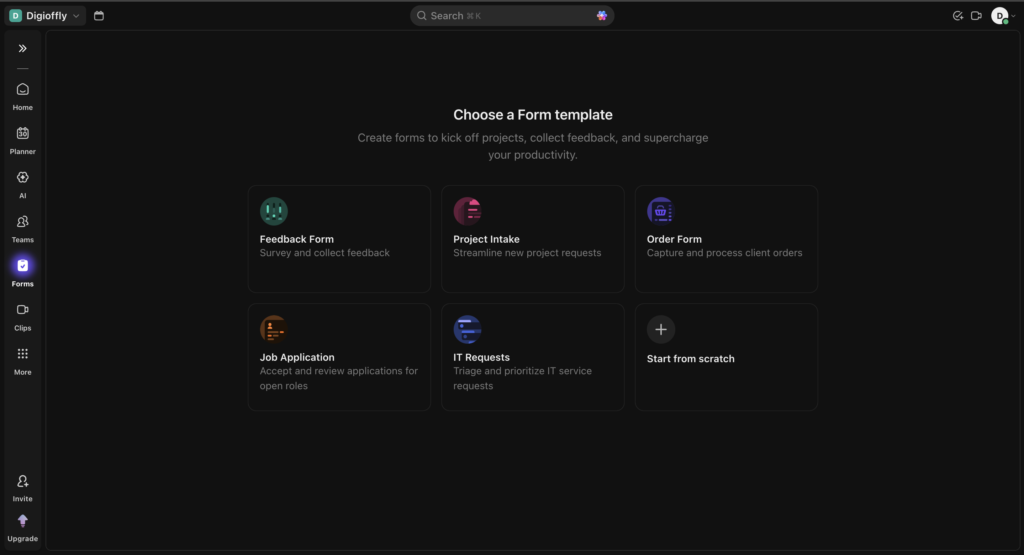
A core takeaway from this review is that the platform is built for structural scale.
If you are a solo consultant looking for a digital sticky note to remind you to call a client, this platform is overkill.
However, it becomes an absolute necessity for complex operational teams. It is the ultimate tool for ad agencies managing dozens of client pipelines, software developers running Agile sprints with bug tracking, and remote teams who need a “single source of truth” for all company documentation, communications, and deadlines.
🥊 ClickUp vs Monday (and Alternatives)
The project management landscape is crowded, but only a few platforms actually compete at the enterprise level. In the ongoing ClickUp vs Monday debate, the choice often depends on whether you prefer deep structural data or high-level visual polish.
Monday.com is stunningly visual. Its color-coded boards and highly intuitive UI make it incredibly easy for non-technical teams (like HR or Sales) to adopt immediately. It feels like a beautiful, highly automated Excel spreadsheet. However, Monday struggles with deep, text-heavy documentation and complex nested subtasks.
Asana is the master of the “To-Do” list. It is clean, fast, and excellent for straightforward cross-functional collaboration. But Asana requires costly third-party integrations if you want advanced time tracking, whiteboards, or native document wikis.
ClickUp, by comparison, is the powerhouse. It is slightly less visually “breezy” than Monday, and has a steeper learning curve than Asana, but it absolutely crushes both in terms of raw feature density, customization, and replacing external apps.
If you are looking for ClickUp alternatives for small business that are less intimidating, Trello (for visual Kanban) or Notion (for document-first tracking) are excellent, lighter-weight options.
🌪️ Why this comparison matters
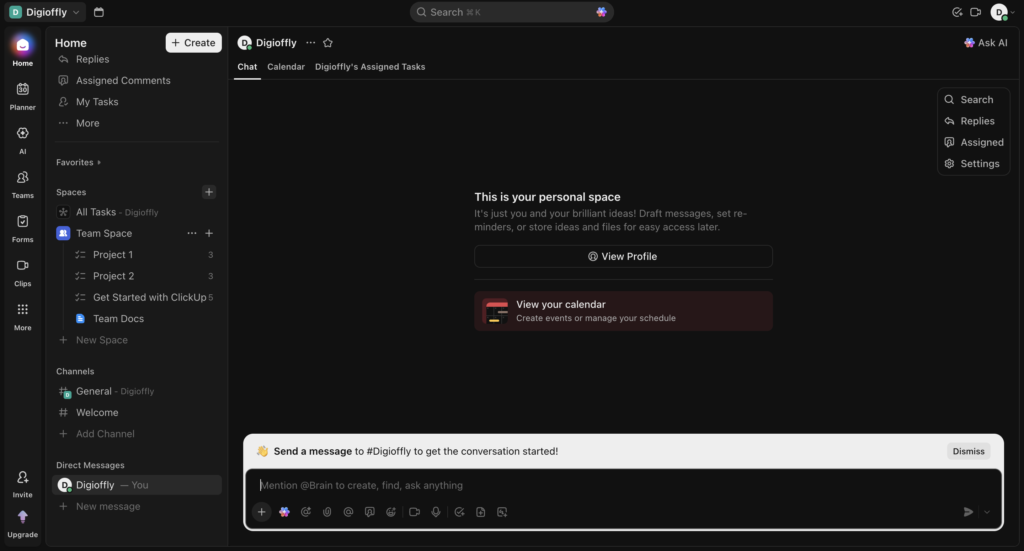
The real reason teams compare ClickUp with Monday, Asana, or Notion is simple: they want fewer tools, cleaner workflows, and less operational drag. The question is not whether ClickUp has more features on paper — it’s whether those features reduce chaos or create more of it.
| Feature | ClickUp | Monday.com | Asana |
| Best For | Agencies, Software Devs, Operations | Sales CRM, Marketing, Visual Tracking | Cross-functional Teams, Simple Projects |
| Interface | Deep & Feature-Heavy (Steep curve) | Highly Visual & Intuitive (Easy) | Clean & Straightforward (Moderate) |
| Key Strength | Ultimate tech stack consolidation & native AI | Beautiful color-coded dashboards & automations | Cross-department collaboration & simplicity |
| Entry Price | Excellent “Free Forever” plan ($7/user/month) | No functional free tier ($9/user/month) | Basic free tier ($10.99/user/month) |
ClickUp vs Monday is less about features on paper and more about whether your team values customization or immediate ease of use.
🧪 How We Tested ClickUp
To write this review, we didn’t just read the marketing brochure. As DigiOffly’s reviewer, I (Alex Wright) personally migrated a portion of Digioffly’s operations into ClickUp for a 30-day period.
We generated a full “Q3 Content Launch Campaign” to test the workload management, pushed the limits of ClickUp Brain to summarize messy comment threads, and built out an intricate CRM dashboard using Custom Fields to track affiliate partnerships. The insights you read throughout this review are based on real, hands-on experience managing agency-level data, not just aggregated internet opinions.
🏁 Final Verdict of Our ClickUp Review 2026
After 30 days of hands-on testing, ClickUp still feels like one of the strongest project management platforms for agencies, operations teams, and growing businesses that need structure.
Its biggest advantage is not that it does everything. It is that it can replace several separate tools — tasks, docs, internal knowledge, reporting, and automations — inside one workspace, if the setup is done well.
That is also the catch. ClickUp is not the easiest platform for casual teams, and it does require someone to own the structure, templates, and workflow logic early on.
For teams drowning in disconnected tools, ClickUp can realistically replace several apps — but only if someone owns the setup. If your business needs a more structured operating system rather than a simple to-do list, it is absolutely worth testing.

Frequently Asked Questions
Is ClickUp worth it for a solo freelancer?
Yes and no. If you only need a basic to-do list, it might be too complex. However, if you are a freelancer managing multiple clients, tracking billable hours, and storing contracts, the Free Forever plan offers incredible value and is definitely worth the initial setup time.
What is the main difference in the ClickUp vs Monday debate?
The main difference comes down to interface and feature depth. Monday is highly visual, colorful, and easier for traditional corporate teams to pick up quickly. ClickUp is more complex, offering deeper hierarchies, native document creation (Docs), and more granular customization for development and agency teams.
Does ClickUp have a free plan that is actually usable?
Yes, ClickUp’s “Free Forever” plan is one of the best in the industry. It includes unlimited tasks, unlimited members, and access to Docs and Whiteboards. You only hit a paywall when you need advanced automations, workload dashboards, or specific team permissions.
How long does it take to learn ClickUp ease of use 2026?
With the improvements in the 3.0 interface, the learning curve has shortened. However, users should expect to spend about 3 to 5 days fully acclimating to the hierarchy, views, and navigation. We highly recommend utilizing their pre-built templates to speed up the process.
What are the best ClickUp alternatives for small business?
If ClickUp feels too overwhelming, the best alternatives for small businesses are Asana (for clean, straightforward task tracking), Trello (for ultra-simple visual Kanban boards), and Notion (for teams that prioritize written documents and wikis over task due dates).
How to use ClickUp for beginners without getting overwhelmed?
The secret is to ignore 80% of the features on day one. Create a Space, make a simple List, and stick to basic statuses (To-Do, In Progress, Done). Do not add custom fields or automations until your team is comfortable simply logging in and checking off daily tasks.
Can I use ClickUp for agile project management?
Absolutely. ClickUp is a top-tier ClickUp project management solution for agile teams. It natively supports Sprint folders, Sprint points, velocity charts, Gantt timelines, and GitHub/GitLab integrations, making it a perfect replacement for expensive tools like Jira.
EXPLORE NEXT ON DIGIOFFLY
📂 Explore More on DigiOffly
If you found this ClickUp review 2026 helpful, check out our other guides on scaling your agency, optimizing your team’s workflow, and saving on SaaS subscriptions:
Explore relevant software
- The Ultimate Agency Growth Hub – Discover our curated list of the best software for project management, client onboarding, and team scaling in 2026.
- Notion Review: The Best Wiki for Startups? – Learn how to build a “company brain” and document your standard operating procedures (SOPs) flawlessly without relying on messy Google Docs.
Compare before choosing
- Explore All AI & Tech Guides – Dive into our full library of honest SaaS reviews, SEO auditing tools (like SiteGuru and Screpy), and exclusive lifetime tech discounts for founders.
- Best VPNs for Remote Teams (2026 Edition) – Secure your distributed workforce and protect sensitive client data with our top-rated, manually verified enterprise VPN deals.
Plan your next steps
- Jasper AI Review 2026: Still the Best for Copywriting? – Read our deep dive into the industry-leading AI writing assistant to speed up your content creation process right inside your ClickUp workspace. (Или, если хотите сделать акцент на видео)
- HeyGen Review 2026: Is It Truly the Best AI Video Generator? – Learn how to turn your static AI avatars into highly realistic, talking-head videos for your agency clients.