

GitHub: GitHub has added eight GitHub Copilot connectors for services including Supabase, Box, Buildkite and Calendly. The GitHub-verified MCP servers are available in public preview across Copilot plans, although some organizations and services require administrator configuration.

Eight new connections, one Copilot workflow
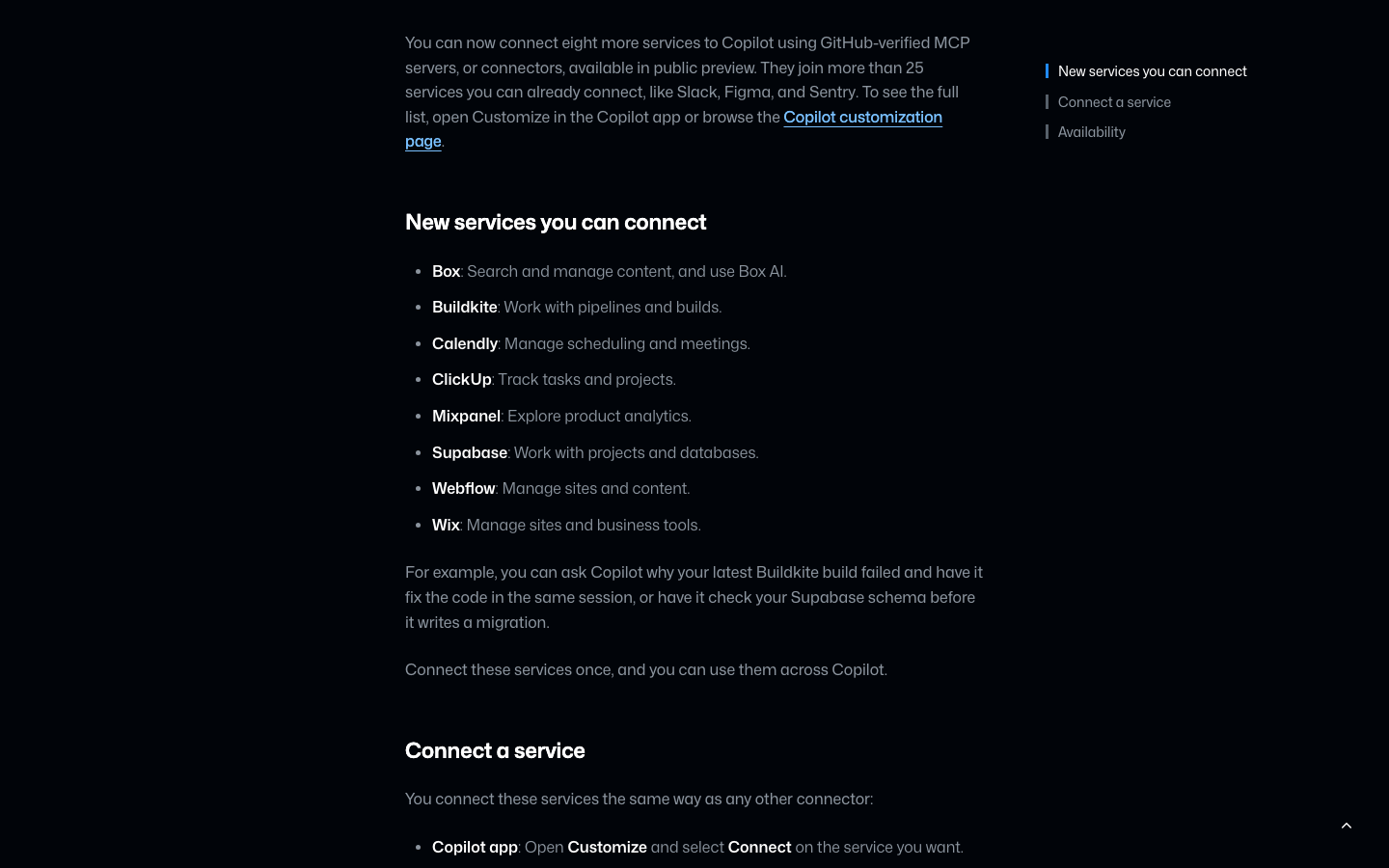
GitHub added Supabase, Box, Buildkite, Calendly, ClickUp, Mixpanel, Webflow and Wix as Copilot connectors in public preview. Depending on the organization and service, administrators may need to enable preview settings or configure access.
What Happened
The November 18 announcement expands Copilot's connector selection beyond the more than 25 services GitHub says were already available, including Slack, Figma and Sentry. The additions cover databases, builds, content, scheduling, project tracking, analytics and website management. GitHub describes the integrations as Copilot MCP servers, also called connectors. GitHub says connected services can be used across Copilot experiences, subject to client support and organizational policy. Availability on the announcement date is a public preview, not a general-availability release.
Who Is Affected & When
The Copilot public preview is open to all Copilot plans, according to GitHub. Users of Copilot Business and Enterprise need an administrator to enable the Editor preview features policy. Depending on enterprise settings, administrators may also need to add the new connector URLs to an MCP allowlist. Some services require an administrator to enable access on the service's side; GitHub gives Box MCP access as an example. Teams should confirm their own policies and service permissions before enabling access.
What Changes in Practice
GitHub Copilot services: databases and builds
Developers can connect Supabase to Copilot to work with projects and databases, and connect Buildkite to Copilot to work with pipelines and builds. GitHub suggests asking Copilot why the latest Buildkite build failed and having it fix code in the same session. It also suggests checking a Supabase schema before Copilot writes a migration. The announcement does not specify which database operations or build actions are available beyond those descriptions, so teams should verify the capabilities they need before relying on either workflow.
Content, scheduling and project services
Users can connect Box to Copilot to search and manage content. Box AI in Copilot is also listed as a capability, without details of its individual functions. Users can connect Calendly to Copilot for meetings and scheduling; GitHub mentions scheduling and meetings but does not promise a complete booking workflow. They can also connect ClickUp to Copilot for tasks and projects. The announcement does not identify which ClickUp task fields or automations are supported.
Analytics and website management
Users can connect Mixpanel to Copilot to explore product analytics, connect Webflow to Copilot to manage sites and content, and connect Wix to Copilot to manage sites and business tools. GitHub describes these as broad capabilities but has not detailed individual reports, publishing actions or service-specific permissions.
Connect and govern the services
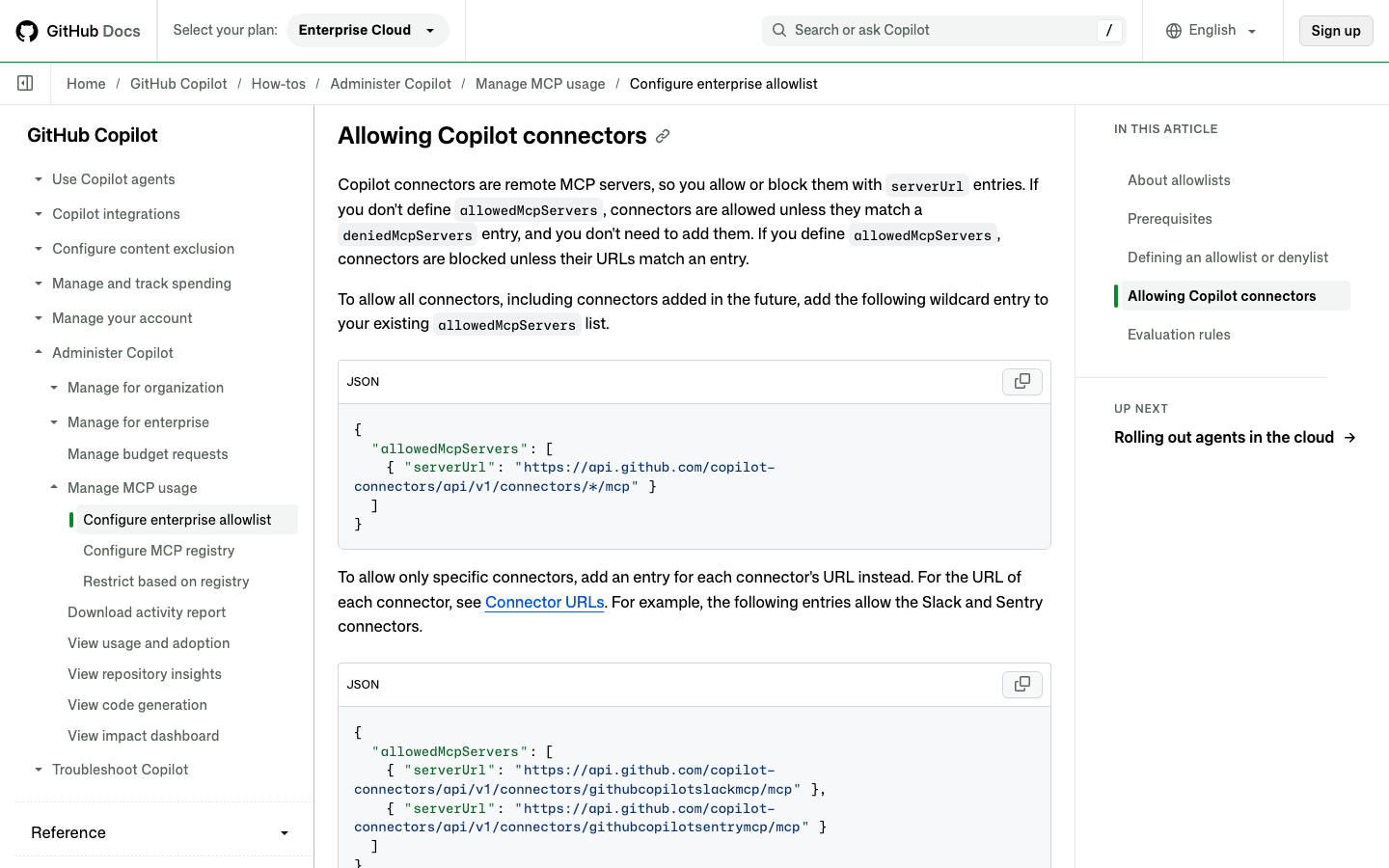
There are several setup routes. In the Copilot app, open Customize and select Connect on a service; in the Copilot CLI, run /mcp and use the Connectors tab. In VS Code, open Agents > Customizations, or browse the github.com Copilot customization page to select a service. For enterprise administrators, the Copilot Editor preview features policy must be enabled for Business or Enterprise. GitHub's separate documentation says MCP servers must also be enabled by policy and describes allowlist and denylist controls on clients that support MCP managed settings. A Copilot MCP allowlist wildcard can permit all connector URLs, including future additions; individual entries restrict the allowed set. Copilot connector denylist rules take precedence over allowlist entries.
| Consideration | Wildcard allowlist | Individual connector entries |
|---|---|---|
| Connector scope | Matches all Copilot connector URLs. | Matches the connector URLs explicitly listed. |
| Future connectors | The wildcard can allow connectors added later. | A new connector needs a matching entry. |
| Exceptions | Specific connector URLs can be denied; deny rules take precedence. | Specific connector URLs can also be denied; deny rules take precedence. |
| Policy context | Subject to applicable MCP policies and managed-settings support. | Subject to applicable MCP policies and managed-settings support. |
Why It Matters
The additions could bring more project context into a Copilot session without treating each external service as a separate workflow. GitHub's examples are a Copilot Buildkite build failure investigation followed by a code fix in the same session, and a Copilot Supabase schema check before writing a migration. Those are proposed workflows, not independently tested results or guarantees that Copilot will diagnose every failure or produce a correct migration. Administrators also have a meaningful choice between allowing connectors broadly and permitting named services individually.
Our Take
The most consequential part of the announcement may be the combination of broader service coverage and central controls. A developer can explore Copilot connectors across clients after connecting a service once, while an enterprise with an allowlist can decide whether new connector URLs should be permitted. That does not remove the need to review service-side access and generated changes. GitHub's examples show what the integrations are intended to help with, but the official announcement does not establish their reliability, detailed permissions or performance in production.
Frequently Asked Questions
Are the eight new connectors generally available?
No. GitHub says the connectors are in public preview for all Copilot plans. The announcement does not give a general-availability date.
Do business users need an administrator to enable them?
Copilot Business and Enterprise require an administrator to enable the Editor preview features policy. An enterprise that lists connectors individually in its MCP allowlist also needs the new entries added. Some services have their own administrator-side requirements.
What happens if an enterprise has no MCP allowlist?
GitHub's documentation says connectors are allowed when allowedMcpServers is not defined, unless they match a deniedMcpServers entry. Other applicable policies still matter, including the requirement to enable MCP servers in Copilot. The documented managed-settings controls apply on clients that support them.
Where can users find the full connector list?
GitHub directs users to Customize in the Copilot app or to the Copilot customization page. The company says the eight additions join more than 25 previously available services.
Official Sources & Dates
Announcement: 2026-11-18. GitHub describes the eight connectors as available now in public preview; it does not give a separate rollout or general-availability date. Check official updates before purchasing or changing production settings.
Editorial note: DigiOffly verified dated primary sources. This is not a claim of hands-on testing unless independently documented. Prices and access conditions may change.