

An order confirmation arrives, the CRM needs updating, and a support ticket should open only if a customer’s address failed validation. None of these steps is difficult alone. The challenge is making them behave like one dependable process. n8n puts that process on a visual canvas and lets its builder combine ready-made application nodes, HTTP requests, JavaScript or Python logic, and AI steps without writing an integration service from scratch.
Before choosing a plan, decide who will operate the service. n8n Cloud and self-hosted n8n are different purchasing and operating decisions. A hosted subscription saves infrastructure work, while the Community Edition gives an appropriately skilled team more control of deployment. Neither route makes bad data disappear, guarantees reliable AI output, or removes the need to monitor failures. This n8n review examines where the software creates real leverage and where its flexibility introduces responsibilities that simpler automation tools can hide.
For our n8n review 2026, we researched the vendor’s current Cloud Starter and Pro pricing, its self-hosted Business offering, the Community Edition, execution-based billing, AI agent capabilities, and common operational pitfalls. We also compare n8n with Make and Zapier using equivalent business outcomes, rather than pretending that executions, Make credits and Zapier tasks are the same unit.
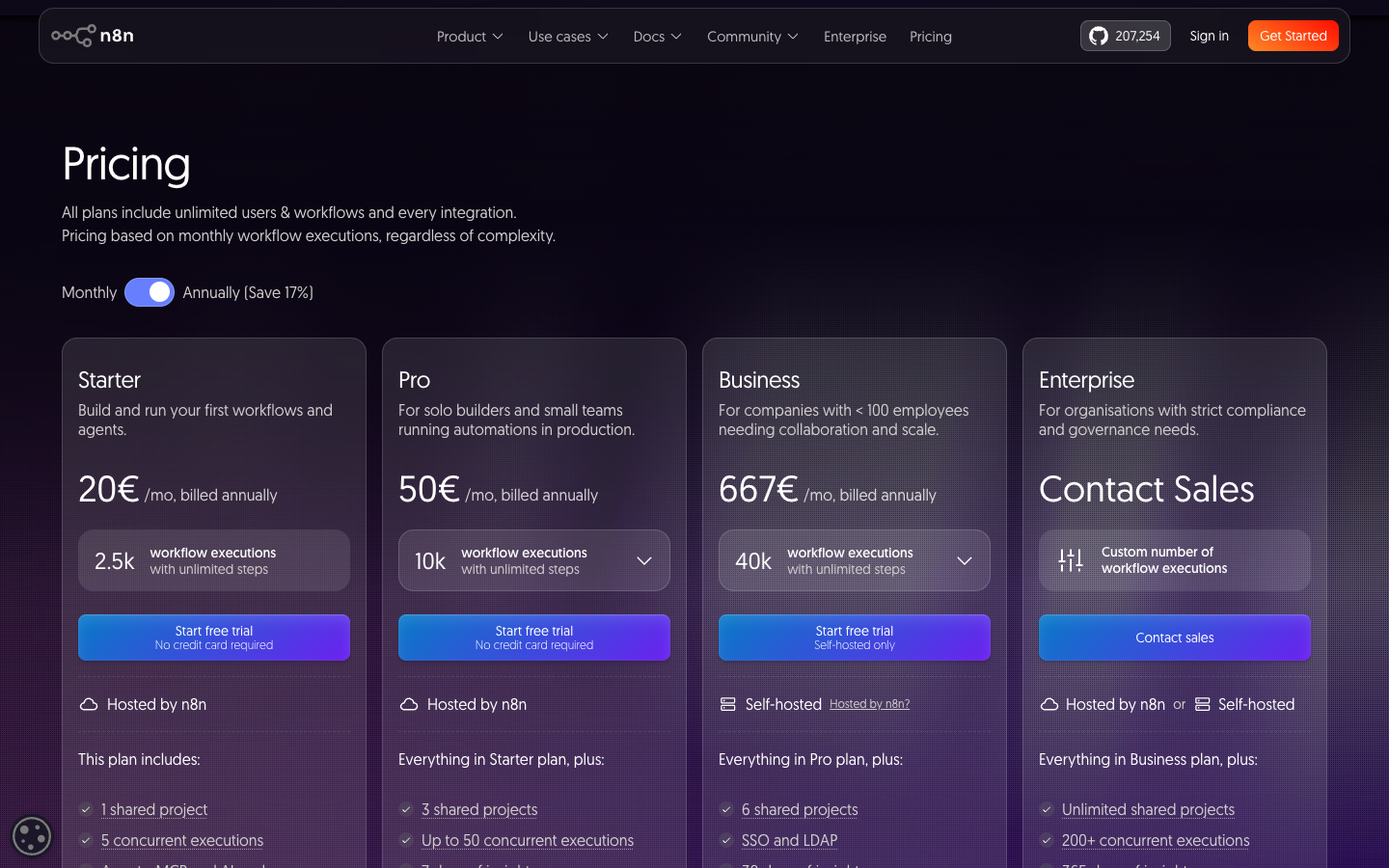
Pricing reference — October 2026: The official n8n pricing page displays Starter at €20/month billed annually, with 2,500 workflow executions; Pro at €50/month billed annually, with 10,000 executions; and a self-hosted Business tier at €667/month billed annually, with 40,000 executions at the displayed selector. Enterprise is quoted separately. These are displayed reference offers, not a promise of monthly-cancellable pricing. The vendor’s live plan selector, applicable region, currency, tax, volume and checkout terms control the actual contract.
Editorial disclosure: Alex Wright’s DigiOffly editorial assessment is grounded in official product information rather than a purchased test account. We did not buy an n8n Business license, run a production load test, benchmark queue throughput, test a real customer’s data, or conduct a security penetration test. Any figures used to model automation costs are clearly hypothetical. No independent reliability score or fabricated firsthand experience is presented.
📊 n8n at a Glance: The Buying Facts
Best fit: technically comfortable small teams, operations builders, developers and AI automation projects needing visibility into individual processing steps. Main appeal: a combination of visual orchestration, API access, programmable nodes, AI tooling, and a self-hosting option. Main limitation: that freedom asks for disciplined workflow design and, if self-hosted, real infrastructure ownership.
The billed unit on eligible hosted plans is generally a full workflow execution, not an individual node operation. A ten-node workflow triggered once is not automatically ten billed executions; repeatedly triggering that same workflow can increase execution volume. That makes n8n interesting for workflows with many steps—but it does not prove that a 100-step automation has the same infrastructure cost as a two-step one. Processing time, concurrency, file sizes, external provider fees and memory still matter.
The public pricing page describes Starter Cloud with 2,500 monthly executions, five concurrent executions and one shared project. Pro Cloud moves to 10,000 executions, more shared projects and administration tools. The Business plan is self-hosted and targets organizations needing features such as environment management and source control; a free-to-download self-hosted Community Edition is available separately. Enterprise requires a quote and can involve hosted or self-hosted arrangements depending on requirements.
n8n’s official documentation calls it a fair-code licensed automation platform. That is not synonymous with an unrestricted open-source license. Individuals and companies can run the Community Edition for permitted uses, but organizations planning to commercialize the platform itself or embed it as a customer-facing service must read the license and obtain legal or vendor guidance if necessary. Hosting the software does not transfer unlimited distribution rights.
Here is where we would draw the line. A team with repeatable, complex processes and someone able to maintain them should investigate n8n. A solo operator with one trigger and one destination may achieve the same result faster through a native app automation or simpler Zap. The right choice follows from the data flow, accountability and total cost—not the desire to own an impressive workflow diagram.
⚡ Quick Verdict: Is n8n Worth It in 2026?
Yes, if what you need is flexibility rather than the fewest possible setup decisions. n8n’s editor exposes the stages of a workflow: an event enters through a trigger or webhook, data is mapped or transformed, branches run under conditions, and downstream applications receive updates. It supports custom requests when a ready-made app connector lacks the required action. This can be valuable for an organization with several systems that never quite exchange the right fields.
The strongest case is a process that changes over time. A lead-routing flow may begin with a form and CRM update, then add deduplication, owner assignment, a conditional alert and a human approval step. Building those changes inside a visual engine can be easier to audit than maintaining scattered scripts. It also reveals where the business rule is vague. A diagram exposes decisions; it does not automatically make them correct.
For teams with basic engineering skills, self-hosted Community Edition can be attractive. They can decide where the instance lives, how it connects to internal services and when to update it, subject to the applicable license. The hidden cost is operational responsibility: backups, security patches, authentication, access control, monitoring, incident response and restoring lost credentials. A free software license does not make a business-critical installation free to operate.
For teams that dislike maintaining servers, Cloud Starter or Pro may be simpler. Cloud saves substantial deployment work, but adds recurring subscription charges and plan limits. It also does not remove separate bills from CRM software, AI model APIs, data stores and connected services. Leave those lines out and the apparent bargain may disappear after launch.
Buying recommendation: write down one real workflow, confirm connectors, run a safe pilot and model monthly executions and bursts. If you plan to self-host, write the maintenance and recovery plan before enabling production events. Choose a tier only after a representative sample proves that the workflow behaves correctly.
👍 What We Love
- ✅ Flexible orchestration: Connect visual nodes with programmable transformations and custom APIs.
- ✅ Deployment choice: Cloud and permitted Community self-hosting serve different operational needs.
- ✅ Execution-oriented Cloud billing: Headline plans measure workflow runs rather than every node.
- ✅ AI and developer tools: API requests, code steps and AI nodes support detailed workflows.
👎 Where It Falls Short
- ❌ Infrastructure ownership: Self-hosted deployments need patches, monitoring, backups and security.
- ❌ Operational complexity: Error recovery, duplicate records and long-running workflows need a plan.
- ❌ License considerations: Fair-code terms restrict some forms of commercial resale or embedding.
- ❌ Plan restrictions: SSO, environments and advanced administration require appropriate tiers.

n8n Automation — Editorial Buying Snapshot
Good fit: custom API workflows, technical integrations and controlled AI-assisted processes. Reconsider: no-code-only expectations, unmanaged server operations or processes without an accountable owner.
Documentation-based analysis. No paid hands-on test or numerical product rating is claimed.
🧭 How n8n Works: Nodes, Triggers and Items
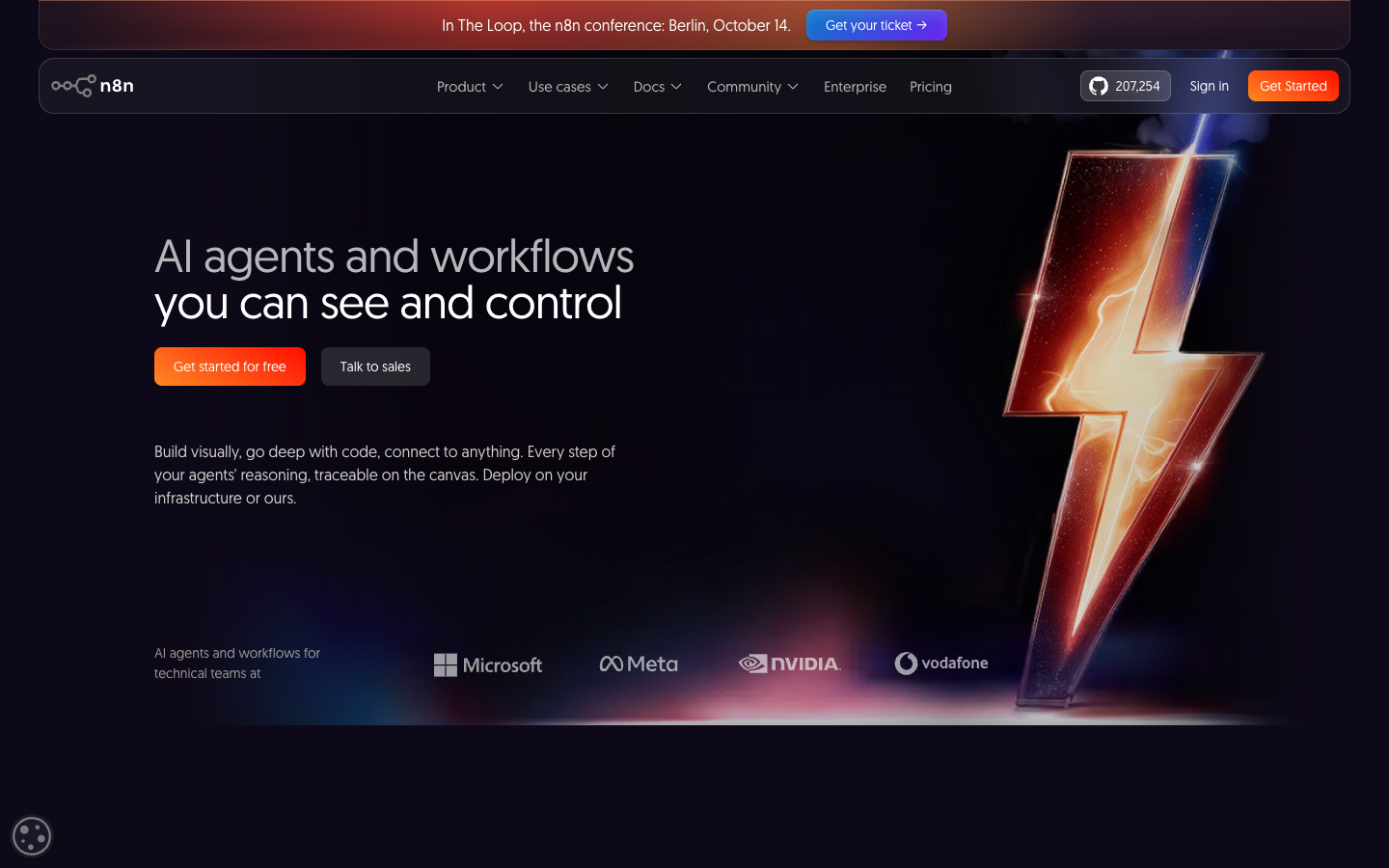
A workflow in n8n is a connected series of nodes. A trigger begins work when a schedule, webhook or application event occurs. Other nodes perform actions: reading a database, requesting an API endpoint, changing data, choosing a route, invoking a model or writing an output. Items represent data traveling between nodes, often as JSON. The workflow execution gives operators a record of what happened along the path.
The distinction between items and executions matters. One incoming event could contain a list of fifty orders; a node may process that list in one workflow run or split it into other work depending on design. The number of individual records inside a payload is not automatically the same as the number of billable workflow starts. At the same time, a workflow that triggers fifty times in response to external events may produce fifty executions even if each one performs a single database update.
n8n has built-in nodes for many services and a generic HTTP Request node for APIs without a purpose-built action. A technical operator can combine no-code mapping with code for a complex transformation. That flexibility helps when a vendor connector only exposes “Create record” and the actual business requirement is “Update if this exact identifier exists; otherwise flag for review.” But writing custom API calls increases the work of maintaining authentication, response parsing and rate-limit handling.
A workflow also needs a business definition separate from its implementation. “Sync customers” could mean create all new records, keep specific fields aligned, preserve a history of changes, or prevent duplicates. Before connecting systems, define the intended source of truth and whether the receiving application is allowed to overwrite human edits. The editor cannot resolve a conflict between two contradictory business rules.
It is often worth sketching the route on paper. Identify the input, unique key, required fields, approved output actions and exception path. Then implement one step at a time using synthetic records. A green success indicator on a single test does not prove the process will behave correctly when an API rate limit appears or a malformed record arrives tomorrow.
🔌 Integrations, HTTP Requests and Custom Nodes
n8n’s integration catalogue spans common productivity, database, marketing, CRM and communication services. A ready-made node can simplify authentication and expose useful operations without code. However, a provider appearing in the catalogue does not prove that it supports the exact event, search or update action you need. Connector functionality can also change when the outside service updates its API.
For example, an operations team might connect HubSpot, Google Sheets and Slack. Creating a new CRM contact may be simple; updating an existing contact only when a stable customer ID matches can require a search and conditional branch. A messaging node can send an alert, but the company must still decide who should receive it and whether confidential fields are allowed in a chat channel.
The HTTP Request node is important because not every application has a polished integration. It can call a documented REST endpoint and transform the response for later nodes. That flexibility is valuable when the desired API exists but no native connector has caught up. It also demands attention to authentication tokens, pagination, error handling and the provider’s request limits. The ability to call an endpoint is not permission to ignore its terms of service or access restrictions.
Self-hosted installations may also support community or custom nodes. These can extend functionality, but the same code that helps integrate an unusual system can access data or infrastructure under the instance’s permissions. Before installing a third-party node, inspect its maintenance history and security posture. A package that has not been updated for a long time may be a greater risk than the time saved during setup.
Ask an evaluator to test the exact actions, not simply the logos. Does the source fire instantly or require polling? Can the destination update records? What authentication scope is required? Does its paid API plan permit the expected volume? If the workflow relies on a fragile custom endpoint, include the maintenance cost in the purchasing decision.
🏗️ Building a First n8n Workflow Without Breaking Production
An effective first project has a safe outcome and a clear definition of success. Consider receiving a test form submission and writing approved fields into a sandbox spreadsheet or CRM. Use fabricated sample names and addresses rather than a real customer list. The goal is to learn how values move through the nodes while keeping the consequences of mistakes small.
Start with the trigger. A webhook can accept an event from a system that supports outgoing requests. A scheduled trigger can check a service periodically when an instant event is unavailable. In either case, understand whether the source might send duplicates and whether the destination accepts idempotent updates. A webhook that receives the same event twice should not automatically create two contacts.
Next, choose a stable identifier. An email address may change, and two people can share one; a form submission ID or CRM contact ID is often safer for reconciliation. Check that missing fields cannot silently become incorrect defaults. A null phone number is not the same as the text string “null,” and a local date may need a timezone conversion before it becomes a UTC timestamp.
Build the route incrementally. First inspect the sample payload. Then add the lookup and an explicit condition for whether a matching record exists. Only after verifying these outputs should you add a write action. If you are testing a support or accounting workflow, make the test destination a non-production account and require human review for consequential changes.
Run failure cases on purpose. Disconnect a noncritical test credential, supply an invalid ID and simulate a destination that returns a rate-limit response. Check whether n8n marks the execution as failed, where the error is visible and what action the operator should take. This exercise is more valuable than a screenshot of the ideal path alone.
Finally, document ownership. Someone should know how to pause the workflow, find recent executions, restore the connection and replay eligible data without creating duplicates. A workflow is an operational system once coworkers depend on it. Keeping a diagram is helpful, but keeping it maintained is what makes the investment worthwhile.
💰 n8n Pricing in 2026: Cloud Starter, Pro, Business and Enterprise
| Plan | October 2026 published reference | Key buying constraint |
|---|---|---|
| Community Edition | No recurring software license fee for permitted self-hosted use | Infrastructure, updates and backups are your responsibility |
| Starter Cloud | €20/mo equivalent, billed annually; 2,500 executions | Managed hosting; limits on concurrency and projects |
| Pro Cloud | €50/mo equivalent, billed annually; 10,000 executions | More projects, administration and history features |
| Business self-hosted | €667/mo equivalent, billed annually; 40,000 executions | Commercial advanced controls, environments and Git-based versioning |
| Enterprise | Custom quote | Custom execution allowance and enhanced governance |
The current vendor pricing page presents a clear contrast between managed Cloud subscriptions and more advanced self-hosted deployments. The prominent figures are quoted as monthly equivalents on annual billing: Starter €20 with 2,500 executions, Pro €50 with 10,000 executions, and Business €667 with 40,000 executions at the displayed selector. Enterprise pricing is custom. Taxes, overages, currency and payment frequency need confirmation at checkout.
Starter Cloud is aimed at an individual builder or small team. It includes the hosted service, a limited number of concurrent executions and shared projects, unlimited steps in workflows, and access to the core visual engine. It can be a good way to learn production automation without administering a server. Its included execution volume is not unlimited; neither is the compute capacity assigned to a plan.
Pro Cloud increases the published starting allowance to 10,000 executions and introduces capabilities such as more project collaboration, additional administration, history or insights options. An operator should upgrade for something it can name: a real volume requirement, a missing governance feature or a workflow history need. Paying more simply because a process feels “professional” is not a cost model.
Business is advertised as a self-hosted plan on the current pricing selector. It offers advanced organization features that matter to larger teams, including environment management, source-control options and scaling features, subject to the published plan conditions. The €667 annual-equivalent figure is not a cheap substitute for Community Edition; it is a commercial tier for organizations needing specific premium capabilities and support arrangements.
Enterprise can include custom execution allowances, additional secrets management, extended logging and contractual support, according to the vendor. It is quote-based and should be assessed through a written procurement checklist. Do not extrapolate its cost from Business without a vendor offer.
There is also the Community Edition: a no-license-fee self-hosted version available under the vendor’s fair-code terms. Its infrastructure, administration, storage, backup, networking and support requirements are separate costs. A serious financial comparison includes staff time, incident response and the cost of outages. A one-person experimental setup may be inexpensive; running an internal process that must stay available every day has different economics.
Annual equivalents are not monthly cancellation prices
A displayed “€20 per month, billed annually” typically represents an annual commitment with a monthly equivalent, not a guarantee that you can use the product for one month and cancel at €20. n8n also presents monthly billing options and separate eligibility rules for special programs. Compare the actual upfront amount, expected annual usage, and the flexibility your project needs. Some processes change enough during a pilot that a short evaluation arrangement is worth more than the headline discount.
The startup discount is conditional, not a general price
n8n also advertises a startup-specific Business offer for eligible organizations, with conditions such as company size and funding. It is not a standing public discount available to every reader. Do not put a promotional rate in the main pricing table unless the user and the business clearly meet those eligibility rules. The standard product comparison should describe the normal tier first.
🧮 Workflow Executions Explained: What Actually Gets Counted?
“Pay per execution, not per node” is an appealing line, but it needs context. n8n’s paid Cloud allowance is based on the execution volume described in its subscription terms. A workflow may contain ten nodes or many more, and the headline pricing is not simply multiplying that node count by a task charge. A workflow that runs repeatedly, however, can still consume its monthly allowance quickly.
Consider two systems. One receives a customer order and performs eight steps. Another receives the same order, creates three separate downstream workflows and rechecks a record repeatedly. Even if both begin with one order, their execution histories can differ. Sub-workflows, manual runs, failed starts and production triggering deserve specific attention under the vendor’s actual billing rules. Avoid assuming that every testing action, partial run or auxiliary flow has identical treatment unless the chosen plan’s documentation confirms it.
The accounting unit also leaves out outside costs. An n8n workflow that invokes an AI model may owe token charges to the AI provider. A workflow that queries a premium CRM might need an additional application subscription. A self-hosted deployment uses CPU, memory, storage and bandwidth regardless of how a licensing price counts executions. These are not contradictions; they are different items on the total operating bill.
The practical budgeting formula is therefore broader than a single number. Estimate monthly workflow starts and any additional triggered child workflows, then compare that count with the relevant plan allowance. Next add external API charges, model tokens, data-storage needs and expected maintenance. For a process that handles large files or spikes in requests, review concurrency and memory requirements instead of relying only on an average monthly estimate.
A quota risk worth testing: On Cloud Starter and Pro, n8n’s official execution-limit guidance says new trigger and webhook runs fail immediately after the included execution cap is reached; they are not queued for a later reset. Those failed events do not automatically replay when the subscription renews or the plan is upgraded. Plan alerts and recovery around your busiest days, not just an average monthly count.
A sound pilot records both the number of executions and what each accomplished. One run that updated ten records is a very different business outcome from a run that attempted ten updates and failed halfway through. A buyer should calculate cost per correctly completed outcome, not simply cost per run. A queue full of duplicate orders could erase several months of savings from a lower subscription fee.
🆓 n8n Community Edition: What “Free Self-Hosted” Means
For a weekend experiment, Community Edition and Cloud Starter may look interchangeable. They aren’t: one puts the server on your to-do list, and the other doesn’t. n8n publishes a self-hostable edition with no recurring software license charge for eligible use. It can be deployed on a machine or server an operator controls. The vendor uses a fair-code Sustainable Use License rather than a conventional unrestricted open-source license; assess commercial and resale uses before presenting the edition as software that anyone can freely offer as a competing hosted platform.
The core attraction is control. A business can decide how its instance connects to internal systems and can deploy alongside databases or internal APIs without exposing every interaction to a third-party managed platform. For an engineering team already running applications, this can fit an existing operational model. For a nontechnical owner who has never maintained a server, “install it yourself” is an entire second project.
Installation cost is only the first item. A responsible self-hosted n8n instance needs TLS, updates, credentials management, backups and tested recovery. A password rotation must not unexpectedly make stored credentials unreadable. A database should survive an instance replacement. Logs should be retained according to business needs without revealing sensitive customer data. DNS, reverse proxies and inbound webhooks must be configured deliberately.
Plan-specific enterprise controls cannot be assumed to exist in Community Edition. Features such as SSO, certain project permissions, environment management, advanced insights and source-control workflows may require higher commercial tiers. n8n’s vendor documentation distinguishes Community and enterprise functionality, and those differences matter when the platform will be used by more than one department.
The honest description is not “unlimited automation for free.” It is software that can avoid a recurring license bill for permitted self-hosted use, provided you can pay the real infrastructure and maintenance costs. If the system is a weekend experiment, those costs may be small. If customer onboarding stops whenever a server crashes, they are part of the product’s effective price.
🐳 Self-Hosting n8n With Docker: Production Checklist
Docker makes the mechanics of running n8n more approachable, but a container running successfully is not a production architecture. The official Docker installation guidance covers the application environment and persistent data. A technical team should treat the sample installation as the beginning of a deployment plan, not evidence that security, backups and monitoring are already complete.
Persistent storage is critical. If an instance’s state is left only inside an ephemeral container, replacing that container can destroy the application database or stored information. Use a durable database and volume strategy appropriate to the deployment. Document exactly where the data lives and which components must be restored together. In a production setup, PostgreSQL is often evaluated as a durable external database option rather than relying on an unmanaged local file.
The encryption key deserves special protection. n8n uses encrypted credential storage, and losing or mismatching the encryption key can affect whether restored credentials can be read. Store secrets securely and back up the necessary configuration in accordance with the vendor’s instructions. Do not paste live tokens into a public repository or a troubleshooting message. Rotate credentials with a plan rather than deleting them impulsively.
For publicly reachable webhooks, place the service behind properly configured HTTPS and a reverse proxy; validate request signatures where the source provider supports them. Protect administration behind appropriate authentication and access policies. Rate limiting, network restrictions, firewall rules and platform updates matter because a workflow engine that can call APIs or execute code is a valuable target for attackers.
Finally, simulate recovery. Can a replacement host restore the database, encryption key, workflow definitions and correct webhook URLs? Who notices an outage outside office hours? How is a failed queue processed once the system returns? Without an answer, “self-hosted” means the organization owns both the flexibility and the interruption.
🔐 Security, Permissions and the Fair-Code License
n8n’s flexibility brings security trade-offs into focus. A workflow can receive personal information, transform it, contact external services and sometimes run arbitrary logic. That gives the builder considerable power. A company should limit which people can edit production workflows and which credentials they can use, especially where data is regulated or financial decisions have consequences.
Stored credentials can enable expensive or sensitive actions. A CRM access token may reveal customer information; a cloud storage token might allow file deletion; an AI provider key can create charges. Apply least privilege to each connection and make it easy to revoke access when an employee leaves. Keep a register of which workflows use which accounts so an administrator can rotate a token without guessing what will break.
The n8n security audit feature identifies several categories of risk. Its checks can report unused credentials, risky nodes, problematic instance settings and unprotected webhooks. Such automated checks are useful operational signals, not certification that a deployment is safe against every vulnerability. They should supplement regular patching, peer review and monitoring.
Community nodes are a particular concern. Third-party packages are not automatically subject to the same scrutiny as the platform’s core code. A convenient integration can run with broad access if installed without adequate isolation or review. Technical teams should inspect maintained versions and restrict risky nodes where appropriate. Users without those resources may be safer in a managed environment that provides the needed connector directly.
Legal rights also require their own check. A fair-code license can permit internal business automation while restricting certain forms of commercial resale or embedding. Anyone considering a customer-facing automation service based on n8n should consult the official licensing terms and the provider. Describing the edition as unrestricted open source would be misleading.
🤖 AI Agents in n8n: Where the Promise Meets Reality
n8n supports AI-oriented workflow nodes, tool connections and agent patterns. A workflow can pass a document or message to a model, request structured output, and use that output to decide which internal task should be proposed next. For a support operation, it may categorize an issue and prepare a draft response; for editorial research, it may extract metadata from approved sources. The surrounding automation then controls how and where the result is stored.
This is more useful when AI is one bounded component of a known process than when a model is allowed to take every available action autonomously. A classification result can be checked for valid values. A proposed refund cannot safely be executed just because a model described it confidently. Give consequential actions explicit conditions and, where appropriate, a human approval gate.
The distinction between AI assistance and agent execution matters in both cost and risk. An agent may perform multiple model interactions or tool calls while fulfilling one user request. The n8n execution count does not necessarily include the token bill from the AI provider or any paid tool services. n8n’s pricing page also mentions Assistant credits and model-access benefits that are plan-specific. Those allowances should not be represented as unlimited third-party model tokens.
Consider a customer-service classifier processing an attachment. It might need OCR or file parsing, an AI model call, a database lookup and a decision about whether to notify a human. Each component can fail independently. A model may misread an order number, an API may reject a request or a document may contain malicious instructions. The workflow designer should set limits on allowed tools, validate inputs and log enough context to audit the result.
Where a tool call could publish an article, send a marketing message or delete a record, the safest version asks for permission or routes the output into a review queue. That does not diminish AI usefulness; it makes the process defensible. Good agent design exposes uncertainty and constraints. A demo that hides them may be more exciting but less suitable for real operations.
🧠 Prompt Injection, Model Output and AI Workflow Controls
AI-connected automation creates a distinct attack surface because incoming documents and user messages may contain instructions intended for a model, not legitimate commands from the organization. A malicious support ticket could try to persuade the model to ignore its instructions, reveal a secret or call an external endpoint. A workflow that blindly trusts model output can turn that text into an actual side effect.
Separate untrusted content from trusted configuration. Limit which tools an agent is allowed to use and avoid giving an ordinary classification step broad access to administration APIs. Validate structured model output against an explicit schema; reject unexpected keys, addresses or commands. For high-impact actions, require human approval rather than letting the agent choose its own authorization criteria.
Model evaluation should reflect real failure modes. A classifier that works on ten tidy training examples might struggle with multilingual messages, long attachments or missing context. Build a set of representative cases that includes uncertain and contradictory inputs. Track the rate of items referred for human review; reducing that rate by suppressing uncertainty is not an improvement if errors become invisible.
Cost controls are equally important. A loop that repeatedly invokes a model can spend money even when only a handful of top-level workflow executions occur. Limit tool recursion, retries and output size where supported. Monitor provider usage separately from n8n’s plan dashboard. Cloud versus self-hosted deployment does not eliminate this consumption.
Do not allow model-generated text to masquerade as verified source evidence. If an agent drafts an article, preserve the links and passages used to support claims, and conduct a human editorial review before publishing. An automation platform can coordinate that pipeline; it cannot automatically make the resulting statements true.
🧯 Error Workflows, Retries and Partial Success
A robust workflow begins by defining what failure means. An API timeout, a missing required field and a duplicate event should not all receive the same response. n8n provides execution history and error-workflow capabilities. Operators can inspect failed runs and, in applicable situations, retry an execution using current workflow logic or the original saved workflow definition. The execution history guide describes those choices and their limits.
Imagine a workflow writing an order to a database and then sending a notification. The database write succeeds, but the notification step times out. Replaying the entire workflow without checking the database could create a second order. The question after that timeout is whether the order already exists. Check by a durable order ID before replay; otherwise an innocent-looking retry can write the same order twice.
A Wait step or a delayed retry can help when an API imposes rate limits. But a delay is not the same as a durable queue with guaranteed delivery. If the process requires strict transactional consistency, examine what the connected services support. n8n can orchestrate actions across APIs, yet it cannot magically roll back a credit-card charge in one system because a later Slack message failed.
The execution log should answer operational questions: when the event arrived, which branch was chosen, what was written, which node failed, and whether the failure was handled. Retention options and search availability can differ by plan. The most useful alert is one that tells the owner what to investigate—not one that floods a channel with generic error notices.
Test recovery while the stakes are low. During a pilot, intentionally disconnect a test destination, allow an incomplete record and examine the result. Document which actions may safely replay and which need human confirmation. If no one can safely recover a failed process, it should not control a high-stakes operation unattended.
📈 Queue Mode, Concurrency and Scaling Under Load
The workflow that passes every test with ten events might stall when ten thousand arrive after a launch. A marketing campaign, scheduled import or product launch may produce a burst that overwhelms a single instance or exceeds a Cloud plan’s concurrency allowance. That is why it is misleading to judge scalability only by the monthly execution total.
The vendor documents queue mode and related scaling approaches for eligible deployments. A queued system can separate receiving work from processing it and distribute execution across workers, subject to the architecture and plan. This introduces additional components, such as a queue broker, database and workers, which have their own deployment and recovery requirements. More moving pieces can improve throughput while increasing operational complexity.
Concurrency is the number of executions allowed to progress simultaneously, not the same as total executions per month. An automation that processes one short event a minute can fit a modest limit; an automation that spends ten minutes processing each file can accumulate waiting jobs with the same event rate. Measure the slowest stages and long-tail latency, not just average success.
Cloud plan concurrency details may change with the selected tier and the current pricing comparison. Check those limits before promising real-time processing. For self-hosted systems, performance depends on hardware, node behavior, database capacity, external APIs and configuration. No public price table guarantees how quickly a custom deployment will handle your specific workload.
A team should load-test with synthetic data on an authorized instance before committing to a service-level target. The objective is to find how errors, memory usage and delayed processing behave at peak traffic. We have not performed that benchmark here; our recommendation is an evaluation method, not an unearned performance claim.
📨 Example 1: Lead Routing Across a CRM and Two Teams
Suppose a small software company collects 1,200 inbound form submissions a month. Each triggers a workflow that looks up the CRM contact, normalizes a company field and directs the event to an appropriate owner. Some leads require an additional Slack notification. A reasonable planning model treats this as roughly one main triggered execution per submission, or 1,200 top-level workflow runs, if the implementation does not deliberately spawn additional workflows.
Those 1,200 runs are a starting point for the budget, not a total-cost estimate. The buyer should compare the main execution count with the relevant plan limit, include any child workflows, and account for external CRM or data-enrichment charges. If each lead triggers a separate correction job or scheduled replay, total execution demand could be higher.
The harder part is record integrity. If the form is submitted twice, should it open a duplicate opportunity? If a lead’s industry field is blank, who decides the route? If a CRM connection fails, is the event retained somewhere retrievable? The process should use a stable event ID and a recorded disposition for every event. Without that, successful workflow runs do not prove that all leads reached the right person.
An n8n visual diagram can express the routing logic, but the company still owns its sales policy and data quality. This is the type of use case where a pilot with synthetic cases and a documented failure path can establish genuine value before a subscription upgrade.
🧾 Example 2: Invoice Intake With a Human Approval Gate
Consider a finance team receiving 150 supplier invoices each month. A workflow can file the attachment, extract candidate invoice details, locate the supplier, and ask an authorized employee to verify the amount. Only after approval does it send structured data to the bookkeeping service. The process can reduce copying without allowing a model or file parser to approve a payment.
Under a simplified design with one main run for each incoming invoice and no additional independently triggered jobs, this is 150 main workflow executions per month. That number alone says little about the total cost. Document extraction may require a paid service, the accounting platform may enforce API limits, and a reviewer could request corrections that create separate executions.
More importantly, the business must know exactly which file was approved and by whom. If a PDF has multiple invoice numbers, the system should not guess a single payable. If a supplier changes banking information, the flow should stop rather than silently trust the new attachment. A software platform can route the event into a review queue but does not replace the accounting team’s authorization rules.
Here, automation has done its job once the right invoice lands in the right approval queue. The decision to pay still belongs to a person with the authority to make it.
🤖 Example 3: AI-Assisted Support Classification
An internal support team receives 600 customer messages a month. An n8n workflow sends each message through a model to suggest a category, checks the response against an allowed list, and creates a queue item. The model is an assistant to classification; it does not send a customer-facing response or take account actions without an authorized workflow rule.
In a simple architecture this could mean 600 main event executions, before accounting for any separately triggered retry or child jobs. The AI expense is not necessarily represented by the same number. Long requests, document attachments, additional tool calls and larger outputs can raise the external model’s token bill. The buyer should monitor that usage independently.
A useful pilot includes messages that fall outside the categories, contain conflicting details or use multiple languages. The workflow should assign “requires review” when the evidence is weak. Give supervisors the ability to correct classifications and keep enough source context to understand a mistake. AI-assisted categorization can save repetitive work while still leaving uncertain cases to people.
The temptation to make the process entirely autonomous is understandable. Resist it when the next action is an account deletion, money movement or public statement. Automating the preparation and triage of information often delivers most of the benefit without turning model uncertainty into a business incident.
⚖️ n8n vs Zapier vs Make: Compare the Same Workflow
The three services overlap in purpose but have different economic and technical characteristics. n8n Cloud generally highlights workflow executions, Make uses credits associated with operations and certain variable features, and Zapier primarily counts successful action tasks with exceptions for advanced products. These are distinct units. A table that calls 2,500 n8n executions “equivalent” to 2,500 Zapier tasks would be deceptive.
| Decision factor | n8n | Make | Zapier |
|---|---|---|---|
| Best use | Technical workflows, custom APIs and AI agents | Visual no-code workflows with branches | App connections with managed onboarding |
| Hosting | Cloud or self-hosted Community version | Vendor-hosted cloud | Vendor-hosted cloud |
| Main usage model | Cloud workflow executions | Credits across module operations | Tasks across actions |
| Setup trade-off | More developer responsibility | Complex scenarios need credit tracking | High-volume actions need task planning |
n8n may appeal when a technical builder wants code steps, custom HTTP requests, self-hosting or workflows with several transformations inside each run. Make is a strong alternative when a visual branching diagram is central to how an operations team understands the process. Zapier can suit straightforward app-to-app routing where ready-made triggers and actions are more important than deployment flexibility.
No one editor guarantees cheaper automation. A simple two-action Zap may be easier for a nontechnical employee to maintain than a custom n8n installation. A complex process with many API calls might be economical under execution-based billing but consume considerable compute and external API fees. A hosted Make scenario can be convenient for a team that prefers visual routing and does not want to maintain its own worker infrastructure.
Read our independent Make Review and Zapier Review to compare their billing assumptions. Before ranking the products, write the same test specification for each: trigger, required transformations, branch conditions, destination writes, monthly event count, error recovery and expected peak traffic. Then evaluate real usage with synthetic records.
An organization may already have a suitable solution inside its CRM or collaboration suite. In that case, buying any orchestration product adds another vendor and another failure point. Start by looking for the simplest safe process that meets the need.
🎯 Who Should Choose n8n—and Who Should Skip It?
n8n makes sense for a technically capable operator who wants the convenience of a workflow canvas without giving up direct API and code-level flexibility. It may suit internal SaaS integration, data preparation, support routing, technical marketing operations, AI-assisted analysis and processes involving custom business logic. Self-hosting offers an additional deployment choice where governance and infrastructure skills justify it.
It is a less comfortable default for someone who wants to connect two apps once and never maintain the integration. The Community Edition is not a magic way to avoid operational expenses. If credentials expire or the database fills up, the organization running that instance must notice and respond. A hosted plan shifts some maintenance to n8n but still requires a person to own workflows and their correctness.
Companies with regulated data should examine the exact plan, security policies, data regions, administrative roles and audit requirements. Self-hosting may enable more placement control, but it does not automatically make the deployment compliant. The person responsible for compliance should review the real data flow and the contract.
Choose n8n for flexibility you can use and maintain. Skip it when the requirement is simpler than the platform, when critical integration actions are unsupported, or when nobody can responsibly operate the result. The right response may be to fix the process before buying automation software.
🧪 Research Methodology and Limits of This Review
This review uses n8n’s official pricing and documentation on workflow execution, self-hosting, AI and agents, credentials, recovery and security auditing. We also compare documented economic units with the vendor references used in our existing Make and Zapier research. All pricing figures are October 2026 reference points from public pages.
We did not operate a paid Cloud or Business subscription for this review, independently benchmark throughput, test a recovery from a real server outage or examine internal platform infrastructure. As a result, we do not award a fictitious speed score or pretend to have observed customer-specific reliability. The example calculations are planning models explicitly constrained by their assumptions.
Product descriptions can be accurate while still failing to answer a particular company’s procurement question. An engineer comfortable with Docker may treat an extra managed server as a reasonable cost; a small creative studio without IT resources may reasonably prefer a paid Cloud plan. Your actual decision should account for staffing, data sensitivity, execution patterns and the reliability requirements of the workflow.
The purpose of this article is to make a defensible selection easier. We have linked relevant official references and identified where source documents alone cannot prove a real-world claim. Before subscribing or deploying an instance, verify the terms and reproduce the critical workflow with your own non-sensitive test records.
🏆 Final Verdict: Is n8n Worth the Money in 2026?
n8n is a credible choice for teams that want visual automation with room for programming, AI steps and custom APIs. Its execution-oriented Cloud pricing can be attractive for workflows with many transformations, and the Community Edition offers a self-hosting path to operators who can manage it. The platform’s strongest benefit is control over the process, not a universal promise that automation will be effortless.
The buying decision hinges on the surrounding responsibilities. Do not confuse a no-license-fee Community Edition with a no-cost production service. Do not equate a single workflow execution with a complete, correctly delivered business outcome. And do not assume that an agent’s model calls are covered by the workflow plan simply because the n8n execution allowance has capacity.
Start with a safe test of one concrete process. Confirm the connectors and their actions, define the failure path, estimate executions and separately billed resources, and identify a human owner. Then choose the smallest appropriate deployment and tier. For many technically confident teams, that process will put n8n on a strong shortlist; for others, a simpler managed integration is the better tool.
Bottom line: n8n is most valuable when its flexibility solves an actual integration problem and the organization can maintain the result. Browse the official n8n pricing page and our Automation & No-Code guide before deciding.
Frequently Asked Questions About n8n
Is n8n completely free to use?
The self-hosted Community Edition is available without a recurring software license charge for permitted uses, but you must supply infrastructure and handle maintenance. Paid n8n Cloud plans include managed hosting, allowances and plan-specific features. “Free self-hosted” does not include server bills or technical support labor.
Is n8n open source or fair-code?
n8n describes itself as fair-code licensed. Its Sustainable Use License is not interchangeable with unrestricted open-source licensing. Internal and personal uses may be permitted while commercial embedding, resale and competing hosted services can raise licensing questions. Review the vendor’s license before using it as part of a commercial platform.
How much does n8n Cloud cost in 2026?
The public annual-billing selector lists Starter at €20 per month equivalent with 2,500 executions and Pro at €50 with 10,000 executions. Business is a self-hosted commercial tier shown at €667 monthly equivalent for 40,000 executions. Enterprise is quoted separately. Check current plan selection and checkout for actual obligations.
What counts as an execution in n8n?
An execution represents a workflow run. Paid plans generally focus on workflow execution volume, not counting every individual node as a separate task. Manual testing, sub-workflows and distinct triggers can have rules that require checking against the chosen plan. Do not equate executions with Make credits or Zapier tasks.
Can I install n8n on my own server with Docker?
Yes. n8n provides Docker self-hosting documentation. A responsible production deployment also needs persistent storage, access controls, HTTPS, a backed-up encryption key, updates, monitoring and disaster recovery. A working container alone is not proof that these operational controls exist.
What is the difference between n8n Starter and Pro?
At the vendor’s displayed annual-billing reference, Starter has a lower monthly execution allowance and fewer collaboration or operational features. Pro increases the allowance and provides additional history, administration and project controls. Confirm the precise limits and concurrency available for the currently selected plan.
Does n8n include free AI model tokens?
Do not assume unlimited model access. The public pricing page lists plan-specific Assistant credits and AI-related features, while third-party model services and APIs may bill separately. The cost of an agent can depend on prompt size, model selection, output and tool calls even if a workflow is counted as one execution.
Is n8n better than Zapier or Make?
It depends on the workflow. n8n may be attractive for technical teams, self-hosting and code/API flexibility; Zapier and Make can simplify certain managed integrations and visual routing needs. Billing units differ, so compare the same input events, branches, searches, destination actions and maintenance requirements.
Can n8n automate business processes without coding?
Many workflows can use prebuilt nodes and field mapping without custom code. More unusual integrations or data transformations can require HTTP requests, JavaScript or Python and technical troubleshooting. The platform is flexible, but it should not be described as effortless for every use case.
How do I recover a failed n8n workflow?
Use execution history and the available retry or error-workflow mechanisms, subject to plan and configuration. Check whether previous steps already changed an external system; blind replay can duplicate records. A stable event key and a documented human escalation procedure are particularly useful.
Is self-hosted n8n safe for confidential information?
It can be part of a controlled deployment, but security depends on configuration, access permissions, updates, network protections, third-party nodes and logging. The official n8n security audit can identify some risks; it is not an exhaustive security certification. Sensitive deployments require professional review.
🔍 More Software Research on DigiOffly
Explore our Automation & No-Code Software guide for orchestration tools and no-code builders. The Make Review and Zapier Review give context for credit- and task-based alternatives; their allowance numbers are not directly comparable with n8n executions.
Our Software Cost Calculator can help estimate recurring application subscriptions, but plan to account separately for cloud compute, workflow execution volumes, AI-provider charges and operator time. Use the Software Finder to refine a broader shortlist and Compare Software to assess documented features and plan restrictions.
The DigiOffly research methodology describes how we distinguish documented product facts from actual firsthand testing. Never rely solely on a dated review for a binding vendor price or legal compliance decision.
EXPLORE NEXT ON DIGIOFFLY
Next: Put This n8n Review to Work
n8n can connect the tools you already use. Compare hosted subscriptions, self-hosting responsibilities, execution allowances and alternative workflow engines before deploying a production process.
Explore your workflow category
- Browse the software directory — Find comparable products and published review pages.
- Match tools to your workflow — Narrow your options by functional needs before optimizing the bill.
Check total subscription costs
- Run a side-by-side comparison — Review feature differences that a monthly total cannot show.
- Check free plans and current offer references — Explore catalog-listed trials and pricing sources without assuming an unverified discount.
Compare related software
- Review ready-made software stacks — Avoid overlapping subscriptions across your team.
- Explore editorial software shortlists — See alternative categories worth considering before checkout.
- Understand our pricing research method — Learn where estimates end and vendor confirmation begins.