

Editorial note — October 2026. This is an independent documentation-based assessment. We consulted Riverside’s current product information, help center, pricing page and 2026 training materials; we did not buy a subscription, record a benchmark session or interview the company. Vendor prices and entitlements can change. Screenshots sourced from Riverside illustrate its own interface, not an account we personally operated.
It’s easy to mistake a video call for a usable recording. Two people can hear each other, the conversation flows, and everything looks fine inside a browser window. Then the editor opens the downloaded file and discovers that one person’s microphone was quiet, the other person’s face is permanently embedded in a tiny square, or the internet connection made half a sentence sound robotic. The call succeeded. The production didn’t.
Riverside approaches that problem by recording participants locally on their own devices and offering the host access to separate audio and video tracks afterward. It has also expanded far beyond the traditional remote-podcast recorder. Riverside’s 2026 releases brought a rebuilt studio and editor, more publishing and distribution tools, and broader AI-assisted post-production options. Evaluating it only on video quality misses a large part of what a subscription now buys.
Our Riverside review verdict for 2026: Riverside is a strong contender for conversation-led production where clean source tracks, transcript-based editing and repeatable publication workflows are more important than low-level encoder control. Its value is highest for podcast interviews, business conversations, customer stories and social content derived from those recordings. It makes less sense when your only requirement is a basic screen capture or a single live gameplay stream.
The crucial buying question has changed with the product. You aren’t simply comparing Free and Pro recording allowances. Riverside’s current public plans are Free, Pro, Grow, Webinar and Business, with distinct access to production, publishing, live multistreaming, lead capture and administrative features. Older articles that describe Standard and Pro as the only paid options may refer to an earlier pricing structure. Use the actual subscription selection shown in your own account before buying.
Readers comparing a browser studio should also look at StreamYard. Creators who have already built their scenes locally may prefer OBS Studio with a separate distribution layer such as Restream. Riverside belongs on the shortlist when the source material and the editing handoff matter at least as much as where the broadcast goes.
A proper evaluation doesn’t require an elaborate production. Run one remote conversation with a guest on a different network. Inspect every high-quality source file, adjust a transcript, export a short clip and try to publish or deliver that clip. The workflow should feel manageable from invitation to final file. If you never need the editor, local tracks or distribution features, a comprehensive platform subscription may be unnecessary.
🎯 Riverside at a Glance: The Buying Decision
Best for: Podcasters who regularly record remote guests; video interview creators who need source footage for editing; marketing teams turning interviews into reusable content; teachers who want clean recordings rather than highly technical local scenes; producers who need transcript edits and consistent publishing.
Less suitable for: A gamer who primarily needs direct capture of graphics-intensive gameplay; a team that expects every cloud or AI feature without quota restrictions; a user who cannot ask guests to remain connected while local files upload; a business needing regulated-content storage without performing its own security review.
Current plans: Free, Pro, Grow, Webinar and Business are shown in Riverside’s October 2026 pricing material. In the current public yearly comparison, the site advertises Pro at a $24/month equivalent billed $288 annually and Grow at a $34/month equivalent billed $408 annually. It also shows monthly list prices of $29 for Pro and $39 for Grow in a separate comparison section. Some Webinar pricing fields are internally inconsistent on the page, so we would confirm the final checkout total rather than inventing a reliable annual amount.
Separate tracks: Riverside says locally recorded participant tracks can reach up to 4K video and 44.1 or 48 kHz audio when the device, camera, account and studio settings permit. The local source recording is different from the lower-bandwidth view seen in a live call, and the separate tracks must finish uploading before they can be downloaded.
Recording versus track-download caps: Riverside’s current pricing FAQ distinguishes unrestricted recording sessions on paid tiers from quotas for downloading individual high-quality participant tracks. The public comparison lists 15 hours a month for Pro, 20 for Grow and 25 for Webinar, with Business offering unlimited downloads subject to a custom contract. Free provides a limited, one-off introduction to multitrack exports.
Our verdict: Consider Pro if your recurring job is to record, edit and publish a well-produced conversation. Move to Grow if live distribution and audience-building tools are central. Consider Webinar when event registration and audience interaction are essential. Business deserves a separate discussion about seats, roles, security and scale. Don’t pay for a higher tier because you like its label.
🧭 What Riverside Does — and Why 2026 Matters
Originally associated with remote podcast recording, Riverside now markets a broader production lifecycle. Its Riverside 2.0 announcement in June 2026 presented a rebuilt recording studio, new AI Editor and deeper publishing and distribution functions. The point wasn’t simply a visual refresh: the product increasingly asks creators to manage source capture, editing, derivative content and publishing without leaving the same environment.
This changes how buyers should evaluate competing software. A team that once used a remote recorder, a transcript editor, a clipping tool and a podcast-hosting service may find overlapping capabilities inside Riverside. Consolidation could save time and reduce the number of file transfers. It could also concentrate operational risk in one account and introduce limits on the functions a team actually uses. Neither result can be assumed from the feature list.
There are at least four separate jobs. Capture means obtaining source-quality camera and microphone tracks from the host and guests. Production means organizing live participants, screens and audio sources into a session. Post-production means removing unwanted material, adjusting layouts, preparing captions, inserting supporting graphics and exporting formats. Distribution means getting finished content onto social networks, podcast platforms or an audience-facing website.
Riverside has features associated with each job, but access differs by tier. The most important requirement is to map the actual workflow: perhaps a customer interview is captured with separate tracks, cut by transcript and exported to a video editor for the final treatment. Another show might be edited and distributed entirely through Riverside. Neither team should purchase capabilities it doesn’t need.
The platform’s 2026 Editor brings more granular timeline control than the older transcript-only impression suggests. Riverside’s documentation describes separate and collapsed timeline modes, trimming, per-track volume work, scenes, custom layouts and more flexible overlays. A creator can work from spoken words for fast cuts and from a timeline when precise picture and music adjustments matter.
That does not make Riverside a full replacement for every specialized nonlinear editor. Complex color grading, layered visual effects, strict broadcast delivery formats and a carefully engineered music post-production workflow may remain better suited to dedicated software. Riverside is especially attractive when the content is dominated by people speaking and the editor needs to create several useful outputs without getting buried in technical controls.
A frequent source of confusion is the word “studio.” On Riverside, a studio is an organizational home for a show or content project, with associated recordings and related features. The current pricing FAQ says Pro includes one studio, Grow two, Webinar three and Business more flexible arrangements. A business running different brands may therefore reach a studio limit before it reaches its track-download quota.
An organization should not duplicate content between studios casually. Decide how to separate client material, recurring podcasts and internal interviews, and document who is responsible for each. A simple folder or naming convention is valuable even when the product offers a polished dashboard.
In October 2026, the right perspective is to treat Riverside as an evolving production suite. Review its current feature entitlement table, not a product review from 2023 that says it is just a high-quality video-call recorder.
🎙️ Local Recording vs Cloud Backup: What Happens to Each Participant
Riverside’s central technical proposition is local source capture. Each person records their own video and audio on their device during the session. The recorded media is uploaded to Riverside during or after the call. The service can also provide cloud backup material, but that is not equivalent in quality or purpose to the original high-quality participant files.
The difference matters because live conversation quality is constrained by bandwidth. During a call, a guest may see a temporarily blurry image, or video may freeze while the audio continues. That does not automatically mean the locally captured media is unusable. If the device continues recording successfully and the upload completes, an editor may receive a higher-quality source track than the live preview suggested.
The reverse warning also matters. Local recording is not guaranteed simply because Riverside markets 4K. If a browser loses microphone permission, a laptop crashes, the device runs out of storage or a guest closes the tab before uploading finishes, source footage can be compromised. A cloud backup is a safety measure, not a reason to skip a rehearsal.
Riverside’s high-quality tracks documentation distinguishes raw and aligned video options, separate audio and the conditions affecting file quality. Raw footage preserves more of what the source recorded. An aligned file can be helpful when bringing several speakers into an editing timeline, because matching synchronization between participants is part of post-production.
A producer should decide which export is needed before the interview. If someone will create a cut in a specialized editor, independent video and audio source files may be essential. If the team only needs a short trimmed social recap, an internally edited mixed export may be more convenient. Downloading every possible file can create unnecessary storage and transfer costs.
The important 4K caveat is hardware. A camera that outputs 1080p cannot suddenly become a true 4K camera through a cloud service. Riverside’s recording-in-4K guide explicitly notes that camera, capture, browser and app support matter. Mobile device limits can vary by model and front-versus-rear camera. Verify each participant’s actual capture settings rather than promising uniform high-resolution tracks.
Audio has similar constraints. A 48 kHz file recorded from a poor microphone in a noisy kitchen is still a poor recording. Ask speakers to use headphones and position a microphone consistently. Check the input selection in the lobby. A good source makes AI processing more effective later, but no post-production feature makes an absent voice appear from nothing.
Separate tracks aren’t the same as unlimited track downloads. Riverside’s plan table currently distinguishes paid recording activity from an allocation of downloadable high-quality separate source files. It says a producer who hits the monthly track-download allowance may still have access to recordings, but individual-track download permissions can be limited until the allowance resets or the plan changes. This distinction deserves explicit attention if your editor depends on raw files.
For recurring work, count recording time, not the number of speakers as if each participant multiplied the session allowance. Riverside explains that a one-hour session with four participants is treated as an hour of recording time in its general plan calculation. Still, confirm the exact account’s track-download definition and monthly cycle. Small differences in entitlement terminology can cause costly production surprises.
If your work includes three guest interviews per week, keep a record of recording durations and who needs separate files. A producer might use mixed exports for short updates and reserve individual high-quality tracks for the interviews that will be edited extensively. That can help manage plan limits without lowering every session’s quality.
Never assume a successful meeting means an export is safe. At the end of the session, verify that each participant’s local upload finished and that the download options are present. Play the beginning and end of each file, inspect audio sync, then archive it somewhere the relevant editors can access. When a guest’s time is expensive, that short verification step is worth doing.
🏠 Studios, Lobby, Guest Links and the Host’s Workflow
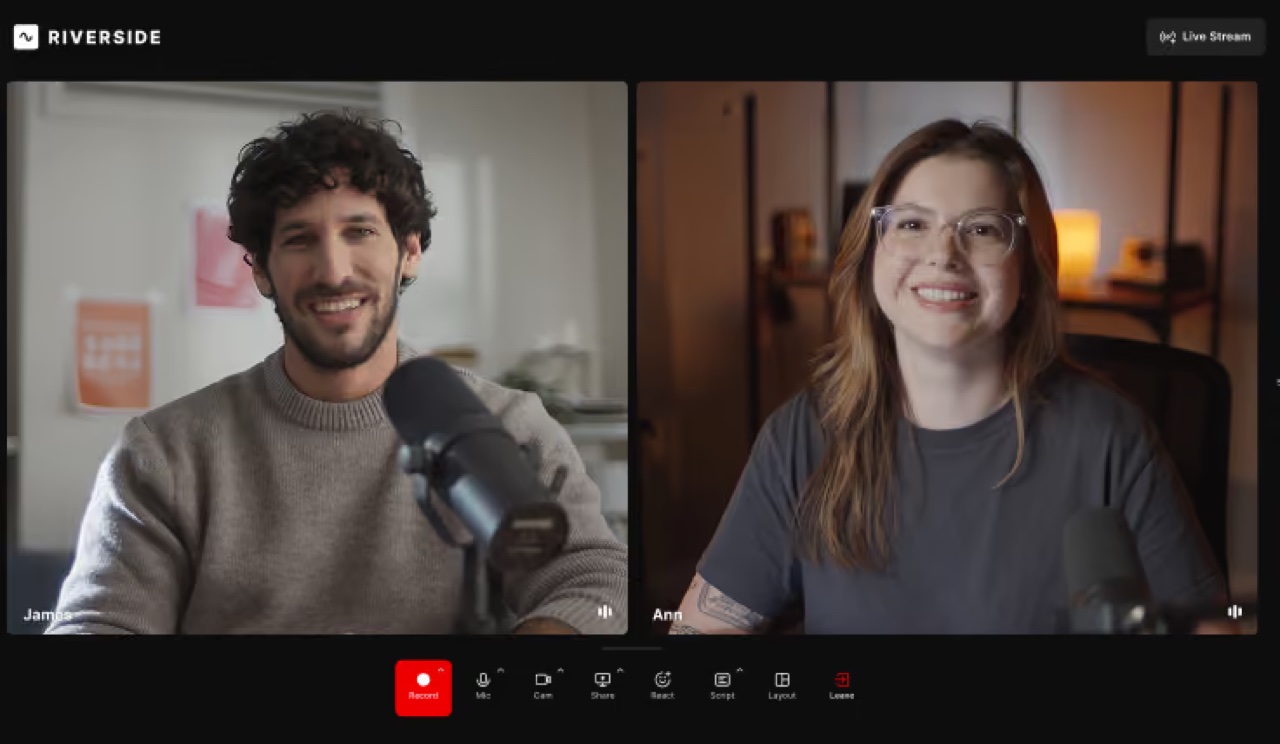
A good host’s interface is valuable when it gets out of the way. Riverside’s 2026 training materials describe a revised studio lobby with a larger camera preview and consolidated input settings. The current layout gives the host more room to check framing before joining and organizes functions such as echo cancellation alongside microphone and speaker controls.
The lobby is the first quality gate. Check that the correct camera and microphone are selected, that background noise is reasonable and that the intended browser has permission to capture the devices. If a guest joins from a phone, ask them to test the exact mobile app or browser recommended by Riverside. A studio that works on the host’s desktop is not proof that every guest device behaves identically.
Guest invitations reduce technical setup but need operational discipline. Send the link early, tell speakers what the session is for, and clarify whether the recording will be distributed publicly. A guest link should not be shared indiscriminately. A producer dealing with confidential customer stories must also set an appropriate retention policy.
Riverside describes a host- and guest-oriented Studio, with supported participant management features and separate recording tracks. Current pricing materials mention ten participants in a single recording session on certain paid tiers, but the practical production limit may depend on mode or workspace options. Don’t promise a ten-person event before running a realistic rehearsal on the selected plan.
The 2026 interface includes a People panel for inviting and managing guests, reaction and hand-raise controls, audio settings and a rebuilt Media Board. The Media Board is useful for bringing presentation material into a show, but producers should check upload size and format limits. Riverside’s September 2026 studio tour mentions a 1 GB limit for supported media-board assets in that workflow.
There is a difference between a speaker entering a Studio and a speaker appearing in the final broadcast. When live publishing is involved, the operator needs a clear stage and backstage process. A guest joining early should be able to adjust their device without unexpectedly appearing in public. For webinars and larger panels, decide who has the authority to bring a person into view.
Use a short guest instruction note: join ten minutes early, wear headphones, disable distracting notifications, keep the computer on power and avoid switching browsers during recording. If a local upload must continue after the call, tell guests to wait for confirmation before shutting their laptop.
If a guest loses connection mid-session, the host should distinguish the live preview from the locally recorded portion. A reconnect might restore the conversation while leaving separate media that needs careful synchronization. The producer should note the approximate disruption time so the editor isn’t forced to reconstruct the incident later.
Scheduling and naming help once the show is recurring. A project called “Customer Interview — October 15 — Company Name” is much easier to audit than “New Recording 12.” Use consistent labels for cameras, speakers and final deliveries. A good naming scheme saves work downstream when content is exported into another editing system.
The studio is the place to get the source material right. The editor is where the finished story takes shape. Mixing those responsibilities unnecessarily can make the host preoccupied with effects when they should be listening to a guest.
🧑💻 2026 Editor: Transcript Cuts, Timelines and Scenes
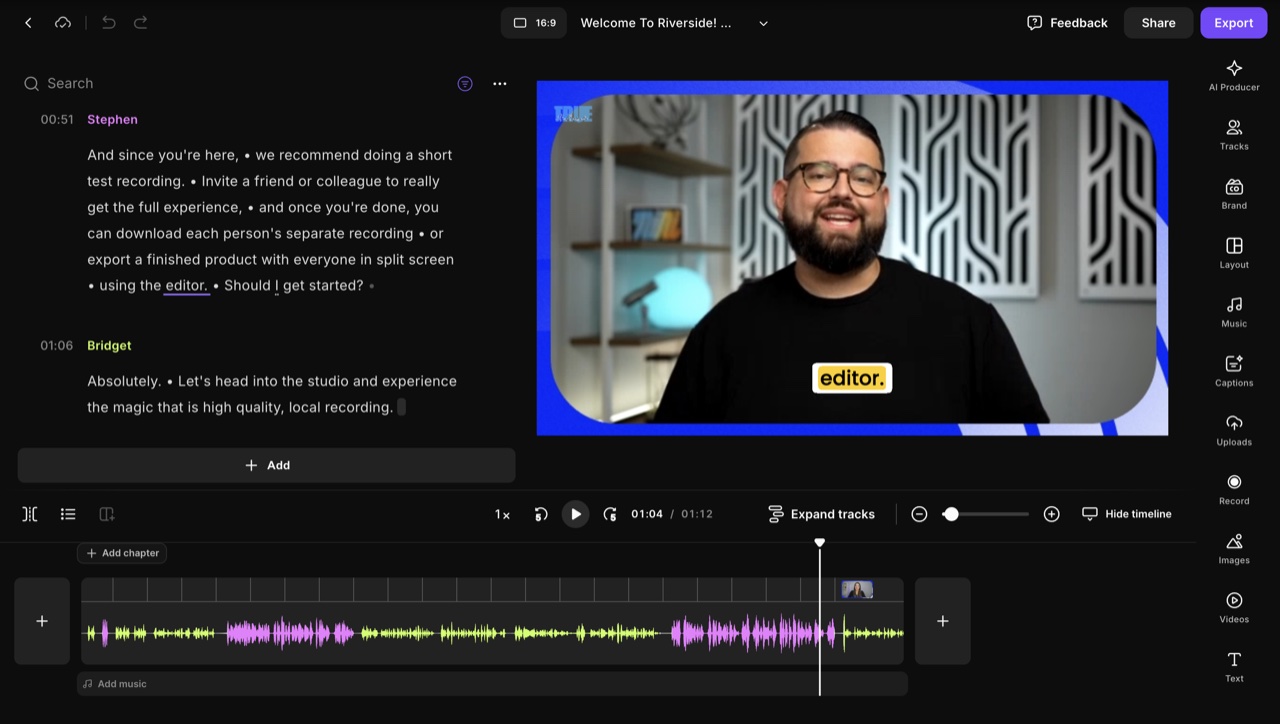
Riverside’s editor is more interesting than a typical automatic clip generator because it combines readable transcript-based editing with conventional visual timeline operations. The producer can remove unwanted sections by editing spoken text, but can also trim, split, rearrange visual material and adjust the presentation when a simple word-level cut isn’t sufficient.
The July 2026 editor walkthrough demonstrates the redesigned workspace. It describes a transcript pane, a video preview, collapsed and expanded timeline modes, smart layouts and scenes, as well as AI tools for pauses, filler words and sound. The combination allows a creator to make quick narrative edits without surrendering every final choice to an automated editor.
Transcript editing works especially well for talking-head content. If a guest repeats an answer, a producer can locate the repetition in the text and remove the weaker passage. If the host asks a question poorly, they can shorten a preamble without individually dragging every waveform segment. That can reduce the time required to produce a clean interview.
However, words are not the entire recording. A speaker’s reaction, timing and pacing carry meaning. Removing every pause can make a conversation sound unnatural. A transcript tool that performs a cut exactly where the selected words end may create an abrupt audio transition. Listen to every important edit; don’t assume a clean sentence in text guarantees a convincing spoken result.
The expanded timeline becomes useful when music or multiple speakers need individual adjustments. Riverside’s updated documentation describes section-level volume control, scene layers and trims that can affect selected tracks independently. That power also introduces synchronization risk. Moving one participant’s video without understanding the linked audio can cause an interview to look subtly wrong.
Scenes let the production change presentation over time: a two-person interview, a single-speaker close-up, a slide or screen-share segment, a call-to-action card and a closing frame. In 2026, Riverside introduced more flexible layouts that allow positioning and resizing speaker tiles, rather than limiting every show to fixed templates. A creator can build a consistent look without manually compositing every moment in a separate video editor.
Visual design should remain subordinate to clarity. A crowded collage may showcase what the layout controls can do, but a phone viewer probably wants the speaker’s face and the most relevant content in a readable arrangement. Establish a minimum font size, safe margins and consistent color palette. Use the preview on a real phone, not just the full-size editing canvas.
The editor offers design controls such as spacing, corner radius, overlays and transitions. These can help maintain a recognizable series, but a team benefits from a simple preset. If every episode uses completely different visual treatments, viewers spend time figuring out the layout rather than listening to the content.
Automatic cleanup is helpful as a starting point. Filler-word removal can shorten a repetitive interview, yet some phrases contain meaningful hesitation or emphasis. Noise correction can improve an imperfect room, but extreme processing can make voices sound artificial. Review a sample from every participant and compare it with the original source before applying the same setting to an hour-long conversation.
Riverside’s editor now includes AI-assisted tools for visual components and repurposing, such as supporting footage and automatically created clips. These can accelerate production, but generated material requires factual and rights checks. A picture inserted because it resembles a transcript keyword is not automatically an accurate illustration of what the guest meant.
An important October 2026 feature update is zoom and pan. Riverside’s tutorial describes using it on talking-head shots, screen shares and overlays, with different start and end framing. It can draw attention to the element under discussion, but it is not a substitute for a correctly captured screen. A tiny, blurry interface remains tiny and blurry even when zoomed.
The AI Editor should therefore be judged as an assistant to a deliberate cut. The best outcome is not a fully automated timeline that no one watches; it is a workflow that makes the editor’s decisions faster while preserving the guest’s meaning and the organization’s editorial responsibility.
💳 Riverside Pricing in 2026: Free, Pro, Grow, Webinar and Business
| Comparison | Free | Pro | Grow | Webinar | Business |
|---|---|---|---|---|---|
| Displayed monthly list price (USD) | $0 | $29 | $39 | $99 | Contact sales |
| Yearly monthly equivalent | $0 | $24 / $288 annually | $34 / $408 annually | Page has inconsistent annual total; verify checkout | Contract-specific |
| Individual source track downloads | One-off limited introductory allowance | 15 hours/month | 20 hours/month | 25 hours/month | Unlimited per contracted terms |
| Studios | Limited Free account | 1 | 2 | 3 | Custom or unlimited |
| Main workflow | Learn recording and editing | 4K source capture, edit and publish | Live multistreaming and audience growth | Registration and managed webinars | Roles, SSO, teams and security |
Riverside’s pricing deserves a careful explanation because the product changed its structure and the public page currently has some inconsistent legacy comparison elements. The headline plans are Free, Pro, Grow, Webinar and Business. You may also find older search results referring to Standard or Live+; those labels should not automatically be treated as current checkout products.
The official Riverside pricing page shows Pro at a $29 monthly list price with a $24 monthly equivalent when billed annually, for an annual total of $288. Grow is shown at a $39 monthly list price, or $34 per month equivalent with annual billing totaling $408. The page presents Webinar at a $99 monthly list price and a $79 equivalent on an annual setting, but one section also displays a $408 annual billing total for Webinar, which doesn’t reconcile with the equivalent figure. We would not quote that particular annual total as fact. Confirm the entire payable amount at checkout.
Free is most valuable for learning the workflow rather than long-term professional delivery. Riverside advertises a one-off allowance for two hours of multitrack recording, limited video quality up to 720p, Riverside watermarking and a range of basic editing features. The wording “one-off” matters. It is not necessarily a free two-hour allocation that resets every month.
Pro is the central recording-and-editing option. Current marketing materials list support for 4K video on eligible devices, 48 kHz audio, removal of the watermark, a host teleprompter, editor tools, transcript-based editing and 15 monthly hours of downloading separate participant tracks. It supports one studio and publishing functions for recorded content. Those details should be verified against the exact plan because quality settings, recording hours and download entitlements are not always the same control.
A podcaster with a weekly 90-minute interview should estimate how much separate-source material they expect to download. Four episodes over a month could fit within 15 session hours, but interviews, retakes and additional guests can change the calculation. The product’s usage rules determine which sessions count against download limits. A practical workflow records expected durations and checks the account dashboard before a busy production week.
Grow adds distribution and audience functions. The current page lists multi-destination live streaming, custom RTMP, 1080p live output, multi-aspect-ratio streaming, Omnichat, social scheduling, hosting and promotional features. It also raises the included number of studios to two and the separate-track download allowance to twenty hours a month. A creator who produces only recorded episodes may not need those additions. A company launching a recurring live series might.
Riverside describes unlimited supported streaming destinations in its Grow marketing materials. That is not a promise that every external platform is always eligible or that simultaneous streaming will never encounter a platform-specific restriction. The source signal, destination account permissions and third-party terms still determine whether a particular event can be delivered successfully.
Webinar is aimed at a different problem. It builds on Grow with registration, branded emails, Q&A, polls, event analytics and CRM-oriented workflows. The public page names one hundred registrants for the relevant entry-tier webinar offer, and a larger capacity on custom Business plans. The included separate-track download allowance increases to twenty-five hours a month, with three studios listed. A product marketing team may find these event-specific functions worth paying for; a video podcaster who never hosts registered events probably won’t.
Business is a consultative offer for organizations with production teams, custom roles, collaboration, additional studios, advanced security and larger registrant requirements. Riverside’s page mentions SSO, custom workspaces, API access, business integrations and more flexible quotas. Those aren’t merely additional decorative options. They change how a company controls people, files, access and publishing at scale.
Another cost line is AI credits. Riverside’s current FAQ says some AI features such as translation and certain generated media draw from a credit allowance, while other core AI tools may not. Do not assume a plan labeled “unlimited editing” allows unlimited third-party processing or every generative effect. Ask which functions consume credits, whether credits expire and how paid top-ups are billed.
Team editing is also separate from the basic subscription. Current pricing guidance says additional editor seats can be purchased as add-ons on several individual tiers, while Business supports a more advanced collaboration model. A solo plan’s flat price is not necessarily the total price for a three-person production company.
To evaluate a subscription, write down the cost of the whole episode cycle: recording, individual-track downloads, editing, captions, hosting, distribution, storage and any needed additional seats. Compare what you use today with what Riverside can genuinely replace. Consolidating a recording tool and editing app is only a saving when you actually stop paying for the old service and the new outputs meet your standards.
Seasonality matters. A creator recording a single batch of interviews over one month may have a different optimal commitment from someone producing multiple shows throughout the year. Annual billing can reduce the monthly equivalent, but it also commits money before the workflow has been tested. Start with a real pilot and inspect the cancellation and renewal terms.
A useful rule is to select the smallest plan that supports the exact deliverables. If source-track downloads and transcript cleanup are the main requirements, Pro may suffice. If recurring multi-network broadcasts are necessary, evaluate Grow. If event registration and lead capture are contractual needs, consider Webinar. If production governance and roles are the bottleneck, move the discussion to Business. Avoid buying the plan with the longest feature list by default.
📉 Track Download Hours: The Hidden Constraint in a Recording Platform
A plan comparison can easily confuse “recording hours,” “download hours” and the number of separate files. Those terms determine whether a creator can deliver raw footage to an editor after a long interview. Riverside’s current documentation and pricing FAQ make the distinction especially important.
Riverside records individual participant media locally and produces project files inside the service. It may allow continuing to record even when the account has reached an allowance for downloading those individual high-quality source tracks. The restriction is not the same as the physical recording suddenly stopping. However, a buyer whose entire workflow relies on raw participant files can find the limitation just as disruptive.
Imagine an agency producing three interview series for different clients. Each series records two hours in a week, and the agency wants to deliver isolated camera and audio files from every session. The total number of source exports may be substantial, even though the host only spends six hours inside the Studio. If the account tracks certain downloads under a time allowance, the team needs to know exactly how it is calculated.
The current published Pro allowance is fifteen hours of separate-track downloads per month, and Grow advertises twenty. These are planning figures, not invitations to ignore the platform’s usage policy. Check the dashboard as you record, because a full day of bonus interviews can consume more of the budget than an ordinary week.
There is also a distinction between raw, aligned and compressed output. Riverside’s download guide describes raw video, aligned video, raw audio and compressed audio. They are useful for different editing situations. Sending the wrong one can waste both storage and editorial time.
An editor working in Premiere Pro or another multitrack application may want synchronized individual footage. A researcher preparing a transcript might be fine with a compressed audio reference. A production company delivering client masters needs a clear definition in its contract. “Full recording” should not stand in for a file format, resolution and audio specification.
When an account’s allowance is close to its limit, decide what needs to be preserved at source quality. A mission-critical customer interview probably deserves separate files. An internal brainstorming call may only need a mixed reference. This isn’t an argument to skimp on backups; it is a reason to understand what each exported file is for.
Because plan definitions can change, confirm how limits reset, whether an upgrade is immediate and what happens to recordings when you downgrade. A creator should not discover after a client session that downloaded tracks are inaccessible at the purchased tier. Test the deliverable while there is still time to repeat a low-stakes recording.
🤖 AI Editing, Magic Clips and Co-Creator: Useful Assistant or Expensive Distraction?
AI features are most useful when the task is clearly defined. Finding three potentially interesting moments in a two-hour interview can take real time. So can cleaning repeated filler words and preparing a draft transcript. Riverside positions its editor and repurposing functions as a way to reduce that manual work.
The practical value begins with retrieval. Once a transcript exists, a producer can search for a topic, find the point where a guest answered a particular question and move directly to that moment on the timeline. This is especially valuable for long interviews where the team knows what it wants but doesn’t remember the timestamp.
Magic Clips and similar repurposing features can suggest short segments for social distribution. Treat those suggestions as candidates, not final editorial judgments. A model may select a sentence because it sounds dramatic while omitting the context that made it accurate. Anyone publishing a customer quote should compare the clip with the complete answer and verify that the meaning hasn’t changed.
Audio cleanup can also save work. Removing persistent low-level noise or reducing obvious silence can improve a draft, but automatic cleanup can distort natural speech if applied aggressively. A nervous guest may pause before an important answer; cutting that pause to zero can make the interview feel rushed. The editor should preserve authenticity rather than maximize the number of cuts.
Riverside’s Co-Creator branding covers AI-assisted workflow actions within the production suite. The current pricing page also introduces a Riverside MCP connection for eligible tools. These features may help an assistant locate material, propose edits or coordinate publishing actions, but a buyer should examine access permissions, credit use and the consequences of allowing automation to manipulate client content.
For a business, an “AI agent” is not a substitute for a publishing policy. Decide who may approve generated clips, captions and descriptions, and keep a review step before content appears on a public social account. Automated topic selection can be fast; it cannot guarantee legal context, brand suitability or editorial truth.
Riverside’s July 2026 editor training demonstrates tools for filler words, pauses, visual media, sound enhancement and layouts. These are credible capabilities to evaluate in a trial. The amount of time they actually save varies by source material. A clean studio interview with two articulate speakers may need little processing; a noisy group call might require much more human correction than the marketing demo suggests.
Generated B-roll brings another responsibility. If an AI visual implies that a particular person visited a place, used a product or experienced an event they did not, it can mislead viewers. Use generic illustrative material only when clearly appropriate, and verify licensing or platform usage permissions before public distribution.
Automatic subtitles deserve careful attention to proper nouns, acronyms and foreign names. A transcript engine can turn a software brand into a common word or mishear a product’s technical specification. When a company publishes professional advice, those errors can damage credibility far more than a missing transition animation.
For high-volume teams, a good AI-assisted pipeline might be: first import or record a conversation, then search the transcript for a genuine claim, generate candidate clips, verify context against the full recording, adjust captions, approve the visual treatment and schedule the final item. Each step has a clear owner. That is more scalable than asking one assistant to “make everything viral.”
The economic argument is also mixed. Bundled AI tools can reduce subscriptions for a small team. A specialist editor may still deliver better control for complex material. Compare the output quality and correction time of both approaches, not simply the number of available AI buttons.
📡 Riverside Live Streaming and Audience Tools: When Grow Makes Sense
Live production and high-quality local recording are not the same job. A creator can have excellent local tracks and still deliver a poor public stream because of an unstable network connection or a destination configuration error. Riverside’s Grow tier addresses live distribution and related audience workflows in addition to the recording-and-editing tools of Pro.
Riverside’s current pricing page markets Full HD 1080p live streaming, multistreaming to supported social platforms, custom RTMP, an aggregated chat view and multi-aspect-ratio streaming as Grow capabilities. That makes Grow relevant to creators who need their recorded show to reach an audience in real time, rather than only publishing an edited episode afterward.
The production chain still matters. The host and guests send their live media to Riverside. The platform constructs the live experience and sends it to the chosen destinations. Separate locally recorded files can later be used for post-production. A livestream that looked slightly compressed to viewers is not necessarily the same file the editor receives after the session.
The number of destinations isn’t a reliable proxy for the number of people reached. A creator can stream to six networks but still spend most of the show talking to the one place where viewers actually engage. Each platform has its own comment conventions, audience habits and moderation requirements. More outputs can also increase the work of keeping titles, thumbnails and permissions consistent.
Omnichat can reduce the number of browser tabs needed for supported conversations. However, merged messages don’t give the host identical moderation powers everywhere. A producer may still need platform-native dashboards for account-specific actions. Test what appears in the merged view before relying on it during a sponsored event.
Portrait and widescreen streaming create a design challenge. A screen share that is readable in a 16:9 YouTube presentation may be almost useless in a narrow vertical format. If a creator wants both, they should treat them as distinct outputs and check where faces, captions and product UI appear on actual mobile playback.
Live engagement tools can make a show more interactive, but only if someone watches the audience. A solo host trying to demo a complicated app while monitoring multiple chats is likely to miss useful questions. A moderator or producer can protect the conversation from becoming a continuous series of technical distractions.
For a company measuring live content, define the downstream outcome before going on air. It may be webinar registrations, qualified demo requests or customers who complete onboarding. Aggregated viewers are not necessarily comparable across platforms because concurrent audience statistics and playback definitions differ.
Riverside’s distribution features may overlap with Restream, which specializes in routing live programs. If you already produce a complex OBS output and simply need additional destinations, a dedicated relay may be more straightforward. If you need remote recording, editing and publication in the same account, Grow has a broader workflow to offer.
It is also reasonable for a podcaster to ignore live streaming entirely. Not every show benefits from turning a careful recorded interview into a public event. The pressure of a live audience can make guests less comfortable, and post-production often improves accuracy and pacing. Upgrade for a real audience strategy, not because every creator seems to be livestreaming.
🎟️ Webinars, Registration and Lead Capture: Different from a Podcast Episode
A public interview and a lead-generation webinar can use the same microphones but have different business requirements. A webinar may require registration, reminder emails, private access, live Q&A, a follow-up message and tracking of which attendees requested a product demonstration. Riverside’s Webinar tier targets that set of needs.
At the public pricing check, Riverside described a Webinar plan with registration forms, branded reminders, audience polls and Q&A, CRM-oriented integrations and event analytics. It listed a starting capacity of one hundred registrants, with larger arrangements available through Business. The exact registrant cap and billing cost should be confirmed in the intended account before sending invitations.
A structured webinar begins before the speaker turns on a camera. The organizer chooses an accurate title, invites the right audience and agrees on what personal information will be collected. Registration can generate useful leads, but it also creates privacy and retention duties. A successful technical stream does not automatically justify every follow-up email.
A typical run sheet could allocate five minutes to a welcome, fifteen minutes to teaching, ten minutes to a demonstration and ten minutes to audience questions. The host should rehearse transitions and ensure that sensitive browser content cannot appear during screen sharing. A pre-recorded event should be represented transparently if viewers believe the presenter is speaking live.
The service may support scheduling recurring webinars, embedding a broadcast in an external website, and publishing a recording afterward. The organizer should still check whether those actions follow the selected plan’s limits and the organization’s legal requirements. Some businesses may prefer Riverside only for the production and use an established CRM or event platform for registration and nurture workflows.
Lead capture is only as good as the experience offered to participants. A complicated sign-up process can deter people from attending, while a smooth entry page with a clear promise may work better than a dozen branded fields. Test the registration from a device that is not signed in as the organizer, and verify exactly what confirmation messages arrive.
When a webinar ends, the work continues. Confirm the recording is complete, review any generated clips, send only the promised follow-up and assess the questions people asked. If the show produces no meaningful inquiries, the next decision may be to improve the topic rather than buy a larger event plan.
Webinar’s value should be evaluated in comparison with a simpler Grow live stream and an existing registration tool. A team already paying for a robust events platform may not need duplicate sign-up and analytics functions. Conversely, a small organization may benefit from the convenience of producing and managing an event in one place.
The difference between Grow and Webinar is therefore not just a line of features. Grow helps broadcast and publish; Webinar adds the infrastructure around a registered audience event. Choose the one that matches the operational job.
🔒 Security, Guest Permissions, Retention and Team Roles
Video software handles more personal information than many creators expect. An ordinary interview may contain a guest’s name, image, voice and background. A customer demonstration can include company dashboards and account identifiers. A team meeting may record people who did not expect their words to become public content. Good source quality does not make a workflow automatically appropriate for sensitive information.
A guest link should be shared only with the intended participant. Do not place studio invitations in public documents, examples or screenshots. Agree on whether the session is live, recorded, edited and republished before the guest starts talking. When a contributor joins from a mobile device, remind them to turn off notifications that might expose private content if the screen is shared.
Riverside’s Business offering advertises administrative options such as custom roles, SSO and team-oriented collaboration. Those features may be relevant when a company runs several shows or handles client recordings. However, a feature label is not a full information-security assessment. Review the specific contract, user roles, data processing agreement, storage locations and compliance requirements for the organization’s jurisdiction.
AI-assisted editing introduces additional questions. If an assistant can read transcripts and alter clips, who approves the action? If the workspace connects to external publishing accounts, what can the integration post? A producer should understand which credentials are held by the service and what permissions remain after someone leaves the team.
Recording retention is often overlooked. The storage required for local 4K tracks can be substantial, and keeping every rough take forever may not be desirable. Establish where verified masters are archived, who can download them and how long unnecessary files should remain. Removing a file from an editing dashboard should not be confused with deleting every copy from backups or external publishing systems.
There is also an editorial obligation. If a person makes an inaccurate factual claim during a recording, automation should not amplify it into ten short clips without verification. The producer remains responsible for statements, captions, images and consent. This is especially important in medical, financial or legal discussions.
For businesses, an access audit should follow every major project. Confirm who still has a seat, which collaborators can view client files and whether connected social accounts are still needed. When staff change, rotate compromised keys or tokens and retire stale invitations. Small controls are easier to maintain when they are documented before a problem occurs.
Riverside publishes security claims and enterprise capabilities, but we did not conduct a penetration test, inspect its private architecture or certify any compliance program. Buyers who handle sensitive material should perform the assessment required by their own organization.
🆚 Riverside vs StreamYard, Restream, OBS and Descript
| Workflow | Riverside | StreamYard | Restream | OBS Studio | Descript |
|---|---|---|---|---|---|
| Main job | Remote source recording, editing and publishing | Browser guest production and live shows | Cloud routing and browser Studio | Local encoder and capture | Transcript-based editing and media production |
| Individual local tracks | Core model subject to plan quotas | Available under qualifying plans | Studio beta under its own conditions | Local capture tracks configurable | Import or edit recordings |
| Editing focus | Transcripts, timelines, AI and social clips | Live-stage and after-show tools | Limited by plan and production mode | Technical recording, plugins | Editing and transcript workflow |
| Live multistreaming | Grow and higher, subject to destination rules | Paid 3/8 destinations by plan | Core routing strength | Extra plugins or cloud routing | Not primary product role |
| Best for | Interview production through publication | Remote guest-led live shows | Distribution of an existing program | Gaming/complex local scenes | Editorial post-production |
A comparison is only fair when the products solve the same job. Riverside’s distinctive combination is remote recording, editable source tracks, post-production and distribution. StreamYard’s identity is a browser studio built around guest-led live production. Restream is especially useful as a cloud relay for existing live feeds. OBS is a local capture and encoding application. Descript emphasizes transcript-led editing and related media workflows.
Riverside versus StreamYard: Both can host remote conversations. Riverside deserves extra attention when editors require separate high-quality participant source tracks and want to turn those recordings into many outputs. StreamYard is particularly relevant to hosts who prioritize fast browser-stage control, guest management and live interaction. Neither should win without testing the actual recording export and required live destinations.
Riverside versus Restream: Riverside increasingly covers live distribution on Grow and higher tiers, but Restream remains a dedicated choice for routing an already-produced local show to several destinations. If your source is OBS and your only problem is distribution, a relay may be simpler. If your work includes recording, transcript edits, podcast hosting and published short clips, Riverside’s wider suite might reduce handoffs.
Riverside versus OBS Studio: OBS is excellent for technical, local-first capture, with broad control over scenes, devices and encoder parameters. Riverside makes a remote two-person recording easier to organize and produces separate participant tracks under supported plans. A company could use OBS for a live product demonstration and Riverside for customer interviews. There is no reason to force every format through one application.
Riverside versus Descript: Both address editing conversations using text. Descript has its own specialized workflow for audio and video changes, while Riverside tightly connects the editor to its own source recordings and publishing process. A team that already records elsewhere may prefer a dedicated post-production tool. A creator starting from Riverside guest links may benefit from keeping the first edits in the same place.
The cost comparison should include everything needed to complete one episode. A zero-cost local recorder does not pay for live distribution, cloud file delivery or a paid video editor. Equally, buying Riverside Grow does not guarantee that every specialized editing function or enterprise security requirement is covered. Compare complete workflows, not only monthly sticker prices.
Our separate StreamYard review, Restream review, OBS Studio review and Descript review offer additional context. Choose the tools that remove actual friction from the work.
🧪 Three Riverside Pilot Scenarios — Illustrations, Not Benchmarks
Scenario one: A weekly remote interview podcast. The host invites one guest, records a forty-five-minute conversation, downloads each person’s source files, removes a long digression by editing the transcript, and exports the final episode. The pilot succeeds when both voices are clean, the video and audio remain synchronized, and the editor receives the formats they need. Whether the company uses AI for clips comes after proving the source capture works.
A team should also test the guest handoff. Was it easy to find the correct input? Did both local uploads finish before the guest left? Could the host recover the recording in a predictable location? Those mundane answers determine whether a workflow is suitable for a weekly publishing schedule.
Scenario two: A founder recording product customer stories. Three interviews are scheduled with customers in different time zones. The marketing team wants a long video testimonial plus brief clips for social networks. Riverside’s separate tracks and transcript editor could make that workflow efficient. But the team must obtain publishing permission, check the interview’s accuracy and avoid AI-generated imagery that suggests the customer said or did something they did not.
The meaningful measure is not how many clips an AI proposes. It is how many accurate, consented and brand-appropriate pieces can be published without exhausting a producer’s time. An automated output that must be rewritten completely is not a productivity gain.
Scenario three: A registered live product webinar. A software company plans a forty-minute workshop with a product demonstration, live questions and an edited replay. Grow might support live distribution, but Webinar functions are relevant if the business needs registration, reminder emails and lead analytics. Before paying, the team tests attendee registration, speaker permissions, the mobile viewing experience and the availability of source recordings for post-production.
The event should have a backup destination if the main platform or a connected service becomes unavailable. A moderator should own audience questions. The business should also define which collected information is used for follow-up and how long it is retained. Reliable video is only one part of a successful webinar.
These scenarios are proposed evaluation methods. We did not run them as laboratory tests, and they do not represent measured Riverside performance.
✅ Pros, Cons and the Pre-Purchase Checklist
👍 What We Love
- ✅ Locally recorded tracks: Separate participant source media helps with remote interview editing.
- ✅ 2026 editing tools: Transcript cuts, timeline controls, scenes and AI tools make repurposing accessible.
- ✅ Publishing workflow: Paid plans can connect recording, editing and distribution more tightly.
- ✅ Flexible audience options: Grow and Webinar expand into live streaming and registered events.
👎 Where It Falls Short
- ❌ Track download caps: Recording is not the same as unlimited high-quality source exports.
- ❌ Pricing clarity: Old plan references and conflicting Webinar figures need checkout verification.
- ❌ Quota-dependent AI: Some generative features use credit allowances or add-ons.
- ❌ Specialist tools can fit better: Complex local game capture may need OBS or Streamlabs.

Riverside — Editorial Recording Snapshot
Good fit: remote podcast and interview recording with editing and publishing. Reconsider: unlimited 4K recordings on every device, unlimited source downloads, or every AI service without credits.
Vendor-documentation research; no paid subscription or laboratory benchmark is claimed.
Riverside’s strengths are most obvious in its locally recorded participant media, host-and-guest workflow and the connection between transcripts, editing and publishing. A solo creator can reduce tool switching when the editor is sufficient for their format. A marketing team can preserve high-quality source files and prepare clips without rebuilding every project from scratch.
The limits are equally real. Separate-track download caps differ from recording allowances. AI-credit pricing can be difficult to forecast for heavy use. The current pricing page has inconsistent remnants of older plan comparisons. Teams may also require paid seats or Business administration, and 4K depends on participant hardware and workflow.
Before buying, answer a short set of questions: Can every guest use the supported device? Which source files must be downloaded? How many monthly track-download hours will the production need? How many separate shows or studios will exist? Does the team genuinely need livestreaming or registered webinars? Which AI functions consume additional credits? What is the total checkout and renewal commitment? Who approves all public clips?
A twenty-minute pilot is enough to discover many deal breakers. Record a guest, edit a transcript, download a separate track, create one short clip and verify its caption. If the plan cannot support those actions at the required quality, it doesn’t matter how compelling the pricing grid looks.
🏁 Final Verdict: Is Riverside Worth Paying For in 2026?
Riverside is worth considering when a conversation needs to become usable source media and then a polished deliverable. Its 2026 studio and editor improvements make the product more capable than older descriptions of a remote-only recorder suggest. The platform is particularly relevant to podcasters, interviewers, educators and teams creating reusable video around real human conversations.
Pro appears to be the practical first paid plan for recording, editing and publishing. Grow is for creators who will actually use live multistreaming and audience tools. Webinar adds a structured event workflow. Business supports a more complex organization, but requires contract-specific review. The free plan is suitable for testing within its limitations.
We would not recommend an upgrade merely because 4K, AI or unlimited recording appear in a marketing headline. Ask what can be exported, how many high-quality individual-track hours are included and whether the guest devices are capable of producing the desired files. For a reliable editing operation, those details are more important than the plan’s name.
The strongest reason to buy Riverside is a measurable reduction in the work between the conversation and the final piece of content. The strongest reason to choose something else is that you only need one narrow part of that workflow.
❓ Frequently Asked Questions About Riverside
Is Riverside free to use in 2026?
Yes. The Free tier provides access to basic recording and editing, but with a one-off allowance for multitrack recordings, reduced video quality and Riverside branding. The current marketing page describes two hours of separate-track recording on Free rather than an automatically renewing monthly allowance. Some editing functions are also present, though export formats and AI permissions may vary. Try a real guest session before deciding whether the limits fit an ongoing series.
What’s the difference between Riverside Pro and Grow?
Pro is centered on recording, editing and publishing, with eligible 4K source capture and a current published allowance of fifteen hours of separate-track downloads per month. Grow adds live multistreaming, audience and scheduling features, more studios and a twenty-hour separate-track download allowance. The exact value depends on whether your workflow is recorded-first or live-first. Do not upgrade for distribution features you will not use.
Does Riverside record each participant locally?
Riverside describes locally recorded high-quality participant audio and video tracks that upload during or after a studio session. This differs from relying only on a compressed cloud call recording. However, the quality depends on each participant’s hardware, studio settings and successful upload completion. A host should confirm that every source file is available before ending the production handoff. A cloud backup may be useful, but it is not always equivalent to the original track.
Can Riverside record video in 4K?
Yes, on supported paid plans and devices. Riverside’s recording guide explains that the participant must have a camera capable of 4K and use a compatible browser or app setup. Mobile capabilities can depend on the device and which camera is selected. 4K is not a promise of identical quality from every participant, nor does it mean every live destination receives a 4K broadcast. Verify the actual recorded file after a test.
Are Riverside recording hours and separate-track download hours the same?
No. Riverside’s updated pricing FAQ explicitly distinguishes the ability to continue recording from the monthly allowance for downloading individual high-quality participant tracks. Current figures include fifteen hours on Pro, twenty on Grow and twenty-five on Webinar. When the track-download allowance is exhausted, recording may remain available while access to further individual source downloads is limited until the plan cycle changes or an upgrade applies. Check the account dashboard before a critical session.
Does Riverside offer a transcript-based video editor?
Yes. Riverside’s 2026 Editor supports text-based cuts together with a more flexible timeline, scenes, layouts, audio adjustments and overlays. You can navigate a recording by spoken text, trim and split media on the timeline and export edited video or audio. Some AI-assisted tools automate repetitive operations, but human review remains important to protect accuracy, natural speech rhythm and synchronization.
What does Riverside Grow add for livestreaming?
The public Grow offer includes Full HD 1080p live streaming, multistreaming to supported platforms, custom RTMP, multi-aspect-ratio output and Omnichat-style audience management. These tools are useful for recurring live programs that need multiple audiences. Platform permissions and network quality still affect delivery, and additional destinations require more moderation. A recorded-only podcast may not need Grow.
Is Riverside’s Webinar plan necessary for a registered event?
Riverside currently reserves structured webinar capabilities such as registration, branded reminders, Q&A, polls and event analytics for Webinar or more advanced offerings. Grow has live broadcasting tools but is not identical to a dedicated lead-generation webinar workflow. If the organization already uses a registration platform, evaluate whether the added layer is necessary. Confirm the selected plan’s registrant limit and checkout total.
Can AI Magic Clips replace a human editor?
They can suggest useful short segments and reduce time spent scanning long recordings, but they do not guarantee that a clip preserves the original context or meets a publication standard. A producer should verify speaker attribution, captions, facts, visual rights and consent. AI is most valuable as a candidate-generation and cleanup tool inside a reviewed editorial process, not as a substitute for approving everything it creates.
Is Riverside better than StreamYard for podcast interviews?
Both offer browser-based guest recording workflows. Riverside is particularly compelling when separate high-quality source files and editing/publishing features are central to the process. StreamYard is a strong comparison for host-led live productions with guests, banners and audience interaction. The right choice depends on required downloads, guest devices, multistream destinations, workflow and plan cost. Test the same real interview format in both before paying.
How much does Riverside cost in 2026?
Riverside’s current public pricing page lists Free at $0, Pro with a $29 monthly list rate or $24 monthly equivalent billed $288 yearly, and Grow with a $39 monthly list rate or $34 monthly equivalent billed $408 yearly. Webinar and Business have different entitlements; at this check, the public page displayed inconsistent annual billing amounts for Webinar. Use the exact checkout terms presented to the intended account, including taxes, add-ons, credits and renewal conditions, before treating a figure as final.
📚 Editorial Sources and Method
This review is based on current public documentation rather than paid hands-on testing. Primary sources include Riverside pricing, Riverside 2.0 changes, high-quality local tracks, downloading individual source tracks, 4K recording setup, the 2026 editor walkthrough, the updated timeline and editor and October 2026 zoom and pan.
We distinguish vendor descriptions from our editorial interpretation, make no claims of using a paid account or measuring live broadcast performance, and recommend confirming prices, quotas and policies in the actual checkout and subscription dashboard. Riverside’s public site still contains some inconsistent pricing display fields at the time of writing.
EXPLORE NEXT ON DIGIOFFLY
Explore More After This Riverside Review
Choose a reliable remote recording, editing and distribution workflow before purchasing overlapping creator subscriptions.
Choose a video production stack
- Compare StreamYard — Assess browser-based guest and live-show production.
- Compare Restream — Explore cloud routing and distribution.
Check source recording expenses
- Review OBS Studio — Evaluate free local recording and encoding.
- Review Descript — Research transcript-first editing options.
Compare recording alternatives
- Explore creator tools — Find other podcast and video software.
- Find additional tools — Filter software for production tasks.
- Estimate software costs — Compare recurring and annual commitments.
Published plan references change. Confirm usage, annual billing, participant tracks, AI credits, annual commitments and editing seats directly with the vendor.