

Prices checked October 16, 2026. SiteGround advertises annual prepaid introductions of $2.99/month for StartUp, $4.99 for GrowBig, and $7.99 for GoGeek in its US offer. Its October 12 regular-rate table shows $17.99, $29.99, and $44.99/month for a 12-month renewal term. These figures exclude tax and can change. Hosting plans · Official regular rates.
Most hosting companies are delightful on day one. You pick a plan, connect a domain, click Install WordPress, and watch an empty dashboard appear. The difference emerges six months later, when a plugin update breaks checkout, an editor accidentally deletes a page, or your renewal invoice looks nothing like your signup bill.
That’s where SiteGround has something interesting to offer. Its pitch is less about giving you a blank server and more about handling ordinary website chores from one dashboard. Backups, caching, SSL, staging and WordPress maintenance live in a recognizable workflow. But does that convenience justify its higher ongoing prices?
In this SiteGround review 2026, we’ll put the three plans against actual publishing scenarios, examine what Site Tools can and cannot do, and run the renewal math that promotional landing pages rarely emphasize. The official screenshots are from public SiteGround pages. We did not purchase a plan or perform independent uptime or speed benchmarks.
📊 SiteGround Review Summary
SiteGround is a managed, WordPress-friendly hosting option for people who would rather spend time publishing than managing the underlying server. StartUp is aimed at one modest website. GrowBig makes more sense when staging and multiple websites are part of your normal workflow. GoGeek is for users who genuinely need more agency and developer options.
The deciding factor is the trade-off between convenience and cost. SiteGround documents a useful range of site-management features, but the advertised entry prices are promotional; the regular 12-month prepaid rates are several times higher. Our assessment weighs the documented functionality against the practical costs and limits—not promotional speed claims.
The short version: shortlist SiteGround for structured WordPress management. Skip it if your chief requirement is the lowest possible long-term bill or extensive server-level control.
⚡ Quick Verdict: Is SiteGround Worth It in 2026?
For a WordPress business that regularly changes its site, yes—provided the renewal price fits the budget. Being able to stage a redesign, recover a broken installation and manage SSL or backups in a single panel is not glamorous. It is, however, the kind of capability that helps a small team work without turning every update into a crisis.
GrowBig looks like the most balanced plan for a growing publisher or a small store because it adds capabilities a one-site starter may eventually miss. StartUp can be enough for a simple blog or portfolio. GoGeek deserves consideration when your agency actually uses Git, white-label access, private DNS and priority support.
The weak points are worth saying upfront: unlimited website counts are still bounded by shared resource policies, staging has technical limitations, and the second-year bill is far less attractive than the first. A custom app demanding root access or specific infrastructure should be compared with cloud hosting instead.
🏆 SiteGround Pros and Cons
Our positive assessment is about the practical toolset and clear tier progression, not invented firsthand support experiences. Equally, the concerns about renewal economics and resource constraints come from the vendor’s own published model. That is a stronger basis for a buying decision than claiming one host beats another by an unverified number of milliseconds.
👍 What We Love
- ✅ One management interface: Site Tools brings SSL, files, application controls, backups and other daily operations into a site-focused dashboard.
- ✅ Staging on higher tiers: GrowBig and GoGeek support testing significant WordPress changes before publishing them.
- ✅ WordPress-centered offering: SiteGround documents migrations, managed updates, caching and recovery options.
- ✅ Developer options: GoGeek is built for more advanced team, Git and agency-related workflows.
👎 Where It Falls Short
- ❌ Steeper regular prices: The one-year promotional totals are much lower than published regular 12-month rates.
- ❌ Resource ceilings: Multiple websites and unmetered transfers do not mean unlimited processing capacity.
- ❌ Staging restrictions: Database, inode, storage and WordPress Multisite limitations can affect complex projects.
🏆 EDITORIAL VERDICT: RECOMMENDED FOR WORDPRESS TEAMS
Best for: WordPress publishers and small agencies that value staging, backups and straightforward website management. This is an editorial fit assessment, not a lab-tested speed rating.
🧠 What Is SiteGround?
SiteGround sells several website services, but the product at the heart of this review is its shared web hosting family: StartUp, GrowBig and GoGeek. These plans can host WordPress websites and give the owner access to Site Tools, a site-specific management interface. SiteGround also offers a Website Builder, which is a different product experience.
That distinction matters. A conventional WordPress installation consists of familiar files, plugins, themes and a database that can generally be migrated to another compatible host. A site created in a proprietary builder may not offer the same one-to-one export of its design. If WordPress flexibility is the reason you’re shopping for hosting, make sure the product in your checkout really supports the WordPress workflow you intend to run.
The advertised bundle covers everyday essentials such as SSL, email, CDN, backups, installation and management options. It does not mean the provider takes ownership of your plugin choices, site security policy or customers’ personal information. SiteGround provides a managed environment; you still operate a website.
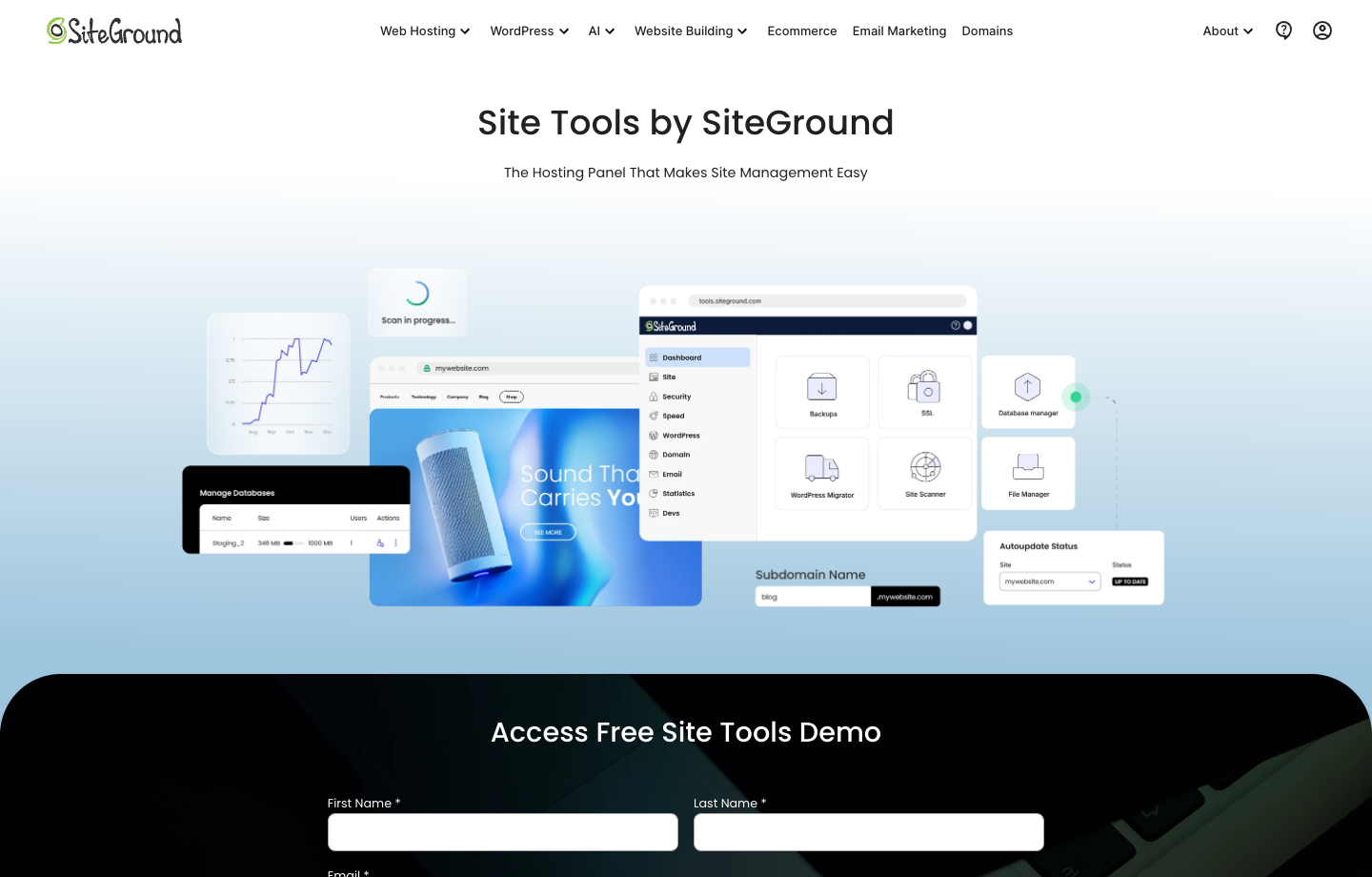
Official vendor screenshot from <a href=”https://www.siteground.com/site-tools” target=”_blank” rel=”noopener noreferrer nofollow”>SiteGround</a>, captured October 16, 2026. This is a public marketing page, not a private paid account.
🖥️ SiteGround Site Tools: Interface and Daily Management
SiteGround’s control panel is called Site Tools. Instead of putting every task into a traditional cPanel view, it organizes many settings around the website you are working on. The public interface shows pathways for SSL, files, databases, application installation, caching, email, backups and other administrative work.
Imagine an editor reports that the contact form stopped sending messages after an update. You would want to check the website, examine its application or email configuration, inspect the recent changes and consider whether a restore is necessary. Having common site tools within one environment can make those steps less intimidating, especially when the person handling the problem isn’t a full-time system administrator.
Still, a clean control panel doesn’t magically fix broken plugins. SiteGround’s public screenshots cannot tell us how quickly a particular database query runs or how a real support agent resolves a complex issue. We’re judging the documented tool coverage and the workflows it permits. Users coming from cPanel should also expect to relearn a few menu paths.
The key test before committing is simple: can you locate a file manager, confirm a backup exists, manage a certificate, see the WordPress installation and find the staging controls without depending on outside tutorials every time?
🧭 How to Move Your WordPress Site to SiteGround
Moving an existing website isn’t just about copying posts. Your installation may depend on email, payment callbacks, image files, redirect rules, DNS settings and outside services. If you change hosts, all of those deserve attention.
1. Select a WordPress-compatible plan
Check whether one site or multiple properties need hosting. Confirm storage and resource policies, the presence of staging if necessary, and the billing term. Make sure the cart contains the hosting product you need rather than an unrelated website-builder setup.
2. Back up files and databases
Before touching DNS, create a complete copy of your current WordPress files and database. Export mailboxes if the old hosting account also handles email. Keep a written record of current DNS entries, especially MX and email authentication records. Don’t cancel the old host while the migration is still unverified.
3. Migrate and test privately
Follow SiteGround’s current migration documentation or use qualified assistance for a complicated configuration. On a private preview, test older articles, image attachments, logins, contact forms and any transactional functions. A WooCommerce site should verify products, payments, stock updates and emails—not only that the homepage loads.
4. Switch DNS and verify the real site
When the destination passes your tests, change the appropriate DNS records and watch for errors. Recheck HTTPS, canonical URLs, redirects, email delivery and analytics events. Retain the former hosting environment for an appropriate overlap period so you can recover if something unexpected appears.
🛠️ SiteGround Features That Actually Matter
The most useful features tend to reveal their value during maintenance. SiteGround’s public documentation helps us separate basic access to a tool from its advanced entitlements.
🔐 Backups and Recovery
Automated daily backup copies are part of SiteGround’s shared hosting offer. The vendor documents ways to restore files, databases and email separately or together, depending on the recovery scenario. Additional manual, hourly and one-click downloadable backups can depend on the plan or Premium Backups.
That distinction is easy to miss. Having backups does not always mean you can download every ready-made snapshot for free. SiteGround’s October 14 guide explains that customers without Premium Backups can still obtain an independent copy by downloading site files and exporting the database manually.
For a blog, restoring a missed file may be relatively straightforward. For a busy store, rolling a database back a day could erase recent orders. Keep an independent copy, rehearse recovery and understand which parts you would restore before an emergency makes the choice for you.
🧪 WordPress Staging
Staging is a private copy of your website where you can test a theme redesign, plugin update or new checkout element before deploying it to real visitors. That alone can justify paying for a higher tier when your WordPress site generates revenue.
SiteGround documents limitations that should be part of any serious evaluation. Its staging tutorial calls for a database smaller than 5 GB and fewer than 500 tables, with more than 51% free storage and 20% free inodes. It also limits the number of staging environments and daily operations, and does not currently support WordPress Multisite.
Those conditions won’t worry everyone. But if your store has an unusually large database, staging should be validated before you promise a client a frictionless launch. Never assume testing is risk-free simply because it takes place on a different subdomain: copies may contain customer data, and a full deployment can overwrite newer production information.
🚀 Caching, CDN and Security
SiteGround advertises caching and a CDN as ways to improve delivery of website content. Both can be helpful, but they tackle different bottlenecks. Cached pages reduce repeat WordPress work; a CDN can place eligible assets nearer to visitors. Neither automatically cures a plugin that issues costly database queries, a poorly optimized landing page or a cart that must be calculated individually for each buyer.
SSL and routine security features are valuable, too. But a web host cannot remove your responsibility for updating third-party plugins, limiting administrator access and using sensible passwords or multi-factor authentication. If a contractor still has an old login or an abandoned plugin remains installed, an impressive security badge on the hosting homepage will not make those risks disappear.
We have not performed a controlled speed comparison or uptime benchmark on a paid SiteGround account. We won’t describe SiteGround as the fastest hosting provider based on its own advertisements. To test that claim, you’d need equivalent WordPress installations, identical page content and caching settings, repeated geographic measurements and representative uncached traffic.
🧮 What Does SiteGround Really Cost?
At the advertised introductory prices, the three plans cost $35.88, $59.88 and $95.88 for the first prepaid year before tax. Those prices are not the standard year-two rates.
The October 12, 2026 regular pricing table lists $215.88, $359.88 and $539.88 for a twelve-month period at current regular equivalents. Your actual future invoice could differ.
Price the domain, email, premium plugins and recovery requirements as well. A plan is affordable only when its long-term operating cost fits your website.
⚠️ Three Limitations Worth Understanding
The first misconception is that an unlimited website allowance means unlimited server capacity. GrowBig and GoGeek let you host several websites within shared resources, but the workload still matters. Ten small blogs and ten demanding stores aren’t interchangeable just because both totals are ten.
The second is assuming a managed provider will handle every WordPress problem. Some issues originate in custom code, incompatible plugins, payment providers or third-party services. A support team can be helpful, but the site owner should know what is and isn’t included. We haven’t tested SiteGround support responsiveness in this review, so no response-time score is claimed.
Finally, introductory pricing can make a plan feel considerably cheaper than it is over a normal website lifespan. The real cost includes domain renewals, paid extensions, email, backup requirements and potentially the time spent migrating away. A purchase decision should still look sensible when you remove the launch discount.
💰 SiteGround Pricing 2026: Which Plan Makes Sense?
On the US 12-month prepaid introductory offer checked October 16, 2026, StartUp costs $2.99 per month, GrowBig $4.99 and GoGeek $7.99. Those aren’t pay-as-you-go monthly charges; each assumes prepaying a year. The first-year pre-tax totals are $35.88, $59.88 and $95.88.
SiteGround’s official regular-price schedule, updated October 12, lists the same 12-month commitments at $17.99, $29.99 and $44.99 per month. That translates to illustrative annual bills of $215.88, $359.88 and $539.88 at the stated rates, before tax or extras. The precise renewal invoice may differ if prices change.
StartUp is the one-website option with 10 GB of storage. GrowBig moves to 50 GB and multiple websites within resource limits, adding staging-oriented flexibility. GoGeek offers 100 GB and more advanced workflows such as Git and agency-related capabilities. SiteGround’s suitable monthly visit numbers are estimates, not a promise of performance or an absolute transfer quota.
The practical question isn’t “Which percentage discount is biggest?” It’s “What will this particular website need in year two?” A simple blog may not benefit from GoGeek. A small company performing regular production changes may find staging much more useful than a few extra gigabytes of disk.

Official vendor screenshot from <a href=”https://www.siteground.com/web-hosting.htm” target=”_blank” rel=”noopener noreferrer nofollow”>SiteGround</a>, captured October 16, 2026. This is a public marketing page, not a private paid account.
| SiteGround plan | StartUp | GrowBig | GoGeek |
|---|---|---|---|
| Intro USD / mo, prepaid 12 months | $2.99 | $4.99 | $7.99 |
| First-year total before tax | $35.88 | $59.88 | $95.88 |
| Regular USD / mo, prepaid 12 months | $17.99 | $29.99 | $44.99 |
| Illustrative regular annual total | $215.88 | $359.88 | $539.88 |
| Storage | 10 GB | 50 GB | 100 GB |
| Websites | 1 | Multiple, within limits | Multiple, within limits |
| Staging | Not included | Included | Included |
| Advanced workflow | Basic management | Staging, multiple sites | Git, agency-related options |
⚠️ The Catch With Renewal Pricing
Imagine a small agency chooses GrowBig because $4.99 a month looks harmless. Its discounted first year is $59.88 before tax, but a full year at the October 2026 regular twelve-month price is $359.88. The agency also pays for a domain, professional email, a premium forms extension and occasional developer time. A web host that initially looked like a trivial expense is now a meaningful recurring line item.
That doesn’t mean SiteGround is bad value. If its management workflow reduces outages or saves hours of administrative effort, a higher bill may be justified. But only the buyer can make that calculation with their own workload and costs. For a personal portfolio with no revenue and infrequent edits, the same renewal jump can be difficult to defend.
Don’t compare SiteGround’s twelve-month deal with a competitor’s four-year bundle without normalizing both term lengths. Get actual checkout totals for comparable plans and inspect what happens after the discount expires. That is more useful than a “best hosting” ranking based on the first number on a landing page.
🎯 Who Should Use SiteGround?
One blog or portfolio: StartUp is the logical place to begin if you need just one WordPress site and modest resources. Spending more on features you won’t use isn’t a sign of professionalism.
Growing content business: GrowBig becomes more interesting when you publish across multiple sites, test design changes or need a more developed recovery workflow. It is probably the tier most likely to justify its extra cost for a small editorial team.
WooCommerce store: Checkout, inventory, logins and subscriptions generate uncached activity. Verify resources under real usage, test payment flows in staging and think carefully about how database restores affect new orders.
Agency maintaining clients: GoGeek’s developer and client-oriented tools can be relevant, but staff permissions and domain ownership remain separate organizational decisions. An advanced tier won’t replace a proper maintenance agreement.
Custom application developer: If you’re deploying unusual runtime software, require low-level server customization or expect highly bursty application traffic, compare managed cloud alternatives before choosing a shared WordPress plan.
⚖️ SiteGround Alternatives: How Does It Compare?
SiteGround and Hostinger are natural rivals because both sell accessible WordPress hosting with attractive introductory offers. But their product lineups, backup policies and contract durations differ. Comparing a SiteGround one-year offer with a four-year Hostinger promotion doesn’t tell you who will be cheaper to operate over two years. Check renewal rates, storage, the tools you actually need and any limits that apply to your traffic.
Our Hostinger review 2026 explains its separate plan structure, backup options and renewal economics. It makes a useful companion to this article if you want a fair, like-for-like purchasing checklist.
Cloudways is worth evaluating when you need a different managed cloud operating model or greater flexibility in infrastructure choices. Kinsta belongs on the shortlist when specialized managed WordPress operations matter more than entry-level pricing. Neither should be compared against a low-priced shared plan solely on the headline invoice.
Wix, Squarespace, Webflow and Framer are different choices again. They bundle website editing and hosting into a hosted product. For a visual portfolio, the editing experience may be more important than access to PHP or a WordPress database. For a publication with complex plugins and thousands of articles, content portability and ecosystem compatibility might dominate.
The best option depends on whether you’re buying a web server, a managed WordPress workflow or a website-building platform. Those are overlapping, not identical, jobs.
| Buying priority | SiteGround | Hostinger | Managed cloud / WordPress specialist |
|---|---|---|---|
| Best reason to evaluate | Site Tools and staging workflows | Accessible WordPress hosting options | Different infrastructure and managed-service model |
| Core diligence | Renewal, staging limits, recoverability | Term length, renewal, backups | Resource allowances and support boundary |
| Migration concern | WordPress files, DB, email and DNS | Chosen product and builder portability | Application architecture, integrations |
🧪 How We Evaluated SiteGround
This article is an independent documentary review, not a fictional hands-on experiment. We read SiteGround’s current shared-hosting materials, its regular-price schedule dated October 12, 2026, and official support guidance on staging, Site Tools and backups. The two product screenshots shown above were captured from the provider’s public pages on October 16.
We did not open a paid SiteGround subscription, run months of production traffic or speak with support agents under controlled conditions. We also did not invent numerical load times, uptime percentages or a laboratory star rating. When we call a plan attractive, we’re expressing an editorial judgment based on the published features, limitations and costs that a prospective buyer can verify.
For a truly controlled comparison, we’d provision equivalent WordPress environments, use identical plugins and content, measure cold and warmed page delivery, test logged-in scenarios and repeat the work across regions. An honest buying guide should distinguish that future research from facts already established in official documentation.
🏆 Final Verdict: Is SiteGround the Right Host in 2026?
SiteGround makes the most sense when you want a managed WordPress environment with practical site-management tools and are comfortable paying the regular rate. The strongest argument is operational: it offers a documented route to staging, backups, SSL management, caching and routine WordPress administration.
Our default recommendation is to start with the least expensive tier that meets the workflow, not the highest tier you can afford. For one simple site, investigate StartUp. When staging and multiple sites become necessary, compare GrowBig. Pay for GoGeek only if its advanced team and developer features solve real problems for you.
And keep your exit strategy. Save a backup outside the host, retain control of the domain registrar and record the renewal amount before checking out. A good hosting service should make itself boring. Your website should remain the interesting part.

Frequently Asked Questions
Is SiteGround good for WordPress in 2026?
It is a credible option for WordPress owners who value managed hosting tools. The right plan depends on the number of sites and your workload; this review does not claim independent speed-test results.
How much does SiteGround cost in 2026?
The US introductory 12-month prepaid monthly equivalents checked October 16 were $2.99 for StartUp, $4.99 for GrowBig and $7.99 for GoGeek. Taxes and promotions can vary.
What does SiteGround cost after the introductory period?
Its October 2026 published regular 12-month prepaid rates are $17.99, $29.99 and $44.99 per month respectively. Actual future renewal prices may change.
Is SiteGround staging available on StartUp?
Staging is positioned as a higher-tier WordPress workflow, associated with GrowBig and GoGeek. The staging tool also has documented technical limits.
Does SiteGround include backups?
Yes, SiteGround documents automated backups. Manual or downloadable backup capabilities and hourly retention can depend on your plan or an extra service.
Can SiteGround host more than one website?
StartUp is for one website. GrowBig and GoGeek support multiple websites within account resource and fair-use limits.
Is SiteGround faster than Hostinger?
That can’t be established from vendor landing pages. We haven’t run controlled matched benchmarks, so we don’t claim a winner.
Can I move my WordPress site to SiteGround?
Yes, migration tools and instructions exist. Before the move, back up files and the database, then test the destination, DNS, email and transactional functions.
Does SiteGround use cPanel?
SiteGround uses its own website-oriented control panel, called Site Tools, instead of traditional cPanel.
Is SiteGround suitable for WooCommerce?
It can be, but the right tier depends on uncached transactions, database usage, traffic spikes, backup needs and checkout performance.
🔍 Explore More on DigiOffly
After this SiteGround review 2026, compare hosting models and the software you need around your website:
Compare before you buy: Read our Hostinger review 2026 for the differences in plan terms, renewal and WordPress tools.
- Explore Hosting & Websites — Discover all eight hosting providers and visual website builders.
- Calculate Your True Software Budget — Include subscriptions, hosting, renewals and essential add-ons.
- Find the Right Software — Narrow the options around your website and workflow.
- Compare More Platforms — Study the important trade-offs before committing.
- Plan Website Growth — Find SEO and marketing tools for the site after launch.