

Pricing reference: Reviewed 14 October 2026 against Airtable’s official pricing and support documentation. USD figures below are illustrative published list prices, not a checkout quote. User permissions, the selected workspace, currency, taxes, add-ons and billing term can change what an organization pays.
Editorial disclosure: DigiOffly evaluates public product documentation, operational constraints and practical buying scenarios independently. This article is not an account of a paid hands-on test, security audit or measured uptime experiment. No vendor-provided discount, customer testimonial or invented benchmark determines our assessment.
This Airtable review starts with the decision that matters more than the interface: do you need another spreadsheet, a relational operational database, a lightweight internal application, or an orchestration engine between separate services? Airtable can resemble all four from a distance. The differences emerge when three colleagues edit the same client, a form creates a duplicate order, an automation quietly hits its monthly allowance, or a contractor needs access without seeing confidential fields.
The platform’s appeal is straightforward. Teams can start with rows and familiar views, then connect records, build interfaces, collect submissions and automate recurring work. Its costs are less straightforward. Airtable charges for eligible collaborators on paid plans, and features including native automations, API access, AI, storage and external portals come with their own limits or conditions. A cheap-looking plan can become expensive if a loosely designed workspace grants too many people editing privileges.
Our verdict is conditional rather than theatrical. Airtable is compelling when structured records form the center of a business process and colleagues need a usable front end around them. It is a weaker purchase when all you want is unlimited free collaboration, a conventional spreadsheet model, unrestricted external portals or a cheap replacement for every cross-app automation engine. We explain the boundary and supply numbers you can model before committing.
🎯 Airtable at a Glance: The Buying Decision
Best for: Operations teams, marketing departments, content organizations, agencies and smaller businesses that need connected structured information, filtered collaborative views and workflow interfaces without building a custom database application from scratch.
Less suited for: Organizations with strict self-hosting requirements, unlimited low-cost editors, large relational workloads beyond plan caps, heavily customized public-facing applications, or engineering teams that need a full transactional database with independently controlled infrastructure.
Pricing model: Free for lightweight use, Team and Business with published per-billable-collaborator subscriptions, and quoted Enterprise Scale terms. Monthly versus annual billing makes a material difference; the price advertised as “$20/user/month” is an annual-billing equivalent, not the month-to-month rate.
What deserves scrutiny: Permission-based billing, workspace versus organization scope, record and attachment caps, automation triggers that count even when actions fail, API volume and rate limits, AI credits, external sharing and optional portal seats.
DigiOffly’s short verdict: Start with a small real workflow rather than the prettiest template. If linked data and internal interfaces eliminate duplicated handoffs, Airtable may justify its seat cost. If the organization mostly needs to move messages among unrelated tools, compare a dedicated automation service first.
🧭 What Airtable Actually Is — and What It Is Not
Calling Airtable a spreadsheet with upgrades both understates its value and sets the wrong expectation. A typical spreadsheet treats cells and formulas as the primary working surface. Airtable treats a record as an object with a defined set of typed fields. Those records can link to other records, appear through multiple views, trigger workflows and populate interfaces designed for different teams.
Imagine an agency managing 80 active content assignments. One sheet stores clients, another projects, a third deadlines and a fourth invoices. The client’s name appears in several places, sometimes spelled differently. A staff member changes a contact address in one file without updating the others. Airtable’s linked-record structure can let an assignment refer to a single client record and a single project record. Views can then show deadlines by editor, campaign or client without requiring a separate disconnected copy of the data.
That does not automatically turn Airtable into a relational database with guarantees equivalent to a dedicated database engine. Teams still need record identifiers, validation conventions, deliberate schema changes, permission design and a policy for handling duplicates. Someone must decide what counts as a unique client, who may merge records and how historical relationships should be preserved.
Airtable’s visual layer is also distinct from a completely custom website. Views expose data in different arrangements; Interface Designer creates more focused work surfaces. An account manager might see only tasks assigned to them, while an administrator sees the entire pipeline. This can reduce confusion, but it is not a substitute for verifying actual access permissions and plan entitlements.
Finally, Airtable offers automations; it is not primarily an interchangeable alternative to every scenario handled by Make, Zapier or n8n. Those platforms typically orchestrate events across separate applications. Airtable is often the data system being updated by them. Treating the categories as identical leads to distorted feature lists and misleading price comparisons.
🧱 Bases, Tables and Records: Building a Reliable Source of Truth
A workspace groups bases and is also important for self-serve billing and several usage allowances. A base holds connected tables. A table may represent clients, leads, inventory, requests, campaigns or another entity. Each record sits in a table with fields whose types determine how information is handled. These concepts sound elementary, but separating them early avoids costly redesign.
For an order-fulfillment workflow, resist creating one enormous table with customer name, every product SKU, repeated contact details, three shipping updates and six payment columns. Prefer clear entities such as Customers, Orders, Order Items and Products when the operational problem requires them. The right structure depends on whether the same customer can order repeatedly, whether each order includes multiple products and how changes must be reported.
This relational approach becomes especially useful when a team’s data grows. A customer can be connected to multiple requests while keeping one authoritative contact record. A campaign may relate to many content assets without copying its budget into each asset. Individual tasks can reference an owner rather than storing an inconsistent free-text name.
The trade-off is learning curve. Somebody accustomed to copying a table into a new tab every month may find the relational model initially slower. Yet duplicate tabs often create separate truths. Ask which behavior is less expensive over six months: training colleagues to work with linked data or reconciling contradictions across files every Friday.
Airtable’s official workspace limits count records across all tables in a base. An organization with 20,000 contacts and 35,000 associated interactions does not have “two tables under 50,000” on Team; it has a base containing 55,000 records. That exceeds the documented 50,000-record Team ceiling. Count the whole base before committing to the design.
A second practical issue is attachments. Storing marketing images, PDFs and videos directly inside records can exhaust a plan’s per-base capacity even when record counts remain modest. For large assets, consider retaining files in dedicated storage and storing stable references in Airtable, subject to access-control requirements. This is an architectural decision, not a promise that all external links remain available indefinitely.
🔗 Linked Records, Lookups and Rollups Explained with a Real Example
Linked records connect separate tables. A lookup displays a field from a related record. A rollup can calculate an aggregate across linked records using a formula. These features sound similar but solve different problems, as Airtable’s lookup and rollup documentation explains.
Suppose a creative studio has a Clients table and a Projects table. Each project links to one client, and each client can have multiple projects. A lookup on Projects can display the client’s account manager or region without retyping it. Change the authoritative value in Clients, and its linked presentation can reflect the revised information. For numeric analysis, a rollup in Clients could aggregate related project budgets or the number of completed milestones.
A lookup is not a security boundary. Showing a less sensitive field in a filtered view does not prove that the underlying table or base is inaccessible to every collaborator. Access needs to be tested at the user and interface level. Likewise, a rollup is not a financial ledger: it computes from the current linked records and chosen formula. Audit requirements may demand immutable event history in another system.
Teams should also watch for unlinked records. Creating a linked-record field in the schema does not retroactively connect incorrectly imported rows. A lookup with no links cannot magically find a client using a similar name. Assign stable reference keys during imports and decide how to handle records that fail matching.
Before adding a third or fourth table, sketch the relationship. Ask whether a single order can belong to multiple customers, which record owns a status, and what happens when a referenced project is archived. This preparation costs less than recreating twenty views and automations after the schema changes.
👀 Views, Filters and Workload Visibility
Airtable views give different working contexts to the same set of records. An operations lead may need a grouped table of overdue tasks. A producer may want a calendar. A manager may prefer a Kanban-style sequence of status columns. None of these necessarily requires duplicating the underlying records.
The strongest use of views is reducing irrelevant information. Someone preparing a shipment should see the destination, item list, fulfillment status and owner rather than an internal sales forecast. A weekly editorial meeting needs items pending review, not every archived campaign. A useful view is a decision surface: it makes the next action obvious without presenting the entire schema.
Filters alone, however, are not authorization. A hidden column in a view may still be present in the base for someone with broad access. Where sensitive fields exist, distinguish convenience from permissions. A view meant to simplify daily work is valuable; a view used as the sole defense for confidential customer data is a design mistake.
Naming conventions are underrated. “Final queue”, “Final queue 2” and “Actual final queue” communicate uncertainty. Prefer a small set of named views tied to a business purpose, with owners who periodically review them. Archive experiments rather than letting every builder create overlapping variations.
🖥️ Interface Designer: When a Database Starts to Feel Like an App
Interface Designer changes the experience for someone who should act on records without editing the full database schema. An intake coordinator may receive a page showing new requests, a detail panel and only the fields needed for triage. A team lead may review assignments and milestones. An executive may monitor a few approved indicators instead of navigating fifteen raw tables.
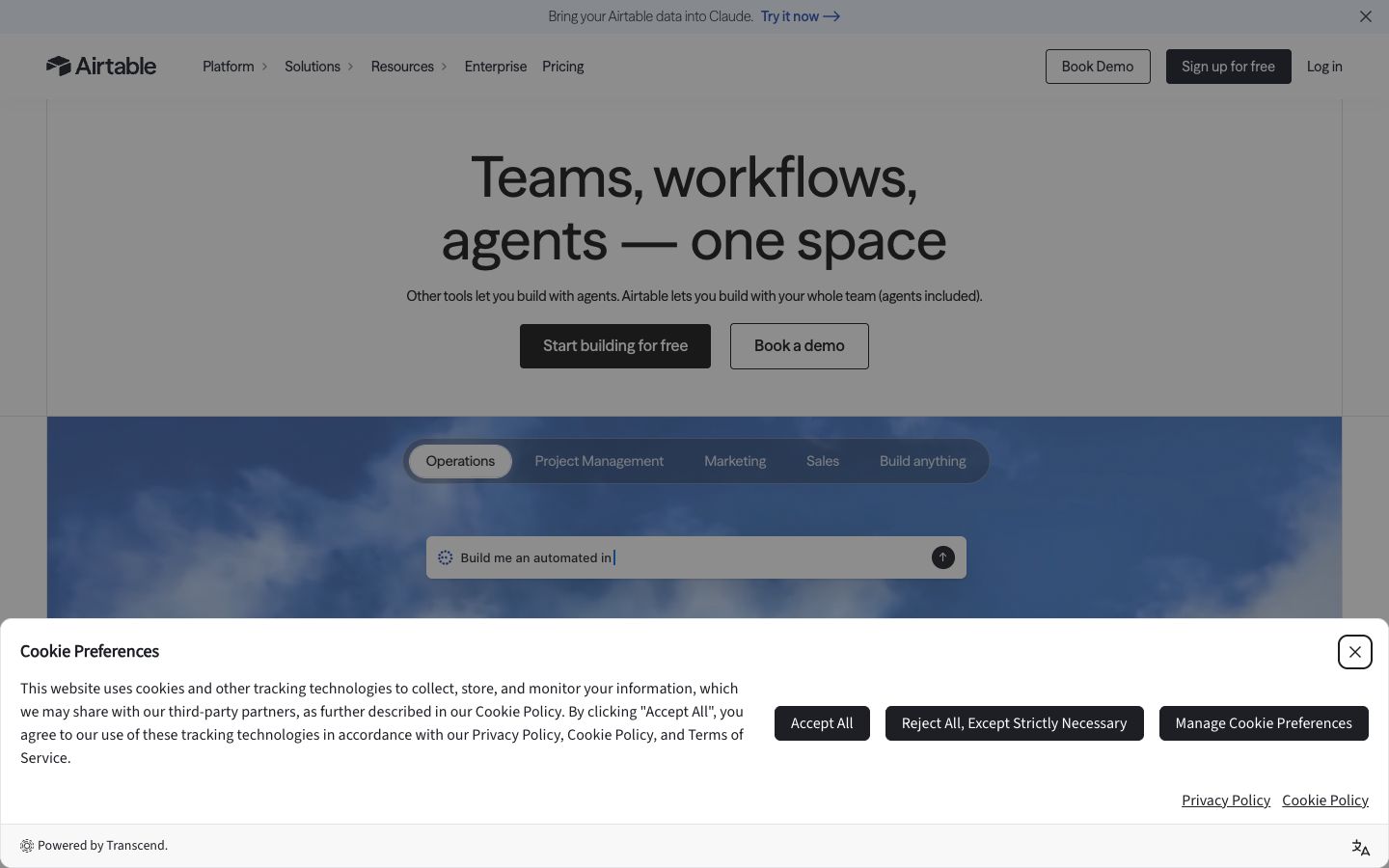
This is a meaningful capability for small organizations. A spreadsheet-like base can hold the operational model while interfaces expose a narrower experience. There is less need to build a conventional application solely to give colleagues an approachable way to read and update records. Yet “no-code app” is not synonymous with a custom product that you own and can deploy independently.
There is a significant access distinction: sharing a base is not the same as sharing an interface. Airtable documents paid-plan interface-only collaborators and access levels, while the base’s Share control grants broader access to the underlying information at the chosen permission. See Airtable’s current interface-sharing guide and permissions overview.
For a fictional procurement workflow, a department head could use a published interface to approve spending requests, but they should not automatically receive edit permissions for the entire vendor directory. Test the permissions using a real account with the intended role. Confirm whether a person can browse unrelated requests, export records or reach base configuration they should not alter.
Interfaces are not freely shared public application endpoints on every plan. Access to general organizational sharing and interface-only invitations depends on the subscription and configuration. For organizations inviting external clients, the distinction matters because an external guest may require a portal arrangement or another application architecture.
Airtable’s surfaces can reduce training, but the underlying workflow still needs definitions. What exactly happens when a reviewer selects “Approved”? Is there an assigned backup reviewer? What if an approval is reversed? A polished interface around an undefined process simply makes inconsistency look attractive.
📝 Forms and Intake: Convenient Input, Not Automatic Data Quality
Forms can provide a straightforward route from an external request into a table. A consultancy might collect project briefs, a newsroom can gather story pitches, and a support team can create triage requests without granting submitters full editing access. These are useful entry points because people submit structured information instead of sending a loosely formatted email.
The important limit is that collecting a record is not the same as validating it. Someone can submit the same request twice, use two slightly different email addresses or select an incorrect department. Design deduplication and review steps before the submission reaches an irreversible downstream system.
Consider giving incoming records a status such as “New — verify” rather than “Approved”. If an automation immediately creates a CRM contact, fires off messages and assigns a billable resource for every response, spam or mistakes can multiply. For business-critical intake, make a person approve records or define narrow automatic acceptance rules.
Privacy expectations are also relevant. A form should ask for only the data needed for the stated purpose. Make clear who will read responses, avoid unnecessary sensitive fields and confirm how any connected services process data. A no-code form is still a real information-collection system with compliance implications.
⚙️ Airtable Automations: What Counts as a Run?
An Airtable automation combines a trigger with one or more actions. A new form submission might trigger an assignment rule, add a timestamp or notify an owner. A record entering a view could start another process. These are useful when changes inside the database should lead to repeatable actions.
The critical detail: Airtable counts an automation run when the trigger fires, whether the action ultimately succeeds or fails. This is stated in the official automation documentation. It means execution failures can consume the same monthly allowance as successes. Teams should not budget only for completed outcomes.
As of the review date, the documented monthly automation-run ceilings per workspace are Free 100, Team 25,000, Business 100,000, and Enterprise Scale 500,000. They reset at the first of the month. Airtable also documents a separate maximum number of defined automations per base. Creating 75 disabled automations on Free consumes those configuration slots; a disabled automation is not automatically removed from the count.
Suppose a service team’s request table experiences 800 meaningful status changes each month and has three automations listening to different changes. One status transition does not necessarily equal one total run: the result depends on which triggers actually fire. Count trigger evaluations in the chosen workflow and include repeat edits, reprocessing and failed attempts. Do not multiply “records” by “steps” as if Airtable billed in Zapier tasks.
The Free tier has additional restrictions. Airtable says its native Run a script action is unavailable, and the built-in Send email action can send only to verified collaborators associated with the base. These constraints can turn a seemingly free proof of concept into a paid design decision before volume becomes the problem.
The practical test is a deliberately small workflow with a controlled test record, an expected audit trail and an expected run count. Confirm each action’s behavior, simulate an error and inspect the history. We recommend this as a buyer’s test; DigiOffly has not performed it in your workspace or measured the product’s reliability.
🧩 Trigger Design, Idempotency and the Duplicate-Action Trap
Many no-code failures are not dramatic outages. They are mundane repeated actions caused by insufficient state management. A record changes from “Pending” to “Approved”, an automation sends an email, somebody corrects a spelling mistake, and a poorly configured condition sends the same email again. The technology performed the defined rule; the rule itself was wrong.
A safer process has an explicit transition and a separate field recording whether an external action was completed. The workflow checks that the record is eligible, performs the operation, records a stable external identifier and prevents repeat execution for the same business event. This is commonly called idempotency: the same event can be processed again without causing a second unintended effect.
Idempotency is a design goal, not a blanket Airtable guarantee. Two concurrent automations, a temporary API error or a manual edit can still create races. For consequential operations—issuing invoices, granting access, canceling subscriptions—consider a stronger authoritative system or a human verification stage.
Another source of duplication is using the display name as an identifier. Two clients may share the same name, and one client may rename a company. Keep stable IDs and link records carefully. When syncing into a CRM, store the CRM’s canonical ID so updates target the original entity rather than creating a new one on every run.
Record workflow outcomes in fields that actually support diagnosis: action requested, completion timestamp, external object reference, failure state and last reviewer. Storing a generic “Done” checkbox is not enough when the next operator must explain what was done and whether it was reversible.
🧪 A Practical Workflow: From Lead Intake to Human Approval
Consider a small B2B service agency using Airtable to coordinate website inquiries. The following is an illustrative design, not a report of a deployed customer installation.
First, a prospect submits a form with company, work email, requested service and a short project description. The record enters an Intake table with a unique request ID and a status of “Needs review”. The team keeps Clients in a separate table so a new inquiry can be associated with an existing company rather than creating an isolated duplicate customer entry.
Second, a coordinator examines potential duplicates and either links the request to an existing Client or creates a new Client with a stable identifier. This step may be partly automated if matching rules are narrow, but ambiguous names should be reviewed rather than merged on a guess. A known customer submitting a new request should produce a new request, not a second customer.
Third, the record becomes eligible for an assignment automation. Perhaps requests mentioning data migration go to the technical team, while editorial work goes to content operations. If several categories match, the rule sends the item to a manual queue rather than silently choosing an owner.
Fourth, the assigned specialist sees the job through an interface exposing the required details and a review action. A human checks scope, pricing and whether confidential data was submitted. Approved requests move to “Accepted”; rejected ones retain a reason. External messages should be sent only after the appropriate approval state is recorded.
Fifth, a notification or downstream CRM integration informs the next team. Store the downstream record ID, timestamp and whether the operation was acknowledged. If the message fails, the request can be retried with a reconciliation check that avoids sending the same proposal twice. Count the automation runs consumed, including unsuccessful attempts.
Finally, provide an exception view: unmatched clients, requests without owners, notifications awaiting acknowledgment and jobs stuck in review. This view is more valuable operationally than an attractive dashboard containing only completed work. It reveals what someone must do tomorrow morning.
The workflow illustrates Airtable’s particular strength. It coordinates people working around linked records. It does not prove that Airtable’s native automations can replace a specialized customer-support suite, all-purpose messaging infrastructure or a transactional backend at arbitrary scale. Evaluate every external system as part of the complete architecture.
🤖 Airtable AI in 2026: Useful Assistance with Separate Credits
Airtable increasingly describes AI as part of its platform, but the phrase “AI included” should not be read as unlimited model usage. Its AI billing documentation distinguishes monthly AI-credit allocations and reset timing across self-serve and sales-led arrangements. Credits are not interchangeable with ordinary automation runs, API calls or paid collaborator seats.
The most defensible AI tasks are narrow, verifiable assistance. A classification step might suggest a category for an incoming request. Text handling might summarize an internal status note or extract structured fields from a customer-submitted description. A person can then confirm the result before it changes the authoritative record.
Be careful with tasks whose accuracy is hard to inspect. If an assistant creates a regulatory classification, invents missing client details or alters an account’s access based on ambiguous language, the apparent convenience may move risk into a less visible part of the workflow. A review queue and clear audit record are sensible controls.
Teams should establish a modest AI credit budget and watch how different activities consume it. An “AI step” in the marketing copy does not by itself tell you the final cost of a long document, several iterations or repeated retries. Check the plan and account-specific allocation in the billing screen; do not substitute a general automation-run allowance for an AI quota.
The plan overview currently lists an AI-credit allocation for Free users with editor-or-higher permissions, but that should not be extrapolated into an unlimited shared company budget. Paid plan entitlements and additional purchase terms vary. The article deliberately avoids inventing a fixed credit-to-token conversion.
Sensitive content deserves a separate approval process. An organization working with financial details, health information or private client contracts needs to verify data handling, retention, geographic requirements and access to AI capabilities in its own agreement. UI availability is not sufficient evidence of regulatory compliance.
🤝 Strengths and Trade-offs in Practice
👍 What We Love
- ✅ Relational structure: Link clients, projects and operational records instead of duplicating data.
- ✅ Purpose-built interfaces: Show colleagues a focused decision surface without exposing every table.
- ✅ Integrated operations: Combine intake forms, views, approvals and native automations around one base.
- ✅ Flexible starting tier: A real Free plan supports low-volume evaluation before a seat commitment.
👎 Where It Falls Short
- ❌ Seat-driven costs: Billing depends on user roles and workspace access, sometimes including commenters.
- ❌ Resource ceilings: Records, files, API requests and native runs have independent limits.
- ❌ External portal overhead: Guest editing can require a paid add-on and careful access design.
- ❌ Operational diligence: Duplicate records, trigger loops, permissions and recovery still need an owner.

Airtable — Editorial Buying Snapshot
Good fit: connected client records, internal approval interfaces and documented workflows. Reconsider: unlimited free editors, an unrestricted public portal or unmanaged permission costs.
Documentation-based analysis. No paid hands-on test or numerical product rating is claimed.
Airtable’s best features work together: structured records, relational links, views, interfaces, intake and workflows make a messy internal process easier to coordinate. Its limitations also connect. More editors raise subscription costs; growing datasets approach record caps; automatic behavior consumes runs; external access may require new paid components.
A buying decision should therefore weigh the complete workflow rather than scoring isolated features. One well-designed base serving five colleagues can replace several fragmented systems. Another organization may simply centralize information inside a costly workspace while continuing to use the same spreadsheets, email follow-ups and manual reconciliations. The product does not eliminate process ownership.
💰 Airtable Pricing 2026: Free, Team, Business and Enterprise
| Plan | USD per billable collaborator | Documented core volume (per base / workspace) |
|---|---|---|
| Free | $0 | 1,000 records/base; 1 GB files/base; 100 native automation runs/workspace/month; 1,000 API calls/workspace/month |
| Team | $20/mo (annual); $24/mo (monthly) | 50,000 records/base; 20 GB/base; 25,000 automation runs/workspace/month; 100,000 API calls/workspace/month |
| Business (self-serve) | $45/mo (annual); $54/mo (monthly) | 125,000 records/base; 100 GB/base; 100,000 automation runs/workspace/month; unlimited monthly API calls |
| Enterprise Scale | Custom quote | 500,000+ records/base; 1,000 GB/base; 500,000 automation runs/workspace/month; contract-specific terms |
| Portals add-on | Separate: Team from $120/mo / Business from $150/mo | Published example includes 15 external guest seats; access rules and plan compatibility apply |
The official Airtable pricing page advertises a Free tier, Team, Business and Enterprise Scale. Published Team pricing is $20 per billable collaborator per month when billed annually or $24 per collaborator on monthly billing. Business self-serve is $45 per billable collaborator per month billed annually or $54 on monthly billing. Enterprise Scale requires a quote. All values are USD list references checked 14 October 2026.
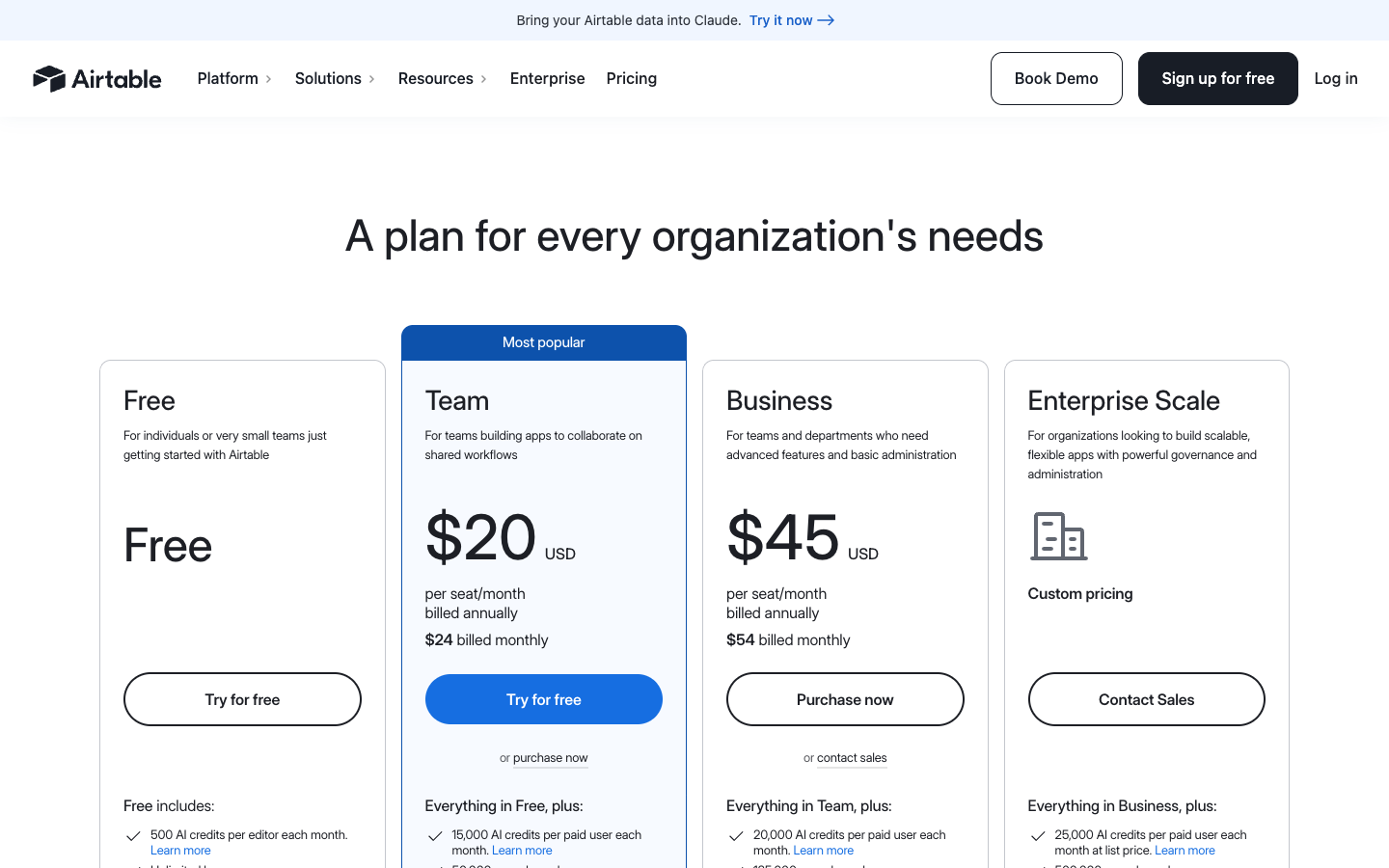
The difference between an annual equivalent and a month-to-month bill is not cosmetic. If a Team workspace has three billable collaborators, the published annual price implies 3 × $20 × 12 = $720 per year, before taxes or add-ons. At $24 on monthly billing, the comparable twelve-month list-rate sum is $864, assuming three seats remain billable for all twelve months. The annual option may require committing to a full term or different proration arrangements.
For Business, the same three-seat illustration becomes $1,620 per year at $45 per seat per month billed annually, versus $1,944 as twelve monthly charges of $54, before additional conditions. Those calculations are examples rather than a quote, and a sales-led Business agreement can use a different structure.
Seat counts matter more than raw headcount. A person who reads an interface without modifying the underlying records may be treated differently from someone who edits records, approves requests, or comments. Do not assume every invited user is billable, or that every commenter is free. Airtable documentation currently contains differing formulations of Team Commenter billing, while its interface-permissions material indicates some interface-only commenters can be billable. Audit role-by-role billing in your own workspace before inviting a department.
A second subtlety is workspace scope. Airtable’s billing overview says self-serve Team and Business plans are billed per workspace rather than as one universal account-wide license. A company with separate paid workspaces should model access carefully rather than multiplying one plan by its number of employees and assuming every workspace is covered.
Because upgrading individual workspaces is possible, governance is part of controlling spend. A marketing team might use one paid workspace for operational data and leave a separate experimental workspace on Free. That does not mean the free workspace receives higher limits by association. Assess each separately and avoid duplicating record sources solely to evade legitimate plan constraints.
The pricing page and support articles should be checked again at actual purchase. Feature bundles, seat permissions, plan names and regional taxes can change. Our editorial model is a starting point, never a binding vendor invoice.
🧾 Who Is a Billable Collaborator?
A billable collaborator is not necessarily every person who has ever received a link. Read-only guests, authenticated interface users, commenters, editors, creators and workspace owners are separate concepts. Some permissions grant access to the entire base, while an interface-only invitation can allow a more focused activity without full base access.
The central risk is role inflation. If a contractor only needs to see deadlines, making them an Editor of the whole base increases both privileges and potential cost. If an accountant only needs monthly export data, maintaining a persistent high-level collaborator seat may be unnecessary. Map the business action to the minimum effective permission.
There is an important documentation wrinkle. The official billable collaborator management guide characterizes paid Team roles primarily as Owner, Creator and Editor, while the Airtable billing overview and collaborator billing discussion also describe Team Commenters as potentially billable in workspace or interface scenarios. These statements should not be silently blended into a promise. Inspect your exact plan, workspace sharing model and quoted total.
Treat a new invitation like adding a service subscription. Confirm whether the user’s email is already billable within that scope, whether adding them at base level changes billing, and whether an interface-only or read-only role suffices. Document who may invite collaborators, and review stale access monthly.
Billing can change mid-cycle. The official support documents discuss prorated collaborator adjustments and differing renewal behavior for monthly and annual agreements. Do not assume removing a user necessarily produces an immediate cash refund. Review the invoice and relevant renewal terms.
The optimal design lets people do required work without unrestricted privileges. Security and financial discipline point in the same direction: accurate collaborator roles usually cost less and expose less data.
📊 Plan Limits: Records, Files, API Calls and Automation Runs
The word “limit” covers several independent resources. Airtable’s workspace limits reference currently lists 1,000 records per base for Free, 50,000 for Team, 125,000 for Business and 500,000 or more for Enterprise Scale. They are records in a base across its tables, not rows allowed in each individual table.
Per-base attachment allowances are listed as 1 GB Free, 20 GB Team, 100 GB Business, and 1,000 GB Enterprise Scale. These numbers are not a commitment that every attachment type, security requirement or backup method is covered. Teams with design assets should estimate the average attachment size times the retention period rather than guessing from the number of records.
Monthly public API allowances are also plan-dependent: 1,000 Free, 100,000 Team, with Business and Enterprise Scale described as unlimited for the monthly count. “Unlimited monthly calls” does not mean unrestricted request bursts. Airtable documents an API rate limit of five requests per second per base across plans, a maximum of 100 records per paginated retrieval page, and a maximum of 10 records per request for certain batch operations.
For a hypothetical nightly integration reading 8,000 records, 100 records per page suggests roughly 80 paginated listing calls before separate lookups, updates and retries. If it runs daily, the listing component alone can exceed the Free tier’s 1,000 monthly API-call allowance. Those numbers are illustrative arithmetic under a straightforward pagination strategy, not measured consumption for a specific product or connector.
This is why a workflow can fit comfortably within an automation-run quota while running into an API allowance, or the reverse. These are different meters. An external automation platform polling the API may produce many Airtable API calls without consuming Airtable’s native automation runs for every request. Conversely, record-triggered native workflows consume their own runs even when no external API is called.
Airtable’s API call policy describes additional behavior when quotas are exceeded. Free has a one-time grace arrangement under specified conditions; Team calls may be throttled beyond its monthly allowance. Such contingencies are not a capacity plan. Design integrations for normal limits, backoff and reconciliation.
💸 A Realistic Total-Cost Model for a Small Team
A subscription calculator is useful only if it represents the organization’s actual usage. Build a worksheet with active billable editors by workspace, billing term, expected record volume, attachment growth, automation triggers, API integrations and any paid add-ons. Also count the people-hours required to maintain access policies and repair workflows.
Consider an illustrative four-person operations team: one owner, two staff members editing records and one colleague who only reads a published view. If three roles are billable, the Team annual-list-price model is 3 × $20 × 12, or $720 annually, before taxes. The read-only person’s role must genuinely remain non-billable under the relevant plan and invitation context. It is not enough to call them a “viewer” in your spreadsheet if they have elevated workspace permissions.
Now suppose the same organization invites five consultants to comment or modify interface records. Their treatment depends on access type and the exact plan; they could materially increase seat costs. This is precisely where reviewing the collaborator-billing screen is more useful than a simplified advertised price.
Model two operating scenarios: the present year and a realistic growth year. If 15,000 current records become 65,000 after adding event logs and client interactions, Team’s published 50,000-record ceiling would no longer fit a single base. You may redesign the data, archive records responsibly or investigate a higher plan. Treat migration and information governance as part of the decision, not an afterthought.
External-facing collaboration is a separate line item. Airtable’s Portals documentation lists an add-on starting at $120 per month for 15 portal seats on Team, or $150 per month for 15 seats on Business, with specific guest rules and sales-led variations. It is not included automatically in the base per-editor price. Verify the selected package and billing terms.
If the final model resembles a complex custom app budget, consider whether the operation truly needs Airtable interfaces and Portals. Maybe an internal database plus a conventional front end is more appropriate. Or perhaps a simpler form plus email process remains adequate at the current volume. The best value depends on the cost of errors and coordination, not only the subscription total.
🔌 Airtable API and Integrations: Powerful, but Not Limitless
Developers and no-code builders can use Airtable’s Web API to read and update records. The documented API makes it possible to connect a base to existing CRM systems, dashboards, websites and workflow orchestrators. It also introduces engineering obligations: authenticating safely, respecting rate limits, handling pagination, matching identifiers and monitoring errors.
A beginner mistake is treating one HTTP request as one record. List endpoints can return multiple records, but pagination matters. The API’s maximum page size of 100 means a complete export requires looping through continuation tokens or equivalent pagination. A sync process that reads only the first response can silently omit data once a table grows.
Rate limiting is a second concern. Five requests per second per base can be entirely adequate for a human-operated workflow and still become a bottleneck for a chatty integration making individual record updates. Use appropriate batch operations where supported, throttle intentionally, and implement retry logic for rate-limit responses rather than sending repeated immediate requests.
Security should not be an afterthought. Credentials belong in a secrets manager or the connector’s secure store, not pasted into a public view, ordinary record or shared document. Grant the minimum scopes that let an integration perform its task. Rotate or revoke credentials when a team member departs or a contractor’s access ends.
If a third-party automation engine drives most data movement, its billing sits alongside Airtable’s charges. A Make Review or Zapier Review can help estimate those platforms’ separate meters. An Airtable API request is neither inherently a Make credit nor a Zapier task; each system bills or limits according to its own rules.
For a stable architecture, define which application owns each piece of truth. Airtable may own editorial assignments while the CRM owns customer account IDs and the accounting platform owns invoices. Synchronizing those systems is possible; claiming all three can simultaneously be the unquestioned source of truth is a recipe for conflict.
🔄 Airtable Sync: Centralize Carefully, Especially with Two-Way Changes
Sync features can propagate selected data between bases and supported sources, depending on the plan. This can support a common reference directory shared across departments without granting everyone unrestricted access to a master operational base. It can also create subtle assumptions about which data is authoritative.
Airtable’s Sync introduction says current Free workspaces do not include Airtable Sync, and published Team entitlements differ from Business and Enterprise. The Team plan’s documentation does not list two-way sync; Business and Enterprise Scale do, with specific supported-source constraints.
Two-way does not mean every edit behaves like a direct change to a normal table. Airtable’s two-way sync guide documents restrictions on creating or deleting records in downstream synced tables, limitations for API and automation changes, source-view filters, computed fields and possible propagation delay. A designer should read the constraints before using sync as a replacement for direct database writes.
Imagine two teams editing a shared supplier catalog. If one team sees only a filtered subset, a new record that does not satisfy the source filter may fail rather than appearing where expected. A bulk edit may propagate asynchronously. A downstream automation that assumes the update is already visible could make an incorrect decision.
For material changes, assign the source system clearly, define authorized editors and decide how conflicts are resolved. Test deletion and rollback behavior on non-production records. Critical audit trails should not rely solely on what appears in a synced view after a change.
🛡️ Permissions, Privacy and Enterprise Governance
Airtable can centralize commercially sensitive information, which makes its sharing model important. A workbench containing client briefs, contract prices and internal approvals should be treated with the same care as any other business database. The risk is not limited to external attacks; an overly broad invitation can expose unrelated clients to otherwise legitimate collaborators.
Review access at four levels: who may enter a workspace, which bases they can access, which interfaces they can view, and what actions the underlying data permissions permit. A filtered or hidden field is not equivalent to a validated security rule. A team member’s everyday convenience should not silently override confidentiality obligations.
If an external contractor needs a small subset of information, use the narrowest supported sharing arrangement and test it as that user. Verify whether they can follow links to the full base, see other records or invite someone else. Shared links, form links and interface invitations each have their own audience and settings.
Some enterprise organizations require administrator controls, SSO, audit workflows, approved domains and formal retention policies. A vendor’s support article describing a capability is not proof that it appears in your specific plan. Confirm subscription level, contractual commitments, and whether any client or regional requirement forbids the intended storage arrangement.
Before purchasing for regulated work, make a short data inventory. Identify personal data, access requirements, retention periods, external recipients, backup arrangements and what happens when a contract ends. A visual no-code tool can accelerate creation, but responsibility for lawful processing and sound permissions remains with the organization.
🧑🤝🧑 External Clients and Portals: The Hidden Collaboration Budget
An agency might want customers to check project progress without receiving internal workspace access. Airtable’s Portals add-on is designed for external collaborators using interfaces, but it carries its own access rules and monthly price. It is not the same thing as putting a publicly editable application on a custom domain with no restrictions.
Portal pricing depends on the package and plan. Airtable documents packages of guest seats, and a guest granted editing access across multiple bases can be treated differently from a guest who interacts only with one portal. Read the actual guest-seat criteria before modeling a large customer-facing rollout.
If you plan to invite 100 customers and expect them to update records, total cost might be driven more by portal access than by the four internal editors who built the workflow. Conversely, read-only portal access may have different billing implications. The correct budget starts with the customer’s actual permissions, frequency of use and the number of bases involved.
A design alternative is a separate public-facing application connected to Airtable as a backend, but that introduces another subscription, API use and security model. For that reason, compare the cost with tools such as Softr once its DigiOffly review is available, rather than assuming a generic portal solution is free or interchangeable.
📧 Notification Limits and a Better Alert Strategy
Internal notifications can keep an operations team informed without creating a flood of messages. But Airtable’s native email action is not an unrestricted email-marketing service. The official Send email action reference outlines plan-specific restrictions for sending to people who are not verified base collaborators.
At the time of this review, Airtable documents 100 unique external recipient addresses per day on Team, 1,000 on Business, and a Free-plan restriction to verified collaborators. It also documents a maximum of 1,000 recipients per automation run for this action. These are distinct from monthly automation-run quotas and from whatever limitations apply to third-party email integrations.
A practical alert strategy groups routine events rather than sending a separate message for every field edit. A daily digest of records awaiting approval can be more useful than 25 single-record notifications. Escalate only when a deadline approaches or a failure requires immediate action, and include a direct link to the correct review interface.
A failed notification should remain visible in an exception queue. Merely sending an email is not evidence the recipient read or acted on it. If the process requires a decision, track the decision on the record instead of inferring it from a message being dispatched.
🏢 Where Airtable Works Best: Four Organization Patterns
Editorial and creative teams: Airtable can link articles, contributors, campaigns and publishing dates. Editors may work from a filtered interface while a production manager sees dependencies across the portfolio. The product’s real value is a common operational record, not a stylish content calendar. Define how revisions, approvals and assets relate so changes do not destroy reporting consistency.
Client services: A small consulting firm can organize client requests, owner assignments and deliverables. Linked entities reduce repeated client information. The buying issue is client access: internal staff may require billable editing seats, and external review may need a different design or paid portals. Avoid giving every client access to an entire base as a convenience shortcut.
Operations and procurement: Requests, suppliers and approvals fit naturally into linked tables and interfaces. A purchase request can move through review with timestamps and accountable owners. High-value approvals should use explicit permission boundaries and an independent financial system for final payment execution. Airtable can be the workbench without becoming an unverified accounting ledger.
Marketing and campaign analysis: Teams can connect campaign assets, spend categories, deadlines and status information. Rollups can summarize linked records, while views help coordinators find overdue work. For large-scale analytics, transactional event data or very high query volume, consider a more specialized warehouse and reporting stack instead of forcing everything into one base.
In each pattern, the common thread is people coordinating around a defined data model. The weak pattern is a team buying Airtable because every tool recommendation calls it essential, then continuing to manage the actual process in message threads.
🚧 When Airtable Is the Wrong Purchase
Choose something else if the primary requirement is a cheap, conventional spreadsheet and no one intends to maintain relational structures or interfaces. Google Sheets or Excel may be more efficient for ad hoc calculations, personal tracking and straightforward formulas. Their exact collaboration and automation features vary, so compare a real workload rather than assuming feature parity.
Airtable can also be the wrong place for large transactional workloads with complex integrity guarantees. If an application processes high-volume purchases, financial balances or highly concurrent state changes, a dedicated database and properly designed application layer may be a better foundation. Airtable’s accessible UI does not eliminate database architecture concerns.
For an organization wanting to automate many unrelated services—calendar, CRM, ticketing, billing and chat—without using Airtable as the data hub, a dedicated orchestration platform may make more sense. Read the Automation & No-Code category and compare the actual source and destination applications, exception handling and separate billing units.
Airtable is also not a universal low-price external client portal. If dozens or hundreds of customers need authenticated record editing, calculate guest-seat and access costs before building on a template. An alternative front end may be better suited, but its security and subscription cost must also be counted.
Finally, avoid any SaaS product that cannot meet your mandatory data residency, security or procurement standards. For those buyers, obtain the necessary documents and contractual commitments before storing production information. Attractive templates do not answer a compliance review.
⚖️ Airtable vs Make, Zapier, n8n and Spreadsheet Tools
Airtable vs Make: Airtable manages structured data and provides workflows close to that data. Make is built around multi-step integrations between services. If a lead database is the central problem, Airtable may be the foundational layer. If connecting several existing platforms is the central problem, Make’s review is the better starting point. Using both is a valid architecture, with two distinct cost models.
| Decision factor | Airtable | Softr | Make |
|---|---|---|---|
| Primary purpose | Structured database and team workflows | Customer portals and internal applications | Cross-application automation |
| Best starting point | Bases, tables, views and forms | App pages, permissions and user access | Triggers, integrations and mappings |
| Paid billing focus | Billable editors per seat | Workspace tiers and included builders/app users | Credit allowance and scenario tier |
| Core boundary | Not a full external client-portal frontend | Connects or hosts data rather than replacing every database | Does not replace a relational data store |
Airtable vs Zapier: Zapier focuses on trigger/action automation across apps; Airtable focuses on collaborative structured records with native automations. A sales team may use Airtable to review incoming opportunities and Zapier to connect a web form, mailbox and CRM. Do not compare Airtable automation runs with Zapier tasks as equivalent billable units. The Zapier review explains the latter.
Airtable vs n8n: n8n is an automation engine with cloud and self-hosting choices under its own licensing terms. Airtable is a hosted structured data/application environment. A technical team could use n8n for orchestrating integrations while retaining Airtable for records and interfaces. If self-hosting the entire data layer is required, Airtable’s hosted deployment model deserves scrutiny.
Airtable vs Google Sheets or Excel: Spreadsheets remain versatile for calculations, exports and simple collaboration. Airtable becomes attractive when multiple entities must maintain stable relationships, individuals need purpose-built interfaces and data changes trigger controlled operational actions. If the workbook is already accurate, used by two people and inexpensive to maintain, migrating may add complexity without value.
Airtable vs Softr: Softr is often evaluated for building client-facing or internal front ends using connected data. Airtable can instead serve as the structured record system behind an application. Which one belongs in the stack depends on whether the missing capability is the data model, the interface, external access or both. Evaluate integration and licensing carefully rather than treating these as identical products.
🔍 How to Evaluate Airtable Before Paying
Start by listing the decisions your team makes every week. Examples include approving an expense, assigning an incoming request, tracking a content deadline or confirming the next supplier shipment. Choose one process that repeatedly loses information or requires manual reconciliation.
Describe the entities involved. Are Clients and Projects separate things? Can one project have several invoices? Who is the owner of a task? Which fields are required to approve a request? Model the smallest schema that captures those relationships without redundant copies.
Create a representative dataset in a trial or sandbox, excluding confidential records. Include normal inputs, duplicates, missing values, canceled requests and delayed approvals. You learn more from an awkward data case than from importing five pristine template rows.
Next, invite only the essential test collaborators and evaluate access. Can an editor do the job without changing schema? Can a viewer see only what is appropriate? Does an interface-only user have the intended capabilities? Note the role that the billing screen recognizes before adding more people.
Then build one automation and observe how often its trigger fires. Test a normal path, an ineligible record, a repeated status update and a deliberate failed action. Record the number of runs consumed and where errors are shown. Compare that behavior with the operating budget, not merely with the advertised allowance.
If you need the API, simulate the expected monthly request volume, pagination and peak concurrency. A nightly export and a frequent live sync are different loads. Test throttling behavior within the vendor’s rules and prepare a recovery procedure that does not create duplicate changes.
Finally, write a simple ownership note. Identify who may edit the schema, grant collaborators, approve automations, review failed runs and oversee subscription costs. A no-code system without an owner tends to become the same fragile spreadsheet problem it was supposed to solve.
🧪 Our Review Methodology and Its Limitations
This assessment uses primary vendor documentation, dated pricing references, explicit plan comparisons and reproducible hypothetical cost arithmetic. The underlying product capabilities and quotas were checked against Airtable’s official pricing, billing, automation, API, sharing and AI resources on 14 October 2026.
We did not perform an independent penetration test, measure uptime, purchase a subscription, collect customer satisfaction survey results or run a proprietary benchmark. Readers should treat performance and reliability claims not verified here as open questions. Where the vendor’s documentation uses inconsistent language, we flag the conflict instead of manufacturing certainty.
Our recommendation framework asks six questions: does the data model fit the process, can staff use appropriate interfaces, what seats become billable, which limits will grow with volume, are security obligations met, and can operators recover safely from a failed workflow? That is more meaningful than a generic star rating without transparent measurements.
Documentation is a moving target, especially around new AI features and collaboration rules. Current checkout totals and contractual terms take precedence over examples in an independent review. Consult the source links throughout this article and test your exact setup before placing production data.
✅ Final Verdict: Is Airtable Worth It in 2026?
For small and medium operational teams, Airtable can be a strong choice when fragmented spreadsheets have become a source of duplicated work and poor accountability. Linked records can connect the entities that matter, interfaces can give people focused tasks, and native automations can handle routine transitions. The clearest returns arrive when the team treats the base as a maintained business system rather than a prettier set of cells.
The biggest buying mistake is ignoring who needs access. Per-collaborator pricing, comment and interface permissions, multiple paid workspaces, optional portals and supporting integration subscriptions can dominate the budget. Plan-level automation runs and API ceilings are real limits, not interchangeable marketing numbers. AI credits are a further distinct allocation.
Our conditional recommendation is to pilot one representative workflow with three goals: clear ownership of records, safe access for each role and a credible twelve-month cost. If Airtable meets those criteria better than a spreadsheet or purpose-built app, the subscription can be justified. If it mainly replaces a working sheet with more administration, hold off.
For related buying decisions, use DigiOffly’s Automation & No-Code guide, Software Directory, Software Finder and Software Cost Calculator. These resources support research; they do not override actual vendor terms.
Frequently Asked Questions About Airtable
Is Airtable free in 2026?
Yes. Airtable offers a Free plan intended for individuals and small or lightweight workflows. Its published limits include 1,000 records per base, 1 GB attachment storage per base, 1,000 API calls per workspace per month and 100 native automation runs per month. A newly created account may first receive a 14-day trial of Team for its first workspace, so check what plan is active before assuming trial-level features remain free.
How much does Airtable Team cost per user?
The published self-serve Team list price is $20 per billable collaborator per month with annual billing, or $24 with monthly billing, in USD as reviewed on 14 October 2026. The $20 figure is a monthly equivalent inside an annual commitment; it is not the ordinary month-to-month rate. The number of eligible users and their permissions determine the actual seat total.
Is Airtable Business $45 or $54 per month?
Both numbers can be correct under different billing terms. Self-serve Business is listed at $45 per eligible collaborator per month when billed annually, and $54 when billed monthly. Sales-led Business and Enterprise Scale arrangements may use different contractual terms. Add taxes and any paid add-ons to estimate an actual invoice.
Do Airtable read-only or commenter users count as paid seats?
Read-only access is generally treated differently from editing access on paid plans. Commenter permissions are more complicated: official Airtable articles describe some Team Commenter and interface-only Commenter scenarios as billable, while other summaries emphasize editors. Do not assume commenters are free; review their exact permission, workspace billing screen and the applicable plan terms before inviting them.
How many automation runs does Airtable include?
Airtable’s documented monthly native automation-run limits per workspace are 100 on Free, 25,000 on Team, 100,000 on Business and 500,000 on Enterprise Scale. A trigger firing counts as a run even if an action fails. These allowances reset at the start of each month and are separate from external automation-platform tasks or credits.
Can Airtable replace Zapier or Make?
Only for some processes. Airtable’s native automations are useful when the work is centered on records, statuses and interfaces within Airtable. Make and Zapier specialize in coordinating actions among numerous independent systems. Teams often use Airtable as the operational data hub and a separate workflow engine for broader integrations. Compare trigger behavior, recovery needs and total combined costs.
What is the maximum record limit in Airtable?
The current published per-base limits are 1,000 Free, 50,000 Team, 125,000 Business and 500,000 or more Enterprise Scale. The count includes records in all tables within that base. The relevant limit is not multiplied by the number of tables. Also check file storage, API allowances and historical-data needs before picking a plan.
Does Airtable have AI features, and are they unlimited?
Airtable includes AI capabilities and monthly AI-credit allocations, but they are not unlimited by default. AI credits are separate from native automation-run allowances and public API calls. Reset timing can differ for self-serve and sales-led customers. Check the current plan’s account-specific AI-credit amount, permitted data handling and any top-up pricing before building a high-volume workflow.
Can clients use Airtable without purchasing full editor accounts?
Sometimes. Read-only sharing, interface access and the optional Portals feature provide different choices, with plan and permission requirements. Portals has separate packages and billing, including documented starting prices for 15 guest seats. External users editing across multiple bases can affect how they are classified for billing. Model the intended client roles rather than relying on a free-access assumption.
Is Airtable better than Google Sheets for a small business?
It depends on the work. Sheets is often simpler for calculations, personal lists and uncomplicated collaborative documents. Airtable offers typed records, relational links, multiple views, interfaces and native automations that can help a business coordinate processes. Those advantages justify learning and seat costs only when the organization actually uses them. Start with a real business workflow, not a feature checklist.
Does Airtable allow self-hosting and unrestricted API usage?
Airtable is a hosted service rather than a self-hosted database product. Business and Enterprise plans may describe unlimited monthly API calls, but the Web API still has request-rate, pagination and batch-size constraints. Free and Team also have published monthly API-call allowances. If complete infrastructure control, high-throughput transactional behavior or unusual compliance requirements are mandatory, evaluate another backend.
🔍 More Software Research on DigiOffly
The software that looks cheapest on a pricing page is not necessarily cheapest in production. Compare the people who need to edit data, the information you must retain, the number of external systems that must connect and the effort of recovering from errors. Use independent sources and vendor terms before upgrading an entire workspace.
EXPLORE NEXT ON DIGIOFFLY
Explore More After This Airtable Review
Before upgrading an Airtable workspace, compare editing-seat costs, connected tool subscriptions and alternatives for handling your records and automations.
Choose your data and workflow tools
- Browse the software directory — Find comparable products and published review pages.
- Match tools to your workflow — Narrow your options by functional needs before optimizing the bill.
Evaluate the full operating cost
- Run a side-by-side comparison — Review feature differences that a monthly total cannot show.
- Estimate software costs and billing — Model your software subscriptions using published plan data.
Research the alternatives
- Review ready-made software stacks — Avoid overlapping subscriptions across your team.
- Explore Automation & No-Code tools — Read the automation category and compare your options.
- Understand our pricing research method — Learn where estimates end and vendor confirmation begins.