

Last researched October 15, 2026. This is an independent, documentation-based review. We studied Restream’s pricing pages, support articles and documented streaming workflows; we did not operate a paid Restream account, record benchmark numbers, or run a live broadcast as a controlled product test. Where feature access differs by plan or the billing selector, confirm details directly with Restream before purchasing.
A creator has finally figured out one platform. Their microphone works, the picture is sharp, and the chat isn’t completely unmanageable. Then someone asks: “Can we also go live on YouTube? What about LinkedIn? Could our guest send this to their audience?” That sounds like three extra checkboxes. In practice it introduces several decisions about stream destinations, account permissions, video formats, moderation, reliability and who is supposed to watch which chat.
Restream review 2026 — our verdict: Restream is most compelling when you already know what you’re broadcasting and need a manageable way to deliver it to more than one destination. It also has a browser-based Studio for shows built around people, interviews, presentations and guests. Those are related jobs, but they are not interchangeable. A local OBS setup routed through Restream gives you different creative controls from an interview hosted inside Restream Studio.
There is an appealing story in a platform that promises to distribute one live program everywhere. It should not be read as a promise of effortless audience growth. Streaming to five channels creates five potential conversations, five distinct sets of platform rules and more ways for a production to go wrong. Nobody gets additional viewers simply because an extra destination is switched on.
For a solo creator who only needs one Twitch channel, OBS Studio may be all the broadcasting software they need. A gamer who wants an integrated suite of overlays and alert widgets should also consider Streamlabs Desktop. Restream earns its place when the distribution layer, browser Studio or cross-platform operational controls solve a problem those local applications alone do not.
We favor starting with Restream’s free plan, even if you expect to upgrade. Test a private or low-stakes production, verify what arrives at each destination, and work out who will monitor the comments. Move to paid access for an identifiable capability — a third channel, a Facebook Page, custom RTMP, specific output quality, collaboration or branding — instead of assuming a larger plan means a better show.
🎯 Restream at a Glance: The Editorial Verdict
Best for: Creators broadcasting the same program to two or more networks; interview and webinar hosts who want a browser Studio; teams using OBS to produce a sophisticated local feed and a cloud service to route that feed; organizations that must manage destination access, guest appearances and live-event scheduling.
Less suitable for: A single-platform streamer who does not need cloud delivery; someone looking for a complete multitrack local recording application without a browser; game creators who need low-level control of scene capture but don’t want to use OBS or Streamlabs; teams expecting all cross-platform chats, metrics and moderation rules to become identical.
Free and paid: The public Restream pricing page listed a permanent Free plan at $0, Standard at $19 per month, Professional at $49 per month and Business at $239 per month when the monthly billing option was selected at our editorial check. Annual plans and add-on products follow different pricing mechanics. Restream’s support guidance lists 2, 3, 5 and 8 simultaneously active channels for those tiers. Those counts describe active outputs, not how many channels can be connected to an account in total.
Studio or encoder: Restream Studio runs in a browser, with scenes, guest links and hosted production controls. An external encoder workflow accepts a signal from OBS or another compatible broadcaster and distributes it to selected services. Restream also describes scheduled and pre-recorded workflows, with access depending on plan.
Our practical advice: Decide whether you need cloud distribution, a browser-based live production studio, or both. Then list the exact destinations your audience uses. A single clear diagram of the broadcast path is worth more than trying every feature in the dashboard.
🧭 What Restream Actually Does — and What It Doesn’t
A helpful way to understand the product is to follow the video from its source. When you work in OBS, your computer captures the game, camera, browser or slides and encodes a live output. With Restream connected, the encoder sends the program to Restream, which distributes it onward to the enabled services. The operator manages one main uplink to Restream, and the distribution service handles the platform-facing copies.
That differs from separately configuring multiple local outputs, where a computer and its connection might need to manage several destinations directly. It also differs from a show constructed in Restream Studio. Inside Studio, you create scenes and host guests within the web interface. The browser is part of the production process, not just a settings dashboard sitting beside a desktop encoder.
Both approaches can be useful in the same organization. A weekly gaming stream might use OBS because it relies on game capture, audio filters and reusable scenes. A founder interviewing two customers might open Restream Studio because a browser invitation and two on-camera guests are more important than scene-collection portability. The brand is the same, but the work the software performs is different.
There are three roles to separate. Production means combining cameras, microphone tracks, graphics and screen content into the show. Transport means getting that finished show from the creator to its destinations. Distribution management means selecting those destinations, confirming permissions, monitoring their status and handling the resulting audience interactions. Restream participates in all three through different features, but its value changes dramatically depending on which role dominates your day.
This explains an important limitation: Restream cannot make a noisy microphone sound clean simply by forwarding the signal, and it does not give a low-end laptop unlimited encoding power. If the source signal contains clipped audio, unreadable slides or an overlay hiding the game, viewers on every connected network may receive the same flaw. Solve production problems at the source before using more destinations as a stress test.
Restream’s own overview of going live distinguishes streaming from Studio, using an encoder and scheduling video-based output. That distinction belongs at the beginning of any comparison, not buried in a feature checklist.
🚦 First Setup: Start With Destinations and Access Permissions
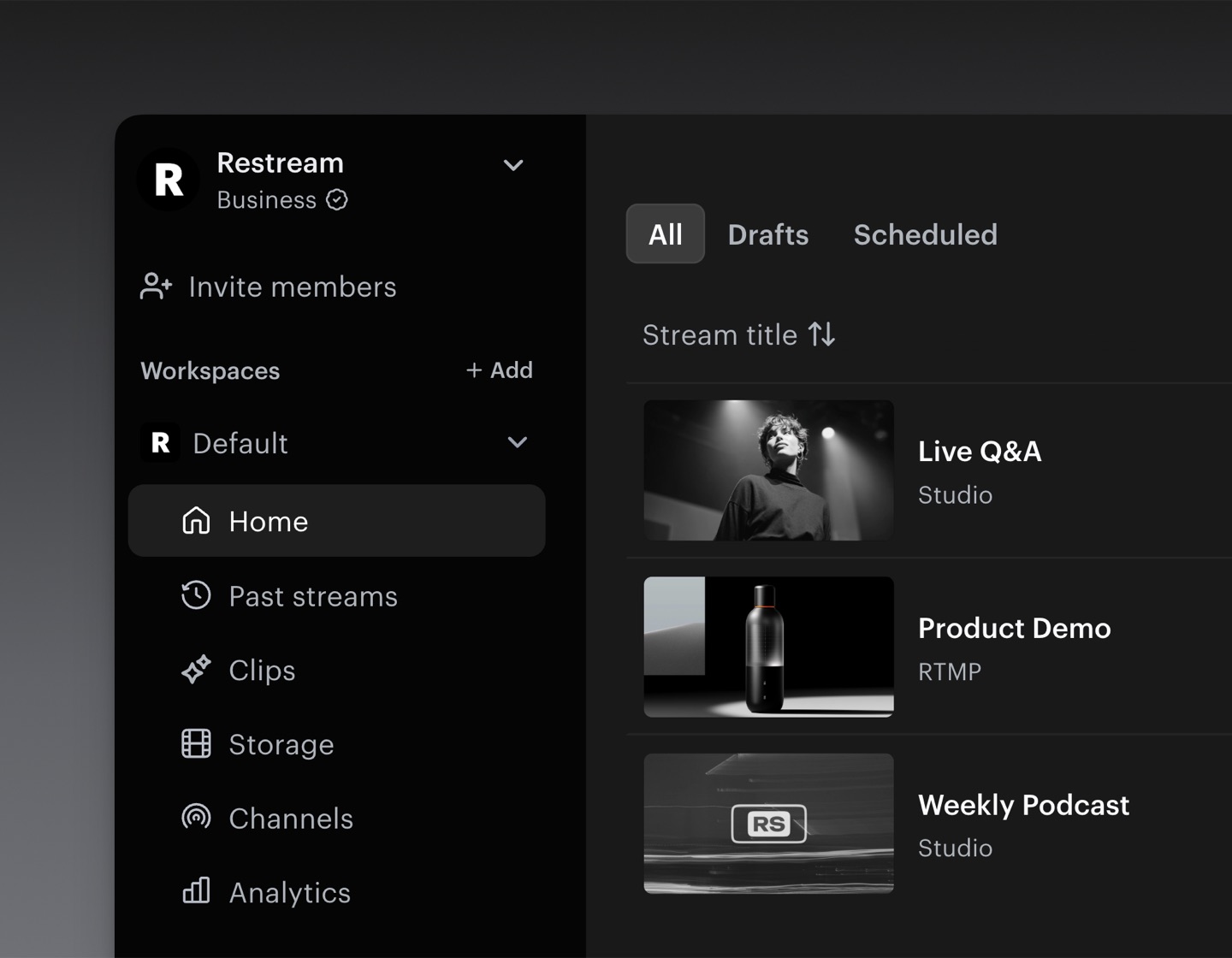
The first meaningful step isn’t choosing a subscription. It is identifying where your audience already spends time and checking whether your account can legally and technically broadcast there. A Twitch account, a YouTube channel and a Facebook Page are not equivalent connection types; each platform sets its own eligibility, permissions, content restrictions and live-stream activation requirements.
Begin with one destination you control. Connect it to Restream using the documented authorization method, grant only the permissions needed for publishing, and inspect how it appears in your channel list. Then add the second channel. Restream’s account can store connections independently of the number of channels that are active in a particular broadcast, so seeing a service in the dashboard is not proof that a chosen plan can stream there alongside every other one.
The vendor’s public pricing comparison distinguishes connected channels from simultaneous outputs. The free plan has an active-channel limit of two. That is a meaningful opportunity to test a real workflow before paying, but it comes with restrictions. Facebook Pages and custom RTMP channels, for example, are identified as paid features in the support documentation.
A creator can also have multiple profiles on one network. Two YouTube destinations may count as two simultaneous channels even though they share a brand name on a pricing spreadsheet. Before promising a sponsor an eight-network broadcast, count the individual destinations that must be live at the same time and check the exact tier.
Use a small preflight list for each connection: who owns the channel, whether live streaming is enabled, what the current account permissions allow, whether the stream has an age or geographic restriction, and what title or description the audience should see. If you routinely stream for clients, document who is permitted to reconnect or disconnect each account. A forgotten authorization prompt ten minutes before an event is a production problem, not merely an administrative inconvenience.
Name draft events clearly. “Product Demo — Oct 21 — Host + Guest” is more useful than “Untitled Livestream 4.” A consistent convention reduces mistakes when you have multiple workspaces, different hosts or channel combinations. It also helps reviewers spot an event that is accidentally configured for the wrong brand.
The Restream Home screen guide describes the account area for draft and scheduled streams, past broadcasts, recordings, analytics and connected channels. Take a minute to learn that layout before inviting guests. The control that creates a new stream is not the same thing as a button that starts broadcasting immediately.
🔁 OBS + Restream: One Encoder, Multiple Destinations
The OBS integration makes Restream especially relevant to creators who already have a production workflow they like. In OBS, you build scenes, choose sources, mix audio, and decide how to encode the finished video. You then open the Stream settings, select Restream.io where supported, and connect your account or configure the authorized destination credentials. Restream’s official OBS connection guide outlines the supported approach.
The phrase “one uplink” is important. Your computer produces a single primary stream for Restream instead of having to encode and upload one copy for each selected destination. That can simplify local bandwidth planning. It does not mean internet upload quality stops mattering, or that the remote service can rescue an already-corrupted stream. The outgoing signal must still remain steady enough for Restream to receive.
Imagine a creator whose connection supports 12 Mbps upload under good conditions. Sending multiple high-bitrate outputs directly from the same computer can leave little headroom for live fluctuations, backups or other household devices. Routing a suitable primary output to a cloud distributor changes the demand on that local connection. The actual safe bitrate still depends on measured stability, platform requirements, encoder settings and realistic overhead. Do not treat a synthetic bandwidth example as a speed recommendation.
OBS also remains responsible for scenes. Want a game capture, a camera frame, a scoreboard and independent microphone filters? Configure and test them locally. Restream’s routing layer doesn’t automatically rebuild the OBS scene graph for a new aspect ratio. If the program is composed at 16:9 and a portrait platform requires a different crop, the workflow needs an explicit vertical output plan.
For reliable production, run a short recording in OBS before going live. Listen to the file with headphones; check voice-to-game balance; confirm there is no exposed personal notification or hidden browser tab. Then send a short private test broadcast through Restream and inspect the result on each destination. Look for synchronization, readable on-screen text, correct title, audio presence and platform-specific warnings.
When an event is underway, keep two monitoring views where possible: local encoder health and distribution status. A local dropped-frame indicator points to a different class of issue from one destination becoming unavailable after the signal reaches Restream. Distinguishing those failures saves time when a chat message says the video has frozen.
A cloud relay changes who performs the final delivery, but it adds a dependency as well. The cloud service and the destination platforms must be reachable. A critical business broadcast should therefore have a documented fallback: perhaps one direct destination configured in OBS, or a rehearsed backup link. You may not need to use it, but finding the stream key during an outage is a poor recovery plan.
An OBS plugin, native OBS integration and RTMP stream-key workflow are related but not identical methods. Follow Restream’s current platform-specific instructions, protect any stream keys from screenshots, and confirm which path supports the features you intend to use. Do not assume that a feature demonstrated in Restream Studio automatically applies to an encoder-only broadcast.
🎬 Restream Studio: What a Browser-Based Show Really Requires
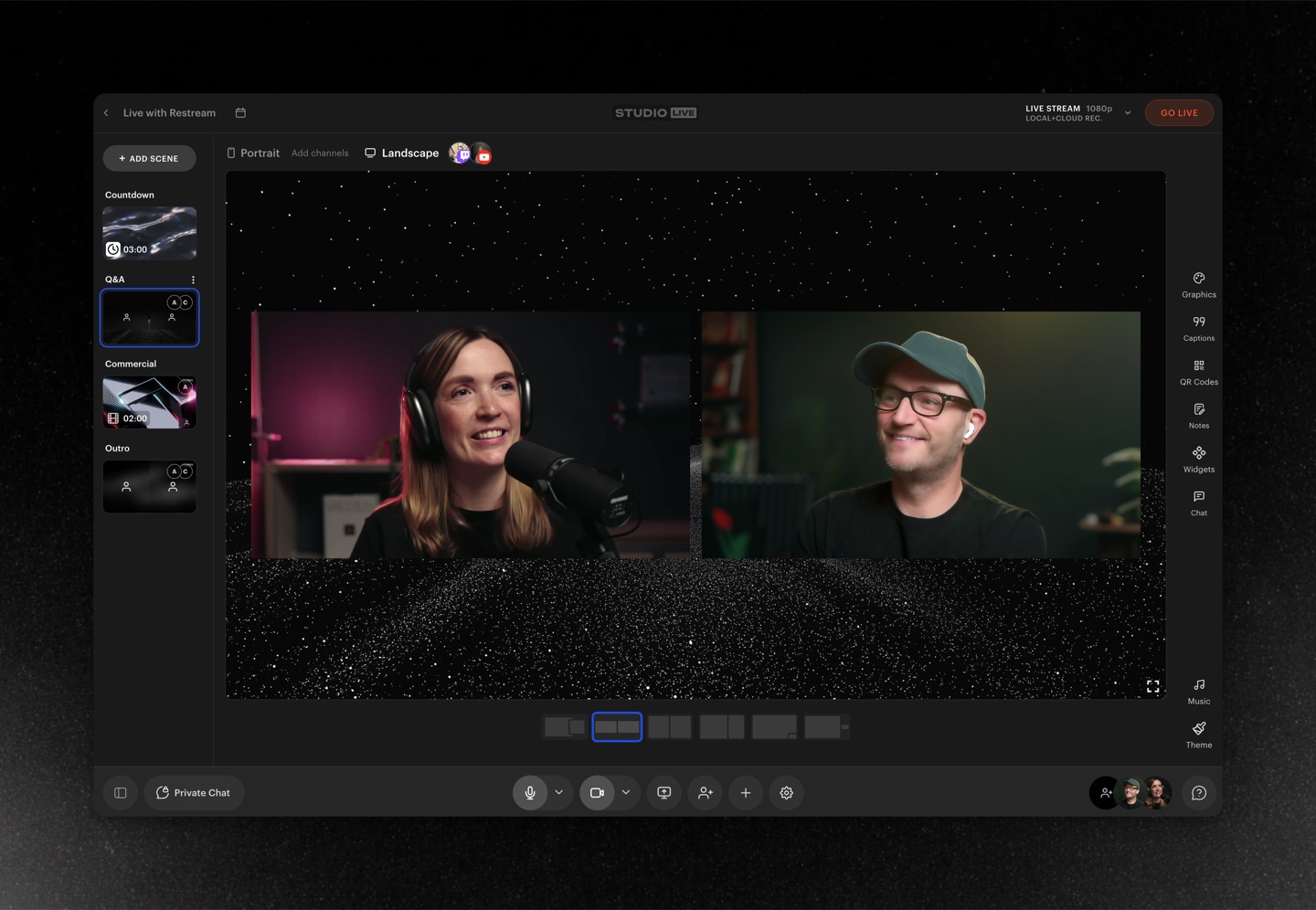
Restream Studio is easier to describe with a real production scenario than with a generic feature score. Picture a small software company interviewing a customer, demonstrating the product in a browser and answering questions from two social platforms. The people involved are in different locations. They need microphone checks, a screen share, a title graphic and a way to decide when each person appears on screen. This is the kind of problem a hosted Studio is built to address.
The host enters Restream Studio in a compatible browser, prepares the visual layout and sends guest invitations. According to Restream’s September 2026 guest instructions, guest links are available from the Sources area, and arriving participants first appear backstage. The host can bring them on-screen when ready. A backstage workflow is operationally useful because a guest may need to reconnect their microphone, adjust a camera angle or wait until a product demonstration is finished.
A browser removes the need for each guest to install a full desktop production suite. It does not remove device permissions, browser compatibility or network constraints. Ask remote speakers to join early from the equipment and connection they intend to use. Headphones reduce acoustic feedback. A wired microphone is often more predictable than a laptop mic beside a noisy fan. If a contributor has privacy-sensitive notifications, a rehearsal is the time to discover them.
Restream’s help center recommends Chrome on desktop, with other browsers supported to varying degrees. Browser and mobile guest experiences can differ, so an invitation that works on a producer’s laptop should not be treated as proof that every mobile device will provide the same camera, audio and recording options. The host’s technical requirements may be higher than a passive guest’s because the host also manages layouts and the ongoing event.
Within Studio, scenes can hold different arrangements: host-only introduction, two-person conversation, full-screen screen share, a call to action and closing remarks. A strong show usually needs fewer layouts than the design gallery suggests. Five deliberate states that everyone understands are more useful than fifteen transitions that no one rehearsed.
The screen-share documentation describes sharing a tab, window or screen, with supported audio options. It also notes limits on simultaneous sharing. If you present software, test the actual app in the intended mode. Some full-screen applications behave differently from ordinary windows, and a browser permission prompt can interrupt a live demonstration at exactly the wrong moment.
Guests should know whether their camera is visible, whether their screen is shared and whether a recording is being made. A producer should also know who is allowed to trigger an on-screen change. This is less glamorous than adding an animated overlay, but it prevents accidental exposure of personal conversations, internal dashboards or client files.
Studio supports branding and graphics through its web workflow, but free and paid users should check which assets, resolution levels and watermark rules apply. A creator purchasing a plan exclusively to remove a logo should compare the actual export or broadcast appearance, not just the plan name. Pricing pages summarize capabilities; the event preview shows how they affect your audience.
Restream’s 2026 placeholder feature can reserve spaces for participants or media before the relevant feed arrives. This can help a rehearsed panel keep its layout stable when a guest connects late. It is available on the free tier according to the vendor, though the number and type of placeholders are limited. Placeholders are conveniences, not substitutes for a human checking that the participant’s sound is actually coming through.
For recurring panel shows, keep a reusable run sheet. It might say who opens the session, which scene carries the topic graphic, who introduces the guest, which screen shares are needed and who watches comments. The software can lower the friction of switching visual states. It cannot decide whether a conversation is progressing or whether a question is inappropriate for a particular audience.
💬 Multichat and Analytics: One View Isn’t One Community
Multistreaming has a human problem that becomes obvious after a few minutes: the creator is speaking to several separate rooms. A single audience member on Twitch may not see the conversation occurring on YouTube. Comments arrive at different speeds, platform features differ, and moderation tools don’t always work uniformly across services.
Restream offers a consolidated chat view for supported destinations. That can reduce the number of browser tabs a producer needs to watch. It should not be interpreted as a universal moderation system with identical powers everywhere. Some actions may require a native platform dashboard, and platform changes can affect which messages or metadata the integration receives.
Consider whether the show needs an on-air host to read comments or a separate moderator. A small informal stream may be manageable alone. A product launch with several platforms and hundreds of messages is more comfortable when someone else filters questions and watches for account-specific issues. Switching a chat overlay on does not automatically give that person an effective process.
Restream analytics can help compare destination activity and past streams. Numbers may reflect different definitions, reporting delays or platform availability. Don’t add concurrent viewer counts as if all platforms measured the same population the same way. If a business needs an accurate campaign result, it should combine the streaming service’s available data with destination-native reports and its own downstream metrics.
A useful post-event review asks which channels generated genuine engagement and whether that engagement matched the show’s goal. A small professional audience that schedules a demo might be more valuable than a much larger audience that watched for thirty seconds. Restream can make it easier to be present in several places; it cannot tell you which outcomes your organization should care about.
When platforms disconnect, a merged chat can also become misleading. The absence of new messages may mean no one is talking, or it may indicate a destination-specific integration problem. Keep channel dashboards accessible so that a host can distinguish social silence from a technical failure.
💳 Restream Pricing in 2026: Four Plans, Many Conditions
| Feature | Free | Standard | Professional | Business |
|---|---|---|---|---|
| Monthly list price (USD) | $0 | $19 | $49 | $239 |
| Simultaneous active channels | 2 | 3 | 5 | 8 |
| Primary use | Try the workflow with eligible destinations | Three channels and added branding options | More outputs and advanced quality/recording options | Larger teams and multi-channel operations |
| Destination eligibility | Facebook Pages/custom RTMP require paid access | Check paid destination-specific entitlements | Paid routing and specific premium functions | Check available collaboration and seats |
| Notes | Restream branding applies | Verify Studio and recording allowances | Verify 1080p, local recording and add-ons | Verify team seats, cloud storage, full checkout cost |
The headline plan ladder is straightforward at first glance. On the public Restream pricing page, the monthly selector at our October 2026 check listed Free at $0, Standard at $19 per month, Professional at $49 per month and Business at $239 per month. The page also advertised 20% savings for annual billing. These are published list prices, not a promise that every country, promotion, renewal or add-on will follow the same checkout calculation.
What matters most is the combination of simultaneous output limits and a few workflow-specific permissions. Restream’s plan guidance assigns the regular tiers 2, 3, 5 and 8 simultaneous channels. Enterprise offerings may support substantially more, but they are a separate sales conversation. The service can store more connected accounts than it activates for one event; plan limits apply to the active destinations.
Free is a credible starting point. A creator can learn the browser Studio, connect two eligible destinations and test the relay workflow without a subscription. Free also carries Restream branding and limits on certain destinations and premium functions. If your exact plan involves Facebook Pages or a custom RTMP target, budget for a paid tier rather than assuming every free destination type is interchangeable.
Standard generally changes the conversation for small broadcasters. A third simultaneous channel matters when a show already has two useful communities and wants to reach a third without doubling the local encoding workload. The pricing page also describes branding and guest-channel benefits. A team should still check which recording and quality options are included before labeling Standard an all-purpose professional studio.
Professional becomes more relevant to creators who need five simultaneous destinations or particular higher-end studio and output settings. Restream markets Full HD 1080p and 4K recording features in connection with higher tiers, but resolution promises should always be matched to the mode in use. Studio, cloud recordings, local recordings, output destinations and encoder settings can have different requirements. Do not infer that every 4K-related bullet makes every outgoing live destination a 4K broadcast.
Business is aimed at organizations and larger operational requirements. The eight-channel limit may be useful for a regional campaign or a program with multiple branded destinations, but channel count alone rarely justifies that price. Look closely at staff seats, storage, guest permissions, production responsibilities and the features you would otherwise buy separately. A two-person marketing team might prefer a smaller tier and a dedicated editor to an expensive broadcasting subscription with unused capacity.
Pricing pages can also promote additional services for clips or webinars. Optional add-ons are separate purchase decisions. If your workflow doesn’t involve automated short-video extraction or a private webinar service, they shouldn’t be included in the value claim of a basic multistreaming plan. If you do need them, include their full recurring price when comparing alternatives.
Annual billing can make a monthly-equivalent figure look attractive. It may also create an upfront cash commitment. Compare the total due today, the number of months covered, cancellation terms, renewal conditions and any introductory discount separately. A discount for a longer commitment is not automatically a bargain for an unproven show.
For example, suppose an individual expects to need Standard for only four months during a seasonal campaign. Four months at the listed monthly price totals $76 before taxes and add-ons. A prepaid annual plan could cost more cash even at a reduced per-month rate if the account remains idle for the rest of the year. That illustration uses the vendor’s listed monthly rate, not a prediction of checkout tax or promotional billing.
The safest buying process is to write down the minimum features that materially change production. If a third active channel is the reason to pay, verify channel eligibility. If 1080p Studio is the reason, verify the plan and the actual output method. If a team needs cloud recording and downloadable separate tracks, verify that entitlement and retention period. These answers determine value much more reliably than a general “best plan” label.
🌐 The 2 / 3 / 5 / 8 Channel Decision
Restream’s channel numbers look like a simple progress ladder, yet the decision is rarely “more is better.” Think about where the audience actually is. Two destinations that people already follow can outperform eight accounts with dormant subscribers. Additional channels can also increase moderation load, title maintenance and platform-specific troubleshooting.
A business publishing from one camera might start with YouTube and LinkedIn. If the free tier’s destination eligibility fits its channel types, that is already a useful test. Adding a third network could justify Standard, but only after someone accepts responsibility for its chat, caption quality and post-live follow-up.
A more established creator could want Twitch, YouTube and a brand channel simultaneously. The creator may then prioritize whether each service permits identical content and whether monetization terms permit concurrent streaming. Restream’s output limit is one constraint among several, not a replacement for the destination platforms’ rules.
A large event with regional channels faces a different challenge. It might need separate languages, graphics, access permissions or moderation teams. One shared live program may not be the right answer if the audiences require genuinely different shows. The eight-channel Business tier counts simultaneous delivery paths; it does not automatically produce eight localized programs.
Count each account being sent the show, not just the network names in a pitch deck. And rehearse a realistic combination of those accounts. An untested multi-destination setup can produce embarrassing surprises when one target was disconnected weeks earlier or a platform changes its publishing requirements.
A good rule is to pay for the smallest tier that supports the actual show plus a justified near-term requirement. Add the extra channel only when it solves a distribution problem. This keeps marketing enthusiasm from turning into a permanently oversized software subscription.
📱 Vertical and Horizontal Video: Don’t Let the Crop Decide for You
A live production framed for a laptop screen can look terrible when sent to a portrait feed. Titles slide off the edge, a presenter’s face becomes too small, and overlays cover the subject. Multistreaming makes those differences visible because each platform can prefer a different viewing experience.
Restream’s vertical-and-horizontal OBS guide explains a workflow using a Restream OBS plugin to produce vertical and landscape outputs. The availability and configuration should be checked for the user’s operating system and product plan. The plugin is an explicit production tool; it should not be confused with a generic promise that cloud distribution will perfectly recompose any image.
Before adopting dual format, ask how much distinct visual direction the show needs. A stationary person framed in the middle may survive a careful crop. A game interface with critical information in the lower corners probably will not. A slide deck designed for 16:9 may become unreadable on a narrow phone display.
A real dual-format workflow may need independently positioned cameras and text layers. Treat vertical as a second design, not merely a copy of the first one with different dimensions. Build a simple title, a safe center frame and minimal overlay clutter. Test at typical phone sizes and at the actual destination’s playback view.
There are also audio implications. Restream documentation describes vertical output inheriting audio from the main mixer in the OBS workflow. That can simplify production, but it means a muted source or poorly balanced microphone is not magically fixed in the portrait version. Check the mix while checking the crop.
A beginner does not need to start with both orientations. If most of the audience watches a horizontal tutorial, choose one excellent widescreen feed before adding a portrait experiment. If short-form discovery is central to your strategy, test whether the added vertical production cost is justified by the resulting traffic or retention.
Professional offers for dual-format streaming may vary by tier or output method. Read the plan table together with the technical support article. The correct question is not only “Can Restream support dual format?” but “Can this exact subscription and setup produce the two versions our viewers need?”
🎙️ Recording, Separate Tracks, and the Meaning of ‘Local’
Live content often becomes useful after the stream ends. A business may want a clean interview recording for its website. A creator may want clips for YouTube Shorts. A trainer may want to remove an interruption and keep the rest as a course module. The post-production workflow starts before the broadcast, because recording settings determine which edits remain possible later.
Restream offers recording features, but the word “recording” covers different technical situations. Cloud recording means a recording is managed by the service according to available plan settings, quality and storage limits. Local recording generally means media is captured on a participant’s own device and later made available for production. Those methods can differ in quality, editability, failure modes and upload dependencies.
Restream’s Studio local recording documentation describes a paid beta for separate participant tracks and high-quality captures, including 4K in the supported context. The beta status matters. Requirements can include a current browser, specific device types, storage availability and session-duration limits. It should not be represented as a guaranteed feature for every guest on every phone.
Most importantly, the Studio local recording beta is not the same thing as an OBS encoder sending its output to Restream. If you choose an encoder-only workflow, check the recording options for that mode rather than assuming a Studio-exclusive local-track feature will appear in the output. OBS can itself record locally, but that is a separate decision under the creator’s control.
Separate tracks are valuable because a mixed live program usually bakes the speakers and overlays together. Suppose one guest coughs during another person’s answer. A single mixed audio track gives an editor fewer choices. Distinct tracks can let the editor reduce the noise or rebalance the two voices. However, obtaining separate tracks does not automatically guarantee proper synchronization, adequate microphone quality or permission to redistribute the conversation.
Before a customer interview, tell participants what is being recorded, who may edit it and where it may be published. Consent and retention obligations depend on the context and jurisdiction, not on the presence of a record button. If the content contains client data, a simple download policy and access list help avoid a storage surprise later.
A careful capture routine includes at least one independent backup when the event matters. That may be a local recording in OBS, a supported Studio recording option, or another agreed fallback. The exact combination should reflect the number of moving parts. Capturing everything twice is not free in CPU, storage or operations; missing the only usable recording can be more expensive.
After the event, verify that the file actually plays from beginning to end. Check the start and end, listen for clipping, inspect synchronization, and confirm whether graphics are baked into the output. A downloaded clip that opens successfully is not proof that every minute of an hour-long recording is intact. For recurring production, establish a quick quality-control process before deleting local backups.
Do not purchase a higher tier solely because a pricing bullet contains “4K” or “separate feeds.” Confirm that your intended studio or encoder mode, participant devices, recording duration and required export format are all supported. If they are not, a specialized recorder or a more deliberate OBS configuration could be the better investment.
📆 Scheduled Streams, Events, and Pre-Recorded Shows
The ability to plan a broadcast is as important as the act of going live. A team may need a registration link, a prepared thumbnail, a start time and a list of channels to verify. Restream provides event and scheduling tools that can make those tasks more organized than manually publishing each platform separately.
The account home screen distinguishes drafts and scheduled items. Use that separation deliberately. A draft is a place to prepare a show; a scheduled event can create an audience expectation. When a presenter changes the time, confirm that all connected destinations reflect the update rather than assuming one dashboard edit propagated in exactly the same way to every network.
There is also the option to broadcast a pre-recorded video through supported Restream workflows. The economic and technical requirements may differ from broadcasting live from a browser or encoder. Ask whether the plan includes the scheduling method you need, how long a recording may be and whether the format is accepted.
Pre-recorded output can be practical when a team must cover a predictable session across time zones. It is a poor substitute for truthful communication. If the host is not actively presenting live, be clear about the content format and whether questions will be answered in real time. Some platforms and audiences expect a live conversation, and that expectation should not be manipulated just because the interface uses a Go Live workflow.
A scheduled show also creates a need for rehearsal. Check the thumbnail, episode title, destination permissions, captions, copyright permissions for media and any guest link that will be shared. An automated publication schedule does not verify that a licensed music track may be replayed on every destination.
Guests may have the option to contribute channels to an event, depending on plan. That is appealing for a co-hosted discussion because each speaker can reach an established audience without sharing full account credentials. It also requires agreement about who controls event metadata and whether all channels should carry identical promotional material. Plan and platform limitations may apply.
For a recurring weekly show, keep a concise production log. Record which draft template was used, the connected destinations, the expected guests, the final start time and the file location for the recording. When someone asks why one destination did not receive an episode, that history is more useful than a recollection of which checkbox may have been on.
⚙️ Reliability and Troubleshooting: Find the Broken Link in the Chain
Every multistream has a chain: source equipment, local network or browser, Restream’s service, destination service and viewer playback. A failure at any point can look similar to the person watching on a phone. The correct response begins by locating which link failed.
If the local encoder reports dropped frames, start with the source system and connection. Reduce competing bandwidth traffic, check the actual upload stability, verify encoder settings and isolate heavy capture sources. Upgrading Restream’s plan won’t improve a poor wireless connection or a laptop overheating under game capture.
If Restream receives the signal but only one destination fails, inspect that destination’s status, authentication and platform restrictions. A revoked permission or stream-key reset can look like an infrastructure outage. If every destination fails simultaneously, check the inbound feed and service health before individually reconnecting all accounts.
Audio issues deserve their own checklist. If viewers on all platforms report silence, check the source mix first. If one destination has a peculiar delay, compare its native playback with the rest and consult the platform’s latency settings. Do not conflate a slow chat update with a defective video encoder.
There are situations where you should stop troubleshooting live and execute a fallback. For a paid event or important company announcement, agree on that threshold beforehand. Perhaps a single reliable YouTube link is acceptable if multistream routing is temporarily unavailable. Tell viewers clearly where to move; scrambling to set up an unfamiliar backup service mid-event rarely helps.
A status dashboard is useful, but so is an independent viewer device. A producer watching only the Restream preview can miss a destination-specific problem. A simple phone or separate browser session tuned to the actual public stream can reveal playback, aspect ratio or audio errors that do not appear in the production editor.
Before each important event, verify at least one minute of a real end-to-end path. Send a realistic signal, confirm the destination has actually received video and audio, and check how it looks outside the broadcaster. Keep a copy of confirmed resolution, frame rate and bitrate settings. Changes made late under pressure are common sources of unintended regressions.
Finally, retain enough operational records to diagnose recurring problems: event time, destinations selected, local encoder health notes, error messages and the point in the stream when the fault appeared. A log reduces guesswork and makes customer-support conversations more productive. It is also valuable when determining whether a subscription upgrade would solve anything.
🔒 Account Permissions, Data Privacy and Retention
To distribute content, Restream must interact with connected social accounts and their publishing permissions. Those connections should be treated as operational credentials, even when authorization happens through a familiar platform sign-in page. The safest practice is to use the official connection flow, review granted scopes and avoid sending passwords or stream keys to guests.
Restrict administrative access. Not everyone who appears in a broadcast needs permission to change billing, disconnect channels or see client recordings. Where team roles are available, check the subscription and assign the smallest level of access that supports the person’s actual job. Remove temporary contributors once their work is complete.
Stream keys and temporary invitation URLs have different threat profiles, but both deserve care. A stream key can permit unauthorized broadcasting if mishandled. A guest link can admit someone to a production room, creating disruption or privacy risks. Don’t place either in public screenshots or reusable demo documents.
Recording storage adds another layer. When the service holds media, you should understand who can retrieve it, how long it remains available, and what happens when the plan changes. Retention limits can change across subscriptions and features. A creator relying on a cloud archive should maintain a second copy of irreplaceable footage under a documented policy.
Businesses dealing with customers, employees or private demonstrations should check relevant privacy and data-processing terms, not just the marketing comparison table. Ask where footage goes, who has access, whether an appropriate agreement is needed, and what the internal retention policy requires. These questions belong to the organization’s use case and may require legal review.
When an account changes hands, disconnect unused social integrations and rotate exposed credentials. Keep event asset folders tidy so that a freelancer preparing a thumbnail does not accidentally receive video files from an unrelated client. A clean permission boundary often matters more than an additional production effect.
This review cannot audit Restream’s private infrastructure or certify its compliance posture. It can identify the operational questions a buyer should ask before putting regulated or confidential content into any cloud production system. For low-risk public broadcasts, the questions may be straightforward. For medical, financial or sensitive internal events, the organization needs a more formal assessment.
🧩 Which Features Actually Reduce Work?
A feature is valuable when it eliminates a repeated step without creating an equal or greater problem elsewhere. For Restream, connecting multiple destinations once can reduce setup time on subsequent broadcasts. Studio’s guest invitation workflow can reduce the friction of remote panel shows. A shared chat window can help an operator pay attention to several rooms. These gains are real possibilities, but they should be measured against the creator’s own workflow.
Create a before-and-after list for a representative week. How many times does a producer need to reconnect services? How long does it take to prepare a guest? How many minutes are spent checking platform status? How much work remains in editing and republishing the recording? A product that improves one of those numbers can justify a subscription even if it offers fewer decorative features than an alternative.
The other side of the ledger is dependency. A managed service can simplify distribution while introducing another account, another monthly renewal and another failure point. The value is highest when the production is consistent enough that the saved operational work outweighs those costs.
If you’re unsure, start with a single repeatable use case: a weekly two-platform livestream, a monthly expert interview or a small product demo. Use the free tier if eligibility permits and keep notes about any specific feature that blocks progress. Upgrade because a tested workflow reaches a documented limit. That produces a much better long-term software stack than buying the plan whose marketing page has the most colorful checks.
🆚 Restream vs OBS Studio, Streamlabs and StreamYard
| Decision | Restream | OBS Studio | Streamlabs Desktop | StreamYard |
|---|---|---|---|---|
| Core role | Cloud distribution and browser Studio | Local encoding, recording and scenes | Local streamer production and widgets | Hosted browser studio and guest production |
| Where scenes are produced | Browser Studio or external encoder | Computer running OBS | Computer running Streamlabs | Browser-based show workflow |
| Multistreaming | Native relay, plan channel limits | Requires additional output routing or service | Check current Ultra entitlements | Depends on purchased plan |
| Local recording | Plan-restricted Studio beta; distinct encoder paths | Native local capture/recording | Native local recording | Recording depends on hosted plan |
| Guest interviews | Studio guest links and scenes | Separate guest integration typically required | Separate guest workflow may be needed | A primary browser studio use case |
| Good fit | Creators needing distribution or guest Studio | Technical, local-first creators | Gaming creators who like widgets and overlays | Interview-centric teams |
| Verify before paying | Channel types, recordings and renewal | Hardware, capture method, plugins | Premium feature and output limits | Guest count, recording, brand limitations |
Four products often appear on the same shortlist even though they do different work. OBS Studio is a local production application. Streamlabs Desktop is also a local broadcasting app, with a more integrated creator-widget ecosystem. Restream combines cloud distribution with a browser Studio. StreamYard focuses on browser-based hosted production, especially guest-driven shows. None of those descriptions means one product has every capability the others provide.
For the gamer with complex scenes and capture-card inputs, compare Restream plus OBS with Streamlabs and its supported multistreaming options. Restream isn’t automatically an alternative to OBS; it may be the service receiving OBS’s finished program. The decision is whether the extra routing layer is worth its price and administration.
For a two-person interview, the choice can look different. A browser Studio reduces the pressure to assemble a full local recording rig, but the host still needs to check guest devices, branding permissions, recording access and output quality. StreamYard is a meaningful comparison because its browser-first workflow addresses similar requirements. A fair evaluation should compare the exact guest and recording functions included in the plans you would buy.
For someone who wants to record a tutorial and upload it later, Restream may be unnecessary. OBS can record the desktop locally for no subscription fee, while an editing tool handles the finished file. Cloud multistreaming would add another service without solving the core task.
The simplest comparison question is: Where is the show produced, and where does it need to go? If the show is already produced locally, investigate cloud routing. If guests and layouts are the challenge, evaluate browser Studios. If a single local stream is the only requirement, resist paying for a second broadcasting layer out of habit.
Read our separate OBS Studio review and Streamlabs Desktop review for the local-production side of that decision. Those are not interchangeable with Restream pricing. Each product has its own plan and resource constraints, and the right pairing depends on where the actual bottleneck sits.
🧪 Three Practical Restream Setups — Illustrative, Not Claimed Tests
Scenario one: An independent creator covering two communities. A small educational creator publishes weekly presentations and already knows OBS. Their audience follows both Twitch and YouTube. They connect two eligible channels to Restream Free, use OBS to produce a single landscape feed, and check both destinations from separate viewing sessions. The trial succeeds if both destinations receive acceptable video and sound, the creator can follow the chats without distraction, and the weekly workflow is repeatable. This is a proposed trial, not a test we personally ran.
The same creator might discover that most of their audience stays on one network and asks questions there. In that case, the second destination adds little value and upgrading for a third network would make no sense. Alternatively, the second platform could attract a distinct audience, and the person might decide that a supported paid feature would save enough time to justify a subscription. The point of the trial is to decide with evidence.
Scenario two: A SaaS company running product interviews. Two guests are in different cities and a host wants a screen-share demonstration, an introduction scene and clean audio for an edited recap. Restream Studio offers a browser-first way to arrange participants and distribute the program to supported social channels. Before choosing a plan, the producer checks the guest limits, recording mode, download terms and any requirements for separate local tracks. They rehearse the screen share with dummy data and give participants clear instructions about recording and publishing.
If the event turns out to need professional isolated audio and independent camera files, the team should verify whether the appropriate Studio recording options are available on the selected tier and participant devices. That may justify an upgrade, or it may point toward a dedicated remote recording workflow. A “4K” label cannot substitute for checking the deliverables the editor actually expects.
Scenario three: A distributed brand launch. A marketing team wants a product announcement across several channels, perhaps involving a partner account and a vertical social feed. They first document the destination list and who controls each one. They choose the smallest tier with enough active outputs and the necessary destination types. They design the horizontal and vertical layouts deliberately instead of assuming cloud routing will crop everything correctly.
The rehearsal has two jobs: validate the channel permissions and validate the creative output on real devices. A backup broadcast path is documented in case a destination disconnects, and a separate moderator checks comments. The team’s success criterion might be qualified landing-page visits or event registrations, not simply an aggregated viewer counter. A large audience number does not pay the production bill if the wrong viewers arrived.
Across these scenarios, Restream makes more sense when it removes a repeatable operational burden. It makes less sense when a team confuses additional destinations with a better source recording or a proven marketing strategy.
✅ Strengths and Limitations: Who Benefits Most?
👍 What We Love
- ✅ One-to-many distribution: A single eligible source can be routed to multiple live channels by plan.
- ✅ Browser Studio: Guest invitations, scenes and presentation workflows reduce setup demands for remote shows.
- ✅ Useful free starting tier: Two eligible simultaneous channels allow real exploration before subscribing.
- ✅ OBS integration: Experienced local creators can retain their scenes while using Restream for delivery.
👎 Where It Falls Short
- ❌ Plan-dependent channel access: Facebook Pages, custom RTMP and higher channel counts require paid access.
- ❌ More destinations mean more work: Every platform brings its own chat, rules and failure scenarios.
- ❌ Recording options vary: Separate local guest tracks and higher quality modes are not universal.
- ❌ Service dependency: Distribution relies on Restream, the upstream connection and each destination.

Restream — Editorial Broadcasting Snapshot
Good fit: cross-platform live broadcasting and remote guest production. Reconsider: unlimited destinations, local capture without an encoder, or identical features on every plan.
Independent review based on official Restream materials; no paid account access or performance benchmarks are claimed.
There is a good reason Restream remains attractive to people who already broadcast. A local encoder can send one program to a cloud service, while the service handles several downstream destinations. That division of labor is clearer than asking a beginner to maintain several independent local outputs. The free tier gives many creators enough room to learn the process, and Studio offers another route for guest-oriented shows.
The limitations are equally important. Channel caps, restricted destination types and plan-specific recording functions mean the free label doesn’t encompass the entire service. Guest management, chat moderation and destination permissions still need an operator. Using another cloud service adds another subscription and another dependency.
We consider the strengths substantial when the creator’s main challenge is reliable, repeatable distribution. We would be cautious if the creator expects a single app to handle advanced game capture, isolated interview recording, short-form editing and social audience growth equally well. Those are separate production disciplines, and no dashboard removes the need for informed setup.
🛠️ Twelve-Point Preflight Checklist Before Your First Multistream
A production routine can be short without being superficial. Before every important Restream event, confirm these twelve points with the person responsible for the show.
First, verify the broadcasting accounts are the correct destinations and that the expected permissions remain active. Second, confirm that the selected plan allows the number and types of channels required. Third, inspect the title, description, thumbnail, audience setting and scheduled time separately on each platform where possible.
Fourth, choose the production path deliberately: Studio or encoder. Fifth, test the microphone and speaker routing with headphones, including any remote guest. Sixth, confirm cameras, slides and screen captures do not reveal private information. Seventh, inspect aspect ratio and safe text placement for each intended orientation. Eighth, send a brief test signal and verify playback outside the production interface.
Ninth, make sure someone can monitor the necessary chat or comment streams. Tenth, decide which recording method is active and where the resulting files will be stored. Eleventh, agree on a fallback destination if the routing layer or a platform fails. Twelfth, write down who can stop the show, rotate a compromised key or respond to unexpected guests.
The checklist seems mundane until an event fails. Preventing the wrong title from appearing on a sponsor’s channel can be worth more than an extra visual effect. Rehearsed boring details make an engaging live show possible.
🏁 Final Verdict: Is Restream Worth Paying For?
Restream is worth serious consideration when one broadcast needs to reach several eligible destinations without forcing the creator to manage several local encoding paths. Its browser Studio is also a practical option for live conversations and presentations whose guests would rather open a link than install production software.
The free plan is a useful first step, especially for two-destination tests that fit its destination restrictions. Paying becomes easier to justify when a genuine need appears: three or more simultaneous outputs, a permitted Facebook Page or custom RTMP channel, the right branded Studio experience, specific recording entitlements or a team workflow that saves real production time.
We would not recommend an upgrade just to chase hypothetical reach. The extra destinations create ongoing work. Nor would we recommend paying for a cloud distributor to solve a source-level problem such as faulty screen capture, distorted audio or insufficient upload bandwidth. Find the failure before buying a different plan.
The best combination could be OBS for local production and Restream for delivery. It could be Restream Studio for remote guest broadcasts. It could also be one free local application and no distribution subscription at all. Choose the arrangement that keeps a real show predictable, fits the current audience and can be explained clearly to the person who takes over next week.
❓ Frequently Asked Questions About Restream
Can I use Restream completely free?
Yes. Restream documents a Free plan that supports a limited but useful starting workflow, including two simultaneous eligible destination channels and access to parts of the browser Studio experience. The free tier carries branding and does not include every destination type or professional feature. Its limits make it suitable for experimentation and small recurring shows, not a guarantee that every production need can be covered without paying. Check the exact accounts you need before announcing an event.
How many destinations can Restream send a stream to at once?
Restream’s published plan guidance lists two simultaneous active channels on Free, three on Standard, five on Professional and eight on Business. The service can hold more connected destinations than the number selected for one broadcast. Enterprise packages have different arrangements. A channel is a destination account, not necessarily a distinct social-network brand. If a show is going to two separate YouTube accounts, that may consume two active outputs. Always check the destination list before going live.
Can I use OBS Studio with Restream without encoding separate streams?
Yes, that is a core external-encoder workflow. OBS produces a single program output and sends it to Restream, which can forward the received signal to the active destinations. You still configure scenes, audio and encoder settings inside OBS. A cloud relay reduces the need to upload several independent encoded copies locally, but it cannot repair a corrupted incoming program. For essential broadcasts, perform an end-to-end test and retain a fallback plan.
Do I need to install desktop software to use Restream Studio?
No. Restream Studio is browser-based and supports producing shows with scenes and remote guests. A modern supported browser, working microphone and camera permissions and a reliable internet connection remain necessary. The browser path is especially useful for interviews and presentations, but browser capability can vary by device and feature. People who need game capture or complex local source routing may prefer OBS or Streamlabs feeding a Restream destination instead.
Can the Free plan stream to Facebook Pages or custom RTMP destinations?
Restream’s own premium-feature guidance identifies Facebook Pages and custom RTMP channels as paid-only destination types. A free account can still provide useful multistreaming to eligible channels, but you should not treat every social destination or arbitrary RTMP endpoint as interchangeable. Before selecting a tier, list the exact accounts and connection methods that must be active. If a particular branded page or external ingest server is essential, confirm its paid-plan eligibility.
Can guests be recorded to separate tracks inside Restream Studio?
Restream documents local recording functionality in Studio, including separate participant tracks under a paid beta and supported conditions. That is valuable when an editor needs to balance speakers independently. However, feature access depends on the current plan, browser and beta requirements. Confirm whether every participant’s device is supported, what duration and quality are allowed, and how the files are delivered. Do not assume that the word “recording” automatically promises separate local video files for all guests.
Does the Studio local recording beta also work for an OBS-only broadcast?
Do not assume so. The vendor’s local-recording beta documentation describes a Studio workflow with browser-based participant capture. An external encoder sending an RTMP signal through Restream is a different production path. OBS can record locally using its own settings, and Restream may offer other recording capabilities depending on plan, but those are distinct from Studio’s beta for isolated tracks. Verify the method you intend to use rather than carrying assumptions from one product feature page to another.
Can Restream stream vertical and horizontal video from OBS?
Restream documents an OBS plugin workflow for sending portrait and landscape outputs. The exact configuration, operating-system support and feature entitlement must be checked in the current guide. A second orientation still requires production decisions: a vertical crop may cut off game information, subtitles or slides designed for widescreen. Check both outputs on real devices before making dual-format streaming a regular commitment. A supported option isn’t the same as a design that looks good without extra work.
Is Restream better than StreamYard for live guest interviews?
Neither is universally better. Both address browser-based broadcasting and remote guest production, but their workflows, recording allowances, platform distribution, pricing and branding may differ. Restream is especially interesting when multi-destination delivery or an existing OBS workflow is central. StreamYard deserves consideration for a team prioritizing a hosted guest-production interface. Compare the exact paid tiers, run the same rehearsal on each and decide which one reduces the host’s operational work.
Does paying for Restream automatically remove branding and provide 1080p?
Different paid tiers unlock different things. Restream’s pricing page associates branding removal with a paid entry tier and identifies Full HD 1080p among higher-plan capabilities. That does not mean every paid subscription has identical resolution limits in every Studio or encoder mode, or that all connected destinations accept the same settings. Check the selected plan and the actual workflow you will use. Inspect a real test output before promising a client a specific video quality.
What should I do if one destination disconnects during a multistream?
First determine whether the source encoder or browser is still sending a healthy signal to Restream. If other destinations continue receiving the show, focus on the failing platform’s permissions, stream status or connection settings. Do not automatically restart a healthy multi-channel show. If all destinations have failed, inspect the upstream signal and any available service-status information. For important broadcasts, use a rehearsed backup channel and communicate clearly with viewers about where the session continues.
📚 Official Sources and Editorial Method
This review relies on published product documentation, not a claimed hands-on subscription test. The central references are Restream pricing, pricing for premium features, free-plan guidance, choosing a live workflow, connecting OBS, inviting Studio guests, Studio local recording beta and vertical/landscape OBS broadcasting.
Plan access, price displays and specific feature limits can change. We distinguish documented terms from illustrative scenarios, and we do not claim to have measured video performance or used an account when we did not. Readers should confirm current checkout details and destination rules before committing to a paid plan.
EXPLORE NEXT ON DIGIOFFLY
Explore More After This Restream Review
Choose the right streaming production, distribution, recording and post-production tools without buying overlapping subscriptions.
Plan your live production stack
- Review OBS Studio — Evaluate free desktop production and encoder control.
- Review Streamlabs Desktop — Compare local scenes, recording and creator widgets.
Compare ongoing creator expenses
- Explore Creator & Streaming — Browse streaming, creator and editing software.
- Edit interview recordings — Review transcript-based editing for long conversations.
Explore streaming alternatives
- Find complementary tools — Filter documented software capabilities.
- Compare more software — Examine vendor features side by side.
- Budget software costs — Plan recurring and annual software commitments.
Published plan references change. Confirm usage, annual billing, active channels, production tools, editing services and annual billing commitments directly with the vendor.