

Editorial note — October 2026. This is an independent, official-source review. We examined StreamYard’s published pricing, support documentation, product updates and practical workflow descriptions. We did not purchase a subscription, perform controlled broadcast benchmarks or interview the company. Vendor pages may display account-specific offers, so confirm the selected plan and renewal price before paying.
The tricky part of a live interview isn’t always getting two cameras to work. It’s making sure the guest joins on time, their microphone sounds right, the audience sees the correct screen, the title graphic is spelled correctly, and the recording survives when the live show ends. The software needs to help a producer handle those jobs without creating more technical work than the conversation itself.
StreamYard sets out to make that type of production accessible from a browser. A host prepares the show, invites people with a link, chooses visual layouts, and can deliver the finished program to supported streaming destinations. The same environment can serve recording-only sessions, webinars and recurring interviews, depending on the plan. There is no need to install a full desktop encoder just to invite a guest and put two cameras side by side.
That convenience is worth examining rather than simply accepting. StreamYard’s plan limits, branding, storage rules, guest permissions and recording formats can matter more than the list of decorations in the studio. A show that needs eight simultaneous destinations, isolated 4K files and several team operators requires a different purchase from a creator who only records a short conversation once a month.
Our StreamYard verdict for 2026: The platform is a strong fit for presenter-led content, interviews and small teams that value a manageable browser studio. Its limitations are less about creating attractive scenes and more about what lies outside that simple workflow: exact local capture control, separate editing applications, platform permissions, recording storage and subscription economics. The free edition is a sensible place to learn, but important capabilities sit behind paid tiers.
Creators whose entire production revolves around game capture and hardware-optimized encoding may prefer OBS Studio or Streamlabs Desktop. Teams that already produce a finished local program and mainly need to reach additional networks should compare Restream. StreamYard belongs on the shortlist when the actual bottleneck is running a conversation or demonstration with people, not tuning a collection of complex desktop sources.
There is no single feature that makes a broadcaster reliable. A rehearsal, a good microphone, clear guest instructions and a documented fallback usually matter more than one additional animation. The question to answer before subscribing is whether StreamYard reduces those recurring production burdens enough to justify a monthly commitment.
🎯 StreamYard at a Glance: Who Should Consider It?
Best for: Interview hosts and podcasters who want clean guest access; educators presenting a browser screen and camera; founders running repeatable product conversations; marketing teams recording expert panels; community creators who want basic layouts, banners and a simple on-air control room.
Less suitable for: People who need advanced game capture without a local encoder; engineers who want full control over encoding, plugins and hardware routing; teams that assume one purchased plan includes every collaboration feature; businesses that cannot put confidential recordings into a cloud workflow without additional governance.
Plan ladder: At the public pricing check, StreamYard described Free, Core and Advanced individual plans alongside separate Business arrangements. The public monthly selector displayed $44.99 for Core and $88.99 for Advanced, with lower monthly-equivalent prices shown when annual billing is selected. Some visitors may see different offers or a signup flow instead of the same figures. Never present an annual equivalent as a month-to-month rate.
Free access: The free tier includes a basic studio with StreamYard branding, streaming limits, storage limits, up to six participants on screen and a published allowance of two hours of local recording per month. Other features and eligible destinations depend on the selected tier. Free should be treated as a real trial environment, not as an unlimited production subscription.
Our buying advice: Begin with a realistic 20-minute rehearsal, preferably using a guest on another connection. If it works, write down which limitation matters before upgrading: watermark removal, three or eight simultaneous destinations, additional guests, 1080p, local recording quality, webinar features or access for additional operators.
2026 context: StreamYard announced a visual redesign in March 2026, including a refreshed dashboard, colors and logo. Older tutorials can still explain the logic of the studio, but screenshots from several years ago may look different from the current experience. Don’t assume that an older button location is unchanged.
🧭 What StreamYard Actually Does
StreamYard is a browser-based production studio. The host can arrange participant videos, bring shared screens onto the stage, display comments and brand graphics, and produce a program for live delivery or a recording-only session. It combines several jobs that would otherwise involve a desktop encoder, conferencing application, overlay software and scheduling workflow.
That integration is attractive to a recurring host. Instead of asking a guest to install software and connect to a private RTMP server, the host can send an invitation URL. A contributor joins through a supported browser, permits microphone and camera access, checks their display name and waits backstage. The operator then decides when that person appears to the audience.
What StreamYard doesn’t automatically do is equally important. It doesn’t turn a low-quality mic into a professional recording. It doesn’t make a viewer’s network faster. It doesn’t eliminate the moderation rules of YouTube, Facebook, LinkedIn or Twitch. A polished on-screen layout is still a production choice, not something guaranteed by a paid plan.
Browser-first production also has its own dependencies. The host needs reliable upstream bandwidth, enough computer resources for browser video work, current device permissions and compatible guest devices. Network instability can damage a recording or make a live conversation feel awkward. A browser reduces setup complexity; it does not remove physics or human error.
For that reason, evaluate the application as a workflow rather than as an isolated piece of software. Ask how long it takes to prepare a familiar show, add an unplanned guest, put a shared screen on air, find the resulting recording and hand the raw files to an editor. Those recurring tasks reveal value that a checklist of icons cannot capture.
🚀 Starting a Show: Destinations, Studio and the First Rehearsal
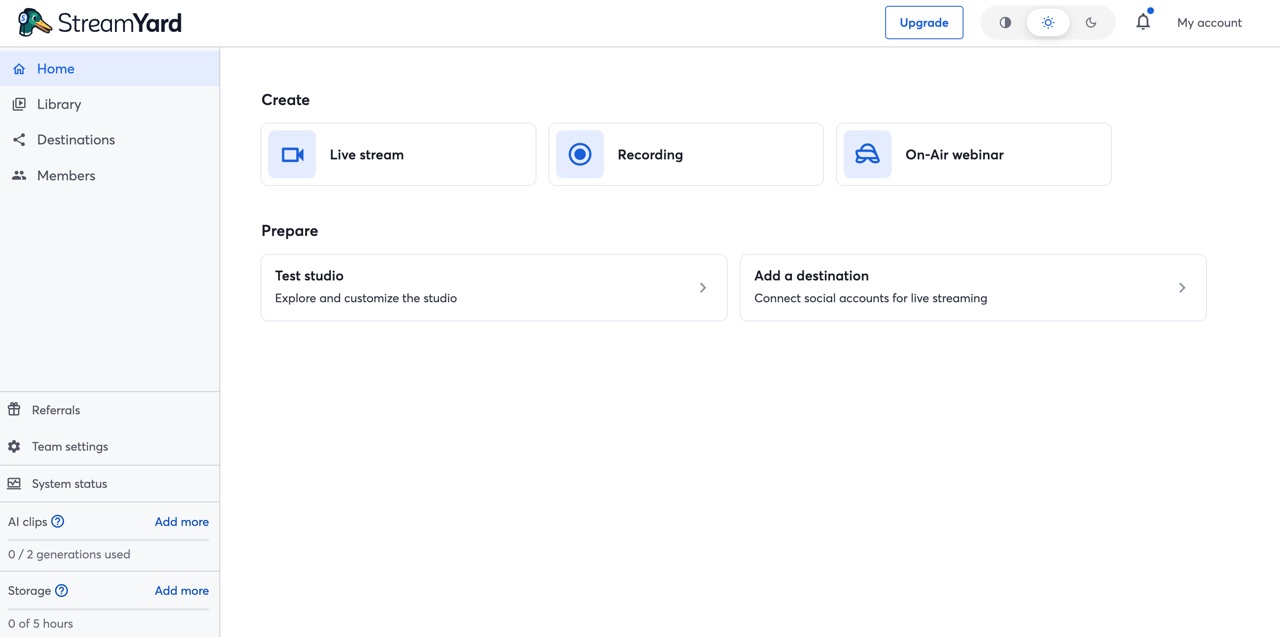
Start with a concrete use case: perhaps a weekly customer conversation that goes live on YouTube and is later edited into a short case study. Name the episode, decide whether it is live or recording-only, and prepare a script that includes a brief introduction and a clean end.
When connecting a destination, use the official account authorization route, verify the correct channel and check the platform’s live eligibility. A public Facebook Page, a personal Facebook profile and a LinkedIn Page aren’t interchangeable just because they live under the same brand. Some may have different permissions or require a paid plan feature.
If you’re planning multistreaming, count every destination separately. A creator who wants to reach two YouTube accounts and one LinkedIn account has three active outputs, not two platforms. StreamYard’s published Core plan includes three simultaneous destinations; Advanced lists eight. Business entitlements and custom arrangements should be verified with sales or the account billing page.
The first rehearsal should be deliberately simple. Connect one microphone and camera, invite one guest, practice showing a title graphic, and make a 60-second recording. Watch the result outside the studio. Confirm that names are readable on a phone, the voice isn’t echoing, and the host knows how to remove a participant from the stage.
Repeat one action under slight pressure: ask a guest to share a browser tab during the call. Their screen may appear in the host’s source area, but the host still needs to add it to the stage. That is an important division of control. It prevents a guest from accidentally broadcasting a private desktop just because the sharing permission exists.
Write down the roles before starting a significant event. Someone hosts the interview. Someone else may manage comments and guests. For small podcasts, one person can do both; for a sponsored webinar with multiple speakers, the distinction becomes useful. The software allows several kinds of collaboration, but the required role permissions differ by tier.
Finally, rehearse how to end the show and locate the recording. Many producers know where the Go Live button sits but discover only afterward that their plan or storage allowance does not provide the raw export they expected. A brief test of the complete lifecycle avoids that surprise.
👥 Guest Links, Backstage and Greenroom: Where the Real Production Happens
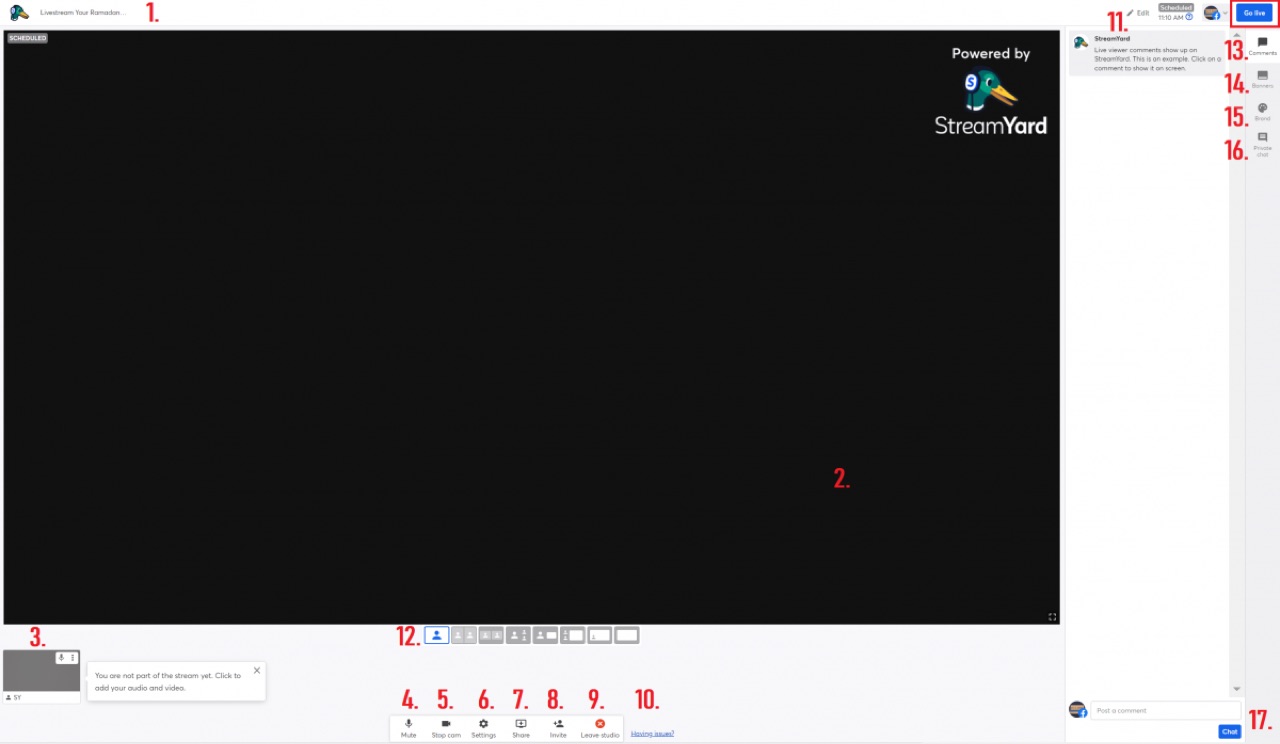
A live panel is less chaotic when the audience cannot see its preparation. StreamYard’s guest flow makes that possible. The guest opens a link, chooses the camera and microphone, enters a name and arrives backstage. The host controls whether they are placed on screen. Guests normally do not need to create an account just to participate, though optional authentication and guest-destination features impose additional conditions.
Backstage and Greenroom should not be confused. Backstage is a waiting area connected to the production. The Greenroom is an additional workflow for organizing participants and private pre-show communication, available according to supported plan options. If a client wants a five-speaker panel with someone coordinating late arrivals, the operational design matters as much as the advertised maximum number of guests.
The vendor’s participant guidance lists different on-screen and backstage capacities. At our editorial check, the public pricing materials identified up to six on-screen participants for Free, ten on Core and a larger backstage allowance on Advanced. The help article states Advanced supports fifteen backstage participants but ten on screen. That distinction matters for an event with many guests taking turns.
Invite contributors well before the public start time. Give them one concise note: use headphones, join from a quiet room, close notification-heavy applications, keep a charger connected and test the exact browser or device they will use. Ask them to speak at their usual volume, rather than whispering to make the meter look safe.
If a guest has a weak connection, avoid diagnosing the problem only through the production preview. Ask them to run a short separate connectivity check, close other video calls and try an alternate network if practical. A delayed video image with clear sound may be preferable to a perfectly framed face with audio that cuts out.
Have a contingency for absences. A two-person interview can proceed with a solo introduction and a short question segment while the guest reconnects. A five-panel show may need a spare moderator and a schedule that isn’t dependent on every speaker being present at the same instant. No amount of software polish can replace that plan.
Guests also need clarity on recording permission. Before beginning, explain whether the session is broadcast live, recorded for editing or both. Tell them how the material may be reused and who will have access to it. A link to a browser studio is an access mechanism, not a substitute for informed production consent.
🖥️ Layouts, Screen Sharing and Brand Controls
StreamYard’s layout approach trades unlimited configuration for decisions that a host can make during a conversation. A presenter can show one speaker, two speakers, a screen-share demonstration, or other supported arrangements. For many interview formats, that is more than enough visual range.
The challenge is deciding which content deserves the largest portion of the frame. When a guest demonstrates software, the application window should be readable. Put the presenter’s camera in a corner only if it isn’t covering navigation or text. A split screen that looks balanced on a desktop monitor can make both the person and their slide deck illegible on a phone.
Branding elements help viewers recognize a series: logo, background, lower-third, banner and a consistent color scheme. Avoid using every available animation. A clean title and one well-timed call to action are often more effective than several moving assets fighting for attention.
At paid tiers, StreamYard supports more customization, including logos, overlays, clips and backgrounds. Custom layouts become more flexible at higher tiers. The exact set and limits should be checked against the relevant plan, particularly when an event requires several speakers plus a persistent sponsor treatment.
Screen sharing is useful for product demos, lessons and collaborative presentations. Guests can also share in supported desktop workflows, but the host decides when their shared content reaches the audience. Test audio sharing as well as video; a silent demonstration of a product that depends on sound can appear defective even when the screen looks fine.
Slides introduce their own problem. Fonts that are comfortable in a conference room become tiny when squeezed beside two cameras and a comment overlay. Design for the smallest likely viewer. Use high contrast, short labels and screen elements that stay away from the edge where platform interfaces or captions may sit.
If a company needs animated scenes, custom compositing, virtual camera routing or many independent audio sources, compare a local-first encoder. StreamYard’s advantage is a manageable control room; it should not be evaluated as if it were a replacement for every low-level OBS feature.
💬 Comments, Banners and Hosting Several Audiences
When a show appears on more than one network, the host is effectively speaking to multiple rooms at once. Comments, likes, moderation capabilities and even the meaning of “viewers” differ between platforms. A consolidated control view can help, but it doesn’t erase those differences.
StreamYard’s comments panel allows supported messages to appear in the production environment, and selected comments can be displayed on-screen. That is useful for Q&A sessions. It is also an editorial responsibility: a host should read a message before amplifying it across every audience.
Banners can handle predictable information without interrupting the guest. A product URL, episode topic or next session date can appear when relevant and disappear again afterward. The most useful on-screen information tends to answer one immediate viewer question, not reproduce an entire advertisement.
Moderation gets harder when a guest has added their own destination. Decide who watches which channel and whether a native moderator has the appropriate privileges. One producer may be able to operate a small stream, but a panel on several networks can benefit from a separate chat moderator.
Cross-platform analytics should be interpreted carefully. Aggregated viewer numbers may use inconsistent destination definitions, delays or deduplication rules. Don’t report a combined concurrent audience as though each network provides the same measurement. Compare quality of engagement and business outcomes where possible.
A practical rule is to review questions after the event. Which platform generated the most relevant audience contributions? Which comments deserved a longer answer? Was the show too complex for one operator? Those observations can help determine whether multistreaming, an extra moderator or a new format would make the next session better.
💳 StreamYard Pricing in 2026: Free, Core, Advanced and Business
| Decision | Free | Core | Advanced | Business |
|---|---|---|---|---|
| Published monthly price | $0 | $44.99 | $88.99 | Contact vendor |
| Simultaneous destinations | Limited free access | 3 | 8 | Contract-specific |
| On-screen participants | 6 | 10 | 10; up to 15 backstage | Verify custom contract |
| 4K local recordings | Not in Free allowance | Not included as 4K tier | Eligible devices and local recording settings | Verify agreement |
| Storage allowance | 5 hours | 50 hours | 50 hours | Custom / higher caps |
| Best fit | Trial and limited creator use | Regular small creator shows | High-end recording and multistreaming | Organizations, administration, team rights |
Pricing is the point where two creators with apparently identical shows can make very different choices. One person needs a watermark-free weekly YouTube interview; another wants to broadcast the same program to several accounts and deliver separate high-resolution participant files to an editor. Both might say they “need StreamYard,” but they should not purchase the same tier automatically.
StreamYard’s official pricing page presents Free, Core and Advanced for individual creators, with Business arrangements for organizations. At our October 2026 editorial check, the public pricing selector displayed Core at $44.99 per month and Advanced at $88.99 per month when billed monthly. The same page showed lower monthly-equivalent figures — $35.99 and $68.99 — alongside a yearly-billing discount. Those annual equivalents should not be mistaken for flexible one-month subscription prices.
There is a second caveat: StreamYard’s help center explains that actual plan pricing can require signing into an account to view eligibility and current offers. Promotions, regional variations, trial access and renewal terms can differ. If the checkout does not match the public list, the checkout for the correct account and period is what determines the purchase.
The Free plan helps you learn the studio, bring guests on screen and assess the basic quality of a session. It retains StreamYard branding and has streaming, recording and storage limits. The public plan description included up to six on-screen participants and an allowance of two hours of local recording per month. This is enough to run an evaluation, but not a promise that a recurring business production can remain free indefinitely.
Core makes sense when a presenter needs watermark removal, custom visuals and more practical live distribution. The public pricing comparison lists 1080p live output, up to three simultaneous destinations, ten on-screen participants, custom RTMP destinations, guest destinations and expanded recording access. It also includes a published fifty hours of storage, but usage and retention rules apply. A creator who broadcasts only once a month may still prefer the cheaper commitment of a shorter trial period before paying annually.
Advanced adds workflow features for operators who have outgrown Core. The public comparison lists up to eight simultaneous destinations, 4K local recording files where supported, greater backstage capacity, webinar features and additional layout or customization choices. Advanced is not simply a more expensive version of the same stream. It serves teams whose production and distribution requirements have genuinely changed.
Business requires separate evaluation. StreamYard’s own support materials describe it as the offering for larger organizational workflows, company email domains, roles and security or administration features. Pricing and eligibility may require a sales conversation. Do not assume that buying the individual Advanced tier is appropriate for a company production just because a single employee is operating the camera.
The plan you’re allowed to buy matters. Some published guidance specifies that Core and Advanced are for individual use rather than every commercial organization. Review StreamYard’s subscription guidance and current usage policy before treating a personal plan as a substitute for a business agreement.
A large percentage discount deserves a little skepticism. Suppose a creator publishes four paid webinars each quarter and knows that every session needs Advanced features. An annual commitment could be economical if the workload is predictable. Another creator who only has a seasonal launch in November may pay less overall by using a single month of a higher tier and cancelling properly. Compare the total cash commitment over the actual production schedule, not just the attractive monthly-equivalent label.
Storage also deserves its own calculation. According to StreamYard’s storage guide, the default allowance is five hours on Free and fifty hours on Core and Advanced, with other arrangements for Business. Exceeding storage can stop new recordings from being saved in the service even if a live broadcast can continue. Paid storage add-ons extend capacity but also change the recurring bill.
Imagine a weekly show that creates two hours of archived footage. Over three months, it may generate more than twenty-four hours of recorded content before shorter highlights, retakes and extra interviews are considered. A team that assumes its cloud library has unlimited space could find its recording routine interrupted long before a subscription anniversary.
Recording length limits and total storage are not the same number. A plan can permit a ten-hour individual recording and still have a total stored-hours cap. Download important masters, verify them, and keep a deliberate retention policy. If a guest’s consent only permits thirty days of storage, holding the footage indefinitely is not necessarily better even when space is available.
For any paid tier, build a simple budget with five elements: selected plan, billing commitment, extra seats or business requirements, storage add-ons and any external editing services. The most expensive line may end up being staff time, not the StreamYard subscription. A software stack that leaves four people manually exporting and combining files can cost more than one that charges a higher monthly fee but simplifies post-production.
The essential question is what stops working if you choose the cheaper tier. If the answer is “nothing important,” save the money. If the answer is “we cannot deliver separate participant files to the editor” or “our third live destination is unavailable,” the upgrade has a concrete purpose.
🎙️ Recording-Only Studio, Local Tracks and Cloud Exports
Many people search for live-streaming software when their real need is to produce a recorded conversation. StreamYard offers a recording-only workflow that uses the familiar browser studio without sending the session to public destinations. That can be a good choice for customer testimonials, training interviews, podcast segments and product tutorials.
The basic process is straightforward. Create a recording, enter the studio, check participant cameras and microphones, choose the layout, and press Record. The output can later be downloaded or repurposed according to the subscription and storage permissions. StreamYard’s recording guide describes this flow.
There are two recording concepts that buyers should not merge. A cloud-mixed recording captures the composed show from the production service. A local recording can capture source material on participants’ own devices, keeping tracks separate for editing before the files are uploaded or delivered. The workflow, availability and reliability differ.
The mixed file is convenient when the on-air production was already well composed and needs minimal editing. The local tracks become more valuable when a producer must correct a speaker’s audio, crop an individual camera independently or change visual timing in post. A podcast editor receiving isolated material has a different set of options from someone who receives a single widescreen broadcast master.
Cloud individual audio tracks are a further distinction. StreamYard’s individual-audio guidance describes separate cloud tracks with a plan restriction. Those tracks are not necessarily the same as locally recorded participant videos. A buyer requesting “multitrack” should name the exact deliverable: isolated WAV files, separate camera files, a composited master or all three.
Before a guest interview, request a two-minute test with a second participant. After recording, inspect the available files in the actual account and verify whether the timestamps match and the audio can be imported into the chosen editor. It is better to discover a plan limitation before interviewing someone who cannot easily repeat the conversation.
A browser recording can be affected by device sleep, low disk space, aggressive battery management or permission changes. StreamYard’s exact local-recording requirements should be reviewed with each participant. Advise contributors not to close the browser immediately after a session if files need to finish uploading. A host who leaves successfully is not proof that every remote upload has completed.
The difference between an online session and a professional master matters. You may be content with an HD mixed recording for internal training. A paid testimonial intended for a large-screen conference might require more careful lighting, microphones and isolated source files. The software can store higher quality video, but the source camera and the internet environment still matter.
For crucial sessions, agree on a backup. This might be an additional local capture controlled by the host, a secondary audio recorder, or another permitted recording workflow. There is a cost in storage and setup, so keep the backup proportional to the risk of losing the material. A client interview that took months to arrange deserves more redundancy than a short personal status update.
After each show, verify the opening and closing minute, an audio-heavy middle passage and the transition between shared content and cameras. The ability to open a file does not guarantee the conversation was captured cleanly from start to finish. Only then should you clear temporary files or assume the production is safely archived.
🎥 The 4K Question: Recording Quality Isn’t Live Quality
Marketing phrases can make 4K sound like a universal switch. StreamYard is more specific. Its official 4K help article says that supported higher tiers can download 4K local recordings, while the maximum live-stream resolution remains 1080p. That distinction should appear in the review and in any sales proposal built around the software.
A user who needs a polished 1080p livestream may be completely satisfied. A documentary editor might want 4K camera files because they leave more room to crop in a later export. Those are separate objectives. Sending a 1080p composed stream to YouTube does not prevent a local 4K track from being useful afterward if the recording mode and hardware support it.
The limitations are operational as well as contractual. The source webcam must deliver a true usable resolution. Browser and device support matters, particularly for mobile guests. StreamYard’s help center states that 4K local recording is not available on mobile devices or tablets in the documented workflow. A team with three remote guests on phones should not promise three matching 4K files.
The cloud-mixed export is also constrained by the live-production resolution. The vendor warns that a mixed cloud file is not the same as separately downloading each participant’s genuine 4K local track. This matters when a producer plans to crop a participant into vertical video after recording.
Before paying for Advanced because of 4K, test a clip from the actual camera, inspect the file metadata, and verify how the editor receives it. A high-resolution video that is poorly lit, out of focus or recorded with echo will not be rescued by additional pixels.
For most business webinars and live Q&A sessions, clear audio, legible screen sharing and predictable guest handoffs are more important than a 4K badge. The subscription should support the output you actually publish, not the largest number in the plan comparison.
🌐 Multistreaming, Guest Destinations and Custom RTMP
StreamYard can send a prepared show to more than one destination on supported paid plans. That removes the need to build each social stream manually in a separate window and can simplify the host’s operational view. It doesn’t turn all destination accounts into a single audience.
A practical scenario might involve a founder hosting a public product interview on YouTube, LinkedIn and a community destination. Core’s publicly described three-output allowance may fit. If the event requires five distinct channels, a higher tier may be necessary. But do not upgrade merely to fill every available slot: a dormant channel can create setup and moderation obligations without helping the event reach relevant people.
Account eligibility matters. A platform might require a particular profile type, live activation history or permission. An approved authorization token could expire between events. The host must inspect each connected destination before going live. The live studio can make publishing easier; it cannot override the destination’s account rules.
Guest destinations are a related but different feature. StreamYard allows invited contributors to bring supported accounts into a broadcast under particular plan and authentication conditions. That is appealing for interviews where both the host and guest have their own communities. It also introduces questions about branding, title consistency and which party owns the resulting audience relationships.
Custom RTMP destinations expand compatibility with services that accept an encoder feed. They also require the right server address, stream key and output settings, so the setup may be less forgiving than a native platform connection. Treat stream keys as credentials; never paste them into public screenshots or send them through an untrusted group chat.
Some teams compare StreamYard with Restream primarily because of multistreaming. That is reasonable, but their product emphasis differs. Restream is a routing service that can accept a locally produced OBS program, as well as offering its own Studio. StreamYard’s main appeal is the integrated browser production experience. If you already own a complex local scene system, a cloud relay may be a cleaner layer than rebuilding that production in another hosted studio.
Destination-specific video formats can complicate the comparison. A vertical service may not want the same layout as a widescreen YouTube audience. Don’t assume one framing decision works everywhere. Review current portrait and landscape options, prepare a suitable layout, and inspect playback on the platforms where the audience will actually watch.
A multistream can succeed technically while failing editorially. The host might neglect half the comments because they only read one platform’s chat. A product demo might be readable on desktop but impossible to follow on a narrow phone feed. Measure whether the additional destinations deliver useful engagement, not just whether they show a green connected icon.
One last limitation is latency and reliability. The browser, the production service, the destination and the viewing app each introduce potential delays. If a business needs a precise real-time interaction, rehearse it. A quiz dependent on responses within two seconds may behave differently from a lecture where viewers submit questions throughout the session.
🗂️ Library, Storage and Repurposing After the Show
The live program is often the beginning of a content workflow, not its final deliverable. A one-hour interview can become a full replay, a transcript, several social clips, a short newsletter story and a product FAQ. StreamYard’s library and recording tools can support parts of that lifecycle, depending on plan.
The first step is ensuring the source recording remains available. The service imposes storage allowances, and the availability of downloads depends on account entitlement. StreamYard’s download instructions distinguish paid download access, account roles and local track options. Don’t sell a workflow that depends on exporting masters until you have tested that permission on the intended tier.
A recording file isn’t an archive strategy. Store a verified master in an agreed location, give it a meaningful name, and record the event’s date and usage rights. A team with several similar podcasts will struggle if everything is called “Untitled Recording” and no one remembers which guest approved clips.
Transcripts and AI-generated clips can accelerate reuse, but they still need human review. A short video chosen automatically might remove context, confuse who said what or highlight a sentence that sounds misleading by itself. A responsible production process includes accuracy, caption and licensing checks before publication.
Compare StreamYard’s built-in repurposing with dedicated editing products if the team produces material every day. A transcript editor can be better suited to reconstructing a conversation and cleaning long-form audio. A short-form clipping tool may offer specialized caption treatments. Overlap is a cost question, not just a feature comparison.
For a weekly interview program, create a handoff checklist. Identify the approved long-form master, audio files, captions, thumbnails and dates for social publication. If the show routinely reaches three audiences, decide whether all three need the same replay and edited clips. The after-show process can quickly take more time than the live broadcast itself.
An organization should also establish deletion rules. Unlimited retention isn’t automatically desirable when sessions contain customer identities, employee information or private commercial discussions. Use the smallest storage period that satisfies editorial, contractual and legal requirements, and restrict who can access the files.
StreamYard can help the recording happen with less friction. Turning that footage into useful, accurate content remains a separate editorial responsibility. The best tool stack makes that handoff clear rather than hiding files inside another subscription.
🎟️ Webinars, On-Air Events and the Difference Between Public and Private
Not every broadcast belongs on a public social network. A company might run a training event for existing customers, a paid group workshop or a partner webinar where access and participation should be more controlled. StreamYard markets an On-Air webinar workflow on suitable paid plans, with feature and viewer limits that depend on the subscription.
The important distinction is between producing a video and managing an event. A normal livestream might simply need a YouTube destination and a clear title. A webinar can require registration, an agreed viewing location, a designated chat process, speaker introductions and follow-up materials. The studio may handle the video well while the business still needs a separate process for attendance, consent and sales communications.
Before selecting Advanced because the comparison table includes On-Air, list the event’s obligations. How many people need to attend? Does the audience need an invitation? Are recordings available after the event? Must attendees submit questions privately? Do some participants need access without appearing on screen? These are product requirements, not assumptions that come with the word “webinar.”
The public pricing page listed a hundred attendees for an Advanced webinar entitlement at the time of our check. That figure should be treated as a plan-specific limit, with current checkout conditions and any available expansions verified. Do not build a launch campaign around a capacity number copied from an older blog post.
For a training event, an effective run sheet may contain a five-minute introduction, a demonstration, a moderated question period and a clear closing instruction. The host should rehearse the transition between presentation and Q&A. A guest who cannot share a screen properly during a rehearsal is unlikely to resolve the problem faster under the pressure of an audience.
Moderation and privacy also change. An internal training broadcast can contain employee or customer material that should not appear on a public channel. Test the final audience destination from a device that isn’t logged in as the host. Never assume an event is private merely because its link wasn’t advertised widely.
The practical value of a webinar plan comes from the whole process: setup, delivery, audience experience, recordings and follow-up. If the organization already has registration and communication software, a simpler streaming tier plus its existing event workflow may be enough. Buying a duplicate hosted webinar layer can add cost without improving the attendee experience.
🔐 Security, Guests and Business Usage
A guest link is convenient partly because it removes administrative friction. That convenience also makes the link worth protecting. Treat invitations as access credentials for an ongoing production, even when they aren’t account passwords. Send them directly to participants and avoid including them in public calendars or screenshots.
StreamYard offers guest authentication options in some workflows. According to its guest authentication guidance, a participant can usually join a basic invited show without creating an account, while hosts may require additional sign-in under supported settings. A guest contributing a destination to the broadcast faces a different authorization requirement.
There is a clear trust boundary between joining a show and controlling it. Normal guests shouldn’t be able to change the whole broadcast, start or stop the event or publish an unapproved shared screen. StreamYard’s guest instructions describe those restrictions. The host remains responsible for moving people on stage and approving what the audience sees.
Businesses should go further. Decide who has ownership of the account, billing control, destination connections and recording downloads. A contractor who needs to edit banners may not need permission to manage payment details or access every past customer interview. Check whether the appropriate role separation requires a Business plan.
Recording data deserves special care. A panel discussing public software trends creates a different risk from a session showing private client analytics. Before capturing sensitive material, review the provider’s current privacy and data-processing terms alongside your organization’s retention and access requirements. We cannot certify StreamYard’s internal security or legal compliance from marketing documentation alone.
Stream keys for custom destinations should be stored securely. If a credential is accidentally shown during screen sharing, rotate it and document the event. Avoid copying secrets into scripts or sharing them with guests who don’t administer the destination account.
Temporary collaborators should be removed after a contract or event finishes. An unused guest invitation and an active team seat are not the same type of access, but both need a clear owner. A quarterly account review is a useful habit for organizations broadcasting for multiple clients.
For commercial productions, confirm the plan’s usage policy. StreamYard distinguishes individual subscriptions from its business offering in its published guidance. A company email domain or team-oriented workflow may affect which plan is appropriate. The smallest publicly advertised price isn’t always the correct licensed option for a business.
⚙️ Reliability: A Browser Studio Still Needs a Backup Plan
The greatest operational advantage of StreamYard is that a small team can run a credible show without learning every technical detail of a desktop broadcaster. But reliability depends on the entire chain: camera, microphone, computer, browser, local connection, StreamYard and each destination platform.
When the audio sounds doubled, check whether two microphones are live in the same room or whether the guest has speakers playing into their mic. Headphones often solve more audio problems than a new subscription. When a screen share appears blank, test the sharing permission and the specific application window rather than changing multiple settings at once.
Video stuttering requires a different diagnosis. Look at device load and network stability. A creator encoding gameplay with a desktop application may have a different performance bottleneck from an interview host sending two webcams through a browser. Neither class of problem can be solved by randomly adding more destinations.
A browser update or camera permission change can surprise a recurring host. Keep a short setup document with the supported browser, default microphone, expected resolution and destination status. After major device or OS changes, run a rehearsal. Production familiarity tends to hide assumptions until an upgrade breaks one of them.
Remote guests should have a backup communications channel that doesn’t depend on the studio. A simple phone number or agreed messaging app can help the host explain what to do when someone drops out. A producer shouldn’t have to diagnose a network failure by sending instructions into the same failed video call.
For a high-value event, define a fallback. It may be a direct destination stream, a pre-recorded holding slide or a separate conference link. A small livestream doesn’t need a television-grade disaster plan, but a paid product presentation should have an agreed way to recover without leaving viewers guessing.
Distinguish a studio preview from public playback. Check at least one real destination with a separate viewer account before starting. A host can see a perfect composition locally while viewers receive an incorrectly cropped picture, silent audio or the wrong title.
Keep the recovery process small enough to remember. For example: identify whether guests can still hear one another, check if StreamYard shows the event as live, inspect the destination natively, and only then decide whether restarting would help. Restarting an otherwise healthy program can turn one-channel trouble into an outage for every audience.
A good show ends with its recordings verified. The host should not close the last browser tab and assume every local file has completed uploading. Use the vendor’s current status indicators and wait for the export process to finish before clearing devices or disconnecting guests.
🆚 StreamYard vs Restream, OBS Studio and Streamlabs
| Decision | StreamYard | Restream | OBS Studio | Streamlabs Desktop |
|---|---|---|---|---|
| Main role | Browser studio and guests | Cloud distribution and browser Studio | Local capture and encoder | Local live production and widgets |
| Guest participation | Core hosted workflow | Studio guests by plan | External solutions often needed | Requires a suitable guest workflow |
| Multistreaming | Plan limits of 3/8 on Core/Advanced | Plan limits by chosen tier | Additional routing or plugins | Check current premium features |
| Local recordings | Separate participant tracks, plan limits | Studio local recording beta | Local recording with track options | Local recording in desktop app |
| High-quality source files | 4K local tracks on qualified tier; live up to 1080p | Mode-specific recording entitlements | Hardware/encoder dependent | Hardware/encoder dependent |
| Best use case | Interview, webinar, guest demo | Distribute existing show to networks | Game capture and advanced local scenes | Gaming with overlays and alert widgets |
StreamYard is frequently compared with products that occupy different positions in a production stack. That can make a comparison table misleading unless it starts with each tool’s actual job.
StreamYard versus Restream: Both offer browser-based studio and distribution capabilities. Restream has a strong identity as a relay for creators who already produce an OBS output, while StreamYard focuses on a host-oriented production environment with guest access, scenes, comments and recordings. A buyer should compare the exact number of destinations, included recording modes, guest permissions and business licensing on the tiers they’re considering.
StreamYard versus OBS Studio: OBS provides granular local control over sources, encoding, recording and plugins without a software subscription. That is valuable for games, elaborate scene systems and hardware integrations. StreamYard gives a host faster browser-based guest onboarding and a more managed conversation workflow. A team could use both for different productions; the tools aren’t mutually exclusive philosophies.
StreamYard versus Streamlabs Desktop: Streamlabs addresses local game-streaming production with widgets, alert systems and a creator ecosystem. StreamYard makes different trade-offs by emphasizing guests, layouts and hosted operations. A solo gaming creator may not need a browser interview studio. A weekly expert panel may not need desktop overlay software with additional hardware setup.
The costs differ, too. OBS itself is free, but a full production may still require overlays, distribution, storage or editing services. Streamlabs offers a free desktop application with optional paid services. Restream and StreamYard both have free and paid tiers with different output limits. The cheapest plan is only comparable after you list all services required to deliver the same result.
Choose on the basis of the hardest recurring task. If it is managing remote guests, StreamYard deserves attention. If it is getting one production to numerous networks, compare Restream’s relay. If it is capture from a specific game and advanced hardware, evaluate OBS or Streamlabs. When a team has several kinds of content, a combination may be entirely reasonable.
Read our published reviews of Restream, OBS Studio and Streamlabs Desktop to understand those trade-offs in more detail. No one solution should win simply because it has the longest feature list.
🧪 Three Practical Scenarios — Not Claims of Hands-On Testing
Scenario one: An educator interviewing two specialists every Friday. The program uses a shared slide deck, a guest introduction, a ten-minute audience Q&A and an edited replay. The main risk is a guest having technical trouble. StreamYard’s browser link and backstage workflow are appealing because contributors don’t need to install a full desktop production suite. A sensible pilot checks one episode end to end, including what the editor receives afterward.
If both guests join with microphones that clip and screens that are too small to read, the host should improve preparation before upgrading for extra resolution or effects. If the format works but the free plan’s branding and recording limitations block professional delivery, a paid tier has a measurable reason.
Scenario two: A creator publishing to three communities. The show is a short weekly talk about technology products. The creator already owns a webcam, a reasonable mic and reliable internet. They want YouTube, LinkedIn and a third compatible network active simultaneously. StreamYard Core’s published three-destination limit may fit, with the hosted studio simplifying operation. The pilot should check destination eligibility, viewer playback, chat duties and actual recording downloads.
An alternative is to produce locally and use Restream for distribution. Which option is better depends on whether guests and hosted graphics or routing and local encoder flexibility are the primary need. A creator who never invites guests might not benefit much from choosing a guest-centric control room.
Scenario three: A company planning six product webinars. The organization needs invited customers, three rotating presenters, recording permissions, custom branding and material for sales follow-up. The Advanced feature set sounds tempting because it includes more capacity and webinar capabilities. But the company must first confirm Business eligibility, event registration needs, participant permissions and whether the desired post-production files are included.
The team should build one complete rehearsal with a dummy customer and test every step, not merely the public video. Can the attendee open the event? Does a screen share reveal private records? Is the resulting recording accessible to the editor and within the storage allowance? What happens if a presenter disconnects? Those answers are more valuable than a generic rating.
None of these scenarios is evidence that we personally conducted the tests. They are realistic trial designs intended to help buyers validate their own requirements before subscribing.
✅ Pros, Cons and the Final Buying Checklist
👍 What We Love
- ✅ Browser production: Hosts can start interviews and recording without setting up a desktop encoder.
- ✅ Guest-friendly links: Backstage control helps contributors join and prepare before appearing live.
- ✅ Recording options: Eligible plans support local participant files and useful reuse workflows.
- ✅ Live audience tools: Layouts, banners, comments and plan-specific multistreaming support host-run shows.
👎 Where It Falls Short
- ❌ Free plan limits: Branding, storage, streaming and recording allowances constrain long-term use.
- ❌ Plan and licensing rules: Individual and business accounts have different eligibility and rights.
- ❌ Cloud recording complexity: Local 4K tracks, cloud files and storage caps are easy to confuse.
- ❌ Not a universal OBS replacement: Complex game capture and low-level encoder work may require local tools.

StreamYard — Editorial Streaming Snapshot
Good fit: browser-based interviews, live guest shows and recording-only productions. Reconsider: unlimited free broadcasting, 4K livestreaming, or the same recording access on every plan.
Vendor-documentation research; no paid subscription or laboratory benchmark is claimed.
The strengths are clear: a low-friction browser studio, practical invitation links, guest and layout management, on-air comments, recording workflows and built-in multistreaming on supported plans. For creators who regularly interview people, the ability to begin with a conversation rather than an encoder configuration can be a genuine productivity gain.
The limitations are also concrete. The free plan is restricted and branded. Feature availability changes by tier. Storage and download permissions require planning. Cloud production introduces another external dependency, and advanced local capture may still call for OBS or Streamlabs. Commercial account eligibility needs review instead of assuming an individual plan suits every organization.
Before purchasing, answer these questions in writing: Who produces the show? How many people appear simultaneously? How many destinations actually matter? Are isolated files needed? Who edits the recording? How long should it be retained? Will the show be public or registered? Which person handles a guest problem or destination outage? What happens when the subscription renews?
Choose the least expensive legitimate plan that meets those requirements. If a 20-minute pilot on Free can answer them, run it first. A subscription should solve an observed problem, not compensate for the fact that a marketing page looks impressive.
🏁 StreamYard Review 2026: Our Final Verdict
StreamYard is a sensible default candidate for interview-led live production when the host wants a browser control room that doesn’t demand deep encoding knowledge. Guest links, layouts, banners and recording options make the workflow approachable, and the free plan allows meaningful exploration of the basics.
Core is worth evaluating when the operator needs to remove branding, use more of the supported production features or reach three destinations. Advanced becomes relevant when the program needs additional simultaneous channels, specific high-quality local recordings or webinar capabilities. A larger organization should also validate its eligibility for the right Business arrangement.
We would not pay for StreamYard merely to record a single desktop window or run a technically complex game capture setup. Native tools, OBS or Streamlabs may be more efficient there. We also wouldn’t assume a 4K recording allowance means 4K live output, or that one cloud library replaces a deliberate archive.
The best test is a complete rehearsal with a real guest and the intended export. If that process saves time and leaves the editor with the files they need, a paid plan can be justified. If the rehearsal works just as well with the free tier or a simpler local workflow, keep the savings.
❓ Frequently Asked Questions About StreamYard
Is StreamYard free in 2026?
Yes. The published Free tier provides access to the core browser studio with StreamYard branding and limitations on streaming, storage and recordings. It can support a genuine rehearsal with guests and basic production controls. The exact current allowances must be checked in the plan details; paid capabilities such as unbranded output and supported multistreaming are not automatically included. A free studio account is a good way to learn the interface before making a billing decision.
What is the difference between StreamYard Core and Advanced?
Core targets a smaller production with up to three simultaneous live destinations and practical paid-branding and recording features. Advanced lists up to eight destinations, access to supported 4K local recording and webinar-related capabilities. Both require checking eligibility, storage, guest limits and billing terms. An individual should choose based on the exact function needed, not because Advanced has more items in the comparison chart.
Can StreamYard livestream in 4K?
No, not under the vendor’s documented limits at this review date. StreamYard’s official help center states that supported higher tiers can provide 4K local recording files, while the maximum live-stream resolution remains 1080p. The cloud-mixed export and local participant files are different outputs. The camera, browser and participant device must also support the required local recording quality. Do not promise 4K live delivery based on an Advanced recording feature.
Do guests need to create an account to join?
Generally no. A normal invited guest can open the link in a supported browser, grant camera and microphone permissions, choose a display name and wait for the host to add them to the stage. A host may enable extra authentication, and a guest contributing a destination account may need a StreamYard login. Sending the invite directly and testing the guest’s equipment before the show is still important.
Can StreamYard record each participant separately?
Yes, the service offers local participant recordings under documented plans and limits. This can help editors adjust audio and camera framing independently after the event. Cloud individual audio tracks are a separate feature with their own entitlement. Confirm whether the selected tier provides separate audio files, separate video files, mixed cloud recordings or some combination. Test the actual downloads before interviewing someone who cannot repeat the session.
How many people can appear on screen in StreamYard?
StreamYard’s public pricing and support pages describe up to six on-screen participants on Free and ten on Core and Advanced at the time of review. The number permitted backstage may be higher: Advanced documentation describes up to fifteen backstage while keeping ten on screen. Some capabilities differ for Business. A show with many rotating guests needs to count its waiting participants separately from the people viewers see.
Does StreamYard automatically record every livestream?
Not on every plan. StreamYard’s help center states that live broadcasts are recorded in its library on paid plans, subject to per-session length and storage limits, while Free live streams are not automatically saved there in the same way. Recording-only and local recording allowances are separate concepts. Verify both the storage capacity and the ability to download files before promising a replay or post-production delivery.
Can I stream to several platforms from StreamYard?
Yes, supported paid plans offer multistreaming. The public plan comparison listed three simultaneous destinations for Core and eight for Advanced. Platform permissions, destination types and account eligibility still apply. A third-party service can reject a stream even when StreamYard is operating correctly. Use a test event and confirm public playback on each destination rather than trusting the setup screen alone.
Is StreamYard better than Restream for remote interviews?
It depends on the production. StreamYard emphasizes a browser studio with guest invitations, staged layouts, comments and recording. Restream also has a Studio, but is especially useful for routing an existing external encoder program to several platforms. Compare the exact plans, guest permissions, storage, recording outputs and number of destinations. A small test with the actual speakers is more informative than a general winner.
What happens when I run out of StreamYard storage?
StreamYard’s support documentation explains that exhausting available stored hours can stop the service from saving new recordings, even while livestreaming remains possible. The default storage allowance differs between Free and paid tiers, and some paid plans permit storage add-ons. The safest workflow is to download and verify important masters, maintain a retention policy and monitor the storage counter rather than assuming a library is unlimited.
Can a business use the individual Core or Advanced plan?
Eligibility deserves careful checking. StreamYard’s current support guidance distinguishes individual self-service plans from Business arrangements intended for organizations, particularly accounts using company email domains and team administration needs. A business should review the applicable usage policy and confirm the appropriate offer with StreamYard before purchasing. Price alone does not establish whether a plan is suitable for a particular company workflow.
📚 Editorial Method and Official Sources
This review uses source-backed feature and plan comparisons, not a claimed hands-on paid test. Key primary references include StreamYard pricing, subscription guidance, paid-plan features, guest limits, local and cloud recording distinctions, 4K limitations, storage limits, recording downloads and the official March 2026 interface redesign.
We explain illustrative workflows as suggestions rather than experiments we conducted. Plans, promotions and permissions may change. Verify current eligibility, selected billing cadence, checkout cost and the precise output types needed before purchasing.
EXPLORE NEXT ON DIGIOFFLY
Explore More After This StreamYard Review
Build an efficient live production and editing workflow without overlapping creator subscriptions.
Build a live-production workflow
- Compare Restream — Review cloud routing and hosted Studio alternatives.
- Compare OBS Studio — Evaluate free local scenes, capture and recording.
Budget creator software
- Compare Streamlabs Desktop — Explore game-streaming widgets and overlays.
- Browse creator software — Explore tools for live streams and video editing.
Compare streaming choices
- Edit your recordings — Research transcript-first post-production.
- Find supporting software — Filter tools for your exact workflow.
- Plan subscription costs — Compare recurring and annual software commitments.
Published plan references change. Confirm usage, annual billing, on-air destinations, guests, recording storage and editing subscriptions directly with the vendor.