

Editorial note — October 2026. This is an independent documentation-based review of the publicly described OpusClip service. We checked the vendor’s current pricing, product features, changelog and developer documentation; we did not use a paid workspace, run controlled export benchmarks, or measure the popularity of clips created with OpusClip. Feature entitlements and credit limits can change. Confirm the settings and charge at checkout before subscribing.
A forty-minute podcast episode might contain one genuinely useful thirty-second explanation, a moment of tension, and a surprisingly funny remark that would make a good standalone short. Finding those moments is not the hardest task in editing, but doing it every day across interviews, tutorials, webinars and recorded streams gets expensive. Someone has to watch the material, mark a promising passage, understand whether it makes sense without the preceding conversation, reframe it for a phone, prepare captions, export, check the quality and publish.
OpusClip promises to take much of that repetitive work off the creator’s plate. You provide a source video, and its AI proposes clips, reframes the material, generates captions and makes the results available for editing and posting. The company has also expanded the product into a broader editing and publishing workflow, including tools for talking-head footage, audio and B-roll, with options for teams and developers. In 2026, a review that describes it as nothing more than a viral-clips button would miss important parts of the product.
Our OpusClip verdict for 2026: It is a strong candidate when you already own substantial long-form video and need a repeatable way to produce short-form versions. It is most useful for interviews, explanatory content, podcasts, livestream archives and video-first teams with a large backlog. It is less compelling as a replacement for skilled narrative editing or as a guarantee that every AI-selected segment will perform well on TikTok, Reels or YouTube Shorts.
The distinction between creating a clip and creating a good clip is essential. A tool can identify a sentence with an interesting opening and still miss the context that makes it accurate. It can move a crop smoothly while hiding the product demonstration the viewer needs to see. It can add stylish captions with an incorrect product name. OpusClip can accelerate first-pass preparation, but it doesn’t remove the creator’s editorial responsibility.
The right subscription is also a genuine economic question. OpusClip currently presents Free, Starter and Pro, with Business handled separately. The publicly displayed monthly prices are $15 for Starter and $29 for Pro. Annual billing can change the monthly equivalent; the public page, for example, shows $174 billed annually for a Pro option, which is $14.50 per month equivalent rather than a $14.50 pay-as-you-go subscription. Processing is based on credits, so a plan’s headline price doesn’t fully explain how much usable source material it can process.
For someone recording remote guests, Riverside or StreamYard can supply the original material. For someone whose entire program is produced locally in OBS Studio, OpusClip occupies a later step: it helps mine the recording for smaller assets. It cannot repair a distorted microphone or an unreadable source image captured during the livestream.
The buying process should start with a realistic source video. Choose one that’s representative of the content you publish, generate a batch of candidate clips, review the transcript and visual framing, make the needed corrections and evaluate what is actually usable. If you save meaningful editorial time and can afford the monthly credits, the platform deserves consideration. If every selection needs complete rebuilding, the apparent automation savings may disappear.
🎯 OpusClip at a Glance: The Editorial Buying Verdict
Best for: Podcasters turning full episodes into daily shorts; educators repurposing lessons; YouTube creators with an extensive archive; companies converting webinars and interviews into social video; editors preparing repeatable captioned versions for multiple platforms; teams looking to automate ingestion and clipping under proper review.
Less suitable for: Creators who have no good source material; productions that require detailed color grading or compositing; channels publishing content without permission to reuse it; anyone who expects an AI Virality Score to predict actual view counts; teams that cannot afford the time to check captions, crop placement and context.
Pricing: Free is listed at $0, Starter at $15 monthly and Pro at $29 monthly on OpusClip’s public monthly comparison. Its current pricing page lists 150 credits a month for Starter and 300 for the default Pro configuration, with team workspace and brand options attached to Pro. The annual equivalent and credit multiplier vary by the exact selection. Business pricing is custom.
Key capabilities: ClipAnything, ReframeAnything, AI captioning, a manual editor with transcript/timeline controls, caption styles, branding, B-roll, audio cleanup, short-form post scheduling and, in newer products, AI Producer and agent-facing integration tools. Not all features are necessarily included at every tier or immediately available to every account.
Practical recommendation: Start with the free allowance or a limited trial. Evaluate how many minutes of source footage use a credit in your selected plan, how many genuinely publishable clips arrive from one episode, which exports remain accessible and whether the editor saves time after corrections. Then decide whether Starter’s 150-credit monthly allocation is enough or whether Pro’s larger budget and workflow options are justified.
🧭 What OpusClip Actually Does, and How It Has Changed
The central workflow begins with material that already exists. A creator uploads a video or submits a supported URL. OpusClip processes the source, identifies potential moments, returns clips of different lengths, applies captions and framing, and offers further manual changes. The resulting video can be downloaded or sent through supported publishing integrations, depending on plan and account permissions.
This is distinct from a recording studio. OpusClip is not the camera application for a high-quality remote interview in the same sense as Riverside, and it isn’t a local desktop encoder like OBS. Its strongest role is repurposing content after the original session has been captured. It sits between the video library and the social distribution schedule.
The distinction matters because long-form content comes in different shapes. An interview with two people speaking naturally provides many clean cut points. A complicated gaming recording may depend on visual events that don’t correspond to meaningful dialogue. A product tutorial might rely on a cursor movement, a brief technical warning or a slide that must remain visible throughout the explanation. A single clipping model does not necessarily interpret each format equally well.
OpusClip addresses that variety through its ClipAnything model, which the company describes as multimodal rather than restricted to spoken words. It can use visual context and other signals when selecting moments from formats such as vlogs, gameplay, sports and presentations. The important word is candidate. A model may identify a visually interesting event, but the creator must check whether it is relevant, original and appropriate for their audience.
The company also markets ReframeAnything, designed to convert video for different aspect ratios while following moving subjects. AI subject tracking can simplify turning a horizontal interview into portrait format. It is harder when a game HUD contains critical information at opposite sides of the image or a presenter refers to text located away from the main subject. The product includes manual tracking or framing controls, which should be considered essential when automatic choices fail.
By mid-2025 OpusClip had begun positioning itself as a broader video-production and audience-growth tool. Its anniversary product announcement described more advanced models, automated import, a redesigned editor and agent-like catalog functions. In 2026 the official website also promotes AI Producer, which can turn talking-head source footage into a fuller edited video using captions, B-roll, music and motion graphics. That is a different workflow from simply finding one segment in a long interview.
OpusClip’s current AI video editor page describes transcript editing, timeline adjustments, layouts, asset uploads and targeted AI changes. This suggests an important product boundary: creators may start with a one-click generated cut, then perform the final fifteen percent of work manually. That is a more realistic proposition than believing all finished videos will be publication-ready without inspection.
The official September 2026 changelog shows additional work on the editor and asset handling, including user-supplied audio, lower-third graphics and a revised dashboard. These are practical changes for repeatable publishing. They make it easier to use a consistent brand and manage the content library, but they don’t remove the need for individual clip approvals.
Businesses should decide which part of the pipeline they’re buying: discovery, reframing, captions, manual editing, scheduling or a connected agent workflow. A subscription earns its place when it eliminates a repeated problem with an observable result. A product with many modes can also be more complicated than a team needs if its only goal is to caption one short video a month.
📥 Importing a Video: Sources, Permissions and the First Project
The import options vary more than the simple pricing grid suggests. Free supports a restricted selection. Starter introduces common video-hosting and collaboration sources. Pro’s comparison column includes a wider variety, such as Twitch, Riverside, StreamYard, Loom and other services, along with larger local file allowances. The page names up to 10 GB for certain Free and Starter uploads and up to 30 GB for Pro and Business. Confirm the selected source and file restriction because the entire purpose of an import workflow is to avoid manually moving footage.
A test project should use footage the creator owns or has permission to edit and republish. Being able to paste a public video URL into a tool does not give you permission to republish someone else’s speech, music, sporting event or other protected content. This is especially relevant when an AI workflow makes cutting another channel’s video almost effortless.
Choose a typical episode instead of a promotional demo. If most of your source material contains two speakers, test a two-speaker interview. If your channel posts detailed software walkthroughs, use one with several screen changes. If you’re clipping livestream archives, use an ordinary session with pauses and on-screen movement rather than an unusually polished recording.
Check the expected output length before processing. A brief social hook, a one-minute answer and a three-minute story serve different audiences. The company’s tools can generate different clip lengths, but a clip length is not the same as a narrative structure. Make sure the viewer can understand who is speaking, what problem is being discussed and why the conclusion matters.
Source audio needs attention. Clear speech supports accurate transcription. Background music, overlapping voices and poor microphones can introduce caption errors and make highlight selection less coherent. It is generally better to improve recording quality where the media is created than to spend credits repeatedly processing the same problematic file.
Once the project is processed, review the clip list systematically. Identify which passages are self-contained, which require extra context and which are unusable. A good first pass may include several promising clips that need a different opening frame. A poor pass may contain multiple versions of the same generic observation. Counting every generated result as an editorial win will exaggerate the tool’s benefit.
Give projects names that a team can search later: show title, episode number, recording date and subject. A folder called “Marketing Podcast — Episode 14 — Customer Retention” is more useful than a collection of anonymous exported files. OpusClip’s 2026 dashboard improvements added project organization and collection functions, making that administrative discipline easier to maintain.
The producer should also retain a link to the unedited source. A finished social clip can cause a factual or legal question weeks after publication, and it helps to know where the original conversation occurred. This is especially important when automated cutting changes the order of comments or hides a clarification given elsewhere in the episode.
✂️ ClipAnything: Does AI Find the Right Moments?
Highlight selection is not a purely visual task. A good short-form clip contains a coherent thought that earns attention early and rewards the audience for watching. Sometimes the best passage is a surprising number. Sometimes it is a direct answer to a common question. A spectacular reaction without context can be visually exciting but editorially empty.
OpusClip’s ClipAnything is designed to go beyond finding transcript phrases. The company says its models use visual and other signals to identify moments across multiple genres. This is especially relevant for gaming and sports content, where a dramatic event can occur with little narration. The marketing claim is worth testing, but it should not be confused with a guarantee of accurate event classification.
For a podcast, the editing task is often to isolate a useful answer from the surrounding conversation. The model may begin a clip where the guest states the conclusion but omit the question that gives it meaning. The editor can sometimes repair that by extending the selection earlier. A creator should ask: could someone who never saw the full episode understand the point?
For a gaming clip, the problem may be reversed. A model could select a tense fight or impressive move without the setup that makes it remarkable. The audience might need to see the score, the character, a relevant UI state or the final outcome. In a portrait crop, those elements may be out of frame. Human judgment remains essential even when ClipAnything correctly selects the time window.
For a software tutorial, a clip that removes a caution can become actively misleading. Imagine a presenter explaining that a particular setting should only be used in a test environment. An automated highlight might preserve the instruction and cut the warning. The result looks concise but gives the wrong advice. Always compare technical how-to clips with the original surrounding explanation.
The safest editorial process grades candidate clips on three dimensions: whether the statement is accurate, whether it is understandable in isolation, and whether the picture shows the information the narration refers to. A clip with a high machine ranking can fail any of those tests.
OpusClip’s model is a good tool for finding places to look. It is not a fact-checker, copyright validator or replacement for a producer who understands the creator’s tone. That boundary is not a weakness unique to OpusClip; it is a reality of automating narrative decisions.
📊 Virality Score: Useful Ranking or False Promise?
OpusClip assigns machine-generated scores to candidate clips that it labels as indicators of likely audience appeal. Its public documentation and product descriptions discuss hook, engagement and related sub-signals. The score can help a creator triage dozens of candidates instead of reviewing them in random order.
That can be useful operationally. If twenty clips emerge from a long webinar, an editor might review the highest-ranked handful first, then scan the rest to catch valuable technical sections the model underweighted. A score is a sorting aid. It is not evidence that a short will reach a specified number of views.
The biggest risk is treating the score as a scientific forecast. The actual performance of a video depends on the existing audience, distribution channel, upload timing, topic fit, thumbnail or first frame, music rights, platform changes and many other variables. None of those conditions is completely determined by a score assigned to a candidate segment.
The company markets the score as based on learning from successful short-form videos. That may produce helpful correlations. It doesn’t demonstrate a controlled uplift for the user, and an externally claimed growth benchmark should not be copied into an independent review as a guaranteed result. We did not perform an A/B test, so this article does not claim that a 90-point clip will outperform one scored 65.
In practical use, a high score can be a reason to inspect a candidate sooner. A low score does not automatically disqualify an expert explanation that is valuable to a smaller audience. An accountant’s precise answer to an obscure tax question might matter more to the correct viewer than a dramatic general statement that attracts lots of irrelevant traffic.
A disciplined team can test whether OpusClip’s rankings predict outcomes on its own channel. Review a sample of approved high- and medium-ranked videos, publish them under comparable conditions and record meaningful measures such as completion rate, relevant questions, subscribers or product inquiries. The objective is to learn whether the tool’s sorting choices help the specific publishing program.
Avoid optimizing exclusively for the number. Creators who chase an exciting first second while ignoring context may damage trust. An accurate, visually clear clip with a moderate score can support a brand more effectively than one that makes an aggressive promise the complete video doesn’t justify.
📱 ReframeAnything: Vertical Crops and the Missing Information Problem
A conventional horizontal video places information across a wide canvas. A typical social short is consumed on a narrow phone screen. Reframing means deciding which part of the original image matters at each moment. This is not always a simple center crop.
OpusClip’s ReframeAnything uses subject tracking to keep people or objects in view while changing aspect ratio. For a straightforward two-person conversation, automatic movement can follow the active speaker. The process is harder when the speaker points to a chart located elsewhere on screen or when two people react simultaneously.
Gaming content exposes the problem clearly. A shooter might contain a reticle at the center, a minimap in a corner, a health indicator elsewhere and a scoreboard at the top. Tracking the player’s visible character can hide the information that explains the outcome. A portrait clip may need a redesigned composition with selected UI elements repositioned rather than a mechanically narrow view of the original frame.
Software demonstrations face a similar issue. A presenter may refer to a button on the far right of a desktop application. The AI can keep the webcam in view while cropping away the button. A skilled editor will prioritize the relevant UI, adjust the layout and perhaps enlarge an inset. Manual tracking and reframing controls are therefore valuable components of the product, not edge-case extras.
Review the crop from beginning to end, including transitions between camera views. A subject may be correctly tracked for twenty seconds and then be suddenly cut in half when the screen changes. Check subtitle position as well; captions that overlap a crucial button or platform overlay defeat the purpose of accurate framing.
A reasonable trial exports the same segment as a portrait short and a horizontal clip, then compares them on actual target devices. If the audience must understand a dense chart, it may be better to create a separate vertical graphic rather than relying on crop intelligence to make widescreen data legible.
Automatic reframing saves meaningful time when the subject is predictable. It should not be used as a substitute for content-specific design decisions. The fastest export is only a benefit when viewers can still understand the story.
💳 OpusClip Pricing 2026: Free, Starter, Pro and Business
| Comparison | Free | Starter | Pro | Business |
|---|---|---|---|---|
| Published monthly list price (USD) | $0 | $15 | $29 | Custom quote |
| Default processing credits | Limited Free plan | 150/month | 300/month | Contract-dependent |
| Default brand templates | Limited | 1 | 2 | As contracted |
| Team seats and social connections | Restricted | Individual use | 2 workspace seats; 6 social connections | Custom teams and integrations |
| Main workflow | Try clipping | Recurring solo clipping and captions | More footage, import sources and team publishing | Scale, APIs and security needs |
OpusClip’s public pricing looks straightforward at first: a Free tier for occasional use, Starter for an individual creator, Pro for higher-volume work and Business for custom arrangements. But an editing subscription cannot be evaluated on the monthly charge alone because its processing capacity depends on credits, source-file eligibility and the rights associated with each tier.
At our editorial check, OpusClip pricing showed Starter at $15 per month with 150 monthly credits. The default Pro offer showed $29 per month with 300 credits for the corresponding monthly configuration. The annual selector advertised a Pro monthly equivalent of $14.50, billed $174 annually, with potential credit and multiplier controls. That is a discount for an annual commitment, not permission to pay $14.50 for a single month.
The same comparison table lists Free at $0 and Business as a custom purchase. On the public page, some trial and free-plan capabilities are shown separately, and captions, export availability, watermarks, scheduling and import sources differ. New accounts may receive a promotional trial with its own expiration conditions. Do not assume an introductory offer is the permanent recurring entitlement.
Free makes sense as a low-risk test. It offers limited basic processing and some AI clipping functions. You should check the availability of exports and the presence of a watermark before investing effort in a large project. A free trial can show whether the service recognizes relevant sections of your content, even when the available output is insufficient for a professional campaign.
Starter suits a creator who regularly processes a small, predictable amount of source footage. A 150-credit monthly allocation can be useful, but the meaning of each credit must be verified. Credits aren’t necessarily interchangeable with generated final videos. Depending on the tool and project, they may represent minutes or processing operations. The practical capacity depends on what you’re putting into the product and which functions are enabled.
A creator making one long video each month might find Starter sufficient. Someone editing several two-hour livestream replays could burn through a similar allocation quickly. Compare the amount of footage processed during the previous month with the current plan’s credit rules. A pricing page that says “150 credits” does not by itself promise 150 approved clips.
Pro adds a larger credit budget and more advanced workflow features. OpusClip lists a team workspace with two seats, multiple brand templates and six social-account connections on the default pricing configuration. It also offers more import sources and functions intended for regular editorial operations. Some accounts can select a different credit multiplier, so the displayed capacity and payment can change together.
One specific detail matters: the public Pro description advertises that unused credits can roll over for two months. That is a helpful buffer for a creator whose output fluctuates. It is not necessarily an unlimited bank that persists forever. Plan changes, expiration dates and promotional credits may have different terms. Keep the credit cycle visible if the production calendar includes busy months followed by quiet ones.
Business is aimed at larger organizations with higher processing volume, collaboration, integrations and support requirements. The public page directs buyers to contact the vendor rather than treating Business as a single fixed checkout price. A company should identify the number of people approving content, upload volume, security requirements and publishing destinations before requesting a quote.
The right economic measure is not simply dollars per credit. It is the cost of producing one approved, useful clip. Suppose an hour of source material generates twenty candidates but only four are publishable after review. The creator still uses processing capacity on the entire operation and editorial time on all the candidates. Compare the total subscription cost and review time with the manual process it replaces.
A team making expert videos might prefer fewer, better clips over a factory of low-value segments. A high-volume entertainment channel may accept a higher proportion of exploratory candidates. The target output quality changes the value calculation. The same plan can be excellent for one format and inefficient for another.
Also factor in downstream costs. Some creators still use Canva, CapCut, Descript or a professional editing application to finish exported footage. Social media managers may need separate analytics or scheduling tools. OpusClip includes a growing range of functions, but a feature existing in the product doesn’t guarantee it meets the team’s style or legal requirements. Avoid counting theoretical subscription savings until an old tool can genuinely be retired.
To choose a plan, calculate at least three months of projected footage, decide which videos need full processing, identify the number of account seats and estimate whether the selected social destinations are supported. Start monthly unless the annual discount is justified by a proven workflow and an affordable upfront payment. A creator who only uses a platform during a seasonal campaign may lose money on an annual commitment even at a lower monthly equivalent.
🎨 Captions, Text Accuracy and Brand Consistency
Animated captions can improve the accessibility and clarity of a clip when viewers watch without sound. They also make a short video feel intentional rather than an unedited crop from a longer session. OpusClip provides AI captioning with multiple visual styles and languages, plus manual changes in the editor.
The first priority is correctness. Automatic speech recognition can mishear product names, acronyms, surnames and terms in specialized subjects. A creator explaining cryptocurrency might use a word that sounds like an ordinary noun. A medical expert may pronounce a drug name or technical procedure unfamiliar to general speech-recognition systems. Those errors can change the actual meaning.
Review captions against audio, not just against the generated transcript. If a speaker says “not approved” and the word “not” disappears, the video communicates the opposite of the source. A flashy subtitle animation doesn’t compensate for misinformation. This becomes more serious when clips are used as evidence of what a person said.
Visual style matters, but restraint helps. High-contrast lettering is useful on a busy background. Excessive movement can become distracting, especially for an educational segment containing numbers or detailed instructions. If every word has a different color and movement effect, viewers may struggle to follow the narrative.
OpusClip supports brand templates for recurring style. Starter is shown with one brand template in its public plan comparison, while Pro’s default configuration includes two. A team that publishes for several clients should check whether it can keep the visual identity of each one separate. Font, logo, caption placement and colors should be deliberate choices rather than whichever template happened to be selected last.
Safe areas differ across platforms. TikTok interface controls, YouTube Shorts buttons and Instagram overlays can conceal captions placed near the bottom or sides. Review the final export on a representative phone screen. Text that is readable inside a desktop editor may be partially hidden in the publishing app.
Caption language support is broader than English, but accuracy varies by accent, microphone quality, overlapping speakers and domain-specific vocabulary. The marketing page describes twenty-plus supported languages; that is not a measured claim that every language is transcribed equally well. A multilingual business should test a representative sample from its own speakers before using captions for customer-facing content.
Captions can also form part of compliance and accessibility work, but automatic captions alone may not satisfy every applicable standard. Consider punctuation, speaker identity, meaningful sound cues and the relevant platform’s caption file requirements. When accessibility is important, a proper review process belongs in the production budget.
For a recurring series, create one small internal style guide: typeface, two main colors, maximum words per caption, how to display numbers, when to identify a speaker and which content categories require second-person proofreading. That simple discipline can produce more consistent results than selecting a different viral preset for every episode.
🎞️ Editing the Result: Timeline Control, B-Roll and AI Producer
A candidate generated by AI is rarely a complete editorial decision. The model may correctly identify a topic but begin too late, end too soon, or place a caption over the only interesting visual. OpusClip’s manual editor exists to repair those problems without requiring the creator to rebuild every short from scratch.
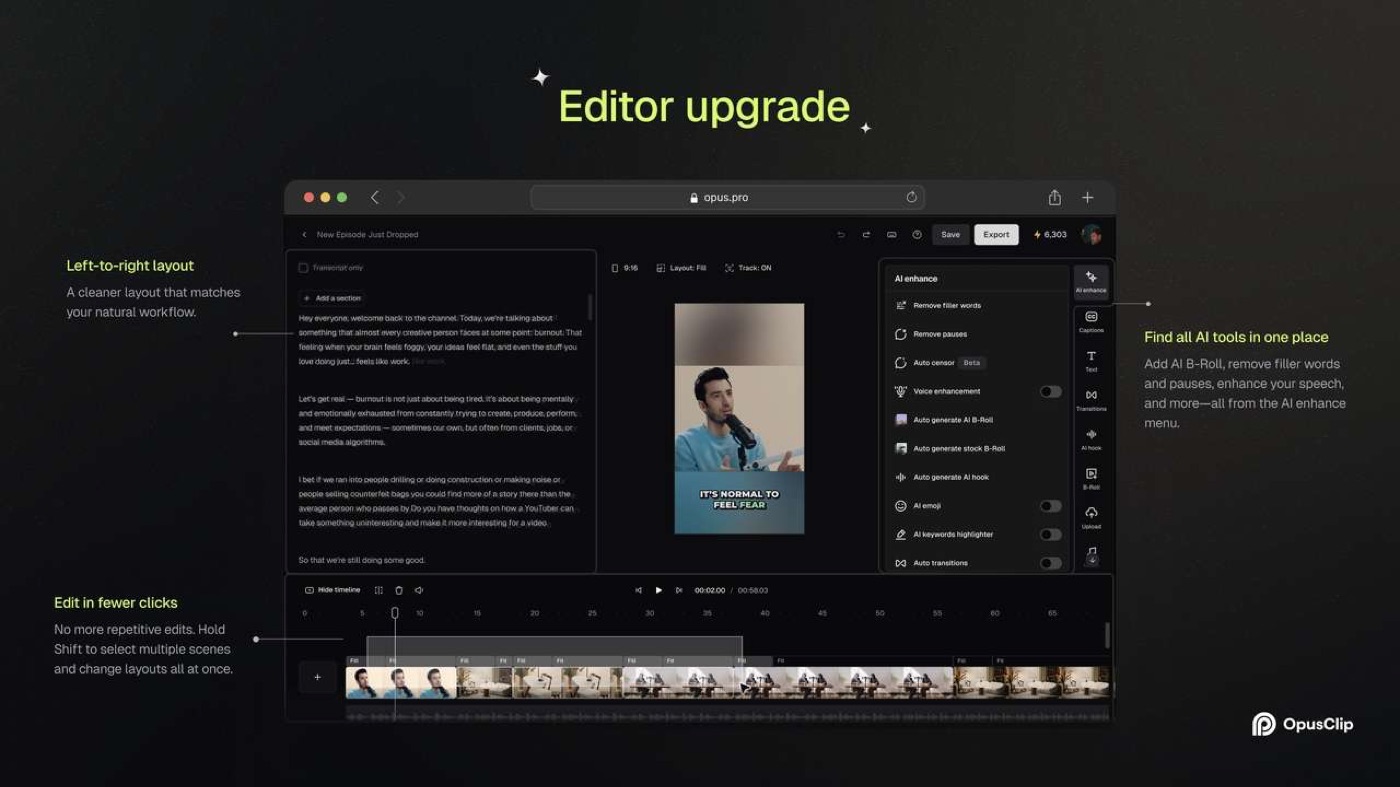
The official editor upgrade notes describe a left-to-right workspace: transcript, video preview and editing tools. A timeline can be shown when precision matters. That arrangement is familiar to editors who alternate between fixing words and adjusting the timing of picture or sound.
A practical correction might be simple: extend the first two seconds to include the guest’s question, trim a repetitive closing sentence and move the crop slightly right so a screen-share button remains visible. The value of the editor lies in letting a producer complete that change without reprocessing a source file from the beginning.
OpusClip also offers audio enhancement and automated silence or filler-word removal. These functions can reduce tedious manual cleanup, but they should be used carefully. A pause can signal an emotional or important moment. Removing every hesitation can make a sincere story sound unnatural. Compare the processed clip with its original recording and adjust the result if necessary.
B-roll is a separate judgment. The product can suggest stock or generated imagery that fits a topic. That is useful when a talking-head segment would otherwise appear static, but the chosen footage must be accurate, licensed for the intended use and visually appropriate. A generic stock shot of an office does not prove that the specific company being discussed operates in that office.
An AI-generated visual can be even more misleading. If a creator discusses an event involving a named person, generated imagery might imply a likeness, incident or location that never appeared in the source. Use generated illustration transparently and avoid letting visuals imply factual evidence that doesn’t exist.
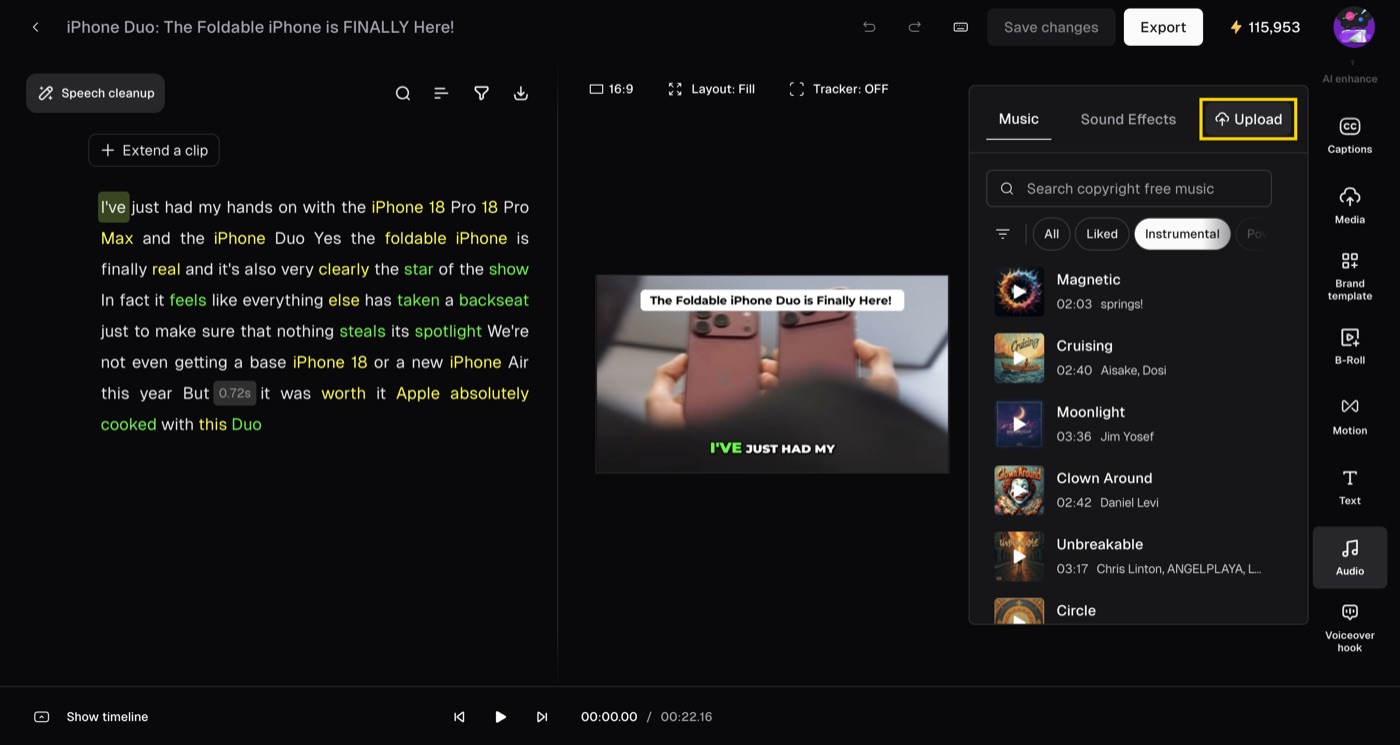
Music and sound effects need the same care. The official September 2026 changelog includes an update allowing selected plans to bring their own audio from uploads or links, and another that adds fade controls to soundtrack elements. Those are useful for brand identity and professional polish. Confirm rights to uploaded tracks and review whether the platform or destination has additional music restrictions.
AI Producer is OpusClip’s broader attempt to turn raw footage into a more complete edit. The vendor describes an agent that chooses captions, B-roll, motion design, effects and audio, while allowing the creator to request targeted revisions using natural language. It also describes an edit log explaining changes and a manual editor for the final adjustments.
This is attractive to creators who do not want to learn a complex timeline. Yet the more decisions an agent makes, the more things need review: was the B-roll appropriate, was the music too loud, did a transition obscure an important line, and did the style reflect the brand? A faster draft can still require careful finishing.
The main benefit is potentially reducing repetitive setup. A producer might request a concise 45-second version of an interview insight, retain the original voice, apply the approved brand style and keep a readable opening hook. If the generated version is close, the editor can fix the final details. If every scene requires replacement, a dedicated editor may remain more efficient.
The product’s editing controls deserve a trial on the actual footage. Marketing demonstrations tend to show clean source video with obvious cuts. A two-hour livestream with interruptions, chat sounds and several overlapping speakers presents more difficult conditions. We haven’t measured the agent’s success rate on those cases and won’t claim a particular time saving.
🧩 The September 2026 Editor Updates: More Than a Clip Button
Software reviews become stale quickly when a product is iterating as actively as OpusClip. Its public changelog includes features added in September 2026 that affect everyday editing rather than only AI discovery. Understanding these changes helps buyers avoid evaluating a current workspace against screenshots from several years ago.
One update allows Pro and higher subscribers to upload personal audio assets or import an audio track from a link, subject to current trial and plan rules. The audio becomes available in the project’s media library, reducing the need to upload the same music or effect repeatedly. A company should still manage ownership and rights for the asset.
Another update introduced broadcast-style animated lower-thirds, including name tags and location treatments in the editor. This is a small but useful improvement for interviews. A speaker’s identity should not need to be recreated manually for each short, provided the template can be reviewed and the name is accurate.
The changelog also describes better brand vocabulary handling and changes to YouTube post captions, including an option to add the original long-form video link. Connecting a short to its full source can help audiences discover the longer context and makes the distribution path more useful. Verify how each destination renders the text and links; platform conventions aren’t identical.
Dashboard organization was also revised in September. Projects gained clearer navigation, and collections can help a creator separate work by show or campaign. Operational improvements like those are not glamorous, but a producer managing dozens of episodes may benefit more from a searchable catalog than from another caption animation.
These details suggest that OpusClip is moving toward a more managed creator workflow. The product increasingly combines discovery, edit, branding, review and publishing rather than exporting a set of anonymous videos. That direction may reduce the number of tools some teams need.
It can also introduce more decisions about permissions, project ownership and retention. A larger library requires clear naming, a backup policy and separate access for different brands. Don’t confuse a convenient dashboard with an entire content-governance system.
Treat the dated release notes as evidence of specific features, not as a guarantee that every screen and plan allowance remains unchanged indefinitely. We use authentic editor screenshots from the vendor’s published materials and mark their source, but an account may display newer controls, experiments or subscription-specific options.
📅 Scheduling and Publishing: Automation Still Needs Approval
OpusClip supports social account connections and functions for posting or scheduling clips to selected platforms. That can save a creator from downloading every export, opening multiple social apps and pasting a description manually. But distribution is not just a file transfer; the same clip can have different creative, legal and formatting requirements on each destination.
A video created for TikTok may need a different title and opening frame on YouTube Shorts. Instagram Reels may show overlays in a different area. The caption text, links and hashtags that make sense on one service aren’t necessarily ideal for another. Treat scheduling as a stage of the editorial workflow, not a one-click decision to make every generated video public.
A reliable process looks like this: import the source, review suggested clips, verify their meaning, correct captions and crops, choose the publication destination, preview the post and approve the final copy. Only then should scheduling take over. An automated account connection does not have independent judgment about whether a guest agreed to be featured.
Some subscriptions restrict the number of connected publishing accounts; the default Pro configuration lists six. Team members should confirm which channels are authorized and who controls them. Someone editing a client project doesn’t necessarily need the ability to publish directly to every customer account.
Automation can introduce duplicate publication, too. If a video is imported through a feed and an employee also imports it manually, the service may generate multiple projects with overlapping results. Establish an episode identifier and a human approval status. Duplicate content can waste credits and confuse the schedule.
For a small creator, a simple calendar may be enough. Larger organizations benefit from clear status stages such as “generated,” “reviewed,” “approved,” “scheduled” and “published.” That makes it possible to automate moving an approved asset while keeping sensitive decisions with the person responsible for the channel.
When platform authorization expires, schedule visibility may not reflect the final destination status. Check the native platform after publishing and verify that the video, description, captions and thumbnail look right. A calendar entry marked complete doesn’t guarantee the audience received the intended post.
Finally, remember that consistency is a means to an end. Posting a mediocre clip every day may be worse for an audience than publishing a thoughtful clip twice a week. Automation is useful when it maintains a good editorial standard, not when it replaces one.
🤖 API, MCP and Agent Workflows: What Actually Exists in 2026
OpusClip has moved beyond a simple web editor by providing integrations for developers and agent-assisted workflows. Its July 2026 MCP tools reference documents operations for submitting a project, listing clips, examining transcripts, changing editing scripts and handling certain publication actions. Some operations consume credits, and the vendor’s list distinguishes those from read-only tools.
This can matter to a production company managing a repeatable pipeline. A connected assistant could start processing a permitted recording, retrieve the resulting candidate list, extract transcripts, flag phrases for editorial attention and prepare draft changes. In principle, structured editing scripts reduce the amount of manual clicking required for routine corrections.
The distinction between read operations and changes is vital. Listing clips or reading a transcript does not have the same risk as starting paid processing, deleting an asset, altering a published video or posting to a brand’s account. An organization should separate exploration permissions from actions that spend credits or change public content.
The official tools reference discusses editing-script retrieval and application, allowing targeted changes such as trims and caption corrections. These are powerful primitives for developer workflows. They also create an opportunity for accidental edits if an agent operates on the wrong clip identifier or repeats a non-idempotent action.
For a safe rollout, begin with one test workspace and a small number of licensed source videos. Log every project identifier, credit-consuming action and editing change. Require human approval before publishing or spending substantial credits. A failed network request should not cause an automation to submit the same expensive processing operation repeatedly.
The vendor’s product pages currently advertise a growing number of MCP tools; marketing counts differ across pages as integrations expand. For example, the July documentation lists twenty-seven while another landing page mentions twenty-five. Use the current reference for the particular integration being configured, not a hard-coded count in a marketing summary.
OpusClip’s APIs and connected tools are useful only if they remove a genuine repetitive task. A solo creator with two videos per month may find the web interface faster than building an integration. A team processing hundreds of recurring episodes could justify the implementation work, particularly if every action is tracked and reviewed.
The biggest lesson is that an agent pipeline does not remove accountability. It can prepare candidates, apply approved transforms and collect metrics. The content owner still has to decide which statements are accurate, which guests can be shown and which outputs represent the brand honestly.
🔐 Copyright, Privacy, Permissions and Client Workflows
An AI clipping tool makes it technically easy to turn any accessible recording into new public material. It does not create permission to use the footage. If a creator owns an interview, they still need to consider the guest’s release, music licensing, brand agreements and whether a platform permits the proposed reuse.
A public YouTube video is not automatically free material for a different channel. Likewise, a sports broadcast, film excerpt or customer training session may contain rights owned by several parties. Uploading or importing it to OpusClip can implicate both the terms of the source platform and the rights attached to the content itself. Businesses should document the authorization basis before giving staff access to an automatic import feature.
Clips also change context. A sentence selected from an hour-long conversation can make a guest appear to support a position they were actually criticizing. That can damage trust even when the selected words are an exact quotation. Compare potentially controversial or sensitive clips with the full source and ensure the surrounding meaning remains intact.
Privacy adds another layer. Webinar recordings may contain attendee faces, names, comments and internal documents. A presenter can accidentally reveal credentials or private company data in a screen-share. Automatic cropping, generated captions and new publishing destinations can make that information more prominent than it was in the original recording.
An organization should decide which videos are allowed into cloud editing tools and how long projects may be retained. The appropriate policy varies with the data and jurisdiction. A clip that is acceptable for a public marketing video may be inappropriate for a private employee discussion or a medical consultation, regardless of whether the platform technically processes it.
Connected social accounts deserve the same attention. A teammate who needs to change captions may not need permission to publish from the main corporate channel. Use available workspace controls and restrict account connections where possible. If a staff member leaves, review their access and connected publishing permissions instead of relying on the fact that they can no longer open one editor tab.
Brand templates can also contain licensed assets. A company logo is usually straightforward, but uploaded music, celebrity footage, stock clips and externally generated visuals can have more complicated usage rules. Recording a project under one license does not prove that every derivative is lawful to post everywhere.
We did not audit OpusClip’s private infrastructure or certify its compliance with any particular legal framework. Its public pages offer trust and policy information, which buyers should examine in light of their own requirements. For client work, review the relevant contracts and data-processing terms before moving sensitive source media to a new workspace.
A simple editorial checklist can prevent many problems: verify ownership or permission for the input, confirm the selected quote’s context, check captions and claims, inspect on-screen personal information, validate asset rights and approve the final destination. Automating the mechanical steps makes this review more important, not less.
🆚 OpusClip vs CapCut, Descript, Riverside and Manual Editing
| Workflow | OpusClip | CapCut | Descript | Riverside | StreamYard |
|---|---|---|---|---|---|
| Main task | Find and reformat shorts from longer content | General-purpose short-form video editing | Transcript-led long-form editing | Remote source recording and editing | Browser guest and live production |
| AI moment discovery | Core product focus | Check selected AI features | Editing-focused, different workflow | Repurposing under plan | Recording-first |
| Transcript and timeline | Candidate clips plus manual editor | Timeline and caption editing | Core editing model | Studio editor and timeline | Hosted recording and editing features |
| Publishing workflow | Social connections on qualifying tiers | Platform-dependent tools | Export and integration choices | Plan-specific publishing | Live destination focus |
| Best fit | High-volume long-video repurposing | Custom editing of a chosen short | Editing conversations and podcasts | Capture interviews before repurposing | Host guest-oriented broadcasts |
OpusClip competes with several products that overlap on editing but differ in what they consider the starting point. The most useful comparison begins with the job the creator actually performs.
OpusClip versus CapCut: CapCut is a general-purpose video editor with templates, timeline tools, effects, captions and mobile-first production features. OpusClip is particularly focused on identifying short-form candidates inside longer videos and preparing them efficiently for social publication. If the challenge is finding usable moments across hours of source content, OpusClip deserves attention. If the challenge is custom editing a short already chosen, a broad editor like CapCut may be more suitable.
OpusClip versus Descript: Descript specializes in text-based editing workflows and gives creators a way to work on narration, interviews and other media through transcripts. OpusClip also uses transcripts, but adds AI clipping and short-form repurposing as core experiences. A creator cutting a one-hour podcast into a polished twenty-minute episode might prioritize a long-form editor; a social team looking for ten short candidates from that same episode might prioritize OpusClip. Some teams use both, with one application preparing the main edit and the other exploring reusable social moments.
OpusClip versus Riverside: Riverside is designed to capture high-quality remote source media, including separate participant tracks, and increasingly offers editing and publishing features. OpusClip starts once a source recording exists. If your problem is how to interview someone remotely with good audio, invest in recording quality first. If you already have clean recordings and want clips from them, OpusClip’s discovery workflow may deliver the additional value.
OpusClip versus StreamYard: StreamYard is a host-oriented browser studio for live conversations and recording. It can make guest participation and live controls manageable, but the core production task is different from discovering moments across an archive. It may be reasonable to record a panel in StreamYard and later process the file with OpusClip, provided the plan and file permissions allow it.
OpusClip versus manual editing: A skilled human can recognize subtle context, tone and visual storytelling that an automatic tool may miss. But manually screening a large catalog can consume many hours. AI candidate selection can be a useful assistant, allowing the editor to spend more time on judgment and polish rather than watching every second from scratch.
A fair cost comparison includes the source footage, editor time, processing credits, subscriptions and publication responsibilities. A $15 software plan may seem cheap until a creator discovers that the videos they need to process exceed its monthly credits. A free manual workflow may seem attractive until the team spends eight hours a week hunting for excerpts that a capable discovery model could surface faster.
Don’t count features twice. If Riverside’s current editor already produces useful clips for your podcast, OpusClip must offer a clear improvement in selection, branding or workflow to justify a second subscription. If a dedicated social editor makes better crops in less time, adding another platform may create extra handoffs rather than remove them.
Our Descript review, Riverside review and StreamYard review provide additional context for those adjacent workflows.
🧪 Three Realistic OpusClip Pilot Scenarios — Not Measured Benchmarks
Scenario one: A YouTube educator with weekly forty-minute lessons. The creator publishes long explanations of a software product and wants several concise, accurate tips for Shorts. They import one representative lesson, inspect the generated segments and compare them with three moments they would have selected manually. An approved clip should include the relevant UI, retain any warning and make sense to a person who never watched the full lesson.
After processing, the creator reviews each caption against the original audio and checks whether the automatic portrait crop retains the setting being described. One genuinely useful result may be worth more than several dramatic but technically incomplete snippets. The pilot measures saved editing time, not an assumed increase in views.
Scenario two: A gaming streamer with a weekly two-hour archive. This creator records matches in OBS or Streamlabs and wants the most interesting moments turned into short vertical posts. OpusClip’s multimodal selection may identify important visual events, but the producer should inspect whether the model has preserved the preceding setup and the game HUD necessary to understand what happened. A high-energy clip that misses the outcome can be worse than a slower segment with a clear payoff.
The creator can compare a small sample of candidates with manual bookmarks from the stream. If the AI repeatedly picks useful moments, a monthly processing allocation may justify its cost. If it selects reactions while missing gameplay context, the streamer might prefer clip markers, manual editing or a workflow with more precise visual guidance.
Scenario three: A B2B team repurposing customer webinars. The organization has several recorded demos, each containing useful questions about its product. It wants accurate short videos for LinkedIn, YouTube and an email learning library. OpusClip can create a first set of candidates, but a subject-matter expert should approve every technical claim and ensure that no private customer information is visible.
The team also needs documented rights to reuse the original sessions, consistent on-screen branding and a schedule that respects the customer’s approval conditions. The pilot should measure how many approved clips can be created per recorded hour and whether the total workflow beats the team’s existing editor. Bulk automated posting should come only after approvals work reliably.
Across all three scenarios, the real success measure differs. The educator values accurate explanations, the gamer values coherent visual moments, and the company values trustworthy reusable knowledge. OpusClip’s automatic rankings can assist each one, but cannot decide the business objective for them.
We did not perform these pilots ourselves. They are proposed tests that buyers can reproduce before choosing a paid subscription.
✅ Pros, Cons and Our Pre-Purchase Checklist
👍 What We Love
- ✅ Fast candidate discovery: ClipAnything proposes short moments inside long-form source videos.
- ✅ Smart reframing: ReframeAnything helps adapt horizontal footage for portrait platforms.
- ✅ Caption and editing control: Text, timeline, templates and audio changes support practical finishing.
- ✅ Growing automation: Scheduling, team features and API/MCP options support repeatable workflows.
👎 Where It Falls Short
- ❌ Credits require planning: The cost of processing is not equal to the number of clips published.
- ❌ Scores are not forecasts: A Virality Score does not guarantee engagement or income.
- ❌ Editorial errors remain possible: Crops, subtitles and highlights can lose essential context.
- ❌ Not a replacement for source capture: It cannot fix poor video recording or absent rights.

OpusClip — Editorial Creator Snapshot
Good fit: automatic discovery and editing of short clips from long-form recordings. Reconsider: guaranteed viral views, unlimited AI processing or publication without rights review.
Vendor-documentation research; no paid subscription or laboratory benchmark is claimed.
OpusClip has a clear strength: it helps creators look through long-form material for passages that may work as short-form content. ClipAnything broadens the source formats the system is designed to consider. ReframeAnything helps adapt footage for portrait viewing. Captions and manual editing controls make it possible to finish a candidate without starting a separate timeline project for every export.
The service is also becoming more useful for operations. Team workspaces, brand templates, asset management and connected publishing reduce repetitive steps. The newer AI Producer and agent interfaces may appeal to teams that want more automated production, provided they can still approve the final material.
The limitations should be understood before subscribing. A Virality Score is not proof of future views. Credits can make processing volume more expensive than the headline price suggests. AI cropping may hide context. Captions can change the meaning of a sentence when they contain errors. Generated B-roll and direct publishing require editorial, licensing and security review.
A creator should test several questions in a real project. Does the source format import cleanly? Are the best moments easy to identify? Does a candidate make sense without the long video? Is its portrait frame readable? Can captions be corrected quickly? Does the selected tier allow the necessary export and post workflow? How much processing capacity is consumed? Who owns the final publication decision?
For teams, add questions about seat count, social-account connections, brand separation, credit rollover and content rights. A successful solo trial doesn’t automatically prove that the platform is ready for five client accounts with different approval processes.
If the product saves substantial time while maintaining an acceptable editorial standard, it can justify a paid tier. If the creator spends more time fixing and checking the AI choices than selecting and editing the clips manually, choose another workflow or reduce the scope of automation.
🏁 Final Verdict: Is OpusClip Worth Paying For in 2026?
OpusClip is worth a genuine test when the creator already has good recordings and wants to publish useful shorts more consistently. Its strongest promise is not effortless virality. It’s reducing the labor of searching, reframing and preparing candidate clips, while leaving the final decision with the person responsible for the content.
Starter’s $15 monthly list price offers an accessible entry point for a regular individual workflow with limited processing needs. Pro’s $29 monthly list price and larger credit allowance are more relevant when teams, more import options, multiple brands or repeated publication become part of the process. Annual billing can reduce the equivalent monthly figure, but it commits cash upfront. Business is a custom conversation.
We wouldn’t recommend buying OpusClip to repair a weak source recording, automatically repost other people’s footage or replace editorial judgment in sensitive content. Nor would we promise that AI-generated high-score clips will produce a particular view count. Those expectations exceed what public feature descriptions can establish.
The best trial is one complete cycle: import a real episode, review the proposed moments, correct the best clip, verify its captions and crop, export and publish with appropriate permission. If the output saves time and satisfies viewers, then the subscription is serving a concrete purpose.
❓ Frequently Asked Questions About OpusClip
Is OpusClip free in 2026?
Yes. OpusClip offers a Free tier at $0 with limited processing and feature entitlements. New users may also receive a free trial of paid functions with separate usage and expiration rules. Free is useful for testing whether the system identifies relevant moments in your actual videos, but it should not be assumed to include professional exports, every import source or all branding features. Review the plan table and account status before committing to an important production.
How much does OpusClip Starter cost?
OpusClip’s public pricing page listed Starter at $15 per month when billed monthly at our October 2026 review. The default Starter configuration includes 150 credits per month and a single brand template, with plan-specific import and editing permissions. Credits are a processing budget, not a guaranteed number of approved final clips. Check the selected billing period, credit rules and any trial terms in your account before purchasing.
How much is OpusClip Pro?
The default public monthly plan shows Pro at $29 per month, with 300 credits, a two-seat team workspace, multiple brand templates and connected social channels. The annual selector also advertises an equivalent of $14.50 a month when $174 is billed in advance for a year, subject to current options. That is not a month-to-month $14.50 plan. Larger credit multipliers and Business terms can change the price.
What do OpusClip credits mean?
Credits represent usage capacity for the processing and features defined by the current plan. They are not identical to the number of clips you will publish. A longer source video or a credit-consuming AI operation can have a different cost from a simple edit. OpusClip’s current pricing interface provides a plan comparison and indicates certain quota or rollover terms. Estimate your typical monthly source material and check the actual consumption after a small test.
Can OpusClip make clips from gaming or sports videos?
OpusClip markets ClipAnything as a multimodal clipping model designed for formats beyond talking-head podcasts, including gaming, sports, vlogs and other visual content. That is a capability claim, not a guarantee that every selected moment will make narrative sense. Gaming clips may require the preceding fight setup, score information or a visible HUD. Review each output and adjust the crop or boundaries before posting.
Does OpusClip Virality Score guarantee more views?
No. The score is a model-generated indicator used to rank candidate clips, not a reliable promise of a particular audience result. Actual views and retention depend on the audience, platform, topic, timing, visual choices and many other variables. Use the score to decide which candidates to review first, then judge their accuracy and relevance independently. We did not conduct tests that would establish a quantitative uplift from any score.
Does OpusClip create captions automatically?
Yes. OpusClip’s AI captioning generates text overlays with multiple styles and supported languages, and the editor lets creators make changes. Caption accuracy depends on the source recording and speaker. Product names, technical terms and numbers can be misheard. Review the entire clip’s captions against audio before publishing, especially when a missing negation or incorrect number would change the meaning.
Can OpusClip reframe videos for TikTok, Shorts and Reels?
Yes. ReframeAnything and related editor controls adapt source footage to formats such as 9:16 and can track moving subjects. Automatic framing is helpful for ordinary interviews but can hide important game UI or software demonstration details. Review the composition on a real target device and use manual framing adjustments when the critical action is outside the crop.
Can OpusClip publish directly to social media?
Supported plans provide social account connections and features to post or schedule content to selected platforms. The available destinations, connection limits and exact workflow depend on the account and plan. Publishing directly is convenient, but it should follow a review of captions, rights, crop and post copy. A scheduling confirmation does not eliminate the need to check how the post appears on the native destination.
What is OpusClip AI Producer?
AI Producer is a newer OpusClip editing experience that takes raw talking-head footage and prepares a more complete edited video with captions, B-roll, motion design, music and sound effects. The company describes natural-language targeted revisions and an edit log. The available options may vary by account and subscription. Human review is still needed to verify meaning, image rights, audio balance and visual choices.
Is OpusClip better than CapCut or Descript?
They focus on different workflows. OpusClip emphasizes finding and repurposing short-form candidates from existing videos. CapCut is a broad video editor for making detailed short-form edits, while Descript is particularly strong in transcript-based post-production. The best choice depends on whether your bottleneck is discovering usable passages, constructing a custom edit, or editing a long conversation. Test the complete process with your actual source material before adding overlapping subscriptions.
📚 Editorial Sources and Method
This review is grounded in the current OpusClip pricing page, its AI video editor, the official product history and 2025 features, the OpusClip editor upgrade, the 2026 changelog and the July 2026 MCP tools reference.
We have not run controlled performance tests or used a paid account. We distinguish vendor-reported features from illustrative workflows, avoid presenting AI ranking as a performance guarantee, and recommend confirming credits, renewal prices, export rights and social-account permissions in the actual selected subscription.
EXPLORE NEXT ON DIGIOFFLY
Explore More After This OpusClip Review
Compare reliable recording, AI clipping and editing options before adding subscriptions to your creator workflow.
Choose the right creator workflow
- Review Riverside — Record guest interviews before clipping.
- Review StreamYard — Produce and record browser-based live shows.
Estimate processing and editing costs
- Compare Descript — Explore transcript-first editing.
- Capture with OBS — Record long-form local broadcasts.
Compare clipping alternatives
- Explore creator software — Compare editing and streaming offers.
- Find companion software — Filter software for your production needs.
- Estimate software costs — Budget recurring processing and editing charges.
Published plan references change. Confirm usage, annual billing, clipping credits, export permissions, team accounts and annual pricing directly with the vendor.