

Prices and documentation checked on October 16, 2026. Cloudways markets two distinct WordPress hosting approaches: Flexible (choose cloud infrastructure and resources) and Autonomous (a managed autoscaling application service). Both use usage-related billing, not the same annual introductory-versus-renewal model as shared hosting. Official Cloudways pricing · Billing explanation.
There comes a point when the familiar shared-hosting comparison stops being useful. Perhaps a store’s checkout is becoming unpredictable during promotions, an agency is running dozens of client websites, or your developer needs to adjust server resources without moving to an entirely new host. At that point you aren’t just shopping for cheap web space. You’re evaluating how much infrastructure control and operational responsibility you need.
Cloudways is interesting because it sits between traditional shared hosting and running a cloud server entirely yourself. You select an infrastructure arrangement, while Cloudways provides the platform for application setup, monitoring, backups, staging and other management tasks. But this convenience creates its own learning curve and cost decisions.
This Cloudways review 2026 explains the real differences between Flexible and Autonomous, breaks down public pricing examples, explores the new interface and outlines who will benefit from either product. The findings are based on current official documentation and published prices, not an invented paid account, private dashboard, or independent speed benchmark.
📊 Cloudways Review Summary
Cloudways isn’t one simple hosting plan. Flexible lets you choose a cloud provider, server size and resource allocation for supported applications. Autonomous is designed around WordPress-oriented autoscaling, application allowances and additional usage charges. They solve different operating problems, even though both live under one brand.
The strongest reason to consider Flexible is its managed-server approach: greater choice than an ordinary entry shared plan without having to maintain an unmanaged Linux instance. Autonomous is potentially compelling when traffic volatility creates a real need for automatic scaling and the site’s revenue can support a larger operating budget.
Cloudways isn’t always the easiest place to launch a one-page portfolio. For a basic blog, the smallest traditional WordPress plan may be simpler and cheaper to budget. For an agency or growing WooCommerce operation, Cloudways can make more sense—provided the team understands its billing model, resource allocation, backup charges and deployment controls.
⚡ Quick Verdict: Is Cloudways Worth It in 2026?
Yes, when server flexibility is a necessity rather than an impressive-sounding extra. Cloudways removes much of the routine infrastructure burden while retaining controls that a shared hosting dashboard may not expose. Its platform documents staging, Git deployment, cloud-provider choice, scaling and managed security capabilities.
Our default recommendation is Flexible for a technically comfortable WordPress owner, developer or agency that needs server-level resource choices and is prepared to measure usage. Autonomous belongs on the shortlist for busy WordPress and WooCommerce applications where predictable operation during demand spikes is more important than the smallest monthly invoice.
The catches: Cloudways does not give you unrestricted root access to its managed servers. Billing can include usage and add-ons, and server costs may continue while instances remain active. An autoscaling bill can grow during unusual traffic. None of those factors makes Cloudways poor value by itself; they mean its value must be evaluated against real workloads and operating expectations.
🏆 Cloudways Pros and Cons
Cloudways’ best documented advantage is the balance between convenience and choice. You can pick the cloud model that fits your project without personally assembling every server service. Application-level management, staging and team-oriented tools reduce friction when managed carefully.
The limitations belong in the same conversation. The user needs to understand resource and billing units; some facilities are extras; and control is not equivalent to owning an unmanaged virtual private server with full root access. A real buyer should validate the platform during the trial before moving critical production traffic.
👍 What We Love
- ✅ Flexible resource choices: Select a server provider and capacity to match a real WordPress or application workload.
- ✅ Managed operations: Staging, backups, application management and deployment tools reduce routine infrastructure work.
- ✅ Developer workflows: Git deployment, SSH and team access support more structured releases.
- ✅ Autoscaling option: Autonomous offers an alternative model for eligible high-traffic WordPress applications.
👎 Where It Falls Short
- ❌ More billing variables: Resources, usage and optional services need a realistic monthly budget.
- ❌ No unrestricted root access: Managed infrastructure cannot accommodate every specialized server requirement.
- ❌ Overages matter: Autonomous usage and autoscaling can add costs beyond a plan headline.
🏆 EDITORIAL VERDICT: BEST FOR FLEXIBLE CLOUD WORKFLOWS
Best for: WordPress developers, agencies and sites needing explicit cloud resource choices. No independent speed or uptime rating is claimed.
🧠 What Is Cloudways Managed Cloud Hosting?
Cloudways is a managed cloud-hosting platform. Unlike a conventional shared WordPress plan that sells a predefined bundle of websites and storage, it provides several ways to run web applications on managed infrastructure. The primary choices in its current pricing presentation are Flexible and Autonomous. It also has newer products for other types of development, but those should not be silently included in a WordPress hosting comparison.
Flexible supports WordPress and additional application stacks, with infrastructure options presented through Cloudways. Autonomous centers its proposition on automatically managing capacity for WordPress workloads. Selecting the product is as important as selecting the price, because the resource model, deployment workflow and usage charges are different.
The platform isn’t a substitute for owning your domain, securing administrator accounts or maintaining a recovery strategy. Cloudways handles parts of the hosting operation. The application owner still has responsibility for plugins, content, third-party integrations, customer data and business continuity.
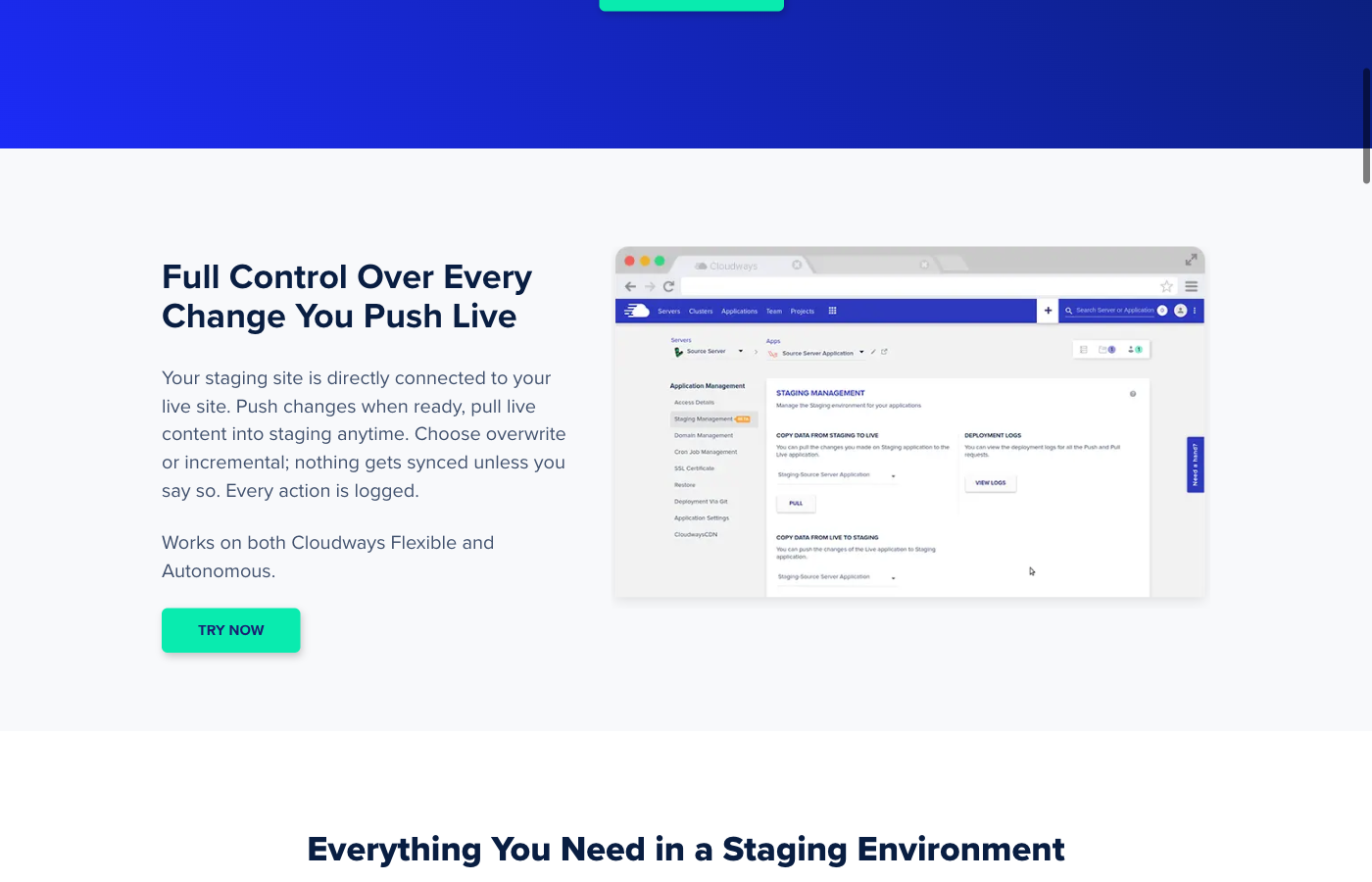
🖥️ The Cloudways Dashboard and New Interface
Cloudways documents a redesigned interface with product navigation for Flexible, Autonomous, support, billing and team access. Its support center explains that the new layout emphasizes applications and servers rather than forcing people to search through older menus. An agency running several projects should find that distinction useful, especially if different staff have different responsibilities.
Flexible users should expect to think in two layers: a server has resources, while applications run on that server. That is not the same mental model as clicking an unlimited-websites button in a shared hosting plan. When an application slows down, you’ll want to identify whether the problem belongs to its code, the server configuration, storage, caching, database activity or a third-party provider.
Autonomous is organized around applications and service allowances. Its dashboard and billing reports matter because an autoscaling service can change resource consumption as traffic changes. The relevant measure isn’t whether the UI looks attractive; it’s whether you can inspect usage, backup status, deployment history and spending before a problem becomes urgent.
Cloudways offers demonstrations and public documentation, but we haven’t accessed a private customer dashboard for this review. Any vendor images included should be understood as examples of the published interface—not evidence of our own performance results.
🧭 How to Launch WordPress on Cloudways
Getting started is different from ordering a familiar shared plan because you may need to choose the infrastructure as well as the application.
1. Decide Between Flexible and Autonomous
Choose Flexible when you want to select cloud resources, host supported application types and have managed-server controls. Consider Autonomous when an eligible WordPress or WooCommerce application benefits from the autoscaling model and you understand its usage-based costs.
2. Choose a Server or Application Plan
For Flexible, inspect the cloud-provider and server-type choices, RAM, CPU, storage, transfer allocations and the monthly equivalent. Avoid selecting a large server purely because it sounds safer. For Autonomous, compare baseline capacity, application allowances, bandwidth, storage and additional autoscaling charges.
3. Deploy an Application and Configure Access
Follow the current Cloudways onboarding guide. Create WordPress, configure the domain and SSL, set permissions and review server or application settings. Use individual team accounts instead of sharing master credentials indiscriminately.
4. Test Before Moving Public Traffic
Create a private staging copy for migration and upgrade tests. Inspect pages, media, forms, logins, payment callbacks and email delivery. Keep the old host and a separate backup available while updating DNS. After the switch, measure response time and error rates rather than assuming the migration is complete when the homepage appears.
🛠️ Cloudways Features Worth Paying For
🧪 Staging and Safer WordPress Changes
Staging is more than a duplicate home page. It is a separate application environment where you can test a plugin, redesign a checkout flow, or experiment with a new PHP configuration before customers experience the change. Cloudways supports staging workflows for Flexible and Autonomous, with distinct paths through their interfaces.
Its official guide describes pushing and pulling files and databases, full or incremental choices, and the option to take a backup before deployment. That last detail matters. A production WooCommerce database can receive orders while a test environment is being changed; replacing the whole database with an older staged version could destroy legitimate recent transactions.
Staging also has costs in the broader sense. An extra environment may consume storage, transfer or other resources, depending on the product. Autonomous specifically counts staging bandwidth, storage and visits toward plan quotas. Treat the environment as a real copy of potentially sensitive user data. Password protection, deliberate access controls and careful deployment choices remain essential.
💾 Backups and Recovery
Cloudways provides automated and on-demand backup workflows and publishes documentation about their operation. But a backup feature isn’t equivalent to an independent business-continuity plan. Flexible pricing disclosures include offsite-backup storage charges, and recovery procedures differ by product and configuration.
A store owner should ask three questions: what is backed up, where is it retained, and which restore action would overwrite orders placed since the snapshot? Test restoration to an isolated destination rather than waiting for an emergency. Keep a separate archive when the website is business-critical, and record who can access it if the Cloudways account becomes unavailable.
The ability to schedule copies is valuable, but that value disappears if nobody checks that they are complete. As databases and uploads grow, backup retention, storage costs and recovery time should be revisited. An annual restoration drill can reveal missing credentials, database export problems or unexpected dependencies long before an actual outage.
⚙️ Git, SSH and Deployment Control
Cloudways documents Git deployments for Flexible and Autonomous and provides SSH-related workflows for developers. This is a meaningful difference from a host whose main value proposition is simply installing a theme. A development team can version code, review changes, deploy selected revisions and keep a record of why a feature was released.
Don’t confuse code history with a complete WordPress recovery system. Git normally doesn’t contain live customer orders, uploaded photos or secrets. A deployment policy must keep the database and external services in view. It should also define who can change production, which environment is tested first and how rollback works when a change fails.
Cloudways does not provide unrestricted root privileges for ordinary managed server accounts. That protects some aspects of platform operation but can be a limitation for custom software. Verify needed extensions, system services and deployment commands before choosing it for a nonstandard application.
🚀 Caching, Scaling and Performance
Cloudways markets its server stack, caching features and scaling tools as performance advantages. Faster responses are plausible when an application receives more appropriate resources or avoids repeated database work. However, the performance of any specific WordPress installation also depends heavily on themes, plugins, images, external scripts and the requests it receives.
Cloudways’ newer Lightning Stack and Redis or Object Cache Pro arrangements are product-specific features, not universal guarantees that every workload will be fast. A WooCommerce checkout is not the same as a cached landing page. If performance is your primary buying criterion, create identical test sites and compare cold pages, warmed pages, backend requests and sustained concurrency.
Scaling is especially important to distinguish by product. On Flexible you select and modify server resources within the available infrastructure options. Autonomous has an automatic scaling model and an additional usage component. In both cases, more capacity can cost money. The responsible strategy is to monitor load and tune the actual bottleneck rather than upgrade every time a test score looks disappointing.
💰 Server Price Is Not the Entire Invoice
Cloudways Flexible bills according to the selected provider, server size and runtime. Choosing hourly or monthly displayed equivalents does not eliminate charges for active resources.
Cloudways Autonomous uses a separate application plan and autoscaling model. Its June 2026 documentation explains how overages and usage charges can affect the invoice.
Before moving, price backup storage, email, CDN or update services where applicable, and calculate a normal month and a high-traffic month rather than trusting the lowest advertised figure.
⚠️ Cloudways Limitations and Hidden Operational Work
Cloudways is not a traditional all-inclusive shared-hosting subscription. Many users appreciate its freedom, but that freedom brings decisions. You need to choose the correct product and understand what its fees cover. A server left running for a full month is a different billing event from a service activated for only part of the period. Bandwidth, storage, backup and optional add-ons deserve separate attention.
Email is another frequent surprise for buyers accustomed to shared hosting. Cloudways offers email-related integrations and add-ons rather than assuming that a complete traditional mailbox service is part of every cloud server. Before migrating, check where your business mailboxes will live and whether MX, SPF, DKIM and DMARC records need to change.
The lack of unrestricted root access matters for application developers who need unusual system-level software. For conventional WordPress maintenance it may never be a problem. For a bespoke service, it can be decisive. A managed cloud platform trades a degree of control for operating convenience; it shouldn’t be described as an unmanaged VPS with a prettier dashboard.
Finally, Cloudways can’t fix poor application architecture. Inefficient database queries, redundant plugins, badly configured caching or a broken payment provider can still make a managed website unreliable. Measure the site and its dependencies before assigning every incident to the host.
💰 Cloudways Pricing 2026: Flexible vs Autonomous
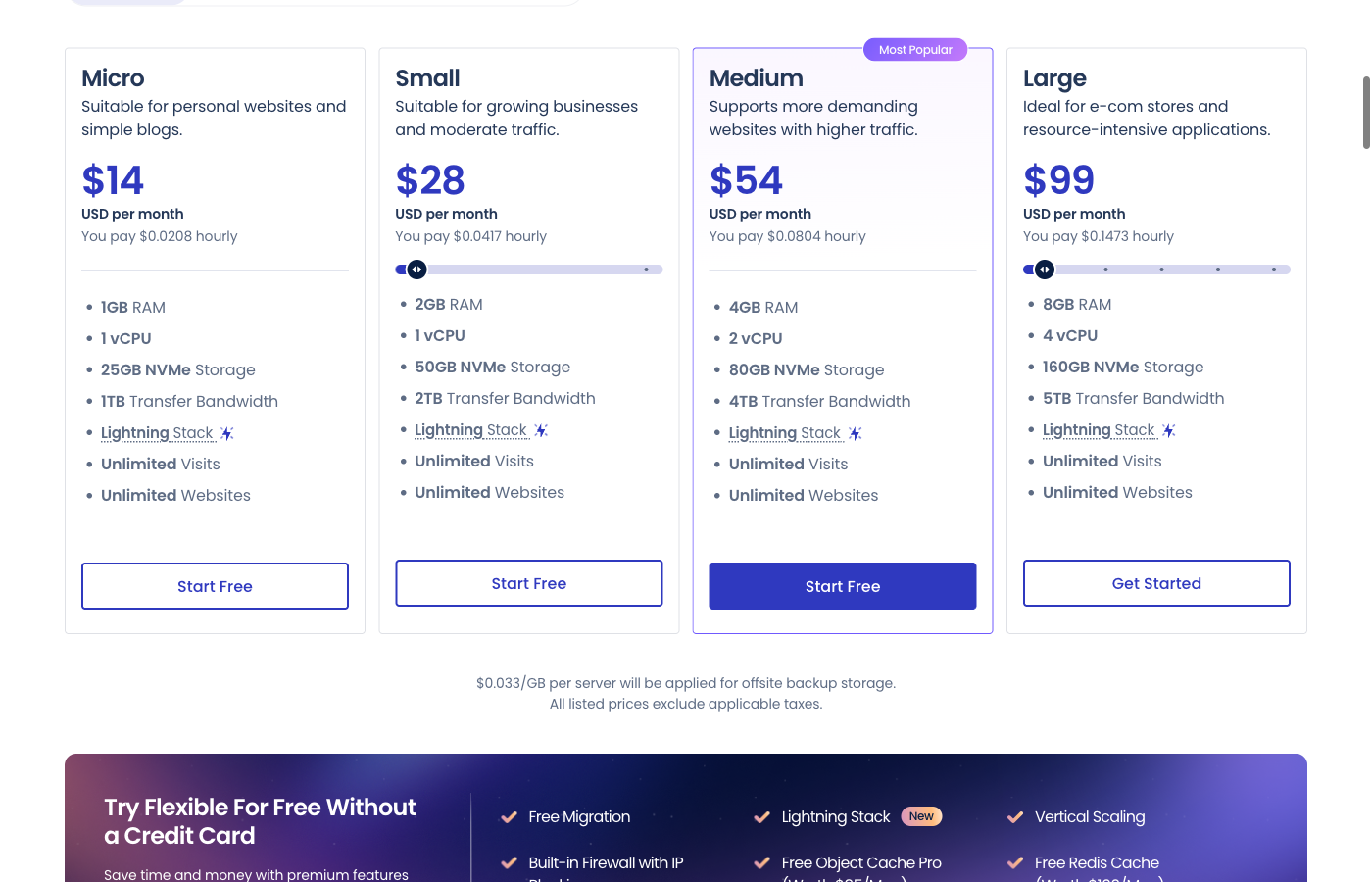
Cloudways pricing needs more explanation than a single “starts from” number. In the official DigitalOcean Premium selector captured October 16, 2026, Flexible showed Micro (1 GB) at $14/month, Small (2 GB) at $28, Medium (4 GB) at $54 and Large (8 GB) at $99. This is a dated configuration snapshot, not a promise that all provider combinations cost the same. Flexible lets you select the underlying provider and server capacity. The vendor currently shows DigitalOcean resource tiers and monthly or hourly equivalents; costs depend on which option is selected and how long a server remains active. Its examples include separate offsite-backup charges and optional add-ons.
The public pricing presentation has undergone changes during 2026. Some Cloudways pages show different starting numbers and experimental pricing layouts, so this review will not pretend that every visitor sees an identical lowest price at checkout. The most meaningful purchasing step is to select a specific provider, instance size and region, then record the displayed monthly cap, hourly charge and extras.
Autonomous follows a different model. Official documentation updated June 2026 describes hourly, per-application charges with autoscaling and overages. The vendor’s public WordPress pricing page shows examples such as Growth at $99/month, Scale at $199/month and Plus at $399/month, subject to the product’s currently displayed terms. Its Growth example lists additional disk, bandwidth and autoscaling prices, so a headline monthly plan isn’t necessarily the entire invoice.
For instance, a site that suddenly receives a surge of uncached visitors could consume resources beyond its baseline. If the selected plan bills autoscaling time and transfer separately, the total may rise. Such pricing can be entirely reasonable for a revenue-generating campaign, but a team should establish alerts and review invoices to avoid expensive surprises.
⚠️ Calculate Total Cost, Not Just the Server
A sound Cloudways budget includes the server or application plan, region and provider choices, backups, mail, CDN, premium security or updates where applicable, and the time needed to manage the application. Don’t add a feature to the invoice if it is already included in your precise product. The current feature list and checkout must be the source of truth.
Compare Cloudways with shared hosting over the same period. Shared providers may ask for a year or several years of prepayment at a promotional rate, then charge higher renewals. Flexible’s usage billing is different, so comparing its recurring server rate with a discounted four-year hosting equivalent is misleading.
The clearest buying recommendation is to estimate a normal month, a busy month and a worst reasonable month. Confirm the resources that trigger additional charges. If the application’s revenue cannot justify those three scenarios, choose a simpler platform until the operational need is demonstrated.
| Buying question | Cloudways Flexible | Cloudways Autonomous |
|---|---|---|
| Primary pricing unit | Cloud server resources and runtime | WordPress application plan, time and usage |
| Control model | Select cloud provider and resource tier | Managed WordPress autoscaling |
| Public example | DigitalOcean tiers; verify chosen server | $99 Growth / $199 Scale / $399 Plus per month examples |
| Additional charges to check | Offsite backup storage, email/add-ons | Bandwidth, extra disk and autoscale servers |
| Best profile | Developer, agency, customized applications | WordPress and WooCommerce with traffic spikes |
| Main budgeting question | Which provider, tier and runtime? | Which allowances and overage conditions? |
🎯 Who Should Choose Cloudways?
WordPress developer managing client sites: Flexible is a logical candidate when the developer needs Git, configurable resources, application staging and a cleaner path to managing multiple environments. Budgeting for server resources rather than a headline site count may make more operational sense.
Growing WooCommerce operation: If traffic is becoming unpredictable, Autonomous is worth investigating alongside other managed WordPress platforms. But don’t equate autoscaling with unlimited free capacity. Review the baseline, overages and what happens when sudden traffic reaches payment or account pages.
Small content publisher: Cloudways may be more platform than required. If you own one uncomplicated blog and don’t work with code, compare a conventional WordPress plan first. The ability to adjust RAM is of little value if you only need to publish two articles each month.
Agency with several websites: Centralized projects, user permissions, billing and deployment workflows can reduce repeated administrative tasks. Before choosing a shared Flexible server, measure the combined resource use of client sites and define how a problematic website is isolated from others.
Specialized application owner: Review supported software and root-access restrictions carefully. If a custom service needs direct operating-system control, an unmanaged cloud server or more specialized platform may be a better match.
⚖️ Cloudways vs SiteGround, Hostinger and Kinsta
Cloudways and SiteGround are frequently compared, but they do not sell identical products. SiteGround’s StartUp, GrowBig and GoGeek shared plans bundle a WordPress-oriented environment and use promotional prepaid periods. Cloudways Flexible starts with infrastructure choices and usage billing; Autonomous is built around a different app and autoscaling model.
Read our SiteGround review if you want a side-by-side understanding of site-centric management, staging and the regular price after an introductory contract. The difference is not that one interface is inherently better. It is how much resource choice and billing complexity your workflow warrants.
Hostinger may make more sense for beginners prioritizing a straightforward hosting or website-creation bundle. Again, normalize the term and renewal before assuming the cheapest displayed number wins. Kinsta is another specialist managed WordPress alternative with its own resource allowances and support model.
If you are building a design-heavy portfolio rather than operating a WordPress application, Wix, Squarespace, Webflow or Framer might be more natural starting points. Choosing a cloud hosting provider won’t by itself deliver an easy visual editing environment.
| Decision factor | Cloudways | SiteGround | Hostinger | Kinsta |
|---|---|---|---|---|
| Main proposition | Managed cloud resources / autoscaling | Tiered WordPress-friendly shared hosting | Hosting and website-related plans | Managed WordPress specialization |
| Billing diligence | Provider, hours, add-ons, overages | Intro versus regular renewals | Intro term and renewal | Plan allowance and overage rules |
| Test before switching | Server/app monitoring and staging | Backups and staging fit | Backup resource entitlements | WordPress workflow and support scope |
| Avoid assuming | Root-level freedom or free scaling | Unlimited server resources | Promo prices persist | All traffic types are equivalent |
🧪 How We Evaluated Cloudways
This review is based on official public pricing and current Cloudways support documentation examined in October 2026. We focused on the aspects that change buying decisions: Flexible versus Autonomous, deployment workflow, billing, staging safety, backup policies, server restrictions and the operating needs of different website types.
We did not pay for a Cloudways account or run an independent uptime and load-test series. We did not measure support response times or compare identical WordPress installations against competing hosts. Therefore any statement about relative performance is a feature-based assessment or an explanation of how a proper benchmark should be run—not a fabricated firsthand result.
The two screenshots shown here were captured from Cloudways’ official public website on October 16, 2026: its Flexible pricing selector and staging demonstration. Neither is a screenshot of a private customer account. Pricing details should be rechecked against the live vendor checkout, since provider and product selections change what a buyer sees.
🏆 Final Verdict: Is Cloudways Worth the Price?
Cloudways belongs on the shortlist when managed hosting needs to remain flexible as the application grows. Flexible can be compelling for a developer or agency that wants cloud-provider choices, staging and controlled deployments without managing every underlying server component alone. Autonomous is better assessed against WordPress-focused services designed for changing demand.
The main challenge is choosing the right model before committing. A basic portfolio may not benefit enough to justify Cloudways’ complexity. A revenue-generating store may value its additional controls, but the bill must still be predictable enough for the business.
If you proceed, begin with the smallest realistic configuration, monitor real traffic and run a staging-and-recovery test. Know what is included, what is usage-billed and how you would move to another provider. That is the difference between buying useful managed infrastructure and buying complexity you didn’t need.

Frequently Asked Questions
What is Cloudways used for?
Cloudways provides managed cloud hosting and application management. Its current products include Flexible for infrastructure choices and Autonomous for autoscaling WordPress applications.
How much does Cloudways cost in 2026?
Prices depend on product, cloud provider, instance size, region and usage. The Flexible and Autonomous pricing models are not directly interchangeable. Check the live configuration rather than relying on a single starting figure.
Does Cloudways charge hourly or monthly?
Flexible can show monthly caps and hourly billing for supported infrastructure. Autonomous charges by application usage under its plan rules, including possible autoscaling and overage fees.
Is Cloudways good for WordPress?
It is a credible option for WordPress users needing server-resource choices, staging, deployment tools or autoscaling. A basic blog may be easier to operate on simpler hosting.
Does Cloudways include staging?
Both Flexible and Autonomous document staging. Deployment settings matter because copying a database from staging can overwrite live data.
Does Cloudways have cPanel?
Cloudways has its own platform dashboard and management workflows rather than offering a standard unmanaged cPanel server.
Can I get root access on Cloudways?
Ordinary managed servers do not provide unrestricted root access. Check whether required tools and operations are supported before choosing Cloudways for custom software.
Does Cloudways offer backups?
Cloudways provides backup workflows. Offsite storage and other charges may depend on the chosen product and configuration, so inspect the relevant pricing disclosure.
Is Cloudways better than SiteGround?
Neither wins universally. SiteGround can be simpler for conventional shared WordPress hosting; Cloudways offers different resource, application and usage models. Compare the workflow and total operating cost.
Does Cloudways give unlimited free scaling?
No. Autonomous autoscaling is governed by its plan allowances and additional usage charges. Understand capacity and spending conditions before running a busy production site.
🔍 Explore More on DigiOffly
After this Cloudways review 2026, compare hosting models and the tools needed to run the rest of your business:
Want a simpler alternative? Our SiteGround review and Hostinger review compare a different approach to hosting and renewal costs.
- Explore Hosting & Websites — See the providers and builders on our shortlist.
- Calculate Your Software Budget — Estimate hosting and subscription costs together.
- Find Complementary Tools — Choose software that fits your hosting workflow.
- Compare Platforms — Evaluate trade-offs before changing services.
- Research Growth Software — Plan the SEO, analytics and marketing side of your website.