

Research updated 19 October 2026. This QuickBooks Online review covers the US product, its published plan matrix and the changes introduced during 2026. We compared official documentation and realistic business scenarios. We did not open an Intuit account, enter private financial records, connect real banking credentials or test payment processing. Screenshots, when included, are identified by their original source and are not presented as evidence of first-hand account access. Pricing and feature eligibility may change.
A small construction company has three kinds of money movement in the same week: a customer pays a deposit, the owner buys materials on a credit card, and a subcontractor sends a bill for work that has not been approved yet. The checking account shows some of these movements, but that does not make it a finished profit-and-loss statement. Getting an accurate view requires matching payments to jobs, recording bills and keeping the owner’s personal spending separate.
QuickBooks accounting software addresses that accounting problem rather than merely displaying a bank balance. It helps a business track invoices, payables, imported bank transactions, expenses, reports and—on higher plans—inventory or project profitability. That makes it a plausible alternative to a mixture of spreadsheets and disconnected apps. Whether it is worth its cost depends on the number of people editing the books, the types of transactions involved and the effort required to review exceptions.
Our QuickBooks Online review examines the August 2026 price increases, the real difference between Simple Start, Essentials, Plus and Advanced, the newer free and Lite tiers, the changes to automated bookkeeping and how a business should compare it with Xero. More importantly, we explain what the software cannot guarantee: correct taxes from inaccurate records, a profitable job from a green dashboard or an accountant’s judgment from an automated suggestion.
📊 QuickBooks Online Review Summary
What QuickBooks does well
Invoicing, banking feeds, accountant access, useful financial reports and tiered operational tools.
Where to be careful
Strong price jumps, per-tier user limits, extra payment or payroll costs and human review of automated classifications.
Best for: US small businesses that need a connected accounting ledger, recurring customer billing, bank reconciliation, useful financial reporting and a workflow an outside bookkeeper can support.
Standout strengths: Familiar accounting concepts, invoice and expense tracking, connected bank feeds, extensive reports, payment integrations and higher-tier controls for teams handling projects, inventory and detailed operations.
Watch-outs: Each step up in the paid plan ladder is substantial. User limits matter; payment acceptance and payroll can introduce additional costs. AI-assisted bookkeeping depends on correct source data and review. Promotions are temporary, and some new features are in beta or limited by plan.
Editorial conclusion: A good fit for growing US businesses that will maintain the books consistently. Simple Start can handle a straightforward owner-operated firm; Essentials becomes relevant for a small team; Plus is the more meaningful upgrade when inventory, project work or location/class tracking is needed. Advanced is a specialist business decision, not a default recommendation.
⚡ Quick Verdict: Is QuickBooks Online Worth It in 2026?
For a company issuing invoices, paying suppliers and reconciling accounts every month, QuickBooks Online is worth comparing seriously. It can place related financial information in one ledger instead of scattering it across a payment portal, a bank statement and an unstructured spreadsheet. The value comes from consistently recording transactions and reviewing them, not from the brand name alone.
The price matters more after the August 2026 increase. US regular monthly rates now appear at $38 for Simple Start, $85 for Essentials, $140 for Plus and $340 for Advanced. Intuit’s site may show 50% or 90% introductory discounts on some visits, but those are different offers and must not be treated as renewal rates. The correct starting plan is the least expensive one that supports the users and workflows the company actually needs.
A consultant with a few clients may prefer Simple Start. A studio with three internal users and bills to manage may need Essentials. A business tracking inventory and individual project margins should inspect Plus. A company requiring complex permissions, advanced reporting and coordinated workflows might justify Advanced, but should obtain an exact quote for its connected services.
This assessment is based on publicly documented features, not a simulated account login. We do not assign a numerical hands-on score without genuine user testing.
🧠 What Is QuickBooks Online?
QuickBooks Online is Intuit’s cloud accounting platform. It organizes sales, purchases, account balances and adjustments into a set of books that can be used for income statements, balance sheets, tax preparation and everyday financial decisions. It is related to, but different from, QuickBooks Desktop and the separate QuickBooks Solopreneur offering.
The key distinction is accounting versus banking. A linked bank account is a source of activity; QuickBooks uses that data to help explain where money came from, where it went and which bills or invoices it settled. Seeing a $5,000 deposit is not enough to decide that $5,000 of revenue was earned that day. The entry might be a customer prepayment, a loan or a transfer between business accounts. The bookkeeping treatment depends on its economic meaning.
For a small company, this structure matters because the owner may be simultaneously selling, purchasing, paying wages and trying to understand whether a particular project earned a margin. An accounting system can show the effect of those events without asking everyone to maintain their own independent spreadsheet.
How a transaction moves through the books
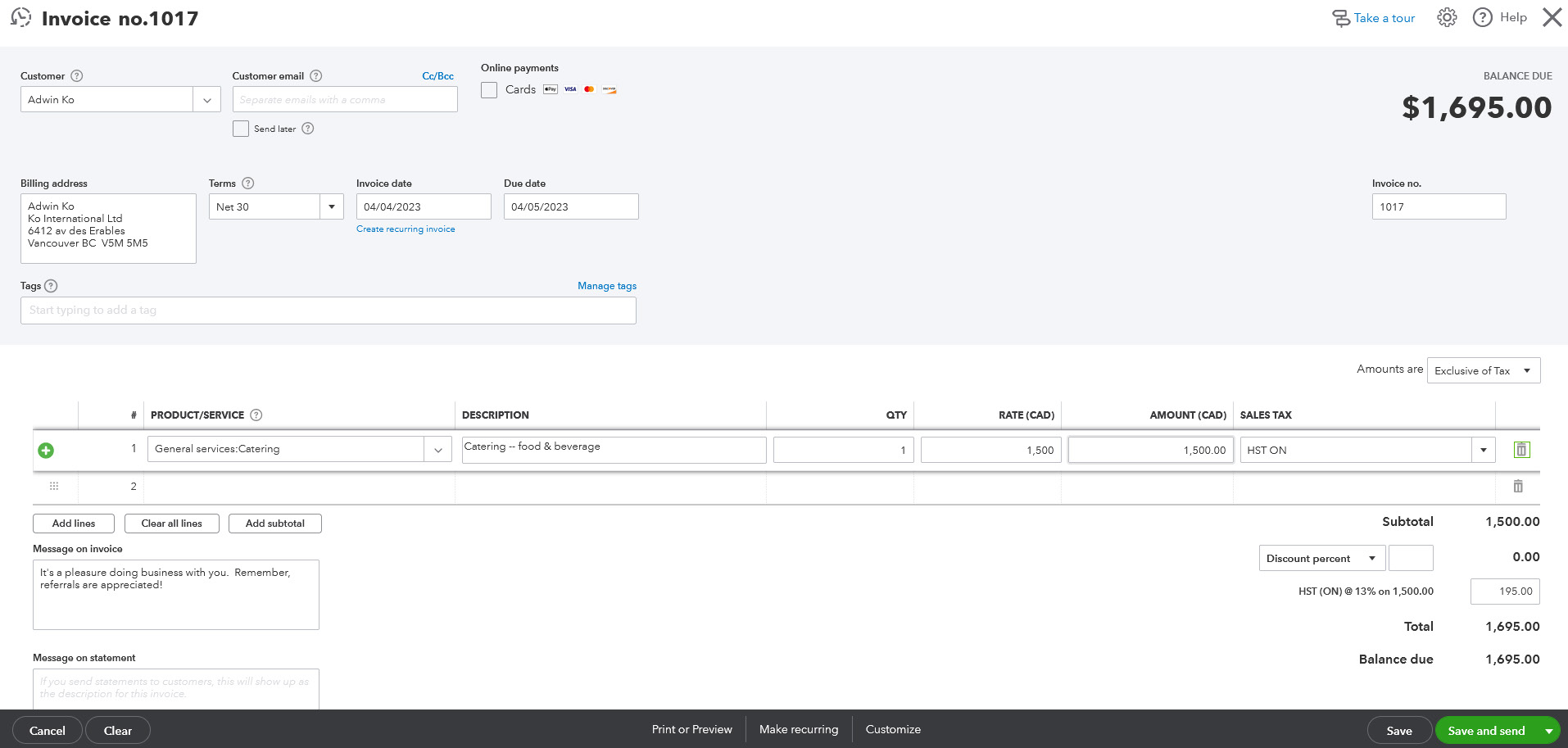
Suppose a photographer invoices a customer $1,500 for an event. On an accrual basis, issuing the invoice records a receivable and revenue. The customer then pays by card, and the payment service deducts a fee before transferring funds. Reconciliation must account for the gross payment, fee and net deposit without recording the revenue twice.
The same logic applies to bills. Entering a supplier bill does not mean the bank has already paid it. An expense can be recorded before the bank outflow, and later payment clears the liability. Software can make these connections easier to inspect, but only if the chart of accounts and payment details are accurate.
This is why QuickBooks Online bookkeeping is not measured by how many items the program automatically categorizes. The meaningful test is whether the records still agree with source documents, bank statements and applicable accounting policies at the end of the month.
Who should consider an accounting platform?
A one-person service provider with only a few deposits may not need the same plan as a wholesaler with stock on hand, a bookkeeper and five staff members who enter transactions. The relevant variables are invoice count, bill approval, team access, tracking dimensions and reporting expectations.
If the owner has never reconciled a bank account or reviewed a profit-and-loss statement, some training is essential regardless of subscription. An accountant can help choose the chart of accounts and review the treatment of unusual transactions before messy records accumulate.
🛠️ QuickBooks Online Features That Matter
Invoicing, estimates and receiving payments
The accounting platform supports creating invoices, sending them to customers, tracking balances and recording receipts. Higher-tier workflows add more bulk processing and controls; certain Intuit Intelligence invoicing functions are labeled beta or restricted by plan. An emailed invoice is still just a request for payment until the customer pays.
For businesses considering QuickBooks Online invoice tracking for freelancers, a useful test is how well the software handles an estimate that becomes an invoice, a partial customer payment, a credit note and a deposit reduced by processing fees. The aim is to see the full sequence rather than merely confirming the invoice template looks professional.
QuickBooks Payments is an additional financial service, not a guarantee that every credit card or bank transfer is included for free. Pricing and availability can depend on payment method, customer profile and plan. Check the live US plans and payment disclosures before advertising a fixed per-transaction rate.
The business should also distinguish invoice reminders from collections. Automated reminders can reduce missed follow-ups, but an overdue customer dispute still needs a person who can verify the contract and resolve the problem.
Bank feeds, transaction matching and reconciliation
Connected bank and card feeds can import financial activity and suggest categories or matches to existing invoices and expenses. A correct match helps prevent duplicate recording. A wrong classification can quietly distort an income statement, especially when owner contributions, loan payments or transfers resemble ordinary revenue.
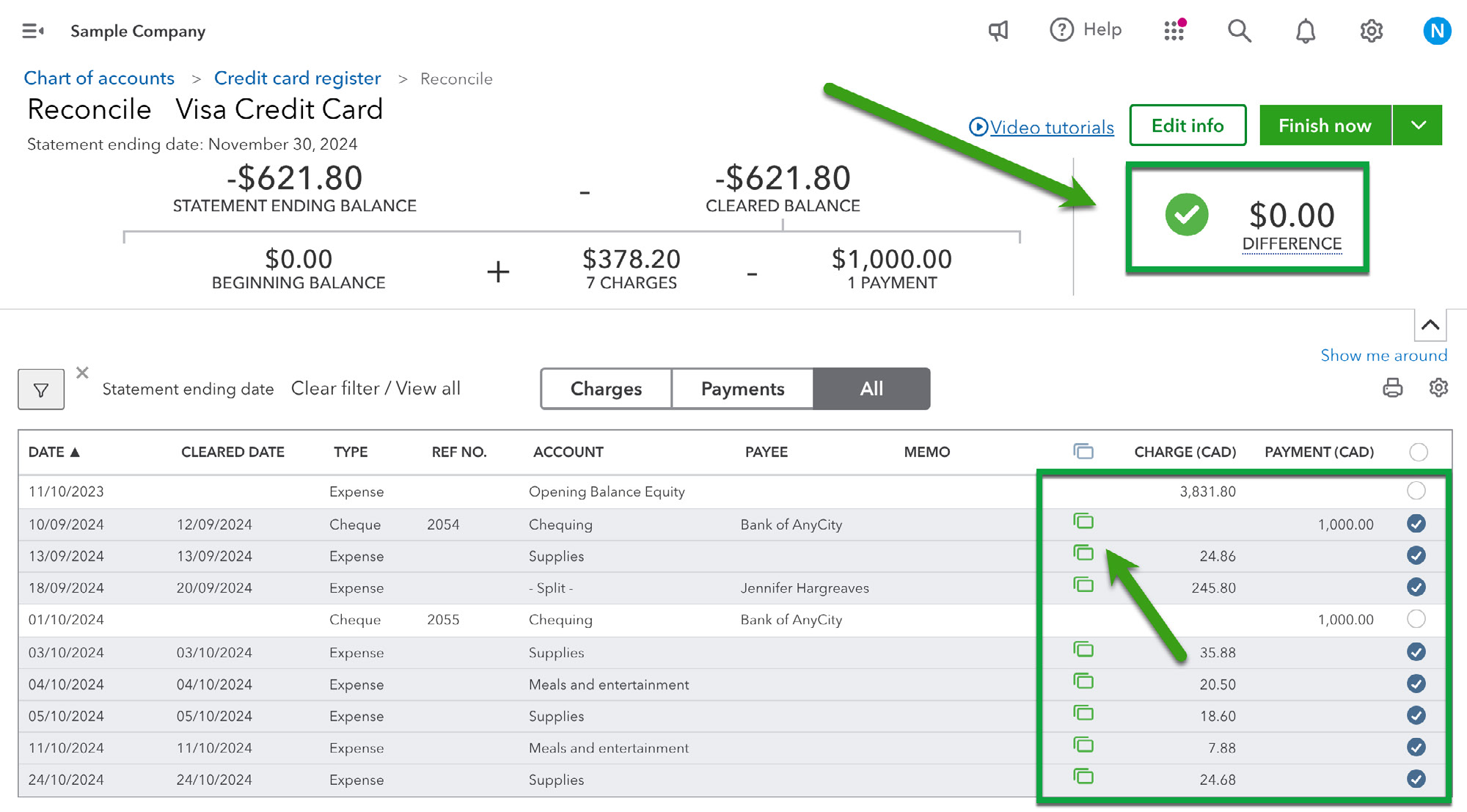
For QuickBooks Online bank reconciliation, the useful test is whether the books agree with a complete period-end statement and whether the business can investigate and document discrepancies. A feed that stops importing transactions is not the same thing as a reconciled account.
Intuit’s 2026 product updates describe improvements in categorization, reporting and reliability, including AI-supported suggestions and tools to check book quality. Those functions may save review time, but they should be assessed by their handling of edge cases such as duplicate transactions, split deposits and reversed payments. Do not assume a confidence label replaces an accountant’s check.
For the first month after setup, review a sample of imported transactions with the bookkeeper. Include a transfer between bank accounts, a card processing fee, a reimbursed owner purchase and a refund. If the balance and accounting treatment match source evidence, the workflow is performing something useful.
Expense capture and accounts payable
Recording supplier bills and expenses consistently is essential to understanding future cash needs. An approved bill can appear in accounts payable before it is paid. A credit-card transaction might need a receipt, a tax category and approval from a manager. Automation is useful only when the business knows who checks these details.
Simple Start includes accounting foundations and bill-pay options subject to monthly ACH allotments and possible additional transaction charges. Essentials expands tools relevant to managing bills and working with a small team. Intuit’s current US matrix should be checked for the exact features available in each subscription and any payment-service terms.
An agency that books ten contractors each month may care more about approval history and consistent expense coding than about automatic receipt recognition. Review whether the system supports the separation of an invoice’s preparation, approval and final payment at the right tier.
Financial reports, dashboards and Intuit Intelligence
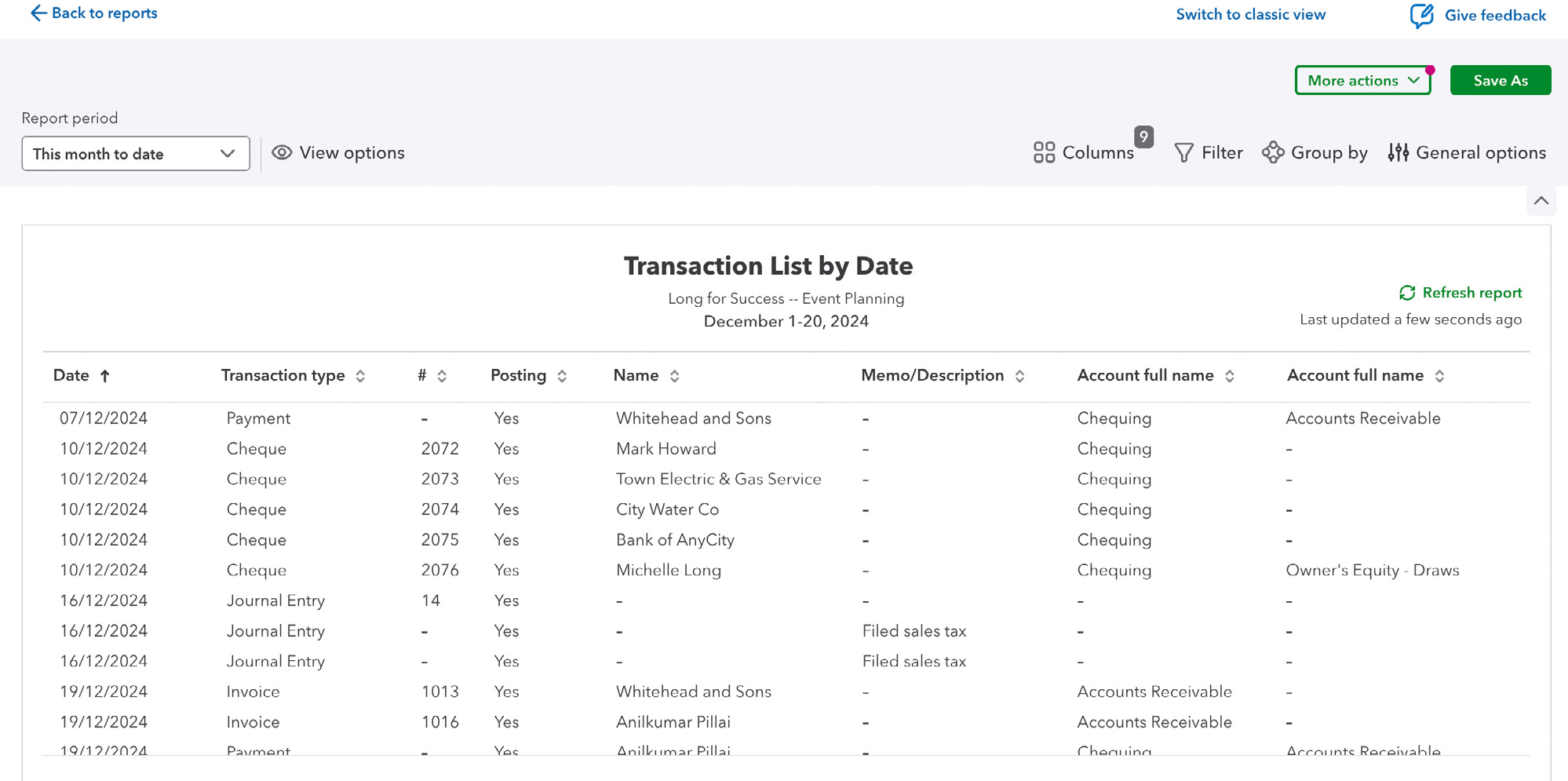
Reports turn transactions into statements: profit and loss, balance sheet, unpaid customer invoices, supplier bills and cash flow. The usefulness of a dashboard depends on what the underlying ledger includes and which accounting basis is being used. A small owner-run service company might be content with a basic profit-and-loss report; a multi-department organization may need custom metrics.
Intuit’s August and October 2026 materials emphasize Intuit Intelligence, expanded reporting and clearer financial insights. Some capabilities are described as beta, limited-capacity or available only in selected higher-tier plans. A user should verify which features are active inside their particular organization rather than assuming every item on a product update page applies universally.
Advanced also offers options for more sophisticated dashboards, user permissions and workflow management. Before paying for those, identify the actual reporting questions: is project A profitable after contractor costs, which customers are overdue, and will the company have enough cash to pay suppliers next month?
Asking an AI assistant which invoices are late can be convenient. It does not make outstanding invoices collectible or substitute for correcting an underlying accounting error. The difference between reporting and financial judgment remains important.
Inventory and project profitability
Selling stock introduces purchase quantities, cost of goods sold and inventory valuation. A company that runs project-based services instead needs to allocate materials, staff time and subcontractor costs to individual jobs. These are not interchangeable uses of the same category label.
The QuickBooks Online inventory tracking functions are associated with Plus and higher plans in the current US comparison. A business should test a purchase, inventory adjustment, returned product and sale before making this its inventory source of truth. If the firm already uses warehouse software, it may need to reconcile what each system considers the quantity on hand.
Similarly, QuickBooks Online project profitability becomes valuable only when costs and revenues are consistently attributed to a project. If employees do not submit time, or supplier bills omit the project name, the profitability report will understate labor or material costs.
A construction subcontractor can use a project-cost report to compare estimated and actual margin. But a report that is accurate to the cent can still mislead if an approved change order has never been entered or future commitments are absent.
Accountant collaboration and user permissions
Accounting workflows often involve at least two perspectives: the employee entering transactions and the accountant reviewing them. Intuit’s US paid tiers publish different user limits: one with Simple Start, three with Essentials, five with Plus and up to twenty-five with Advanced. Accountant access is handled separately, subject to the product’s current rules.
For QuickBooks Online accountant access, confirm both the invited accountant’s permissions and who can approve payments, change banking information, edit payroll-related records or close a period. An outside bookkeeper needing review access does not necessarily require the same level of authority as the business owner.
A team may discover that adding one extra internal approver forces a change of tier even if the core accounting tasks have not changed. Plan user permissions before purchasing instead of waiting until an important bill cannot be approved.
💰 QuickBooks Online Pricing 2026: Regular Rates vs Promotions
The official US comparison currently lists the normal monthly cost of the core paid plans at $38 for Simple Start, $85 for Essentials, $140 for Plus and $340 for Advanced. These are list prices, not estimates derived from an old screenshot. Intuit announced an increase affecting Essentials, Plus and Advanced renewals on or after 1 August 2026. Simple Start’s regular rate did not change in that announcement.
The official August 2026 price-change notice matters because older comparison pages may still quote the pre-August prices. The current US pricing matrix also shows time-limited offers that vary. We observed official pages advertising 50% off for three months and other pages showing 90% off for eligible introductory periods. Neither is the standard renewal fee. Check the actual plan and checkout terms before relying on a discount.
| US paid plan | Standard monthly price | Published internal users | Core reason to consider it |
|---|---|---|---|
| Simple Start | $38 | 1 | Foundational books, invoices and reports for an owner-led business |
| Essentials | $85 | Up to 3 | More team access, enhanced reporting and time/billing workflows |
| Plus | $140 | Up to 5 | Inventory, budgets, job profitability and class/location tracking |
| Advanced | $340 | Up to 25 | Advanced reports, permissions, workflows and more demanding operations |
The matrix above summarizes major decision points rather than every entitlement, tax treatment or beta feature. Transaction fees for QuickBooks Payments, paid payroll, extra apps and some optional bill-pay services are separate from the base subscription.
What does the introductory discount actually save?
A 50% introductory promotion for three qualifying months would bring the temporary monthly subscription to $19, $42.50, $70 and $170 for Simple Start, Essentials, Plus and Advanced respectively. But the business then faces the standard monthly price unless the vendor offers a different renewal arrangement. The 90% promotion shown on other official pages has different terms and cannot be assumed available to every buyer.
With 50% off for the first three months, an illustrative first-year subscription would total $399 for Simple Start, $892.50 for Essentials, $1,470 for Plus and $3,570 for Advanced before tax and optional products. That assumes exactly three discounted months followed by nine months at the listed price, without plan changes or fee increases. Real costs may differ.
A first-year budget should compare the introduction and regular rate explicitly. The example below assumes exactly three months at 50% off followed by nine months at full price, with no taxes, payroll, transaction fees or other add-ons.
| Plan | Three months at illustrative 50% promotion | Nine months at standard rate | Illustrative 12-month total |
|---|---|---|---|
| Simple Start | $57 | $342 | $399 |
| Essentials | $127.50 | $765 | $892.50 |
| Plus | $210 | $1,260 | $1,470 |
| Advanced | $510 | $3,060 | $3,570 |
These figures describe one hypothetical offer, not the amount a particular subscriber is guaranteed to pay.
For existing subscribers, the QuickBooks Online 2026 price increase makes the renewal notice more relevant than an introductory offer aimed at new customers. Intuit says certain newer subscribers receive initial price stability under its terms, but the precise eligibility rules depend on subscription history and timing.
The Free and Lite options are not the same as Simple Start
Intuit also offers newer Free and Lite choices for smaller or earlier-stage businesses. The official pricing table presents Free as $0, with a restricted set of bookkeeping functions, and Lite as a separate entry-level product intended for a different set of needs. These are not simply full QuickBooks Online subscriptions with a temporary $0 coupon.
The QuickBooks Online free plan limitations include a reduced number of supported invoices and bank connections and fewer integrations or accountant features compared with paid business subscriptions, subject to the current plan matrix. For a business expecting dozens of monthly invoices and accountant collaboration, Free is unlikely to replace the paid tiers.
Do not compare the word “free” across accounting brands without checking workflows. A no-cost tool that omits the bank feed or report an accountant requires may be more expensive in manual labor than a paid subscription. On the other hand, a genuine side project with one or two transactions a month may not justify a full accounting platform yet.
The cost of users, payroll and payment processing
A consulting agency with an owner, office manager, project lead and outside accountant should first confirm which people need to edit or merely review the books. The internal user limit can affect plan choice before an advanced feature does.
Payroll is a separate consideration. To estimate QuickBooks Online payroll add-on cost, compare the base charge, per-employee fees, state coverage, payroll schedule and tax-filing services separately from the accounting subscription. Payroll choices, promotions and employee-based charges can change independently.
Payments introduce another cost category. When comparing QuickBooks invoice payment fees, separate the charges for accepting cards or bank transfers from the monthly bookkeeping license. Some payment methods have allowances and additional transaction fees. Check the payment method, the qualified rate and how refunds are handled.
For the average small business, a budget should show at least three separate lines: recurring accounting subscription, payroll/connected applications and variable payments. Combining them into a single “QuickBooks cost” figure hides the differences between a company sending five invoices and one processing thousands of card payments.
⚖️ QuickBooks vs Xero, FreshBooks, Zoho Books and Mercury
Accounting comparisons become confused when the reviewer compares unlike price tiers or even unlike categories. QuickBooks and Xero are general small-business bookkeeping platforms. FreshBooks emphasizes client invoicing and service administration. Zoho Books may fit companies operating inside the wider Zoho ecosystem. Mercury offers eligible US business banking and payment tools: it is not a replacement for a general ledger.
The right choice is more likely to emerge from a test month than a list of marketing badges.
| Product | Main job | Good reason to shortlist | Practical concern |
|---|---|---|---|
| QuickBooks Online | Cloud accounting, invoices, bank feeds and reporting | Accountant collaboration and familiar US bookkeeping workflows | User limits, steep higher-tier pricing, add-on fees |
| Xero | Cloud accounting, invoices, reconciliation and apps | Team-led bookkeeping and integrations with existing workflows | Higher US plans needed for some features such as multi-currency |
| FreshBooks | Client billing and service-business administration | Consultant or agency prioritizes invoicing and project work | Verify required accounting reports and user/plan limits |
| Zoho Books | Accounting linked with other Zoho business applications | Company already runs CRM and operations in Zoho | Value depends on the wider application stack |
| Mercury | Business banking and financial operations | US-eligible companies need deposit accounts and payment rails | Cannot replace a complete accounting ledger |
QuickBooks vs Xero: which is better for a small company?
A realistic QuickBooks vs Xero accounting comparison begins with the accountant’s responsibilities. If the business already has a well-organized QuickBooks ledger and an accountant who closes the books there each month, changing systems for a short promotion could introduce unnecessary migration work. If the accountant and the wider company already use Xero successfully, the reverse may be true.
As of October 2026, the current US price ladders are also meaningfully different. Xero’s regular advertised business plans are $27, $59 and $97 for Early, Growing and Established, while QuickBooks paid business tiers show $38, $85, $140 and $340. This comparison is not one-to-one: the limits and advanced features differ. Check which tier covers the specific transaction types, required users and integrations.
Try reproducing one real month in the candidate system. Include invoice credits, supplier bills, a transfer between accounts, transaction fees, taxes and a profit-and-loss statement. Verify that both systems produce a correct record, not merely a visually convincing chart.
QuickBooks or FreshBooks for an independent contractor?
An independent service provider who issues several invoices per month might prioritize invoices, reminders and expense capture over inventory or multi-department accounting. FreshBooks deserves evaluation in that case. QuickBooks Online may become more useful when broader ledger control, external accountants, supplier obligations or more complex reporting are needed.
The question is not which product looks simpler in a promotional video. It is whether the actual month-end workflow makes the owner less dependent on manual correction and whether the accountant can retrieve reliable evidence.
QuickBooks and Mercury are complementary
A US-based company may use Mercury for eligible business deposit accounts, cards and transfers while using QuickBooks for expense classification, invoices, balances and reports. Linking the services does not mean every bank transfer will be categorized correctly by default. Transfers, card refunds and owner contributions should be reviewed to avoid counting the same money twice.
When budgeting, add any bank-specific foreign currency or card fees separately. QuickBooks does not automatically remove the cost of payment rails merely because the ledger imports their transactions.
✅ QuickBooks Online Pros and Cons
Pros
Clear bookkeeping workflows, invoicing, bank-feed matching, accountant collaboration and higher-tier project or inventory tools.
Cons
Large price jumps, different internal user allowances, payroll and payment extras, and a need for careful review of AI suggestions.
Advantages: QuickBooks Online offers an established cloud accounting workflow with invoicing, bank feeds, reports and broad accountant familiarity. Different plans cover owner-led businesses, small teams and organizations needing more sophisticated accounting dimensions. Its 2026 improvements target repetitive bookkeeping and clearer review tools.
Drawbacks: Costs rise sharply between tiers and may increase as a team needs more internal seats. Intuit’s promotions can make the initial price look much lower than renewal. Complex permissions, project/inventory tracking, payments and payroll require closer attention to plan details and optional charges. AI suggestions still need verification.
A support team may use “automation” to refer to several very different processes: importing a bank feed, suggesting an expense category, applying a rule or automatically posting a transaction. Each has a different failure mode. Ask what happens when a suggestion is wrong and how the mistake is corrected rather than assuming the word implies end-to-end accuracy.
🎯 Who Should Choose QuickBooks Online?
Consider Simple Start if you are one primary accounting user with straightforward invoices, expenses and standard financial statements. It is a foundation, not a guarantee that all billing, expense approval or banking needs are covered.
Consider Essentials if three internal users, enhanced reporting and time/billing workflows better describe the business. A firm where the owner and two staff members all need to enter records may justify the extra cost even if inventory is irrelevant.
Consider Plus if inventory, project costing, budgets or location/class dimensions are central to the operation. This is often a more operationally meaningful upgrade than merely adding another dashboard.
Consider Advanced only if higher user limits, sophisticated permissions, reporting or workflow functions justify the major price difference. If a company is evaluating Advanced only to gain a single specialized report, it may be worth comparing that expense with a dedicated reporting integration.
Consider alternatives if your accountant already works efficiently in another system, you need only minimal invoicing or a different service includes features required by your industry at lower total cost. A successful choice should be validated against a complete month’s records.
🧪 How We Reviewed QuickBooks Online: Sources and Limits
We checked the US product comparison and list prices, the official 2026 price change notice, the current pricing and feature matrix, Intuit’s 2026 product update log and public documentation for invoices, dashboards and accountant access. We then evaluated the differences using common small-business accounting workflows.
This is a research-based review. We did not sign into an employer or business account, connect bank feeds, approve payments, run payroll, import private records or benchmark actual support response times. Images illustrating invoicing, reconciliation and reporting are extracted from Intuit’s own 2025 Canadian training material: customer invoicing, bank reconciliation and financial reporting. The screenshots show sample Canadian workflows from those guides; screens, amounts and plan access may differ in US QuickBooks Online in 2026.
Our evaluation emphasizes verifiable costs and limitations. It does not claim a particular AI suggestion accuracy rate or that a report will always agree with a bank statement. Some features have staged availability and vary by plan.
Before choosing a subscription, ask the person who will reconcile the books to define five representative cases: a paid invoice with processing fees, an unpaid supplier bill, a refunded order, a transfer between company accounts and an unusual tax-related expense. Check whether the selected plan can handle those cases with an appropriate audit trail and the necessary user permissions.
🏆 Final Verdict: Is QuickBooks Online Worth the Money?
QuickBooks Online is worth a place on the shortlist for US companies that need more structured bookkeeping than spreadsheets can reliably provide. Invoicing, supplier records, reconciliation and financial reporting are meaningful advantages when a business uses them consistently and validates imported data.
The central 2026 buying decision is the tier. Simple Start costs $38 monthly at standard list price, Essentials $85, Plus $140 and Advanced $340. Those figures are separate from short introductory offers and optional payment or payroll services. Do not commit on the strength of a discount that expires after three months.
Our editorial choice would be to test Simple Start for a genuine one-person operation, Essentials for a small multi-user business and Plus for inventory or job-costing needs. Advanced requires a written explanation of the value added to that company’s operations. That is a decision framework rather than a universal award.
Before moving historical records, confirm pricing, user access, required connected apps and month-end accounting procedures with a qualified bookkeeper. The software can keep the information together, but people still need to make sure the books describe the business correctly.
QuickBooks Online Review: Frequently Asked Questions
Is QuickBooks Online free?
QuickBooks now lists a separate Free product with restricted features. Full paid US QuickBooks Online plans have recurring monthly fees, starting with Simple Start.
How much is QuickBooks Online in 2026?
US standard monthly rates are $38 Simple Start, $85 Essentials, $140 Plus and $340 Advanced, before tax and optional services. Temporary new-customer discounts may be available.
Which QuickBooks plan includes inventory tracking?
The current US comparison lists inventory tracking with QuickBooks Plus and Advanced. Check the precise stock workflow and integrations your company uses.
Can QuickBooks Online automatically reconcile bank transactions?
It imports and matches transactions and provides reconciliation tools. AI suggestions can help, but the business must verify balances and review unmatched or wrongly categorized items.
How many users can QuickBooks Online have?
Intuit lists one internal user for Simple Start, three for Essentials, five for Plus and up to twenty-five for Advanced. Accountant access has separate conditions.
Is payroll included in QuickBooks Online?
Payroll is a separately priced product with base and per-person costs. Review tax filing, state rules and funding deadlines for the selected package.
Is QuickBooks better than Xero?
Both provide cloud accounting and reporting. The better fit depends on accountant workflow, required users, plan-specific capabilities and ongoing costs, not the brand alone.
Can QuickBooks Online track project profitability?
Plus and higher plans include project profitability and related reporting. Reports depend on correctly assigned expenses, labor and customer revenue.
What happened to QuickBooks prices in August 2026?
Intuit increased the standard rates of Essentials, Plus and Advanced for renewals beginning August 2026. Simple Start was not included in that announced rise.
Are advertised 50% or 90% QuickBooks discounts permanent?
No. Such discounts are limited introductory offers with eligibility and time restrictions. Compare regular renewal pricing and check the current checkout terms.
EXPLORE NEXT ON DIGIOFFLY
What to explore after QuickBooks Online
Compare accounting, payroll and business banking against the workflows you actually need.
Finance comparisons
- Explore our Finance software hub — Review banking, accounting, payroll and expense platforms.
- Browse the full software directory — See the wider catalog and existing reviews.
- Xero review — Compare another cloud accounting system.
- Bench Accounting review — Compare bookkeeping support versus self-service software.
Compare total ownership costs
- Estimate recurring software costs — Separate monthly fees from annual commitments and transaction charges.
- Compare software side by side — Check capabilities and the unknowns before subscribing.
Keep researching
- Find software for your workflow — Shortlist tools by concrete business needs.
- Read our research methodology — See how public vendor documentation is interpreted.