

Notion to ClickUp Automation with Make
Notion to ClickUp automation is useful when editorial briefs live in Notion but delivery tasks belong in ClickUp. A good workflow transfers only the approved information, links the task to its source and tells the editor what happened. This guide uses Make and Slack to turn a Ready brief into one production task, without trying to synchronize every field in both directions or publish content automatically.
By Alex Wright, DigiOffly · November 14, 2026 · Source-led implementation blueprint. We checked official connector and billing documentation; no paid-account integration or live automation benchmark is claimed.
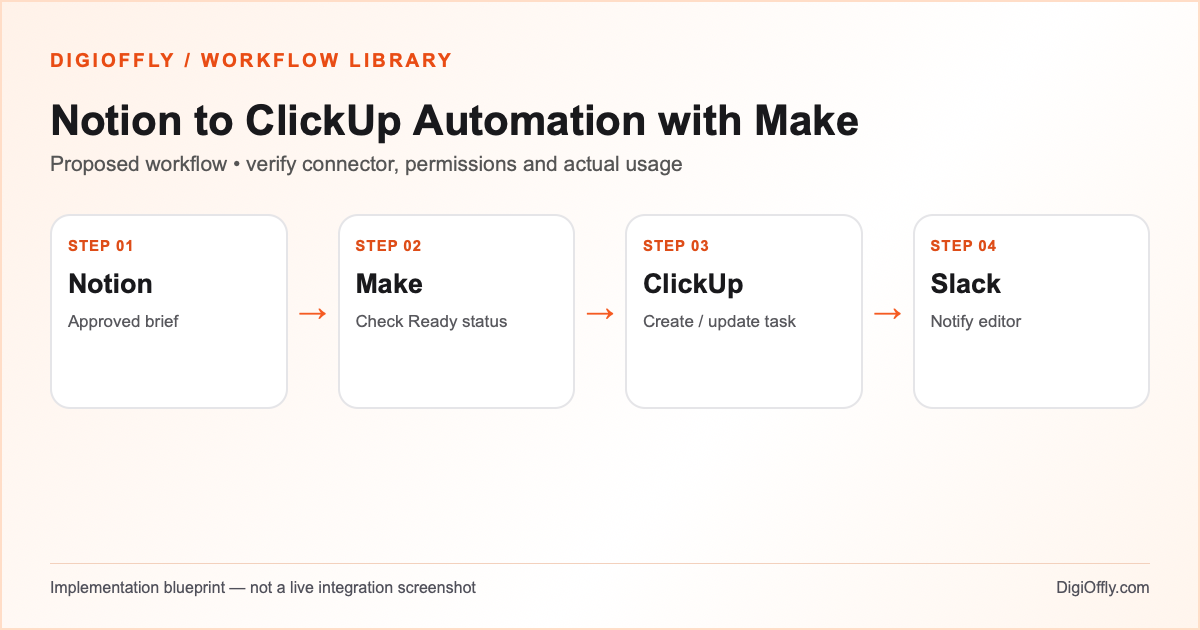
Notion to ClickUp automation: what you will build
One approved Notion brief corresponds to one ClickUp production task. A revised deadline can update the existing task under a documented ownership rule. An editor gets a link and can review the handoff before publication.
Use Notion to ClickUp automation if your team deliberately keeps research and editorial context in Notion while ClickUp manages delivery. If ClickUp Docs or Notion alone meets the whole process, compare a single-tool workflow first. A duplicate task system is not an achievement.
Decide which system owns the handoff
For Notion to ClickUp automation, the most important decision is field ownership. Let Notion own the approved brief and ClickUp own production status. A Notion to ClickUp automation can transfer an updated source deadline only if that is the agreed rule; when the production manager changes the schedule, route the conflict to review instead of treating a newer timestamp as permission to overwrite.
Keep the mapping register small: a stable brief ID, task ID, current stage and last verified update. A Notion to ClickUp automation does not need a full copy of every draft, comment and attachment. A link to the approved brief gives the editor context while keeping the content inside the authorized workspace.
Software and prerequisites for Notion to ClickUp automation
Notion
Editorial briefs
Make
Orchestration
ClickUp
Production task tracking
Slack
Editorial notification
Before connecting any production account, confirm access, the exact connector event and action, supported plan and test environment. Treat the following field names as your own design; adjust them to the actual source and destination schema.
Notion to ClickUp automation: data mapping
| Source | Destination | Mapping rule |
|---|---|---|
| Notion page or data-source item ID | External brief ID on ClickUp task or mapping register | Stable link for updates; titles can change. |
| Brief title | Task name | Use a short name; keep rich text and research in the brief. |
| Status = Ready | Eligibility condition | Only approved briefs enter the production route. |
| Due date + timezone | ClickUp task due date | Define date-only versus timed deadlines; test timezone conversion. |
| Owner | ClickUp assignee ID | Resolve identity in the target workspace; unknown owner goes to review. |
| Notion page link / version | Task link field or description | Reference the source rather than copying the full document. |
How to set up Notion to ClickUp automation
1. Design the editorial handoff
Create a Notion database or data source with title, status, owner, due date and a stable identifier. Define Draft, Ready and Archived as separate states. Agree that the editor controls readiness in Notion and the production lead owns task status in ClickUp. A content production workflow works best when each field has one owner; otherwise an update in one app can undo a human decision in the other.
2. Connect Notion and ClickUp
Make supports internal and public Notion connections. Grant the integration access to the specific pages or data source needed for the workflow. Confirm the current connector supports the database or data-source structure used in your workspace; older and newer Notion modules may differ. Connect ClickUp with a test list and verify the authorized workspace, list and assignee mapping. Connect Slack to a private editorial channel.
3. Choose a supported trigger
Use the relevant Notion event or a scheduled search for eligible records in a draft Make scenario. Do not assume every page edit emits the event you want. Filter for Ready status and a known brief ID. If using polling, store a suitable last-seen timestamp or process marker, and allow for empty checks and pagination. Run an initial controlled sample so historical briefs are not all created as new tasks by accident.
4. Create or update a production task
Find the existing task by your stored brief ID mapping. On first approval, create the task in the designated ClickUp list with title, deadline, assignee and the Notion link. On later updates, modify only fields owned by the source workflow. Do not reset production status or comments. If a task was deleted or moved, route the mismatch to an editor instead of blindly recreating a task.
5. Avoid synchronization loops
This Notion ClickUp integration is one-way for the initial handoff. If you add completion feedback later, isolate the returned status in a separate field and exclude that field from the creation trigger. Track the source version and the last written destination values. Repeated edits, a task rename or a delayed event should not create new work. Test conflicting deadline changes and define which system wins.
6. Notify and run the pilot
Send a Slack message containing the brief link, task link and assignment outcome. If task creation succeeds but notification fails, preserve the task ID and retry only the message. Start with a few approved briefs, including one with a missing owner and one with a revised deadline. Compare the visible task properties with the source, then let the editorial team approve the pilot before using real publishing work.
Notion to ClickUp automation: test cases before launch
These are acceptance criteria for your pilot, not test results. Record the source event ID and the destination ID in each test. Compare the intended outcome with the actual one before enabling the scenario.
| Test case | Expected result |
|---|---|
| Ready brief created | One task with correct link, deadline and owner. |
| Draft brief edited | No task creation; approval still required. |
| Same Ready event repeated | Existing mapping used; no duplicate task. |
| Deadline edited after assignment | Only the authorized deadline field changes. |
| Unknown owner or missing date | Visible review item; no random assignment. |
| Task moved, deleted or alert fails | Human resolution or targeted retry; no publish action. |
Notion to ClickUp automation: failure recovery
The critical handoff is successful only after a task ID is stored against the brief ID. If the task is created but the mapping write fails, a full replay might create another task. Use a destination lookup or unique external key before retrying, and record incomplete executions. Pause the scenario if repeated permission errors or property schema changes appear. Restore a known mapping before resuming.
Security and ownership in Notion to ClickUp automation
Restrict the Notion integration to approved content data and the ClickUp connection to the relevant list. Keep draft copy, client materials and credentials out of Slack. Preserve human approval for publication: the content production workflow creates internal tasks and does not publish, generate or send posts. If a brief is archived, define whether the task should stay active, be reviewed or be linked to an archive.
Notion to ClickUp automation: usage and pricing
For the example, 120 approved briefs per month at five credits per brief, plus 100 additional monthly credits for checks and overhead, with 20% reserve, gives 840 credits. The overhead number is illustrative. Polling every few minutes can consume far more than 100 credits monthly; calculate your actual schedule and include empty checks. If a search returns several briefs, count downstream operations for each returned bundle.
This workload may fit a small Make allowance, but select a plan only after checking scheduling and required features. Notion and ClickUp may both charge per user, so a four-person team must assess seats and collaboration needs rather than counting software by name alone. Current ClickUp plan rollout and AI allowances may vary; do not assume an AI-inclusive tier for this deterministic process. The calculator separates confirmed and incomplete prices.
Calculate Notion to ClickUp automation cost
Illustrative workload, not measured consumption. Change each input for your design.
840 estimated credits / month
Calculate stack cost & optimizeMake normally charges ordinary module operations; some modules are exempt or use other rates. Polling, multiple bundles, AI and code can change demand. The calculator applies the catalog’s documented plans, not a vendor invoice.
Measure Notion to ClickUp automation after rollout
Track approved briefs with no task, duplicate tasks, incorrect owners, missed due dates and time from approval to task creation. Review false alerts and polling cost. If the editorial team spends more time repairing the sync than it saves on handoffs, simplify the workflow.
Notion to ClickUp automation: frequently asked questions
What is Notion to ClickUp automation?
It transfers a chosen Notion record into a ClickUp task under agreed rules. This blueprint uses Make for the handoff and Slack for internal notifications.
Can Make connect Notion and ClickUp?
Yes, Make documents connectors for both services. You still need the appropriate workspace access, current module support and field mapping in your own account.
Can Notion to ClickUp automation create tasks only after approval?
Yes. Filter on the defined Ready state and test the trigger with Draft and approved records. Human approval remains the source of eligibility.
How does Notion ClickUp integration avoid duplicate tasks?
Store a stable brief ID and the destination task ID. Check the existing mapping before creating a task, and test retries and simultaneous events.
Should I use a two-way sync?
Start with one-way transfer and explicit field ownership. Two-way updates can cause loops or overwrite human decisions unless carefully designed and tested.
What happens when an editor changes a deadline?
Update the existing task only if the workflow owns the deadline field. Otherwise send a review notification; do not silently overwrite the production plan.
How many credits does editorial workflow automation need?
The sample is 840 credits per month, not measured usage. Empty polling, returned bundles, mapping writes and repeated updates can change the total.
Can I use free plans for this workflow?
Possibly, depending on team access, connector features, scheduling and actual demand. Review the selected plans rather than assuming all free tiers meet team requirements.
Does this content production workflow publish articles automatically?
No. It creates or updates an internal production task and notifies the editor. Publication remains a separate approved action.
Can I replace Make with Zapier?
If the required Notion and ClickUp events and actions are supported, build a comparable workflow and measure Zapier tasks separately.
Where should I calculate the software cost?
Use the imported stack and estimated Make demand below, then select the relevant plans and team size. Verify any unknown or eligibility-dependent pricing.
Official sources for Notion to ClickUp automation
Vendor documentation checked on November 14, 2026. The workflow design, sample field mapping, acceptance tests and budget arithmetic are DigiOffly editorial examples. Verify your exact account entitlements, current modules and actual operation counts before enabling production. No automation has been installed or executed by this guide.
After Notion to ClickUp automation: related workflow guides
- Workflow Library — compare all four practical blueprints.
- Lead Capture Automation with Make and HubSpot
- Shopify Order Automation with Make and Airtable
- Zendesk Ticket Escalation Automation with Make
- Software Finder — choose tools for another workflow.
- Software Cost Calculator and Stack Optimizer — compare annual billing and alternatives.
- Make vs Zapier — compare the two automation platforms.
- Software Stacks — plan the rest of your business software.
- AI Content Workflow Automation with Human Review