

AI Content Workflow Automation with Human Review
AI content workflow automation can shorten repetitive drafting work, but a draft is not a verified article. This blueprint uses Notion for an approved brief, Make for orchestration and a selected AI module, ClickUp for the review task and Slack for the editor notification. Publication remains a separate human decision. The goal is a traceable first draft with known inputs, not an unattended content factory.
By Alex Wright, DigiOffly · November 15, 2026 · Source-led implementation blueprint. We checked official connector and billing documentation; no paid-account integration or live automation benchmark is claimed.
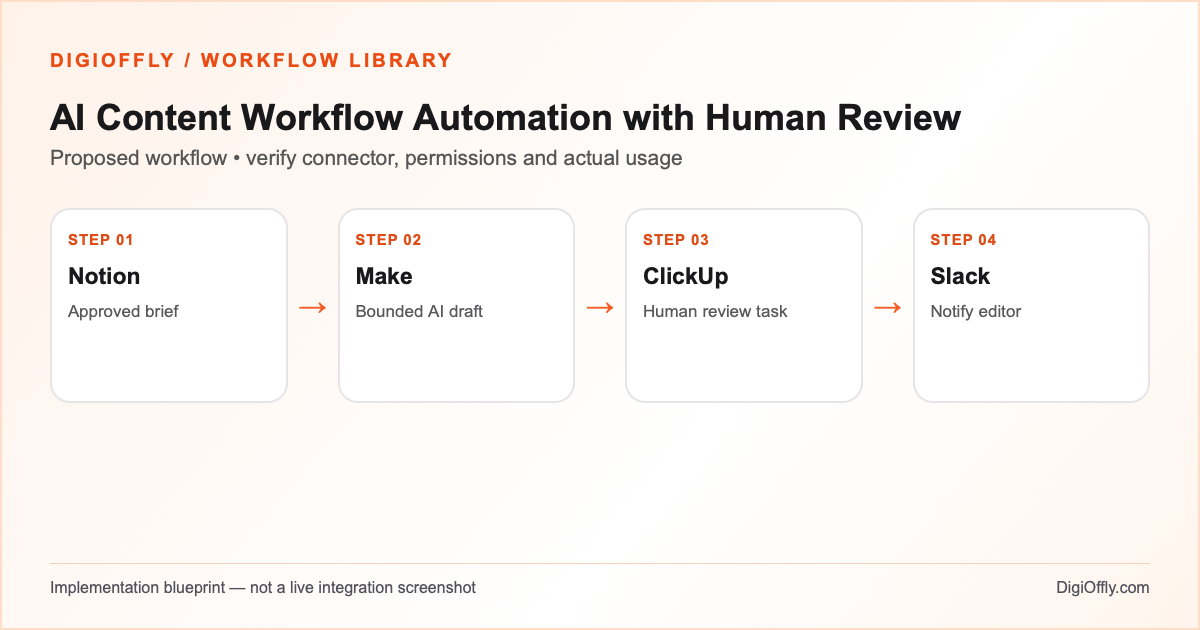
AI content workflow automation: what you will build
A versioned brief produces one bounded draft reference and a review task with a source checklist. A reviewer can reject, correct or approve the draft. Provider errors, unexpected output and duplicate events become visible exceptions rather than another automated publication attempt.
Use AI content workflow automation when a team has repeatable research or drafting tasks and a responsible editor. It is a poor fit for a process that cannot tolerate unverified claims, confidential prompts or automatic publication. Compare an ordinary editorial checklist with the additional AI dependency before buying a new subscription.
Decide which parts are actually worth automating
An AI content pipeline should make editorial responsibility more visible. Let Notion hold the approved brief and the version of the evidence; ClickUp holds the draft review status and assigned editor. A changed brief must not overwrite the evidence for an already generated draft. Use a brief/version key rather than a title. When a source changes, create a new reviewable draft version instead of silently replacing the previous output.
An AI editorial workflow can prepare an outline, draft or summary without granting the model the ability to browse private systems or publish. Treat generated text as data, not commands. Limit the selected module, request size, output destination and number of attempts. For an AI workflow automation pricing comparison, separate the Make charge from the provider charge and the human review effort; a low token price alone does not determine editorial value.
Software and prerequisites for AI content workflow automation
Notion
Approved brief and source links
Make
Orchestration and AI module
ClickUp
Human review task
Slack
Editorial notification
Before connecting any production account, confirm access, the exact connector event and action, supported plan and test environment. Treat the following field names as your own design; adjust them to the actual source and destination schema.
AI content workflow automation: data mapping
| Source | Destination | Mapping rule |
|---|---|---|
| Brief ID and version | Draft / task mapping key | One draft per approved version; preserve earlier versions. |
| Approved source links | Review checklist | Record accessible evidence; do not invent a source or claim a page was read. |
| Audience and scope | Bounded AI input | Include only approved text and relevant constraints; exclude secrets and private records. |
| Model output and token usage | Draft reference / usage log | Treat as untrusted text; record model, input and output usage where available. |
| Review owner and status | ClickUp task | Human approval is required; failure or rejection does not publish. |
| Review link and result | Restricted Slack alert | Send status and link, not full drafts or credentials. |
How to set up AI content workflow automation
1. Lock the approved brief
Create a Notion record with a stable brief ID, version, intended audience, scope, source links, content rights and review owner. Require an explicit Ready for draft state. Keep secrets, private customer information and unapproved documents outside the prompt. Make sure an editor can see which evidence was supplied for each generation. Do not assume a model has accessed a URL simply because it appears in the brief. If factual claims need web research, provide verified source extracts or require a human to check the sources independently.
2. Choose the AI connection and budget boundary
Use a documented Make AI module appropriate to your workflow. The official credit rules distinguish fixed consumption from dynamic consumption, which may depend on tokens, files or processing time. A custom provider connection can require a paid Make plan and separate provider billing; the OpenAI API is not included in an ordinary ChatGPT subscription. Set an approved provider, model, maximum request count and input/output limits. Do not enable a provider connection until the account owner has approved permissions and spending controls.
3. Build a bounded Make AI automation
Read only the approved brief version. Validate required fields and stop if source context is missing. The generation request should have a clear scope, such as one draft for editorial review, and a fixed destination. Treat output as untrusted content: never let instructions inside a source or generated response trigger extra tool calls, access to secrets, financial changes or publication. Record the request identifier and result state. If the model output does not match the expected structure, flag it for review rather than guessing missing fields.
4. Create the human approval workflow
Create or update a ClickUp task keyed to the brief ID and version. Include the draft reference, original brief link, source checklist and editor assignment. The review status belongs to the human reviewer. Give the editor a way to mark Needs revision, Rejected or Approved; the scenario cannot approve its own output. Keep the publication action outside this automation. For a revised brief, create a deliberate new version and retain the old review record rather than overwriting historical decisions.
5. Handle retry and review notifications
Use a small request cap and explicit retry conditions. A temporary connection error can be retried within the approved limit; a quota, permission or policy error needs human attention. If draft generation succeeds but task creation fails, reuse the recorded draft and resume the task stage. Do not pay for another generation merely because Slack was unavailable. Notify the restricted editorial channel with the task link and result status. Avoid posting the complete draft, unpublished source material or API credentials in the message.
6. Test the AI content workflow automation
Use fictional briefs and approved public source material. Test a normal draft, a missing evidence link, a prompt containing misleading instructions, malformed output, a duplicate event and an exhausted request allowance. Review claims and citations manually; a fluent response is not evidence that they are correct. Confirm that rejection never triggers publishing and that replays do not create extra drafts. Only after an editor approves a controlled pilot should the team consider increasing the number of approved requests.
AI content workflow automation: test cases before launch
These are acceptance criteria for your pilot, not test results. Record the source event ID and the destination ID in each test. Compare the intended outcome with the actual one before enabling the scenario.
| Test case | Expected result |
|---|---|
| One approved brief version | One draft reference and review task, with source checklist. |
| Brief not approved | No generation request or draft task. |
| Same version replayed | Reuse draft or task; no unnecessary generation. |
| Source includes tool instructions | Treat as text; no unapproved tool or publication action. |
| Malformed output / provider quota error | Review queue and recorded failure; no uncontrolled retry. |
| Editor rejects draft | Retain review outcome; nothing is published. |
AI content workflow automation: failure recovery
When AI content workflow automation fails, distinguish generation failure from downstream task or notification failure. Record the draft ID and provider response metadata before the next stage. If the generation already succeeded, retry only the unfinished task update. A rejected draft is a business outcome, not a technical error that should automatically generate indefinitely. Review the output and source evidence, then decide whether a new approved attempt is warranted. Keep the actual provider usage history and account budget visible to the person responsible for costs.
Security and ownership in AI content workflow automation
Send only approved input to the selected provider. Review data retention, processing locations, access controls and contractual terms before submitting sensitive material. Keep API keys in authorized connections, never in prompts, Notion briefs or Slack messages. Model output can contain false statements or untrusted instructions. Human approval is required for public content, and this AI content workflow automation does not grant publishing, account administration or billing permissions. Record sources and editorial corrections rather than asserting that generated text is automatically original.
AI content workflow automation: usage and pricing
The illustrative fixed-credit design uses 120 approved briefs, six ordinary credits per brief, 100 extra credits and a 25% reserve: (120 × 6 + 100) × 1.25 = 1,025 credits. This covers an assumed fixed-credit connected design, not dynamic AI token billing. If a selected module charges variable credits for tokens or processing, replace the average with measured usage. Additional retries, source processing and draft storage can change the estimate.
The calculator imports Notion, Make, ClickUp and Slack with four seats. External AI provider token charges are intentionally excluded from the total. Compare the actual paid provider invoice and Make credit usage with the time saved in review; never treat a missing provider price as zero. For a cost comparison, include the human editor’s time, rejected drafts and required corrections. No paid API key or external account is supplied by DigiOffly.
Calculate AI content workflow automation cost
Illustrative workload, not measured consumption. Change each input for your design.
1,025 estimated credits / month
Calculate stack cost & optimizeMake normally charges ordinary module operations; some modules are exempt or use other rates. Polling, multiple bundles, AI and code can change demand. The calculator applies the catalog’s documented plans, not a vendor invoice.
Measure AI content workflow automation after rollout
Track approved drafts, rejected drafts, factual corrections, average tokens, credits, failures and cost per approved draft. Measure time from approved brief to completed editorial review rather than only generation speed. An AI content workflow automation improves productivity only if the final accepted work meets the same evidence and quality standards as a human-only process.
AI content workflow automation: frequently asked questions
What is AI content workflow automation?
It coordinates a bounded drafting task, review record and notification. The example keeps the human editor responsible for evidence, approval and publication.
Can Make connect an AI provider?
Make documents AI modules and custom provider connections. Choose a supported module and verify the plan, connection type, model and billing before enabling it.
Is a ChatGPT subscription the same as API access?
No. Connected OpenAI API usage is a separate dependency and may incur separate token charges. Check the actual provider account and budget.
Does every AI module use one Make credit?
No. Fixed and dynamic rates vary by module and connection. Some AI modules use tokens or other consumption factors; read the selected module rules.
Can the AI content pipeline publish automatically?
Not in this design. Draft creation and publication are separate; an authorized editor verifies sources and approves the final content.
How should prompts handle confidential information?
Exclude credentials and unapproved private data. Review the provider’s processing and retention terms, and limit input to the approved brief.
How do I prevent duplicate drafts?
Use a stable brief/version key, record successful generation and reuse the existing draft on downstream retry. A new version requires explicit approval.
What if the model makes up a source?
Treat citations as unverified until checked. The editor must inspect source evidence and correct or reject unsupported claims.
How do I control AI spending?
Set request and output limits, approved retries and provider-side budget controls. Track actual usage rather than relying on the example estimate.
How many credits does the AI content workflow automation example use?
The stated fixed-credit workload gives 1,025 credits. Dynamic AI usage and provider token fees require a separate estimate.
Where do I estimate the complete budget?
Import the four catalog tools using the calculator. Select real subscription plans and add the separately measured AI service cost.
Official sources for AI content workflow automation
Vendor documentation checked on November 15, 2026. The workflow design, sample field mapping, acceptance tests and budget arithmetic are DigiOffly editorial examples. Verify your exact account entitlements, current modules and actual operation counts before enabling production. No automation has been installed or executed by this guide.
- Make credits
- Make credit rules by feature
- OpenAI connector
- Notion connector
- ClickUp connector
- Slack connector
- Make credit consumption rules
- Make error handling
After AI content workflow automation: related workflow guides
- Workflow Library — compare all eight practical blueprints.
- Google Sheets to HubSpot Automation with Make
- Mailchimp Email Marketing Automation with Make
- QuickBooks Invoice Automation: Approval and Reconciliation
- Software Finder — choose tools for another workflow.
- Software Cost Calculator and Stack Optimizer — compare annual billing and alternatives.
- Make vs Zapier — compare the two automation platforms.
- Workflow Builder — customize the proposed stack and compare usage assumptions.
- Software Stacks — plan the rest of your business software.