

Mailchimp Email Marketing Automation with Make
Mailchimp email marketing automation begins with permission, not with an email address. This guide uses a dedicated Tally signup form, Make for validation and routing, Mailchimp for audience records and Slack for restricted exception notices. The blueprint prepares permission-aware membership records. It does not launch a campaign or treat a sales inquiry as permission to subscribe.
By Alex Wright, DigiOffly · November 15, 2026 · Source-led implementation blueprint. We checked official connector and billing documentation; no paid-account integration or live automation benchmark is claimed.
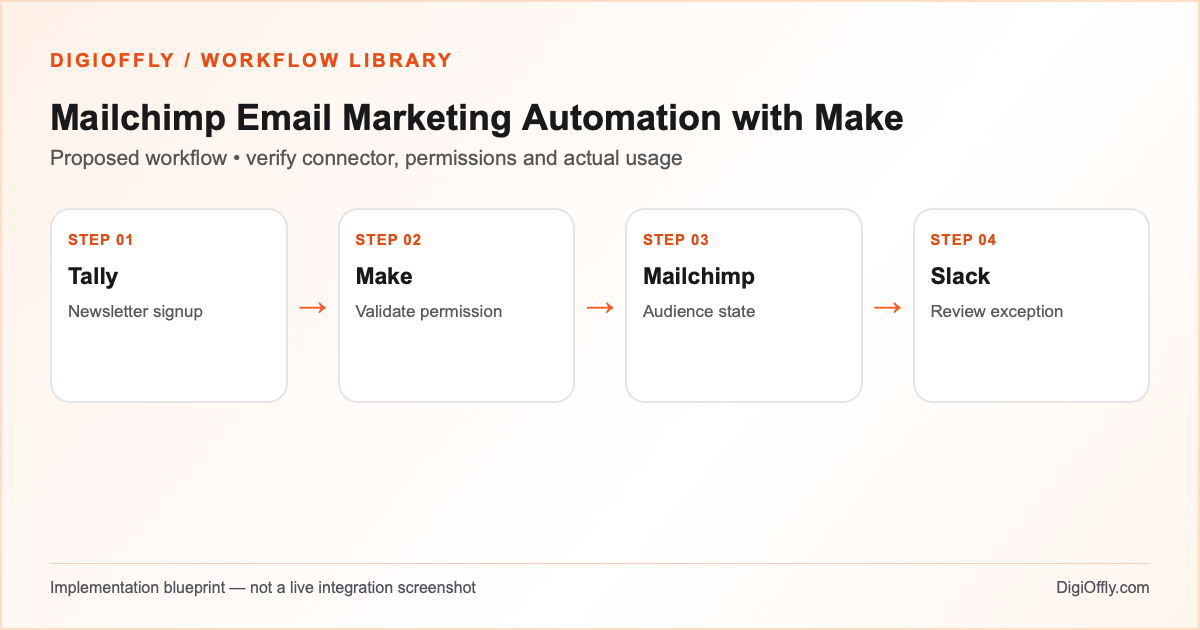
Mailchimp email marketing automation: what you will build
A valid signup creates the intended audience membership or a controlled update to an existing record. The workflow preserves confirmation, unsubscribe and suppression states. Ambiguous re-subscription requests reach a human review queue; neither a successful connector action nor a new form event automatically authorizes a marketing send.
Use Mailchimp email marketing automation when a team needs a consistent newsletter signup workflow and has a documented consent process. If Mailchimp’s own hosted forms already meet the requirements, consider that native route before adding Make. This guide is particularly useful when a team needs additional validation, internal exception routing or an independent source record.
Decide which system owns subscription status
A Tally Mailchimp integration should distinguish a new permission event from a new audience member. For email consent management, the form records the signup purpose and evidence; Mailchimp remains the authority for membership and suppression status. Never overwrite an unsubscribed or cleaned contact simply because a new submission includes the same email. Review re-subscription through the authorized path and preserve the existing state until the required confirmation or review completes.
Mailchimp double opt-in automation requires careful design. A confirmation message and a marketing campaign are different actions. Mailchimp’s audience-level double opt-in setting applies to its own signup forms, not automatically to Tally or API integrations. For a custom integration, verify a supported confirmation path or use a Mailchimp-hosted signup form. Retain pending status until confirmation is complete; a successful API write is not proof of consent. Follow applicable privacy and marketing requirements. Keep the minimum necessary evidence and do not collect additional personal information just because a connector offers a field.
Software and prerequisites for Mailchimp email marketing automation
Tally
Newsletter opt-in
Make
Orchestration
Mailchimp
Audience and consent state
Slack
Exception review
Before connecting any production account, confirm access, the exact connector event and action, supported plan and test environment. Treat the following field names as your own design; adjust them to the actual source and destination schema.
Mailchimp email marketing automation: data mapping
| Source | Destination | Mapping rule |
|---|---|---|
| Submission ID | Consent / processing register | Stable event identity; distinguish replay from a new permission event. |
| Audience member lookup | Normalize for matching; use the intended audience and existing status. | |
| Signup purpose and timestamp | Consent evidence | Keep the purpose explicit and retain only necessary evidence. |
| Audience membership status | Eligibility decision | Preserve unsubscribed, cleaned and pending states; review uncertain cases. |
| Confirmation result | Membership / review state | Do not mark pending contacts subscribed without required confirmation. |
| Exception category | Restricted Slack notice | Use a reference and issue type, not a mailing list or full form payload. |
How to set up Mailchimp email marketing automation
1. Prepare the signup form and permission record
Create a dedicated Tally form for the newsletter. State what messages the person is requesting, who sends them and how to manage preferences. Use a distinct signup event identifier and retain consent source, purpose and timestamp as appropriate. Do not reuse a generic contact form as automatic marketing permission. Configure your test with fictional addresses or addresses controlled by the team. Define how a valid request, a missing permission field and a previously unsubscribed contact should be handled.
2. Connect the correct Mailchimp audience
Authorize the intended Tally and Mailchimp accounts in Make. Mailchimp’s documented modules can retrieve member details and add or update audience records, including status fields. That capability does not mean every status should be overwritten. Identify the exact audience, permission settings and approved signup path. Confirm the sender, account access, contact limits and any applicable confirmation requirements. Use a test audience where possible and keep production campaign actions outside the scenario.
3. Validate the newsletter signup workflow
Read the form event, validate the email and required permission evidence, then check the event ID against the processing register. A duplicate submission is not a reason to perform a second uncontrolled audience mutation. Look up the intended audience member and current status before any write. Route invalid addresses, ambiguous identities, missing permission and unexpected audience states to review. Do not use a general create-or-update operation with a default subscribed status that could override suppression.
4. Route consent and membership correctly
For a genuinely new request, follow the authorized signup or confirmation path for that audience. If double opt-in is required, verify the custom form/API confirmation behavior or route the person to a Mailchimp-hosted signup form. Retain pending status until the person confirms. For an existing subscribed member, update only the permitted fields and preserve relevant consent history. For unsubscribed, cleaned or complaint states, do not perform a routine resubscribe; review the platform’s allowed process and applicable rules first. Record the destination member identifier and the outcome for the original permission event.
5. Handle exceptions without sending campaigns
Notify a restricted Slack channel only when an operator must act, such as an unresolved status conflict or a failed audience write. Include a short reference and link to the authorized review record. Keep contact details and the full mailing list in the proper system. If the audience write succeeded but notification failed, retry only the alert. Avoid campaign-send, bulk re-subscribe and deletion modules in this starter workflow. A human reviews the prepared audience before any separate campaign action.
6. Pilot Mailchimp email marketing automation
Run controlled tests for a new signup, a duplicate form response, a pending confirmation, an existing subscribed member, an unsubscribed member and a cleaned address. Reconcile each source ID with the actual member status. Verify that a missing permission event cannot add a contact and that the scenario never launches a campaign. Force a connector failure after a successful write to test recovery. After the responsible person approves the limited pilot, compare the measured Make operations with the budget and review the audience regularly.
Mailchimp email marketing automation: test cases before launch
These are acceptance criteria for your pilot, not test results. Record the source event ID and the destination ID in each test. Compare the intended outcome with the actual one before enabling the scenario.
| Test case | Expected result |
|---|---|
| New permitted signup | Authorized membership / pending confirmation path; record source ID. |
| Repeated submission | No duplicate mutation or uncontrolled resubscription. |
| Pending confirmation | No subscribed status or marketing campaign until requirements met. |
| Existing unsubscribed member | Suppression preserved; approved review path only. |
| Invalid or cleaned address | No routine enrollment; visible review outcome. |
| Alert fails after audience write | Resume alert without repeating membership update. |
Mailchimp email marketing automation: failure recovery
Mailchimp email marketing automation should persist the membership ID and processing stage before marking a form event complete. A connector error can occur after a successful write; check the audience and recorded stage before retrying. Do not retry a permission or suppression conflict as if it were a temporary network error. Keep failed records visible to the consent owner and reconcile source events with audience membership. The operator needs an explicit decision on any re-subscription request.
Security and ownership in Mailchimp email marketing automation
Keep permission evidence in a restricted system and avoid exporting raw mailing lists to Slack. Grant only the access needed for the selected audience and review workflow. Follow the privacy and marketing rules applicable to your recipients and organization, including retention, deletion and opt-out handling. A form submission is not blanket permission for every campaign or audience. Mailchimp email marketing automation in this guide never sends a campaign, changes an unsubscribe automatically or assumes a contact can be marketed to.
Mailchimp email marketing automation: usage and pricing
The illustrative example uses 1,000 signup events, four ordinary credits per event and a 20% reserve: 1,000 × 4 × 1.20 = 4,800 credits per month. A trigger, member lookup, controlled write and review notification are possible components; consent-register writes, confirmation checks, polling and retries can increase demand. Count actual operations and excluded events during the pilot. The example is not a measured workload or a provider quote.
Compare Mailchimp pricing, features and reviews alongside the actual contact allowance, sending limits and audience features. The calculator imports Tally, Make, Mailchimp and Slack with three team members, then evaluates the applicable catalog plans. A contact-based email subscription is not necessarily priced per staff seat. External confirmation services, campaign sends, taxes and missing prices require separate verification. Compare the manual review cost as well as the software cost.
Calculate Mailchimp email marketing automation cost
Illustrative workload, not measured consumption. Change each input for your design.
4,800 estimated credits / month
Calculate stack cost & optimizeMake normally charges ordinary module operations; some modules are exempt or use other rates. Polling, multiple bundles, AI and code can change demand. The calculator applies the catalog’s documented plans, not a vendor invoice.
Measure Mailchimp email marketing automation after rollout
Measure confirmed signups, pending confirmations, suppression conflicts, failed writes and time to resolve review cases. Reconcile the source permission event with the current audience state. A larger audience is not automatically success: Mailchimp email marketing automation should protect permission quality and prevent unwanted messages.
Mailchimp email marketing automation: frequently asked questions
What is Mailchimp email marketing automation?
It is an organized workflow for permission-aware email operations. This blueprint prepares audience records from a dedicated form and does not send marketing campaigns.
Can I connect Tally to Mailchimp through Make?
The products have documented connectors. Select the exact form event, audience action and permissions, then test the intended signup path.
Can an existing unsubscribe be overwritten automatically?
No. Preserve suppression and review the authorized re-subscription process. A new form event does not by itself justify overriding an unsubscribe.
What does Mailchimp double opt-in automation mean?
It means a confirmation-aware signup flow. Keep a contact pending where required until confirmation is complete and verify the actual audience behavior.
Does this workflow send newsletters?
No. The example prepares membership records and internal notices. Campaign approval and sending remain separate actions.
How do I prevent duplicates?
Store the source event ID, look up the intended member and record the destination ID and stage. Test retries and overlapping events.
What if a contact is cleaned or has complained?
Do not routinely resubscribe the address. Preserve the suppression status and send an authorized reviewer the appropriate exception reference.
Can I use a sales inquiry as marketing permission?
No. Separate the purpose of the inquiry from newsletter signup and preserve the evidence required by your consent policy.
How many credits does Mailchimp email marketing automation use?
The stated illustrative workload is 4,800 credits. Real module calls, confirmation checks and retries can change usage.
Do I need a paid Mailchimp plan?
It depends on the current audience allowance, features, sending limits and plan terms. Verify the actual account rather than assuming a free tier is sufficient.
Where can I estimate the total cost?
Use the editable budget below, select the applicable subscriptions and check external fees and unknown prices separately.
Official sources for Mailchimp email marketing automation
Vendor documentation checked on November 15, 2026. The workflow design, sample field mapping, acceptance tests and budget arithmetic are DigiOffly editorial examples. Verify your exact account entitlements, current modules and actual operation counts before enabling production. No automation has been installed or executed by this guide.
- Mailchimp modules
- Tally connector
- Mailchimp audience opt-in
- Slack connector
- Make credit consumption rules
- Make error handling
After Mailchimp email marketing automation: related workflow guides
- Workflow Library — compare all eight practical blueprints.
- Google Sheets to HubSpot Automation with Make
- AI Content Workflow Automation with Human Review
- QuickBooks Invoice Automation: Approval and Reconciliation
- Software Finder — choose tools for another workflow.
- Software Cost Calculator and Stack Optimizer — compare annual billing and alternatives.
- Make vs Zapier — compare the two automation platforms.
- Workflow Builder — customize the proposed stack and compare usage assumptions.
- Software Stacks — plan the rest of your business software.