

Updated October 30, 2026. This Tally review uses the provider’s public pricing and help documentation. Screenshots show public Tally pages rather than private forms submitted by real customers. DigiOffly has not processed a production payment or collected respondent personal information in Tally for this review. Pricing is a snapshot, subject to region, selected billing cadence and vendor changes.
A team onboarding freelance photographers receives confirmations by email: availability in a sentence, equipment in an attachment and billing details in a separate message. The coordinator then copies the answers into a tracker. A structured intake form can collect those items in consistent fields, but the team still has to decide which responses belong in a scheduling system and which sensitive details belong somewhere else.
Tally presents form editing more like a document than a conventional field configuration screen. Its Free offering includes submissions and form creation within fair-use rules, plus logic, uploads and integrations. A business can begin with a project intake without upgrading just to branch between two types of request. Paid Pro and Business plans focus on branding, collaboration, analytics, retention and verification features rather than simply opening the ability to submit a response.
Quick verdict: Tally deserves a look when a team needs clean forms, practical logic and strong free-tier functionality without a complicated price ladder. Its free plan is not an unlimited guarantee for every type of bulk or abusive traffic, and collecting payments, files or private data adds responsibilities independent of the subscription price.
📊 Tally Review Summary
| Buying issue | Official information |
|---|---|
| Primary product | Online forms, surveys, registrations and lightweight intake workflows |
| Free | Unlimited forms and submissions subject to fair use |
| Free capabilities | Conditional logic, calculations, uploads, signatures and common integrations |
| Pro | $29/month or $290/year in published USD help documentation |
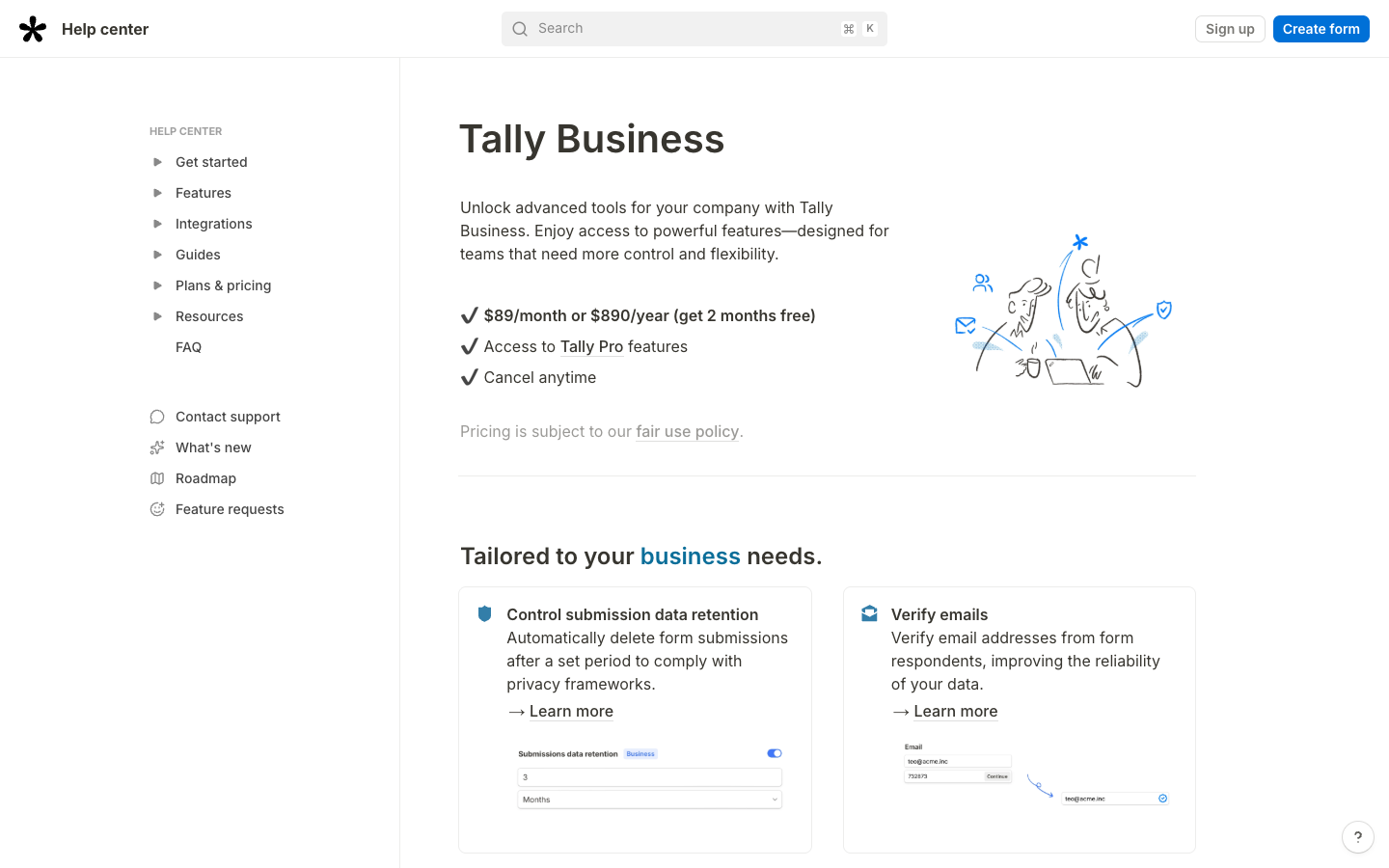
| Business | $89/month or $890/year in published USD help documentation |
| Paid differences | Branding removal, custom domains, team workspaces, analytics and more |
| Business emphasis | Data retention control, email verification and longer version history |
| Integration paths | Notion, Sheets, Airtable, Zapier, Make and webhooks |
| Research basis | Vendor docs only; no signed-in production test |
🧭 Contents and Navigation
Jump to features, pricing, comparisons, practical scenarios, and official sources.
🧠 What Is Tally and Who Needs It?
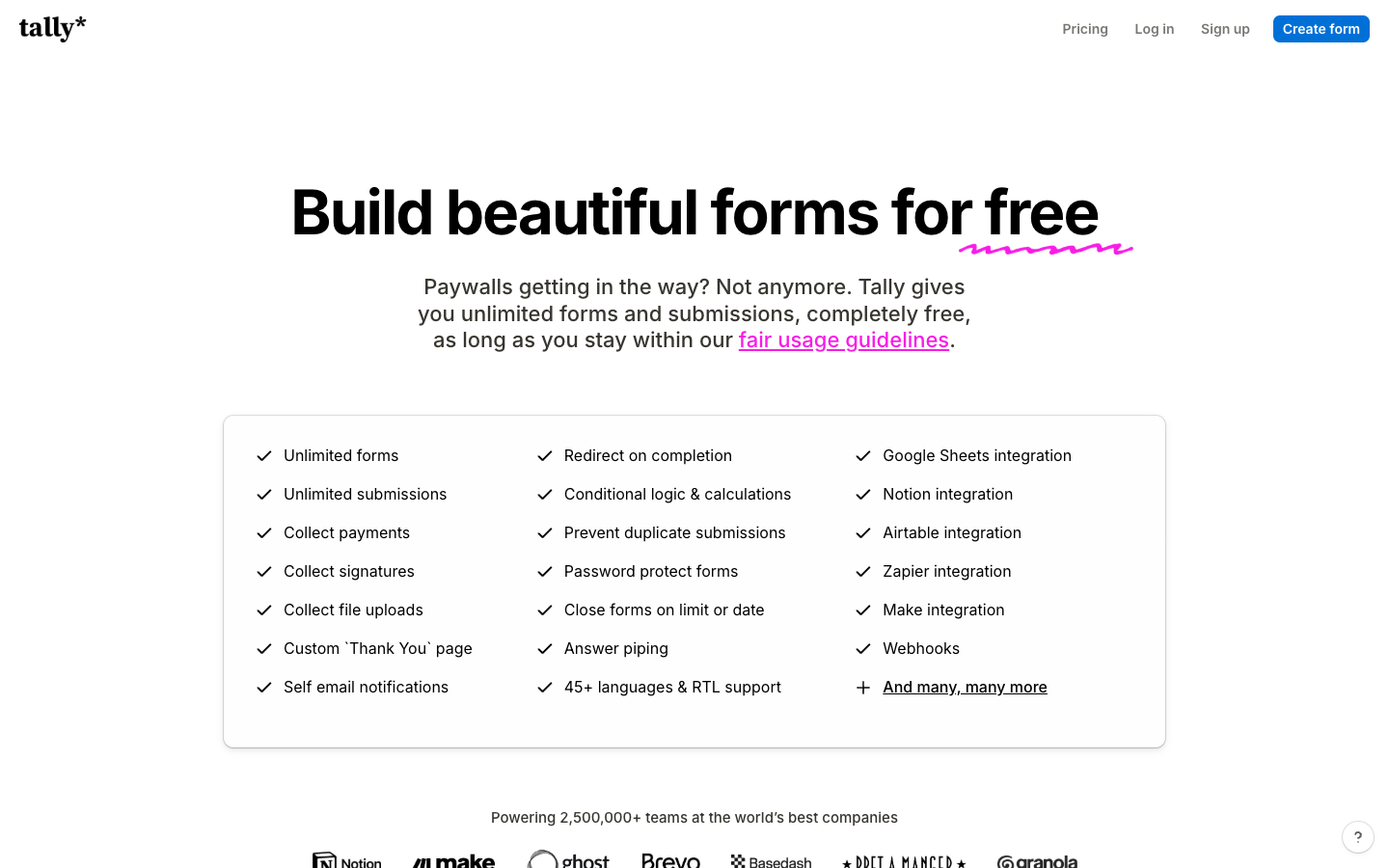
Tally is a web-based form creator aimed at users who want to build surveys, intake questionnaires and registrations without complex application development. Its interface is closer to editing a document than assembling a database schema. A business can use it to ask for project requirements, screen applicants, register webinar attendees or gather internal requests.
A workshop registration can create a contact row, trigger a confirmation and reserve a seat. Those outcomes may happen in three different systems. When the person submits twice or a downstream service is unavailable, the business needs a submission ID and a clear owner for correcting the duplicate. The form builder cannot repair the entire workflow by itself.
For a small consultancy collecting twenty proposals a month, Free may cover the form logic and export needed for initial intake. Branding or shared editing can become a separate purchase decision later. A company that needs enterprise research panels, sophisticated reporting or complex respondent segmentation should compare the specific requirements rather than assume every form tool is the same.
💰 Tally Pricing 2026: Free, Pro and Business
A $29 monthly Tally Pro quote and a $290 annual subscription do not imply identical cancellation terms. If the public pricing page shows another currency, use the checkout for the actual business country rather than combining a USD support article with a local promotional price.
| Tally tier | Published pricing reference | Main reason to choose it |
|---|---|---|
| Free | $0; fair use limits | Build and collect forms without a subscription |
| Pro | $29/month | Custom domain, branding removal, advanced design and collaboration |
| Pro annual | $290/year | Annual commitment, effective price about $24.17/month |
| Business | $89/month | Submission retention control, email verification and 90-day form version history |
| Business annual | $890/year | Annual commitment, effective price about $74.17/month |
The effective monthly equivalents are arithmetic, not a claim that yearly subscriptions can be cancelled and refunded after one month. Paid plans do not eliminate third-party payment processor fees, domain charges or the company’s privacy responsibilities. The Tally fair-use policy still applies.
Is unlimited really unlimited?
Tally advertises unlimited forms and submissions on Free within reasonable-use conditions. For an ordinary contact form or job application, the absence of a fixed monthly response quota can be appealing. It is not a blanket promise that automated bulk submissions or technically abusive usage will be accepted. The team should read the fair-use guidelines and confirm whether its planned audience or traffic is compatible.
A business processing 4,000 webinar registrations may need to ask whether form visit spikes, file uploads, payment collection and email notifications are suitable for its specific plan. A basic “unlimited submissions” claim does not determine deliverability of confirmation emails, external service rate limits or downstream database capacity.
When is Tally Pro worth paying for?
Paying for Pro makes more sense when a public customer form needs a custom domain, consistent branding or coordinated editing, not because a simple intake suddenly receives more answers. Custom domains, removal of Tally branding, design controls, team workspaces and enhanced analytics can matter when a form represents a company’s public identity. A consulting firm embedding a branded intake form on its website may justify Pro for credibility and client experience rather than a larger submission quota.
A team workspace allows several people to maintain a form. That creates a new practical issue: who may publish a change while a campaign is running? Keep one owner for the live version and let colleagues propose edits in a controlled review. Otherwise a revised field can break the mapping into a CRM without anyone noticing.
What makes Business different?
Business adds features such as configurable submission-data retention, email verification and extended form-version history. Data-retention controls are relevant when forms collect personal information that should not be held longer than necessary. The correct period depends on business purpose and law; choosing automatic deletion without a proper archive may also destroy data needed for a legitimate claim.
Email verification may improve lead quality, but it does not establish that a respondent has consented to marketing or that the person giving an email address has authority to sign a contract. Verification is one component of data collection, not a substitute for identity, consent and transaction safeguards.
🛠️ Form Builder and Editing Experience
Tally’s document-style form editor makes it quick to arrange question blocks, explanatory copy and inputs. This is useful for a project brief where detailed instructions and questions alternate. Instead of sending a separate PDF guide, the form can explain what dimensions to provide or why a file is needed.
Try the form on a phone with its software keyboard open. A long project description may expand vertically, and a conditional question may appear below the visible area. Verify that people can finish the form, correct an earlier answer and see an unambiguous confirmation without excessive scrolling.
Forms should also be maintainable. The operations owner needs to know when a question was changed, whether the change affects historical data and whether downstream automations expect the old field name. Editing a question’s visible label may be harmless, while changing a data field’s meaning can break reporting.
🛠️ Conditional Logic, Calculations and Branching
Tally supports conditional logic and calculations in the published free feature list. This matters when respondents should only see questions relevant to their answers. A freelancer booking form might first ask whether a customer needs a website or product photography; subsequent questions can differ by project type.
Conditional paths are most reliable when every possible answer is considered. An applicant who selects “Other” or refuses an optional question should not be trapped in a branch with required fields that do not apply. Test the entire form as at least three distinct respondent types rather than demonstrating only the preferred path.
For estimates, a calculation may multiply a chosen quantity by a quoted unit amount. The result should be clearly marked as an estimate if final pricing depends on approval, taxes or custom work. Do not imply that a form-generated number is a binding legal quote unless the business process actually supports that.
🗂️ File Uploads, Signatures and Sensitive Data
Tally’s free feature list includes file uploads and signature collection. A recruitment form might accept a CV and portfolio. An internal form might ask a contractor to acknowledge onboarding instructions. These capabilities are useful but create retention and security questions immediately.
A signature input is not automatically equivalent to every legal form of electronic signature under all jurisdictions. For high-value legal agreements, ask counsel what level of identity verification, tamper evidence and contractual audit trail is required. A drawn signature on a basic web form may be inappropriate.
For file uploads, test size limits, allowed formats and how external integrations expose attachment links. A file shared into a public spreadsheet or sent to an unrestricted messaging channel can defeat the privacy controls of the original form. Define who receives the files and when they are deleted.
🛠️ Tally Integrations: Notion, Airtable, Google Sheets, Make and Zapier
Native integrations can forward form answers to tools a team already uses. A Tally-to-Google-Sheets workflow may be sufficient for a small webinar list. An Airtable or Baserow-like structured database may be better when submissions must connect to existing customers and projects. A Make or Zapier flow adds more processing options but introduces task or credit fees.
The first integration test should include a duplicate response, a blank optional field and a record containing punctuation or non-English characters. Confirm the destination fields have correct types. If a respondent enters a date in local format, ensure the receiving system does not swap day and month.
Webhook integrations offer flexibility but require server-side authentication, validation and retry handling. If the endpoint is unavailable, the business should know whether the event can be replayed and whether retrying would create a duplicate. Even a simple form should carry a stable submission ID for deduplication.
📝 Tally Forms for Lead Generation and CRM
A visitor asking for a service quote expects a reply about that request. The same email address should not automatically enter a weekly marketing newsletter. Store the choice to receive marketing separately, with the wording the visitor saw when submitting the form.
A CRM may already contain the visitor as a customer. The integration should attempt a safe match rather than create a fresh person record on every form submit. Duplicate contacts make downstream email campaigns and customer-support history less reliable.
For campaign attribution, consistent UTM values and a reliable source field matter more than stuffing a form with tracking parameters. Pro’s analytic integrations can help marketers measure conversion, but the website and privacy policy must support any tracking technology used.
💳 Tally Payment Collection and Order Workflows
Tally supports payment collection, but collecting a card payment through an integrated provider creates a different workflow from taking an email address. A successful confirmation screen does not guarantee that the payment was captured and settled. A digital-delivery process must verify the payment provider’s trusted event before delivering access.
For a workshop ticket, test a successful payment, a decline and a refund. Confirm how the attendee receives an email receipt and whether the registration sheet reflects a cancelled payment. Avoid marking every submitted form as a paid booking before payment status is confirmed.
Transaction fees from the payment provider and any other applicable charges are not included in a zero-dollar form subscription. Budget those separately. If the business sells physical items, a proper ecommerce platform may be more appropriate for inventory, shipping and returns.
📝 Form Embeds, Custom Domains and Website Performance
A Tally embed may fit a desktop landing page but push the submit button below the viewport when a long-answer field opens on mobile. Check the expanded form, not just its first screen. An embed that changes height after a conditional branch opens can push a nearby button off screen. Test keyboard navigation and screen readers as well as mouse interactions.
A custom domain can support brand trust, especially when customers have to upload documents. But DNS, certificates and redirects must be configured properly. A branded domain does not automatically prevent phishing; the company still needs consistent email messaging and clear support contacts.
Measure page performance realistically. A short one-question contact form should not require a heavy marketing stack just to load. If privacy-sensitive tracking scripts are added, their effect on consent and performance belongs in the assessment.
🛠️ Response Quality, Spam Prevention and Duplicate Handling
Forms on public sites may receive bots, repeated clicks and accidental duplicates. Tally documents duplicate-prevention and password-protection options in its free offering, but those should be configured based on the use case. A password may be appropriate for an internal intake form, while a public newsletter signup requires a less disruptive strategy.
Suppose a customer submits a repair request twice because they see no confirmation. The two records may have slightly different text but the same email and timestamp. The receiving workflow should detect likely duplicates and preserve the actual conversation rather than silently discarding the second attempt.
Blocking disposable email addresses may remove obvious spam, but it can also exclude a legitimate visitor who wants to protect their primary inbox. Offer a visible alternative way to contact the team. Balance response quality against exclusion and document how someone can contact the business if the form fails.
📈 Analytics, Drop-Off and Completion Rates
Tally Pro documents enhanced form-visit and drop-off analytics. These can show where respondents leave, but interpretation needs care. A long optional question may have a high skip rate without preventing form completion. A required question about personal finances may cause genuine abandonment because the respondent cannot see why the information is needed.
Change one major factor at a time when testing. For example, move a file upload to the end of an intake form and see whether completion changes. A before-and-after difference is not automatically a causal effect if traffic source or audience also changed.
A better operational metric may be the share of complete, usable records rather than the raw count of submits. A short form that creates many invalid leads can waste more staff time than a slightly longer form with clear requirements.
⚖️ Tally vs Typeform, Google Forms and Jotform
| Tool | Main consideration | Trade-off to examine |
|---|---|---|
| Tally | Broad free features, document-like builder and flexible forms | More advanced brand and organization features need paid plans |
| Typeform | Conversational one-question-at-a-time presentation | Account-level response allowances and tiered billing |
| Google Forms | Simple form collection for Google-centric teams | Branding and advanced commercial workflow requirements |
| Jotform | Templates, conditional forms and broad business workflows | Different submission, storage and plan limits |
| Baserow forms | Database-connected intake and relations | The primary product is a database, not just a standalone public form |
For an event registration with 800 responses, Tally’s advertised free submission allowance may be attractive. For a highly visual market research experience, Typeform’s conversational presentation may fit better. The correct choice depends on the real question flow and what happens to the data next.
🔐 Tally Security, Privacy and Data Retention
Public forms can collect addresses, phone numbers, attached documents and potentially other sensitive information. The organization must define a purpose for each field and a retention period. An integration that sends submissions to multiple external systems may increase privacy exposure even if the original form is secure.
Business’s retention features may simplify deletion routines, but the privacy team must verify that linked Google Sheets, CRMs and backups follow compatible policies. Deleting a Tally submission does not automatically erase copies already exported to another service.
Access review is particularly important after a contractor leaves. Remove them from workspaces and receiving destinations, then confirm what files and historical entries remain visible. The software can facilitate access, but the data controller still owns the organization’s policy.
🛠️ Tally Pros and Cons
| Advantages | Limitations |
|---|---|
| Generous Free offering for ordinary form use | Fair-use conditions still apply |
| Conditional logic, uploads, signatures and integrations | External payment and automation costs are separate |
| Simple content-first form builder | Requires deliberate data validation and integration design |
| Pro adds branding, collaboration and analytics | Paid plan is not always necessary for basic intake |
| Business adds verification and retention controls | Data in downstream systems needs separate governance |
🛠️ Suggested Evaluation and Verdict
This review is based on official public vendor material. A sensible pilot builds three representative forms: a simple contact request, a conditional project intake and a registration containing a file upload. Test from desktop and phone, then export to the destination system. Record duplicate handling, confirmation text, attachment access and whether an abandoned form creates unnecessary private data.
A small team should begin with Free unless branding, analytics or retention features justify payment. A company handling sensitive records should map privacy and access obligations first, then select the plan that actually supports them.
Tally is not a database replacement or an enterprise research platform by default. It is a flexible intake front-end whose strong free plan makes it appealing when the workflow can be managed correctly after the form is submitted.
📝 Designing a Tally Project-Brief Form That Clients Finish
A design studio may ask prospective clients for their website, audience, target date and existing visual assets. An effective form starts with project type and a short goal, then only requests technical details relevant to the chosen project. Someone who needs a logo should not have to answer questions about ecommerce inventory, while a store owner may need prompts about products, payment methods and shipping regions.
Write down the expected output before adding a question. If the project manager needs a meeting agenda, a short goals field is useful; if finance needs a fixed quote, the form may need a scoped service selection. Ask for the smallest amount of personal information required to respond. A form that feels quick to fill but produces unusable briefs only moves work from the client to the studio.
📝 Tally Form Version Changes During a Campaign
An event organizer launches a registration form, then realizes two weeks later that it must record dietary restrictions separately from general notes. Changing the question is reasonable, but the first 400 responses may not contain the new field. Reporting should distinguish the earlier and later versions rather than pretending all respondents were asked the same question.
For a paid event, keep the original registration ID and payment reference stable across form edits. A late schema change must not detach the ticket holder from the payment. Before publishing a new version, test the confirmation email, integrations and any automated attendance list. Maintain a short changelog that explains when new questions started affecting data quality.
🛠️ Handling File Uploads Without Exposing Attachments
A Tally form might collect portfolios for a hiring process. The hiring team needs restricted access to documents, but an integration that posts attachment URLs to a public project board can disclose resumes unintentionally. Decide where the file will be stored, who can open it and when the original upload is deleted. Check whether a forwarded link remains accessible to someone without an account.
A practical acceptance test uploads a synthetic PDF, sends the submission to a private destination, removes the original account’s access and checks the file link again. Repeat with an unsupported format and an oversized file to see what respondents experience. The objective is a predictable, private handling process rather than simply proving that the upload button works.
🗂️ Tally Plus a CRM: Two Different Data Owners
When a visitor asks for a quote, Tally owns the capture experience and the CRM owns the ongoing sales record. An automation should not treat every response as a brand-new contact. Try matching by a stable email identifier and a defined company key, but allow for shared inboxes and account merges. An automatically merged record can erase useful history if the matching rule is too aggressive.
A second submission from the same lead might update project timing without changing a previously verified billing contact. Decide which form fields are permitted to overwrite the CRM and which should create an activity note instead. A simple source-of-truth table avoids confusing the sales team with duplicate contacts and silently overwritten customer information.
📝 Payment-Failure Handling for Tally Registration Forms
Imagine 150 seats are available for an in-person workshop. A respondent fills the form and enters payment details, but the bank declines the charge. The organizer should not mark the seat as sold because the form was completed. Payment state has to be confirmed by the payment provider, and the system must decide how long an unpaid reservation can hold capacity.
A second case is a refund after an attendee cancels. The attendance list should show the cancellation, and the finance system should link the refund to the original transaction. In an embedded form, a misleading “success” message after failed payment creates both support work and accounting disputes. Test these paths with permitted sandbox payments before opening paid registration.
🏢 Retention Policies for Tally Business
For a recruitment form, the retention period may be different from that of a paid registration. Write down how long the business needs each kind of submission and whether Sheets, email and CRM copies must follow the same schedule. Automatic deletion in the form account does not erase attachments that colleagues have exported elsewhere.
Map every destination: the original form, CRM, spreadsheet, automation platform, email notifications and exported backup. If Tally deletes a submission after 90 days while a copy remains indefinitely in Sheets, the company’s overall retention policy may still be unmet. Assign a data owner to review those external copies and test that access rights change when the business purpose ends.
🗂️ Interpreting Tally Analytics Without Misreading the Data
A marketer sees that visitors often exit when asked for a phone number. That could mean the audience prefers email, that the request is too early, or simply that mobile visitors have trouble with the field. Look at traffic source and device before attributing abandonment to a single question. Remove or make the phone field optional for a controlled comparison.
To compare Tally with Typeform, give both versions the same four questions and send them to comparable visitors. Count usable completed requests and how much cleanup staff must do afterward, not just how many people press Submit. A difference in audience or traffic source makes a raw completion-rate comparison hard to interpret.
📚 Official Sources

Frequently Asked Questions
Is Tally free in 2026?
Tally advertises unlimited forms and submissions for free within its fair-use guidelines, with conditional logic and many integrations included.
How much does Tally Pro cost?
Official help lists $29 monthly or $290 per year in USD. The public pricing page can display a local currency or an annual equivalent.
How much does Tally Business cost?
Official documentation lists $89 monthly or $890 annually in USD, subject to the current quote.
Does Tally allow unlimited responses?
The vendor advertises unlimited submissions subject to fair use. External integrations, file policies and misuse controls remain relevant.
Can Tally collect payments?
Yes, Tally lists payment collection capabilities, but payment processor fees and settlement verification are separate.
Does Tally support conditional logic?
Yes. Conditional branching and calculations are among the documented free features.
Can Tally forms upload files?
Yes, with limits and access settings that vary by feature or plan. Review data handling before requesting sensitive attachments.
Does Tally integrate with Notion and Google Sheets?
Yes. The pricing page lists Notion, Google Sheets, Airtable, Zapier, Make and webhook integrations.
Is Tally better than Typeform?
Tally may be more economical for many submissions, while Typeform emphasizes conversational presentation and advanced research-oriented options. Test the actual respondent experience.
What does Tally Business add?
Business includes Pro features plus controls such as submission retention, email verification and longer form-version history.
Can Tally replace a CRM?
No. It can collect and forward contact data, but ongoing sales records, deduplication and lifecycle ownership still need a suitable destination.
EXPLORE NEXT ON DIGIOFFLY
🔍 Explore More on DigiOffly
Compare automation and no-code tools by actual workflow needs and documented usage limits.
Category and discovery
- Automation & No-Code — Compare capabilities and relevant alternatives
- Software Directory — Compare capabilities and relevant alternatives
- Software Stacks — Compare capabilities and relevant alternatives
Selection tools
- Compare Software — Compare capabilities and relevant alternatives
- AI Software Finder — Compare capabilities and relevant alternatives
- Software Cost Calculator — Compare capabilities and relevant alternatives
Related reviews
- Softr — Compare capabilities and relevant alternatives
- Airtable — Compare capabilities and relevant alternatives
- Make — Compare capabilities and relevant alternatives
- Zapier — Compare capabilities and relevant alternatives
- Typeform — Conversational surveys, quizzes and lead qualification
- Baserow — Relational no-code databases and custom apps
Pricing and limits may change; verify current terms with the provider before purchase.