

QuickBooks Invoice Automation: Approval and Reconciliation
QuickBooks invoice automation should not turn an unapproved spreadsheet row into an accounting transaction. This guide uses Google Sheets for billing requests, Make for validation and read-only lookups, QuickBooks Online as the accounting system and Slack for finance review notices. The accountant creates the invoice after approval and records its identifier. The starter does not send invoices, initiate payments or make tax decisions.
By Alex Wright, DigiOffly · November 15, 2026 · Source-led implementation blueprint. We checked official connector and billing documentation; no paid-account integration or live automation benchmark is claimed.
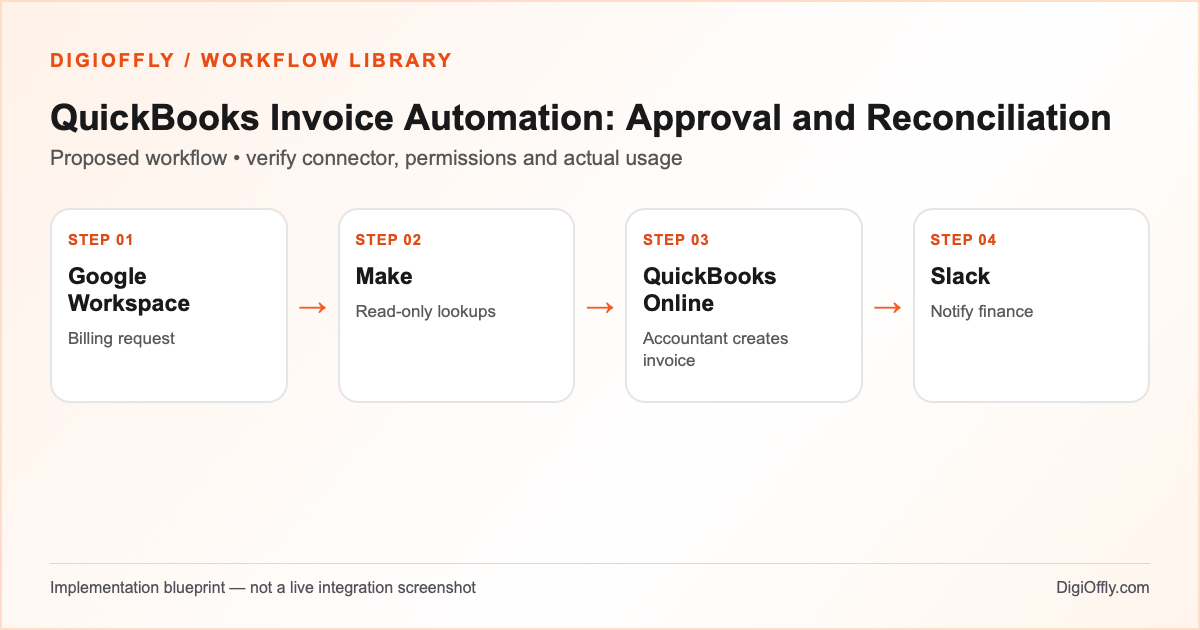
QuickBooks invoice automation: what you will build
A validated billing request reaches an authorized finance reviewer with an unambiguous customer reference, item mapping, currency and amount. After approval and manual creation in QuickBooks, the workflow reconciles the actual invoice ID and totals with the approved request. Duplicate attempts, missing mappings and discrepancies remain visible.
Use QuickBooks invoice automation when an organization receives recurring billing requests from sales or operations and wants a safer approval handoff. If the accounting system already handles the full process, keep that native approach. An automated write to QuickBooks may affect accounting records even without sending an invoice, so this version deliberately excludes that action.
Separate a billing request from an accounting record
Invoice approval automation needs an explicit transition between requested work and the accounting ledger. A sales employee can prepare a request, but the accounting owner decides whether the invoice is correct, which customer and items it belongs to, and how tax and currency are handled. The spreadsheet records the proposed business details; QuickBooks remains the authoritative accounting record. A Slack notification is not an approval or invoice.
For no-code financial workflow automation, persist the request ID and the eventual invoice ID separately. A duplicate request must not become a duplicate receivable. A changed contract amount or tax treatment needs a new review, not an automatic overwrite. Use a versioned approval record and reconcile the final invoice against that version. The design reduces manual coordination without allowing the orchestration tool to make accounting decisions.
Software and prerequisites for QuickBooks invoice automation
Google Workspace
Google Sheets billing input
Make
Orchestration
QuickBooks Online
Accounting system
Slack
Finance approval notification
Before connecting any production account, confirm access, the exact connector event and action, supported plan and test environment. Treat the following field names as your own design; adjust them to the actual source and destination schema.
QuickBooks invoice automation: data mapping
| Source | Destination | Mapping rule |
|---|---|---|
| Request ID + approved version | Processing register | Immutable key; distinguish corrections and replays. |
| Customer reference | QuickBooks customer lookup | Verify exact customer; do not guess from display name. |
| Item references, quantity, price | Finance review record | Validate against contract; accountant resolves missing items. |
| Currency and tax treatment | Approval gate | Keep currency explicit; tax handling requires authorized review. |
| Approved status and reviewer | Manual invoice creation | Only an authorized accountant creates the invoice. |
| Actual invoice ID and total | Reconciliation record | Match approved request, amount and currency before closure. |
How to set up QuickBooks invoice automation
1. Prepare the billing request register
Create a restricted Google Sheet with a stable request ID, customer reference, item references, quantity, unit price, currency, approved contract reference and review status. Use a separate test tab and fictional billing records. The request may describe a billable service but is not an invoice. Store the minimum needed information; never include bank credentials, card numbers or private authentication tokens. Validate numeric fields and require a versioned approval record for any changes to the amount.
2. Connect the accounting lookup only
Authorize Google Sheets and the QuickBooks connector in Make for the intended company and test environment. The official QuickBooks connector documents invoices, customers, items and related accounting objects. For this QuickBooks billing workflow, configure only the read operations needed to confirm customer and item references and retrieve an existing invoice after manual creation. If the connector grants broader scopes, restrict the scenario actions and review the authorization with the account owner. Do not add write, payment or send modules.
3. Validate the invoice approval automation
Read only requests marked Ready for finance review. Check the stable request ID and approved version against the processing register. Validate quantity, price and currency against the approved source. Look up the intended customer and item mappings in QuickBooks. If a customer is ambiguous, an item is missing, the currency is unexpected or tax treatment is unclear, stop the automatic path and flag the reason. Do not calculate or choose tax treatment by guesswork; the accountant owns that decision.
4. Gate the manual accounting action
Generate a review record and send the authorized finance team a short Slack notice with the request ID and restricted review link. The accountant checks the contract, customer, amounts, tax and company context and decides whether to approve. Only after approval does the authorized accountant create the invoice directly in QuickBooks, then record its actual invoice ID. Keep the approval identity, version and timestamp in the authorized review system. The default Make scenario never creates the accounting entry itself.
5. Reconcile the invoice and recover safely
Retrieve the recorded invoice by ID and compare customer, currency, approved totals and relevant item references. Flag any difference for accountant review. Record the confirmed invoice ID and reconciliation result before marking the request complete. If a status update or notification fails after the accountant created the invoice, resume reconciliation using the existing ID; do not ask for another invoice automatically. An invoice already present in the ledger is not proof that it matches the current request version.
6. Run a controlled QuickBooks invoice automation pilot
Use a test company or controlled test records approved by the finance owner. Test a valid request, an incomplete item mapping, an ambiguous customer, a rejected request, a replay after invoice creation and a mismatched invoice total. Verify that none of these cases automatically creates or sends an invoice. Reconcile source request IDs against the accounting records. Only after the finance owner accepts the pilot should the team enable scheduled processing of real requests. Review actual Make credits and exception handling effort.
QuickBooks invoice automation: test cases before launch
These are acceptance criteria for your pilot, not test results. Record the source event ID and the destination ID in each test. Compare the intended outcome with the actual one before enabling the scenario.
| Test case | Expected result |
|---|---|
| Valid approved request | Finance review record; accountant manually creates invoice. |
| Duplicate request ID | Existing request / invoice mapping reviewed; no duplicate creation. |
| Unknown customer or item | Stop and route to finance review. |
| Rejected request | No invoice or payment action. |
| Invoice exists; status write fails | Reconcile existing invoice ID; no second invoice. |
| Invoice amount or currency mismatch | Unresolved discrepancy stays visible for accountant correction. |
QuickBooks invoice automation: failure recovery
QuickBooks invoice automation must distinguish validation, approval, manual creation and reconciliation. When a lookup fails, correct the connection or mapping before retrying. If an accountant already created an invoice, record the actual ID and resume the unfinished stage. Do not retry the accounting action after a failed Slack message. Keep rejected and superseded request versions visible, and allow the authorized accountant to decide whether an existing invoice needs correction. The workflow does not automatically delete, credit or amend financial records.
Security and ownership in QuickBooks invoice automation
Restrict billing requests and review records to authorized staff. Do not copy bank details, card data, credentials or sensitive contract contents into Slack. Confirm the correct QuickBooks company and permitted connection before testing; a read-only workflow design is not a claim that OAuth scopes are read-only. Keep actual accounting authority with the finance owner. QuickBooks invoice automation in this guide does not transfer funds, send invoices, file taxes or create accounting entries automatically. Verify local rules with the responsible professional.
QuickBooks invoice automation: usage and pricing
The example assumes 250 billing requests, five credits per request, 50 additional monthly credits and a 20% reserve: (250 × 5 + 50) × 1.20 = 1,560 credits. This covers assumed validation and reconciliation operations, not invoice issuance or payment processing fees. The number of line items, repeated lookups and approval polling may add operations. Count actual successful and failed runs in the pilot rather than treating the sample as a guaranteed plan limit.
For an automation cost comparison, review the applicable QuickBooks Online subscription, Google Workspace account and Slack access separately from Make usage. The calculator imports the four catalog tools with a three-person example. An accounting subscription may have company or user allowances, and taxes, accountant fees or payment processing charges are outside this estimate. Compare the actual review workload and error correction costs with the software spend.
Calculate QuickBooks invoice automation cost
Illustrative workload, not measured consumption. Change each input for your design.
1,560 estimated credits / month
Calculate stack cost & optimizeMake normally charges ordinary module operations; some modules are exempt or use other rates. Polling, multiple bundles, AI and code can change demand. The calculator applies the catalog’s documented plans, not a vendor invoice.
Measure QuickBooks invoice automation after rollout
Track requests waiting for approval, duplicate billing attempts, missing customer or item mappings, discrepancies and time from approved request to reconciled invoice. Monitor failed notifications separately from accounting results. QuickBooks invoice automation is successful when approved requests reconcile to the correct records and the finance owner can explain every unresolved exception.
QuickBooks invoice automation: frequently asked questions
What is QuickBooks invoice automation in this guide?
It prepares and validates billing requests, routes them to finance and reconciles the resulting invoice ID. Invoice creation remains a manual accountant action.
Can Make connect to QuickBooks Online?
Make documents a QuickBooks connector for invoices, customers, items and other objects. Verify the selected account, company and modules before configuration.
Does this starter create invoices automatically?
No. The default scenario performs lookups and review coordination. An authorized accountant creates the invoice directly after approval.
What is invoice approval automation?
It is a controlled review process for a proposed billing request. Approval is distinct from creating the accounting entry or sending an invoice.
How do I prevent duplicate invoices?
Persist a stable request ID, approved version and actual invoice ID. Reconcile the existing record before taking another accounting action.
What if the tax treatment is unclear?
Route the request to the responsible accountant. This automation does not choose tax treatment or file taxes.
Can the workflow initiate payments?
No. It excludes payment initiation, transfers, charges and invoice sending. Those actions require separate authorization and design.
What if Slack fails after manual invoice creation?
Retain the invoice ID and resume the notification or reconciliation stage, not invoice creation.
How many Make credits does QuickBooks invoice automation use?
The illustrative workload gives 1,560 credits. Actual item lookups, polling, retries and reconciliations may change the total.
What counts as a reconciled invoice?
The actual invoice ID, approved request version, customer, amount and currency agree. Discrepancies require finance review.
Where can I estimate the software budget?
Import the four tools below and select eligible plans. Verify accounting fees, taxes, payment charges and unknown prices separately.
Official sources for QuickBooks invoice automation
Vendor documentation checked on November 15, 2026. The workflow design, sample field mapping, acceptance tests and budget arithmetic are DigiOffly editorial examples. Verify your exact account entitlements, current modules and actual operation counts before enabling production. No automation has been installed or executed by this guide.
- QuickBooks connector
- Google Sheets modules
- QuickBooks Online developer documentation
- Slack connector
- Make credit consumption rules
- Make error handling
After QuickBooks invoice automation: related workflow guides
- Workflow Library — compare all eight practical blueprints.
- Google Sheets to HubSpot Automation with Make
- AI Content Workflow Automation with Human Review
- Mailchimp Email Marketing Automation with Make
- Software Finder — choose tools for another workflow.
- Software Cost Calculator and Stack Optimizer — compare annual billing and alternatives.
- Make vs Zapier — compare the two automation platforms.
- Workflow Builder — customize the proposed stack and compare usage assumptions.
- Software Stacks — plan the rest of your business software.