

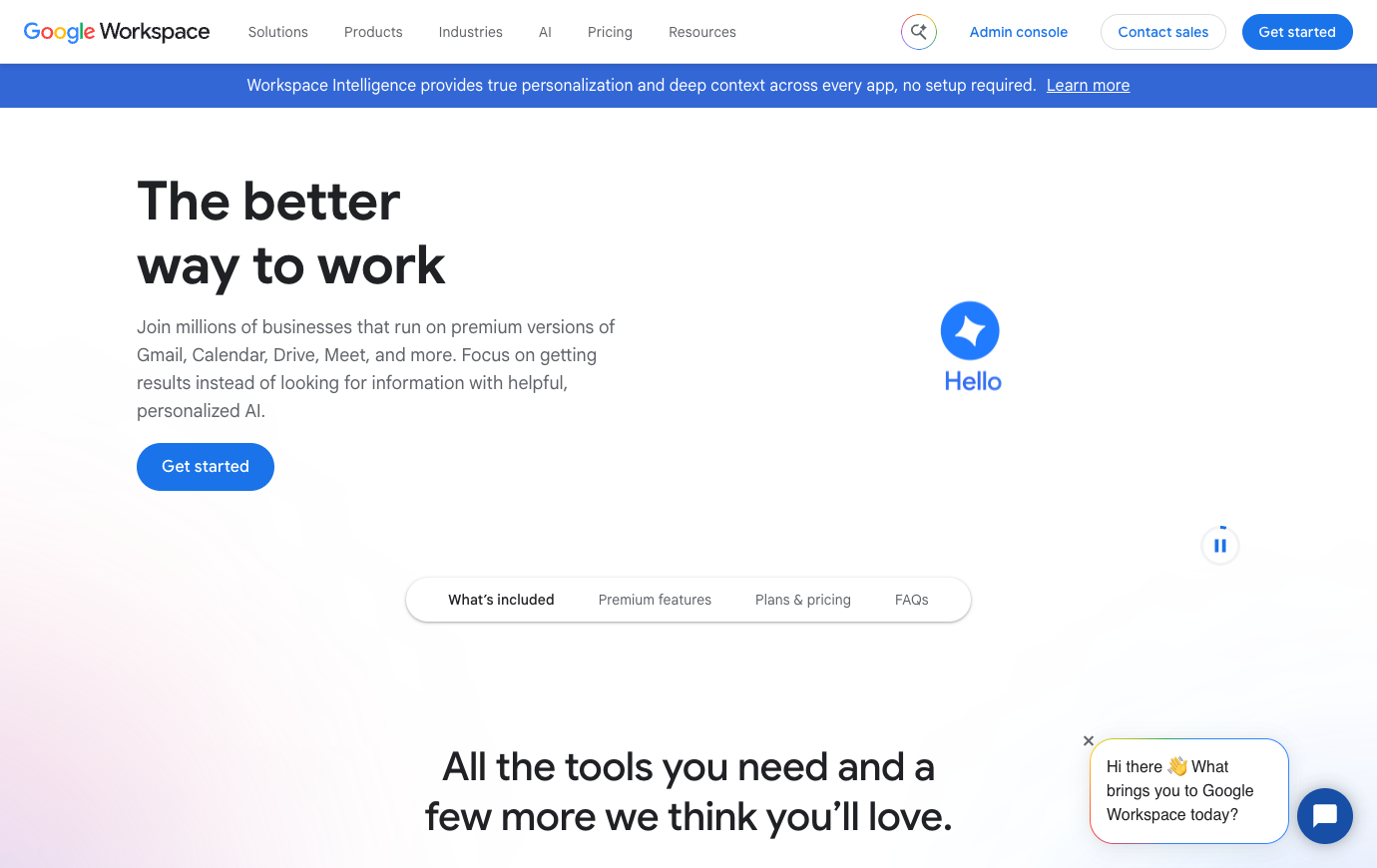
Editorial note: This independent review analyzes official product documentation, published plan information and decision criteria. Vendor screenshots show public webpages. We do not claim to have completed a private-account hands-on test or guaranteed a particular price.
Instead, consider whether Google Workspace fits your current system of record, staff permissions, procurement terms, administrative resources and ability to leave later. Features and packages change, sometimes within a year, so use the official pricing page as the final authority for your region before checkout.
📊 Google Workspace Review 2026: Editorial Verdict
| Decision question | Editorial assessment |
|---|---|
| Core use case | A cloud-first communication and document suite where identity, gmail, drive sharing and meet belong to one administratively managed workspace. |
| Team it suits | A team that wants fast browser-based collaboration, shared files, email and a single set of account controls. |
| Potential poor fit | A company whose work depends on locally installed advanced excel workflows or complex desktop office formatting. |
| Billing evidence | Vendor pricing — regional/tax/term details can vary |
| Suggested pilot | Two to four weeks, with sample tasks, real roles and exit criteria |
| Research status | Editorial assessment of public documentation; no private-account testing |
👍 What We Love
- ✅ Gmail on a business domain: Business Gmail centralizes communications and identity.
- ✅ Docs, Sheets and Slides: Editors can settle document changes in a shared file without passing attachments between inboxes.
- ✅ Admin Console and identity: Managed users, security policies and organizational units create a central operational boundary.
- ✅ Gemini and integrated AI: AI features and their applicable entitlements change faster than core Gmail and Drive.
👎 Where It Falls Short
- ❌ Annual/fixed-term commitments reduce license flexibility and may charge for seats even when unused.
- ❌ Cross-platform formatting may not be identical for complex Excel macros or Word layouts.
- ❌ Improper Drive ownership can complicate offboarding and preservation.
✅ Google Workspace: BUYER FIT AT A GLANCE
Best for: a team that wants fast browser-based collaboration, shared files, email and a single set of account controls.
🧠 What Google Workspace Actually Solves
When assessing Google Workspace for small business, start with the people and domain names that would be affected by a change of mail provider. A Gmail migration checklist for teams should cover aliases, delegated inboxes, recovery administrators and a way to verify incoming mail after cutover. The first practical outcome is not a pretty inbox; it is continued access to customer conversations when the old provider is switched off.
A ten-person consulting firm might replace independent Gmail, personal cloud storage and a patchwork of meeting links with a company-managed Workspace domain. A familiar interface does not prove the suite fits how your team actually works. Before moving, list mail aliases that customers currently use, the documents whose owners have left, and external meeting links embedded in active proposals. If even one key shared folder is still controlled by a departing individual, the new setup has not solved continuity. Set a cutover window, a restore process and a second administrator. Determine whether Starter’s 30 GB pooled storage per person accommodates the firm’s actual media archive or whether the Standard storage allotment is justified. Keep the original mail provider available during migration verification.
A Gmail migration is the consequential part of choosing Google Workspace, even though shared editing often dominates demos. A business needs to decide who holds the domain, how SPF, DKIM and DMARC will be configured, where old mail will be archived, and what to do with delegated inboxes. A smooth conversion of a single mailbox proves little about a company with multiple aliases and external calendar invitations. Assign one employee to own the cutover, protect recovery administrator access, and test replies from three outside providers. A Workspace subscription solves an identity and operations problem only when the mail domain and the new accounts survive that cutover without losing trust.
🛠️ Google Workspace Features: What Matters in Real Team Work
Useful Google Workspace collaboration tools depend on clear file ownership. A Google Workspace shared drive permissions review should ask who can create folders, invite outsiders and retain files after the original author leaves. Validate Google Workspace external file sharing settings with a contractor account before opening a company-wide Drive migration. This is a stronger test than whether two people can edit the same document.
For shared drives, Google Workspace shifts a critical ownership decision from an employee to an organization. That makes Google Workspace administration fundamentally different from sending colleagues a link to a personal folder.
Google Drive gives an organization more than a file-sharing link, but personal folders and shared drives behave differently when someone leaves. When the finance director stores budgets under an individual account, a colleague may inherit access only by ad hoc sharing. A shared drive, where the business rather than the individual owns the content, changes the continuity model. Test a handover with three sample folders: one inherited from a former colleague, one shared with a contractor, and one restricted to management. Then revoke the contractor’s access and confirm there are no forgotten publicly accessible links. The lesson is about file governance, not storage volume.
Gmail on a business domain
Business Gmail centralizes communications and identity. An administrator can provision users and enforce authentication. Examine migration and domain authentication before cutting over from another mail host. Ask the employee responsible for new-hire onboarding to demonstrate the outcome with synthetic data. That observation matters when comparing Google Workspace with Microsoft 365: Before abandoning desktop Office for collaborative documents, test the complex workbook that finance still depends on. A different product may be the safer choice if this exact scenario is the team’s dominant work.
Drive and shared content
When assessing drive and shared content, check how the final record moves between colleagues. The distinction between personal folders and shared drives matters when employees leave. Design ownership, role-based access and default link-sharing before rolling files out. A useful proof is one recurring operations meeting example whose requester and approver disagree about the final state. Any unverified permission or plan restriction should appear in the procurement notes. AI entitlements and costs should be checked in the tenant and not inferred from marketing badges.
Docs, Sheets and Slides
Simultaneous editing is useful, but test what happens when external reviewers suggest changes and the original owner leaves. Desktop compatibility is a separate question when customers exchange complex Microsoft files.
Google Meet and Calendar
Calendar scheduling and Meet links remove some context switching for routine calls. Check participant limits, recordings and access by edition instead of assuming all tenants match. Keep the first experiment small enough to reverse: Sales receives a request in Gmail, drafts a response in Docs, reviews figures in Sheets and shares one approved document instead of parallel attachments. Look for one human owner and one recoverable final artifact. A decision recorded only in chat is easy to lose; link it to a shared action log.
Admin Console and identity
Managed users, security policies and organizational units create a central operational boundary. Document who controls domain DNS, recovery access and mobile devices.
Storage and retention
A team may encounter storage and retention first during onboarding, not during a vendor comparison. Storage quotas are pooled differently by edition, so check the headcount and storage mix. Verify the precise plan needed for Vault and retention before accepting the quote. Populate the pilot with realistic documents, permissions and handoffs. Try this realistic scenario: A team agenda lives in a shared Doc, decisions are captured as comments, and Calendar invitations connect the process with Meet and file access. At review time, compare the resulting artifact with the previous process. Do not award Google Workspace credit for basic good project hygiene that could be achieved with a simpler tool.
Gemini and integrated AI
AI features and their applicable entitlements change faster than core Gmail and Drive. Audit administrator controls, prompts, data handling, credit and regional availability.
External sharing
External sharing deserves scrutiny because not every invited colleague has the same rights. Guest access and external collaboration are convenient but a common leakage path. Test one partner account and audit permissions before enabling organization-wide sharing. Set an owner for the artifact created during client proposal workflow. An honest conclusion will depend on the exact user role and deployment, not a marketing claim about unlimited collaboration.
🧭 Four Practical Google Workspace Workflows
The division between Business Starter, Standard and Plus should be understood as a capacity-and-governance decision. Google’s own edition guide lists 30 GB pooled storage per user at Starter, 2 TB at Standard and 5 TB at Plus. Those figures are important to a team storing large videos or archives but almost incidental to an eight-person consultancy exchanging spreadsheets. Standard also changes collaboration and meeting allowances; higher plans provide additional administrative capabilities. Compare actual storage use and necessary retention requirements rather than paying for the biggest advertised number. An employee accustomed to Microsoft Excel macros should additionally test real workbooks before replacing a desktop Office installation.
Client proposal workflow
Sales receives a request in Gmail, drafts a response in Docs, reviews figures in Sheets and shares one approved document instead of parallel attachments. The next participant should be able to identify the approved version, read the reason for the last change and act under their own account permissions. This is not evidence that Google Workspace was privately benchmarked: it is a repeatable test design for a buyer. Files kept in an employee’s private My Drive can become difficult to hand over after they leave.
In the client proposal workflow exercise, the test report for Google Workspace should name the outgoing and incoming owner. Use company-controlled Gmail accounts and a test partner domain, rather than personal mailboxes, to verify the proposed process.
New-hire onboarding
Imagine a colleague arrives halfway through new-hire onboarding and must finish without asking the original author. A new employee gets a managed account, Calendar invites, role-based shared-drive access and an onboarding checklist with an owner and deprovision date. To keep the test fair, provide the same sample brief in competing software and time the point where the reviewer can understand ownership. Record not only what looked convenient but also the uncertainty that would block rollout. Security and retention requirements can require a higher edition or separate controls.
Before declaring the new-hire onboarding pilot successful in Google Workspace, ask an unfamiliar colleague to inspect the final work. Keep the shared Google document under the appropriate team owner and inspect the exact editor/commenter/viewer permissions.
Recurring operations meeting
Use recurring operations meetings to test how team members share decisions and supporting documents. Before a recurring meeting, link its Calendar invitation to one controlled decision log and check who can read the resulting notes. Document what happens when the usual approver is absent, a guest loses access, or a deadline changes. Ask the administrator to demonstrate which retention controls are included in the proposed edition. A success condition should be specified before someone chooses their favorite interface.
The recurring operations meeting scenario offers a chance to check information continuity, not merely the number of features available in Google Workspace. Make sure Calendar invitations and Meet settings convey the expected attendance and recording permissions. Check the retention edition and role permissions before approving the migration.
Vendor collaboration
A realistic vendor trial should examine what happens when file access changes or the main contact leaves. A contractor gets only a project folder rather than inherited access to a general team drive; the collaboration window and owner are recorded. Check whether the result can be exported and whether the workflow survives removal of the employee who initially created it. The final artifact belongs in the system the organization has declared authoritative, not in a second shadow list. Domain migration, email deliverability, DNS and archiving are implementation work, not trivial toggles.
For a team using Google Workspace in vendor collaboration, a planned interruption is more revealing than a smooth demonstration. Check whether an externally shared Drive item remains reachable after a user is suspended; shared ownership and the domain boundary matter. Annual/fixed-term commitments reduce license flexibility and may charge for seats even when unused.
💰 Google Workspace Pricing in 2026: Plans and Billing Caveats
Read the Google Workspace Business Starter storage limits alongside actual mailbox and shared-file usage rather than assuming every team needs the largest plan. The distinction between Google Workspace annual versus flexible billing matters during a pilot: the displayed monthly equivalent might carry a longer commitment. Use Google Workspace pricing for the purchasing country and ask how charges change when staff members are removed.
Google Sheets is exceptionally convenient for simultaneous comments and ordinary analytical models, yet convenience alone does not settle spreadsheet fidelity. A team that sends macro-enabled financial files to clients needs to know what happens to formulas, pivots, print layouts and charts during Office import and export. Choose a representative approved workbook, make a copy, and evaluate the round trip without risking the original. In Google Docs, the analogous concerns are tracked changes, complex styles and signatures. Account for the time spent fixing converted Excel and Word files when comparing the two suites.
| Edition / plan | Published reference price | Billing and eligibility notes |
|---|---|---|
| Business Starter | $7 | annual/fixed-term commitment; $8.40 flexible month-to-month |
| Business Standard | $14 | annual/fixed-term; $16.80 flexible |
| Business Plus | $22 | annual/fixed-term; $26.40 flexible |
| Enterprise | Custom | contact sales |
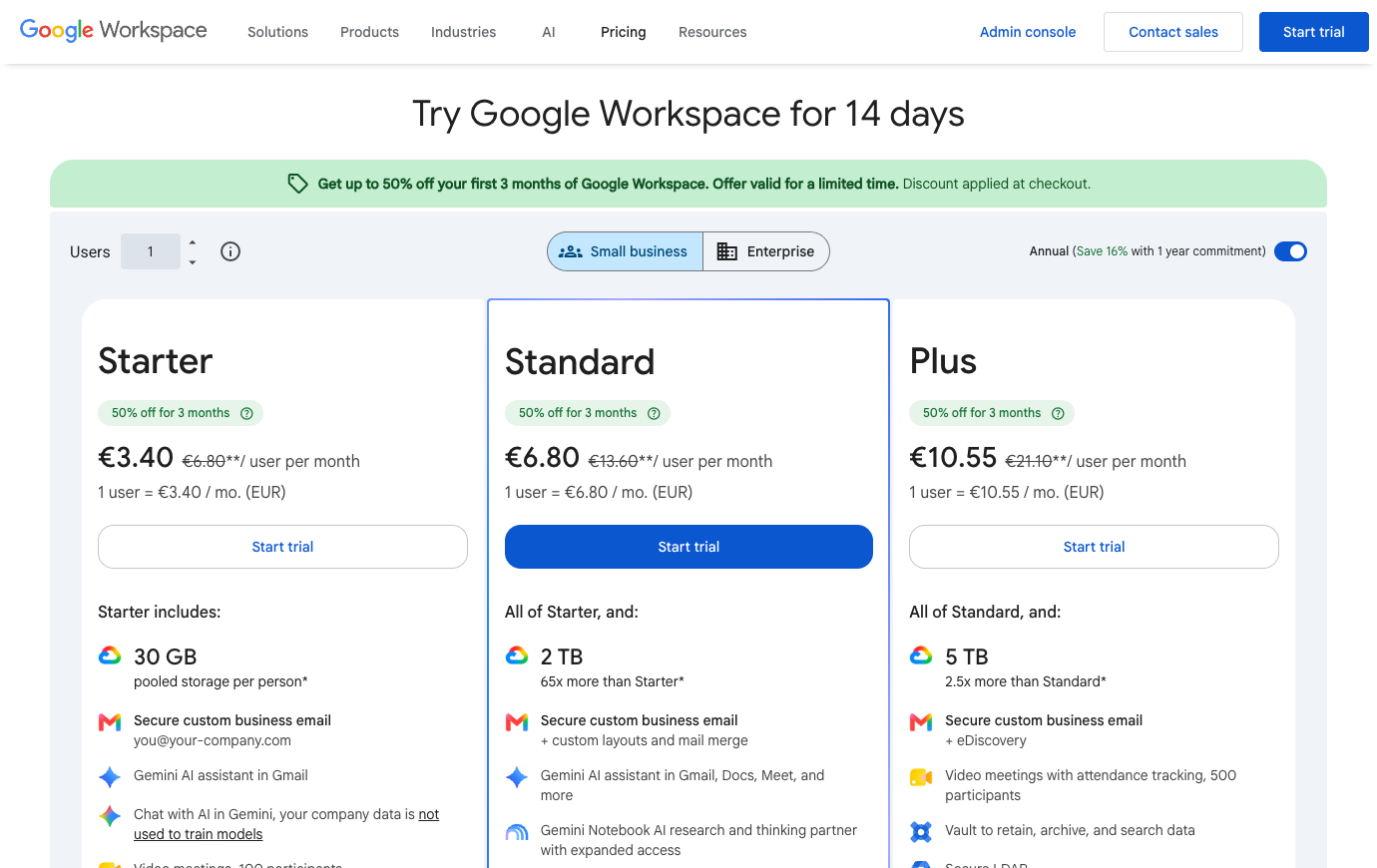
Always consult the official Google Workspace pricing page for the country in which the account will be purchased. Some vendors personalize prices by geography or seat count. Where the public site shows a calculator instead of a fixed amount, we deliberately mark pricing as variable instead of inventing a precise figure. Discounts visible in a screenshot are not promises about your future contract.
🛡️ Security, Governance, Privacy and Exports
Before enabling broad use of AI summaries, document the Google Workspace Gemini privacy controls available to the chosen edition and the permissions of files that may be referenced. An effective Google Workspace offboarding and retention policies checklist should cover shared drives, mailbox preservation, former employees and access by outside agencies. This work should happen before the company accumulates important records in personal folders.
Gemini has become part of the Workspace purchasing conversation, but its entitlements should be evaluated separately from Gmail reliability. An administrator needs to ask which AI tools are actually active for users in the chosen edition, what administrative controls are exposed, what content is available for grounding, and how use is measured. A summarizer that makes a short meeting readable can still omit contractual obligations or misattribute a decision. Assign a reviewer for generated material and retain the source document. The safest early AI use cases are reversible drafts and finding links, not autonomously sharing confidential material or changing customer records.
⚠️ Limitations, Hidden Costs and Failure Modes
The costs of Google Workspace do not stop at its published seat price. Annual/fixed-term commitments reduce license flexibility and may charge for seats even when unused. Check these buying risks against the actual edition and your own requirements.
1. Annual billing and seat flexibility
Workspace licenses look inexpensive per seat, but an annual commitment is not the same as the freedom to remove seats next month. Ask for a quote covering the smallest likely team after a seasonal contraction, then compare it with flexible billing. If the company has acquired several domains, include their mail users and shared mailboxes before approving a migration budget.
2. Office document compatibility
An Excel file that opens is not necessarily an Excel model that still works. Select a real spreadsheet containing macros, protected cells, pivots and unusual number formats; inspect the round-trip from Excel to Sheets and back. A document-first team may tolerate occasional formatting repairs, while a finance department circulating regulated workbook templates may not.
3. Shared Drive ownership on departure
Files created in personal Drives pose a different offboarding problem from files in Shared drives. Draw a map of the documents that customers and contractors need after their original owner departs. Before moving everything, test whether a replacement account can find, modify and share those records without reviving the departed employee’s credentials.
4. Admin access and domain support
Workspace administration is easy to underestimate when a small agency hires rapidly. Someone must control DNS, authentication, recovery accounts, mobile devices, organizational units and external sharing policy. Decide who answers an urgent account-recovery call at midnight. A low-cost mail edition is not a substitute for a support and ownership plan.
5. Gemini permissions and moving entitlements
Gemini capabilities are not a fixed checklist across Workspace editions or regions. Verify the current eligibility of the exact AI feature you want, the administrative switch that enables it, and what happens to the contents of prompts or shared documents. Pilot the feature on non-sensitive files until those questions have defensible answers.
6. Email migration and deliverability
A move to company-managed Gmail can go wrong even if the new inbox looks familiar. DNS records, SPF/DKIM/DMARC, historic aliases, mobile clients, calendar invitations and archived messages all need a cutover plan. Schedule a reversible test before changing the primary domain; ask someone outside the company to confirm that mail arrives and replies reach the intended address.
⚖️ Google Workspace vs Alternatives
Consider an agency with two customer-facing domains and a part-time external accountant. Its most expensive failure may not be missing a premium AI feature; it may be a client proposal stuck in the former project manager’s Drive. Before buying more storage, separate personal documents from team-owned records, decide who can invite the accountant and simulate the manager’s departure. A useful offboarding test is whether another colleague can finish the proposal without the former employee’s password. For a team still exchanging macro-heavy Excel models, add a round-trip conversion exercise before standardizing on Sheets.
A fair Google Workspace vs Microsoft 365 Excel compatibility comparison tests actual formulas, templates and export fidelity rather than only comparing app icons. If the team uses recorded customer calls, compare Google Meet recording limits by plan with what is already licensed in Teams or Zoom. Google Workspace vs Microsoft 365 is ultimately an operational choice about document fidelity, governance and collaboration, not a universal winner.
One credible rollout starts with a pilot group of sales, operations and an external contractor. Sales owns a proposed document, operations reviews figures in Sheets, and the contractor gets access to one folder without seeing other customers. The team should schedule Meet through Calendar, preserve a decision log, and simulate a member leaving mid-project. Success looks like fewer duplicate copies and a clear final owner. Failure looks like private accounts becoming the authoritative repository or users circumventing managed sharing to get work done. That makes the recommendation conditional: Google Workspace is an excellent candidate for a browser-first office, not a universal replacement for every mature Office-dependent workflow.
| Product | Where it may be preferable | Buying question |
|---|---|---|
| Google Workspace | The core workflow examined here | Does it measurably reduce your biggest current bottleneck? |
| Microsoft 365 | Its installed Office apps and SharePoint administration can be a better fit for firms with complex desktop-document workflows. | Would this replace an existing paid seat or add another system? |
| Notion | A flexible team wiki may supplement a suite but does not replace business email or administration. | Would this replace an existing paid seat or add another system? |
| Slack | A channel-first conversation layer can coexist with Docs, while creating duplicate notification work. | Would this replace an existing paid seat or add another system? |
🧪 A Responsible Thirty-Day Evaluation Plan
The same firm may be tempted to add a separate document/wiki tool, project manager and meeting recorder on day one. Consider instead a deliberately minimal combination: Workspace for email, Drive and basic documents; a single task system for accountable work; and one approved client-meeting procedure. Track how many important decisions still disappear into inboxes or ambiguous file links. If a legal team must preserve older versions, check retention capabilities rather than assuming every Business edition includes all governance controls. The goal is fewer systems with clearer ownership, not a leaderboard of collaboration feature counts.
Days 1–3 — baseline and requirements
Start the Google Workspace evaluation with a baseline of five sample client proposal workflow requests. Assign someone to record current completion time, missing information and repeat questions. The baseline matters because a successful pilot must improve an observed handoff, not just create a cleaner workspace.
Days 4–7 — permissions and procurement
Price the actual Business Standard and Business Plus plans for your country and planned license count. For Google Workspace, check external access separately. Confirm cancellation, data export and the authorization required for any paid AI usage before inviting more employees.
Week 2 — real but controlled tasks
Run a controlled new-hire onboarding scenario in Google Workspace: A new employee gets a managed account, Calendar invites, role-based shared-drive access and an onboarding checklist with an owner and deprovision date. Create one realistic problem, one correction and one handoff under a non-admin account. A screenshot is not proof of success; ask another person to reconstruct the final decision without private explanations.
Week 3 — integrations and handoff
Use a safe integration case involving Google Meet and Calendar. In Google Workspace, confirm what happens when two edits conflict, a notification fails, or a collaborator leaves. Document which system holds the authoritative version instead of copying the same status into multiple tools.
Week 4 — decision and exit test
Compare your Google Workspace trial to the old process and to Microsoft 365. In the final comparison, weigh spreadsheet compatibility and existing Microsoft identity controls against the cost of moving accounts. Ask the requester and operator to identify what genuinely improved, then export the sample materials, record the subscription terms and decide whether a limited rollout is warranted.

Frequently Asked Questions
What is Google Workspace best used for?
The strongest use case is a cloud-first communication and document suite where identity, Gmail, Drive sharing and Meet belong to one administratively managed workspace. Consider it when the team is struggling with that specific outcome, then verify whether existing software already provides enough of the same functionality.
Does Google Workspace offer a free plan?
The current published starting tier is Business Starter ($7). Free versions may limit collaborators, history, functionality or number of workspaces. Check the official feature table for the exact restrictions in your region.
What is the cheapest paid Google Workspace plan?
The cheapest paid edition is Business Starter: the published US reference rate is $7 per user per month with an annual/fixed-term commitment, or $8.40 per user on the flexible monthly plan, before tax and promotions. Check local rates and license terms before purchase.
Can I pay monthly rather than annually for Google Workspace?
Term options vary. The published information notes annual/fixed-term; $16.80 flexible. Do not confuse an annual-commitment monthly equivalent with a month-to-month subscription. Inspect the actual checkout.
Is Google Workspace suitable for a remote team?
It may be a good fit for a team that wants fast browser-based collaboration, shared files, email and a single set of account controls. A remote trial should validate access from approved devices, external participants, time-zone handoffs, notifications and the location of durable decisions.
What feature should I evaluate first in Google Workspace?
Start with gmail on a business domain. Business Gmail centralizes communications and identity. An administrator can provision users and enforce authentication. Examine migration and domain authentication before cutting over from another mail host. A useful trial also includes permission and offboarding checks.
What is a common limitation of Google Workspace?
Annual/fixed-term commitments reduce license flexibility and may charge for seats even when unused. Treat this as a purchase risk to verify, not as a claim of firsthand failure. The exact impact depends on your team size and chosen edition.
How does Google Workspace compare with Microsoft 365?
Microsoft 365 offers deeper desktop Office workflows, while this suite emphasizes browser-first collaboration. Select a representative workflow and evaluate both candidates with the same participant roles, retention expectations and costs.
Can external collaborators work with Google Workspace?
Access policies depend on the selected tier and whether a person is a member, guest or viewer. Test invitation scope, deletion of access and whether external people consume billable seats.
Are AI features included with Google Workspace?
Availability and usage limits are plan-specific. Review gemini and integrated ai; do not assume an unlimited allowance from a marketing label. Check credit or request limits and security policies.
What should we verify before buying Google Workspace?
Confirm official pricing, account roles, data export, required integrations, license minimums, renewals and the real outcome of a small pilot. A written owner should sign off on the decision.
🎯 Final Verdict: Who Should Choose Google Workspace?
Use a limited pilot, insist on a written cost estimate and compare one credible alternative. The current vendor plan page should settle any price ambiguity. The objective is not to own the broadest possible software stack; it is to build a workflow where responsibility, documentation and communication are easy to find.
Our methodology: This review is written from public vendor documentation and transparent illustrative decision scenarios. The 2026 price references and both product screenshots were inspected on October 26, 2026. We did not log into a paid account or conduct private first-hand benchmark tests, and nothing here constitutes a guaranteed quote or security certification.
EXPLORE NEXT ON DIGIOFFLY
Build a Smarter Team Software Stack
Use focused reviews and our comparison tools to separate essential collaboration subscriptions from duplicated functionality.
Plan & organize
- Notion review — Compare docs, wikis and linked project databases.
- ClickUp review — Consider tasks, views and team execution.
- Airtable review — Explore connected records and shared workflows.
- Softr review — Build a client-facing portal on structured data.
- Compare workflow automation and no-code tools — See when you need a dedicated workflow builder instead of another task board.
- Bitwarden review — Explore encrypted vaults for team credentials.
Communicate & decide
- Loom review — Record asynchronous walkthroughs for teammates.
- Otter.ai review — Evaluate meeting transcripts and follow-ups.
- Grammarly review — Improve collaborative writing and editing.
- Microsoft Copilot review — Review productivity AI and licensing limits.
- Explore creator and streaming software — Connect Loom-style async walkthroughs with recording and editing workflows.
- Browse AI & Tech reviews — Evaluate AI writing, transcription and Microsoft Copilot alternatives.
Compare your software stack
- Software Directory — Discover our full software catalog.
- Compare Software — Check tools side by side by actual use case.
- Software Cost Calculator — Estimate monthly versus annual commitments.
- Best Value Advisor — Identify potential overlap before another purchase.
- Explore Growth software — Connect project delivery with CRM, outreach and marketing workflows.
- Productivity & Collaboration reviews — Compare the complete team software shortlist.
- Microsoft 365 review — Compare installed Office workflows and SharePoint controls before choosing a document suite.
- Slack review — Check whether your team needs dedicated chat alongside Google Chat and Meet.
- Tally — Flexible forms, conditional intake and integrations