

A 45-minute client call can leave you with three different versions of what happened: your notes, your colleague’s notes, and whatever the client remembers. The difficult part is not recording the meeting. It is finding the moment someone agreed to a deadline — without replaying the entire call.
Otter.ai is built for exactly that headache. It records and transcribes meetings, turns the discussion into a summary, and lets you search for decisions later. That sounds ideal. But there is an awkward detail in the free plan: a call can keep recording after its 30-minute transcript limit. You may discover that the part you needed is locked until you upgrade.
This Otter.ai review 2026 looks beyond the feature list. We break down actual plan limits, what the meeting bot does, when a free account stops being useful, how Otter handles privacy, and when an alternative may be the better buy. You’ll also find a plain-English comparison of Pro and Business — not just another pricing table.
How this review was prepared: Alex Wright personally tried Otter.ai before publication and evaluated the meeting-notes workflow. We also checked Otter’s pricing, help articles, supported languages, product announcements, and independent legal records. We do not claim a laboratory-grade speech-recognition accuracy score or paid-tier performance figures; vendor-published facts are distinguished from first-hand impressions.
📊 Otter.ai Review Summary
The short version of our Otter.ai review: Otter is a strong candidate if you spend your week in Zoom, Google Meet, or Teams and need to retrieve decisions afterward. Live transcription is handy; being able to ask, “What did we agree about the launch date?” is the more interesting feature.
There is a catch, though. Basic gives you 300 transcription minutes a month, but only 30 minutes of transcription per conversation. It also limits imported audio/video files to three across the lifetime of your account. That combination matters more than the word “free” on the pricing page.
A quick example: the 45-minute meeting trap
Suppose you hold three 45-minute client interviews this month. That is 135 minutes in total — comfortably inside Basic’s 300-minute monthly allowance. Yet Basic makes only the first 30 minutes of each interview available. That leaves 15 minutes per interview outside the accessible transcript unless you upgrade. It is the per-conversation rule, not just the monthly quota, that should drive your decision.
For someone taking one short weekly check-in, a paid subscription may accomplish very little. For a recruiter doing hour-long interviews, the limits become a problem almost immediately. Business belongs on the shortlist when several colleagues need shared notes and admin controls, not merely because its plan card is labeled “Best Value.”
⚡ Quick Verdict: Is Otter.ai Worth It in 2026?
Our Otter.ai review verdict: useful, with conditions. If you routinely leave meetings wondering who promised what, Otter can help. If you mainly want to record an occasional ten-minute call, paying every month is harder to justify. And if your workplace already has capable meeting summaries in Zoom or Microsoft 365, compare those first.
Start on Basic. Schedule one non-sensitive meeting where recording is allowed, then check three things: does the transcript capture the names correctly, do the action items match what was actually agreed, and can you find the answer later? If that process saves time, Pro may be worthwhile. If everyone needs access, look at Business.
Don’t use an AI recap as a substitute for a verified record. Otter can get a product name, an amount, or an action owner wrong even when the rest of the summary reads beautifully. That is a real limitation, not a minor footnote.
🎙️ Otter.ai in 2026: More Than Transcription
Otter began as a transcription tool. Today it sells a broader idea: an AI meeting assistant that captures calls, organizes notes, suggests tasks, and answers questions about past conversations. In other words, the transcript is the raw material; the promised value is what you can do with it afterward.
That distinction is useful for sales calls, recurring project meetings, and interviews. You can scan the recap rather than beginning with a blank document. Still, if nobody checks the source transcript, an incorrect action item can travel through the team just as quickly as a correct one.
👍 What We Love
- ✅ Live notes: Transcription and summaries can appear while the meeting is still in progress.
- ✅ Works across platforms: Meeting integration covers Zoom, Google Meet, and Microsoft Teams.
- ✅ Searchable context: Otter AI Chat can retrieve information and draft follow-up material using meeting conversations.
- ✅ Useful free start: Basic offers 300 monthly transcription minutes and three lifetime imports.
👎 Where It Falls Short
- ❌ Free-tier limits: Basic has a 30-minute per-conversation transcription limit and archives older conversations.
- ❌ AI can mishear: Accents, crosstalk, acronyms, and poor microphones require correction.
- ❌ Recording consent matters: Automatic meeting joining and sharing settings demand careful configuration.
- ❌ Not every language: Transcription supports six languages, not arbitrary multilingual live calls.
🏆 EDITORIAL VERDICT: STRONG MEETING-NOTES PICK
Best For: Freelancers, remote teams, recruiters, and managers who want searchable meeting notes and follow-up tasks.
🧠 What Is Otter.ai and How Does It Work?
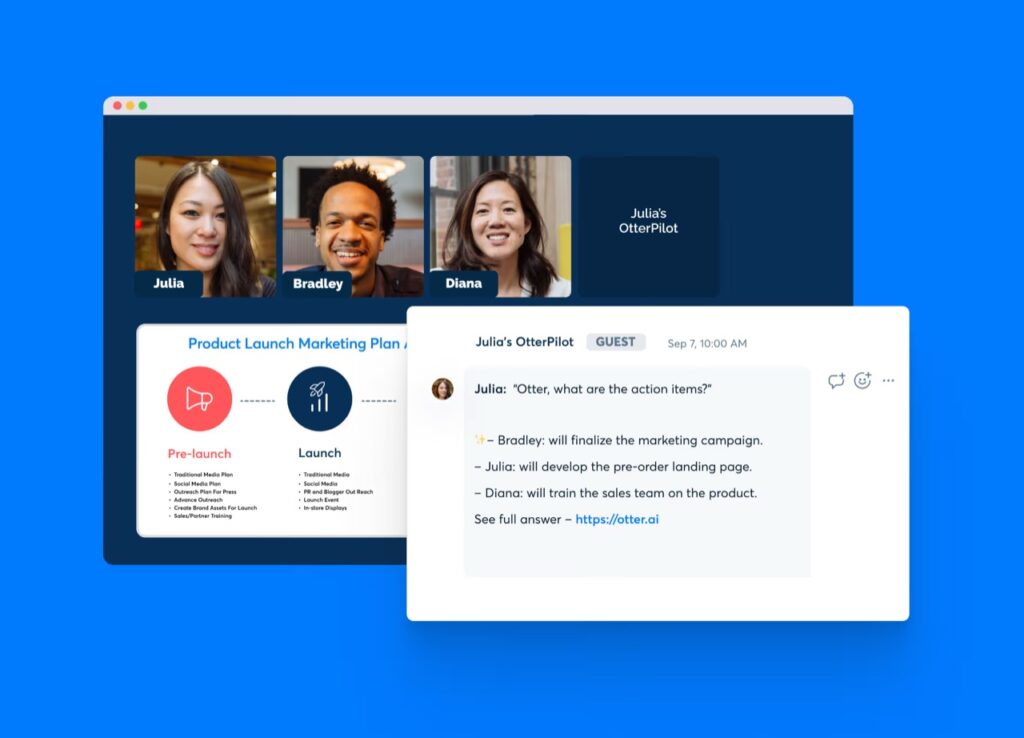
In the typical workflow discussed in this Otter.ai review, Otter connects to your calendar and its Notetaker joins an eligible Zoom, Google Meet, or Teams call. After the meeting, you get a transcript plus an AI-generated recap. You can search for a person’s name, jump to a passage, or ask Otter AI Chat to locate a decision across meetings.
If you opened this Otter.ai review mainly for transcription rather than an all-purpose assistant, pay particular attention to transcription duration and language support. A polished meeting summary is no help if the language is unsupported or the end of a call falls outside your plan limit.
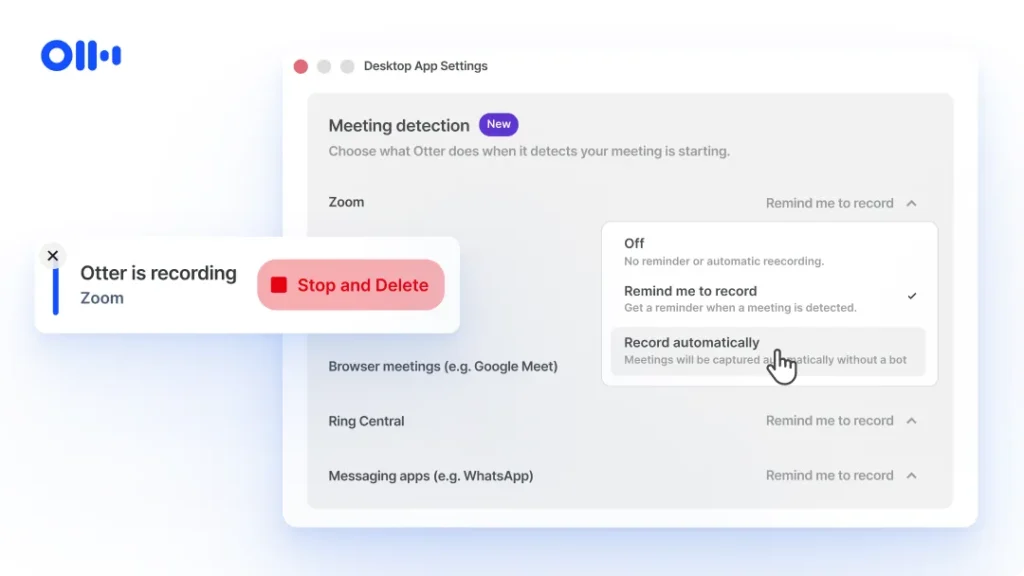
Not every recording has to involve a meeting bot. Otter’s desktop app offers a botless capture option; its mobile app can record conversations in person. The choice matters for client calls where a visible extra participant may feel intrusive. Neither option removes your responsibility to notify people and follow recording rules.
For a meeting that went well, the workflow is straightforward: skim the summary, spot-check the transcript, then copy confirmed action items into your project tracker. A fuzzy microphone or overlapping speakers can still make that last step slower than you expect.
🖥️ Otter.ai Review: Ease of Use & Meeting Workflow
A practical concern in this Otter.ai review is calendar access. Setting up Otter is straightforward; controlling which meetings it joins takes more thought. Do you really want a notetaker entering every call, including an introductory chat with a new client or a private one-to-one? Check the automatic-join settings before connecting a busy calendar.
For anyone following this Otter.ai review as a setup guide, the safer starting point is to select recordings manually. You can turn on broader automation later, once colleagues know when the bot appears and where the transcript goes. Check the sharing defaults separately; a clean transcript is still a problem if it lands in the wrong inbox.
🧭 How to Use Otter.ai: Step-by-Step
1. Create an account and select a plan
Go to the official pricing page and start with Basic if you are evaluating the workflow. Before upgrading, check whether your typical call exceeds 30 minutes; for many professionals, this is the most important free-tier limitation.
2. Connect Zoom, Google Meet, or Microsoft Teams
Connect a Google or Microsoft calendar if you want Otter Notetaker to join scheduled meetings. Alternatively, use a supported desktop or mobile recording workflow. Confirm the meeting organizer allows recording and that attendees receive any notices required under applicable law.
3. Review the live transcript and AI summary
During and after the meeting, inspect speaker labels, dates, names, and numerical commitments. A plausible AI summary is not necessarily a complete or verbatim record. Use playback or the source transcript to verify anything that could affect a client, contract, or deadline.
4. Turn notes into follow-up work
Use search and Otter AI Chat to find a decision, clarify an action item, or draft a recap. Share the validated summary only with the intended participants, and transfer critical tasks to your project-management system.
🛠️ Key Features That Matter in Real Workflows
📝 Live Transcription, Summaries & Action Items
The core feature of this Otter.ai review is Notetaker: it can join supported virtual meetings, capture speech in real time, and generate summaries and action items. This is most useful when a recurring team or customer discussion has clear next steps. It is less valuable if recordings are noisy or if no one verifies the decisions afterward.
Speaker labels are worth reviewing before you send a recap. Imagine a prospect saying “we’ll deliver the files” and Otter assigning the line to your project manager. A plausible-looking summary could send the task to the wrong person. Play back the critical passage before turning it into work.
💬 Otter AI Chat: Ask Questions Across Meetings
AI Chat supports natural-language questions about meeting content. Instead of rereading three lengthy transcripts, you might ask when a project deadline changed or what was agreed in the last customer call. You can also use it to draft a follow-up email or summarize a topic across conversations.
Here is where AI Chat can save time and where it can mislead. A question like “When did we move the launch?” is a good use of search. A question like “Did the customer approve an additional $8,000?” needs the original audio and context. Be especially cautious with names, money, and commitments.
📅 Automatic Meeting Notetaker & Desktop Capture
Calendar-based auto-join is convenient for remote teams, but it can be intrusive when enabled indiscriminately. Otter offers joining controls, and its desktop app supports recording without a visible participant bot. Both approaches still need correct participant notice and recording permissions.
The product also supports mobile recording, useful for interviews, discussions, and in-person workshops. Recording quality and the environment remain decisive: placing a device far from speakers will not produce the same result as a good microphone.
🌍 Language Support and Integrations
As of October 2026, Otter lists transcription support for English, Spanish, French, German, Japanese, and Simplified Chinese. Translation through AI Chat is a different capability from live transcription in another language. If your team regularly speaks Romanian, Ukrainian, or another unsupported language, verify suitability before paying.
Integrations extend to Google and Microsoft calendar workflows, Zoom, Teams, Google Meet, and selected business tools. Higher plans advertise more advanced integrations and administration. Check your exact CRM connector and plan eligibility rather than assuming every integration is available on Basic.
🎧 Otter.ai Review: Transcription Accuracy & Common Errors
For this Otter.ai review, we have not assigned an accuracy percentage: a number without the underlying recordings would be misleading. A quiet, one-speaker English call is not the same as a noisy workshop with overlapping voices. Both can produce a fluent transcript; one may be far less dependable. We have not measured Otter’s word error rate, so we are not assigning it an invented score.
That difference changes how you use the product. For weekly team notes, correct the obvious mistakes and move on. For a customer agreement, a job interview, or sensitive legal and financial discussion, replay the relevant audio and keep human-reviewed notes. Custom vocabulary can help with recurring jargon; it is not a guarantee.
What we could verify: Otter publishes plan limits, transcription languages, and available integrations. What we could not verify independently: an exact recognition rate for particular accents, microphones, or meeting formats. That distinction matters more than a neatly formatted “98% accurate” badge.
💰 Otter.ai Pricing 2026: Free, Pro & Business Plans
The Otter.ai review pricing comparison covers four levels: Basic, Pro, Business, and Enterprise. The numbers below were checked against the official US-dollar pricing page on 10 October 2026. Promotions can shift the annual price shown to different visitors; monthly billing is not the same as paying for a full year up front. Check the latest official prices and renewal terms before choosing a plan.
Otter AI Pro vs Business, in one sentence: Pro is primarily a personal transcription upgrade; Business makes sense when you need longer meetings, shared workflows, more imports, and administrator oversight. The difference is less about which AI “writes better” and more about how your team works.
| Plan | Typical advertised price | Main limits | Best fit |
| Basic | Free | 300 transcription minutes/month; up to 30 minutes per conversation; 3 lifetime file imports | Trying AI meeting notes |
| Pro | $16.99/user/month monthly; from roughly $8–$9/user/month with annual billing (verify checkout) | 1,200 monthly minutes; up to 90 minutes per meeting; 10 file imports/month | Solo professionals and small teams |
| Business | $30/user/month monthly; around $19.99–$20/user/month with annual billing | Up to 4 hours per meeting; unlimited meeting recording subject to plan terms; 6,000 import minutes/month | Frequent meetings and team admin |
| Enterprise | Custom quote | Enterprise controls, custom workflows, and optional compliance capabilities | Larger regulated organizations |
In an Otter.ai review, the word “unlimited” on the Business plan deserves context. It applies to supported meetings and in-app recordings, not every possible type of imported file. Business includes a separate 6,000-minute monthly import allowance and a four-hour per-conversation cap. If your team uploads long interviews recorded elsewhere, read that line of the plan table first.
⚠️ Otter.ai Free Plan Limits: 30 Minutes vs 300 Minutes
The free tier deserves attention in any Otter.ai review. Basic is not a fake trial. You can keep using it, but only 25 recent conversations remain in its immediately accessible history, and older conversations are archived. A 60-minute call may keep recording after minute 30, yet the complete transcript remains unavailable without an upgrade. The three file imports are lifetime, not monthly.
Pro is easier to justify than Business if you are buying for yourself. Its 90-minute meeting cap covers many interviews, and 1,200 monthly transcription minutes are enough for roughly twenty hour-long meetings — provided you are within the other plan rules. At $16.99 monthly, the cost is a small recurring expense; annual billing lowers the effective rate but commits you for longer.
Before relying on any Otter.ai review to choose a subscription, count your weekly meetings, note their average length, and ask how many people need access to the final notes. One person attending four 45-minute calls a week has a very different problem from a sales team importing hours of recorded demos. Don’t pay for a collaboration tier to solve a per-conversation limit on a single account.
🎯 Is Otter.ai Worth It for Students, Teams & Freelancers?
Freelancers and consultants: Meeting notes can help you remember scope decisions, action items, and follow-up promises. Pro becomes attractive when most client calls run longer than the free-tier limits.
Remote managers, recruiters, and sales teams: Regular interviews, stand-ups, discovery calls, and customer reviews create repeatable documentation work. Business adds more meeting and administrative flexibility, but the team must decide who can access and share recordings.
Students and researchers: Searchable audio notes can support lectures and permitted interviews. Recording rules at your institution still apply, and unsupported languages are a meaningful limitation.
Who should probably look elsewhere: Teams that need guaranteed verbatim transcription, primarily unsupported languages, a strictly on-device/offline workflow, or a meeting notetaker already included in a workplace suite with sufficient features.
⚖️ Otter.ai Review: Fireflies, Fathom & Other Alternatives
For the alternatives section of this Otter.ai review, begin with the job you need done. If you mostly want an accurate record to search later, Otter is a sensible starting point. If your real goal is automatically pushing call details into a CRM, compare Fireflies.ai and its connectors. If you want a simple free meeting recap, put Fathom on the shortlist. Each solves a slightly different version of the same problem.
For this Otter.ai review, the fairest comparison is one you can repeat: use the same consented recording in two tools, then spend five minutes looking for a wrong speaker, a missed decision, and an action item assigned to nobody. Measure how long it takes to correct the result. We have not conducted that head-to-head test, so the table below compares workflows rather than claiming a winner.
Otter.ai vs Fireflies.ai vs Fathom: The Practical Differences
| Evaluation point | Otter.ai | Fireflies.ai | Fathom / built-in AI |
| Primary appeal | Live transcription, searchable conversations and AI Chat | Automated meeting capture with integrations | Simple meeting recaps or native suite convenience |
| Platforms | Zoom, Meet, Teams and desktop/mobile recording | Check your platform-specific integration | Depends on the provider and meeting platform |
| Key buying question | Do you need Otter’s cross-meeting search? | Do you need your preferred integrations? | Is your current meeting tool already enough? |
| Privacy checklist | Check auto-join, auto-share, and workspace permissions | Review bot permissions and data sharing | Review account, storage, and admin policies |
These descriptions are positioning-level comparisons, not a measured head-to-head accuracy ranking. We have not run the same audio samples through all products, so we do not assign a winner based on invented percentages.
🔒 Otter.ai Review: Security, Privacy & Recording Consent
Privacy matters in an Otter.ai review because a transcript can contain customer names, pricing discussions, personal information, and private strategy. Even if your team means to record only internal meetings, a broad calendar auto-join rule can put an AI assistant into external calls. Treat the setup as a data-governance decision, not just a productivity toggle.
Start with manual meeting selection and narrow sharing permissions. Tell participants what is being recorded, where the notes will be stored, and how they can object. Consent rules differ across locations. If you work with customers or interview candidates, ask your legal or compliance lead to approve a standard recording notice.
Privacy litigation worth knowing about: In August 2026, a US federal court partly granted and partly denied a motion to dismiss in litigation alleging that Otter recorded some meeting participants without proper consent. These are allegations, not a finding that the company violated the law. They do, however, underline why recording notices and workspace permissions deserve a closer look.
Enterprise plans advertise additional identity, administration, and compliance options; the current pricing page specifically lists HIPAA-related capabilities as an add-on. Do not assume the standard free or Pro plan is approved for protected health information or for regulated workloads without a specific vendor and legal review.
🧪 How Alex Wright Tested Otter.ai and Verified the Details
Alex Wright personally tested Otter.ai before this article was published, focusing on its usefulness as a meeting assistant rather than treating an AI summary as an unquestionable record. Separately, we checked published plan allowances, language support, the official desktop-recording announcement, and an August 2026 US court order relevant to meeting consent. Hands-on experience helps assess the workflow; it is not the same as a controlled speech-recognition benchmark.
Limits of our tests: We have not published a reproducible word-error-rate dataset or a matched-audio benchmark comparing Otter, Fireflies, and Fathom. We therefore make no numeric accuracy claim or measured assertion that one is more accurate across different microphones and accents. The verdict combines Alex’s personal use with verifiable product limits and practical buyer considerations.
Sources: Otter pricing; Basic plan limits; official language list; Notetaker overview; auto-join settings; and August 2026 court order.
🏆 Final Verdict: Is Otter.ai Worth the Money in 2026?
The Otter.ai review takeaway: the tool is worth trying if meetings generate decisions you need to retrieve later. The searchable history and AI Chat are useful ideas; the free plan gives you enough room to decide whether they fit your day. The main downsides are its time limits, the need to review important transcripts, and the privacy work that comes with recording other people.
If I had to choose one thing to check before paying, it would be your typical meeting length. If you frequently pass the 30-minute mark, Basic is likely to frustrate you. After that, check who actually needs access, and whether your existing meeting software already produces adequate summaries.
Start free, run one permitted meeting, and judge the quality of the decisions and action items rather than how polished the summary looks. If you repeatedly have to correct details or the AI bot creates friction with clients, paying for more minutes will not solve the underlying problem.

Frequently Asked Questions
Is Otter.ai free in 2026?
Yes. The Basic plan is free and currently lists 300 monthly transcription minutes, a 30-minute limit per conversation, and three lifetime audio/video file imports. These limits make it useful for trying the workflow, but not necessarily for frequent hour-long calls.
How much does Otter.ai Pro cost?
The official page lists Pro at $16.99 per user per month on monthly billing, with a lower effective monthly price of about $8.33 on annual billing. Regional prices and temporary promotions can differ, so confirm the actual checkout total.
Can Otter.ai transcribe Zoom, Google Meet, and Microsoft Teams?
Otter Notetaker supports all three and may join scheduled meetings through your connected calendar. Its ability to join depends on meeting permissions, bot admission settings, and the host allowing recording.
Which languages does Otter.ai support?
Otter officially lists English, Spanish, French, German, Japanese, and Simplified Chinese transcription. Translation through Otter AI Chat is a different feature. Other spoken languages are not supported for direct transcription according to the current help center.
Is Otter.ai accurate enough for professional meetings?
Otter can provide useful first-draft transcripts and summaries, but we have not measured its word error rate. Review names, numbers, action owners, and contractual promises against the source recording before relying on them.
Does Otter.ai join meetings automatically?
It can, if you connect a calendar and enable automatic joining. You can choose a manual-selection setting to avoid unexpected recording, and review sharing settings separately. Participant notice and applicable recording-consent requirements still apply.
What is the difference between Otter.ai Pro and Business?
Pro focuses on individuals with longer transcription sessions and more imports than Basic. Business adds higher meeting limits, team administration, and more generous recording/import allowances. Verify the precise monthly and yearly terms in the live vendor plan comparison.
🔍 What to Read Next: From Meeting Notes to Action
Otter can help you remember a conversation. The next step is deciding where that information belongs — a task board, a knowledge base, or a polished audio or video recording. These guides cover tools that solve those related jobs.
- ClickUp review — Turn approved action items into assigned tasks, deadlines, and visible project progress.
- Notion review — Build a searchable team knowledge base for decisions, meeting notes, and shared documentation.
- Descript review — Edit interview, training, or podcast recordings when you need a finished audio or video asset — not just minutes.
- All AI & Tech software reviews — Compare more productivity, transcription, and creative tools before adding another subscription.