

Research update: 19 October 2026. This Gusto review examines official US payroll, HR, contractor payment and pricing documentation. We did not open a Gusto employer account, run payroll, file taxes or measure support response times. The interface images are authentic Gusto-provided public marketing assets, not screenshots from our own paid account. This review is editorial research, not legal or tax advice.
Your fifth employee starts on Monday. Your sales assistant works in one state, your designer lives in another, and a contractor needs payment for last week’s project. The spreadsheet says everyone is due money, but it does not tell you whether tax registrations are correct, deductions have been approved or a final payroll can be submitted on time.
This is the business problem Gusto payroll software is designed to address. It connects compensation, payroll tax calculations, worker records and selected HR workflows inside one service. That does not make payroll risk disappear. It means an employer has a place to manage the recurring process — as long as the underlying company details, worker classifications and hours are accurate.
Our Gusto review 2026 focuses on the choices that matter before a business signs up: what $49, $80 and $180 base plans actually provide, when per-person charges outweigh a cheap-looking base fee, why paying employees in multiple states changes plan choice, how contractor payments differ from employee payroll, and what the advertised three-month promotions really mean. We also compare Gusto with ADP RUN, OnPay, Rippling and Deel to identify when a specialist might fit better.
📊 Gusto Review Summary
What Gusto does well
Integrated payroll runs, routine tax filings, employee records and predictable published subscription rates.
Where to be careful
State and worker eligibility, rising per-person fees, extra benefits charges and human responsibility for payroll accuracy.
Best fit: A US small or midsize employer that needs repeatable payroll, routine tax filings, accessible employee records and the option to coordinate onboarding and benefits.
Strengths: Unlimited standard payroll runs on listed employer plans, automated tax handling, W-2 and 1099 reporting, employee self-service, integrated payroll/HR workflows and straightforward published base-plus-person pricing.
Weaknesses: The fee increases every time people are added. Multi-state payroll, scheduling and certain HR workflows depend on higher tiers. Benefits, compliance help and international contractor services can involve separate charges and jurisdiction restrictions. Automation does not eliminate employer responsibility for accurate inputs.
Editorial assessment: Gusto is a credible payroll shortlist for an eligible US business that wants one connected system for paying staff and handling common administrative tasks. The sensible tier depends less on the company name or industry than on where employees live, how they are paid and who manages exceptions.
⚡ Quick Verdict: Is Gusto Worth It in 2026?
For a company with employees in one US state and ordinary recurring payroll, Simple may supply most essentials at a predictable base rate plus a per-person fee. A business paying staff in several states or using time tracking extensively should compare Plus. Premium only starts to make sense when dedicated support, deeper compliance help, more sophisticated HR administration and faster payment choices have measurable value.
Before choosing a plan, verify worker classifications, payroll funding cutoffs, and the procedure for correcting and documenting pay errors. Gusto payroll software can calculate tax from incorrect employment data very efficiently. It cannot independently determine that the input was legally correct.
Our Gusto payroll review is based on the published plan details and realistic pay scenarios, not a numerical performance rating. We did not process a live employer’s payroll.
🧠 What Is Gusto Payroll Software?
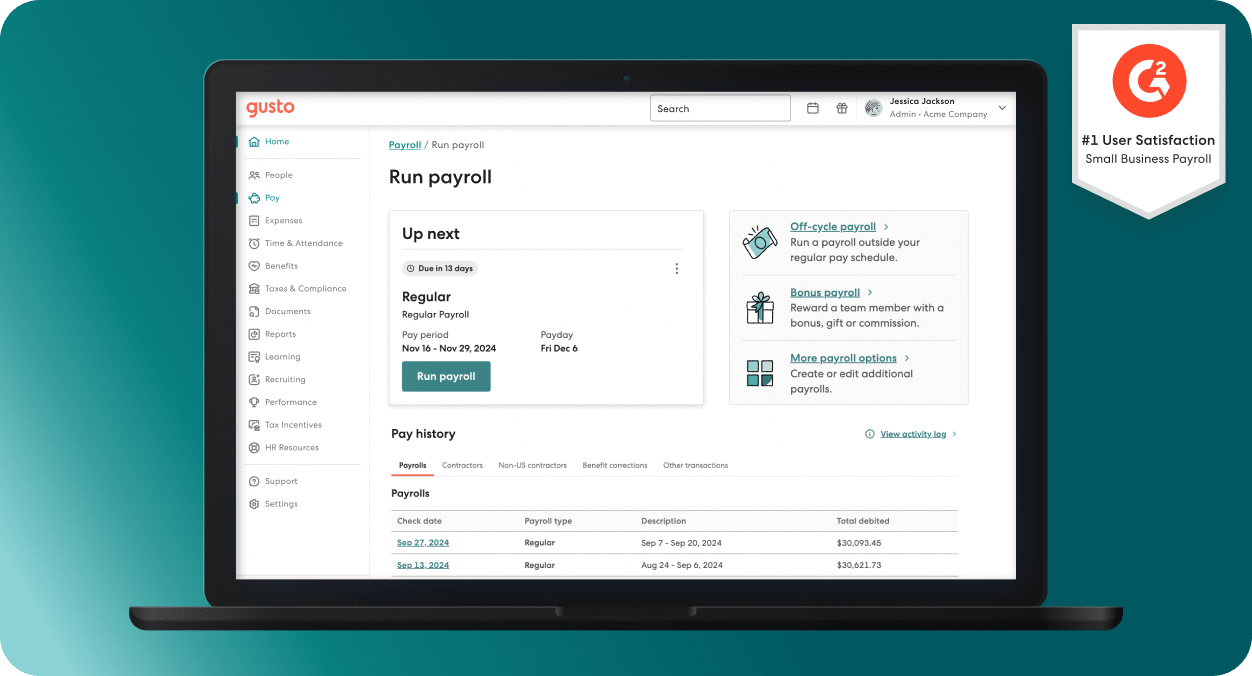
Gusto combines full-service payroll with selected HR and benefits administration for US employers. It calculates wages and payroll taxes using the worker records and pay details provided, supports direct deposit and other pay methods, files eligible payroll forms and can generate year-end documents such as W-2s and 1099s.
The service is not interchangeable with general accounting software. Xero and QuickBooks Online track books, statements and reconciliations. Gusto payroll software handles payroll-specific calculations, filings, employee records and payroll payment workflows; the resulting expenses and liabilities may then be synchronized to the company’s accounting ledger. Businesses can use these systems together rather than pretending one replaces the other.
The employer remains responsible for identifying workers correctly, registering with the appropriate tax authorities, reviewing payroll amounts and preserving records. Tax filing automation is useful, but it is not a substitute for professional advice on unusual compensation, equity, cross-border employment or independent contractor classification.
How payroll works when everything goes right
Consider a service company with eight hourly employees. The manager confirms timesheets, payroll processes gross wages and deductions, the administrator reviews the amounts and the platform initiates transfers and required tax payments according to the selected payroll schedule. Employees can access pay information without asking the manager to email a PDF every payday.
The benefit comes from a consistent workflow. Payroll is not a collection of unrelated wire transfers: net pay, withholdings, employer taxes, benefits and reports all have to agree. A software system can reduce duplicate entry and missing records, although the source timesheets and classifications still need approval.
Before turning on payroll automation, run a pilot calculation with an accountant using a previous real pay period. Compare gross pay, overtime, withholdings and employer tax liabilities. An apparent difference deserves investigation before the next payroll deadline, not after employees report receiving the wrong amount.
🛠️ Gusto Payroll Features in Daily Use
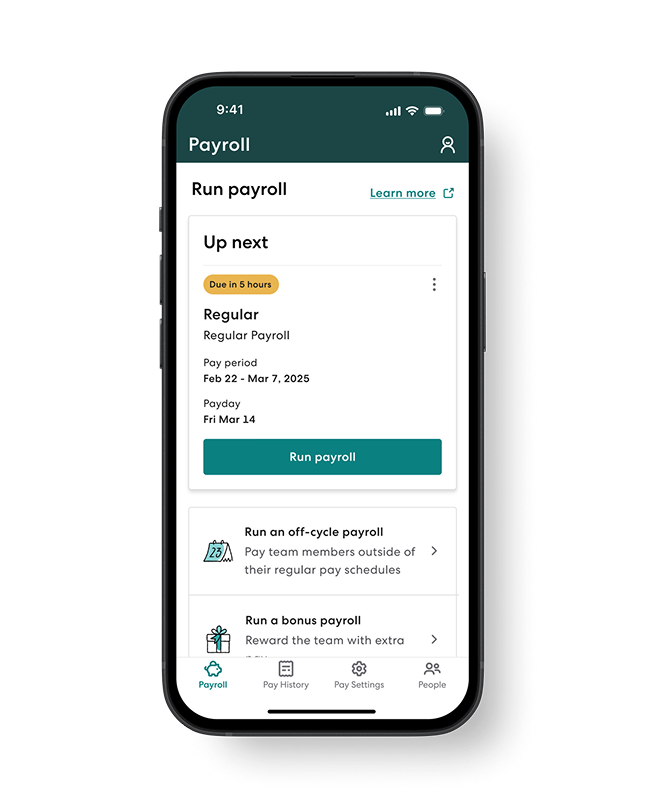
Unlimited pay runs and automated tax filings
Gusto’s official pricing and payroll feature pages describe unlimited regular, off-cycle and bonus payroll runs on its employer plans, plus calculation and payment of supported federal, state and local payroll taxes. These features are material for organizations that issue commissions or need to correct an occasional employee payment without worrying about a separate standard payroll-run charge.
The marketing promise needs practical boundaries. Different pay speeds may cost extra, and payroll processing deadlines depend on the plan, funding method and account history. Employers should confirm their cutoff schedule, available cash and authorized approvers before promising a payday.
For those evaluating Gusto payroll tax filing for small business, focus on the registrations, tax accounts and worker information entered at setup. The platform may file on the employer’s behalf, but an incorrect state account number or incomplete earnings history still requires human attention.
Gusto’s official payroll tax management guide describes tax calculation, remittance and year-end form support. The relevant payroll records and any exception notices should be archived and reviewed, particularly when moving from a previous provider midway through a year.
Employee onboarding and self-service
Gusto describes online onboarding, employee documents, personal information management and self-service access to pay stubs and tax forms. This is useful when employees work remotely or managers do not want to be the only people able to retrieve past payment records.
The best onboarding checklist still exists outside the marketing page. Someone must confirm a worker’s legal name, correct work location, tax forms, pay rate, start date, classification, benefit eligibility and permission to access company systems. The software can help collect these details and establish a trail; it cannot verify every fact without a human review.
A business comparing Gusto employee onboarding features should check who may edit wage details, who can approve the changes and which notifications are issued when a payroll account or payment method changes. The risk of a wrong bank account is more significant than the choice of greeting message in the new-hire flow.
Time tracking, scheduling and paid time off
Time tracking becomes valuable when approved hours move directly into payroll rather than being copied into spreadsheets. Gusto’s Plus plan highlights time tracking and scheduling, while Premium includes more project-based costing and management capabilities. Some features can be offered as add-ons on lower tiers.
For an hourly company, test overtime, split shifts, paid time off and schedule edits using representative cases. Recording hours is not equivalent to applying every relevant state and local labor requirement. A manager still needs to approve exceptions and review unusual totals.
The real value of Gusto time tracking and scheduling depends on consistency. Employees must record time accurately; supervisors must review it; payroll administrators need a reliable deadline for corrections. If a workflow encourages retroactive edits without oversight, a beautifully integrated schedule does not improve compliance.
Health benefits, retirement and HR services
Gusto payroll software also promotes health insurance and retirement plans, employee benefits, hiring workflows and HR support. Access depends on the employer’s state, group eligibility, selected plan and specific benefit. Premium is positioned around higher-touch support and advanced HR guidance.
A frequent mistake is interpreting the presence of benefits administration as a promise that insurance premiums are included in the payroll subscription. They are not. Employers and employees may pay actual insurance or retirement costs, and benefit partners may have their own enrollment requirements and fees.
When comparing Gusto health insurance and benefits costs, ask for the complete cost of the chosen medical plan, employee contribution, employer contribution, broker arrangement and any applicable administration charge. Do not infer the true cost of benefits from a $49 payroll starting price.
Payroll approvals and separation of duties
A small team may allow one owner to prepare and submit payroll. As the company grows, that is a fragile control. Gusto’s help center describes a workflow where one administrator prepares a payroll and another approves it before submission, with coverage and permission limitations. Not every category of contractor or special payroll is covered by the same approval functionality.
For a company with two payroll administrators, test a normal payroll, a bonus and a contractor payment. Confirm which runs require approval, what happens if the approver is away and how changes are recorded after approval.
An important control question is who can create a worker, change their bank details and authorize payment. Splitting these rights reduces the opportunity for a single mistake or malicious edit to send funds somewhere unintended. Payroll software makes such permissions possible; the company must configure them.
💰 Gusto Pricing 2026: Simple, Plus and Premium
The official Gusto pricing page, checked in October 2026, displays three standard employer plans. These are monthly base fees plus a monthly per-person charge. They are not one fixed company-wide subscription.
| Plan | Published US standard rate | Main fit | Watch-outs |
|---|---|---|---|
| Simple | $49/month + $6/person/month | One-state payroll, standard tax filings and basic PTO | Multi-state capabilities, advanced time tools and faster payments may cost more |
| Plus | $80/month + $12/person/month | Employers with multi-state payroll, scheduling and time tracking | Per-person cost becomes noticeable as headcount grows |
| Premium | $180/month + $22/person/month | Growing teams needing dedicated help, compliance tools and advanced workflow support | Significant recurring cost; confirm included features and service scope |
The Gusto pricing details are the baseline, not a guarantee that an account will receive a particular promotion. State registration, payroll funding, health benefits, some HR tools and global contractor payments can create additional costs.
What does Gusto cost for five, ten or twenty employees?
The Gusto pricing model makes payroll software deceptively sensitive to headcount. Using standard monthly rates and assuming each person is billable at the listed price, the calculations are:
| Team size | Simple | Plus | Premium |
|---|---|---|---|
| 5 people | $79/month | $140/month | $290/month |
| 10 people | $109/month | $200/month | $400/month |
| 20 people | $169/month | $320/month | $620/month |
These figures do not include taxes, benefit premiums or optional services. They are cost illustrations, not personalized quotes, and the appropriate billed headcount should be checked against the contract.
For someone searching Gusto pricing for 10 employees, the plan difference is concrete: Simple’s $109/month compares with Plus at $200 and Premium at $400 before add-ons. If multi-state payroll is needed, the lower total may not describe a viable option. If the team operates in one state with ordinary payroll, paying for Premium support might provide little benefit.
The same economics apply as the company hires: twenty billable people add $120/month on Simple, $240 on Plus and $440 on Premium before the base fee. Make a twelve-month forecast of likely headcount rather than budgeting as though the team will never change.
Contractors-only plan and separate payment products
Gusto’s pricing presentations also describe a contractor-only option aimed at companies without W-2 employees. A published offer shows a $35 monthly base reduced to $0 for a qualifying promotional period, plus $6 per contractor. Some pages describe six months at the discounted base rate. These details are conditional and must be confirmed at signup; they do not establish that all employers receive six months free.
For Gusto contractor only plan pricing, check whether the business pays domestic or international contractors, what constitutes a billable month and whether applicable filings are included. The domestic contractor plan does not automatically provide all the tools and withholding treatments of a full-service employee payroll plan.
Gusto payroll also describes payments to international contractors in more than 120 countries through an additional product. Availability and charges depend on the destination country, transfer method and exchange terms. Do not confuse contractor payments with establishing an employer-of-record relationship or handling every country’s employment law.
Add-ons, tax registration and payment speeds
The current Gusto rate sheet lists optional services including state tax registration, HR and compliance products and faster payment modes. As an example, the site lists next-day pay as an available upgrade on Simple, while Plus includes next-day processing. It separately describes same-day and instant options whose fees and plan coverage should be verified for the employer.
A fast transfer does not solve a missing timesheet, a wrongly classified worker or a payroll funding hold. Treat Gusto same day payroll fees as one component of a larger decision about reliable funding and payroll deadlines.
The most useful comparison is the full first-year expense: base fees, each person’s subscription cost, any state registration fees, selected benefits, outside advisers and paid add-ons. A promotion that reduces the first month’s subscription is helpful only when the ongoing service still makes sense.
🎁 Is There Really a Gusto Three-Month Free Payroll Offer?
The Finance hub on DigiOffly currently has a Gusto card referring to three months of free payroll. That is a promotional claim, not part of Gusto’s permanent standard plan. During this review we could verify the standard pricing and some different public promotional terms, but could not independently verify a universal three-month free payroll offer for every new customer.
A concrete qualifying example exists through Citizens Bank’s Gusto partner offer: its published terms describe three free consecutive months of Gusto payroll services for eligible new customers who sign up from April 1 through December 31, 2026 using that promotion. Optional add-ons and third-party services are excluded, the benefit begins with the first payroll run, and the offer may be modified or canceled. That partner promotion does not automatically apply to DigiOffly’s ordinary Gusto pricing link.
Gusto pricing promotions may offer targeted discounts, partner promotions or a reduced contractor-only base charge. The eligibility conditions may depend on acquisition channel, timing, plan and whether the account previously subscribed. A phrase on a software comparison card should never be treated as proof that the exact discount appears in a new customer’s checkout.
When assessing Gusto three months free payroll offer, check the official pricing page and any terms linked to the exact signup URL. Confirm whether the discount applies only to the monthly base fee or to both base and per-person charges, when regular billing begins, whether tax and benefits costs remain payable, and what happens if the business cancels early.
If the promotion isn’t visible in the actual signup process, budget at standard rates. That may seem less exciting than a large discount badge, but it avoids a surprise on the first or fourth invoice. If our own category page advertises a promotion, readers should use the current official terms to verify that it is available to them.
👥 Employees, Contractors and International Workers: Important Differences
A payroll system needs to know what kind of relationship exists between the person and the business. A US W-2 employee, a domestic 1099 contractor and a foreign independent contractor do not have the same withholding, reporting or labor-law obligations. Treating all three as interchangeable entries in one worker list is not enough.
Gusto’s payroll tools cover employees and domestic contractors, and it offers optional products for overseas contractors. Those capabilities do not automatically turn an independent contractor into an employee or satisfy employer-of-record obligations outside the United States.
W-2 employees versus 1099 contractors
An employer usually has tax withholding and other statutory obligations for W-2 employees that differ from an independent contractor payment. Gusto payroll software can help prepare payments and supported documents, but it relies on the employer’s classification and valid identity details.
For a Gusto W-2 and 1099 filing comparison, focus first on which forms and payments actually apply to each worker. If the company incorrectly treats a controlled, full-time employee as a contractor to save payroll taxes, the software cannot make the classification lawful.
A sensible procedure is to review uncertain relationships with a qualified tax adviser or employment lawyer before the first payment. Make sure the contract describes the real working arrangement rather than simply labeling a person a contractor.
Paying contractors abroad
An American company may pay a freelancer in another country without maintaining a full employer presence there, but the legal treatment varies. Payment tools can help deliver money; they are not universal advice on local employment classification, withholding or data protection.
Businesses exploring Gusto international contractor payments should verify the worker’s country, payout currency, service coverage and the overall exchange rate. Compare the final amount received, not just the platform fee. A contractor who bills in euros may care more about the delivered EUR amount than the employer’s advertised USD charge.
If international contractors are the main workforce, compare a specialist such as Deel or Remote against Gusto’s add-on. The platform you use for domestic W-2 payroll need not be the cheapest way to pay ten people across five countries.
Gusto payroll and the accounting ledger
Payroll generates many entries: gross salaries, withheld taxes, employer taxes, reimbursements, benefit liabilities and net payments. These belong in the company’s financial statements as well as its payroll records.
Gusto payroll software documents connections to accounting applications such as Xero and QuickBooks Online. A Gusto Xero payroll integration can reduce manual transfer of payroll data into the books, but the accountant still needs to verify expense categories, payable balances and reconciliation with the bank.
For example, if Gusto calculates an employee’s $4,000 gross wage and deposits a lower net amount after withholding, the company should not record only the net payment as salary expense. This is a straightforward accounting issue that integrations must handle correctly. Test it with a real previous payroll during onboarding, not just a demo animation.
⚖️ Gusto vs ADP RUN, OnPay, Rippling and Deel
No single payroll tool is the right choice for every team. A US employer with ten domestic staff, an engineering startup with complex app permissions and a consultancy paying people in six countries have very different problems. Compare the work first, then the vendor.
| Tool | Primary strength | Best-fit scenario | Important question |
|---|---|---|---|
| Gusto | US payroll, tax filings, connected HR and benefits | Small employers seeking one predictable payroll workflow | Which plan covers employee states and HR needs? |
| ADP RUN | Established payroll service with broad HR and service options | Businesses prioritizing a long-standing payroll vendor and adviser support | What does the specific quote include? |
| OnPay | Payroll and benefits for small employers | Owners wanting to compare straightforward payroll essentials | Are the required complex HR features present? |
| Rippling | Workforce identity, HR, IT and payroll integrations | Growing teams managing employee systems as well as pay | Which modules and integrations cost extra? |
| Deel | Global contractor and international workforce operations | Businesses with dispersed cross-border hiring arrangements | Do you need contractor payments or actual employer-of-record coverage? |
The most useful Gusto vs ADP payroll for small business comparison depends on service expectations and actual proposals. ADP pricing can be customized, so it is misleading to compare Gusto’s transparent entry price against an invented competitor rate. Ask both vendors to quote the same headcount, states, filing requirements and support services.
Gusto versus OnPay is also not a simple competition over which provider has fewer screens. The question is whether the business needs advanced HR workflows, benefits administration, expense connections and particular payment speeds. Record any required features before accepting a promotional offer.
Gusto versus Rippling: payroll or a connected workforce stack?
Rippling is relevant to companies that want employee onboarding to trigger access changes in IT systems alongside HR records. That can be valuable for a growing organization with many software accounts and security permissions. But a business that needs only weekly payroll may not benefit from a broad modular infrastructure.
Gusto concentrates heavily on payroll and related people workflows, making the base proposition easier to understand. When comparing Gusto vs Rippling pricing, look beyond published starting figures: ask which modules are necessary, how each worker is billed and whether the implementation fee or support scope changes with company size.
Both systems still rely on accurate records and sound approval policies. Automatically removing access to a departed employee is useful; automatically sending their final pay from an incorrect wage record is not.
Gusto versus Deel: domestic payroll or cross-border compliance?
Deel is often evaluated when a company works with foreign contractors or needs a third-party legal employer in another country. Gusto is well known for domestic US payroll and can offer additional international contractor-payment functionality. These are not always equivalent legal services.
If the business hires employees outside the United States, clarify whether the vendor will only facilitate payments or will also provide an employer-of-record service with local contracts and obligations. A Gusto vs Deel international payroll comparison without that distinction can lead to the wrong purchasing decision.
What would we use with a small agency?
For a US consultancy with eight employees in one state, regular pay and a part-time accountant, we would shortlist Simple alongside one other domestic payroll service and compare the complete cost. If the agency expands into a second state or needs sophisticated time tracking, Plus becomes a more relevant candidate.
For a distributed contractor-only business, we would compare the total foreign-exchange and transfer costs of the contractor product against a specialist rather than assuming the employer payroll plan is necessary. Those are example decision paths, not a personal endorsement or advice to change legal worker classification.
✅ Gusto Pros and Cons
Pros
Unlimited routine pay runs, tax filings, employee self-service and integrated payroll workflows.
Cons
Per-person billing increases with headcount; multi-state and HR upgrades cost more; correct employer records remain essential.
What works well: A business can use one platform for employee pay, tax filing, common employee records and selected HR tasks. Published standard pricing makes a basic budget possible. Unlimited standard pay runs remove the anxiety of paying an extra fixed fee for an ordinary bonus or correction payroll. Employee self-service can reduce repeated administrative requests for pay statements.
What needs care: The base-plus-person cost increases with headcount. Add-ons and benefit costs can materially change the monthly amount. Multi-state needs can require a more expensive plan. Employer responsibilities around tax account setup, labor rules and worker classification remain even when filing tasks are automated. Customers who need hands-on advisers or complex integrations should assess support scope before choosing a tier.
The biggest operational risk is assuming the initial payroll setup will remain correct as people, wages and state rules change. A company might assume automatic payroll means the software has verified every pay rate, home address and deduction. It has not. A useful system supports review and timely corrections; it cannot replace managerial accountability.
🎯 Who Should Choose Gusto?
Good candidate: A US business with a small or mid-sized workforce that needs compliant recurring payroll operations, common tax forms, employee self-service and an integrated record of deductions and benefits. The best starting plan depends on states, team size and optional services rather than business enthusiasm.
Check Plus first: A company already hiring in multiple states, working with hourly staff who need scheduling or requiring more systematic time management. A cheap first-month deal on Simple is not helpful if the features you need are missing.
Consider Premium carefully: A business that values dedicated account guidance, advanced HR support and specialized compensation administration enough to justify both the $180 base rate and $22 per person. Quantify what service the team currently pays for elsewhere.
Look elsewhere or compare: International-first operations, companies already tied to a different HR/IT stack or businesses that need exceptionally customized payroll rules. A competing service may be more appropriate, but confirm details through a live quote and relevant demonstrations.
The search for Gusto payroll software for startups often begins before the first employee starts. That is a good moment to evaluate the platform. Proper initial setup costs less than correcting an entire year’s payroll records, even if the software interface appears easy to use.
🧪 How We Reviewed Gusto: Sources, Images and Limitations
We compared the live published Gusto pricing matrix, the full-service payroll description, the payroll tax management materials, the contractor solution and relevant administrator help articles. We used a representative set of payroll needs — one-state salaried teams, multi-state hourly teams and contractor-heavy agencies — to identify which plan questions materially affect cost and risk.
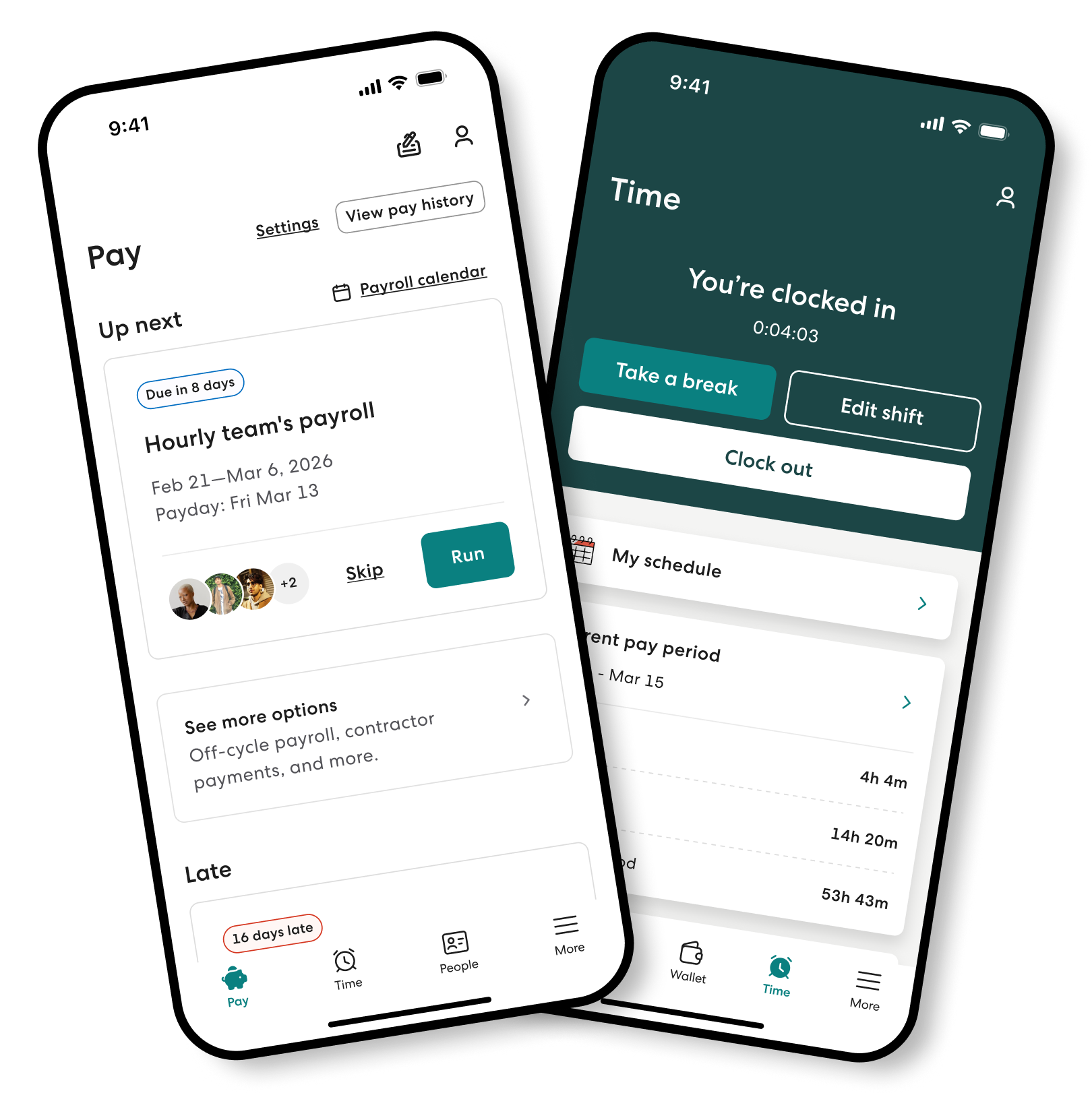
Automated browser access to Gusto’s main site returned a protection page during this review, so we did not create fake screenshots of the blocked website. The interface illustrations used in this article are genuine Gusto-published public product images, downloaded from official vendor media servers. They depict example or promotional interfaces, not our own authenticated payroll account.
We did not calculate or file payroll taxes, complete onboarding, establish a benefits plan, evaluate private support tickets, or test payout speed with real money. That means we cannot make a claim about Gusto’s actual error rate, guaranteed service quality or how every feature appears in a specific account. Those details vary with plan, region and account status.
For a real purchasing decision, verify the state coverage, exact worker mix, expected debit dates, support escalation procedure and all optional charges in a written quote. Test approval roles and a representative mock or historical pay period before using automated payroll for the full workforce.
🏆 Final Verdict: Is Gusto Payroll Worth the Cost in 2026?
During a normal pay cycle, employees can retrieve pay records, managers can approve hours, and administrators can manage supported tax calculations and filings in one workflow. The platform can make those jobs more coordinated, provided its setup reflects the actual employer and worker circumstances.
The standard pricing is also plain enough to evaluate. Simple costs $49 plus $6 per person monthly; Plus is $80 plus $12; Premium is $180 plus $22. Team growth and additional services matter. A Gusto discount can be welcome, but it should not be the main reason to adopt a payroll provider.
Our conclusion: Gusto is a worthwhile shortlist choice for a qualifying US employer that values integrated payroll and people administration, with Simple attractive for straightforward one-state teams and Plus more relevant for multi-state or scheduled hourly work. Premium should be justified by real support or HR complexity. Businesses centered on foreign contractors or highly customized workforce systems should compare specialists before committing.
Before entering sensitive employee information, consult the current official Gusto pricing and terms and confirm the plan, state coverage, taxes, payment schedule and support path. No software can absolve an employer of its legal obligations. Choosing a good system means designing a responsible process around it.
Gusto Review: Frequently Asked Questions
Is Gusto payroll free?
No. Standard employer payroll has a monthly base fee plus a per-person charge. Temporary promotions may reduce some charges for eligible accounts.
How much is Gusto Simple in 2026?
Gusto currently lists Simple at $49 per month plus $6 per person per month, before optional services and applicable charges.
What does Gusto Plus cost?
Plus currently lists at $80 a month plus $12 per person. It emphasizes multi-state payroll, time tracking and scheduling.
How much is Gusto Premium?
Premium currently lists at $180 monthly plus $22 per person, with deeper service, HR and compliance features.
Does Gusto file payroll taxes?
Gusto describes calculation, payment and filing of supported federal, state and local payroll taxes, using information the employer provides.
Can Gusto pay 1099 contractors?
Yes, Gusto supports domestic contractor payments and reporting. An optional separate product supports contractor payments in numerous countries, subject to coverage and fees.
Does Gusto support multi-state payroll?
Plus and Premium include multi-state payroll in the published plan comparison. Check all state registrations and eligibility.
Is Gusto health insurance included?
No. Benefits administration can be available, but premiums, eligibility and applicable third-party or administrative charges are separate from payroll subscription fees.
Does Gusto offer three free months of payroll?
The offer advertised on some category cards is not a universal standard entitlement. Verify an actual qualifying promotion and its terms on the Gusto checkout page.
How does Gusto compare with ADP RUN?
Gusto publishes a base and per-person pricing structure; ADP may use customized quotes. Compare the same workers, states, filing needs, pay schedules and included support.
EXPLORE NEXT ON DIGIOFFLY
What to explore after Gusto
Explore payroll, banking and accounting tools as connected parts of a real business workflow.
Finance comparisons
- Explore our Finance software hub — Review banking, accounting, payroll and expense platforms.
- Browse the full software directory — See the wider catalog and existing reviews.
- Deel review — Explore international payroll and EOR options.
- Remote review — Compare cross-border contractor and employee workflows.
Compare total ownership costs
- Estimate recurring software costs — Separate monthly fees from annual commitments and transaction charges.
- Compare software side by side — Check capabilities and the unknowns before subscribing.
Keep researching
- Find software for your workflow — Shortlist tools by concrete business needs.
- Read our research methodology — See how public vendor documentation is interpreted.