

Pricing and product terms reviewed October 16, 2026. Kinsta’s public WordPress hosting configurator displays $35/month for the Single 20GB bandwidth or Single 35k visits monthly plan, with $350 billed annually on the annual option. The provider offers both visits-based and server-bandwidth-based allocation methods. Prices, introductory promotions and taxes should be verified in the live cart. Official pricing · How plans are measured.
It’s easy to buy web hosting by looking at a storage figure and a monthly price. The harder part is understanding what you’re paying for when your website stops being a hobby. A WordPress store has unpredictable busy periods. An editorial website accumulates images, plugins and scheduled updates. An agency needs a way to make changes without accidentally taking a client’s homepage offline.
Kinsta doesn’t position itself as the cheapest place to put a WordPress installation. Its proposition is a managed WordPress platform with a consolidated dashboard, staging, backups, infrastructure choices and human support. The challenge is deciding whether that bundle is worth its relatively premium pricing—and whether the allowances match the way your site actually receives traffic.
This Kinsta review 2026 examines those decisions instead of promising fictitious speed results. We compare bandwidth and visits billing, inspect MyKinsta, examine backup recovery and staging, and explain who would be better served by SiteGround, Hostinger or Cloudways. The screenshots are from official public Kinsta pages, not our own paid customer account.
📊 Kinsta Review Summary
Kinsta offers a managed WordPress environment for publishers, stores, developers and agencies who care about a predictable operational workflow. Its dashboard, MyKinsta, puts multiple website tasks in one place, including analytics, users, environments, backups and site-level configuration.
The distinctive buying decision in 2026 is whether to measure the plan by monthly visits or server bandwidth. Those are alternative resource measures at corresponding plan levels, and the correct choice depends on your workload. A site receiving many small, automated requests can behave differently from one delivering large files to a smaller audience.
Our editorial verdict is favorable for businesses where reliable WordPress operations are worth paying for, but we would not recommend Kinsta to every new blogger. Its published limits, overages and add-ons require more care than a generic “unlimited everything” promise. We haven’t run an independent uptime or load test, so no performance star rating is invented here.
⚡ Quick Verdict: Is Kinsta Worth It in 2026?
Kinsta is worth considering when WordPress is business-critical and operating time matters. The strongest case is not a dramatic first-year price cut. It is the combination of a well-defined hosting service, website isolation, staging workflows, backups and detailed operational documentation.
We would shortlist it for an editorial publication with meaningful traffic, a WooCommerce store that needs safer deployments, or an agency maintaining multiple WordPress installs. We would hesitate for a personal portfolio that can live comfortably on a simpler budget host. And for a custom application unrelated to WordPress, we’d compare a managed cloud environment first rather than trying to force an unsuitable product into the stack.
The other caveat is metering. You must understand what counts as a visit or server bandwidth, what is served through the CDN, and how the provider charges for exceeding a plan allowance. A plan’s listed SSD storage does not describe every constraint on the environment.
🏆 Kinsta Pros and Cons
Kinsta’s most appealing features are operational: isolated WordPress environments, a polished site dashboard, included staging, predictable documentation for restoring backups and controls for teams. For a growing site, having these tools integrated can remove hours of repetitive maintenance.
The weaknesses concern price and constraints, not a fabricated defect. Kinsta is a managed platform with published resource allocations. Higher traffic or storage needs can cost more, and some backup or staging options are paid add-ons. Teams that need arbitrary root-level server configuration should confirm the platform’s boundaries before buying.
👍 What We Love
- ✅ WordPress-focused management: MyKinsta centralizes site usage, backups, staging and user roles.
- ✅ Included staging: A standard environment lets owners test significant updates before pushing live.
- ✅ Detailed recovery options: Daily, manual and system-generated backups support a clearer maintenance workflow.
- ✅ Alternative traffic metering: Choose plans measured by visits or server bandwidth to match your traffic profile.
👎 Where It Falls Short
- ❌ Premium price: Entry managed WordPress pricing is higher than many beginner shared-hosting offers.
- ❌ Resource ceilings: Visits or bandwidth, CDN and storage have allowances and potential overage charges.
- ❌ Some advanced recovery costs extra: Hourly backups and premium staging have optional fees.
🏆 EDITORIAL VERDICT: STRONG FOR BUSINESS WORDPRESS
Best for: WordPress businesses, publishing teams and agencies requiring deliberate deployment and recovery workflows. No independent performance rating is claimed.
🧠 What Is Kinsta Managed WordPress Hosting?
Kinsta is a managed WordPress hosting provider. Rather than leaving you to secure and administer a raw virtual machine, its WordPress product combines infrastructure, application management, monitoring and support into a defined service. The WordPress hosting product is distinct from other categories of application infrastructure.
Your website remains a WordPress installation with its files, themes, plugins and database. This is important for content ownership and migration. A hosted design-builder’s layouts may require manual rebuilding when you change platforms; WordPress content generally has more standard export and transfer paths, although plugin licenses, DNS, caching and integrations can still complicate a move.
Kinsta’s platform is designed for WordPress operations, not arbitrary operating-system access. You are still responsible for your content, user access, third-party plugins and legal handling of data. The provider can operate part of the infrastructure without replacing the website owner’s security and publishing policies.
🖥️ MyKinsta Dashboard: Does the Interface Help?
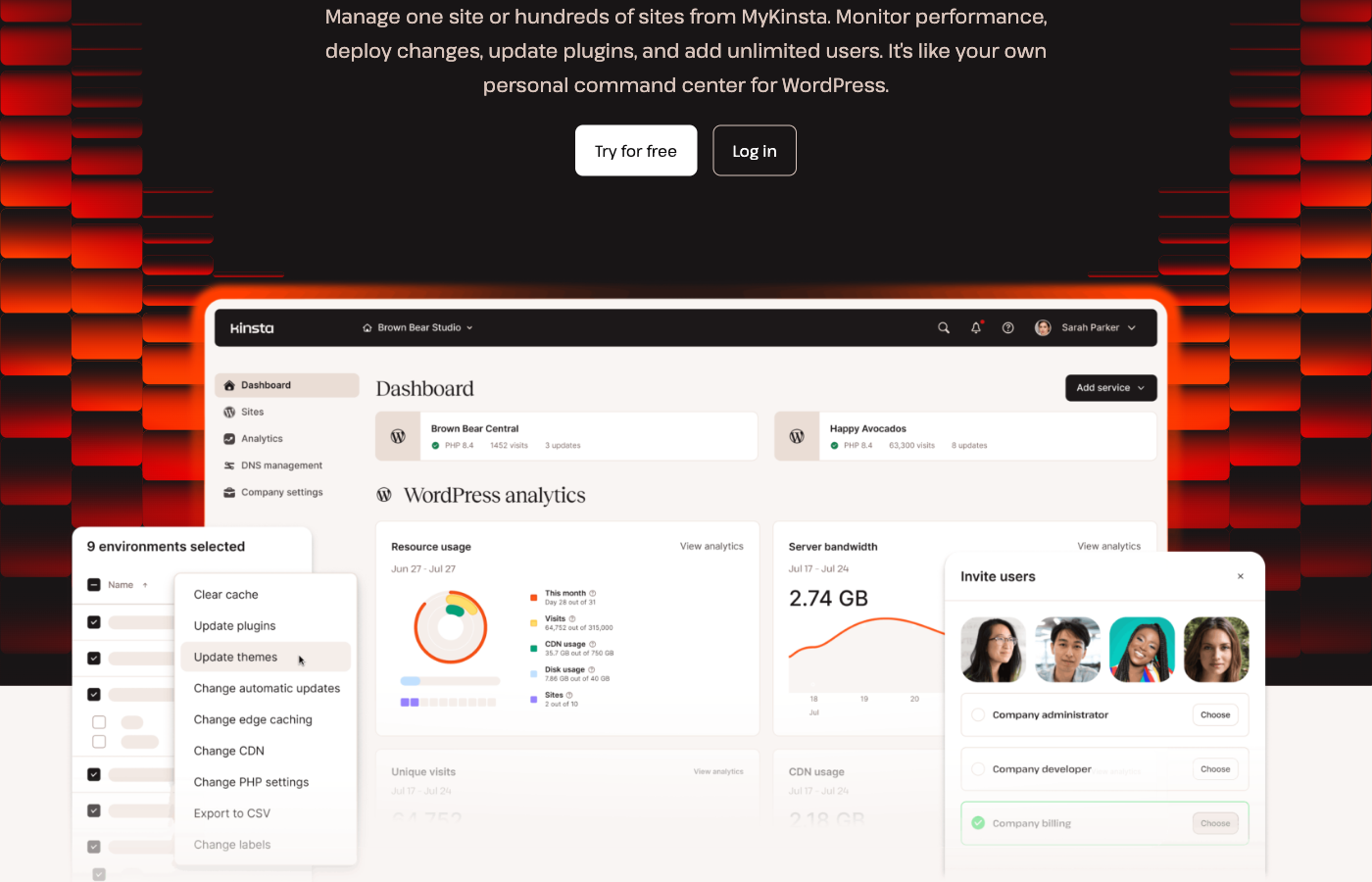
Kinsta’s public MyKinsta presentation shows a modern dashboard for viewing sites, applications, analytics and team roles. It illustrates a WordPress-focused workspace where administrators can inspect traffic, server-bandwidth consumption, PHP settings, cache actions and environment status without assembling several unrelated control panels.
That’s useful in the moments that actually matter. Suppose a campaign suddenly attracts readers to an older article. You need to know whether visits grew, server traffic spiked, a plugin started failing or a media file was downloaded unusually often. The dashboard provides documented usage and site tools; it doesn’t mean every performance issue is automatically diagnosed or solved.
MyKinsta also supports user roles and team access. Agency staff should receive only the permissions necessary for their duties, and account owners should record who is responsible for billing, backups and deployment. A slick interface can’t protect a company that shares one administrator password with every contractor.
The screenshot in this review is Kinsta’s public product presentation. It is not a claim that we logged into a paid site or tested dashboard performance firsthand.
🧭 How to Move a WordPress Site to Kinsta
Moving hosts is an infrastructure change, not a redesign project. The goal is to preserve the existing WordPress content, URL structure, email flow and business operations while changing where the software runs.
1. Estimate Actual Visits and Bandwidth
Look at two recent billing cycles if you have records. Count visitor requests and approximate origin-server traffic. If you use a CDN, separate assets delivered from its edge from traffic hitting the WordPress server. You want enough headroom for unusual months, not just the quietest week.
2. Pick the Correct Site Count and Plan Metric
Choose single-site or a multi-site WP plan. Select the visit-metered or bandwidth-metered variant that fits your traffic profile. Read the storage, backup retention and CDN allowances alongside the primary traffic metric.
3. Prepare a Verified Backup
Export your current site files and database, note important PHP or plugin settings and preserve DNS and email records. Kinsta offers migration assistance under its plan terms, but that doesn’t eliminate the need for an independent rollback copy and a detailed inventory of external integrations.
4. Test Before Switching Production Traffic
Use a staging or preview environment to check older articles, photos, permalinks, checkout, transactional emails and logged-in functionality. After changing DNS, verify HTTPS, redirects, sitemaps, canonical tags and analytics. Keep the former host available until the new site proves stable.
🛠️ Kinsta Features That Matter After Launch
🧪 Staging and Selective Deployments
Every Kinsta WordPress site includes a standard staging environment, according to the provider’s October 2026 safe-change guide. That is one of the more useful inclusions for a company that relies on its website. An editor can test a new theme, a developer can evaluate plugin conflicts and a shop owner can check checkout changes away from the public site.
The important feature isn’t merely the ability to make a copy. Kinsta documents selective pushing between environments: only files, only the database, specific folders or tables, or everything. That gives a careful developer more deployment choices than a blunt full replacement, provided they understand exactly which information must remain untouched.
For a WooCommerce installation, this distinction can protect orders and new user registrations. If the staging database was copied yesterday and you replace the entire live database today, a customer who ordered during that interval may disappear from the restored state. A disciplined team tests the change on staging, creates a fresh production backup, pushes only what’s needed and validates the live outcome.
A standard staging copy isn’t necessarily identical to production resources. Kinsta sells premium staging environments for more intensive testing. Before promising a client that a load test on staging predicts production capacity, check which environment they are actually purchasing.
💾 Backups: What Gets Restored?
Kinsta takes daily automated WordPress backups and creates additional system-generated backups around important actions. Its documentation details manual backups, download options, optional external copies and hourly backup add-ons. Having these restore points in MyKinsta can greatly improve routine maintenance, but the exact retention period varies by plan.
For its Single 20GB bandwidth / Single 35k visits and WP 2 tier, the documentation lists 14 days of backups. Larger tiers may include 20 or 30 days. Paid options include six-hour backups at $20 per site per month and hourly backups at $100 per site per month, both with particular short retention rules. Buyers running transactional websites should check those dates carefully.
The central warning is that restoring a backup can roll back more than posts or plugins. Kinsta’s documentation says a full environment backup includes files, database, redirects, server configuration and MyKinsta settings. If you restore an older copy, you may overwrite newer orders, site configuration and domain settings. A rescue operation requires a plan, not just confidence that an automated backup exists.
Keep an independently verified copy before a migration or major deployment. Where business rules permit it, rehearse a restore into staging. Document who may authorize restoration and what information must be reconciled afterward. A backup that nobody can restore isn’t a complete recovery strategy.
🚀 Caching, CDN and Real WordPress Performance
Kinsta promotes performance-oriented hosting, CDN features, caching and isolated environments. These can be attractive foundations for WordPress, but infrastructure features cannot make poor application code efficient by themselves. An oversized page-builder bundle, slow database query or third-party checkout script can still dominate a visitor’s experience.
The most useful speed comparison would load identical WordPress installations on candidate services and evaluate both cached and uncached requests. Cached editorial pages may perform well almost anywhere, while logged-in member screens and active WooCommerce checkout pages require more backend processing. Measure both rather than choosing a provider based on one hero-section benchmark.
Server bandwidth and CDN bandwidth are also distinct accounting measures. Files served through Kinsta CDN count toward its CDN allowance, not the server-bandwidth allocation. That detail matters for publishers hosting significant images, video previews, downloadable materials or traffic from international audiences.
We haven’t conducted matched tests against SiteGround, Hostinger or Cloudways, so this review doesn’t assign a made-up number of milliseconds to Kinsta’s homepage or claim it always wins Core Web Vitals. The correct questions are whether the available resources support your site and whether their cost remains predictable under real traffic.
🔐 Security, Access and WordPress Updates
Managed WordPress hosting reduces some infrastructure responsibilities, but it doesn’t make passwords, outdated themes or questionable plugins harmless. A website owner should enforce individual accounts, suitable user roles and multi-factor authentication wherever available. Contractors should lose access promptly when a project ends.
Kinsta offers tooling for plugin management and updates, along with backup workflows linked to changes. Its October 2026 documentation provides a safe operational pattern: clone to staging, make the change, take a live backup, selectively push and verify production. For a busy site, this is more valuable than treating automatic updates as a guarantee nothing can break.
Monitor form submissions, important webhooks, scheduled content, SEO metadata and transactional email after releases. A successful WordPress update notice only confirms that an update process completed; it does not prove every business function survived. Build a short acceptance checklist around your own site’s most important user journeys.
📊 Analytics and Usage Visibility
In MyKinsta, administrators can review visits, server bandwidth and other traffic statistics. This is especially relevant because Kinsta allows a choice between two types of usage-based plan allowance. A publisher seeing bot traffic, crawlers or irregular downloads should investigate what is causing usage before paying for more capacity.
The best comparison uses more than one billing cycle. One marketing campaign or a temporary spike can distort the picture. Determine whether the traffic is legitimate, whether assets are being served through the CDN and whether a noisy plugin is producing unnecessary requests. Then choose a plan or caching configuration based on evidence.
Kinsta documents alerts when usage approaches and exceeds plan thresholds. These alerts are useful, but they’re not substitutes for a capacity budget. A business should know whether exceeding a limit causes additional charges, which workloads are likely to push it over the edge and what action an administrator will take during a busy month.
📊 Visits and Server Bandwidth Are Different
Kinsta offers WordPress plans measured by monthly visits or server bandwidth. Equivalent plan levels may have the same price but different measurement allowances.
A website receiving many small requests can behave differently from a website serving fewer but larger origin responses. CDN bandwidth has a separate allowance.
Before choosing a plan, inspect two months of real analytics and potential overages. A well-chosen measurement model can be more useful than selecting hosting from a generic traffic estimate.
⚠️ Kinsta Limitations Buyers Should Know
The obvious limitation is cost. A single-site managed WordPress plan priced around $35 per month can be reasonable for a business, yet expensive for a new hobby blog. Kinsta’s premium positioning makes little sense if you won’t use its staging, monitoring, management and backup features.
The less obvious limitation is how usage gets counted. Your chosen plan may be metered by visits or by server bandwidth. The figures represent different patterns of consumption; an extremely active crawler can affect visit counts, while large origin responses can drive server traffic. Neither metric should be mistaken for “unlimited capacity.”
Kinsta also sets storage, CDN bandwidth, backup-retention and WordPress installation allowances. Exceeding published limits can generate overage charges. This needn’t be a surprise if you watch the dashboards, but it’s a problem for an owner who never checks usage until the invoice arrives.
Finally, it is a managed WordPress environment, not an arbitrary Linux server with complete operating-system customization. Developers running unusual services should confirm their requirements before assuming Kinsta can substitute for a self-managed VPS. Choose a platform for the job it’s designed to do.
💰 Kinsta Pricing in 2026: Visits vs Bandwidth
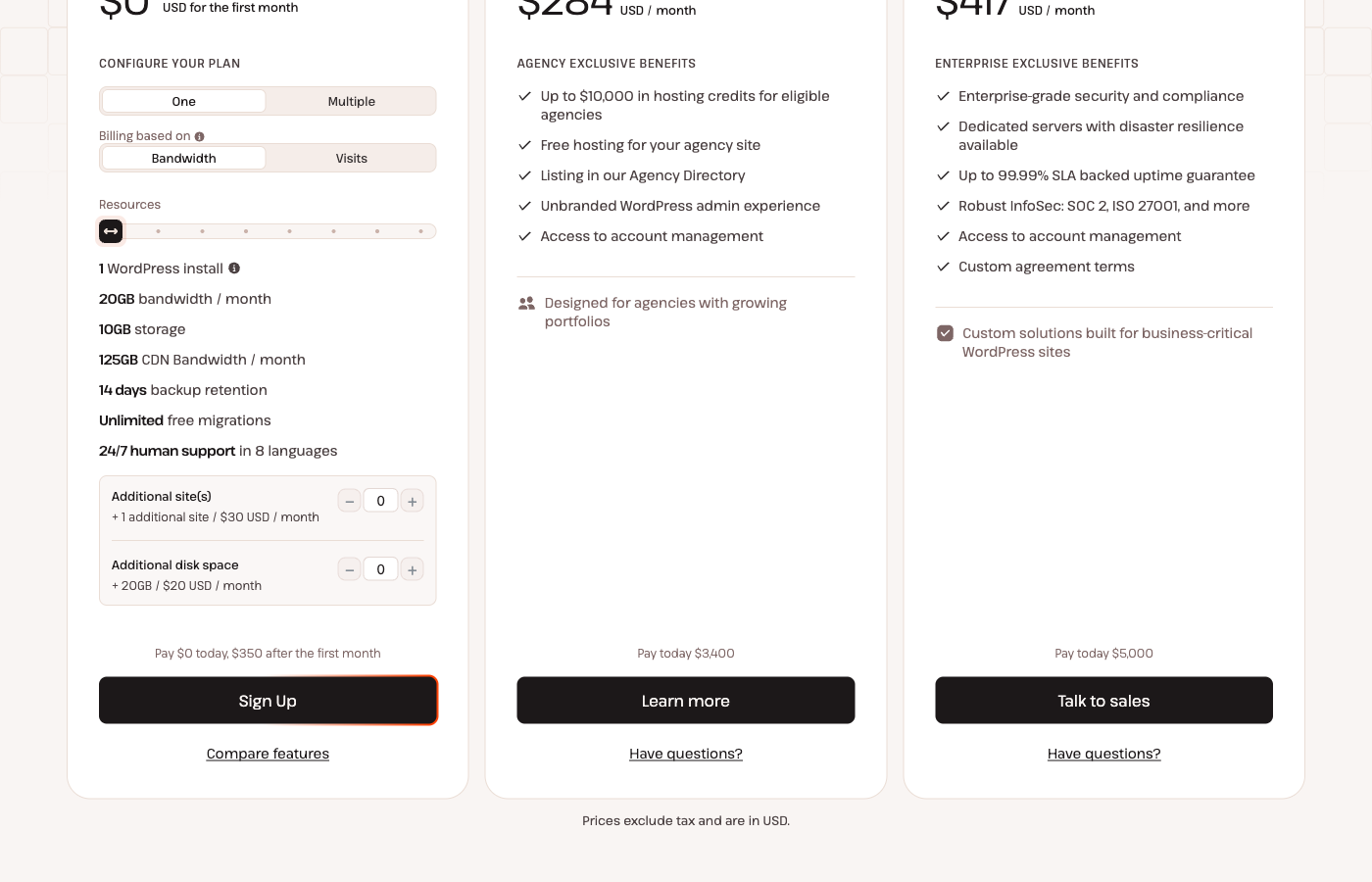
Kinsta’s pricing page presents several ways to configure a plan. A single WordPress install can be purchased under the Single 20GB server-bandwidth or Single 35k visits variation. At the October 2026 public US pricing snapshot, the starting monthly price is $35, with an annual billing option displayed at $350 billed annually, before tax and subject to the active first-month promotion.
The two versions have distinct metering rather than a quality hierarchy. The bandwidth plan includes 20 GB of server traffic per month; the visit-based variation counts up to 35,000 monthly visits. Kinsta’s documentation says the buyer can switch between the measurement models. That makes traffic analysis essential: the right choice depends on whether requests or transferred origin data represent the greater burden for your site.
Its entry configuration shows one WordPress installation, 10 GB of storage, 125 GB of CDN bandwidth and a 14-day backup-retention period. These are separate allowances, so don’t treat the 20 GB origin bandwidth figure as the entire volume that can possibly be delivered through the CDN.
Multiple-site plans use the WP 2, WP 5 and larger family. The public snapshot lists a WP 2 starting configuration at $70 per month or $700 annually under the matching billing selection. Adding websites or storage to some configurations can be priced separately. Always compare the exact server-billed or visit-billed version you would order.
Kinsta also markets agency and custom offerings. These are for different requirements and shouldn’t be presented as simply bigger storage allocations for a single blog. An agency managing many sites must inspect permissions, site count and support terms as well as the per-site effective cost.
| Buying factor | Single 20GB Bandwidth | Single 35k Visits | WP 2 / Multi-site |
|---|---|---|---|
| Primary included quota | 20GB server bandwidth / month | 35,000 counted visits / month | Two installations; choose the metering model |
| Starting US monthly rate | $35 | $35 | From $70 in the cited configuration |
| Annual US illustration | $350 prepaid | $350 prepaid | $700 prepaid in cited configuration |
| Storage (entry single site) | 10GB | 10GB | Check the selected multi-site tier |
| CDN allowance (single site) | 125GB / month | 125GB / month | Check chosen tier |
| Default backup retention | 14 days | 14 days | 14 days for entry WP 2 |
| Main overage concern | Origin bandwidth above allowance | Visit count above allowance | Combined usage across hosted sites |
⚠️ Overage Charges and Optional Extras
Kinsta’s overages documentation states that exceeding visits or server bandwidth, storage or CDN allowances can lead to extra charges. Alerts may appear at 80% and 100% of certain thresholds, with additional notifications for visit usage. A practical purchase plan should include a sensible headroom estimate.
Optional features matter. More frequent backups, premium staging resources, external backups and extra disk space may add fees depending on the configuration. Some upgrades serve genuinely important needs; paying for six-hour restore points may be justified for a store with frequent orders, but not for a static publishing site that changes a few times each month.
For comparison, an entry plan billed monthly at $35 totals $420 over twelve months before tax. The annual $350 prepayment reduces that amount if the annual contract is appropriate. That arithmetic shouldn’t be confused with a special price guaranteed on future renewals; verify the terms and current offer in the live checkout.
A healthy budget includes hosting, domain registration, professional email, paid WordPress extensions and staff time. If your only requirement is publishing a handful of personal articles, there’s no reason to pay a premium for capacity and features you may never use.
🎯 Who Should Choose Kinsta?
Established WordPress publisher. If your website has regular revenue, many content contributors or important SEO landing pages, MyKinsta, staging and recovery tools are useful conveniences. Measure visit counts against origin bandwidth before choosing an allowance.
WooCommerce store. A shop’s checkout, account pages and inventory updates have different requirements from cached editorial pages. Staging and well-understood backups can reduce deployment risk, but you still need realistic testing and a plan for preserving orders during recovery.
Web development agency. Managing many WordPress installs and permissions from a single environment can be attractive. Count websites honestly, evaluate the WP multi-site plans and ensure that account ownership and billing responsibilities are clear to clients.
Small local business. Kinsta may be justified where leads and uptime are unusually important, but compare what you’d actually gain over more affordable managed WordPress plans. A polished dashboard alone doesn’t justify every subscription.
Hobby blogger or custom-service developer. A simple low-traffic blog probably doesn’t require Kinsta’s premium stack. An application that isn’t fundamentally WordPress may require cloud hosting with different runtime support.
⚖️ Kinsta vs SiteGround, Hostinger and Cloudways
Kinsta and SiteGround both offer managed WordPress conveniences, but their pricing models are different. SiteGround’s shared hosting plans use substantial initial discounts and higher later renewals, while Kinsta puts published traffic and storage allowances at the center of its plan selection. Our SiteGround review explains the staging, resource and renewal trade-offs for that model.
Hostinger is another viable WordPress option, particularly when budget and product simplicity matter. Just make sure the introductory term, renewal price, backups and site count are compared on an equal basis.
Cloudways is more relevant if you want a managed cloud-resource model rather than choosing Kinsta’s defined WordPress plan allowances. Cloudways Flexible lets developers evaluate infrastructure selections; Autonomous has a different autoscaling model. For a growing store, those differences may be more important than the first month’s bill.
If you want to design a portfolio in a visual editor rather than operate a WordPress application, Wix, Squarespace, Webflow or Framer may address your requirements more directly. Kinsta’s hosting controls don’t replace a website builder’s editing experience.
No provider should be called the universal winner from marketing comparisons. A reliable decision considers real website requirements, total operating cost, migration risk, backup and staging needs, and the team’s ability to maintain the system.
| What to compare | Kinsta | SiteGround | Cloudways | Hostinger |
|---|---|---|---|---|
| Service model | Managed WordPress with visits/bandwidth plans | WordPress-friendly shared hosting tiers | Flexible managed cloud or autoscaling | Beginner-friendly WordPress and builder products |
| Pricing diligence | Visits or bandwidth plus overages | Intro price vs regular renewal | Runtime, server choice, scaling charges | Commitment term, renewal and extras |
| Workflow check | MyKinsta staging and backups | Staging and backup entitlements | Staging, Git and operational controls | Plan-specific backup and update tools |
| Audience | Growing business WordPress | Small publishers and site owners | Technical owners and agencies | Budget-conscious site owners |
🧪 How We Evaluated Kinsta
This is a documentary editorial analysis of publicly available Kinsta pricing and official support documentation checked on October 16, 2026. We examined the difference between visits and bandwidth metering, site allowances, backup retention, overages, staging behavior, deployment options and management workflows.
The images are captured from Kinsta’s public pricing and MyKinsta marketing pages. We did not log into a paid customer account, run continuous uptime monitoring, send support tickets under timed conditions or benchmark Kinsta against competing providers in identical testing environments.
That limitation matters. A service may promise strong availability or performance features, but proving how it behaves for your WordPress installation requires real data. A rigorous benchmark should use matching themes, plugins and content, test cached and uncached traffic, measure geographic differences and run repeatedly rather than relying on a single test.
We deliberately avoid invented speed numbers, customer-support ratings or first-person claims about an account we don’t own. Our verdict reflects documented capabilities and the purchasing scenarios in which they are likely to be useful.
🏆 Final Verdict: Is Kinsta Worth the Money in 2026?
Kinsta is a strong candidate for a WordPress site where operational reliability is worth paying for. Its greatest appeal is the combination of MyKinsta management, staging, backups, metering transparency and team workflows. These features can make maintaining an established site easier, even if they don’t guarantee that every plugin configuration runs perfectly.
Start by choosing whether visits or server bandwidth better reflects your workload. Check backups and site count, calculate realistic overages and determine whether the available staging setup fits your release process. If the total makes sense against your site’s revenue or importance, Kinsta deserves a place on the shortlist.
If your site is simple and inexpensive to maintain, a lower-cost WordPress host may be the better value. If you need flexible server choices or non-WordPress workloads, a managed cloud platform may be more suitable. Buying hosting is not about picking the brand with the most impressive description; it is about making your website dependable without creating a bill you cannot justify.

Frequently Asked Questions
Is Kinsta good for WordPress in 2026?
Kinsta is a managed WordPress hosting option with staging, backups and site-management tools. Its suitability depends on your budget and workload; this review does not claim independent benchmark results.
How much does Kinsta WordPress hosting cost?
The public US single-site starting configuration was $35/month or $350 billed annually when checked in October 2026, before tax and subject to current offers.
Does Kinsta charge by visits or bandwidth?
You can choose a visit-metered or server-bandwidth-metered WordPress plan. CDN traffic has its own separate allowance.
Does Kinsta include a staging environment?
Yes, Kinsta’s documentation says each WordPress site includes a standard staging environment. Premium staging environments are optional paid resources.
How long does Kinsta keep backups?
Retention depends on plan. Entry single-site and WP 2 plans commonly include 14 days; some higher tiers include 20 or 30 days.
Can Kinsta charge overage fees?
Yes. Exceeding visit, bandwidth, storage or CDN allowances can generate overage charges. Kinsta documents usage alerts.
Is Kinsta better than SiteGround?
Not for everyone. Kinsta emphasizes managed WordPress and resource allowances; SiteGround offers a different shared-hosting and renewal model. Compare total cost and features.
Can I migrate WordPress to Kinsta?
Kinsta provides migration assistance and documented workflows. Verify a backup, email routing, DNS, redirects and key functions before moving public traffic.
Does Kinsta include hourly backups?
More frequent backup options are available as paid add-ons. Standard automated daily backups are included.
Is Kinsta suitable for WooCommerce?
It can host WooCommerce, but a serious store should validate uncached checkout, application load, backup recovery and the cost of real traffic spikes.
🔍 Explore More on DigiOffly
After this Kinsta review 2026, compare hosting and the software that supports your WordPress website:
Compare hosting models: Read our Cloudways review, SiteGround review and Hostinger review before choosing your plan.
- Explore Hosting & Websites — See our hosting and website-builder shortlist.
- Calculate the Real Cost — Estimate the cost of renewals and business tools.
- Find Complementary Software — Match software to your team and site operations.
- Compare Software — Evaluate alternative services by your requirements.
- Grow Your Website — Research marketing, SEO and analytics tools.