

Netlify review — October 2026. New Netlify customers use credit-based billing, while an older account may still be governed by its legacy plan. Alex Wright used Netlify’s published billing and feature documentation, without claiming a private usage test.
Netlify review 2026: the publishing workflow is straightforward—connect a repository, build the site and send reviewers a preview. Pricing takes more care. New accounts use the credit model introduced in September 2025; an existing customer may still have older entitlements. Before choosing Free, Personal or Pro, you need to know which of those two billing systems actually applies.
Netlify’s Git-to-preview workflow is straightforward, but the account’s billing cohort changes the cost discussion. A site opened under older plan terms should not be compared with a new credit-based account without inspecting both contracts.
🔎 Review Summary and Editorial Fit
Netlify is easy to trial with a small static project. Estimating a production bill is different, especially when frequent builds, previews or functions consume credits. The key first step is to establish whether the account uses the credit system introduced in 2025 or an older billing agreement.
Start with a site’s build frequency and runtime shape. A static portfolio may have modest operational needs, while a documentation platform with many previews or a frontend with function calls consumes credits differently. Check the account’s billing cohort and estimate which resource categories are likely to matter before deciding whether Personal or Pro offers useful headroom.
🧭 Contents and Navigation
Jump to pricing, technical constraints, practical scenarios, comparisons and official sources.
🔎 Quick Verdict: Great Deployment Experience, New Billing Math
Netlify handles the release pipeline from repository to URL; the team still has to decide how much server-side work the site really performs. The revised billing model is the critical qualification. A plan may display a low fixed starting amount while consumption is tracked in credits across categories such as builds and web requests. Teams that already use an older legacy plan should not assume identical pricing or limits apply to a new account. A practical evaluation starts with a small production-like deployment and records credit consumption, not only the marketing feature list.
This Netlify review 2026 treats the credit balance as a procurement constraint rather than a universal traffic allowance.
🔎 What Netlify Does and Who Uses It
Netlify serves static and hybrid web applications, supports Git-based deployments and provides a global delivery layer. A frontend developer can publish from a repository while review teammates inspect branch-specific versions. Functions and edge features can extend a site beyond purely static files, but they do not replace a custom server for every workload. The platform fits portfolios, documentation, marketing sites and some application frontends, provided the site’s runtime and data dependencies match. Teams that run an old-style PHP WordPress installation need a different hosting architecture or a deliberate headless migration. For a simple portfolio, automated site deployment avoids manual file transfers. For an API-heavy application, the functions and their bills still require planning.
\n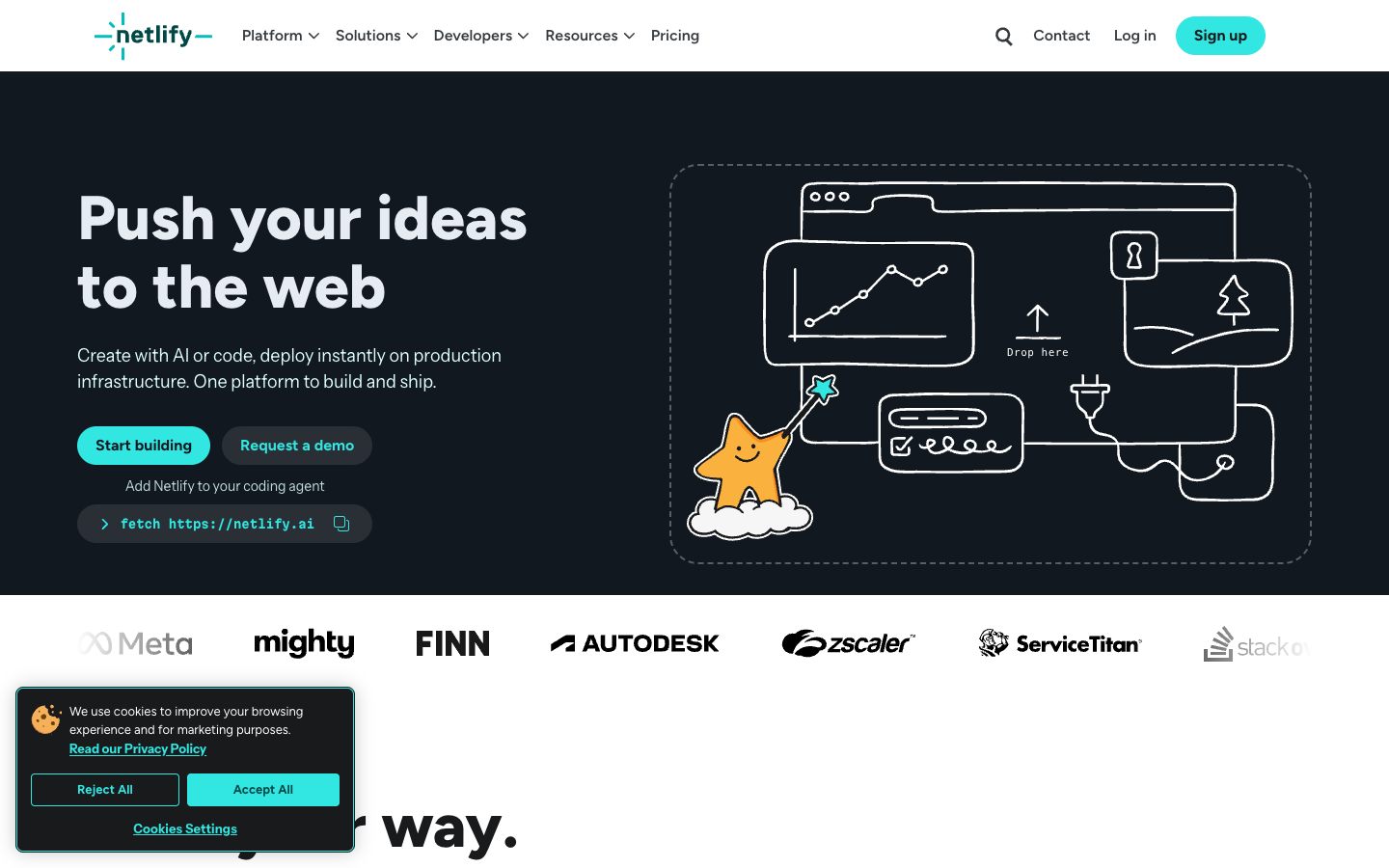
🔎 Netlify Pricing 2026: Credit-Based Plans Explained
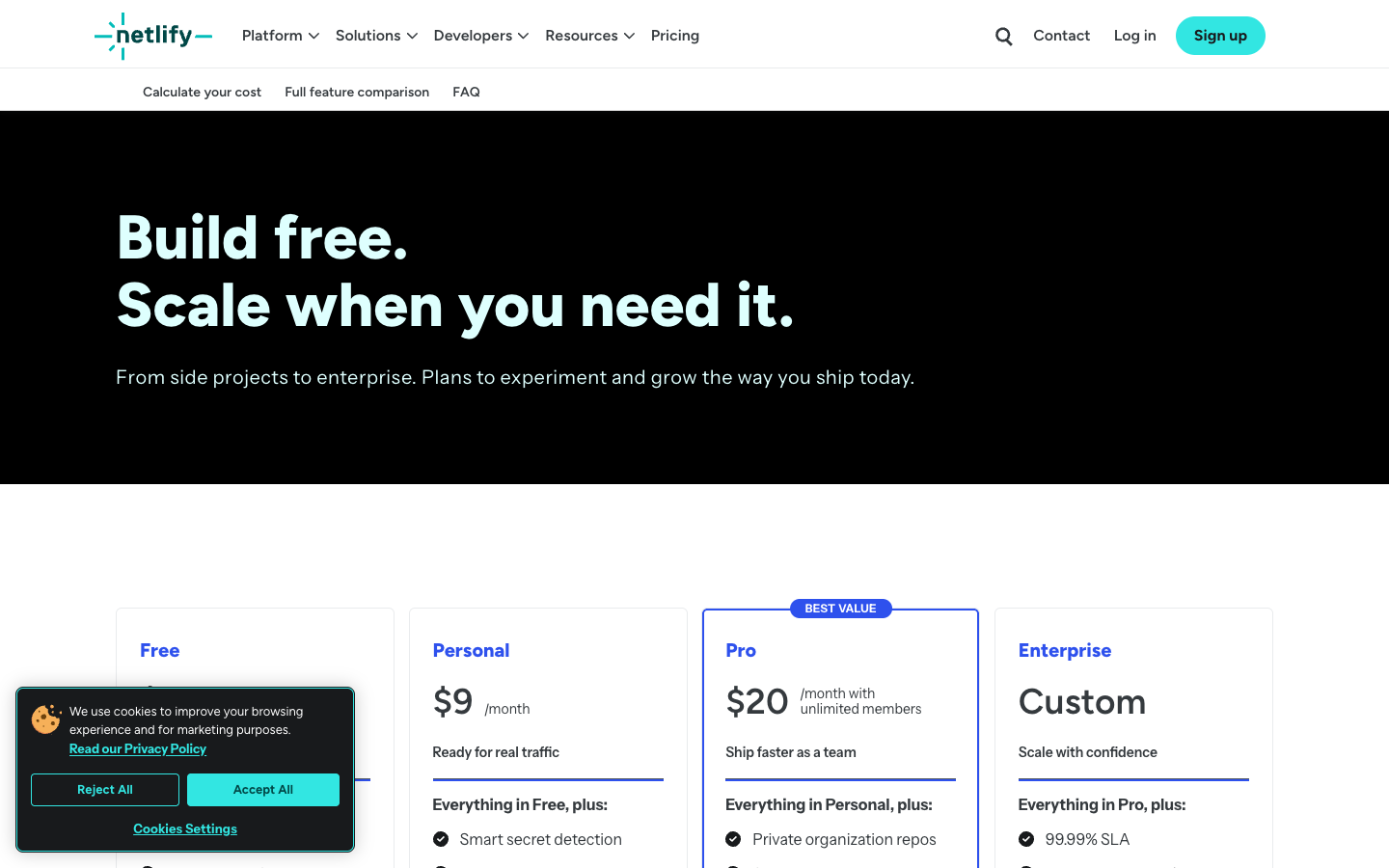
Netlify’s current pricing page shows Free at $0 with a 300-credit monthly limit, Personal at $9 per month with 1,000 credits and Pro starting at $20 per month with higher credit allocations. The current Pro page presents a starting tier around 3,000 monthly credits and selectable larger tiers. Credit consumption spans more than a simple request count, and add-on credits have separate billing policies. A visit-based credit estimate is unreliable without recorded build, request and function usage. Check the price matrix and calculator at purchase time. In this model, build and runtime credits can rise for different reasons, so a simple request count will not tell the whole billing story.
Netlify pricing 2026 has to distinguish the new credit cohorts from the legacy subscription terms held by existing accounts.
Confirm the current credit entitlement for Free, Personal or Pro and identify what happens when the balance runs out. A usage threshold and its operational consequences deserve attention before any paid campaign.
| Plan | Advertised entry | Renewal or usage model | Important boundary |
|---|---|---|---|
| Free | $0/month | 300 credits monthly | Testing and small sites; credits limited |
| Personal | $9/month | 1,000 monthly credits | Individual sites with added support |
| Pro | From $20/month | Starts at approximately 3,000 credits; tier choices | Teams and collaboration; add-ons |
| Enterprise | Custom | Contract-specific credits and support | Enterprise controls, SLAs |
🔎 Free Tier: What 300 Monthly Credits Mean
Free provides a useful way to test a small app, but a monthly credit ceiling remains a ceiling. The page advertises Git or API deployment, previews, custom domains with SSL, global CDN and access to functions and data services. Each of those features may consume different amounts of the monthly allocation depending on use. A personal portfolio with mostly cached assets is not equivalent to a frequently invoked function API. Record the available credit balance over a representative week and decide what happens if the budget is exhausted.
A Netlify free vs pro comparison should quantify requests, builds, collaboration needs and how credit exhaustion is handled.
🔎 Personal Tier: When $9 Per Month Makes Sense
Personal lists 1,000 monthly credits, priority email support, smart secret detection and a limited observability window. It can be a helpful intermediate choice for an individual deploying a real site that needs more headroom than Free, but it does not solve every collaboration constraint. If a business needs organization-wide environment variables, private organization repositories or multiple concurrent builds, evaluate the Pro requirements explicitly. Buying extra credits cannot substitute for a missing collaboration feature, and choosing a higher tier solely because one site became briefly popular may be premature.
Netlify credit based pricing reflects several usage dimensions; estimates from a single pageview metric can be badly misleading.
Protect deploy previews that contain internal information. A generated URL does not imply an access restriction, and client-side bundles should be inspected for accidentally included credentials.
| Area | Question to answer | Evidence to collect |
|---|---|---|
| Access and ownership | Who holds the domain and billing account? | Offboarding, login protection and recovery tested |
| Migration | What must survive the move? | Redirects, forms, DNS, database, assets and rollback |
| Performance | Which workload creates peak cost or errors? | Measure with consistent test conditions |
| Data and security | Which services hold customer or business data? | Permissions, backups and retention verified |
🔎 Netlify Pro: Teams, Concurrent Builds and Analytics
Pro includes the Personal capabilities and adds team-oriented features such as private organization repositories and shared environment variables. Current marketing lists at least three concurrent builds and extended analytics windows, with credit tiers determining resource allotments. The site also describes add-on purchases, so the base subscription should not be treated as an unlimited-use flat rate. Teams with several active repositories can use meaningful build credits quickly if dependencies install afresh and each commit triggers multiple deploy previews. Make build efficiency part of the cost calculation.
🔎 Legacy Billing Is Not the Same as Current Plans
Netlify introduced new credit-based plans for new customers on September 4, 2025. Existing customers could remain on earlier pricing rather than automatically being forced to migrate. This means two people using Netlify can see very different billing rules for ostensibly similar features. A review comparing the modern Free, Personal and Pro tiers must identify its account cohort and avoid applying an old legacy price table to a new signup. Before migrating a longstanding team account, compare both credit usage and feature entitlements with the official legacy documentation.
🔎 Understanding Web Requests, Builds and Function Credits
A single page view is not always one billable request: assets, functions, deploy previews, redirects and background operations can contribute to resource usage. Netlify’s pricing documentation expresses web requests in credits and lists multiple other metered categories. A documentation site with many small assets can have a different credit profile from a site with fewer visits but expensive functions. Use the account usage dashboard after a representative release to identify which categories matter. Test the effect of caching and asset bundling rather than modeling costs from visits alone.
| Situation | What changes the requirement | A useful validation |
|---|---|---|
| A documentation website goes public | The team expects thousands of monthly visits, mostly to text and images, with only occa… | Measure actual requests and build usage; compress assets and evaluate whether Free credit consumption lea… |
| A startup migrates from legacy billing | Its long-running Netlify account has different bandwidth and build allowances from the … | Keep the old plan until a measured credit simulation demonstrates cost and feature parity; document the e… |
| An Astro site has a dynamic function | Most pages are prebuilt, but one API endpoint is called on every interaction. | Measure the function invocation pattern and response caching separately from static page requests; avoid … |
| A company prepares an exit plan | The team may move platforms next year but already uses platform-specific functions and … | Document endpoints, export scripts and DNS recovery; rehearse a second deployment and quantify engineerin… |
🔎 Deploy Previews and Secure Branch Workflows
Deploy previews make review faster, but they are still deployed copies of application code. A preview that includes a production API key, private customer data or an exposed internal route creates a security problem. Use scoped environment variables, protective access controls and synthetic fixtures for review builds. Know which branches receive previews and how quickly the team can disable a stale one. A marketing team should be able to review page changes without being granted the power to alter environment secrets or bypass main-branch approvals.
For forms or backend functions, estimate requests and downstream mail or API charges separately. A visually static page may still perform substantial server-side work after a submission.
\n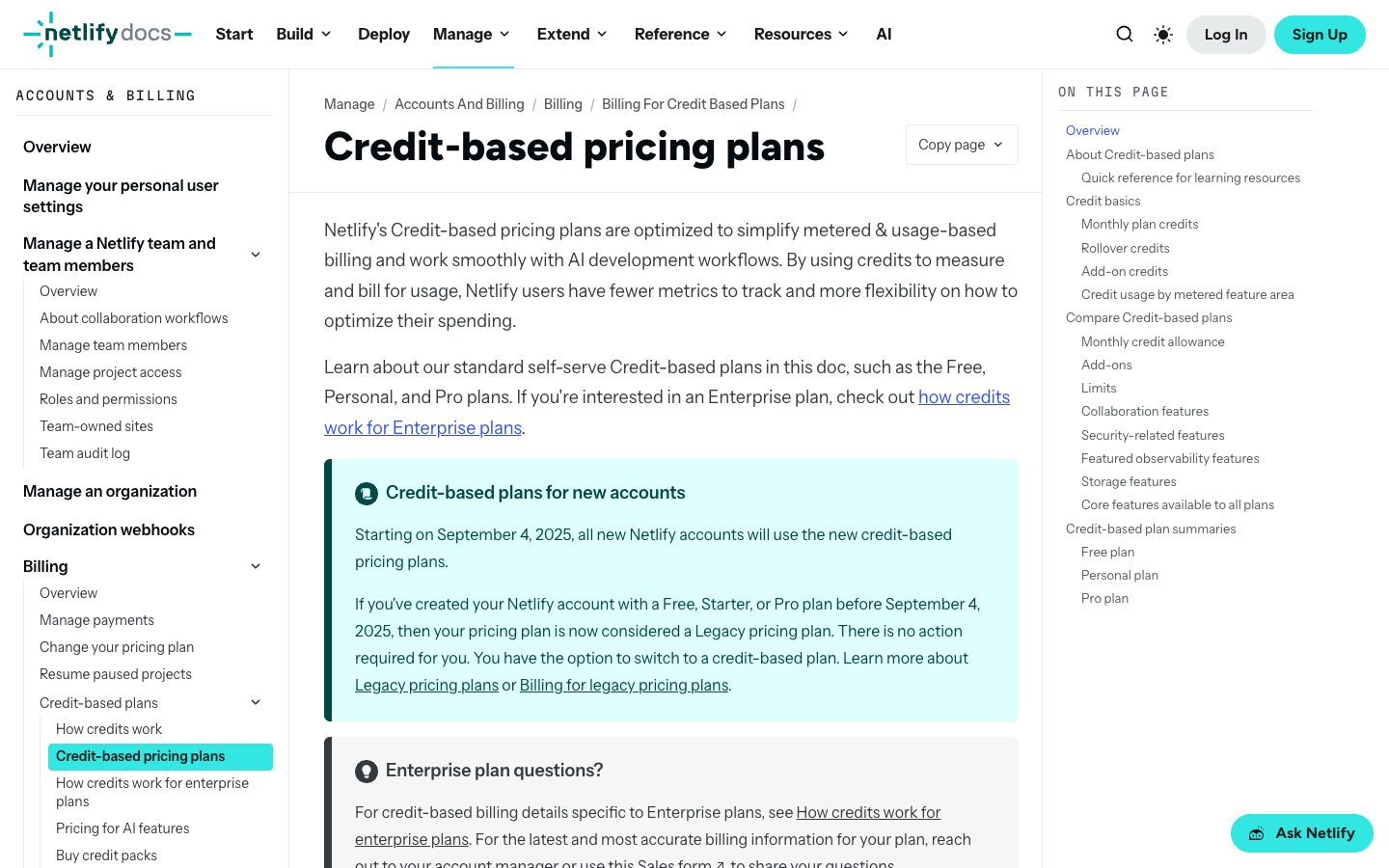
🔎 Netlify Functions and Platform Boundaries
A Netlify Function might validate a form submission or call an external API. It is a poor substitute for a worker that must run continuously. They should not be mistaken for a continuously running server. Long-running tasks need a deliberate strategy for retries, timeout handling, idempotency and durable state. If a workflow involves media processing or large batch jobs, compare a specialized worker runtime. Functions that invoke third-party APIs also generate downstream costs independent of the Netlify subscription. Monitor both parts of the bill and design useful failure responses for the frontend.
🔎 Forms, Database and Blob Storage Considerations
Netlify advertises functions, structured data and blob storage alongside deployment tools. The presence of those services does not mean every storage operation or request is free within a paid plan. Validate storage capacity, access model, consistency needs, backup export and account permissions before relying on a data service for an important application. For a contact form, test spam defense, notification delivery and data retention. For a transactional product, an external database or backend may be appropriate even if the platform offers a convenient data API.
🔎 Domains, TLS and Production DNS
Custom domains and managed TLS remove some certificate setup, but the DNS switch still needs care. Nevertheless, a successful certificate does not validate application permissions, DNS ownership or email routing. Before moving DNS, export existing MX and mail-authentication records, verify the apex and www domains and test redirects that affect search indexing. Check preview access and indexing rules; a public preview can expose unfinished pages to search engines. Establish canonical URLs and a clear rollback process, especially when the live domain has established search traffic.
Netlify deploy previews support editorial review, but they require careful access control and environment configuration.
When comparing Vercel with Netlify, do not equate a Netlify credit with a Vercel request or function-second. Measure the same application and derive each bill using that provider’s actual rate and feature entitlements.
| Provider | Primary model | Cost caveat | Best-fit evaluation |
|---|---|---|---|
| Netlify | Git deployments, credits, previews and functions | Credit-based billing; legacy differs | Static and hybrid websites |
| Vercel | Framework-aware app hosting | Pro base plus runtime usage | Next.js application teams |
| DreamHost | Shared/managed WordPress | Intro and renewal terms | Standard CMS websites |
| Namecheap | Shared hosting and domains | Hosting + domain renewals | Low-maintenance WordPress accounts |
🔎 Netlify vs Vercel and a Traditional Web Host
Netlify and Vercel solve overlapping developer problems but use different consumption models and have distinct preview, build, function and framework integrations. Vercel’s Hobby restrictions and Pro usage credit are not identical to Netlify’s Free and credit-based tiers. Traditional hosting such as DreamHost, Bluehost or Namecheap is better aligned with unmodified WordPress and PHP stacks. For a real Netlify-versus-Vercel comparison, deploy the same representative application, inspect usage and account permissions, and count the engineering effort of migration.
🔎 Costs, Portability and a Controlled Exit Plan
You can take the Git repository elsewhere. The harder parts to move are often function routes, stored form data and edge behavior. Keep an infrastructure inventory containing build commands, environment variables, domain settings, function routes and export procedures. Build a small replica on another platform before the contract becomes critical. Estimate migration from its actual dependencies and not from the assumption that redeploying static files is instantaneous. Cost estimates should include the staff time to understand credits and respond to anomalous usage.
🔎 Editorial Methodology and Sources
This Netlify review uses public pricing, vendor documentation and the September 2025 launch explanation for the credit model. It is research-based editorial work, not a signed-in production experiment or measured uptime test. Screenshots refer to publicly visible vendor materials and cannot establish customer account performance. Credit values, limits and plan eligibility may change; readers should consult the current pricing calculator and legacy-account documentation as appropriate. No undisclosed discount, paid-plan testing result or guaranteed traffic capacity is implied.
🔎 Real-World Decision Scenarios
These hypothetical Netlify situations focus on credit consumption, deployment-preview access and legacy-plan decisions. They are designed to help a buyer frame questions for a test deployment. No named customer or actual billing case has been invented as proof of platform savings.
1. A documentation website goes public
A documentation site is mostly static and appears inexpensive to operate. With Netlify’s credit model, the number of published files is not enough to forecast the next invoice. Track actual builds, asset requests and any dynamic behavior through a normal publishing month, then repeat the estimate for a major release.
For a documentation site, a light static home page can conceal costly request patterns from generated images or redirects. Observe consumption over an ordinary publishing cycle, then check how many credits a high-traffic release might require. Keep the build output small and avoid rebuilding unchanged sections unnecessarily. The monthly credit forecast should use measured usage rather than an invented requests-per-credit conversion.
2. A marketing agency runs many deploy previews
An agency creates a Netlify preview for nearly every commit. Designers like the instant review links, but build frequency and concurrent jobs now matter more than the size of the published homepage. Retire obsolete branches, check access to private previews and compare whether the higher tier removes a genuine workflow bottleneck.
An agency generating previews for every minor commit needs to consider build frequency as well as published traffic. Track how many branches are active and how long jobs occupy concurrent build capacity. Restrict review links to the appropriate clients, and retire previews after signoff. A Pro tier may solve collaboration and queueing problems that cannot be explained by the size of the homepage alone.
3. A startup migrates from legacy billing
A long-running Netlify account still has a legacy billing arrangement. Moving to the current credit plans should not be treated as a routine upgrade: export the existing invoice and entitlements, then model a quiet month and the busiest month from recorded usage. Preserve team access and observability requirements in the comparison.
A legacy Netlify account is a different financial baseline from a new signup. Export its current invoice, resource allowances and feature entitlements before trying a credit-based migration. Model one normal month and one peak month from recorded usage. If the migration would change team permissions or observability retention, include those differences alongside the headline price rather than describing the switch as an automatic upgrade.
4. A freelancer builds a form-heavy website
A conference registration form triggers spam screening and sends confirmation emails. Netlify’s form handling is only one part of that chain; a dropped downstream message can still leave an attendee without confirmation. Submit authorized test registrations, check duplicate handling and document where the attendee data is retained.
Forms create two costs: handling the platform request and delivering the resulting information reliably. Test spam filtering and email delivery while checking whether each successful registration is recorded once. Store only necessary applicant data, define retention and make failure messages useful. The apparent savings of an integrated form service disappear if a staff member must manually recover missing registrations.
5. A product team needs review access
A contractor needs to review the latest Netlify preview, not download production API credentials. Scope site access and environment values accordingly, then inspect the generated client bundle for leaked secrets. When the contract ends, revoke the person and verify that old preview links do not reveal private records.
A public preview URL is not a private document. Before external reviewers use it, ensure that production API tokens are absent and that datasets contain synthetic examples. Test access from a new browser profile, then inspect preview-specific environment variables and permissions. A contractor who can approve visual copy should not automatically gain power to modify live deployment configuration.
6. An Astro site has a dynamic function
Most pages are prebuilt, but one Netlify Function runs whenever a visitor filters a product list. The usage forecast must count that endpoint separately from ordinary CDN page views. Check whether results can be cached safely and ensure upstream errors do not create an uncontrolled retry loop.
One dynamic Astro function can dominate the resource mix of an otherwise static site. Measure how often the function executes, whether a CDN can cache safe responses, and what happens when the third-party dependency times out. Keep retries bounded to prevent a small error from multiplying requests. A credit forecast that counts only document page views will miss this behavior.
7. An event site receives a viral spike
A social campaign will briefly send far more visitors than usual. Before launching on Netlify, establish how the account handles exhausted or replenished credits and who may approve additional spending. Compress campaign assets and watch function usage; the ability to absorb traffic is as important as the promotional conversion rate.
For the event campaign, check the account’s current rules for exhausting or replenishing credits before launching the promotion. Alert the budget owner early enough to choose whether to allow more consumption. Make promotional images cache efficiently and avoid unnecessary function calls. A short traffic surge is an operational event with both financial and reliability consequences, not merely a pleasing analytics spike.
8. A developer compares Netlify to Vercel
A team comparing Netlify and Vercel has static React pages, one server-rendered route and a form. Deploy that combination on both platforms rather than comparing their tier names. Observe builds, preview access, functions and the resulting billing categories independently; a credit is not equivalent to a unit of Vercel compute.
A comparison against Vercel should use the same compiled application and test routes that reflect real behavior. Count Netlify credits separately from Vercel compute, transfer and seat charges rather than converting unlike units to a single artificial rate. Also verify branch preview access and supported function semantics. A team with mostly static files may reach a different decision from one with intensive server rendering.
9. A nonprofit stores donor-related form data
A nonprofit wants to store donor records in whichever services are already included with Netlify. Convenience should not decide the data architecture. Record the legal controller, allowed users, retention and deletion process, then test export and access revocation before collecting sensitive form submissions.
Donor forms introduce privacy and retention requirements that a deployment feature list cannot answer. Specify where submitted records are stored, which roles can see them and how exports or deletion requests are handled. Test access revocation for a former volunteer and verify backups are recoverable. Convenience is not a substitute for a documented data-protection workflow and an informed controller.
10. A company prepares an exit plan
A startup anticipates leaving Netlify next year but already depends on Functions and blob storage. Make a working second deployment before declaring the project portable. Reproduce one backend route, export a small data set, validate DNS rollback and estimate engineering time from those observed differences.
An exit plan becomes useful only after a working second deployment. Identify all platform-specific functions, blob operations and domain routing rules, then reproduce one representative request on another provider. Restore a small data export and validate redirects before projecting migration effort. That prototype helps estimate costs honestly and prevents a future move from depending on undocumented settings.
🔎 Practical Evaluation: What to Verify Before Checkout
Netlify introduced credit-based billing for new accounts in September 2025. An old team’s legacy agreement may retain different allowances, so a comparison based solely on the current public matrix could misstate its migration options. Begin with the account’s actual active contract and record the number of credits used in each category.
A Free credit allowance is not equivalent to a fixed traffic guarantee. Distinguish build activity, asset requests and function invocations to estimate how a specific website uses the monthly quota. The most helpful evidence is usage recorded after a normal publishing cycle and a realistic preview workflow.
Pro capabilities such as organization repository access and concurrent builds may matter even when a site rarely exhausts its bandwidth allocation. Identify the human collaboration requirement before choosing the next tier. Credits cannot substitute for an access-control feature that exists only on an eligible plan.
Plan a platform migration around dependent services, not merely the repository. Map environment variables, DNS, function endpoints, forms, data stores and backup exports. A vendor transition is plausible only when a representative request works outside Netlify and the team can estimate the necessary engineering time.
🔎 Vendor Sources, Research Limits and Next Steps
Consult Netlify’s credit-pricing documentation and the original announcement when deciding between a new account and a legacy plan. The monthly allowances discussed here are dated, not permanent promises. Neither support-response quality nor independent uptime has been tested for this article.
- Netlify official source 1
- Netlify official source 2
- Netlify official source 3
- Netlify official source 4

Frequently Asked Questions
Is Netlify still free in 2026?
Yes, its current Free tier advertises $0 with a 300-credit monthly limit. The useful capacity depends on the site’s real mix of builds, web requests, functions and other measured resources.
How much does Netlify Personal cost?
The current public pricing page lists Personal at $9 per month with 1,000 included monthly credits. Check the complete feature entitlement and add-on billing conditions before purchasing.
What is the new Netlify Pro price?
Netlify currently presents Pro starting at $20 per month with selectable credit allocations, rather than one universally fixed usage allowance. Consult the active tier selector and checkout for the exact total.
What are Netlify credits?
Credits are the unit of the new billing model across different platform resource categories. There is no reliable universal conversion from credits to page visits without understanding requests, builds, compute and services.
When did Netlify introduce credit-based pricing?
Netlify announced the new credit-based model for accounts created from September 4, 2025. Existing customers may remain on legacy plans, so their invoices are not necessarily comparable to new signup tiers.
Can existing Netlify customers keep legacy plans?
The company said existing customers could retain their current legacy plans without forced migration. Check the account’s present agreement and current migration options instead of assuming automatic conversion.
Does Netlify include preview deployments?
Yes, deploy previews are central to its workflow. Protect staging environments, use synthetic data and restrict secrets; a preview URL can still expose information if a team treats it like a private file.
Are Netlify Functions always free with a paid plan?
Feature access is not the same as unlimited usage. A plan includes a credit allocation, and functions can contribute to consumption alongside requests and builds. Monitor real behavior.
How is Netlify different from Vercel?
Netlify emphasizes a credit-based plan family for new accounts; Vercel has its own base fee and usage structure. Compare the same framework, team needs and production workload rather than headline prices.
Can Netlify directly host an ordinary PHP WordPress installation?
It is not a conventional PHP shared-hosting account. A WordPress application would need a different hosting model or a deliberately designed headless architecture using Netlify for a frontend.
Did DigiOffly measure Netlify uptime or support response times?
No. This is a research-based comparison of vendor documentation and plan structures, not a paid production account test or verified service-performance benchmark.
EXPLORE NEXT ON DIGIOFFLY
🔍 Explore More on DigiOffly
Compare hosting, platform operations, deployment needs and total cost before choosing a provider.
Hosting and website software
- Hosting & Websites — Check requirements, alternatives and pricing considerations
- Software Directory — Check requirements, alternatives and pricing considerations
- Ready-Made Software Stacks — Check requirements, alternatives and pricing considerations
Decision tools
- Compare Software — Check requirements, alternatives and pricing considerations
- AI Software Finder — Check requirements, alternatives and pricing considerations
- Software Cost Calculator — Check requirements, alternatives and pricing considerations
Related hosting reviews
- WP Engine — Check requirements, alternatives and pricing considerations
- Bluehost — Check requirements, alternatives and pricing considerations
- WordPress.com — Check requirements, alternatives and pricing considerations
- DigitalOcean — Check requirements, alternatives and pricing considerations
- Vercel — Next.js deployment previews and commercial hosting costs
- Namecheap — domain registration, Stellar cPanel hosting and 2026 renewals
Pricing and feature eligibility can change; confirm directly before purchase.