

Namecheap review — October 2026. Three Stellar tiers, a separate domain invoice, and a renewal change announced in May make the buying decision less obvious than the homepage suggests. Alex Wright checked the published documentation for this article. We did not create or benchmark a paid Namecheap hosting account.
Namecheap review 2026: Stellar hosting looks inexpensive beside a new domain registration, but these are separate purchases with different renewal dates. The May 2026 changes make the published annual Stellar renewal rates more useful than a temporary signup offer. We’ll look at what cPanel actually includes, where EasyWP differs, and when a company should leave its domain at Namecheap but host somewhere else.
A domain registered at Namecheap can point to a completely different web host or email provider. That separation gives an owner flexibility, but only if the team keeps DNS records, registrar recovery access and renewal responsibilities documented.
🔎 Review Summary and Editorial Fit
Someone who already manages domains at Namecheap may appreciate having a cPanel website in the same account. But the domain remains a separate asset. Compare the published Stellar renewal rates with the cost of backups, mailboxes and the technical time needed to move later. That produces a clearer choice than the size of a promotional discount.
A Namecheap login can contain a domain, shared hosting and email, yet each service may renew on a different date. The registrar account may stay at Namecheap while DNS points to a different host. That flexibility is useful for a growing business, but only if ownership, records and service renewals have been documented before a migration.
🧭 Contents and Navigation
Jump to pricing, technical constraints, practical scenarios, comparisons and official sources.
🔎 Quick Verdict: Good for a Simple Domain-and-Site Stack
Namecheap is convenient when an owner already manages domains there and wants a familiar cPanel account for a WordPress installation. The attraction is weaker if a buyer expects all security products, business email subscriptions and SSL renewals to be free forever. A production app that needs custom deployment control should be evaluated on a different platform. For an informational website, a realistic comparison should include site count, database needs, domain renewals, a tested backup path and the actual post-promotion hosting invoice.
This Namecheap review 2026 separates domain registration decisions from the operational trade-offs of a basic hosting account.
🔎 What Namecheap Offers Beyond Domain Names
Namecheap sells domain registrations, standard shared hosting, EasyWP managed WordPress, email products and other infrastructure. These are different products with separate restrictions and often separate billing. The Stellar product family is shared hosting with cPanel, which is useful for traditional PHP and WordPress workflows. EasyWP simplifies part of WordPress management but should not be conflated with the same architecture or control panel. Keeping a domain at Namecheap while hosting elsewhere is also a legitimate arrangement, provided the DNS and renewal ownership are documented.
\n
🔎 Namecheap Hosting Pricing 2026 and Renewal Policy
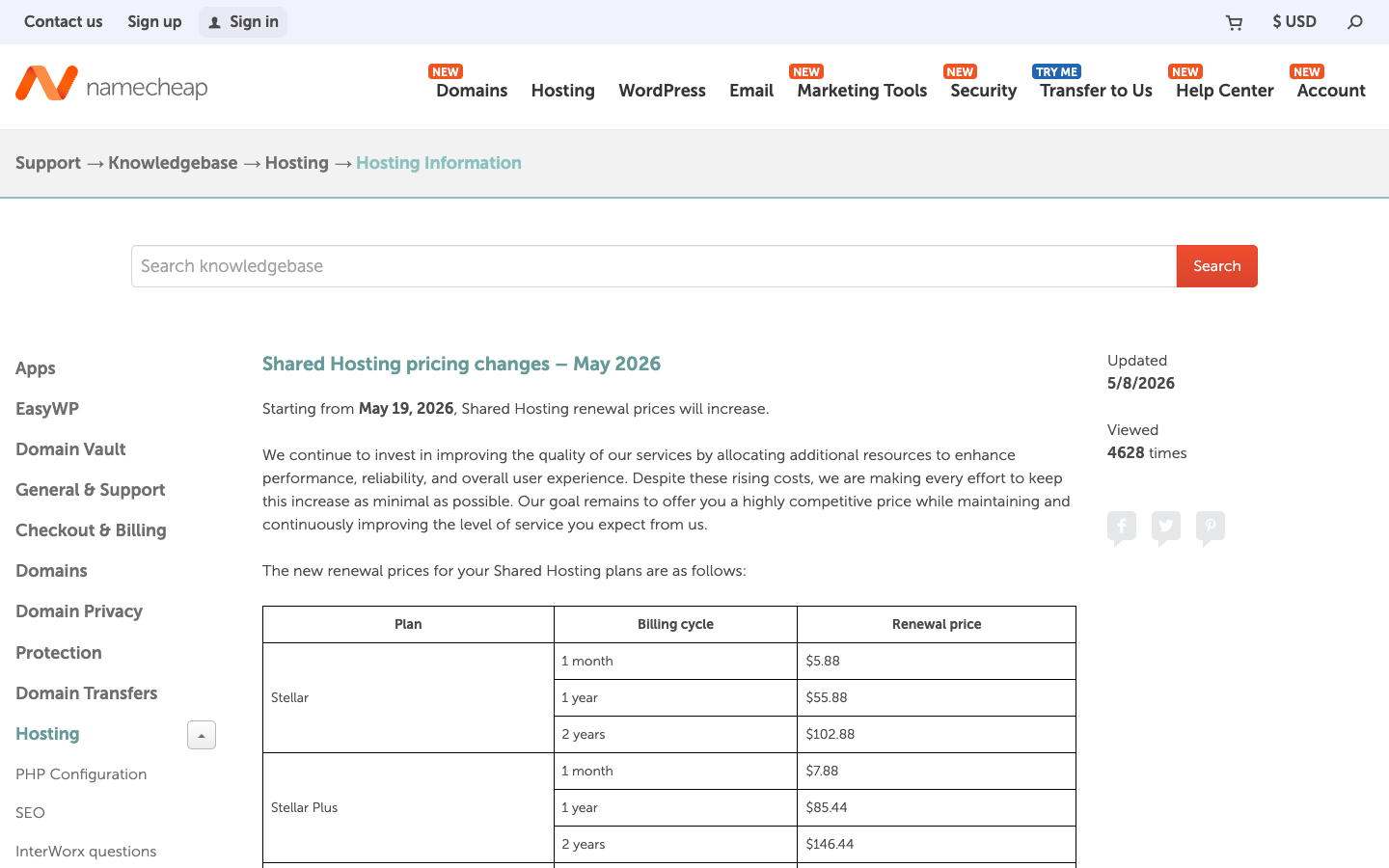
Price presentation varies by selected billing term and promotion. An official Namecheap support notice dated May 8, 2026 says renewal changes apply to invoices issued on or after May 19. It lists Stellar at $5.88 monthly or $55.88 for one renewal year; Stellar Plus at $7.88 monthly or $85.44 annually; Stellar Business at $11.88 monthly or $128.88 annually. These renewal rates are not a universal first-purchase price. A user must inspect the exact checkout for initial order, VAT or sales tax, promotional conditions and any extension of the initial term.
Namecheap hosting pricing differs between promotions and renewals, so a three-year cash comparison matters more than the introductory banner.
Confirm whether the selected Namecheap Stellar plan supports the number of actual domains and storage required today, then leave headroom for backups and thumbnails. Do not infer unrestricted compute from unmetered advertising.
| Plan | Advertised entry | Renewal or usage model | Important boundary |
|---|---|---|---|
| Stellar | First purchase: verify checkout | $55.88 yearly renewal | 3 domains; 20 GB SSD |
| Stellar Plus | First purchase: verify checkout | $85.44 yearly renewal | More domains; unmetered SSD subject to policy |
| Stellar Business | First purchase: verify checkout | $128.88 yearly renewal | 50 GB SSD; enhanced shared tier |
| Domain registration | TLD and promotion vary | TLD-specific renewal | Separate billing and registrant ownership |
🔎 Stellar vs Stellar Plus vs Stellar Business
Namecheap’s published comparison lists Stellar with 20 GB SSD and three hosted domains; Stellar Plus is marketed with unmetered SSD and more hosted domains; Stellar Business advertises 50 GB SSD with additional resources. Unmetered storage must be read with acceptable-use and inode restrictions rather than interpreted as infinite capacity. A database-heavy store should not choose a plan only from the number of websites allowed. Count storage, file count, peak resource demands, admin permissions and expected concurrent users before selecting the tier.
Namecheap Stellar Plus is worth considering when a basic plan lacks the documented storage or domain allowance a project actually needs.
🔎 Domain Registration: Introductory Deals vs Renewal
Domain prices vary by top-level domain, registration term, promotion and registry rules. A low first-year .com promotion may not be representative of the second-year renewal, and premium domain pricing is a separate topic. Record domain renewal separately from web hosting and keep the registrant contact current. Ownership matters more than dashboard convenience: the company or founder should control the registrar account, transfer authorization and access recovery details. If an agency manages registration, confirm who can unlock and transfer the name when the relationship ends.
Namecheap Stellar Business should be evaluated for its own resource policy rather than treated as a guarantee of dedicated server performance.
Distinguish a first-year SSL allocation from lifetime certificate coverage. Check the certificates attached to the apex and www hosts and whether renewal automation is included for the current contract.
| Area | Question to answer | Evidence to collect |
|---|---|---|
| Access and ownership | Who holds the domain and billing account? | Offboarding, login protection and recovery tested |
| Migration | What must survive the move? | Redirects, forms, DNS, database, assets and rollback |
| Performance | Which workload creates peak cost or errors? | Measure with consistent test conditions |
| Data and security | Which services hold customer or business data? | Permissions, backups and retention verified |
🔎 WordPress via cPanel or EasyWP
Shared hosting provides a familiar control environment and WordPress installation tools, which can be useful for ordinary blogs and brochure sites. EasyWP is a distinct managed offering with a different administration experience and compatibility considerations. Evaluate whether the site requires custom PHP extensions, staging, special caching or low-level cron settings before moving between products. A WordPress migration should be tested on an exact clone with the current theme, forms, image library and payment integrations. A generic install wizard does not prove that a complex live site will work unchanged.
🔎 SSL Certificates and Security Layers
Namecheap advertises 50 free standard SSL certificates for one year on shared hosting in its hosting material. That is not the same as guaranteeing that every possible certificate is free at renewal or that a website is protected from account compromise. Confirm the type of certificate attached to each domain, the automation for renewal and what happens if DNS verification fails. Keep WordPress, plugins and PHP current; minimize shared administrator credentials; enable available account protection; and store an independent backup outside the hosting space.
🔎 Professional Email and DNS Deliverability
The registrar interface can manage DNS independently of where mail is hosted. A domain used for customer inquiries needs valid MX, SPF, DKIM and DMARC records, not merely a mailbox with an attractive name. When switching hosting or email products, verify mail routing before and after DNS propagation. If shared hosting lists included email accounts, inspect storage, sending limits and spam-control policies for the actual plan. A business with sales workflows may need a dedicated email provider even when a bundled mailbox is technically available.
| Situation | What changes the requirement | A useful validation |
|---|---|---|
| A freelancer registers several client domains | The designer controls registration for four customers, each of whom owns different lega… | Set each owner as the appropriate registrant, document transfer procedures and schedule renewal reminders… |
| A WordPress site changes its DNS provider | The domain is at Namecheap, hosting is on another service and email uses a separate Saa… | Export every DNS record before edits and validate MX, SPF, DKIM, DMARC, web redirects and the www host af… |
| An agency transfers old cPanel accounts | The inherited site has multiple databases, aliases, subdomains and mailboxes not obviou… | Inventory every dependent service and rehearse a full export-and-import with access restrictions; keep th… |
| A developer expects to host background services | The WordPress site is fine but a separate custom queue worker requires shell access and… | Keep shared hosting for appropriate web content, and put the worker on a runtime designed for its process… |
🔎 Backups, Data Export and Migration Planning
Before moving a live site, inventory every hosted domain, subdomain, database, email mailbox and cron job. Export an application-consistent database snapshot and verify that media and configuration files are present. The advertised hosting backup system should be assessed for retention and restore access, not treated as an unlimited archival service. Test contact forms, checkout notifications and redirects on a staging URL. Preserve the old host until the DNS change has settled and the new provider has successfully delivered real business transactions.
Before moving a store, review cPanel databases, scheduled jobs and mailboxes in addition to public HTML files. Test submission emails and payment callbacks on staging. A backup archive without a restore rehearsal is not a migration plan.
\n
🔎 Shared Hosting Performance: What Marketing Cannot Prove
Shared servers divide underlying resources among customers. A site with thousands of cached views may behave better than one with far fewer requests that repeatedly runs an expensive plugin query. Any claim that Namecheap is faster than another host would require identical installations and repeated measurements. This article does not make that claim. This review does not claim a paid Namecheap account or independent uptime testing. Website speed should be treated as a measurable project outcome rather than a property guaranteed by the word SSD.
🔎 What Unmetered Means and What It Does Not
The support matrix uses unmetered bandwidth across shared plans and unmetered SSD language on some tiers. Unmetered storage does not remove the plan’s file-count, CPU or database restrictions. Video archives, raw backups and large software downloads may be a poor fit for normal shared hosting even when transfer allowance looks generous. Use object storage and a CDN where appropriate, and review the acceptable-use policy before promising customers that the plan can store or serve any amount of content.
🔎 Namecheap vs DreamHost, Bluehost and Hostinger
Match each competitor by purchase term and actual product class. DreamHost’s current web-hosting presentation makes first-year and renewal figures relatively explicit, while Namecheap publishes a dedicated renewal-policy notice. Bluehost and Hostinger may have a different included-site count, support model or add-on policy. Domain registration and web hosting are separable: buying a domain from Namecheap does not require placing the website there. The best choice depends on operating workflow, migration burden and second-year cash expense, not a single heavily discounted price label.
Namecheap renewal prices must be interpreted with the official May 2026 notice and the precise billing cycle on the customer invoice.
Compare the full renewal cost against DreamHost or Hostinger with identical term, domain and email assumptions. The percentage advertised on a signup page is not itself evidence that the ongoing subscription is cheaper.
| Provider | Primary model | Cost caveat | Best-fit evaluation |
|---|---|---|---|
| Namecheap | Shared hosting plus domain registrar | Separate renewals; published 2026 increase | Domain-and-WordPress buyers |
| DreamHost | Shared WordPress, DreamPress, VPS | Intro vs renewal changes by contract | Traditional business websites |
| Hostinger | Shared / managed web hosting | Review term, renewal and add-ons | Budget WordPress sites |
| Netlify | Git-native deployment | Credits for usage | Static and modern frontend apps |
🔎 When Another Platform Is Better
For a static website deployed from a repository, a Git-native platform such as Netlify may remove the need for a traditional control panel. For a Next.js application with server-rendered routes, Vercel offers a different deployment model and an explicitly metered cost structure. For a site requiring complete server access, a VPS or dedicated environment is more fitting than shared hosting. Conversely, teams that need several simple WordPress sites with regular editors may prefer a conventional host that provides easy account onboarding and predictable renewal handling.
🔎 Editorial Methodology and Purchase Checklist
This review is an editorial analysis of public Namecheap documentation, the published May 2026 renewal notice, service descriptions and comparable hosting alternatives. It has not bought a live hosting subscription or established a benchmark. The site screenshots are sourced from public vendor pages, not a private dashboard. Before purchase, ask for the exact first invoice and renewal amount, check which domains and SSL certificates are covered, verify acceptable-use conditions and put a rehearsed backup plan into the operational budget.
🔎 Real-World Decision Scenarios
These are hypothetical Namecheap domain-management and shared-hosting cases. They examine cPanel migration pitfalls, security boundaries, mailbox deliverability, file capacity and continuity of domain ownership. No fictional customer is being cited as evidence of the product’s actual reliability.
1. A freelancer registers several client domains
A designer registers four customer domains in one Namecheap dashboard. Each domain must still have the correct owner, renewal contact and documented transfer process. Agency convenience is secondary to the clients’ ability to recover their names when the contract ends; sharing one personal mailbox for all recovery notices creates avoidable risk.
At a small agency, domain ownership is the risk that survives a website redesign. Store the actual registrant details and renewal contact for each client, and confirm how a transfer authorization code can be issued after a contract ends. A single employee’s private inbox should not be the sole recovery method for four unrelated businesses. Document access without distributing a shared registrar password.
2. A small shop upgrades from Stellar
A small WooCommerce shop becomes sluggish during holiday discounts. Moving from Stellar Plus to Stellar Business at Namecheap might provide more resources, but only a staging checkout test can establish whether an expensive query is responsible. Count slow database calls and verify inventory updates before paying for an upgrade.
The store’s seasonal slowdown needs a profile of checkout and product database queries, not a guess from the label Stellar Business. Identify processes that consume resources when shoppers add items to carts. A plan upgrade may increase available headroom, while a faulty theme extension can remain the root cause. Use a test environment to separate those two explanations.
3. A WordPress site changes its DNS provider
The registrar is Namecheap, the website lives elsewhere and a separate SaaS company handles mail. Changing the website’s DNS does not authorize replacing MX or DKIM records. Export the current zone first, then validate both the apex and www hosts and send a real test message from the existing mail service after the change.
Namecheap can remain the registrar while another service handles website and email traffic. Record the current zone as machine-readable data before switching the site’s A and CNAME records. Then query authoritative DNS for both the apex and www versions, and send a real test message through the existing mail service. A homepage loading successfully does not prove the mail cutover succeeded.
4. A client confuses SSL with website security
An owner sees an SSL badge and assumes that plugin security is covered. Namecheap may supply certificates, but TLS cannot prevent a stolen WordPress password from changing site content. Enable two-factor authentication, review administrator roles, and document who applies plugin patches and restores a compromised installation.
When a certificate appears valid, inspect the renewal dates and the specific hosts it covers, including www and necessary subdomains. TLS only encrypts the connection: a compromised WordPress administrator can still modify checkout or inject a malicious script. Assign responsibility for updates and account recovery. Whether an SSL certificate is promotional or continuously included should be checked at the relevant renewal.
5. A creator wants inexpensive portfolio hosting
A photography portfolio uploads full-size originals alongside hundreds of CMS thumbnails. On Namecheap shared hosting, disk usage and file-count limits can matter before page-view traffic becomes significant. Keep masters in separate storage, publish appropriately sized images and move long videos to a suitable streaming service.
A photographer can consume a 20 GB hosting allowance before attracting much traffic. Keep master images out of the web account, generate display-sized copies and check how thumbnails multiply across CMS dimensions. For embedded videos, an appropriate streaming host can reduce storage and transfer pressure. This test is more informative than choosing Stellar Plus simply because its storage description uses unmetered terminology.
6. An agency transfers old cPanel accounts
The previous developer left behind cron jobs, subdomains and forwarding addresses that are not visible on the homepage. A Namecheap cPanel migration must inventory those dependencies before copying the main WordPress directory. Rehearse the transfer with an isolated database and only retire the former host after forms, mail and scheduled tasks are verified.
The previous cPanel account might contain cron tasks, forwarding rules and development subdomains that nobody remembers. Inventory home directories, database credentials and hidden DNS dependencies before taking a backup. Restore the copy under temporary hostnames and test redirects and contact forms. A successful transfer of public pages alone could still leave an automated invoice or customer notification broken.
7. A nonprofit renovates its email setup
A nonprofit relies on volunteers forwarding shared inboxes to personal email accounts. Before moving mail to or from Namecheap, record who is entitled to read each address, how access is revoked, and which messages need retention. Fix sender authentication and recovery-address dependencies during the migration rather than treating email as a website add-on.
A nonprofit’s mail migration should begin with an inventory of authorized users rather than forwarding everything into volunteers’ personal accounts. Determine which shared inboxes need retention, authentication and handover procedures. Preserve the sending reputation by updating SPF, DKIM and DMARC only after confirming the new sending service. Check that password recovery for the registrar does not depend on the mailbox being migrated.
8. A blogger considers EasyWP
A WordPress blog uses a plugin that depends on cron jobs and direct access to particular files. Namecheap EasyWP is not automatically equivalent to the existing cPanel account. Inspect which server settings and plugin behaviors the managed environment supports, then test those dependencies on a copy before making the switch.
EasyWP may eliminate some configuration work for a simple blog but change access to files, scheduled jobs and custom extensions. Before committing, inventory plugins that rely on special PHP modules or server configuration. Make a staging copy, test edits and backups, and list what can no longer be controlled directly. A managed offering becomes a liability when its conveniences obstruct an essential workflow.
9. A new company compares three hosting invoices
Three hosting advertisements use different promotional durations. Namecheap can only be called cheaper after the comparison uses a common 24-month period and includes domain renewal, mail, backups and any certificate charges. Save the actual Namecheap invoice and renewal notice rather than relying on the promotional banner.
The correct comparison starts with an agreed duration and includes domain, mail, backup and SSL renewals as separate items. A low introductory cPanel price cannot be compared fairly with a competitor’s post-promotion invoice. Keep taxes and currency assumptions visible. If the selected term is unusually long, also calculate the cost of leaving early or paying for a migration twice.
10. A developer expects to host background services
The marketing site works well on Namecheap shared hosting, but a separate application needs a permanently running queue worker. Keep the WordPress frontend where it belongs and deploy the worker on infrastructure that supports reliable restarts and logs. Upgrading a shared account is not a replacement for a process supervisor.
A standard shared WordPress account should not be expected to run a durable queue worker. The site may continue serving pages from Namecheap while the background process executes on a separate service with monitoring and retries. Test the communication between them and protect API keys. That split is more reliable than trying to disguise a long-running job as a scheduled page request.
🔎 Practical Evaluation: What to Verify Before Checkout
The May 2026 renewal notice is a more appropriate source for recurring Stellar costs than a promotional banner. Read the renewal date, selected billing cycle and domain-specific charges independently. A customer buying multiple domains may have several renewal dates that do not coincide with the shared hosting subscription.
Namecheap’s cPanel and EasyWP products should be evaluated as different administrative environments. An ordinary WordPress install is not a complete compatibility test for plugins that depend on unusual PHP features or file system access. Document requirements before deciding whether the management conveniences of EasyWP are worth changing infrastructure.
The published comparison table describes storage and domain allowances, but it cannot establish peak database performance for a particular shop. A useful pilot loads representative assets and exercises checkout with a staging payment mode. File count, cache behavior and concurrent work may matter more than a simple label such as unmetered.
A transfer plan should separate domain registration, DNS hosting, mail delivery and WordPress data. Verify who holds the registrar login, which account receives authorization codes and how MX, SPF, DKIM and DMARC are preserved. Those dependencies can cause business interruption even when the migrated homepage looks correct.
🔎 Vendor Sources, Research Limits and Next Steps
Namecheap’s official shared-hosting matrix and its dated renewal announcement are linked below. Readers should confirm first-purchase totals and ongoing charges on their own accounts. Nothing in this review implies a completed payment, support trial or independent reliability benchmark.
- Namecheap official source 1
- Namecheap official source 2
- Namecheap official source 3
- Namecheap official source 4

Frequently Asked Questions
Is Namecheap only a domain registrar?
No. It also offers standard shared hosting, managed WordPress and email products. These products may have different billing and administrative conditions, so buying a domain there does not mean the website must be hosted there.
What are Namecheap Stellar renewal prices in 2026?
The official May 2026 notice lists Stellar at $55.88 per year, Stellar Plus at $85.44 and Stellar Business at $128.88 for annual renewals. First-time checkout promotions are separate and may change.
Can I host multiple websites on Stellar?
The official comparison lists three hosted domains with the entry Stellar tier, while higher tiers advertise broader capacity. Count real WordPress installations, databases and maintenance responsibilities before choosing based on site limits.
Is Stellar Plus truly unlimited storage?
The plan advertises unmetered SSD, which should be read alongside reasonable-use and file-count conditions. It does not mean unbounded CPU, backups, application storage or sustained database workloads.
Does Namecheap include SSL for free forever?
The provider advertises a first-year allocation of free standard SSL certificates with shared hosting. Confirm renewal automation and applicable certificate terms; HTTPS also does not replace security updates or access control.
Is EasyWP the same as cPanel shared hosting?
No. EasyWP is a distinct managed WordPress product and may offer different plugin, file-access and workflow capabilities. A site with unusual extensions or cron dependencies should test compatibility before moving.
Does a cheap domain promotion fix future registration prices?
No. Registry rules, TLD and renewal pricing determine future domain expenses. Save the checkout terms and calendar renewal dates independently from the web-hosting invoice.
Can I use Namecheap for the domain and another host for the website?
Yes. Point the relevant DNS records to the chosen host while retaining registrar control. Keep email authentication and MX records intact so that a website migration does not interrupt important mail.
What should I test before moving WordPress to Namecheap?
Verify databases, plugins, uploads, canonical links, redirects, backups, email notifications, and checkout if applicable. Keep a working rollback path and use staging rather than copying a production site without validation.
Is Namecheap better than DreamHost or Hostinger?
That depends on the required stack, initial and renewal prices, support scope, allowed resources and account ownership. A useful comparison normalizes a two-year cost rather than comparing unrelated promotional terms.
Did DigiOffly purchase Namecheap shared hosting for this review?
No. This editorial assessment uses accessible company documentation and the published 2026 renewal schedule, without claiming a private account trial, independent speed measurement or customer support test.
EXPLORE NEXT ON DIGIOFFLY
🔍 Explore More on DigiOffly
Compare hosting, platform operations, deployment needs and total cost before choosing a provider.
Hosting and website software
- Hosting & Websites — Check requirements, alternatives and pricing considerations
- Software Directory — Check requirements, alternatives and pricing considerations
- Ready-Made Software Stacks — Check requirements, alternatives and pricing considerations
Decision tools
- Compare Software — Check requirements, alternatives and pricing considerations
- AI Software Finder — Check requirements, alternatives and pricing considerations
- Software Cost Calculator — Check requirements, alternatives and pricing considerations
Related hosting reviews
- WP Engine — Check requirements, alternatives and pricing considerations
- Bluehost — Check requirements, alternatives and pricing considerations
- WordPress.com — Check requirements, alternatives and pricing considerations
- DigitalOcean — Check requirements, alternatives and pricing considerations
- DreamHost — WordPress shared hosting, DreamPress and renewal-price comparison
- Vercel — Next.js deployment previews and commercial hosting costs
- Netlify — Git deploys, credit-based pricing and web functions
Pricing and feature eligibility can change; confirm directly before purchase.