

Pricing reference: Checked against the live Pipedream pricing page and official documentation on October 14, 2026. Pipedream’s public offering now emphasizes Connect and agent integrations. Older Workflow plan guides can describe a different product surface and historic plan names. We distinguish them rather than combine incompatible subscription tables.
Editorial disclosure: DigiOffly independently evaluates published product information and reproducible buying scenarios. We have not purchased a Pipedream subscription, benchmarked API latency, audited its infrastructure, or operated a customer’s production integration. Illustrations in this article are analytical examples, not purported first-hand test results.
This Pipedream review addresses two different readers who often end up on the same pricing page for different reasons. One wants to automate a few internal processes with code steps and prebuilt triggers. The other is building an AI agent or SaaS application and wants customers to connect Gmail, Slack, Notion, HubSpot and hundreds of other services without the engineering team maintaining thousands of OAuth integrations. These jobs overlap technically, but they are not the same purchase.
Pipedream developed a following around event-triggered workflows, hosted execution and developer-friendly JavaScript and Python steps. Its contemporary home page and public subscription table put Pipedream Connect at the center: managed authorization, prebuilt API actions, triggers, MCP tools and a production environment for external users. A practical review must take both histories seriously without treating old Free, Basic or Advanced limits as guaranteed current checkout prices for a new Connect account.
The attraction is real. A small software team can focus on application logic while an integration layer coordinates third-party authentication and predefined operations. The challenges are equally real: external-user identity, credit accounting, permissions, retries, webhook delivery, token revocation and the extra burden of reconciling a partially completed action. Those become more consequential once a connector is used by customers rather than by one employee.
Our verdict is conditional. Pipedream can be particularly compelling when the actual problem is building integrations into your own product, especially an agent that needs per-user authorization. For simple office automations, evaluate the supported Workflow experience and account-specific billing before assuming the new Connect price applies. For organizations with no engineering ownership, a more visual platform may be easier to maintain. Below, we unpack those distinctions and show how to estimate meaningful costs.
🎯 Pipedream at a Glance: Best Fit and Buying Risks
Best fit: Software developers, SaaS builders and AI-agent teams that need managed authentication and programmable access to external applications, including per-user connections. The tool can also suit technically comfortable operations teams building event-driven integrations, subject to the workflow features and plan available to their accounts.
Current public pricing: Free development access; Startup at $99 per month billed annually or $150 month-to-month; Business with a custom annual agreement. These are the live Connect-focused prices reviewed in October 2026, not a comprehensive quote for a historic Workflow subscription.
Included Startup allowance: 100 external users, then $2 per additional user per month, and 10,000 Connect usage credits per month, then $0.012 per additional credit at the listed rate. Third-party API charges, taxes and additional contractual terms are separate.
Important distinction: An external user is a distinct person in your product who connects at least one account through Connect. They are not simply an internal colleague with access to the Pipedream workspace. The public table separately lists unlimited team members.
Primary operational risk: Confusing a successful API call with a completed business operation. A connector can execute correctly while your application incorrectly matches a customer, performs a duplicate update or loses context during retries.
DigiOffly verdict: Shortlist Pipedream when managed integration infrastructure is strategically useful. Do not purchase it merely because a comparison table lists thousands of apps; verify the particular actions, authorization requirements, cost meters and fallback paths your product needs.
🧭 What Pipedream Is in 2026: Workflows, Connect and Agents
Pipedream’s identity cannot be compressed into “Zapier for developers” without losing the purchasing context. Its earlier workflow product emphasized trigger-driven automations, code steps, serverless execution and an accessible development experience. Its present public marketing emphasizes Connect, a service that helps developers expose many third-party integrations inside software products and AI agents.
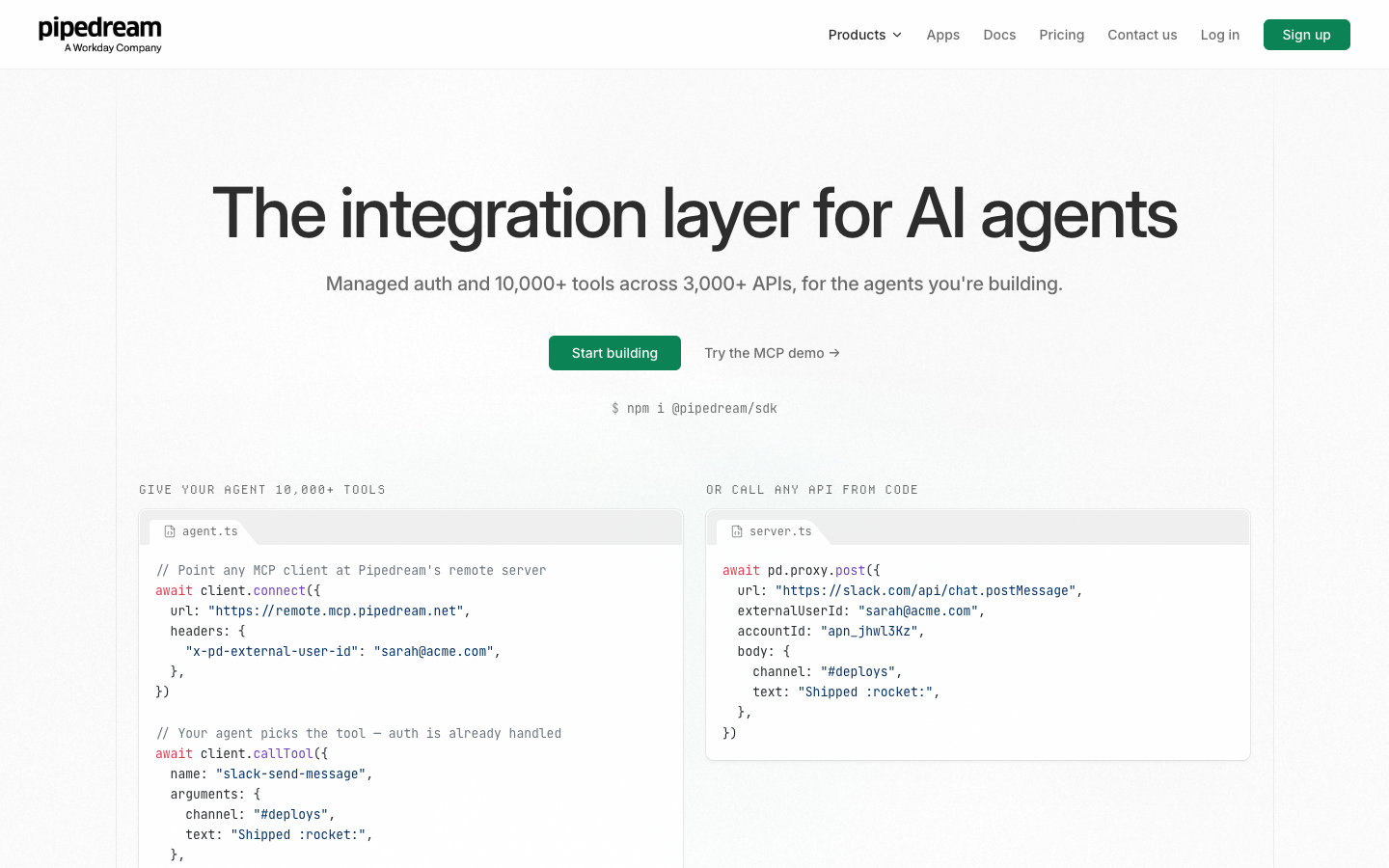
In a conventional Workflow design, an event starts a sequence of steps: an HTTP request arrives, a record is checked and a notification is sent. The developer may insert code between prebuilt actions. In a Connect design, your application asks Pipedream to perform a supported action on behalf of one of your users, using an account that user has authorized. This changes the surrounding responsibilities, identity model and potential bill.
The current pricing page calls out managed authorization for more than 3,000 APIs and over 10,000 prebuilt tools and triggers. The live app registry exposes counts that can change as providers add or remove components. These numbers describe catalog breadth, not a promise that every provider endpoint or field is supported by a ready-made action.
Pipedream also provides MCP access, which is useful for agent tools. A connected user authorizes an application; an agent or backend can then invoke operations under that specific user’s scope. MCP support does not eliminate the need to define what the agent is allowed to do, how it decides to act, or who approves consequential changes.
For teams already using older Workflow subscriptions, the important point is continuity rather than nostalgia. Historic Workflow pricing documentation describes credits per workflow execution, daily limits and plan names not reproduced in the present Connect-focused table. An existing customer’s workspace may still expose workflow-specific entitlements. Inspect that account’s billing screen and vendor terms before migrating or estimating a renewal.
Treat Connect and Workflows as related product capabilities with potentially different commercial boundaries. The technical ideas transfer; a price table copied from one into the other may not.
🔌 Managed Authentication: A Real Infrastructure Shortcut
Authentication is a large part of the hidden cost of integrations. Each third-party provider has different OAuth screens, token lifetimes, refresh behavior, permission scopes, approval policies and failure modes. Writing a single API call can be easy; keeping hundreds of customer connections healthy across policy changes is not.
Pipedream Connect offers managed authorization for supported services and an API/SDK model for associating connections with the correct external user. The app registry presents supported authentication methods and, where available, predefined actions and triggers. The programmatic examples use project credentials and a stable external user identifier rather than passing arbitrary passwords through a message prompt.
Imagine a reporting SaaS that imports Slack activity for 50 customers. Each customer must authorize their own Slack workspace. The SaaS developer should not store all tokens inside a shared spreadsheet or mix every connection into a single owner account. The right design associates each connection with the correct customer identity, supports revocation and keeps the token handling inside the managed authentication path.
This does not outsource the whole security model. The SaaS remains responsible for determining who its customer is, authenticating that person, applying its own role permissions and deciding which features can call a particular connector. A user who can view a report must not automatically be able to delete records in the connected provider.
Check the provider’s authorization screen and scopes. Some APIs expose fine-grained permissions; others grant a relatively broad set of capabilities. If a workflow needs only to list calendar events, asking for unrelated modification rights may be a reason to redesign or decline the integration.
Revocation is another requirement. A customer should be able to disconnect their account, and the product should avoid silently continuing actions using an obsolete or shared token. Pipedream’s pricing and security materials describe encrypted, project-scoped credentials and revocation mechanisms, but contractual and implementation details require verification for the deployment at hand.
The financial value of managed authorization is therefore mostly engineering time and reduced maintenance burden. Do not estimate it simply by counting connectors; compare the integration work avoided with the service fee and the operating responsibilities that remain.
👥 External Users Versus Workspace Members
The public Startup plan includes 100 external users and lists $2 per additional external user each month. The FAQ defines an external user as a distinct person in your app who connects one or more accounts through Pipedream Connect, identified by the external-user ID that your application supplies.
A person connecting Google Drive, Slack and Notion under the same stable external-user ID is one external user under that definition, not three. Conversely, three different customers connecting the same Google service are three external users, not one connection just because the provider is identical.
This distinction is crucial when forecasting cost. A ten-person internal development team can appear on a plan with unlimited team members without consuming ten external-user seats merely by collaborating on the project. The billable external-user dimension is based on connected end users of the app. Pipedream’s support discussions also clarify this distinction, but the live pricing FAQ is the stronger buying reference.
The stable external-user ID matters technically. If your product creates a new random identity every time someone signs in, a single human might appear as several connected users. That may inflate counts and, more importantly, scatter credentials across aliases. Design identity continuity around a deliberate account model.
Consider deletion and account merges. If two product accounts merge, what happens to their connected authorizations and audit history? Avoid simply reusing a former user’s identifier for a new person. Connections and privileges must follow a deliberate ownership transition rather than an accidental string match.
The per-user dimension can dwarf usage charges for apps with many lightly active users. A product with 1,500 connected customers but a modest number of monthly API operations may incur substantial external-user fees before overage compute matters. Calculate both meters separately.
💰 Pipedream Pricing 2026: Free, Startup and Business
| Plan | USD base price | Current Connect inclusion / overage |
|---|---|---|
| Free | $0 | Connect development only; connectors, tools, and community support |
| Startup | $99/month billed annually; $150 monthly | Production access; 100 external users then $2/user/month; 10,000 credits then $0.012/credit |
| Business | Custom quote (annual agreement) | Volume pricing; enterprise security and support conditions |
The live Pipedream pricing page lists three Connect-focused options. Free is $0 and is described as development access, with no credit card required, the connector/tool catalog, MCP support for building and testing, and community support. It is not an unrestricted production tier for serving real external customers.
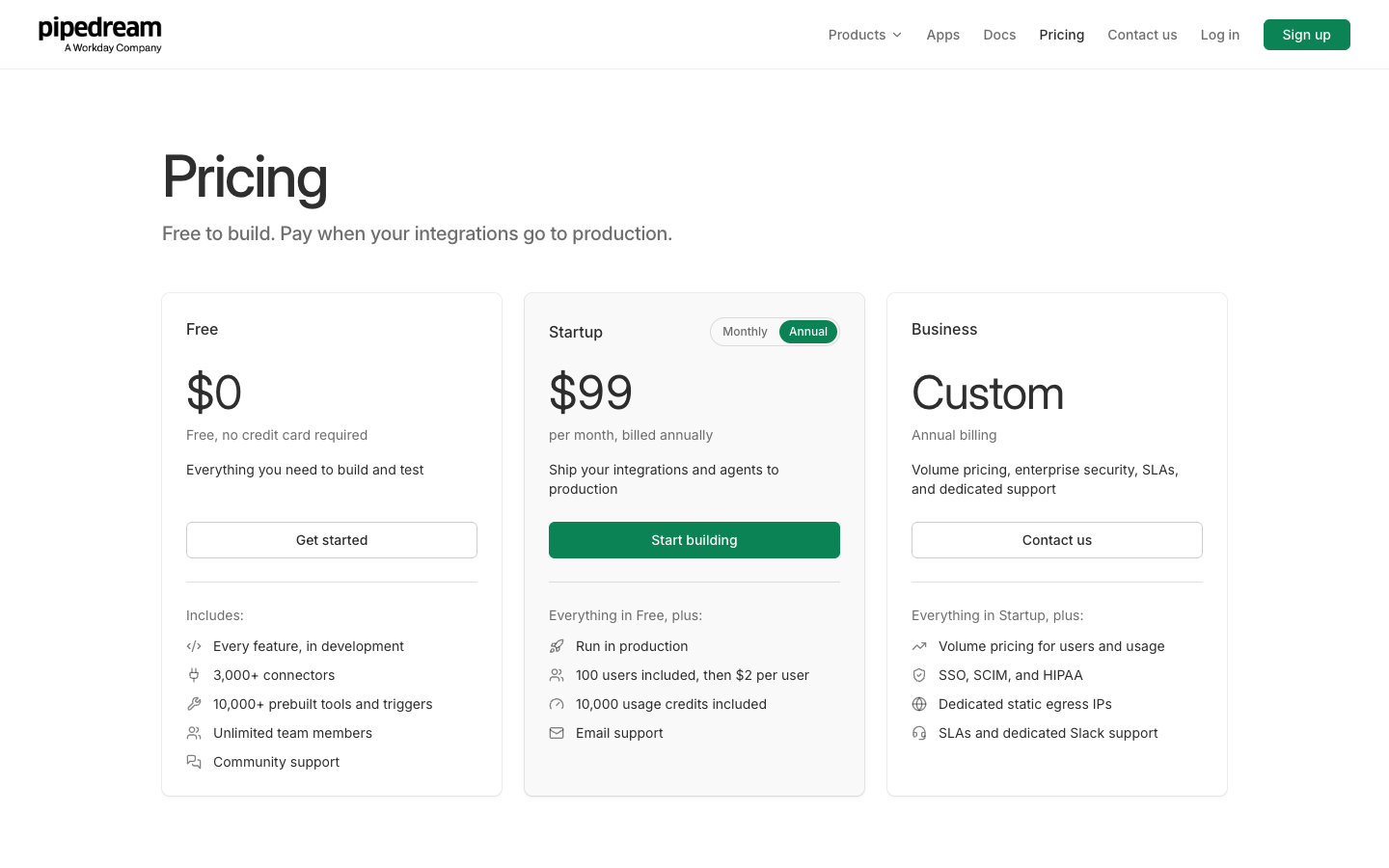
Startup is listed at $99 per month when billed annually or $150 when billed monthly, according to the current selector. At the annual equivalent, twelve months of base subscription amount to $1,188 before tax and other usage. Startup adds the production environment, 100 included external users, 10,000 monthly usage credits and email support.
Business is quote-based with annual billing. The public comparison highlights volume pricing, SSO and SCIM, dedicated static egress IPs, support arrangements, SLAs and enterprise-oriented terms. These are vendor-described capabilities, not proof that every customer is entitled to a particular compliance certification without a signed agreement.
Usage beyond the Startup inclusion has two distinct list-price dimensions: $2 per additional connected external user monthly and $0.012 per usage credit beyond 10,000, with vendor statements about lower rates for sufficiently large volume. Avoid adding a hypothetical discounted volume tier that has not been quoted to you.
The base subscription and variable charges belong in the same estimate but should remain separate lines. A team choosing annual billing can save on the base rate relative to month-to-month payments, but its external-user growth and API usage do not disappear. Verify invoice structure, timing, tax, region and cancellation policies at checkout.
This table should not be mistaken for the old Workflow Free/Basic/Advanced chart. Some historical documents describe daily workflow credits or active-workflow limits; their commercial context is different. Pipedream has changed product positioning and pricing across years. A prospective buyer should base a new Connect purchase on the live current comparison and ask sales about Workflow entitlement if that is the actual use case.
🔢 What a Connect Usage Credit Measures
The current pricing FAQ says Connect usage credits are consumed when running an action, invoking a tool via MCP, using the Connect proxy or emitting an event from a deployed trigger. It describes one credit per 30 seconds of compute for those operations. Management calls such as listing apps or accounts and configuring certain components are excluded from usage billing under the published description.
That is a different model from Zapier charging per successful task or Integrately counting successful actions, checks, searches and transformations. It is also distinct from the classic Pipedream Workflow documentation’s compute-memory explanation. Do not take a credit example from one product surface and assume it covers all of the others without reading the account-specific usage definition.
The obvious planning baseline is that a short operation consuming one qualifying credit costs 1 credit. At the listed overage rate of $0.012, 2,000 qualifying overage credits would cost $24 beyond the included allowance, under an unchanged per-credit price. This arithmetic does not promise every call costs exactly one credit; longer compute, combined operations and entitlement details can alter usage.
An agent workflow may call several tools for one customer interaction: list CRM records, inspect a deal, create a task and update a project item. Count the separate qualifying executions rather than pretending the entire user conversation is a single operation. A connector can also perform background trigger work even when no person is chatting with the agent.
Likewise, management calls should not automatically be added to the usage estimate if the vendor explicitly exempts them. Accurate forecasting means classifying calls, not maximizing a pessimistic multiplier. Capture a trace of the intended operations and identify which part of the published meter each one matches.
The source product can still enforce its own API quotas, message limits or rate restrictions. Paying Pipedream for a Connect action does not buy unlimited Gmail, Slack or CRM API capacity. Monitor the downstream provider’s responses and contractual restrictions independently.
🧮 Cost Example: An Agent Serving 350 Connected Users
Consider a hypothetical SaaS with 350 distinct paying customers, each connecting at least one account through Connect. Startup includes 100 external users, leaving 250 additional users. At $2 per additional user, that is $500 per month in user charges, before usage-credit overages and the base subscription.
Suppose the application also generates 14,000 billable usage credits during a month, and the ordinary Startup inclusion remains 10,000. The overage is 4,000 credits, or $48 at $0.012 each. With the annual-billing-equivalent base of $99 per month, the illustrative monthly equivalent becomes $99 + $500 + $48 = $647 before tax and contractual adjustments.
On month-to-month base billing, the same scenario would use the displayed $150 base rate, making the illustrative month $698 before other conditions. The user and credit assumptions are unchanged. These figures are examples, not claims about actual bills received by DigiOffly or a third-party customer.
The striking point is that external-user charges drive the example more than the modest usage overage. If the same product served only 60 connected users but generated 40,000 qualifying credits, the user surcharge would be zero while usage overage would be 30,000 × $0.012 = $360. The dominant cost factor changes with the product’s usage pattern.
Build three forecasts: the present state, a reasonable six-month growth scenario and a stress scenario. Track connected people separately from connected accounts, qualifying actions, trigger emissions and tool invocations. Add the source services’ costs and internal engineering time.
A good purchasing decision uses cohort behavior. Does a connected user trigger a handful of calls per month, or hundreds per day? Are all users active, or is the product paying for many rarely used authorizations? The relevant dashboard should answer those questions without exposing customers’ private content.
🧩 MCP Tools and Agent Integrations: Useful but Not Self-Governing
Model Context Protocol (MCP) provides a structured way for agents to discover and call tools. Pipedream advertises MCP servers that can give agents access to supported application actions under managed credentials. That can remove large amounts of one-off adapter engineering when an AI product needs to interact with many external services.
The important security question is not merely which MCP server is available. It is which person the agent is acting for, which connected accounts that person has authorized, and which operations the product allows the agent to perform. An agent reading a project board is a different risk from an agent deleting files, inviting users or sending external invoices.
Use least-privilege action exposure. A customer-support assistant may need to read the CRM and draft a response, but not automatically modify billing details. Separate read-only and write-enabled tool paths where possible, and require human confirmation before consequential changes. This is a design recommendation, not a Pipedream-specific promise of built-in approvals.
Prompt injection is another concern. A hostile email or document could contain text instructing an agent to disclose private data or call an unintended tool. Tool authorization and application-side policies must not be overridden because untrusted content appears in the model context. Restrict tool arguments, verify recipients and keep audit logs outside the prompt itself.
For production agents, idempotency matters. A model might retry a tool call after a timeout. If the first call succeeded but the confirmation failed, the second may duplicate an external action. Use a stable operation ID and an explicit status-reconciliation path for transactions where duplication would cause harm.
MCP can widen the surface an agent can reach. That is a useful capability only when the host application owns policy, user identity and meaningful supervision. The integration layer can manage authorization; it cannot decide which business outcomes are acceptable on your behalf.
🧪 A Practical Example: A Customer-Specific Support Assistant
Picture a B2B SaaS vendor building an assistant that helps each customer review CRM opportunities. A user signs into the product and connects their CRM through Pipedream’s managed authorization flow. The SaaS supplies a stable external-user ID that maps to the authenticated account in its own system.
The assistant offers a narrow task: identify deals untouched for more than 14 days and suggest a next action. A permitted tool reads a bounded set of deal records. The model summarizes what it sees; it does not automatically modify opportunities. This first version tests the identity mapping and read permissions while keeping risk relatively contained.
Later, the company adds an option to create follow-up tasks. Now the integration may issue a write action for the selected deal. The user reviews the suggested title, assignee and due date before confirming. The application records a stable operation ID and sends the action only once for that confirmation.
If the CRM returns an error, the assistant should not invent success. It displays the uncertainty and lets the host application reconcile the result. A timeout is not proof the API failed to create the task. The backend can query the provider for an existing task ID before retrying, subject to the API’s available search functions.
The product logs essential audit metadata such as which user authorized the action, which operation ran, its outcome and an external reference. It avoids dumping private CRM contents into an unrestricted log. Role boundaries prevent one customer from borrowing another customer’s connection even if their prompts mention the other account.
Pipedream can provide the connector infrastructure and managed execution path. The SaaS still owns authentication, domain rules, review UX, retry safety and incident response. That division of responsibility is the right basis for assessing whether the subscription saves real work.
⚙️ Workflow Building for Developers: Events, Code and Actions
The legacy Workflow capability explains why developers may find Pipedream attractive even apart from Connect. A typical workflow listens for an HTTP event, scheduled check or supported app trigger, then processes data with predefined actions and optional code. This can be convenient for lightweight integration services that would otherwise need a separately deployed function.
Code steps provide control that purely visual builders sometimes conceal. A developer can validate a schema, transform nested JSON, normalize a date or attach a stable identifier to a downstream request. That flexibility also brings normal software-engineering responsibilities: dependencies, error handling, testing and review.
The older Workflow pricing documentation describes execution-credit calculations using 30-second increments at 256 MB, with memory scaling and development exemptions. Those statements are relevant background to the Workflow product, not a license to copy historical pricing into a new Connect subscription estimate.
Teams using existing Workflow features should inspect their actual workspace usage and entitlement. Is the pipeline counted per execution, compute duration or another product-specific measure? Which connected accounts and premium apps are available? Are polling intervals constrained? These questions are answered by the applicable account plan, not the general Connect headline.
Version control and testing also matter. A code step should have representative fixtures and regression tests for unusual inputs, not just the happy-path event that happened to work in a demonstration. Dependencies can change, source providers can rename fields and authentication scopes can expire.
If your organization needs only basic no-code lead routing, the developer flexibility may be excess complexity. Compare the workflow against Make or Zapier before choosing who will maintain the integration after the original engineer leaves.
📡 API Proxy Versus Prebuilt Actions: Choosing the Right Level
A prebuilt action wraps a common provider operation. An API proxy allows a developer to call an API using a managed connected account where the feature is supported. They solve related but distinct problems. Prebuilt actions reduce mapping and authentication work for recognized operations. A proxy can offer greater endpoint coverage, but it places more responsibility on the application developer.
Suppose a product needs to create a calendar event. A prebuilt action may expose clear parameters for title, start time, invitees and timezone. That is appealing if the component supports the exact API behavior required. If the provider supports an unusual event setting absent from the prebuilt component, an authenticated proxy call may be a suitable alternative, provided the service offers that route and the team understands the provider API.
A proxy is not a guarantee that every endpoint can be reached. Check whether the specific connector supports proxying, whether the provider authorizes the requested scopes, and how the response and error payloads are handled. The Pipedream app directory presents action, trigger and API-proxy availability separately because the capabilities are not identical for every application.
This matters for longevity. A proprietary wrapper can accelerate a demonstration, but a product with mission-critical operations should document exactly which provider endpoint it depends upon. If a prebuilt action changes behavior, the team should be able to recognize the difference and implement a controlled transition.
When security is sensitive, the application must validate the intended destination and parameters before dispatch. An agent asking to update “the client’s record” does not supply sufficient authorization to choose a random record. Require a stable provider record ID, apply the authenticated customer’s tenant scope and log the outcome.
We recommend checking the connector registry not only for an app’s existence but for the exact operations needed on day one and the likely expansion after six months. A missing critical action can change the build decision far more than the difference between two headline monthly prices.
🔔 Triggers, Webhooks and Event Delivery
Pipedream Connect can deploy event triggers for supported sources and deliver events to a backend webhook. The registry shows examples of triggers receiving configuration and a destination URL. This can be a powerful way to respond to third-party activity without engineering every provider’s subscription mechanism.
A typical use case involves listening for newly created CRM records or new messages and forwarding a normalized event to your application. The backend should verify the source, identify which external user owns the event, and correlate the event with the correct tenant before processing it. The webhook URL alone is not an adequate security model.
Delivery systems can produce repeated events. A provider may retry after a slow acknowledgment. A connection may be restored after an interruption and emit events that appeared to be missed. Your application should therefore assume at-least-once-style behavior unless the exact service contract proves otherwise, and make handlers safe to repeat.
Use an event identifier from the provider when available, or construct a stable deduplication key using a controlled combination of source identity, event type and provider object ID. Store processed-event state for an appropriate period. Do not deduplicate solely on a subject line or human-readable title that can legitimately repeat.
A fast acknowledgment should mean the event is durably accepted for processing, not that every downstream system has already succeeded. For long-running work, place events in a queue and process them with retries and dead-letter handling. This is general integration architecture, not a claim that every Pipedream trigger includes a particular queue guarantee.
The current pricing FAQ counts emitting a deployed trigger event among usage-credit operations. Include that in an application integration forecast where relevant. A trigger is not always a free source of unlimited events, regardless of what older Workflow documentation says about some public source executions.
🔐 Security, Compliance and the Limits of Outsourcing
Pipedream publicly describes encrypted credentials, project-scoped access and support for managed authorization. Its current Connect comparison lists SOC 2 Type 2 and GDPR in the security section and Business-only controls including SSO, SCIM and a HIPAA-related offering. These are vendor representations, not the result of a security audit performed for this review.
A procurement team should request appropriate documentation, understand the scope of each audit or contractual commitment, and determine whether the relevant plan covers its intended data. A badge on a marketing page does not by itself satisfy a regulator, a health-data contract or a customer’s security questionnaire.
For an AI application, the integration layer can handle provider tokens while the host product must restrict tool access. The relevant questions include: can a customer read another customer’s connection metadata; can an agent execute a destructive tool; what happens when a user revokes an account; and can an administrator investigate an incident without opening unrelated customer records?
Create separate projects or environments where supported to prevent development credentials from being mistaken for production access. Avoid copying live tokens into test fixtures. Use mock or deliberately limited accounts for experiments and store all sensitive application credentials in an appropriate secret-management system.
Be especially cautious about logs. An integration failure can reveal request bodies, email content or identifiers. Keep operational context sufficient to debug without permanently collecting every sensitive payload. Define who can inspect logs and how long records remain available.
Finally, check data residency and contractual needs before storing production material. The vendor’s website may describe standards, but each organization is responsible for verifying the locations, subprocessors, retention rules and agreement scope relevant to its case.
🔄 Retries, Idempotency and Partial Success
Automation is rarely an all-or-nothing operation. An agent may complete one API action and fail on the second. A request may time out after a provider has already committed a change. A triggered event may be delivered again after a network interruption. These situations are ordinary engineering concerns, not evidence that any particular vendor is defective.
Design each consequential action with a stable operation identifier and a recovery path. When a task is created in a project tool, store its provider ID before doing additional work. If the next action fails, the application can resume from the known state rather than recreating the task and hoping duplicates are harmless.
For example, a CRM sync receives a new lead and then attempts to create a ticket. The CRM operation succeeds but the ticket API returns a timeout. The recovery process should query for a ticket associated with the original lead ID, if the provider offers such lookup, before issuing another creation request. A generic retry of the complete chain might create two leads, two tickets or both.
Capture enough trace information for operators: incoming event ID, authenticated external user, action name, destination object ID, start and finish timestamps, relevant status codes and a redacted error reason. Keep private content separate from basic operational metadata.
Use explicit rate-limit handling when providers return throttling responses. Rapid repeated retries can worsen an outage, consume credits and cause delayed duplicate work. Exponential backoff and a capped retry policy are common approaches, but the right delay depends on provider guidance and whether work is time critical.
A workflow that continuously retries a permanent validation error will not become correct through persistence. Distinguish temporary transport failures from missing permissions, revoked credentials or invalid user input. The last categories require human or application intervention rather than infinite retry attempts.
🧑💻 Developer Experience and Its Trade-offs
Pipedream’s appeal to developers comes from combining provider connectivity with familiar code and HTTP APIs. A team building its own app can invoke supported actions from a backend and use its own frontend for account management and approval. This permits deeper integration into a product than simply sharing a link to a hosted automation editor.
The cost is integration ownership. Somebody must maintain SDK versions, handle API changes, decide what a 429 or 401 response means, and make sure the application treats a disconnected user correctly. The existence of a prebuilt component reduces surface area but does not eliminate the surrounding application logic.
A useful development process includes a catalog of approved operations. For each one, document the source provider, the authentication scopes, expected inputs, output format, error states and any user confirmation requirement. Add sample fixtures that do not contain real customer secrets.
Plan how to update integrations. A revised connector may add fields or change how an optional parameter works. Staging should exercise representative accounts and run regression tests before production deployment. Avoid changing live workflows based solely on a vendor changelog summary.
Teams with no engineer or technical operator may find all of this excessive for routing simple form submissions. In that case, a visual automation builder with clear monitoring may be a more appropriate purchase. Developer flexibility is a benefit only when someone can responsibly maintain it.
Conversely, for SaaS products serving hundreds of separately authenticated customers, recreating the authentication and API orchestration stack by hand is not automatically cheaper. Compare total engineering hours and future maintenance cost, not just the subscription fee.
🧱 Operational Architecture for an AI SaaS Product
A robust architecture has several boundaries. The user authenticates with the SaaS. The SaaS maps that person to a stable external-user ID. The user authorizes a third-party account through a controlled flow. The SaaS stores metadata about authorization without treating a token as a user identity. The application invokes an approved Pipedream tool only after checking the user’s own permissions.
This distinction prevents a common category error: assuming possession of a connected credential means any employee or AI process may use it. A connection can be valid at the third-party provider while an action is forbidden by the SaaS’s business rules.
Use a queue for asynchronous events and a small database table for operation states. A record can move through requested, authorized, dispatched, acknowledged and reconciled statuses. Failed states should preserve enough context for support to investigate without storing entire payloads unnecessarily.
Keep the billing event model similarly explicit. Associate Connect usage with a product tenant or feature, record provider cost signals and create budgets. A company may choose to charge its customers by connected account, by number of automated actions, by active seats or by some business-level metric. Any of those can work, but the internal model must reconcile with the provider’s distinct external-user and usage-credit costs.
For high-impact actions, a confirmation screen is usually appropriate. Show the precise destination and proposed change. For financial or irreversible operations, consider stronger controls and an authoritative downstream system. An agent can prepare an operation without having authority to commit it automatically.
Finally, plan for disconnection. If Pipedream or a source app is unavailable, what does the product show? Does it mark data stale, queue requests, or gracefully disable the feature? Don’t hide failure behind an endlessly spinning “syncing” label. A good integration product remains understandable when a dependency fails.
📊 Comparing Pipedream with Make, Zapier, n8n and Integrately
Pipedream vs Make: Make emphasizes visual scenario building across apps, with a separate credit-based plan model. Pipedream Connect is particularly oriented toward developers embedding provider access into their own products, including user-specific managed authentication. A small business connecting internal tools may find Make’s visual environment easier; a SaaS shipping hundreds of customer-specific connectors may find Pipedream’s architecture more directly applicable.
Pipedream vs Zapier: Zapier has mature workflow and app-automation tooling that many business users understand. Pipedream’s value is less about winning a count-of-apps contest and more about managed authorization, tool invocation and programmatic control. Task-based Zapier costs and Connect external-user plus usage-credit costs should not be compared as though they measure the same unit.
Pipedream vs n8n: n8n provides a workflow engine with hosting choices under its own licensing rules. Pipedream is hosted integration infrastructure and a managed Connect product. An engineering team prioritizing self-hosting might prefer an n8n deployment; a team prioritizing managed customer OAuth and a large tool registry might favor Pipedream. Some companies could use both, paying two different operating costs.
Pipedream vs Integrately: Integrately emphasizes ready-made business automations and a billing model based on qualifying successful operations, including certain searches and modifications. Pipedream Connect’s current pricing emphasizes external users and usage credits. A consultant moving form leads may prefer Integrately’s conventional setup; an app developer serving many unique end users faces a different decision.
Pipedream vs Airtable: Airtable organizes structured records, interfaces and native automations. It is more often a business data destination than a substitute for a broad integration infrastructure layer. A product can use Pipedream to connect accounts and Airtable for a small internal operating system, but the combined permissions, API limits and subscriptions need separate review.
These distinctions are more useful than ranking all products by a single feature tally. Decide whether the center of the problem is structured data, internal workflow orchestration or connectors embedded into an external-facing software product.
✅ Strengths and Trade-offs in Real Deployments
👍 What We Love
- ✅ Managed customer auth: Connect people to supported apps without maintaining every OAuth integration independently.
- ✅ Developer flexibility: SDK, API, action, trigger and MCP tooling can fit within an existing application.
- ✅ Broad connector registry: Thousands of providers and predefined tools reduce repetitive engineering work.
- ✅ Development environment: The public Free tier supports building and testing prior to serving production users.
👎 Where It Falls Short
- ❌ Two usage meters: External connected users and Connect usage credits both affect the bill.
- ❌ Historical pricing confusion: Workflow plan documents do not map cleanly to the current Connect table.
- ❌ Engineering responsibility: Tenant isolation, retries, permissions and recovery remain the app owner’s job.
- ❌ Connector limitations: Some prebuilt actions or provider API paths may be unavailable.

Pipedream Connect — Editorial Buying Snapshot
Good fit: managed user-specific API connections, MCP tools and embedded SaaS integrations. Reconsider: low-code-only expectations, unresolved credential permissions or cost models that ignore connected end users.
Documentation-based analysis. No paid hands-on test or unsupported numerical rating is claimed.
Pipedream’s strongest advantage is reducing repeated integration engineering when customer-specific connections are central to a product. Managed auth, a broad registry, prebuilt tools and trigger support can help a team move from one-off OAuth projects to a more systematic integration layer. It is also attractive to developers who want to mix existing components with code and backend APIs.
The main drawbacks are less visible on a feature list. Current pricing requires modeling both external users and execution-related usage. Some API providers need custom paths beyond the predefined actions. The product remains dependent on sound authorization, retries and identity mapping supplied by the customer application. And the historical Workflow documentation can mislead readers who assume every plan table refers to today’s Connect offering.
A second drawback is fit. If the organization doesn’t operate a software product and only needs to transfer data among its own subscriptions, the integrated user model may be unnecessary complexity. A different automation tool may achieve the desired outcome with a more straightforward purchasing decision.
Avoid treating marketing claims about catalog size, security or cost savings as independently verified benchmarks. Ask for a narrow proof of concept that uses the exact apps and scopes required. Monitor both performance and cost under your actual pattern rather than relying on average case assumptions.
⚖️ Pipedream vs n8n and Zapier: Developer Integration Trade-offs
| Decision factor | Pipedream | n8n | Zapier |
|---|---|---|---|
| Best fit | Developer APIs, integration SDK and embedded Connect | Automated workflows and agents with code options | Standard SaaS automations |
| Production delivery | Hosted developer platform and production Connect | Cloud or self-hosted workflow deployments | Hosted account Zaps |
| Primary paid usage | Production usage credits and external users | Cloud workflow executions | Tasks shared across tools |
| Technical trade-off | Designed for developer-managed integrations | Self-hosting needs maintenance | Fine-grained API flows may require extra steps |
🧪 How DigiOffly Recommends Testing Pipedream
Choose one representative integration rather than trying a dozen connectors at once. A useful candidate has an external user, a real authorization screen, a read action, an optional write action and a recoverable failure. This sample tests the distinguishing parts of the Connect product instead of merely showing that an HTTP request can succeed.
Create two test end users with separate service accounts. Authorize both and verify that each sees only their own records. Confirm that changing the external-user ID does not accidentally expose another customer’s credential or data. Use non-sensitive fixtures and a controlled test environment.
Inspect one prebuilt tool’s available parameters. Does it include the exact record identifier and destination fields needed? If not, check whether a supported API proxy route covers the omission. Estimate the engineering work honestly rather than counting that feature as already implemented.
Run several permitted actions and watch the account’s actual credit meter. Compare the observed billing details with the vendor’s live usage definition. Do not assume a five-step application-level process counts as one call, and do not invent extra billable management calls the FAQ excludes.
Disconnect one test account, expire another authorization if the environment supports that operation, and deliberately send an invalid request. Confirm that the product presents a clear error and does not retry destructive operations without reconciliation. Check what a support employee can inspect without revealing private payloads.
Model a twelve-month bill from connected users, qualifying usage, base rate and additional third-party services. Repeat with twice the number of customers. If user fees overwhelm expected subscription revenue, discuss volume terms with the vendor before relying on future negotiated pricing that may never materialize.
Finally, document the responsibilities left to your team: tenant identity, frontend consent, tool restrictions, queueing, alerting, support, incident response and data retention. A successful proof of concept gives evidence of both technical fit and manageable operating cost.
🧾 Our Review Methodology and Limitations
We reviewed the public Pipedream pricing page, vendor app registry and historical Workflow plan guide available on October 14, 2026. Pricing references in this article are for the contemporary Connect-oriented Free/Startup/Business offering unless the text explicitly labels older Workflow information. We do not interpolate undisclosed prices for legacy customers.
The cost examples are arithmetic scenarios with clear assumptions. They are not vendor invoices, customer testimonials or live benchmark results. We have not authenticated a real customer account, run load tests, measured latency, verified independent security compliance or observed production uptime during the review period.
Our decision framework evaluates the actual job first: whether the user needs internal automation or software-embedded integrations. We then assess exact connector actions, authorization boundaries, developer responsibilities, task or credit definitions, external-user scaling, failure recovery and vendor documentation clarity.
Pipedream’s offering may continue evolving. The official pricing and the contractual entitlements of a particular account outrank numbers quoted here. If a vendor page changes, DigiOffly’s review is a dated independent guide, not a warranty of future subscription conditions.
🏁 Final Verdict: Is Pipedream Worth It in 2026?
For developers shipping integrations to real customers, Pipedream offers a serious value proposition. Managed authorization and ready-to-use actions can remove a significant amount of repetitive work, while SDK, API and MCP access make those capabilities usable from an existing product. Its appeal rises when many providers and many separately authenticated end users are involved.
The purchase is harder to justify for someone who simply wants a personal automation with no development budget. The current $99 annual-equivalent Startup entry point is tied to Connect production access, not a guaranteed price for every historic internal Workflow account. Compare the real need with visual automation services and confirm your account-specific feature and billing model.
We recommend a limited pilot before any enterprise-wide commitment. Measure the exact actions required, ensure tenant isolation and revocation work as expected, and model both connected users and credit consumption. Treat error recovery as a design requirement from the first week, not as a later operational patch.
The decision can then be expressed simply: if Pipedream cuts meaningful integration engineering without creating an unaffordable user or usage bill, it is worth serious consideration. If the job is simpler or the necessary connector operations are missing, choose the solution that minimizes the entire operating burden rather than chasing the largest catalog number.
For wider comparisons use DigiOffly’s Automation & No-Code overview, Software Directory, guided Software Finder and Software Cost Calculator.
Frequently Asked Questions About Pipedream
Is Pipedream free to use in 2026?
Yes, the contemporary Connect pricing page advertises a Free development environment at $0, with access to supported development APIs, connectors, tools and community assistance. It does not present Free as an unlimited tier for shipping third-party integrations to external users in production. Startup is the published production entry point. Historic Workflow free-tier documentation uses a different set of limits, so verify which product and billing environment your account actually uses.
How much does Pipedream Startup cost?
The live Connect plan shows $99 per month on annual billing or $150 on month-to-month billing as checked in October 2026. The annual equivalent gives a $1,188 base subscription across twelve months before taxes and variable charges. Startup includes 100 connected external users and 10,000 monthly usage credits; excess users and credits have their own listed rates. Those figures are not quotes for legacy Workflow subscriptions.
What is an external user in Pipedream Connect?
An external user is a distinct person in your software product who connects at least one third-party account through Connect. Your application identifies that person by a stable external-user ID. A person who connects multiple applications under one ID counts once under the pricing FAQ definition. External users are different from members of your development team, which the public comparison lists separately.
What happens after the first 100 external users?
On the published Startup plan, each additional external user costs $2 per month at the listed price. A product with 350 distinct connected users has 250 above the included 100, corresponding to $500 monthly in external-user charges before base subscription and usage credits. Larger customers can ask about Business volume pricing, but must not treat an unquoted discount as guaranteed.
How many credits does a Pipedream action use?
The current Connect pricing FAQ describes qualifying actions, MCP tool calls, proxy requests and deployed-trigger events using a compute-related meter, with one usage credit per 30 seconds of compute. Listing accounts and configuring certain components are excluded under the described rules. A complete agent conversation may invoke multiple qualifying tools. Do not equate an entire session with one credit or borrow the old Workflow memory-credit formula without checking the applicable product.
Is Pipedream better than Zapier or Make?
They solve overlapping but different problems. Zapier and Make are frequently used to automate workflows among business applications. Pipedream Connect focuses on software developers embedding managed authentication, tools and triggers into their own apps and agents. An internal operations team may prefer a visual builder, while a SaaS that needs customer-specific authorization may benefit from Connect. The best choice depends on required endpoints, error handling and total cost rather than a universal ranking.
Does Pipedream support MCP for AI agents?
Yes. The current Connect feature table includes MCP servers alongside managed authentication, prebuilt tools and an API proxy. Tool availability depends on the provider and connection. MCP alone does not guarantee correct authorization, safe agent behavior or human approval before destructive operations. Those controls remain the responsibility of the host application and its operators.
Can I use Pipedream without writing code?
Some historic Workflow tasks and prebuilt integrations can be configured visually, but the contemporary Connect offering targets developers integrating APIs, SDKs and tools into their products. A nontechnical team can sometimes benefit from templates, yet production permissions, exception handling and the external-user identity model require technical ownership. For conventional office workflows, compare no-code-first products before assuming Pipedream is the quickest option.
Are the old Basic and Advanced Pipedream plans still current?
Older Workflow guides and community discussions refer to Free, Basic, Advanced and other legacy tiers. The live public Connect pricing page examined in October 2026 instead lists Free, Startup and Business. We cannot assume the older names or limits are available to every new customer. Existing accounts may retain different arrangements. Check the actual workspace billing interface or ask Pipedream for a plan-specific confirmation.
Can Pipedream host customer API credentials securely?
Pipedream describes managed provider authentication, encrypted credentials, project scope and connection revocation in its public security and pricing materials. That can reduce the need for a SaaS to directly handle many providers’ tokens. It does not replace the application’s own tenant isolation, permissions, logging, data-processing agreement or compliance assessment. Review the exact scopes and contract before connecting sensitive production data.
Does Pipedream include unlimited connectors and unlimited API calls?
The public catalog advertises thousands of supported applications and tools, but the existence of an app entry is not a promise that every possible endpoint is implemented. Production Connect usage is also subject to a credit meter and source-provider rate limits. Some connectors expose prebuilt actions but not the API proxy. Verify the particular actions and expected event volume before committing to a production integration architecture.
🔍 More DigiOffly Resources
Good automation purchasing decisions begin with the work and identity model, not with the longest list of logos. Compare what has to connect, how users authorize it, whether the application can recover from failures and what every meter charges. DigiOffly’s linked reviews and selection tools can help structure that research; the vendor’s actual checkout and contract remain the authoritative purchasing documents.
EXPLORE NEXT ON DIGIOFFLY
Next: Compare Pipedream Connect with the Alternatives
Managed credentials can simplify an integration stack, but they do not replace permission design or cost forecasting. Compare workflow engines, external-user pricing and operation limits before launching.
Understand the options
- Explore Automation & No-Code — Find related tools with different billing units.
- Browse the software directory — Review established software categories and published articles.
Model the operating cost
- Compare software — Inspect differences before optimizing the bill.
- Use the software cost calculator — Estimate the cost of your whole stack.
Research practical alternatives
- Read our Make review — Compare visual orchestration and workflow credits.
- Read our Zapier review — Review task charges and automation limits.
- Read our n8n review — Investigate technical and deployment options.