

Editorial note — October 2026. This independent review evaluates vidIQ’s publicly documented features, plan limits and creator workflows. We examined the vendor’s current plan comparison, help center and recent product updates. We did not access a paid channel account, conduct performance experiments or verify any claimed subscriber-growth outcomes. Plan pricing, AI credit costs and account entitlements change; confirm the live checkout and workspace before subscribing.
You can publish an excellent video and still struggle to reach the people who would appreciate it. The reason is rarely one mysterious keyword. The topic may already be overserved, the thumbnail may fail to communicate why the video matters, the title may attract viewers who immediately leave, or the creator may not understand which part of their audience is worth serving next. These problems make “YouTube growth software” appealing, but they also make the category easy to oversell.
vidIQ is a research, planning and optimization platform built primarily around YouTube. It offers topic and keyword research, competitor intelligence, daily video ideas, thumbnail tools and an AI Coach intended to answer questions about a channel’s direction. In 2026 it also advertises video clipping, scripts, browser-extension insights, Instagram tools and integrations that bring selected channel research into external AI assistants through MCP.
Our vidIQ review verdict: It is worth investigating for creators who already publish or plan to publish regularly and need a repeatable process for choosing topics and evaluating packaging. The product can reduce research friction and supply useful prompts for deciding what to make next. It cannot force YouTube to recommend a video, prove that a specific title will deliver views or replace watching the audience’s response to published work.
One of the most important changes is how vidIQ charges for AI activity. Its current features-and-credits guide separates a monthly shared AI credit balance from plan-based access to research features. Using AI Coach, thumbnail generation, scripting or clipping may consume credits; checking a non-AI research feature can have a separate quota. These two kinds of limits should not be confused when comparing Free, Boost and Max.
The public plans page at vidiq.com/plans lists Free, Boost and Max, with additional coaching and enterprise services. The default one-channel Free allocation is 150 AI credits monthly, Boost 2,000 and Max 6,000 according to current support documentation. An expanded number of channels can have a larger shared balance, not a full separate allocation for every channel. The page displays Max at $39 per month equivalent under the annual billing selector at this editorial check; the Boost price sometimes fails to render in unauthenticated views, so we do not invent a universal price.
Some reviews on the internet still describe an older set of plans or present YouTube tags as the entire product. That can be misleading in 2026. vidIQ now presents a broader creative workflow from topic discovery through packaging, publishing and performance analysis. It also supports Instagram research, but that doesn’t mean every tool has identical capabilities on both platforms.
If the real bottleneck is editing video, CapCut may be a better starting point. If you have a large podcast backlog and need short clips, OpusClip specializes in repurposing. vidIQ belongs earlier and later in the cycle: planning the idea, choosing packaging and learning from the published result.
A sensible trial is not “install the extension and see if views increase tomorrow.” It is to pick one real topic, research the intended audience, compare competing videos, draft multiple honest title and thumbnail concepts, publish something useful and examine whether the experiment taught you anything. A tool that helps a creator make better decisions is more valuable than one that simply adds numbers to the YouTube page.
🎯 vidIQ at a Glance: Who Should Consider It?
Best for: New and growing YouTube channels searching for a clearer topic strategy; creators publishing regularly who need structured keyword and competitor research; educators and reviewers working in identifiable niches; video-first teams looking for a shared research framework; people who benefit from an assistant that can interpret channel-specific questions rather than give generic content advice.
Less suitable for: Creators expecting a guaranteed increase in views or subscribers; channels unable to publish consistently; producers whose real constraint is poor source audio or video editing; people who want an automated assistant to publish without oversight; businesses that require rigorous data permissions without reviewing vidIQ’s own terms and account connections.
Main workflows: Topic discovery, keyword research, competitor outlier analysis, daily personalized ideas, title and thumbnail generation, AI Coach conversations, selected channel analytics, scripting, optimization and clipping. A browser extension adds context directly inside YouTube, while the web app serves as a larger research workspace.
Plans: Free, Boost and Max are the primary individual tiers. The current one-channel help table specifies 150, 2,000 and 6,000 monthly AI credits respectively. Boost and Max offer additional per-plan access to research and competitive features. Separate coaching and enterprise offerings address more hands-on help or multi-user organizations.
Our decision rule: Start with Free to see whether vidIQ’s ideas and research surface opportunities you can actually pursue. Evaluate Boost if the free result caps and AI allowance interrupt a proven publishing routine. Consider Max if you repeatedly exhaust research and AI capacity, specifically need Max Mode or process enough clips to justify the expense. Don’t assume paying the highest tier makes an underdeveloped content plan successful.
🧭 What vidIQ Does — and What It Cannot Know
The easiest way to understand vidIQ is as a set of inputs for an editorial decision. It can show a creator what subjects appear to attract attention, how competing videos are packaged, which searches seem relevant and what viewers respond to on their own channel. From there the creator still has to decide what original perspective, demonstration or story they can deliver.
That distinction matters because YouTube’s exact recommendation system is not a public, fixed score that a third-party application can optimize perfectly. Titles, thumbnails and keywords can help viewers understand a video, but satisfying the intended audience is a more demanding objective. A compelling presentation to the wrong viewers can create a short burst of clicks and poor engagement.
vidIQ’s research views can accelerate exploration. If a creator covers camera equipment, they might compare a broad term such as “best microphone” with more focused subjects such as an entry-level microphone for noisy apartments. The volume of search interest, competitive landscape and audience intent can suggest where a useful new video fits. The software does not know whether the creator owns the devices required for a credible test.
The platform also proposes personalized ideas informed by channel data. A useful suggestion could connect something the creator’s audience already watches with a recently emerging topic. A poor suggestion may sound topical but fall outside the channel’s expertise. A human should examine whether the idea is worth publishing before spending time on production.
There is a meaningful difference between asking an assistant for twenty video concepts and deciding which one you can execute convincingly. A generic AI prompt might produce a list of evergreen subjects, but vidIQ’s value proposition is that it can use connected research and performance context. That access may improve relevance; it doesn’t guarantee originality or factual correctness.
YouTube creators sometimes fixate on small optimization details because they are easier to change than video quality. A tag can be added in seconds, while improving an explanation, writing a more honest hook or reshooting an unclear screen recording takes effort. vidIQ’s scorecards and recommendations are useful only when they lead to changes that improve the viewer’s experience.
For teams, an explicit research process helps. One person identifies audience questions, another evaluates the product or subject, a producer plans the story and an editor packages the result. vidIQ can provide shared evidence, but it cannot independently determine the company’s priorities, budget or expertise.
The service increasingly positions itself as both YouTube and Instagram growth software. That makes it more relevant to creators publishing videos across platforms, though the format and user behavior differ. An attractive YouTube title is not necessarily a good Instagram Reel opening, and Instagram research metrics cannot be treated as interchangeable with YouTube watch time.
An editorial tool should help a creator say why an idea is worth producing. If all it supplies is enthusiasm for a keyword with large search volume, the decision remains incomplete. The best use is to combine research, real subject knowledge and feedback from the audience.
🔍 YouTube Keyword Research: Search Intent Before Scores
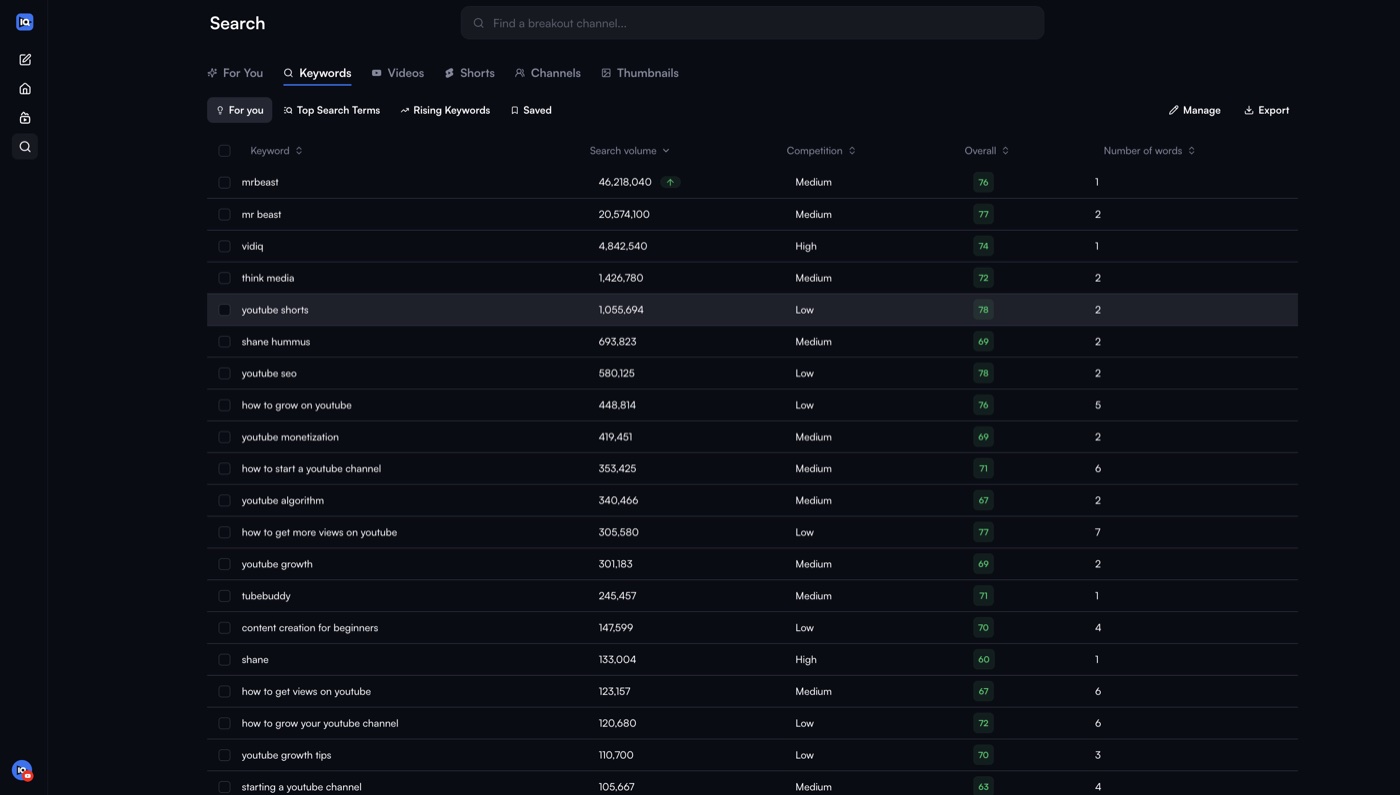
Keyword research can reveal how people describe a topic when looking for videos. That information helps a creator choose vocabulary for titles, descriptions and scripts. It can also expose a mismatch between the question the viewer asks and the explanation the creator planned to deliver.
The vidIQ keyword research guide, updated in August 2026, describes entering research through the app’s Keywords area and exploring relevant search subjects. The product provides measures of search interest and competition along with related suggestions. These are modeled research signals, not direct knowledge of every viewer’s individual search or a guarantee of ranking.
A beginner might search for a broad phrase such as “video editing.” The phrase could have enormous potential audience reach, but competing against all of YouTube’s editing content is not an actionable plan. A more focused topic might compare exporting captions from two versions of an editing tool or solving one recurring issue. A specific query can attract fewer people but better match the value of a detailed demonstration.
Search intent matters. The phrase “CapCut watermark” might represent a viewer seeking a basic instruction, a pricing comparison or a complaint about a paid template. Those are different videos even when they share the same words. A good creator examines the search results and asks what viewers still need, rather than repeating a keyword as often as possible.
vidIQ’s score can help decide where to investigate, but not whether the video is good. A term with high apparent opportunity may attract creators who quickly publish near-identical explainers. A term with modest demand can support a successful niche channel if it answers a serious question that hasn’t been handled well elsewhere.
The Free plan has tighter result limits. The current help center comparison gives three results per keyword search for Free and unlimited keyword results on Boost and Max. That is an example of a plan-based research allowance separate from AI credits. A creator can therefore run out of useful free result depth without having spent any AI balance.
A paid subscription is most useful when the channel conducts this kind of investigation regularly. If a creator publishes one personal vlog every two months, unlimited research may provide little value. If a company maintains a library of product help videos and systematically addresses recurring customer questions, the research workflow can be economically worthwhile.
Keep the topic in plain language. A title stuffed with variations of the same term can sound mechanical and make viewers distrust the video. Choose a promise the content can deliver, use a natural description and let the thumbnail demonstrate the key benefit or question.
One practical test is to compare five competing videos for a given query. Look at the intended audience, age of each upload, clarity of the thumbnail, format and unresolved questions in the comments. The research metrics are a starting point; the creator’s ability to provide a different and better answer makes the opportunity real.
💡 Daily Ideas, Customized Ideas and Outlier Research
Running a content channel requires a queue of viable subjects. Creators sometimes have plenty of enthusiasm but little system for deciding which idea should be produced next. vidIQ offers Daily Ideas and Customized Ideas as tools for building that queue.
The company’s personalized ideas guide explains that personalized suggestions use channel context, while customized searches allow a creator to specify a direction. Its 2026 plan guidance lists three Daily Ideas a day for Free and fifty for Boost and higher, with separate restrictions on custom idea requests. This is a useful example of features that have their own plan-based quotas rather than simply drawing from a shared credit count.
The critical question is not how many ideas the platform can generate. It is how many ideas the creator can make responsibly. A detailed software review may require product access, original screenshots, testing and careful editing. A suggestion about a tool the channel has never used may be interesting but not suitable for publication that week.
A practical content backlog can distinguish several stages. There are speculative ideas, researched ideas with a clear audience problem, approved ideas with source material available, videos in production and completed releases. vidIQ can supply candidates and competitive context, while the editor or channel owner controls what moves through the process.
Outlier research looks for videos performing differently from a channel’s usual baseline. A small channel might produce one video that receives far more attention than its typical uploads. That can suggest a topic or packaging technique worth understanding. But it would be a mistake to copy a single outlier without asking what was unusual: timing, audience interest, a new format, a major event or something about the creator’s reputation.
The vendor’s feature comparison offers a limited number of outlier results per search on Free and broader research on paid plans. Such data can guide exploration, but an outlier isn’t automatically a reproducible trend. A video about breaking news can perform strongly for reasons that vanish a week later.
A recurring review process makes the ideas useful. Once per week, a creator can collect several candidates, reject those requiring unsupported claims or unavailable footage, choose one clear viewer problem and outline a practical video. The value lies in reducing random topic switching and making the next video decision easier.
The strongest ideas are often not the highest-score phrases. A creator may notice that viewers repeatedly misunderstand a specific feature and produce a careful explanation. That could bring fewer general views than a sensational headline but create more relevant subscribers and trust in the channel.
Automated ideas should not become a substitute for community listening. Comments, support questions, audience polls and replies can reveal needs that research software has not captured. Combine those direct signals with vidIQ’s broader patterns instead of treating either source as complete.
A productive outcome is a smaller, better prioritized calendar. If the platform produces fifty ideas a day and the team has capacity for one video, the work is still to decide which forty-nine to ignore.
💳 vidIQ Pricing in 2026: Free, Boost, Max and Coaching
| Comparison | Free | Boost | Max | Coaching/Enterprise |
|---|---|---|---|---|
| Published price | $0 | Verify live checkout | $39/month equivalent billed annually in sampled selector | By offer or contract |
| Monthly AI credits, one channel | 150 | 2,000 | 6,000 | Plan-specific |
| Keyword research results | 3 per search | Unlimited | Unlimited | By entitlement |
| Personalized Daily Ideas | 3 per day | 50 per day | 50 per day | By entitlement |
| Competitor tracking | Up to 3 | Up to 20 | Up to 50 | By agreement |
| Primary fit | Learn with light research | Regular audience and topic planning | Higher-volume AI and advanced Coach | Team governance or expert guidance |
The price of a subscription should be evaluated alongside the amount of research and creative work it enables. vidIQ now combines conventional plan-based feature entitlements with a shared monthly AI credit budget. A creator can have access to keyword research but not a large AI generation allowance, or have unused credits while being restricted by the number of competitors a plan allows them to track.
At our October 2026 editorial check, vidIQ’s public plans page described Free, Boost and Max, plus coaching and business options. Free is advertised at $0. The public Max card showed $39 per month equivalent with annual billing. Boost pricing did not render reliably in our unauthenticated page view, and some legacy software listings show older Boost rates. We therefore would not tell readers that a single third-party dollar figure is today’s guaranteed Boost price. Open the actual checkout for the right account, number of channels and billing period.
Free offers a meaningful look at the platform, including 150 monthly AI credits, a limited number of keyword research and outlier results, three personalized Daily Ideas and a smaller set of competitor tracking options. It is useful for a new channel learning how to research subjects. Free isn’t an unrestricted version of Boost; it gives enough access to test whether the research experience is relevant.
Boost increases the breadth of research. The current comparison lists unlimited keyword and outlier results, fifty personalized ideas a day, broader competitor tracking and 2,000 monthly AI credits for the one-channel option. It also promotes thumbnail creation, an AI Coach, deeper channel insights and additional creator lessons. Boost becomes more reasonable if the creator consistently reaches a specific limitation in Free while maintaining a regular production schedule.
Max expands credit and AI capabilities. The default one-channel plan provides 6,000 AI credits monthly and access to Max Mode for deeper research interactions. The public plans page describes additional AI Coach capacity and a substantial allowance for short clipping and related generation, subject to the way credits are consumed. Max is not automatically a better choice simply because it is the most expensive self-service tier. A channel that rarely generates thumbnails or clips may have little use for the larger allocation.
The current feature help article also names a Pro account level with 1,000 AI credits a month, although Pro is not presented as the main current self-service choice alongside Free, Boost and Max on the public pricing page. That may be relevant to readers with older accounts. Do not assume a legacy Pro subscriber’s entitlement is identical to Boost or that a new customer can necessarily purchase the same plan.
Channel count changes the allowance. The help center lists Boost credit balances of 2,000 / 2,500 / 3,000 for one, two or three channels. For Max, those figures are 6,000 / 8,000 / 10,000. Crucially, the credits are shared at the account level across connected channels, rather than multiplied into independent budgets for every channel. A small production company needs to forecast total use across its portfolio.
The AI credit guide says the budget refreshes on the relevant billing or anniversary date. AI Coach, thumbnail generation, scripting, clipping and similar functions draw from the same shared balance, while certain research pages have their own feature limits. This makes it possible to spend a large portion of monthly credits on one activity without noticing how much remains for another.
Coaching is distinct from an AI chat feature. The company offers a separate human coaching service for eligible channels, with strategy feedback and support in addition to platform tools. A creator should verify the language eligibility, expected response cadence and the human coach’s scope. Paying for coaching is only sensible when the channel can execute and review the suggestions; a weekly conversation cannot substitute for publishing useful work.
Enterprise addresses agencies and brands with multiple seats, centrally managed channels, permissions and more involved analytics. The company advertises dedicated strategists and custom integration possibilities. Prices for different enterprise service combinations are contract-specific and should be negotiated according to the number of channels, access roles and deliverables.
There are also credit top-ups under eligible plans. The vendor’s credit options distinguish one-time packs and available refill behavior from permanently changing the subscription. A credit pack adds usage capacity but doesn’t necessarily unlock a higher feature tier. A business should know who can authorize an automatic refill, because a small convenience can become unpredictable spending.
An annual subscription can look attractive if the creator produces videos every week. It is less attractive when the production schedule is uncertain. The total amount due today, the renewal date and how credits expire or reset matter more than the displayed equivalent per month. Test a real workflow before committing a year’s budget.
To decide between Free, Boost and Max, estimate how many times per month the creator needs research, AI coaching, thumbnail iterations and clips. Record the actual usage during a pilot. Then choose the cheapest legitimate plan that supports those tasks. The product should earn its cost by improving decisions or reducing repetitive work, not by presenting a larger number of remaining credits.
🧠 AI Coach: Useful Channel Context, Not a Growth Guarantee
vidIQ AI Coach provides a conversational way to explore channel questions. Rather than opening a dozen research dashboards, a creator can ask for title alternatives, a channel audit, ideas about underperforming videos or a better structure for the next upload. It can be a convenient assistant when the user has a specific question and knows what outcome is needed.
The company’s July 2026 AI Coach guidance distinguishes Fast, Deep Thinking and Max Mode. Fast is intended for focused answers that don’t require extensive research. Deep Thinking can use richer analysis for ideas, titles and competitive context. Max Mode, available to certain higher plans, is positioned for complex strategic questions and consumes more credits per interaction.
The most important economic lesson is to match mode to question. Asking for five title variations may not require the costliest research mode. Investigating why a channel’s last ten tutorials underperformed relative to its own earlier uploads may justify deeper context. Automatically choosing the largest mode for every query can exhaust the shared AI balance without producing proportionally better decisions.
A useful prompt provides the channel’s intended audience, the topic, the source material and the success criterion. “Make me viral” gives the assistant no reliable target. “Suggest three honest titles for a tutorial aimed at creators who want to fix blurry screen recordings, and explain what each promises” gives the tool a question it can address responsibly.
The AI Coach can help structure an experiment. It might propose comparing two thumbnail concepts or analyzing why a recent video attracted searches that did not match the content. But the result is still an interpretation. The creator should compare recommendations against actual channel metrics and comments before implementing them.
The vendor itself acknowledges that AI Coach can misunderstand requests and may need correction. Its July 31, 2026 guide recommends supplying clear context and refining the answer rather than accepting every suggestion. That is a sensible editorial constraint, not evidence that the tool is uniquely unreliable.
An AI analysis may focus on click-through rate while missing that the audience is highly specialized. A creator producing technical instruction videos may value qualified leads or viewer trust more than broad entertainment reach. If the coach recommends a sensational title that misrepresents the lesson, the user should reject it.
For channel audits, request concrete supporting metrics. A useful answer should distinguish “the data show retention drops at this moment” from “viewers may have become confused here.” One is an observed pattern; the other is an inference requiring interpretation. Keeping that distinction visible helps prevent confident but unsupported recommendations.
A good human workflow reviews Coach advice once a week rather than treating every idea as an instruction. Select one or two changes, make them deliberately and track whether the result improved anything meaningful. A channel can learn more from a small controlled adjustment than from replacing every title, thumbnail and format simultaneously.
For teams, document important decisions outside the AI chat. A channel manager should know why a specific series was approved even if the employee who asked the original question leaves. The Coach can be part of research, but it should not become the only record of editorial strategy.
🖼️ Thumbnails, Titles and the Limits of Packaging Optimization
Titles and thumbnails can affect whether viewers choose to watch. A clear visual promise helps someone decide quickly if a video is relevant to their question. vidIQ offers tools for creating and evaluating thumbnails and for suggesting titles based on the subject and available audience signals.
The challenge is separating a useful packaging improvement from an exaggerated promise. A video titled “The ONE Setting That Fixes Every Camera” may attract curiosity while setting a false expectation. A more specific title that describes the problem and the relevant solution can be more trustworthy, especially for technical education.
The software can generate design directions, but the creator needs to verify that the depicted result is real. A thumbnail for a software review should not suggest a feature the reviewer never tested or show an interface button that doesn’t exist. Generated visuals are illustrations unless they accurately depict the product and are labeled appropriately.
A high-contrast thumbnail with one clear focal point may be easier to read on a phone than a collage containing five screenshots and a paragraph of text. A good test reduces the thumbnail to the size seen in a feed. If the main subject is unclear, extra effects won’t rescue it.
vidIQ also supports thumbnail testing and optimization-related workflows on eligible plans. Tests can inform future choices, but results should be interpreted in context. A small channel may not have enough impressions to distinguish a genuine preference from ordinary variation. A platform’s audience composition can also change while an experiment is running.
Several performance signals can move in different directions. A thumbnail might increase initial clicks while attracting viewers who leave early. An alternative may receive fewer clicks but keep the relevant audience longer. The right objective depends on the content and channel strategy, not only the largest immediate click-through number.
The AI credit budget matters for thumbnail iteration. Generating many visual options can consume credits that the creator also needs for scripts or coaching. A creator should set a reasonable limit on exploratory generations and use the remaining budget for refinements with a clear purpose.
Packaging is a promise. The first minute of the video should deliver enough of that promise to persuade the viewer to continue. A strong title cannot compensate for a long unrelated introduction, a confusing demonstration or audio that is difficult to hear.
For recurring educational channels, keep a simple visual system: consistent typography, recognizable framing and enough variation to distinguish episodes. vidIQ can help suggest concepts, but a stable style may contribute more to reader recognition than chasing a different formula for every upload.
After publishing, inspect comments and engagement along with impressions. An audience that arrives for exactly the right question is valuable even if the total view count is smaller than an unrelated trending video. The best packaging makes the intended viewer curious without misleading them.
🧩 Competitor Tracking and Researching Outliers Responsibly
Competitor research is useful when it reveals why a subject matters to an audience. A creator can compare titles, formats and upload cadence to identify patterns worth investigating. It becomes less useful when a channel blindly copies another creator’s topics without contributing a distinct perspective.
vidIQ’s plan comparison includes competitor tracking with different caps: the current support table lists up to three competitors on Free, twenty on Boost and fifty on Max. Those are plan-based limits rather than AI-credit costs. A small niche channel may only need a handful of relevant comparisons, while a media business may want a broader competitive landscape.
Choosing who to follow is the real analytical step. A small instructional channel could learn more from a similarly sized creator serving the same viewer problem than from a global entertainment channel. Very large channels benefit from existing audiences and resources that a newcomer cannot reproduce easily.
Outlier videos deserve scrutiny. If a competitor’s ordinary uploads receive modest attention while one clip explodes, something about that subject or format was different. It could be a news event, unusual title, collaboration, strong opening or algorithmic distribution to a new audience. A researcher should examine plausible explanations rather than treating the outlier as a guaranteed template.
One useful approach is to create a research note for each promising pattern: the audience question, what the video promised, how it delivered, and what an original response could add. That is much more ethical and valuable than downloading another creator’s footage and imitating the narration.
Metrics like views per hour, search scores and relative performance can help identify examples, but they do not reveal all causes. A creator should avoid claims such as “this title produced the extra views” without an experiment capable of separating the title from changes in timing, topic and audience.
Competition can also highlight gaps. If every popular video focuses on an expensive professional tool, a beginner-friendly alternative may answer a neglected question. A review channel might compare practical workflows instead of producing yet another feature list. A niche creator may find valuable demand in detailed questions that broad channels overlook.
The platform’s recent expansion into Instagram brings similar outlier and performance research to Reels under documented feature availability. However, Instagram and YouTube distribute content differently. The fact that a hook works in a fifteen-second Reel does not prove it belongs at the start of a twenty-minute YouTube lesson.
A healthy competitor research process ends with a new contribution. It should help a creator see what viewers already understand, what they still need and what expertise the channel can offer. The platform supplies possible signals; editorial judgment turns them into a useful content plan.
🧩 Chrome Extension: YouTube Insights in Context
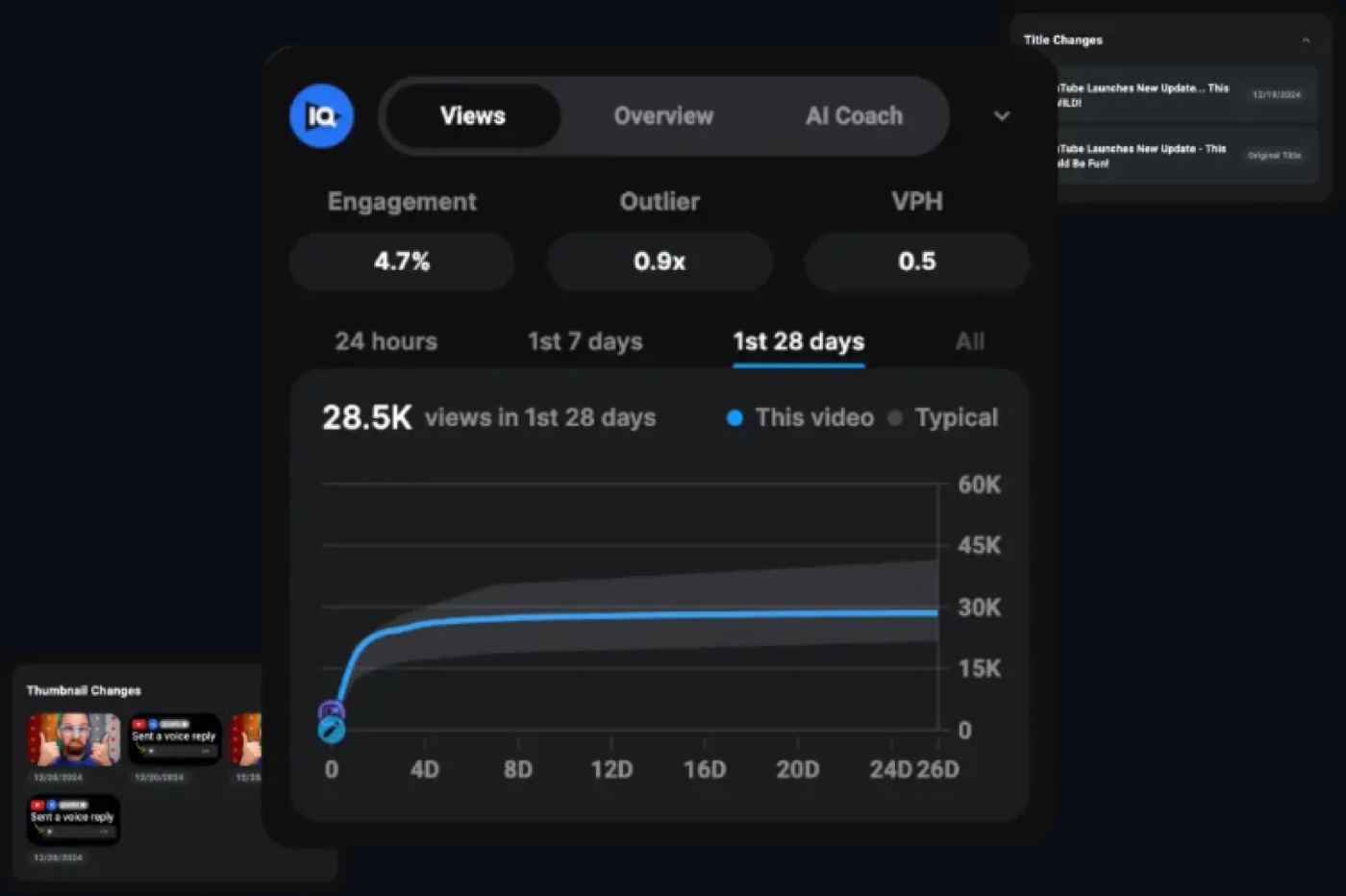
A browser extension changes where research happens. Instead of leaving YouTube to open a separate reporting dashboard, creators can see selected vidIQ metrics while browsing videos and channels. That can make competitor research faster when someone is investigating a very specific subject.
vidIQ’s official extension page illustrates overlays with relative performance, views per hour, engagement and other information. The precise measures shown can vary by account, subscription and YouTube’s current interface. The images are vendor examples; we did not capture screenshots from our own authenticated vidIQ account.
The benefit is convenience. A creator considering a topic can browse several videos, compare how they are packaged and take notes on which questions are still unanswered. The risk is becoming distracted by every metric appearing beside the content. A value on a small overlay is not a substitute for understanding why people watched.
Extension permissions deserve attention. Browser extensions may access information from certain pages to provide features. Before installing, check the current permission request and the provider’s privacy policies, especially on a work browser that also handles confidential client systems. An organization may prefer a separate browser profile or managed installation process.
A creator shouldn’t use competitor metrics as proof of private information. Third-party estimations are not equivalent to seeing another creator’s full YouTube Studio account. View counts and public performance indicators can be observable; revenue and audience details are usually far more uncertain. Avoid treating modeled estimates as audited financial facts.
The extension may also appear on YouTube upload or optimization screens. Suggestions about tags, titles and descriptions are useful when they remind the creator of a missing topic or vague statement. They shouldn’t push the writer to repeat the same keyword unnaturally. Metadata works best when it explains the video accurately to humans.
The best routine is to use the extension during specific research sessions rather than every idle browse. Open a short set of relevant competitors, capture a few useful patterns and decide what original contribution the channel will make. A research tool that encourages endless browsing can easily consume time that would be better spent recording.
🎬 AI Shorts, Script Writing and Repurposing
vidIQ now advertises more than channel research. Its feature set includes script creation and AI-assisted clipping or short-form generation under selected plans. This creates overlap with tools such as OpusClip and CapCut, though the products have different starting points.
The company’s support documentation lists script writing, thumbnails and clipping among the tools that draw on the shared AI credit budget. A creator planning several long-form videos and many short clips should therefore estimate combined consumption. It is possible to use a large amount of credits preparing thumbnails and scripts before any source footage has been clipped.
Script Writer can provide an outline, opening suggestions or a first draft based on the chosen topic. That can help break a blank-page problem. Yet a script created without reliable source material can sound authoritative while being inaccurate. Product claims, technical instructions and quotations require independent verification before appearing on camera.
A script is also not a substitute for personality. A creator can use AI to arrange the order of points and still write the explanations in their own voice. A review channel that relies entirely on generic script patterns risks producing material indistinguishable from countless other videos. Useful opinion, clear testing boundaries and specific examples provide genuine differentiation.
AI Shorts and clipping can help turn long recordings into candidate short videos, but the results should be reviewed for context. A model might select an attention-grabbing sentence without the caution that follows. It may also crop out a detail required to understand a game or product demonstration. Editors should compare every selected clip with the original recording and confirm the subject is still represented fairly.
The number of hours of clipping mentioned in Max marketing is an illustrative capability tied to credits and operations, not a guarantee of a certain number of approved, finished shorts. Output quality, processing choices and subsequent revisions influence value. The creator should inspect the current credit cost before processing a large archive.
CapCut offers a broader timeline and visual editing environment, so it may be the better finishing tool when precise overlays, sounds or effects are required. OpusClip is a dedicated contender for discovering moments across a backlog. vidIQ’s clipping may still be attractive to someone who primarily pays for its research and wants occasional repurposing in the same subscription.
A practical comparison edits the same source passage through the tools available to the creator. Evaluate the quality of the selected moment, framing, subtitle accuracy, export rights, credit consumption and correction time. The output that requires the least total work to meet the intended standard may be the most economical choice.
For teams, keep a human approval step before publication. The ability to identify clips and connect a publishing service is operationally helpful, but it doesn’t establish consent or factual accuracy. A useful workflow keeps the original source accessible so an editor can verify the meaning of every excerpt.
🌐 vidIQ for Instagram and Cross-Platform Planning
In 2026, vidIQ extended its emphasis beyond YouTube by offering Instagram research and selected Reel creation and evaluation tools. The Instagram help center overview describes features for reviewing hooks, generating ideas and researching Reels, along with desktop browser-extension support.
The vendor says its Instagram tools are available on Free, Boost and Max, drawing on the same monthly AI credit budget used by YouTube tools. A creator who researches both platforms should not expect two independent balances. Spending heavily on Reel ideas reduces what remains for YouTube coaching, thumbnails and scripting.
The platforms reward different user behavior. A YouTube tutorial may rely on search intent and a title that clearly explains the problem. A Reel may depend heavily on whether the opening seconds convey enough context without the surrounding channel page. A good cross-platform strategy adapts the presentation rather than reposting the identical video everywhere without review.
vidIQ describes a framework for analyzing a Reel’s opening, momentum and perceived appeal. These are useful prompts for a creator examining a weak opening, but they are not a definitive formula for future reach. An automated score cannot account for every change in recommendation systems, audience tastes and content context.
Repurposing across platforms can provide value when the message still makes sense. A detailed twenty-minute product comparison might yield one clear standalone explanation. It might not yield ten trustworthy, coherent shorts. The creator should prioritize accurate information and an appropriate aspect ratio over the maximum number of exports.
For businesses, compare platform-specific goals. YouTube might support search discovery and detailed answers; Instagram may generate early interest or customer interactions. A single spreadsheet column labeled “views” can obscure these different objectives. Use the metrics appropriate to each channel when assessing whether additional research software helps.
It is also possible to use a separate tool for Instagram analytics while retaining vidIQ for YouTube. A bundled feature is only a saving if it covers the actual needs of the team. Trying to force a creator’s entire workflow into one subscription can be counterproductive when one platform is strategically more important.
🔗 vidIQ MCP, AI Assistants and Connected Account Boundaries
vidIQ’s 2026 public site promotes an MCP integration that allows compatible AI assistants to use selected vidIQ research and channel data. This is a notable expansion beyond a browser extension. A creator can ask questions in a connected assistant rather than manually navigating every research screen.
The vendor states that MCP access is included on Free as well as paid tiers, while tool calls can consume the same shared AI credits. That distinction matters: an integration being available does not mean that unlimited data retrieval or advanced analysis is free. A creator should inspect tool permissions, rate and credit costs before building a large automated workflow.
A connected assistant may help research possible topics, compare competitor patterns or prepare a content outline using data available through the integration. These operations can be useful when repetitive research is the main bottleneck. They should still be traced to the right channel, date and underlying metrics to avoid mixing contexts.
Security is important. Connecting an account creates a path between systems. A user should review which YouTube channels and profile information the integration may access and what the external AI environment can retain or display. Do not paste authorization tokens into public documents, screenshots or shared prompts.
For teams, establish which person is allowed to connect a company channel and whether the service account can access unrelated client channels. A freelancer preparing research may not need all the permissions held by the owner of a media network.
Automation should separate reading from consequential changes. Researching a topic is lower risk than scheduling a public post, buying additional credits or deleting a source project. Any automated workflow involving those actions should have explicit, appropriate approval and clear logging.
The integration is most valuable when it creates a concise decision-ready research brief. A creator who manually asks the same question ten times may waste credits and attention even though the software appears to be doing work. Use clear prompts, save the important findings and avoid unnecessary repeated queries.
Account data can also be incomplete or out of date. A research answer should distinguish live source values from historical patterns and speculation about a future upload. An assistant may sound confident even when the evidence supports only a limited interpretation. Review the relevant dashboard before making a costly production decision.
The larger lesson is that AI integrations extend the workflow but do not guarantee performance. They can make useful research more accessible. They cannot know whether the creator will deliver a clear, original and engaging video in the final edit.
📈 Measuring Results: Use More Than Views and Subscribers
An optimization platform should ultimately help a creator learn from published work. Views and subscribers are easy to count, but the channel’s purpose determines which metrics really matter. A business tutorial channel might value qualified product inquiries, while an educational series may prioritize repeat viewers and topic comprehension.
vidIQ surfaces channel and competitive indicators intended to make performance research faster. Yet numbers alone rarely explain the causal story. A video may gain views because an external site linked to it, a seasonal topic became popular or a previous upload brought new viewers to the channel.
A useful review compares an experiment with an appropriate baseline. If a creator makes an unusually timely video, it may be unreasonable to judge its thumbnail against an evergreen tutorial. Choose comparable subjects and publishing conditions where possible, and note important differences.
Audience retention can be especially informative. If people leave during a long introduction, changing the title may not solve the underlying issue. The creator could instead make the opening more direct, show the promised demonstration sooner or remove unnecessary background. That is an editorial change supported by observed behavior rather than a vague wish for more reach.
Click-through rate should be interpreted with impressions and audience composition. A video can receive a lower CTR after being shown to a much broader audience. A small number of highly interested viewers might produce a very high rate that doesn’t persist with more exposure. A third-party headline score cannot be read in isolation.
For commercial channels, connect publishing metrics to business outcomes responsibly. If a how-to video attracts viewers who later become customers, that can justify making similar explanations. But attributing every sale to the last video someone watched would exaggerate what the available data prove.
A simple monthly review might compare the topics produced, their intended audience, click-through response, watch-time patterns, meaningful comments and the work required to publish them. The goal is to improve the next set of decisions rather than congratulate the team for an impressive dashboard.
The strongest software workflow produces a feedback loop: research a specific need, create an honest video, package it clearly, publish, inspect results and decide what to learn. vidIQ is useful to the extent that it makes some of those decisions more informed and less repetitive.
🔐 Account Access, Browser Permissions and Team Governance
Channel management software may request access to analytics and content metadata. A browser extension can also run within YouTube pages. Those capabilities are useful, but an individual creator and a media company should assess them differently.
Review the current Google account consent screen before connecting a YouTube channel. Confirm what information is shared and what actions are permitted. Do not rely on a generic statement that an application is trusted; the relevant question is whether the requested permissions are appropriate for the actual task.
A company should consider using authorized workspace roles and limiting account access to the people who genuinely need it. vidIQ advertises enterprise permissions and multi-channel administration, which can be relevant to agencies. Those features don’t remove the organization’s responsibility to audit accounts and retire access when someone leaves.
Competitive research should stay within legitimate data collection boundaries. Public views and video packaging are suitable subjects for analysis. Unauthorized access to private creator analytics isn’t justified by wanting a more accurate competitor report.
AI generated titles, scripts and thumbnails also carry editorial and rights questions. A generated image that resembles an actual person or invents a product result should not be published as evidence. Scripts need factual checking and attribution where appropriate. A growth tool cannot independently grant licenses to use third-party content.
When connecting vidIQ to a separate AI assistant, review that service’s privacy and data handling terms as well. Connecting two reputable applications still creates a data flow between them. A company handling confidential launch plans or customer information should decide what prompts and files are appropriate to share.
We did not audit vidIQ’s private architecture, perform penetration tests or certify compliance with any regulatory framework. Organizations with special requirements should examine the provider’s current legal documents and conduct their own assessment before deploying it on sensitive accounts.
For most individual creators, a basic routine is sufficient: review permissions during setup, protect login credentials, enable appropriate account security, revisit access periodically and avoid giving contractors broader channel permissions than necessary.
A good process makes it easy to answer who can access a channel, which tools are connected, how much the organization spends and which person approves public content. Software helps manage the work, but accountability still belongs to the channel owner.
🆚 vidIQ vs TubeBuddy, YouTube Studio and AI Video Editors
| Use case | vidIQ | YouTube Studio | TubeBuddy | OpusClip | CapCut |
|---|---|---|---|---|---|
| Primary role | Ideas, research and channel strategy | First-party metrics and upload management | YouTube optimization workflows | AI clipping from long-form video | General video editing |
| Source of insight | Vendor research models and channel context | Channel data reported by YouTube | Research and optimization tools | Source-video content | Creator footage and assets |
| Typical task | Choose topic, package and analyze | Verify actual channel response | Research and update metadata | Find and reframe short clips | Trim, caption, style and export |
| Editing focus | Research plus selected AI clipping | Limited editing functions | Not primarily video editing | Short-form repurposing | Timeline editing |
| Best fit | A repeatable publishing research process | Every YouTube creator checking results | Alternative optimization stack | Long-form archive repurposing | Polished social video assembly |
No creator should add a research subscription without considering what is already available for free. YouTube Studio provides first-party information about the channel’s own content, including performance and audience signals. vidIQ adds a third-party research layer, suggestions and an assisted workflow. These products can complement each other, but shouldn’t be treated as interchangeable.
vidIQ versus YouTube Studio: Studio is the authoritative place to review much of a channel’s directly reported data and manage its uploads. vidIQ is useful for discovering topics, comparing competitor patterns and asking research questions in a guided environment. A channel owner should verify important performance claims in YouTube Studio before making decisions that involve money or major production changes.
vidIQ versus TubeBuddy: Both offer creator optimization and research functionality around YouTube. TubeBuddy is another well-known option for metadata and publishing workflows; its current packages may emphasize different features and limits. A fair comparison tests the exact research and title tasks the creator needs rather than assuming one subscription wins because it advertises more tools.
vidIQ versus OpusClip: OpusClip specializes in finding and preparing short clips from longer videos. vidIQ now offers clipping, but its larger identity remains topic research, optimization and channel strategy. If the creator’s bottleneck is finding the best moments in a two-hour recording, an editing-focused clipping service may offer more relevant control. If the bottleneck is deciding which videos to make, vidIQ is a more direct candidate.
vidIQ versus CapCut: CapCut is a video editor, not mainly a keyword research platform. It can help with timing, captions, effects and final export. A creator may use vidIQ to research a topic and CapCut to assemble the result. Paying for both only makes sense if both remove actual production work.
vidIQ versus a generic AI assistant: A general assistant can brainstorm ideas and critique scripts without a specialized channel connection. vidIQ differentiates itself through creator data, YouTube research tools and context-specific workflows. The comparison should focus on whether that context produces better decisions for the actual channel and whether its recurring cost is justified.
Our published OpusClip review, CapCut review and Descript review examine products that overlap with vidIQ in the creative process but solve different primary problems.
🧪 Three Practical vidIQ Tests — Illustrations, Not Claimed Results
Scenario one: A beginner explaining everyday software problems. The creator has ten useful tutorial ideas but doesn’t know which question to answer first. They use Free keyword research, compare the search results, ask AI Coach to clarify the likely viewer and choose an idea that they can demonstrate accurately. The real test is not a promised first-month view count. It is whether the process produces a clearer topic and a useful video.
After the upload, the creator checks whether people who find the video actually watch the relevant explanation. If the title attracts searches that don’t match the tutorial, the next experiment might involve more specific packaging. The goal is a repeatable learning process.
Scenario two: A growing product-review channel. The team publishes two videos a week and wants to understand which reviews serve viewers well. Boost’s deeper research and tracking could be worth investigating. The channel compares direct competitors, inspects outlier videos and plans an original angle rather than repeating the top-ranking video’s claims.
The team tests a small set of clear title and thumbnail variations and notes actual response. If it has enough publishing volume to use the research functions regularly, paid access may be justified. If the team cannot produce the researched videos, additional ideas only increase the unfinished backlog.
Scenario three: A small brand managing several YouTube channels. The organization wants shared research, account governance and a consistent planning calendar across languages or product lines. It must evaluate the multi-channel credit allowance, enterprise permissions and the cost of additional people. An account with several connected channels may share one AI credit balance, which can lead to unexpected competition for resources.
The organization tests research with one authorized channel before introducing company-wide automation. It should document who can see each channel, who approves scripts and thumbnails, and how credit-consuming operations are tracked. A connected AI assistant may be convenient, but should not publish or spend without the appropriate human authorization.
These are recommended test designs. We did not perform paid experiments or measure their outcomes.
✅ Pros, Cons and Our Buying Checklist
👍 What We Love
- ✅ Topic and keyword research: Helps make deliberate decisions about viewer questions.
- ✅ Channel context: Competitor outliers and personalized ideas add useful research clues.
- ✅ AI Coach and workflow: Guided planning, titles and thumbnail tools support production.
- ✅ Connected research: Extension, Instagram features and MCP expand access to insights.
👎 Where It Falls Short
- ❌ No guaranteed growth: Research scores cannot ensure views or subscribers.
- ❌ Shared AI credits: Heavy thumbnail, script and clipping use can exhaust the same balance.
- ❌ Pricing caveats: Plans and channel-count options need checkout verification.
- ❌ Interpretation required: Modeled signals and AI recommendations can be wrong.

vidIQ — Editorial Channel Growth Snapshot
Good fit: YouTube research, channel analysis, creative planning and AI coaching. Reconsider: guaranteed subscribers, unlimited shared AI credits or perfect performance forecasts.
Vendor-documentation research; no paid subscription or laboratory benchmark is claimed.
vidIQ’s strengths are a research-oriented workflow, useful channel context, an accessible browser extension and a growing set of AI tools for planning and packaging. It can help a creator organize a backlog of video ideas and make more deliberate choices about topics, titles and thumbnails.
Its limits are equally important. AI credits are shared across functions; feature access differs from usage credits; some pricing is not reliably visible without checkout; and modeled opportunity scores cannot predict a video’s future reach. New integrations introduce privacy and permission questions, while Max-level AI can consume more credits for complex tasks.
Before purchasing, decide which weekly task is most difficult. Is the channel short of original ideas, weak at researching search intent, uncertain about thumbnails, or overwhelmed by source footage? Record how frequently that problem occurs and which free tools already help. A subscription should solve a known bottleneck.
Check how many connected channels are required and how the credit balance is shared. Compare the account’s actual plan price, annual commitment and top-up availability. Then conduct a small trial with a real topic, not merely sample data supplied by the vendor.
Avoid declaring success because an AI Coach answer sounds persuasive or a research dashboard contains attractive numbers. Success is a clearer editorial decision, an accurate video and evidence from the actual audience that helps improve the next upload.
🏁 Final Verdict: Is vidIQ Worth Paying For in 2026?
vidIQ is a credible candidate for creators who need more structure around what to publish on YouTube and why. Its 2026 product spans keyword and competitor research, personalized ideas, AI-assisted planning, packaging and selected distribution-adjacent tasks. The extension and connected AI workflow may reduce the friction of collecting information.
We would begin with Free, then consider Boost when research depth and AI usage become recurring limitations. Max is more appropriate for channels that actively use advanced coaching and generation features at significant volume. None of these subscriptions guarantees more views, and a larger credit allowance does not create original subject expertise.
For creators whose main problem is editing, we would evaluate CapCut or OpusClip before buying advanced research software. For creators who already publish strong videos but struggle to choose relevant topics, vidIQ can provide a useful framework for testing ideas.
The final decision should be based on one real production cycle. If the tool helps the creator choose and deliver a better video with less unproductive research, its subscription may be worth the cost. If it simply produces another dashboard to check every morning, the money may be better spent on production or audience research.
❓ Frequently Asked Questions About vidIQ
Is vidIQ free to use in 2026?
Yes. vidIQ offers a Free plan with 150 monthly AI credits and limited access to research and planning tools. The current feature comparison describes three keyword results per search, a limited outlier view, three personalized Daily Ideas a day and limited competitor tracking. Free is suitable for testing whether vidIQ’s research and suggestions fit an actual channel. The included tools and caps can change, so verify the live account.
What is the difference between vidIQ Boost and Max?
Boost expands creator research and provides 2,000 monthly AI credits for a one-channel subscription in the current documentation. Max provides 6,000 on the default one-channel option and adds higher-capacity AI Coach features including Max Mode, along with increased competitor limits. Both have account and channel-count options. The right choice depends on actual credit consumption and feature use, not on a promise of future views.
How much does vidIQ cost in 2026?
Free costs $0. The public plans page showed a $39-per-month equivalent for the default Max option under annual billing at our October 2026 check, but Boost’s price did not consistently render in the unauthenticated page. Pricing varies by billing period, channel count and available offers. Check the actual subscription checkout before treating any price as the amount payable.
Are vidIQ AI credits separate for each connected channel?
No. vidIQ’s 2026 help center explains that multi-channel plans increase the account’s total monthly allocation but share that balance across supported connected channels. The published Boost balances are 2,000, 2,500 and 3,000 for one, two and three channels; Max lists 6,000, 8,000 and 10,000. Using credits on one channel reduces what remains for the others.
Does vidIQ guarantee more YouTube views or subscribers?
No. vidIQ provides research, ideas and optimization assistance, but no research tool can guarantee a recommendation, click, subscription or conversion. Actual results depend on the topic, audience, source material, title, thumbnail, video quality and platform distribution. Treat scores and suggestions as inputs to a publishing experiment. Evaluate the result with first-party channel data rather than assuming a high score predicts growth.
Is vidIQ better than TubeBuddy?
The products overlap in YouTube creator research and optimization, but their exact current features and subscription terms differ. vidIQ places considerable emphasis on AI Coach, research, ideas and credit-based creative tools. A creator should compare the specific functions used every week, such as keyword research, competitor tracking and upload metadata guidance. There is no defensible universal winner without the actual account and workflow.
What can vidIQ AI Coach do?
AI Coach can help with video ideas, title directions, channel analysis, scripts and strategic questions using supported vidIQ context. The current documentation distinguishes Fast, Deep Thinking and Max Mode, with different research depth and credit implications. The assistant can misunderstand or overgeneralize, so verify any factual claims and channel interpretations. It is a planning aid rather than a replacement for editorial judgment.
Does vidIQ offer keyword research for YouTube?
Yes. The web app and supported mobile tools provide keyword research, including related topics and indicators of opportunity. Free currently has a restricted number of search results, while Boost and Max provide broader access. Keyword metrics are modeled signals, not guarantees of ranking. The best use is to understand what viewers are asking and make a clear video that genuinely answers the question.
Can vidIQ help with YouTube Shorts or Instagram Reels?
Yes. vidIQ markets AI clipping, short-form tools and Instagram research under plan and credit limits. The current Instagram help center says supported features are available on Free, Boost and Max, sharing the existing monthly AI credit balance. The output should still be reviewed for context, caption accuracy, aspect ratio and platform permissions. A generated short is not automatically ready to publish.
What is vidIQ MCP?
vidIQ MCP is an integration through which compatible external AI assistants can access selected vidIQ research and channel context with the account owner’s authorization. The vendor advertises availability even on Free, but supported calls may consume AI credits. Creators should inspect granted permissions, keep credentials private and verify data before acting on research. Availability does not mean unlimited free operations.
Is vidIQ worth paying for a small YouTube channel?
It may be, but only when the channel has a repeatable research or planning problem that the paid plan solves. Free can be enough for a creator who posts occasionally or is still learning to make clear videos. Boost may be useful for a small channel publishing consistently and reaching free research limits. Max is harder to justify without regular use of advanced AI functions. Start with a realistic pilot and evaluate useful decisions, not headline growth promises.
📚 Official Sources and Editorial Method
Primary sources for this review are the official vidIQ plans, features and AI credits by plan, credit top-ups and account limits, keyword research, personalized and customized Daily Ideas, AI Coach, using AI Coach responsibly, vidIQ for Instagram and the official browser extension.
All illustrative pilot scenarios are suggestions, not trials conducted by our team. The review does not claim measured increases in subscribers or views, paid subscription access or independently certified platform metrics. We recommend verifying the selected tier, permissions, credit use and checkout in the current account.
EXPLORE NEXT ON DIGIOFFLY
Explore More After This vidIQ Review
Compare YouTube research, editing and production services without purchasing unnecessary overlapping subscriptions.
Plan a better video research workflow
- Explore CapCut — Edit and finish creator footage.
- Compare OpusClip — Turn existing long videos into short clips.
Budget creator research and AI credits
- Explore Descript — Work on transcript-based media editing.
- Review Riverside — Record high-quality interviews and podcasts.
Compare video growth tools
- Browse creator tools — Compare streaming, editing and growth products.
- Find creator software — Filter tools for your exact needs.
- Plan software spending — Estimate the cost of an editing and research stack.
Published plan references change. Confirm usage, annual billing, channel research, shared AI credits, editing subscriptions and production capacity directly with the vendor.