

Fact-check date: October 24, 2026. US-dollar list prices are quoted from FreshBooks’ public 2026 pricing update, with promotional offers kept separate. FreshBooks serves different countries and prices may vary by region, taxes, add-ons and payment processor. This is a documentation-led DigiOffly review based on official product pages and support guides. We have not purchased a paid account, processed client payments or completed a controlled software benchmark. Images below document public vendor material, not private account test results.
A freelance designer sends eight invoices a month. A small agency sends fifty, tracks subcontractor time and needs to know which projects actually make money. Both might be sold an accounting subscription, but they do not need the same accounting workflow.
Our FreshBooks review 2026 follows the information a service business needs as it grows: the hours worked, invoices sent, expenses recorded and payments actually deposited. FreshBooks puts client billing near the center of its workflow, which is useful for consultants and agencies but less compelling for inventory-heavy businesses.
📊 FreshBooks Review Summary
| Buying question | Practical answer |
|---|---|
| Best suited to | Freelancers, consultants, creative agencies and service businesses billing clients |
| Main strengths | Invoices, estimates, time logs, expenses, customer billing and accessible accounting workflows |
| US monthly list prices | Lite $23; Plus $43; Premium $70; Select custom quote |
| Annual list totals | Lite $248.40; Plus $464.40; Premium $756, subject to regional terms |
| Billable-client allowance | Lite 5; Plus 50; Premium/Select unlimited |
| Accounting depth | Double-entry reports, accountant access and bank reconciliation on Plus and above |
| Team costs | Extra team members listed at $11/month per user, depending on edition and terms |
| Online payments | Processing rates and product availability depend on business country and payment method |
| Best reason to consider Premium | Project profitability, accounts payable/bills and unrestricted client count |
| Evidence limits | Official documents and visible vendor pages; no independently executed payment or workflow tests |
The distinction between an invoice tool and an accounting workflow is worth making immediately. A tool that sends a polished PDF is useful, but accounting work also includes understanding deposits, cash, expenses, liabilities, tax obligations and the relationship between invoice status and bank entries. FreshBooks spans both, yet some of the features that make those records coherent are reserved for higher paid tiers. That is why this review gives each edition a realistic job description rather than ranking plans by the number of bullet points in a pricing grid.
🎯 Who Should Use FreshBooks Accounting Software?
Independent consultants. When revenue comes from hourly work, retainers or fixed-price projects, the link between tracked time and an invoice is often more useful than a large catalog of accounting modules. FreshBooks time tracking lets a consultant record work, assign it to a client or project and mark it billable. The workflow can be simple: log a session, review unbilled entries, assemble the invoice and follow payment status. The remaining work is to verify exactly how that process behaves with the consultant’s real customers and tax situation.
A small client-services agency. Once several employees or contractors contribute to the same assignment, costs are not only the vendor subscription. The agency needs to know whether time was entered against the right project, whether expenses were passed through correctly and whether scope changes were captured. Premium’s profitability features can matter, especially when fee overruns are more expensive than the accounting subscription itself.
Sole traders who want a human-friendly starting point. A sole proprietor may not need an extensive accounting suite on day one. They still need a trail from transaction to receipt and from invoice to collected payment. FreshBooks makes sense as a shortlist option if the owner expects ongoing customer invoicing and wants to invite an accountant later. Check the actual jurisdiction and accountant’s preferred system before committing to a year.
Who should hesitate? A retailer with hundreds of stock-keeping units, warehouses or complicated purchasing workflows should not assume a service-oriented accounting product replaces inventory systems. Similarly, a group of companies requiring sophisticated consolidations, local statutory ledgers or payroll across many countries needs a dedicated requirements workshop. The presence of a tax report in FreshBooks does not promise a completed filing in every country.
💰 FreshBooks Pricing 2026: The Real Monthly and Annual Numbers

FreshBooks is currently advertising a limited-time promotion on its public pricing page. At the time of this review, the US page showed 80% off for four months, presenting Lite at $4.60/month, Plus at $8.60/month and Premium at $14/month during that window. Those are temporary promotional amounts, not the standard subscription price. Another indexed promotional landing page shows a different discount; using a search snippet as a permanent price reference is unsafe.
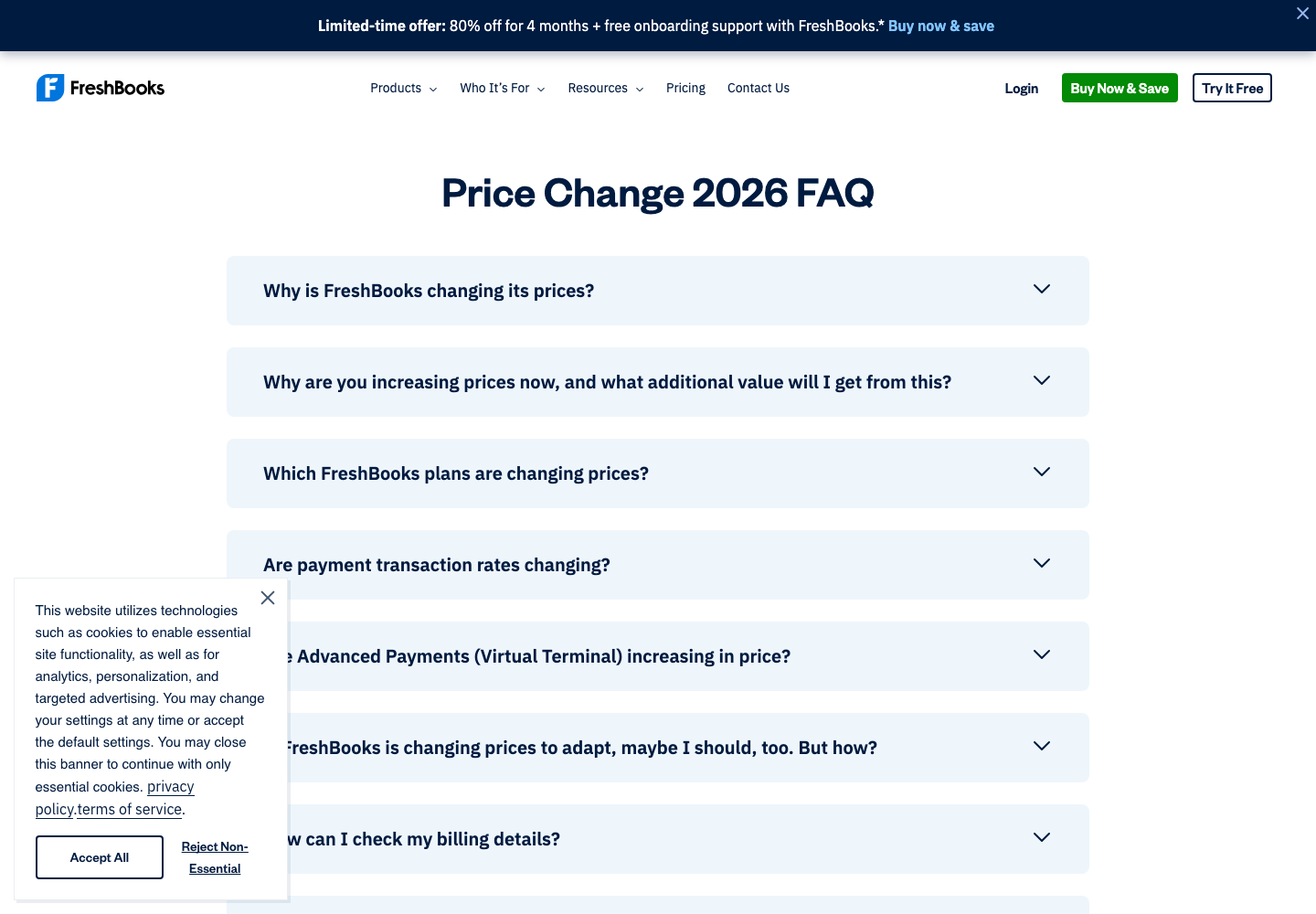
The vendor’s official 2026 price-change FAQ is the clearer baseline for regular US subscription pricing: $23 for Lite, $43 for Plus and $70 for Premium when paid monthly, with a listed 10% discount for annual billing. Select requires consultation and a custom quote.
| FreshBooks plan | Standard monthly USD | Regular annual USD | Active and archived clients | Main purchase reason |
|---|---|---|---|---|
| Lite | $23 | $248.40 | Up to 5 | Invoices, estimates, expenses and basic time |
| Plus | $43 | $464.40 | Up to 50 | Broader accounting, proposals, retainers and reconciliation |
| Premium | $70 | $756.00 | Unlimited | Bills, project profitability and larger workflows |
| Select | Custom | Custom | Unlimited | Negotiated services, support and enterprise-type needs |
These annual prices are the regular amounts stated by FreshBooks, not twelve months of a promotional banner and not the result of buying a monthly plan for a year. Actual checkout offers may differ, and there is no reason to assume an introductory percentage will apply to renewal.
💸 FreshBooks Lite vs Plus: When Paying More Matters
Lite looks attractive to an independent professional sending a handful of invoices. The five-client limit should make you cautious even if you only have four current paying customers. FreshBooks says both active and archived clients count toward the allowance. Archiving an old client does not free a slot. This is an important difference from SaaS tools where archiving removes an object from the billable count.
Plus raises the allowance to fifty and unlocks many accounting functions, including double-entry reports, accountant access and bank reconciliation. A freelancer can plausibly begin on Lite and later move to Plus, but the migration trigger should not only be the sixth client. An accountant asking for trial balance or reconciled books may be a reason to choose Plus from the start. Conversely, a creator issuing occasional receipts without bookkeeping requirements should not buy Plus solely because it is labeled the most popular option.
🧾 FreshBooks Plus vs Premium: What the Upgrade Buys
Premium removes the billable-client ceiling and adds features including project profitability, bill management and additional customization. For an agency with forty-five active customers and several archived engagements, the unlimited-client allowance alone may settle the choice. For a studio with ten projects and inconsistent time logging, however, a profitability dashboard will not solve the operational problem until people enter their costs and hours accurately.
Premium earns its higher fee when project managers actively use cost rates or capacity reporting, and when staff manage supplier bills. A small team that uses neither workflow can usually compare Plus first. Compare expected client growth with the actual need for profitability reports, bill management and additional account features. Unlimited clients alone may not justify the upgrade.
📅 FreshBooks Annual vs Monthly Billing: An Illustrative First-Year Budget
The next scenario intentionally separates the current promotion from the regular subscription. Suppose the displayed promotion lasts four months, then the ordinary monthly price applies for eight more months, with no add-ons and no currency or tax variation. Under exactly those assumptions, Lite costs $202.40 for the first twelve months; Plus costs $378.40; Premium costs $616. These figures are illustrative calculations, not vendor offers or promises about a checkout cart.
| Scenario, USD only | Lite | Plus | Premium |
|---|---|---|---|
| 12 regular monthly payments | $276.00 | $516.00 | $840.00 |
| 12-month regular annual prepayment | $248.40 | $464.40 | $756.00 |
| Illustrative 4 months at 80% off + 8 regular months | $202.40 | $378.40 | $616.00 |
| What is missing | Taxes, extras, price changes | Taxes, extras, price changes | Taxes, extras, price changes |
Before relying on a promotion, read the offer’s billing, eligibility, cancellation and renewal terms. If the promotion cannot be combined with annual billing, the three rows are mutually exclusive alternatives rather than savings that can be stacked. A subscription that’s inexpensive for four months may still become the wrong choice when the fifth-month bill arrives.
🧩 FreshBooks Add-On Costs: The Hidden Team Budget
FreshBooks publicly lists additional team members at $11 per person per month, Advanced Payments at $20 per month and US FreshBooks Payroll at $40 per month plus $6 per user. Select includes special allowances that should be checked against the signed quote. The add-on amounts do not guarantee feature availability in every country.
For a Plus account with three paid additional users, the regular list-price scenario is $43 + 3 × $11 = $76 per month before payment processing. Adding Advanced Payments makes it $96; introducing payroll for four payroll users adds an illustrative $64, raising the hypothetical subscription subtotal to $160. In a real purchase you must verify which people are actually billable seats and whether payroll applies in your business jurisdiction. Do not confuse accountant access with every other kind of team role.
To understand your total monthly cost, count paid users, required add-ons and processing fees before committing to a subscription. Low subscription fees matter less if a service firm is paying much more in card charges or manually repairing incorrectly recorded invoices.
👥 FreshBooks Client Limits: Active, Archived and Deleted
Here is an easy billing mistake: a photographer has five regular customers in Lite, archives two old clients and assumes space has opened for new work. FreshBooks’ archive-or-delete documentation says archived clients still count toward the plan limit. Deleted clients no longer count toward the allowance, and FreshBooks says their earlier invoices and payments remain available. Still, confirm any reporting and record-retention requirements before changing historical customer records.
| Client status | Counts toward listed client cap? | Operational note |
|---|---|---|
| Active | Yes | Normal billing and contact management |
| Archived | Yes | Removed from active views, not a free slot |
| Deleted | Generally excluded from available client list | Check record retrieval and audit obligations before deleting |
Treat these counts as a capacity-planning question, not a suggestion to delete records prematurely. Historical invoices, tax retention and client correspondence may matter long after a project closes. A business expecting to cycle through many small engagements should estimate total relevant client records, not just currently open jobs. The policy is especially relevant to agencies and seasonal contractors, which may keep many past customers on file.
✉️ FreshBooks Invoicing Review: From Work to Payment
FreshBooks invoicing is the heart of the product story. An invoice can draw from services and tracked time, carry customer information, describe the agreed work and offer payment options where supported. The usefulness is not simply that the result looks professional; it is that a business can connect who performed work, what the client owes and whether money actually arrived.
A careful invoice setup includes a consistent naming convention, unique numbering, taxes reviewed for the business jurisdiction, clear payment terms and a policy for resolving disputed line items. The platform may automate reminders and recurring invoice templates, but those rules should be reviewed before the first live send. A repeated invoice sent to the wrong client is not better because it was automated.
📑 FreshBooks Recurring Invoices and Late Payment Reminders
The support guide for reminders and late fees describes automated reminder emails and flat or percentage late fees after due dates. That can reduce chasing, but it can also create awkward customer conversations when an invoice is genuinely disputed or when local rules restrict late penalties. Configure reminder timing to match the contract; check actual messages with an internal test recipient before switching them on.
For a recurring consulting retainer, verify three distinct behaviors. First, does a new invoice generate on the intended schedule? Second, does the customer receive the right payment request rather than an accidental duplicate? Third, how will the system behave when a retainer is paused or canceled? FreshBooks recurring invoices should be tested as an end-to-end billing workflow, not simply as a feature toggle in a pricing table.
⏱️ FreshBooks Time Tracking and Project Billing
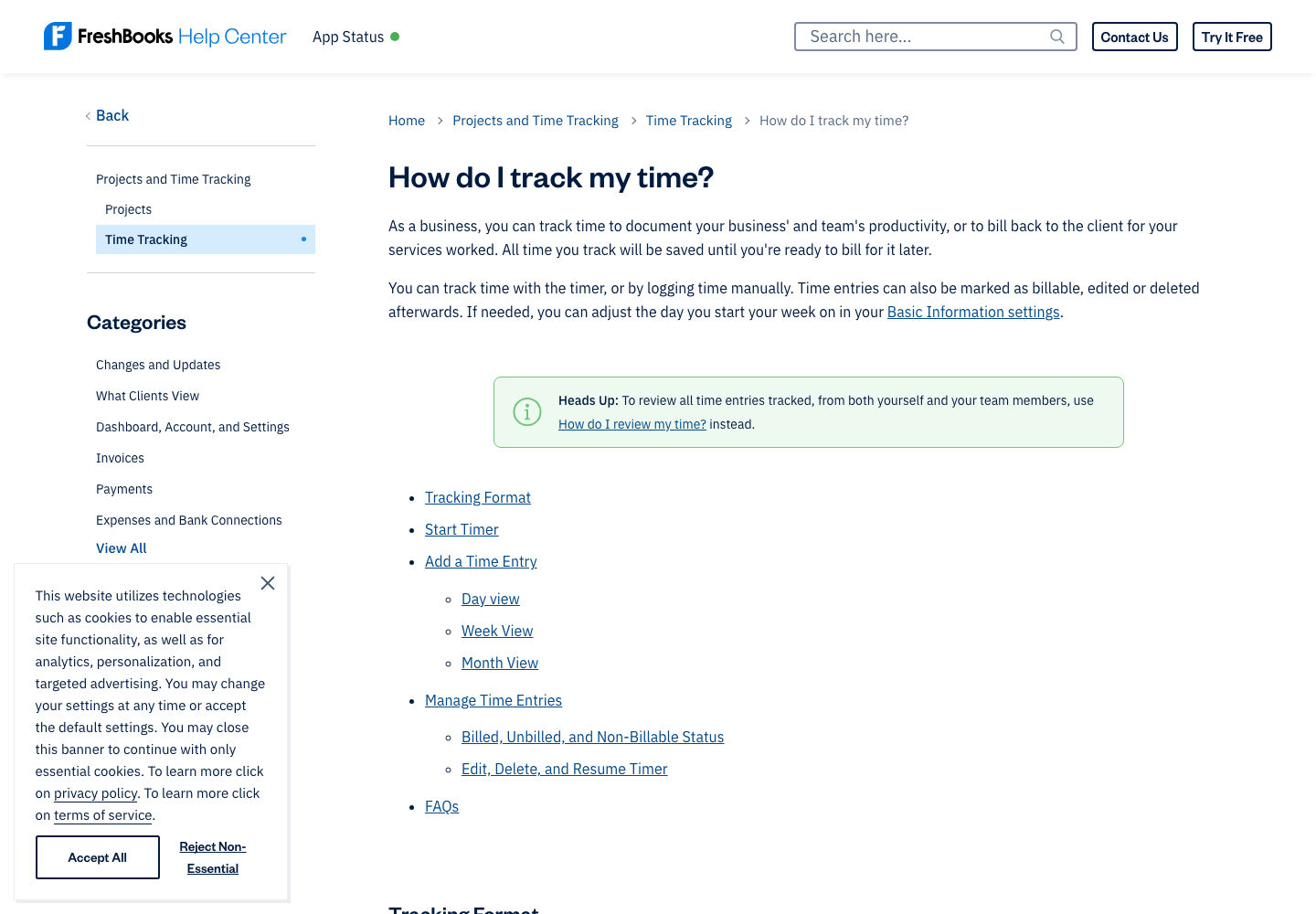
The official time-tracking guide describes both running timers and manually entering time, marking entries billable or non-billable and adding work to projects. For someone charging $100 per hour, a forgotten two-hour session can cost far more than the monthly plan fee. That is a compelling use case, but not evidence that FreshBooks automatically prevents missed time.
An agency should establish who reviews hours before they reach an invoice. Staff may log internal meetings, client revisions and on-site work in different ways. Marking a service as billable is not the same as obtaining the client’s authorization to charge it. Make the approval step explicit, especially when a client has a capped budget or flat-fee agreement.
📱 Mobile Invoicing, Mileage and On-the-Go Work
FreshBooks advertises mobile access and mileage tracking. The practical question is which daily tasks a mobile app supports without a browser. The official iOS and Android time-tracking guides explicitly direct users to a web browser for creating or managing projects. So the statement that a mobile app replicates every desktop capability would be misleading.
A field worker can benefit from recording time and mileage promptly, yet mobile connectivity, permissions and tax evidence remain relevant. Test one realistic travel day: capture a receipt, log mileage where permitted, verify that the expense appears in the correct account and confirm that no personal or client-sensitive data is shared unintentionally. The result matters more than the count of icons on the app’s home screen.
🧮 FreshBooks Accounting Features: Beyond an Invoice List
A healthy bookkeeping system should answer two questions: how much money has the business earned, and how much cash is actually in the bank? Those figures are not necessarily the same. An issued invoice can create an outstanding receivable before a client pays. A card payment might reach the bank days later, minus processing fees. An expense can be paid in one month but belong to a different reporting period.
FreshBooks accounting software includes reports and features to connect some of those records, but depth depends on the edition. The vendor’s pricing support guide identifies the chart of accounts, general ledger and trial balance among Plus-and-above features. That’s a meaningful boundary: an owner using Lite should not assume their accountant can produce the same year-end accounting package as on Plus.
The bookkeeper will still need reconciled transactions, consistent categorization and a traceable approval policy. Interface simplicity can make those steps less painful. It does not decide the proper tax treatment of an unusual expense, approve an adjustment or make incorrect source records reliable.
🏦 FreshBooks Bank Reconciliation: Match Cash to Records
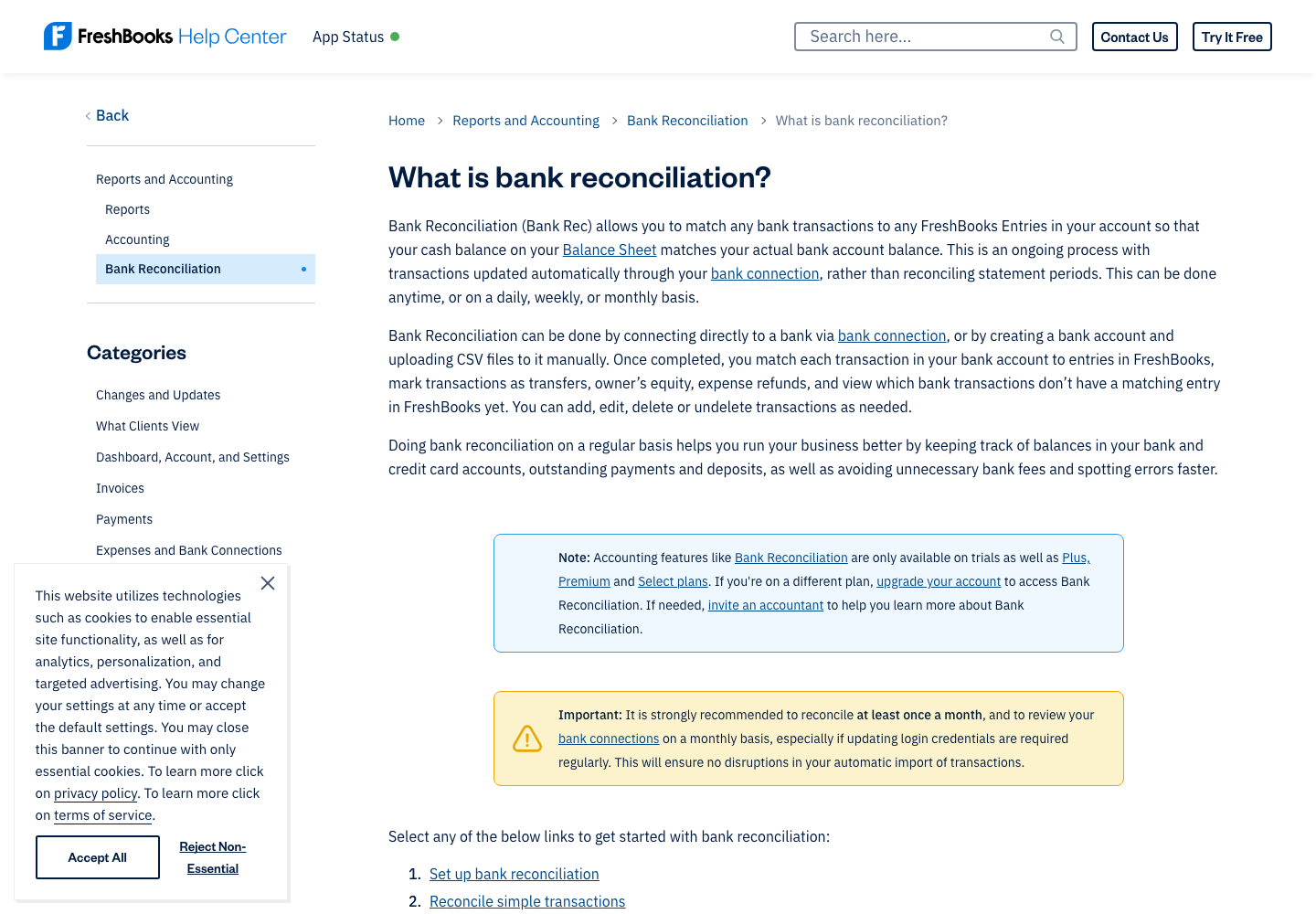
The bank reconciliation guide explains how users can match bank transactions to FreshBooks entries, including expenses, transfers, invoices and owner equity. Connected bank feeds can populate the working list; manual CSV uploads are available for some workflows when direct connections are unavailable.
For example, a client pays a $1,000 invoice by card. The bank receives less than $1,000 after the processor withholds its fee. The invoice amount, settlement and recorded fee need to agree. Marking the invoice paid while ignoring the net payout does not make the books correct. FreshBooks explicitly documents reconciling batched online payment deposits and fees.
Before migrating finances, ask the accountant to reproduce a few anonymized transactions: a sale, one refund, a fee and an internal bank transfer. The result should reconcile to the same closing balance as your old system. Matching those different entries against an independent control total tells you much more than a default dashboard.
📊 FreshBooks Reports, General Ledger and Taxes
A solo consultant might see $12,000 in monthly revenue but only $5,000 in the bank because some invoices remain unpaid and other payments relate to an earlier period. A profit-and-loss statement, balance sheet and bank balance therefore answer different questions.
Check whether the selected FreshBooks plan produces the exact reports your accountant needs, whether their currencies and cut-off dates are accurate, and how exports work. An imported chart of accounts without a clear naming convention can create duplicate categories and misleading totals. More reporting widgets are not a substitute for clean records.
FreshBooks tax reporting should also be evaluated against the business’s jurisdiction. VAT, sales tax, contractor reporting and annual corporate tax filings differ across countries. A report labelled ‘tax’ does not guarantee the software prepares every statutory return. Confirm the accountant’s export requirements and local compliance workflow before buying an annual plan.
💳 FreshBooks Payments Fees: The Other Half of the Budget
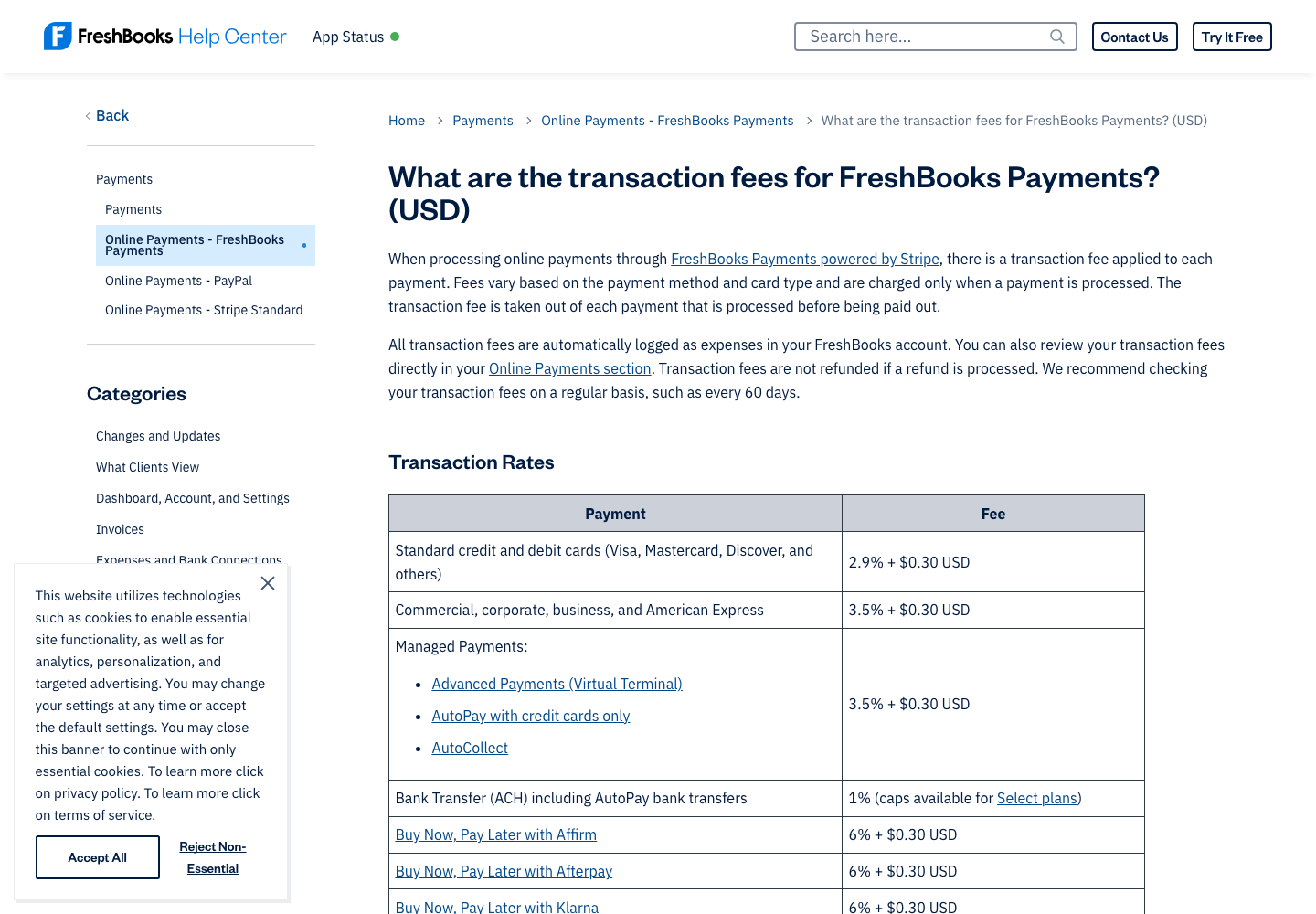
An invoice platform also helps businesses get paid. That convenience creates a second budget independent of the monthly subscription. FreshBooks advertises card and bank-transfer options, but processor availability is location-dependent. Its payment integration guide says FreshBooks Payments powered by Stripe is available to businesses in the United States and Canada. International businesses can evaluate Stripe Standard instead, subject to supported countries and methods.
According to the FreshBooks USD fee schedule, standard eligible cards cost 2.9% plus $0.30 per transaction, while some business, corporate and American Express cards cost 3.5% plus $0.30. Other methods and Advanced Payments functions can carry different rates.
| Illustrative US payment | Standard card: 2.9% + $0.30 | Business/AmEx: 3.5% + $0.30 |
|---|---|---|
| $100 invoice | $3.20 | $3.80 |
| $500 invoice | $14.80 | $17.80 |
| $2,000 invoice | $58.30 | $70.30 |
These are arithmetic illustrations based on a published US schedule, not transactions processed by DigiOffly. They exclude possible international fees, taxes, disputes, refunds, conversion and the specific terms of other processors. A studio collecting twenty $2,000 card invoices can pay processing fees far exceeding its software subscription. FreshBooks payment processing fees therefore deserve a dedicated budget line.
💸 ACH Transfers and International Availability
An ACH bank transfer differs from a card charge in both fees and settlement behavior. The country of the receiving business matters as much as the cardholder’s or client’s location. A European freelance company should not copy a US FreshBooks Payments price into its local budget; international payment setup may use Stripe Standard with SEPA support and country-specific fees.
Ask what product processes the payment in your jurisdiction, how long settlement takes, and how refunds and failed transactions appear in the accounts. A Pay Now button proves none of those details. Trial the actual payment-to-ledger workflow with properly authorized transactions before inviting customers to switch methods.
📈 FreshBooks Project Profitability: For Agencies That Track Costs
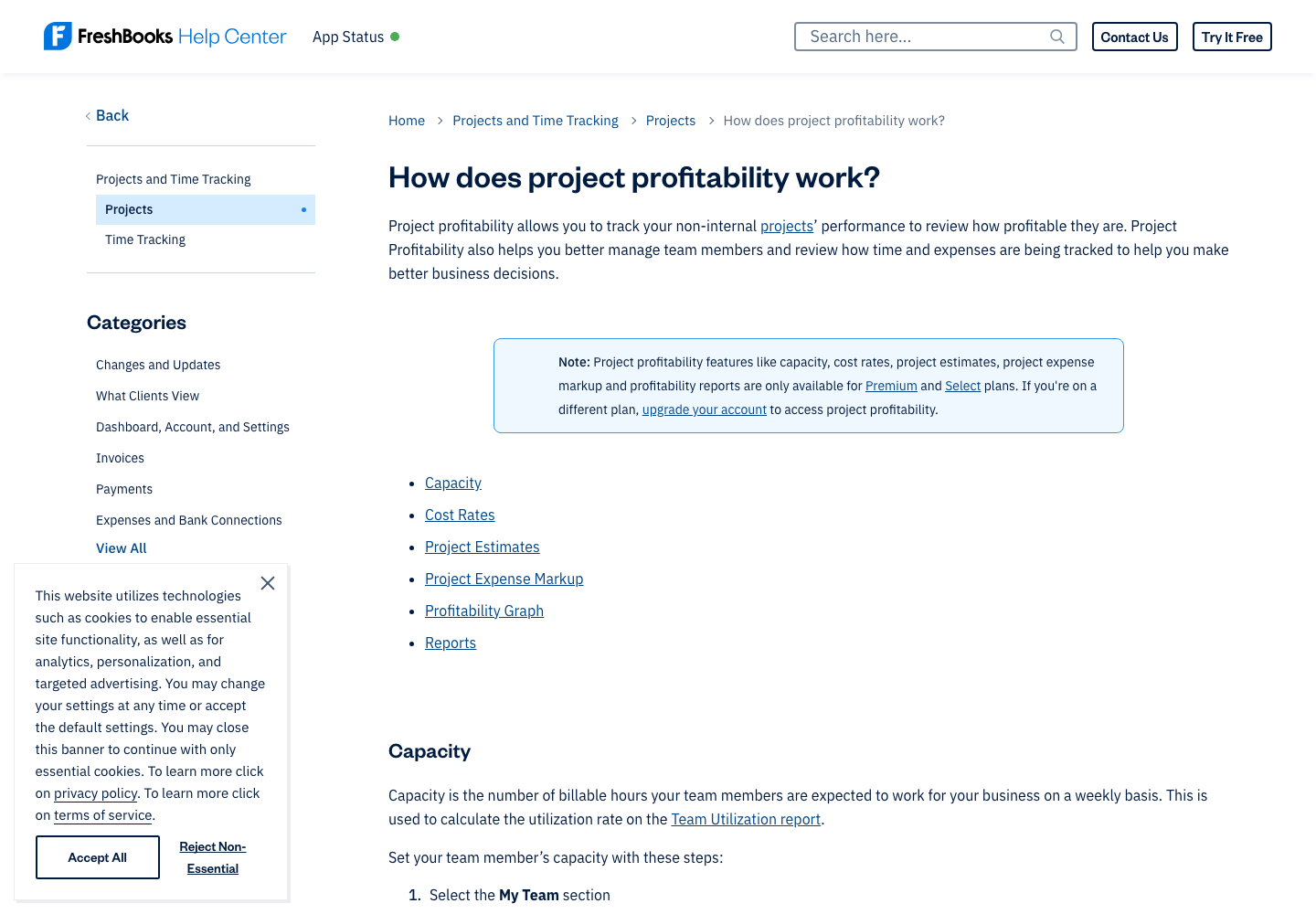
For an established agency, understanding which jobs make money matters more than customizing invoice appearance. It compares earned income against assigned expenses and time costs, revealing whether a contract is delivering the margin expected when it was signed. FreshBooks’ official guide says capacity, cost rates, project estimates, markup and profitability reports belong to Premium and Select.
An agency quotes $8,000 for a branding project, then receives several extra revision rounds that require thirty more senior hours. Unless those hours and their cost are logged, a project can look successful while losing money. The software can make the difference visible, but only if the underlying data is complete.
A useful trial should compare one fixed-fee and one hourly project. Add different team cost rates, one pass-through expense, internal nonbillable time and a realistic scope change. Reconcile the resulting profitability report with a spreadsheet prepared independently. If it matches, the team has a stronger basis for changing its workflow. If not, identify whether the problem is plan entitlement, missing entries or inconsistent project classification.
This is why FreshBooks project profitability reporting should be treated as a process improvement, not just a Premium upsell. Without clear time approval and cost coding, more charts can make weak records look more authoritative.
⚖️ FreshBooks vs QuickBooks, Xero, Wave, Zoho Books and BILL
Comparing accounting platforms by counting features is a shortcut that can disappoint both the finance team and its clients. Start with the actual business model: are you billing for hours, selling stocked products, reconciling ecommerce deposits or approving hundreds of supplier invoices? FreshBooks is most distinctive when customer work becomes an invoice. The right alternative changes with what happens before and after that invoice.
| Platform | When to shortlist it | What to verify rather than assume |
|---|---|---|
| FreshBooks | Consulting, creative and other client-service work | Client allowance, bookkeeping edition, payment method and team roles |
| QuickBooks Online | Accountant-led general ledger and broad small-business workflows | Country-specific edition, inventory, permissions and paid additions |
| Xero | Collaborative bookkeeping and reconciliation | Supported banking connections, reports, payroll integrations and migrations |
| Wave | A very small eligible business prioritizing a simple low-cost setup | Free/paid entitlements, country support and payment fees |
| Zoho Books | Existing Zoho users or finance teams needing configurable workflows | Local tax modules, automation restrictions, users and integration depth |
| BILL | Supplier bills, approval chains and vendor payments | Approval policy, payment rails, regional eligibility and accounting sync |
🔄 FreshBooks vs QuickBooks Online: Different Starting Points
Choosing between FreshBooks and QuickBooks Online starts with who will manage the financial records each day. A consultant living in client projects may value FreshBooks’ route from time to invoice. A business where the accountant owns the chart of accounts, purchasing and reporting process may prefer an established QuickBooks workflow. Neither conclusion should be made without attempting the real tasks.
Recreate three invoices, two expenses and one card settlement in both tools. Then ask the accountant to reconcile the period and export the reports they are responsible for submitting. Count the manual corrections and any extra integration costs. Twenty dollars in monthly subscription savings can disappear quickly if it adds two hours of professional bookkeeping.
Our QuickBooks Online review addresses the competing product. Pay attention to local editions: software availability and payroll, tax or inventory capabilities can differ across countries.
🔁 FreshBooks vs Xero: Projects or Ledger First?
FreshBooks and Xero both cover far more than invoice creation. The deciding factor may be whether the team’s daily work begins with clients and tracked time or with ledger review and reconciliation. When staff begin with projects, services and billable hours, FreshBooks may be intuitive. When accountants begin with bank reconciliation, structured ledgers and regular financial statements, Xero is worth a close trial.
The deciding tests are bank-feed coverage, accountant access, multi-currency behavior, invoice taxes, historical data import and the exact reports required. Do not infer feature entitlement from another country’s price page. See the separate Xero review for that product’s scope and limitations.
🆓 FreshBooks vs Wave: Pay Only for Workflows You Need
A business issuing two invoices a month may not require a substantial subscription. A FreshBooks–Wave comparison should start with billing frequency, service work and whether Wave offers the needed plan in the business’s country. If basic invoices and recordkeeping meet the requirements, a simpler tool could make sense.
If services are billed by hours, projects involve multiple people or monthly bookkeeping needs are substantial, FreshBooks may justify its recurring price. Wave has offered free core accounting options in supported markets, but payment processing, payroll and advanced service tiers require separate pricing checks. The least expensive tool is the one that can complete the work accurately without hidden spreadsheet repair.
🔗 FreshBooks vs Zoho Books and BILL
Zoho Books deserves closer attention when a company already manages its customers or expenses in other Zoho applications. A shared vendor ecosystem can be attractive, but it is not proof that every field synchronizes perfectly. Test permissions, currency settings, transactions, integration errors and export rights. Compare the full cost for the same team and contacts.
BILL is often assessed for a different function: handling supplier invoices, approvals and outgoing vendor payments. It may complement an accounting application rather than replace customer invoicing. The forthcoming BILL review will examine who approves a bill, what evidence accompanies it and how the payment reconciles. Treating BILL as a direct one-to-one substitute for FreshBooks would miss that distinction.
✅ FreshBooks Pros and Cons
| Strength worth investigating | Limitation or decision risk |
|---|---|
| Work-to-invoice workflow suits service businesses | Five-client Lite cap also includes archived clients |
| Time entry, expenses and customer projects can be linked | More complete books and reconciliation require Plus or higher |
| Vendor publishes detailed billing and feature guides | Premium required for deeper profitability and bill workflows |
| Mobile time capture helps field and freelance work | Some project management actions require the browser |
| Payment links and integrations can simplify collections | Rates and processors depend on the business country |
| Free trial enables useful evaluation before committing | Trial access does not certify migration or local tax compliance |
The product does not need to offer every enterprise accounting feature to be a useful choice. The important risk is buying it as an attractive invoice editor, then discovering that the required year-end statement or multi-client workflow belongs to a more expensive edition. A retailer seeking complicated inventory management may be shopping in the wrong product category entirely.
🧪 A FreshBooks Free Trial Checklist, Not Fictional Test Results
This review uses public documentation and verified vendor pages. DigiOffly did not run paid-account invoices, performance benchmarks or live settlement tests. The following checks are recommendations for buyers, not experiments that we claim to have completed.
1. Create one ordinary invoice. Use a synthetic client record and two sample services. Adjust the invoice terms and check how the recipient preview handles tax fields and payment details. Confirm that all required fields from your real contracts are supported.
2. Turn time into billable work. Enter billable and nonbillable hours, change one entry and then generate an invoice. Confirm that none of the entries is accidentally billed twice and that a flat-fee project behaves as agreed.
3. Reconcile one settlement. With accountant guidance, recreate an invoice payment, an associated processor fee and a net bank deposit. The reconciled total should match a hand-calculated control. This test matters more than the appearance of the dashboard.
4. Simulate next year’s client count. Count active and archived client records, then check which edition still meets the limit as the business grows. Do not delete real historical records to make an artificial test pass.
5. Confirm processor eligibility. Check whether your business location supports the actual card or bank-payment integration, what currency settles and which fees apply. Do not promise clients an option that your local account cannot use.
6. Test exports before migration. Request the CSV and financial reports needed for your accountant and possible future migration. Inspect which contacts, attachments, invoice histories and custom fields can be recovered.
A useful evaluation scorecard tracks whether account totals reconcile, which steps require manual correction, how long recurring tasks take and whether the accountant accepts the outputs. Inventing a satisfaction score or an invoice-delivery benchmark would not help anybody make a serious finance-software decision.
🔐 Data Access, Accountant Collaboration and Compliance
Accounting tools contain names, addresses, invoice histories, transaction records and potentially bank details. Assess access permissions, multifactor authentication, connected app scopes, data exports and retention policies before moving sensitive information. A polished financial dashboard is not evidence that every team member has appropriately restricted access.
FreshBooks accountant access is valuable when the responsibility is defined. Decide who reconciles deposits, who can change a chart-of-accounts category, who approves a correction and who closes a financial period. If contractors only need to log time, verify that they cannot see unrelated customer records or private business finances.
Local requirements remain the owner’s responsibility. VAT, payroll taxes, privacy obligations and statutory reports depend on the business’s jurisdiction. A cloud accounting platform can support some of those tasks, but it does not replace advice from a qualified local accountant. This is especially important when a company has employees or customers in multiple countries.
🏁 Final Verdict: Is FreshBooks Worth It in 2026?
FreshBooks is worth shortlisting when a service business wants invoices connected to tracked work and expenses. It can help a freelancer catch unbilled hours, issue an invoice from the work record and trace the eventual payment without rebuilding those details in a spreadsheet.
For a genuinely tiny client list, Lite may be enough. For an owner who needs reconciled books and more formal reports, Plus can be the more sensible starting point. Premium makes more sense when unlimited client records and project profitability match work the team actually performs. Select should be judged against a written custom quote.
The practical conclusions of this FreshBooks review 2026 are straightforward. Count archived clients before choosing Lite or Plus. Separate the limited-time promotion from the standard monthly and annual amounts. Budget payment processing independently of the subscription. Verify that the accountant can obtain the reports they need. And trial the whole path from time entry to bank settlement before replacing the current financial system.
For a consultant who wants simpler billing, FreshBooks may be an excellent fit. For a stock-heavy retailer requiring advanced inventory, it could be the wrong starting point. Those two conclusions are consistent rather than contradictory. Good accounting software should reduce avoidable manual work while producing records that people can trust.
🔎 Sources and Verification
Verified October 24, 2026 against the FreshBooks pricing page, 2026 price-change FAQ, pricing support guide, archiving guide, reconciliation guide, profitability guide, payment-fee guide and international Stripe guide. Promotion eligibility, features and regional rules can change after publication.

FreshBooks Frequently Asked Questions
How much does FreshBooks cost in 2026?
The 2026 US regular monthly prices are Lite $23, Plus $43 and Premium $70. Annual list prices are $248.40, $464.40 and $756. Select is custom quoted. Temporary promotions and regional prices are separate.
Does FreshBooks offer a free plan?
FreshBooks advertises a 30-day free trial, not a permanent free accounting subscription. Check the current trial and payment terms before entering billing details.
Do archived clients count toward FreshBooks client limits?
Yes. The vendor says both active and archived clients count. Lite allows five, Plus fifty, and Premium/Select unlimited clients. Review retention requirements before deleting historical records.
Is bank reconciliation included with FreshBooks Lite?
No. Bank reconciliation and fuller double-entry accounting reports are available on Plus, Premium and Select, according to FreshBooks plan comparisons.
Can FreshBooks turn tracked time into client invoices?
FreshBooks supports timers and manual time entries linked to clients and projects; entries can be marked billable or nonbillable. Check your trial workflow before moving important client data.
Does FreshBooks support recurring invoices and reminders?
Yes. FreshBooks documents recurring invoice templates, payment reminders and late fees. Check the plan, legal terms and reminder timing before activating them for customers.
Does FreshBooks Payments work for every country?
No. FreshBooks Payments powered by Stripe is intended for US and Canadian businesses. Businesses elsewhere may use Stripe Standard subject to local eligibility and available payment methods.
What are the US FreshBooks payment processing fees?
FreshBooks lists eligible standard US credit/debit card processing at 2.9% plus $0.30, with some corporate/AmEx cards at 3.5% plus $0.30. Other methods and locations differ.
Which FreshBooks plan includes project profitability?
The broader project profitability tools, including cost rates, capacity and profitability reports, are available on Premium and Select according to vendor documentation.
Is FreshBooks better than QuickBooks Online or Xero?
There is no universal winner. FreshBooks may suit client-service invoicing and billable time, while QuickBooks and Xero deserve comparison for accountant-led bookkeeping and local reporting. Test your real workflow.
Does FreshBooks automatically file my taxes or cover global payroll?
No general promise should be assumed. Tax reports and payroll integrations vary by plan and country. Confirm the actual filing, accounting and payroll obligations with a local professional.
EXPLORE NEXT ON DIGIOFFLY
Build a Financial Software Stack That Fits
Compare accounting tools, verify service workflows and budget the complete subscription.
Explore finance software
- Finance Software Reviews — Compare accounting, payments and operations.
- QuickBooks Online Review — Explore general-ledger alternatives.
- Xero Review — Compare bookkeeping workflows.
- Zoho Books Review — Review free-plan limits, inventory, team roles and bookkeeping.
- Wave Accounting Review — Compare low-cost US/Canadian invoicing and bookkeeping.
Find useful alternatives
- Best Software — Browse editor-selected tools.
- AI Software Finder — Filter by your business needs.
- Compare Software — Evaluate competing products.
Plan your software spend
- Software Cost Calculator — Model seats and subscriptions.
- Best Value Advisor — Compare practical value.
- Software Directory — Browse the complete product catalog.
- Sage Accounting — UK accounting, VAT and reconciliation