

Verified October 24, 2026. This is an independent documentation-led review based on Zoho’s US pricing grid, feature comparison, accounting help center, and public product materials. DigiOffly has not purchased a paid subscription, entered live invoices, or run performance benchmarks. The screenshots below are taken from official vendor pages, not private test accounts. Prices are for the US edition before taxes and may differ by business country, currency, promotion or plan change.
A consulting firm may look profitable on paper even while invoices remain unpaid and staff forget to log client hours. The right setup won’t collect overdue money for you, but it can show which clients owe it. That is the practical question behind this Zoho Books review 2026: how much accounting structure do you really need, and at which plan does it become available?
Quick verdict: Zoho Books is a serious shortlist choice for growing small businesses, especially teams already using Zoho CRM, Zoho Inventory or related products. Its genuinely free US entry tier is useful for limited workloads, and its paid editions progressively add team seats, sales and purchasing workflows, automation and reporting. Before choosing a plan, check annual transaction limits, included users and the features available in your country.
📊 Zoho Books Review at a Glance
| Question | Practical answer |
|---|---|
| Primary use | General-ledger bookkeeping, invoices, expenses, reconciliation and financial reporting |
| Ideal buyer | Solo operators, service businesses, merchants and growing finance teams needing structured records |
| US monthly list prices | Free $0; Standard $20; Professional $50; Premium $70; Elite $150; Ultimate $275 |
| US annual-billing monthly equivalents | $0 / $15 / $40 / $60 / $120 / $240 |
| Base users by plan | 1 plus accountant / 3 / 5 / 10 / 10 / 15 |
| Key upgrade drivers | Invoice volume, users, projects, inventory, automation, locations and analytics |
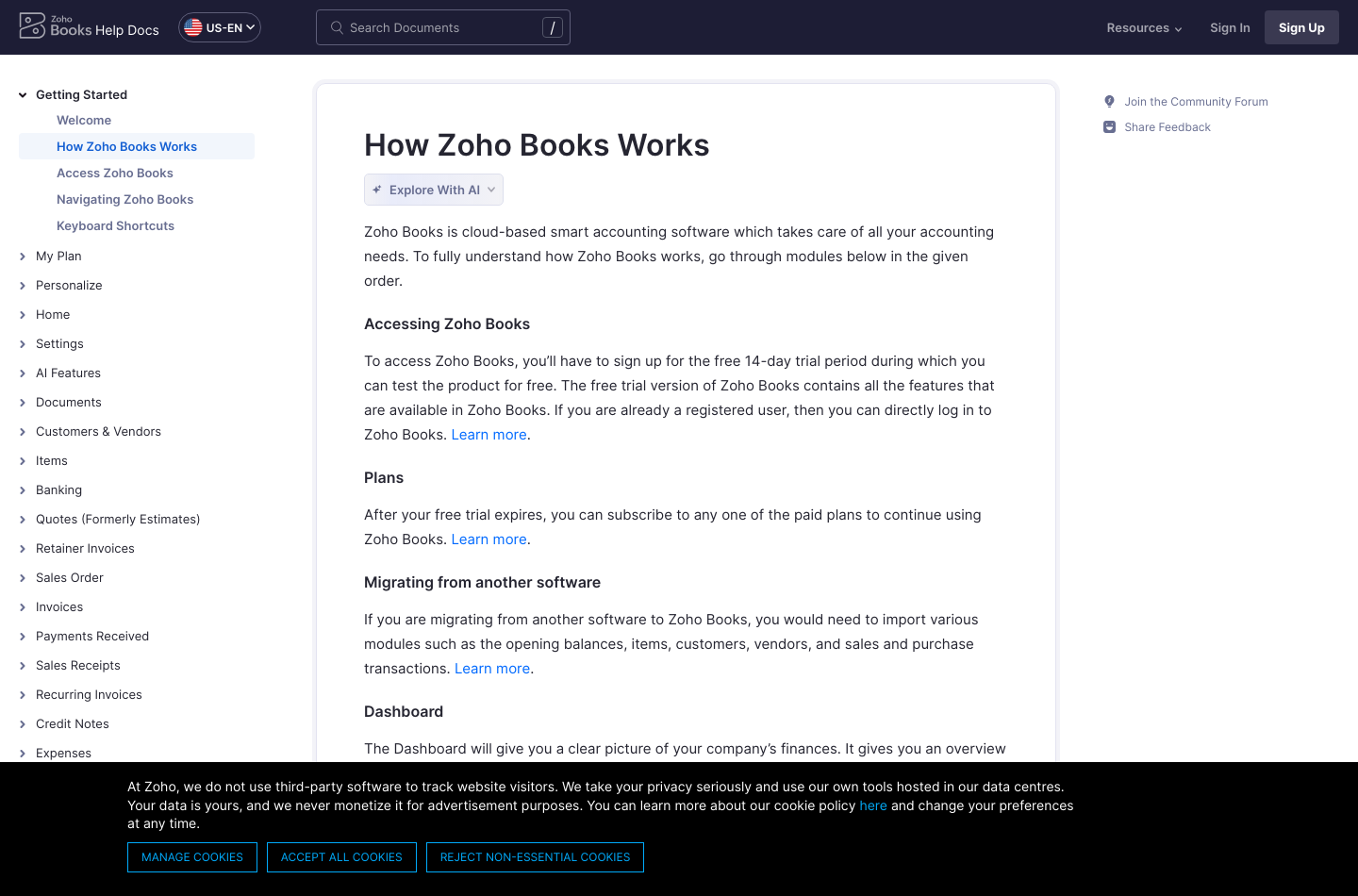
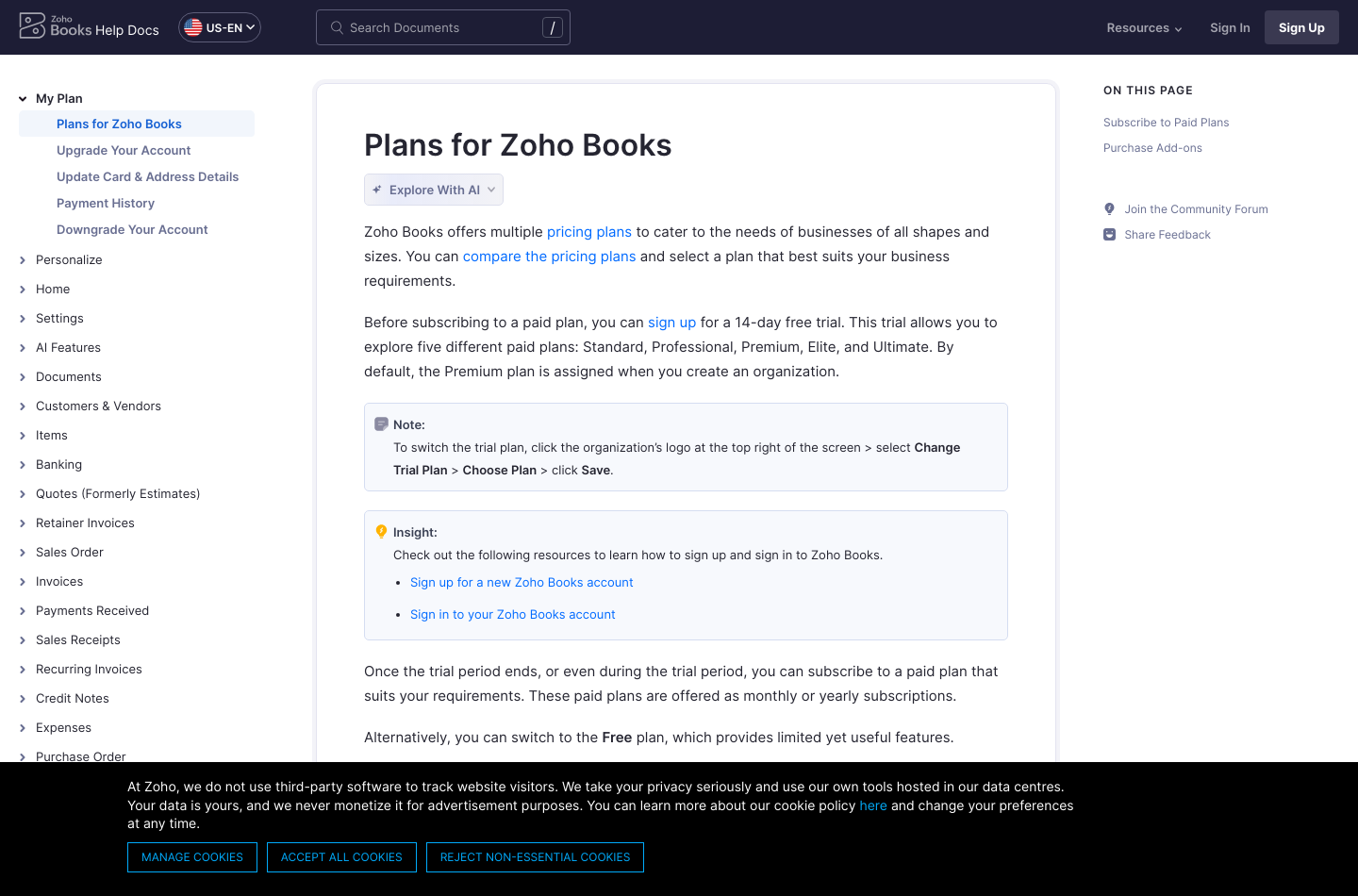
| Trial | 14-day trial of paid plans; default trial edition is Premium |
| Biggest caveat | Local edition rules and feature thresholds differ: verify them before migration |
| Source | Official Zoho Books US plan comparison |
🎯 Who Is Zoho Books Accounting Software For?
A first-time business owner may be attracted by an accounting program that starts without a subscription fee. The Free edition can support early invoicing and bookkeeping, but Zoho’s US pricing FAQ imposes two important limits: annual business revenue must not exceed $50,000, and the plan allows 1,000 invoices per year. At roughly eighty invoices per month, a company could hit that ceiling well before a full year.
A client-services firm needs dependable expense categorization, access for an accountant and perhaps billable project time. Zoho’s timesheets module supports recording the hours spent on customer work and associating them with projects. Yet the edition matters. Buying Standard because it costs only $20 monthly would be premature if the firm’s required purchasing and project tools are positioned on Professional.
An inventory-oriented business may care more about stock costing, purchase orders, warehouses and multiple locations than about elegant invoice templates. Zoho offers Professional, Elite and Ultimate editions with progressively deeper commerce or inventory-oriented features. That does not mean every edition includes the same inventory engine. Check the specific stock valuation, item tracking and location features in the full comparison.
An existing Zoho customer has another question: are the expected links between CRM deals, invoices, contacts and inventory actually configured? One vendor name does not guarantee perfectly consistent data. Start by mapping the fields that need to move between applications, identifying the system of record for each customer, and testing edits in both directions.
💰 Zoho Books Pricing 2026: All Six US Editions Explained
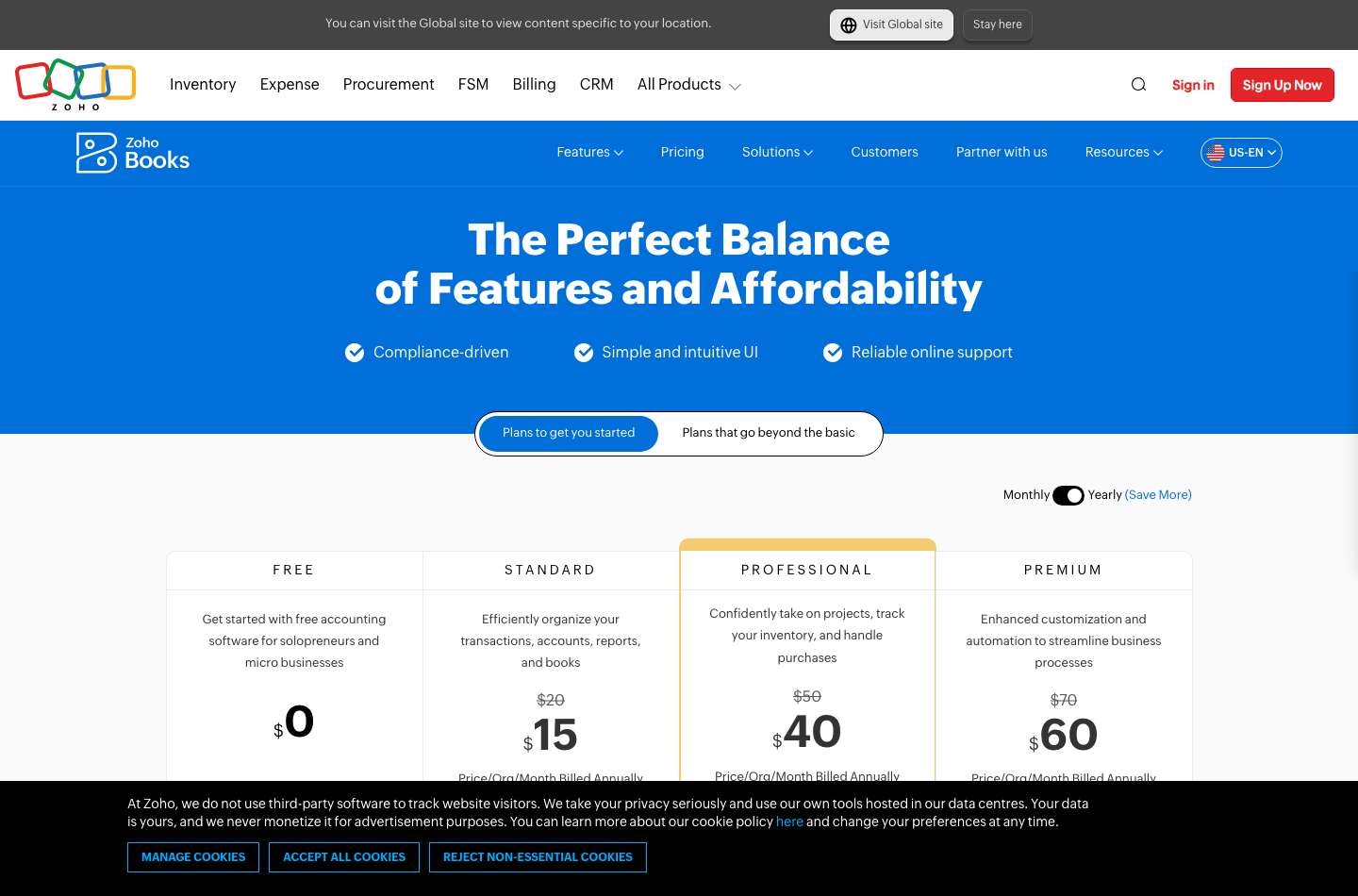
The official US pricing page lists Standard at $20, Professional at $50, Premium at $70, Elite at $150 and Ultimate at $275 per organization per month with monthly billing. Annual billing reduces their monthly equivalents to $15, $40, $60, $120 and $240 respectively. The Free edition is $0, but its restrictions make it inappropriate for every established business. Select the US edition only if that is the actual jurisdiction of your business.
| Plan | Monthly billing | Monthly equivalent billed annually | One year prepaid | Included users |
|---|---|---|---|---|
| Free | $0 | $0 | $0 | 1 user + 1 accountant |
| Standard | $20 | $15 | $180 | 3 |
| Professional | $50 | $40 | $480 | 5 |
| Premium | $70 | $60 | $720 | 10 |
| Elite | $150 | $120 | $1,440 | 10 |
| Ultimate | $275 | $240 | $2,880 | 15 |
All dollars above are published US list prices, not independent quotes. A company paying month by month spends $240, $600, $840, $1,800 and $3,300 per year for those five paid plans, assuming uninterrupted regular pricing. Tax, processing, additional users and other software subscriptions are not included.
🆓 Zoho Books Free Plan Limits: Don’t Confuse Free with Unlimited
The Free edition costs $0 for an eligible small organization, but Zoho’s current US FAQ limits it to businesses with up to $50,000 in annual revenue. The plan also allows 1,000 invoices a year, one user and one accountant. Before registering, check the relevant local edition: revenue thresholds and tax rules may differ outside the US.
If an owner sends fifty invoices in January and another 150 in February, averaging the first two months would badly misrepresent seasonal workload. A more reliable calculation forecasts the largest twelve-month total, including credit notes and recurring transactions where the vendor’s quota applies. Use a trial or direct vendor confirmation to determine exactly what increments the limit.
⚖️ Zoho Books Standard vs Professional: When Projects and Purchasing Matter
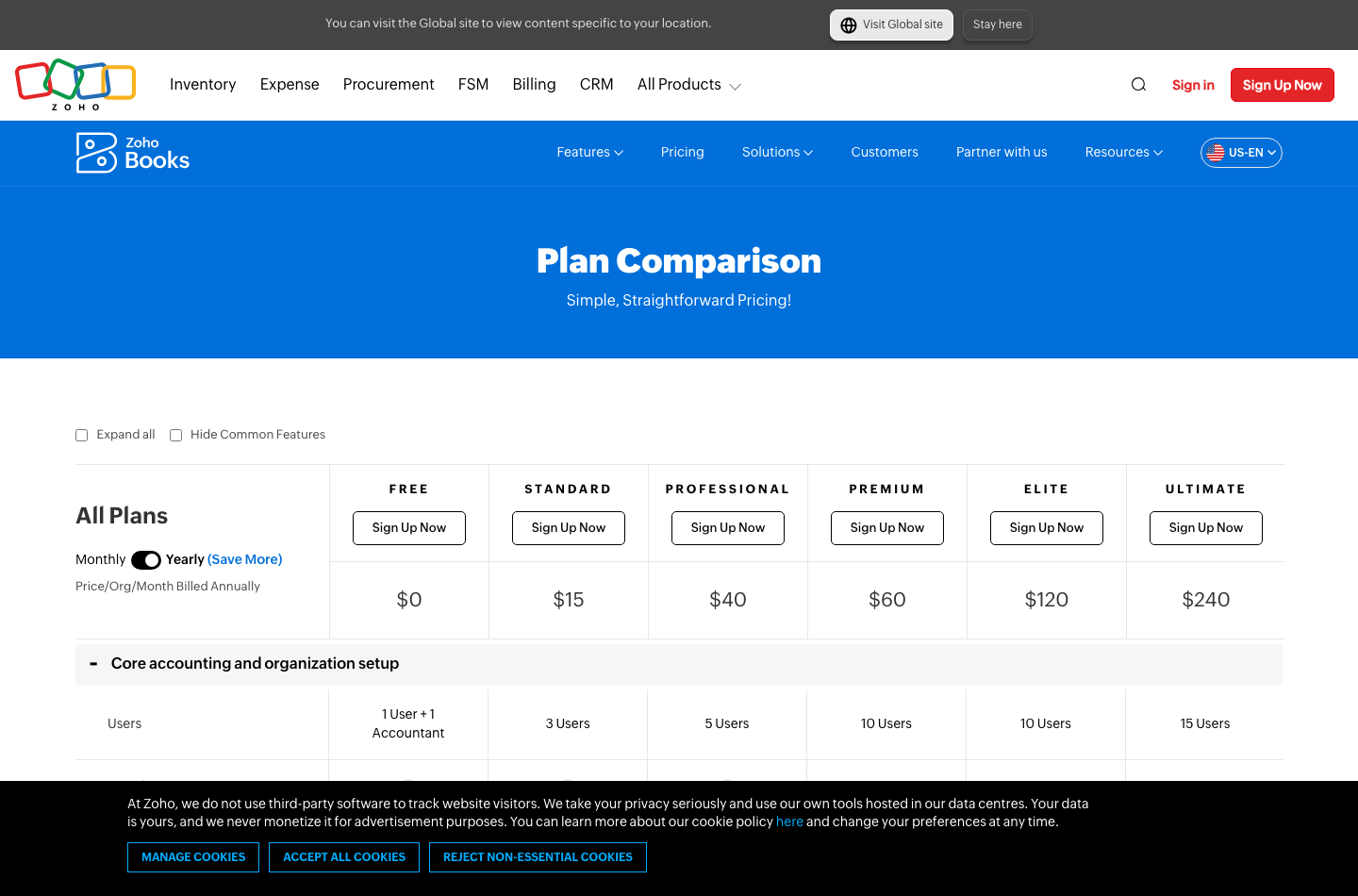
Standard allows three users and raises the published annual invoice allowance to 5,000. Professional increases included users to five and the allowance to 10,000. The Professional tier is described by Zoho as covering projects, inventory and purchases. That difference can be more important than the $30 monthly gap.
A service studio should test one quoted project with billable hours and reimbursable expenses, not just one ordinary invoice. A wholesaler should instead reproduce a purchase order, partial receipt and vendor credit. Those represent entirely different purchase decisions. The full feature matrix is more reliable than an introductory marketing headline.
🏆 Zoho Books Premium vs Elite vs Ultimate: Higher Editions Are Different Products
Premium is aimed at enhanced customization and automation, with ten included users and a published 25,000-invoice annual limit. Elite lists ten users and 100,000 invoices, with greater inventory-management capabilities and support for up to eight locations. Ultimate lists fifteen users, 100,000 invoices and advanced business intelligence. A business should not interpret ‘Ultimate’ as meaning every country-specific payroll or compliance feature exists.
Think about the daily operator. If the finance staff is spending hours reconciling multi-location stock movements, inventory depth may matter. If leadership is reconciling multiple analytical reports and needs customized performance views, the analytics tier deserves closer attention. But moving up two tiers for a dashboard that nobody uses is expensive.
🧩 The Hidden Costs: Users, Locations and Payment Processing
Per-organization pricing simplifies budgeting until additional staff and connected workflows enter the picture. The published comparison shows three Standard users, five Professional, ten Premium/Elite and fifteen Ultimate. The costs of additional seats, contacts and transaction allowances should be checked against the current add-on schedule before signing. Avoid multiplying the base price by user count: Zoho’s base fee is per organization, not per user like some accounts-payable tools.
Locations are another non-obvious distinction. The current US grid shows support for three locations at Premium and eight at Elite and Ultimate; smaller editions do not show the same allocation. Before opening a second warehouse or retail outlet, confirm whether locations, warehouses and bookkeeping branches mean the same thing in the application. The labels can refer to different accounting objects.
Payment processing is a separate service. Invoice creation does not make card transactions free or guarantee the processor is approved for your country. Record the processor, settlement currency, card fee, dispute policy and chargeback procedures. A small subscription saving can disappear when the same customers make many low-value payments.
| Cost component | How to budget it | What can go wrong |
|---|---|---|
| Base subscription | Use actual region and billing cadence | Annual price confused with monthly checkout |
| User expansion | Count operators and accountant permissions | A required staff role exceeds included seats |
| Transaction allowance | Forecast invoices and expenses across 12 months | Upgrade required mid-year |
| Inventory/location needs | Map actual stock sites and movements | Wrong edition lacks warehouse-level workflows |
| Payment gateway | Estimate average payment size and processor rate | Invoice amount and bank payout differ |
| Implementation | Include accountant review and imports | Migrated historical totals do not reconcile |
✉️ Zoho Books Invoicing and Customer Portal Review
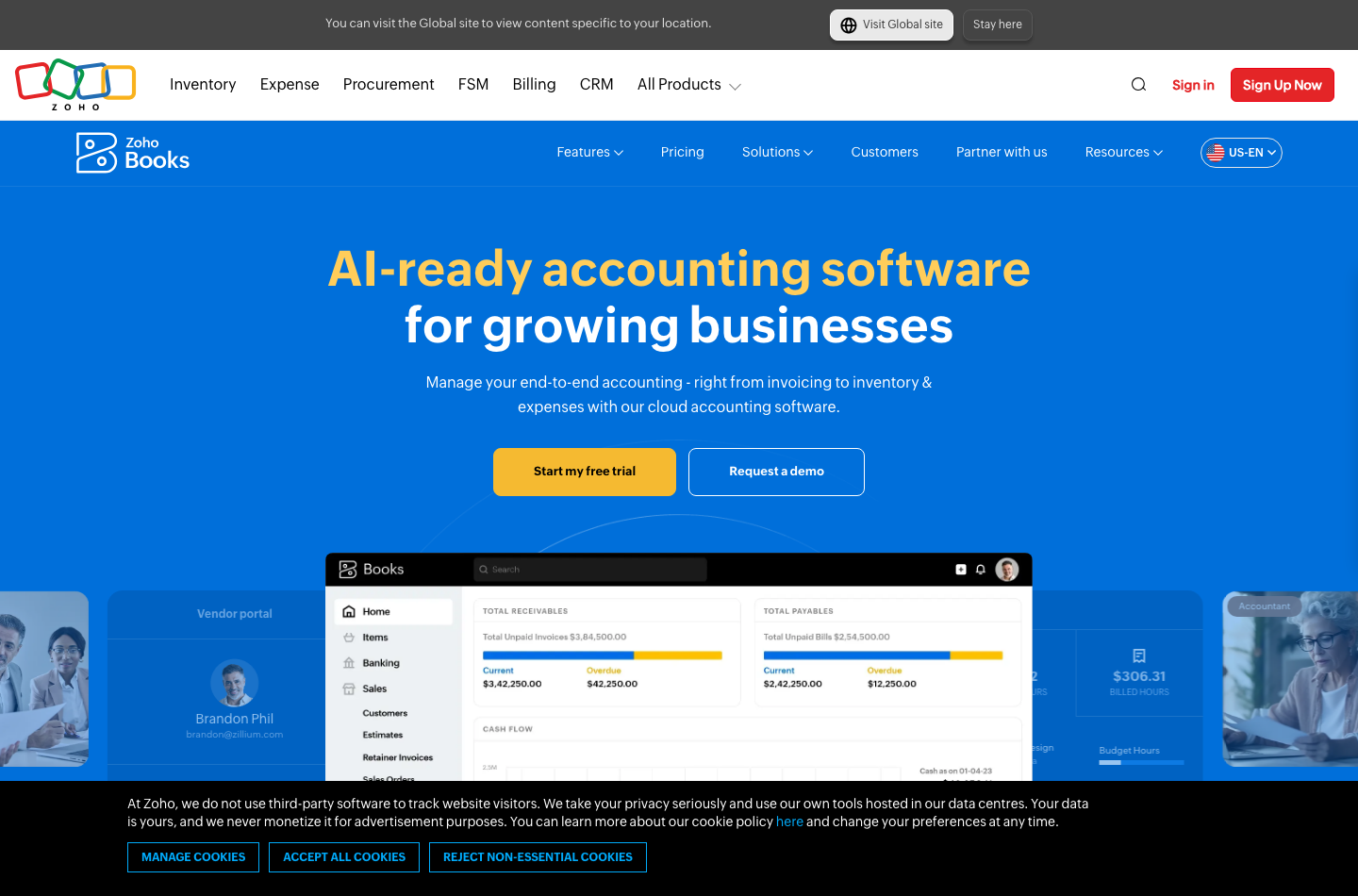
An invoice workflow should begin with the agreed commercial terms. Zoho Books can create customer invoices, handle estimates or quotes, and offer customer-facing communication and payment options according to the organization configuration. For consulting clients, recurring invoicing and reminders can reduce repeated typing; for a business shipping goods, the process may need to follow orders and inventory availability.
A customer portal can make the status of an invoice easier to follow, but it also exposes customer information. Verify which contact sees each account, how portal invitations are authenticated and who can download documents. Make sure the portal’s definition of a paid invoice agrees with bank settlement after processor fees and refunds.
🔁 Recurring Invoices, Reminders and Customer Payments
Before enabling recurring invoices, reproduce at least three cases: a normal monthly retainer, one paused engagement and a price increase that begins next period. Ensure no stale template sends an invoice after a contract ends. Schedule payment reminders conservatively and allow staff to suspend them during disputes.
A customer who pays by card may incur processing fees, and an invoice may not immediately show a matching bank deposit. Write down how the application represents the invoice, the gross payment, gateway fee and final settlement. A partial refund should reverse the appropriate entries rather than disappearing into an expense category.
🏦 Zoho Books Bank Reconciliation: What It Actually Does
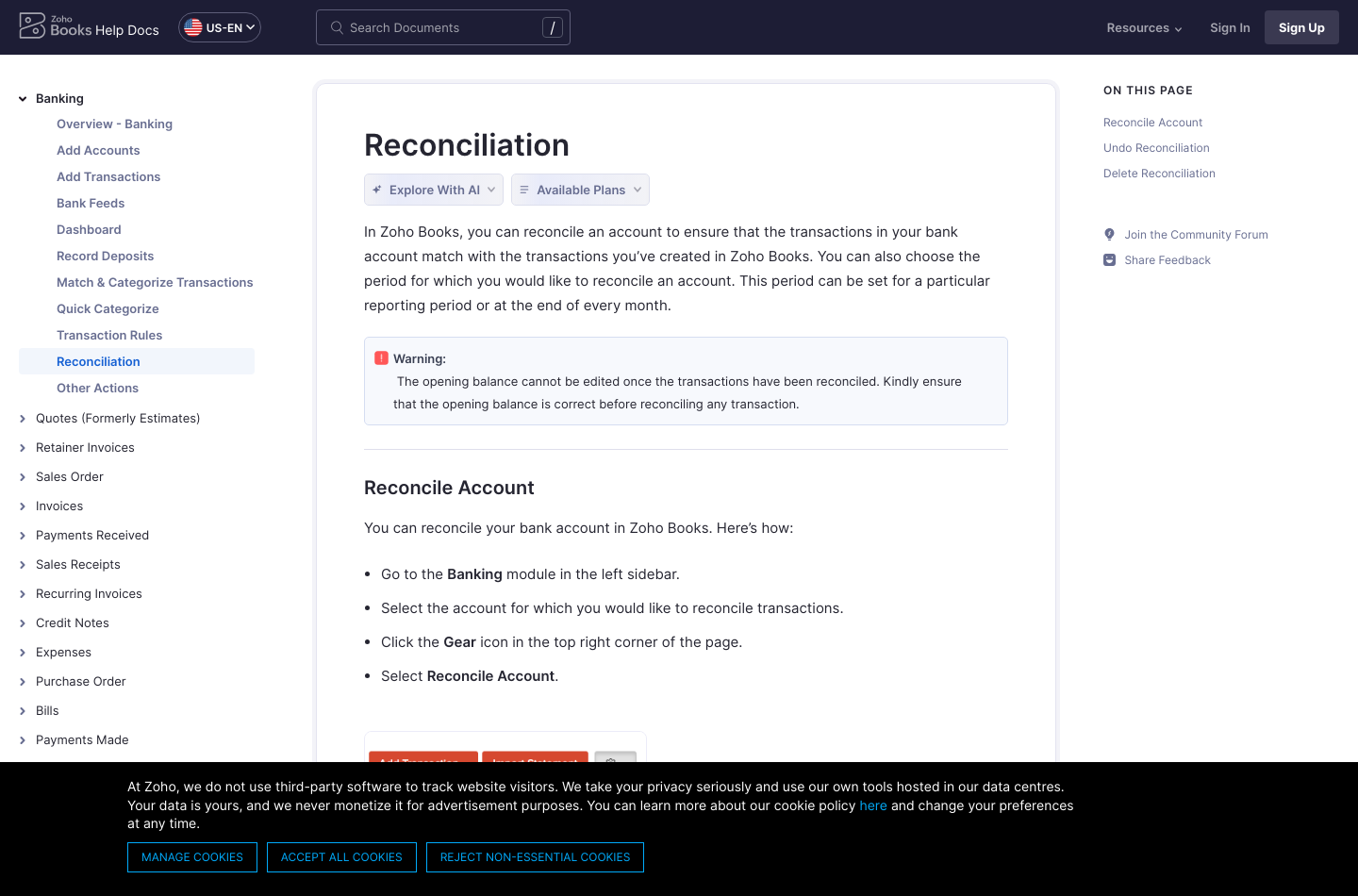
Zoho documents bank reconciliation as comparing imported or recorded transactions with the bank statement for a selected period. Users choose the bank account, initiate reconciliation and identify matched or missing records. The opening balance matters: Zoho warns that it cannot be edited once reconciled transactions have been finalized.
Consider a debit-card purchase posted by the bank on a different date from the receipt. The correct solution is generally to reconcile the actual transaction, not alter an unrelated ledger entry to make the account balance appear correct. Likewise, transfer transactions should not be booked as sales revenue simply because cash arrived in a bank account.
Month-end reconciliation is only finished when somebody can explain the unmatched entries, not merely when the dashboard displays a green check. If a bank feed is unsupported in a country, test the manual import format and how duplicates are handled.
🧾 Expense Management and Vendor Bills
A vendor bill is not simply a negative invoice. An invoice is what customers owe you; a bill is what your organization owes suppliers. When approving an expense, the purchasing record, supplier document, tax code and payment method should agree. Teams with many supplier bills may need approval roles and purchase-order matching.
Zoho’s purchasing and expense modules cover different levels of that process across editions. A company should compare the vendor’s actual entitlement matrix and test one supplier refund and one bill that spans multiple expense categories. Those odd transactions reveal more than creating ten clean sample bills.
⏱️ Projects, Timesheets and Inventory: Where Plan Choice Becomes Operational
In a design agency, a five-hour project may be billed at a flat rate but tracked for profitability. Zoho’s timesheets documentation discusses recording hours against projects and obtaining customer approval. Before using it for real work, decide whether the employee’s cost rate should be visible to the customer and which entries require internal authorization.
For goods-based businesses, the risk shifts toward item counts, purchase orders and stock valuation. An item sold before receipt or allocated twice can make the accounting picture look healthy until the warehouse count is taken. Reconcile actual inventory quantities with booked values, and identify whether serial numbers, batches or multiple warehouses are required.
Test a complete stock cycle: raise a purchase order, receive only part of it, return a damaged item and reconcile the remaining quantity. Every step should leave traceable records without inflated revenue or disappearing costs.
🔄 Automations, Reports and Zoho Integrations
Zoho’s broader software family makes Books especially interesting when invoices need context from sales, commerce or inventory applications. The value depends on field mapping and exception handling. If two departments can edit a customer address, who owns the authoritative record? If a sales order changes after an invoice is sent, should that automatically alter the invoice? The answers should be documented before enabling a synchronization.
Automation also requires controls. A workflow that reminds finance about overdue receivables is low risk. A workflow that updates tax codes, changes payment details or creates supplier payments deserves approval and an audit trail. Ask which actions an operator can reverse and whether a failed task is retried without duplicating records.
Reports should support decisions, not just provide more visualizations. A profit-and-loss statement, balance sheet and cash flow report answer different questions. A company monitoring gross margin must also understand how stock costs, discounts and refunds are classified. Ultimate’s expanded analytics may help, but custom dashboards do not correct wrong transaction categories.
⚖️ Zoho Books vs QuickBooks Online, Xero, FreshBooks and Wave
| Product | Best comparison scenario | A question to test |
|---|---|---|
| Zoho Books | A growing company wants finance and Zoho ecosystem automation | Does data sync correctly and fit the chosen edition? |
| QuickBooks Online | The accountant already works in a country-specific QuickBooks edition | Can the same reports and reconciliations be produced? |
| Xero | Bank feeds, accountants and bookkeeping collaboration drive the purchase | Are local bank connectors and tax reports supported? |
| FreshBooks | Projects and client-service billing are the center of operations | Does work-to-invoice tracking fit the business? |
| Wave | A tiny US/Canadian business wants basic financial records cheaply | Are free-tier tools enough, and is the company eligible? |
| BILL | Vendor approvals and outgoing payments are the operational bottleneck | Which ledger receives the final payment status? |
🔄 Zoho Books vs QuickBooks
The comparison with QuickBooks Online is strongest when the accountant is heavily involved. If the accountant already has reliable QuickBooks workflows and established integrations, switching to Zoho solely to save on the base monthly fee could create an expensive migration. Conversely, a team embedded in Zoho CRM may benefit from keeping finance and commercial processes closer.
Build a genuine side-by-side test: three invoices, two credit notes, one bank reconciliation and a month-end report. Count required manual edits rather than marketing checkboxes. Confirm both products use the applicable country edition before comparing prices.
🏦 Zoho Books vs Xero and FreshBooks
For Zoho Books vs Xero, begin with the supported bank feeds and accountants’ actual reporting requirements. Both include broad accounting functionality, but a feature available in one geography does not imply identical behavior everywhere.
For Zoho Books vs FreshBooks, ask whether invoices mainly originate from client service hours or from a wider set of accounting and purchase records. A consultant may appreciate FreshBooks’ service-oriented flow, while a product seller may want Zoho’s purchasing and item management options. Our FreshBooks review discusses that other workflow in detail.
🌊 Zoho Books vs Wave
Wave is worth examining when a microbusiness in the United States or Canada needs a no-cost starting point. Wave does not currently offer new signups to companies outside those markets, whereas Zoho Books serves more country editions. The apparent free-plan comparison can be misleading unless geographic eligibility is resolved first.
✅ Zoho Books Pros and Cons
| Reasons to shortlist | Things to verify carefully |
|---|---|
| Genuine free entry edition in applicable market | Annual invoice caps and free-plan conditions |
| Clear organization-based progression in base pricing | Seat allowances and add-ons beyond the base plan |
| Bookkeeping, purchases and bank reconciliation | The chosen edition has the exact required module |
| Deeper inventory and analytics at higher plans | Higher prices and complexity may exceed actual needs |
| Broad Zoho product integration possibilities | Bi-directional field mapping and duplicate handling |
| Trial for paid editions | Default trial plan may hide lower-tier limitations |
🧪 How to Test Zoho Books Without Fictional Benchmarks
DigiOffly has not conducted a live paid-account trial. Rather than inventing screenshots of private data, here is an evaluation protocol a serious buyer can complete within a 14-day trial.
Trial task 1 — import and reconcile. Import a small, anonymized set of bank transactions and record an independent control total. Include a transfer, refund, processor fee and duplicate import attempt. The matched closing balance should agree with the source statement.
Trial task 2 — exercise the invoice lifecycle. Generate a quote, invoice, partial payment and credit note. Send only to an approved test address, not an actual customer. Verify that the customer-facing view and financial reports reflect the same amounts.
Trial task 3 — check team permissions. Create sample roles for a salesperson, bookkeeper, manager and accountant. Confirm which users can read customer financial details, change bank information, edit paid invoices and export customer data.
Trial task 4 — test integration failures. Where available, sync a nonproduction contact to another Zoho application; create a duplicate, alter a field and simulate a rejected update. The resolution should be predictable without corrupting customer records.
Trial task 5 — verify downgrade risk. Look at the exact Free, Standard and Professional allowances after the trial. Zoho may start you on Premium by default, so premium features observed in a trial do not imply Standard contains them.
🔐 Security, Migration and Financial Controls
Financial records include identifiable customer and vendor data, potentially bank details and transaction histories. Review role permissions, multifactor authentication, retention settings, audit information and any connected payment providers. Set a policy for revoking access when employees leave and for restricting exports to authorized users.
Treat migration as an audit of balances and open transactions, not just a file upload. Retain records from the old software until the accountant confirms opening balances, aged payables, aged receivables, vendor contacts and tax reports. Compare the totals before permitting automatic payment activities.
Some accounting features are region-dependent, including taxes, electronic invoices and payroll integrations. Do not assume a US comparison chart is a compliance certificate for Romania, the UK, the EU or any other jurisdiction. Local advice remains necessary.
📦 An Accounting Migration Scenario: Three Months of Real Records
Consider a small design-and-print company switching from spreadsheets. Its bookkeeping involves 110 customer invoices, 75 supplier bills, 18 credit notes, two bank accounts and stock held in two places. The monthly subscription is a small fraction of the migration risk. If the company enters opening receivables twice, its financial statements might show revenue that was never earned twice; if it imports stock at the wrong cost, gross margin becomes unreliable.
The migration should begin with a signed snapshot of the old system: chart of accounts, trial balance, unpaid customer invoices, outstanding supplier bills, inventory on hand, tax balances and bank reconciliations. In a test Zoho Books organization, import one data category at a time and check totals against the old ledger. If the ledger was messy before the move, importing it without cleaning it merely transfers the problem.
A finance owner should record the migration mapping. Customer A in the old system must not become Customer A and Customer A (2) in the new one. Likewise, two tax codes with similar names may have different meanings. When an imported item cannot be matched, preserve it as an unresolved exception rather than silently editing a balancing entry.
📅 Zoho Books Annual Billing and a Three-Year Cost Scenario
Budget one year at the regular published US price, but plan a second-year review before committing. For a five-person finance and operations team, the difference between Standard and Professional is not merely $360 over twelve months of annual-billing rates; it also changes included users from three to five and may eliminate the need for separate project or purchasing workarounds.
| Illustrative US annual prepayment | Year 1 | Three years at unchanged list prices |
|---|---|---|
| Standard | $180 | $540 |
| Professional | $480 | $1,440 |
| Premium | $720 | $2,160 |
| Elite | $1,440 | $4,320 |
| Ultimate | $2,880 | $8,640 |
The three-year column is illustrative, not a lock-in offer. Real prices, product entitlements, taxes and the organization’s workload can change. It simply shows why a tier that seems only $25 or $45 more per month can create a meaningful long-term budget commitment.
🔐 Zoho Books Customer Portal and Data Ownership
A customer portal can reduce back-and-forth about invoice status, but it also creates a separate access surface. Identify who within each customer company may see invoices or estimates, whether one customer can have multiple contacts and how an email-address change affects permissions. Test the process with synthetic records before inviting paying clients.
The business should retain a copy of the relevant records outside its accounting vendor, in an appropriately secured archive. Zoho Books supports reporting and backup-related settings, yet the availability and granularity of exports need verification in the real organization. An export is useful only if another system or accountant can read it without losing financial relationships.
🔗 Zoho Books Integrations: Failure and Recovery Matter
Suppose a salesperson creates a contact in CRM, finance sends an invoice, and the customer later changes its billing address. A correctly configured integration should update the intended master record without duplicating the customer or silently changing a previously finalized invoice.
Run a deliberate failure exercise: disconnect a nonproduction integration, update the contact, reconnect it and inspect the conflict. Document who resolves it and how the system records the decision. The same principle applies to inventory sync, payment gateways and third-party workflow tools. Zoho Books integrations can save time, but only when the exceptional cases have a clear owner.
📦 Zoho Books Inventory and Project Accounting Trade-offs
Project profitability and inventory valuation require different disciplines. A project-based agency allocates internal time, contractor bills and direct expenses to an engagement. A merchant must account for items received, shipped, returned or written off. Both flows can eventually affect the general ledger, but a company should not confuse the reporting dimensions.
If using Zoho Books for both services and products, test a mixed invoice that contains a physical product and an installation fee. Check the revenue, tax treatment, item quantity, cost of goods sold and billable hours. When stock is held in multiple locations, reconcile the physical inventory count before believing the financial result.
Ask the accountant to trace a reported number back to its source invoices and payments.
🏁 Final Verdict: Is Zoho Books Worth It in 2026?
Zoho Books is most attractive for businesses whose financial complexity is growing faster than their headcount, especially if they already use Zoho applications. Its Free and Standard tiers offer accessible entry points; Professional brings important purchasing and project use cases, while Premium, Elite and Ultimate target progressively demanding workflow or analytical needs.
The limits that matter are practical: Verify annual invoice volumes, who needs access, what your accountant must export, whether the bank feeds work where you operate and whether any inventory workflow is truly supported at the chosen tier. Once those details are settled, the published prices make it easier to compare options on real cost.
A free plan can become expensive if the owner spends hours correcting books each month. A costly analytics plan that nobody uses is not necessarily better. Choose the edition that makes transactions traceable and reporting trustworthy.
🔎 Official Sources
Zoho Books US pricing · Full plan comparison · Plan and trial guide · Bank reconciliation guide · How Zoho Books works. Prices and availability checked October 24, 2026.

Zoho Books Frequently Asked Questions
Is Zoho Books free in 2026?
Yes, for eligible organizations. The US Free plan is available while financial-year revenue stays at or below $50,000; it allows one user plus an accountant and up to 1,000 invoices per year. Check local plan requirements.
How much does Zoho Books Standard cost?
The published US list price is $20 per organization monthly, or $15 per month when billed annually. That is $180 prepaid for one year before taxes and optional additions.
What is the Zoho Books Standard vs Professional difference?
Professional includes five users versus three on Standard and expands the invoice allowance from 5,000 to 10,000 annually. Zoho positions it for projects, inventory and purchasing workflows.
What are the Zoho Books invoice limits?
Zoho currently lists 1,000 annually on Free, 5,000 on Standard, 10,000 on Professional, 25,000 on Premium and 100,000 on Elite or Ultimate in the US comparison. Verify what counts as an invoice.
Does Zoho Books include bank reconciliation?
Zoho documents reconciling imported or manually recorded bank entries to a defined statement period. Confirm bank-feed compatibility and permissions for your local plan.
Can Zoho Books track project timesheets?
Zoho Books includes a projects and timesheets workflow on applicable editions, allowing hours to be recorded for client work. Test how entries are approved and added to invoices.
Does Zoho Books Premium include more inventory features than Elite?
Elite is positioned for fuller inventory management. Premium focuses on customization and automation. Compare the specific item, location and warehouse functions in the current plan grid.
What is the Zoho Books free trial length?
Zoho advertises a 14-day trial of its paid plans, with Premium selected by default. Change the trial edition before assuming observed features belong to a cheaper tier.
Is Zoho Books vs Xero a straightforward winner?
No. Bank feeds, accountant preferences, local tax reports and migration requirements determine the better fit. Test the same sample financial period in both systems.
Does Zoho Books connect with Zoho CRM?
Zoho promotes integrations with its software ecosystem. Exact sync behavior, field mapping and subscription requirements must be checked in the chosen edition.
Does Zoho Books replace a local accountant?
No. Software can record transactions and produce reports, but local tax filing, payroll and statutory compliance require edition-specific configuration and appropriate professional oversight.
EXPLORE NEXT ON DIGIOFFLY
Choose Accounting Software for Growing Teams
Use our financial software tools to compare bookkeeping, cash flow and operating costs.
Explore finance software
- Finance Software Reviews — Compare accounting, payments and operations.
- QuickBooks Online Review — Explore general-ledger alternatives.
- Xero Review — Compare bookkeeping workflows.
- Wave Accounting Review — Compare low-cost US/Canadian invoicing and bookkeeping.
- BILL Review — Review vendor bill approvals, payables and supplier payments.
Find useful alternatives
- Best Software — Browse editor-selected tools.
- AI Software Finder — Filter by your business needs.
- Compare Software — Evaluate competing products.
Plan your software spend
- Software Cost Calculator — Model seats and subscriptions.
- Best Value Advisor — Compare practical value.
- Software Directory — Browse the complete product catalog.
- Sage Accounting — UK accounting, VAT and reconciliation