

Pricing and product documentation checked on October 29, 2026. This Postman review uses published vendor material and publicly accessible screenshots, not an authenticated customer account. Features, service quotas and billing terms can change. See the official Postman pricing source before buying.
Postman is strong when API requests, environments and team collections need one common workflow; subscription value depends on collaboration and test governance rather than how many requests an individual can send. The Postman review concentrates on how an API example becomes a trusted team artifact. Collection sharing, test automation and documentation can save real coordination work only when credentials and versioning are governed.
This Postman review treats a collection as a shared contract rather than a collection of saved requests. Our focus is what happens when credentials are rotated, an API response changes and a teammate needs to rerun the same test.
Some DigiOffly links may earn a commission at no added cost to readers. Published vendor features and price terms are examined independently of those links.
📊 Postman Review Summary
Postman turns individual HTTP requests into shareable collections, tests and API documentation. Its paid value comes from collaboration across environments and service teams, provided credentials are handled safely and old examples do not masquerade as current API behavior.
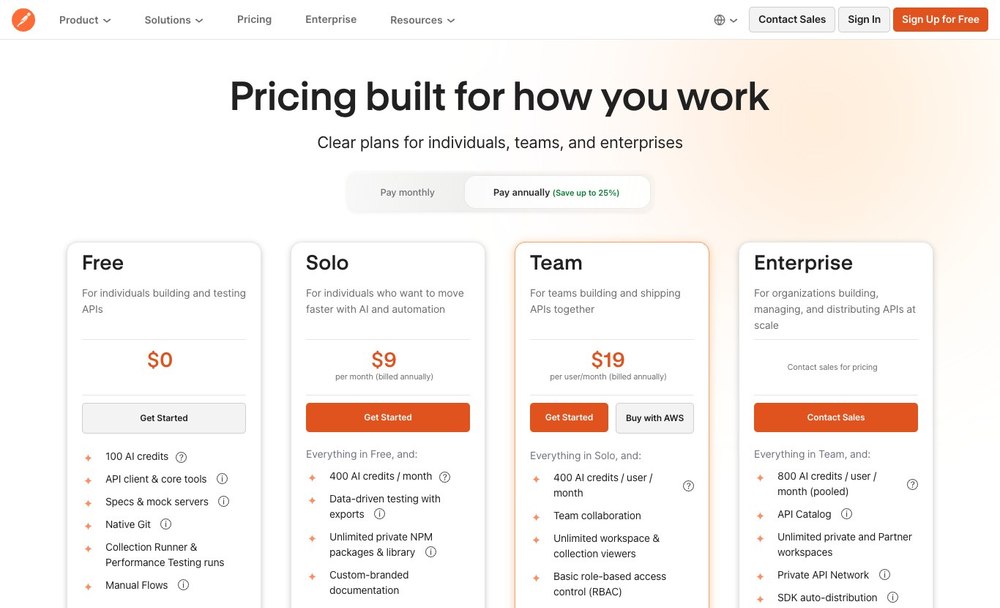
💰 Postman plans at a glance
| Plan | Official entry price | What to verify |
|---|---|---|
| Free | $0 | API client, collections, specs and core tools |
| Solo | $9/month annually | Solo automation and AI allowance |
| Team | $19/user/month annually | Team workspaces, role management and collaboration |
| Enterprise | Custom quote; contact sales | Enterprise API catalog, advanced roles and governance; confirm seats and usage pricing |
⚡ Verdict & Fit
An API team may already have curl scripts, OpenAPI definitions and an internal documentation portal. Postman has to justify becoming the shared place for test collections rather than adding a second set of partially trusted examples.
More than an HTTP request sender
Postman groups requests, tests, environments and API documentation. It solves a team coordination problem when multiple services must agree on expected behavior. Postman REST API testing can connect a request, its response checks and the documentation used by consumers.
Postman functions far beyond a rudimentary HTTP request sender by centralizing requests, automated test scripts, environment configurations, and interactive API documentation into a single workspace. This centralization directly addresses team coordination friction when distributed back-end and front-end developers must reach a shared consensus on expected endpoint behaviors and payload contracts. The architectural tradeoff involves adopting a proprietary artifact format that diverges from native source control unless explicitly exported to JSON, which can complicate diff reviews in repositories like GitHub or GitLab. A shared collection exposes contract mismatches before two teams ship incompatible endpoints. Use staging accounts instead of production credentials. Check whether their teams require collaborative workspace synchronization across distributed environments or if lightweight open-source command-line clients and basic script files adequately cover their integration workflows.
Solo use versus shared workflows
An individual can debug endpoints with several tools; paid Postman seats matter when artifacts need shared ownership and change review.
An individual developer can debug isolated endpoints using lightweight utilities or terminal commands without incurring subscription costs, making the $9 per month Solo tier interesting primarily for personal automation allowances and synced cloud environments. However, paid Team seats priced at $19 per user monthly become necessary when team artifacts require centralized ownership, strict change reviews, and shared workspace visibility rather than fragmented local collections. Problems arise when solo developers hoard undocumented request collections locally, causing severe onboarding friction when new engineers join and lack access to historical testing parameters. This paid tiering model proves useful for growing engineering departments that require governed access control over shared environments and collaborative collection editing. Organizations evaluating these paid tiers must verify whether their return on investment stems from genuine cross-functional collaboration efficiencies or merely paying for individual request-sending conveniences that free developer tooling already solves.
Where Postman is not enough
Collections do not replace a source-controlled API contract, runtime gateway, production observability or systematic load testing.
Postman collections and mock servers are valuable for prototyping, but they do not replace a true source-controlled API contract, a production runtime API gateway, comprehensive production observability, or systematic load testing tools. Relying on Postman workspaces as the definitive source of truth creates a dangerous divergence between documented expectations and actual backend behavior deployed in production clusters. One risk involves teams assuming that passing functional test suites within a collection guarantee backend resilience under high concurrency, ignoring memory leaks or database saturation that only dedicated load testing tools uncover. This limitation means Postman is not enough when organizations need rigorous automated contract testing integrated directly into CI/CD pipelines alongside platforms like Supabase or GitHub Actions. Engineering leaders must verify that their testing architecture incorporates dedicated gateway policies, observability agents, and automated performance suites rather than treating desktop client collections as a substitute for production infrastructure safeguards.
🔌 API Requests & Collections
Picture an engineer copying a production token into a shared environment to reproduce a failing request. Collection convenience is no protection unless workspace roles, variable scopes and the export process are understood.
Organizing requests by service
Collections become valuable when folder naming, variables and version history correspond to stable service boundaries. Otherwise, they are a sprawling collection of personal examples. An API collection in Postman is easier to maintain when folders reflect stable service boundaries rather than individual developers.
Collections transform from cluttered testing scraps into authoritative assets only when folder naming conventions, environment variables, and version histories strictly correspond to stable microservice boundaries. Without disciplined organization, workspaces degrade into sprawling directories of ad-hoc personal requests that baffle teammates and obscure valid integration paths. One risk is the accumulation of obsolete endpoints scattered across poorly named folders, leading developers to execute deprecated queries against staging databases. Structured collection design proves exceptionally useful when coordinating complex architectures where multiple engineering squads depend on clearly demarcated service contracts and predictable payload schemas. Buyers and engineering managers should audit existing workspaces to verify whether collection hierarchies mirror actual production service boundaries or merely reflect arbitrary personal testing habits that require immediate cleanup before scaling team adoption across departments.
Environments and secret handling
Development and production variables must stay distinct. A shared environment that leaks a token makes convenient testing an expensive mistake. Postman environment variables can isolate staging and production endpoints, provided privileged tokens are not exported with collections.
Maintaining strict isolation between development, staging, and production variables is critical to prevent catastrophic data corruption or unauthorized token exposure. A shared environment file that carelessly stores production bearer tokens alongside local debugging credentials turns a convenient testing setup into an expensive security liability. Problems arise when a developer accidentally executes a destructive delete request against a production database because their active environment defaulted to live credentials instead of local mock containers. This environment separation feature proves indispensable when engineers frequently toggle between local services, Supabase backends, and staging servers without manually rewriting authorization headers. Security auditors and team leads must verify that secret variables utilize proper masking, role-based access controls, and strict workspace permission boundaries to ensure sensitive credentials never leak outside authorized engineering groups.
Documentation and specifications
OpenAPI specifications and collection examples should evolve together. A generated documentation site can still be wrong if API implementation drifts. A Postman API testing tutorial is helpful for onboarding, but published examples must match the current OpenAPI contract.
OpenAPI specifications and collection examples must evolve in lockstep to prevent documentation from turning into a misleading fiction for consuming developers. A generated documentation portal provides immense value, yet it remains fundamentally incorrect if the underlying API implementation has drifted from the documented schema. When code changes an endpoint but the OpenAPI document stays stale, clients continue using the old contract. Run the collection against a staging build before release. This documentation tooling proves exceptionally useful when publishing public APIs or coordinating contracts between independent backend and frontend repositories hosted on platforms like GitHub or GitLab. Teams evaluating these features must verify whether their CI/CD pipelines automatically validate and update specifications during code builds rather than relying on manual, error-prone documentation updates.

🧪 Tests & Automation
When a service changes one response property, a Postman collection could flag the regression or quietly pass because its tests are too broad. Review assertions and CI runner behavior with an intentionally incompatible response.
Assertions and regression collections
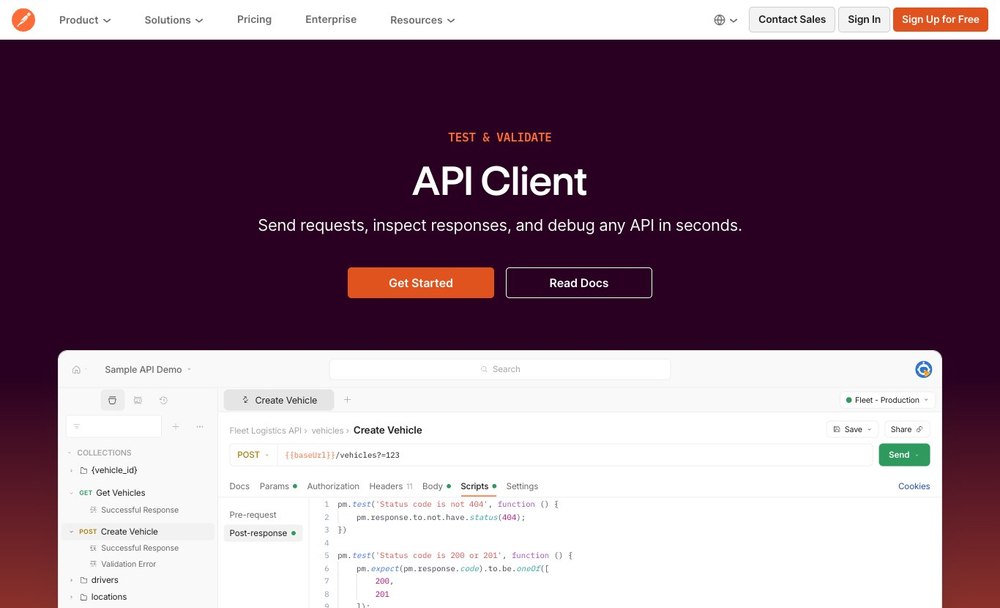
Tests can check status codes, schemas and essential responses. Avoid treating the success of trivial status assertions as evidence that business rules are correct. Postman regression testing should detect a missing response field, not merely celebrate a successful HTTP status.
Automated test scripts and regression collections should validate deep structural schemas, response payload integrity, and essential data types rather than merely checking for superficial HTTP 200 status codes. Treating the success of a trivial status assertion as conclusive evidence that complex business logic executed correctly introduces severe blind spots into the integration pipeline. A recurring failure mode involves test suites passing successfully because an endpoint returned a valid JSON wrapper, while ignoring the fact that internal array data was completely null or malformed. Regression collections prove vital when refactoring legacy microservices or deploying rapid iterations, ensuring that existing integration contracts remain intact across successive releases. Engineering leads must verify that assertion scripts enforce strict schema validation rules and negative test cases rather than relying on superficial status code checks that offer false confidence in system reliability.
Collection Runner and CI
Local runs and automated scheduled or CI-based runs differ in quotas and environment setup. Decide who maintains the runner, test data and credentials. Postman automated testing only protects a release when failing assertions cause the CI job to fail.
Moving from local collection execution via the Postman desktop app to automated pipeline runs introduces distinct operational tradeoffs regarding environment synchronization and execution quotas. While local runs rely on ephemeral local variables and manual token pasting, continuous integration servers require headless execution engines like Postman CLI synchronized with specific workspace version control. One risk involves hardcoding environment secrets or staging tokens directly into collection JSON files, leading to pipeline build rejections or accidental credential leaks when repositories are public. This feature is particularly useful for teams enforcing contract testing or regression suites before deployment to platforms like GitHub or GitLab. Buyers and engineering leads should verify whether their CI/CD tier includes sufficient monthly cloud execution minutes and whether credential injection via secure environment variables is fully supported by their chosen plan level.
Mock servers and collaboration
Mocks support parallel frontend and backend work only when the team labels provisional behavior clearly and removes obsolete examples. A Postman mock server can support frontend development before an endpoint exists, but it does not prove backend permissions work.
Mock servers decouple frontend application development from backend service completion by returning simulated responses based on saved collection examples, creating clear implementation tradeoffs around data drift and maintenance overhead. When backend schemas evolve, unmaintained mock responses can diverge from actual API behavior, causing frontend engineers to code against outdated payloads that inevitably fail during integration. Problems arise when teams spin up multiple redundant mocks for the same service without clear lifecycle labeling, resulting in ambiguous endpoint URLs scattered across client applications. This capability is exceptionally useful during early prototyping phases or when integrating with third-party databases via Supabase before backend endpoints are fully deployed. Engineering managers should verify that their team establishes strict governance policies for tagging provisional mock behaviors, deprecating stale examples promptly, and centralizing mock routing rules within shared collaborative workspaces.
Workflow roles compared
| Capability | What Postman contributes | What the team must own |
|---|---|---|
| Assertions and regression collections | Tests can check status codes, schemas and essential responses. Avoid treating the success of trivial status assertions as evidence that business rules are correct. | Roles, test data, validation and escalation |
| Collection Runner and CI | Local runs and automated scheduled or CI-based runs differ in quotas and environment setup. Decide who maintains the runner, test data and credentials. | Configuration review and failure handling |
| Mock servers and collaboration | Mocks support parallel frontend and backend work only when the team labels provisional behavior clearly and removes obsolete examples. | Access, recovery and documentation |
🔐 Collaboration & Governance
Different Postman workspaces can be useful for partner and internal interfaces. The security question is who can see private specifications, request bodies and the API keys stored in the environments.
Workspace access and roles
Free, Solo, Team and Enterprise differ in collaboration and permissions. Restrict who can modify shared collections or export secrets. A Postman team workspace needs clear editing roles and a rule against distributing live API keys.
Managing permissions across Free, Solo, Team, and Enterprise tiers introduces fundamental administrative tradeoffs between operational agility and security containment. Unrestricted workspace access allows any contributor to modify shared API collections, overwrite production environment variables, or inadvertently export sensitive authorization keys. One risk involves junior developers possessing broad administrative rights who accidentally push breaking schema changes or expose internal staging tokens into publicly visible spaces. Such role controls are particularly useful for growing engineering organizations that must segment external contractors from internal core services or separate staging environments from production codebases. Purchasing decision-makers must carefully audit their subscription tier to confirm whether granular role-based access control, custom viewer roles, and restricted export permissions are natively included before migrating sensitive enterprise collections into shared team environments.
API inventory ownership
An API catalog should identify the accountable owner and documented lifecycle. A list of endpoints without deprecation rules can mislead consumers.
Maintaining an enterprise API catalog creates operational tradeoffs between centralized visibility and decentralized service development speed. Without designated ownership and clear versioning rules, an unmanaged inventory quickly fills up with orphaned endpoints, stale documentation, and deprecated routes that mislead client developers. Problems arise when consumer teams build production workflows relying on undocumented legacy endpoints that lack explicit deprecation notices, causing catastrophic client outages when the underlying service is retired. This catalog governance practice is exceptionally useful for large engineering departments coordinating multiple microservices linked to external databases like Supabase or GitHub repositories. Technical buyers should verify that catalog entries mandate a designated owner email, documented service level objectives, and a clear timeline for endpoint deprecation before fully adopting the inventory across all departments.
Security review of AI features
AI credits and assistance may be useful, but check code and request data boundaries before supplying private credentials or sensitive payloads.
Integrating artificial intelligence assistance into API design workflows introduces significant security and privacy tradeoffs regarding data residency and request payload transmission. While AI assistants can rapidly generate test scripts, mock schemas, or documentation summaries, submitting live payloads containing production keys or customer personal data risks violating compliance policies. One risk involves developers unwittingly pasting internal database connection strings from Supabase or proprietary authentication tokens into AI prompts, inadvertently leaking corporate secrets to external model providers. These AI capabilities are particularly useful for bootstrapping unit test assertions or drafting initial OpenAPI specifications during early feature prototyping. Security officers and engineering leads must carefully verify data boundary agreements, opt-out settings for model training, and credit consumption limits before permitting team members to utilize AI features on sensitive repositories.
💰 Plans & Limits
An individual may be satisfied with the Free client while a growing API team needs the paid workspaces and governance functions. Compare annual seat commitments with actual automation, monitoring and AI credit usage.
Free plan capability
Postman Free includes a client and core tools. Confirm current shared workspace and request limits before planning a team migration.
Adopting the Postman Free tier for individual development provides immediate access to core API client tooling, collection editing, and basic schema specifications, but introduces severe operational constraints when scaling to collaborative projects. The primary tradeoff centers on balancing zero-cost accessibility against strict limits on shared workspace collaborators, mock server calls, and cloud request monitoring. Problems arise when growing project teams attempt to manage collaborative workflows on free accounts, only to encounter sudden wall-blocking restrictions on shared collections or collection runner executions during critical release cycles. This tier is exceptionally useful for individual developers, open-source contributors, or evaluators testing basic REST integrations before committing to paid subscriptions. Procurement managers and technical leads must verify current workspace member thresholds and request volume caps against their projected scaling requirements before planning an organization-wide migration.
Solo and Team annual prices
The official 2026 page lists Solo at $9 per month annually and Team at $19 per user per month annually. The billing unit matters. Postman workspace pricing matters when several engineers require shared governance rather than individual request execution.
Evaluating subscription pricing structures for Solo at nine dollars per month annually and Team at nineteen dollars per user per month annually exposes critical budgeting tradeoffs between individual automation allowances and collaborative workspace governance. The billing unit distinction is pivotal; while Solo plans scale strictly per individual creator, Team subscriptions aggregate costs across all active workspace contributors, amplifying expenditures as engineering headcount expands. Problems arise when organizations purchase lower-tier licenses assuming full team collaboration features are included, only to discover that permission controls and shared testing pipelines require upgrading to per-user team tiers. These pricing tiers are particularly useful when matching tool capabilities to specific developer roles, such as providing automation access to independent engineers versus synchronized workspaces for full-stack squads collaborating with GitHub and GitLab. Finance teams must verify billing frequency commitments, user seat scalability, and tax exclusions before signing annual renewals.
Enterprise and usage-based extras
Enterprise is quoted, and additional testing, monitoring or AI workloads may affect plan fit. Model usage separately from seats.
Postman structures its pricing around a combination of fixed user seats and consumption tiers, meaning enterprise buyers must evaluate how add-ons for automated testing, continuous monitoring, and generative AI workloads scale independently of core licenses. When teams deploy advanced automation or high-volume monitors, usage can spike unpredictably, resulting in budget friction if seat counts are modeled without accounting for operational data throughput. An engineering leader might encounter a failure mode where background monitors run unchecked against staging environments, exhausting monthly limits before the billing cycle resets. This tier is primarily useful for large organizations requiring centralized API catalogs, strict governance, and consolidated audit trails across diverse departments. Procurement teams and engineering managers should verify whether consumption quotas reset monthly, how overage alerts are configured, and what exact metrics trigger additional charges for automated workflows.
⚖️ Alternatives & Integration
GitHub and GitLab can keep API contracts in version control; Postman can make those contracts easier to explore. Confirm whether edits to a collection, a specification and the service implementation remain consistent.
API clients and source control
Postman complements GitHub and GitLab rather than replacing their repositories. Keep API contracts reviewable even when a collection is the day-to-day entry point.
Postman functions as a collaborative workspace layer that complements rather than replaces dedicated source control platforms like GitHub and GitLab, necessitating clear boundaries for where API definitions live. Because collections and specifications evolve rapidly in a GUI environment, engineering teams risk divergence between code-repository source files and Postman artifacts if synchronization protocols are ignored. Problems arise when developers update request parameters locally inside Postman without committing the underlying OpenAPI specification changes back to the main repository, breaking automated pull request validation. This integration workflow is most valuable when teams need a shared, human-readable interface to explore endpoints while maintaining version-controlled specs as the single source of truth. Evaluators should verify how seamlessly collections export to repository-friendly formats and whether automated CI pipelines can validate Postman tests against code-hosted definitions.
Testing Supabase or Firebase endpoints
Postman can exercise app APIs, but authentication setup, mock data, security rules and usage quotas must reflect the actual backend. Postman API security testing should include unauthorized requests against a staging service, never production credentials in examples.
Validating third-party or managed backends such as Supabase or Firebase inside Postman requires meticulous configuration of authentication headers, custom environment variables, and security rules to mirror production behavior accurately. If a tester forgets to configure distinct Supabase service roles or anonymous keys within environment scopes, requests may fail confusingly or inadvertently bypass backend row-level security constraints. One risk involves hardcoding expired authentication tokens or database connection strings into shared collections, leading to blocked team workflows and accidental exposure of sensitive keys during routine exports. This capability proves vital when developers need to isolate endpoint latency, debug payload structures, and simulate client-side authentication flows without spinning up a full frontend application. Buyers and technical leads must verify how securely environment secrets are stored, whether tokens can be dynamically refreshed via pre-request scripts, and how usage quotas on external backends are monitored.
Choosing between tools
A lightweight CLI may suit scripted tests; Postman becomes attractive when collaboration, documentation and repeatable GUI exploration save coordination time.
Choosing between a lightweight command-line interface tool and a comprehensive workspace platform like Postman depends on whether the organization prioritizes raw scripting speed or cross-functional collaboration and visual documentation. While CLI scripts excel at headless execution in CI pipelines, they often create friction for product managers, technical writers, and QA engineers who require graphical interfaces to inspect payloads and share discoveries. Problems arise when teams adopt a heavyweight GUI tool solely for basic script execution, resulting in wasted subscription overhead, or conversely, when they rely entirely on scattered CLI scripts that no one else can easily audit. This platform becomes uniquely attractive when team coordination costs, documentation upkeep, and repeatable exploratory testing outweigh the minimalism of raw terminal commands. Decision-makers should evaluate team composition, maintenance overhead for documentation, and the frequency of cross-role API collaboration before committing budget.
Alternatives and complements
| Software | Relationship to Postman | Key question |
|---|---|---|
| GitHub | Alternative or complementary tool | Which exact workflow changes? |
| GitLab | Alternative or complementary tool | Would this duplicate a paid function? |
| Supabase | Complementary part of stack | How are permissions and failures handed off? |
🧪 Pilot & Verdict
In a real evaluation, select one endpoint with a deprecation planned. Ask a frontend engineer, backend maintainer and QA reviewer to find the same expectation without exchanging screenshots or undocumented secrets.
Exercise a real version change
Choose one API with a breaking change, documented version, consumer and CI test. Follow how the collection and docs are updated.
Evaluating Postman effectively requires executing a rigorous pilot built around a real-world API version change, ensuring that breaking updates, consumer dependencies, and continuous integration pipelines are tested simultaneously. When an API shifts from version one to version two, teams often struggle to keep existing collections synchronized, leading to outdated documentation and broken consumer integrations that slip past initial reviews. A typical failure mode during this trial involves updating requests manually in isolation without verifying whether automated test scripts and downstream consumer collections fail appropriately under the new schema. This hands-on validation exercise is exceptionally useful for determining whether the platform’s collection runner, documentation generators, and workspace controls genuinely reduce migration friction. Technical evaluators must verify how well version tags, environment branching, and automated test assertions handle breaking schema changes during active development cycles.
Check privacy with test data
Keep production tokens and personal data out of shared examples. Review exports, environment copies and revoked user access.
Maintaining strict data hygiene during API testing is critical to prevent production tokens, database connection strings, and personal identifiable information from leaking into shared Postman workspaces or public exports. A recurring security failure mode happens when developers export local environments containing active production credentials and check those JSON files into shared team repositories or cloud storage. This precaution becomes indispensable whenever distributed teams share collections, use automated cloud mocking, or collaborate across organizational boundaries where exposure risks are heightened. Engineering leaders must verify that sensitive variables are explicitly marked as secret types within environment configurations, audit who holds workspace export permissions, and ensure regular revocation of test access tokens. Organizations should establish clear internal guidelines regarding what constitutes safe test data before onboarding new team members to shared workspaces.
Measure practical adoption
A plan is justified when teammates reuse consistent requests and catch regressions earlier, not merely when a dashboard reports more runs.
Measuring the true return on investment of a Postman subscription requires tracking qualitative improvements in team collaboration, request reuse, and early regression detection rather than relying solely on high activity metrics reported in admin dashboards. A misleading adoption metric occurs when executive dashboards show thousands of executed requests or active seats, while individual developers still maintain isolated, undocumented collections on their local machines. One risk involves purchasing higher tier plans based on raw user headcounts without ensuring that teams are actively sharing reusable test suites or standardizing API governance policies. This investment is fully justified when engineering squads demonstrably spend less time clarifying endpoint behaviors and catch integration bugs before code reaches staging environments. Procurement buyers should verify qualitative feedback from developers regarding workflow efficiency, test coverage consistency, and reduction in cross-team communication bottlenecks.
🏆 Final Verdict: Is Postman Worth It?
Postman can prevent API examples, environments and test scripts from drifting across a team. Its strongest case is a shared contract validated by useful assertions. If a collection merely duplicates curl commands or exports production tokens, the workspace adds a risk without improving confidence in releases.
For Postman, begin with a shared API collection whose schema will change next week. Confirm that a teammate can find current documentation, run meaningful assertions and avoid copying a secret into a shared environment. Expand seats only after the handoff works.

Frequently Asked Questions
What is Postman used for?
Postman supports organizing requests by service and related developer workflows. Postman is strong when API requests, environments and team collections need one common workflow; subscription value depends on collaboration and test governance rather than how many requests an individual can send. Compare its role in a complete software stack before choosing an annual plan.
Is there a Postman free plan?
Postman publishes the following plan starting points: Free $0, Solo $9/month annually, Team $19/user/month annually, Enterprise Contact sales. Free access and included services vary by workload; confirm the current official pricing page before relying on an allowance.
How much does Postman cost in 2026?
Postman pricing depends on the plan and service unit. Free $0, Solo $9/month annually, Team $19/user/month annually, Enterprise Contact sales. Additional usage, add-ons, seat count or infrastructure charges can change the total invoice. The vendor pricing page is linked in this review.
What are the key Postman features?
Postman focuses on assertions and regression collections, collection runner and ci, mock servers and collaboration. Availability and limits depend on the active offering, and not every advertised add-on is included in a standard plan.
Who should consider Postman?
Postman is strong when API requests, environments and team collections need one common workflow; subscription value depends on collaboration and test governance rather than how many requests an individual can send. A buyer should validate role permissions, a realistic workload and who maintains the connection after the initial setup.
How should a team evaluate Postman security?
For Postman, test workspace permissions, environment-variable visibility and secrets handling. Ensure collection exports and shared requests do not expose live API keys to teammates who lack production access.
What are Postman alternatives?
Insomnia and Bruno are relevant API-client alternatives; OpenAPI tools emphasize contract definitions. GitHub and GitLab store code but do not replace Postman’s shared request and testing workflow.
Does Postman integrate with other developer tools?
Collections can run within CI through command-line or API integration. Confirm that failing assertions stop a pipeline as intended and that API credentials remain outside checked-in collection files.
What are the limitations of Postman?
Seats, automation quotas and collaboration permissions may matter more than basic request sending. Trial multiple environments and scheduled runs before paying for broader workspace access.
How can a team migrate to Postman?
Export collections and environments without live secrets, then import into a staging workspace or another client. Compare scripts, test assertions, variables and documentation before switching.
How was this Postman review researched?
DigiOffly checked public Postman pricing and product documentation on October 29, 2026. Screenshots show official publicly accessible pages. This article does not claim an authenticated company implementation or independently measured uptime.
EXPLORE NEXT ON DIGIOFFLY
🔍 Explore More on DigiOffly
Compare related developer platforms, estimate software costs and navigate DigiOffly guides before adding Postman to a production stack.
Explore related software
- Development & DevOps — Explore all eight developer software categories and reviews.
- Hosting & Websites — Review hosting and infrastructure choices.
- Automation & No-Code — Find integration and workflow alternatives.
- GitHub review — Repository management and code review
- Supabase review — Managed PostgreSQL and authentication
Compare your shortlist
- Software Directory — Browse reviewed tools by software category.
- Compare Software — Compare capabilities, billing and compatibility.
- AI Software Finder — Narrow options by your exact engineering workflow.
Plan costs and updates
- Software Cost Calculator — Estimate known license and usage costs.
- Best Value Advisor — Compare products against a practical requirement.
- Deal Alerts — Receive relevant software offers and updates.