

ActiveCampaign research update, October 30, 2026: Vendor pricing and product references were consulted for this article about ActiveCampaign. The illustrated public pages are not evidence of private-account testing. Check the current vendor documentation for ActiveCampaign before making a purchase.
ActiveCampaign is aimed at teams whose marketing depends on who a contact is and what they have done, not just on how many newsletters leave the inbox. Its strength is conditional lifecycle logic, but the cost and complexity rise with contact count, branching rules and CRM needs. The useful test is whether its automation reduces manual work while staying understandable six months after the original builder leaves.
ActiveCampaign becomes more interesting when a contact’s actions should change the next message they receive. The trade-off is the maintenance involved: who creates event tags, how waits and branches behave, and how an unsubscribed person exits. This ActiveCampaign review compares those mechanics with the plan restrictions and CRM add-ons that affect the final cost. No conversion improvement or deliverability result is claimed without a controlled test.
DigiOffly may earn a commission from qualifying links about ActiveCampaign, at no additional cost to the reader. Confirm all current vendor terms before buying.
📊 ActiveCampaign Review Summary
ActiveCampaign is a candidate when lead activity must control subsequent email messages. Map the exact start, branch and exit actions for one lifecycle automation, then compare Starter, Plus and Pro against that action list and the contact tier you expect to reach.
- Best fit: Marketing teams needing conditional lead nurturing, auditable contact events and documented stop rules.
- Budget: Verify the applicable usage and seat tier in the detailed pricing section
- Strength: Detailed conditional automations and segmentation
- Trade-off: Automation governance becomes complex
- Evidence: Pricing and product claims checked against official sources, not a private account benchmark.
⚡ Quick Verdict: Is ActiveCampaign Worth It?
A sales lead downloading an ebook but not booking a demo is a useful automation example, not a claim that any preset will convert. Test two sample contacts on different branches; make sure a reply, purchase or unsubscribe cancels the appropriate steps. Only pay for predictive sending, conditional content or enhanced CRM controls when the team can explain how each changes its workflow.
🧭 Contents and Navigation
🧠 What Is ActiveCampaign?
🛠️ Features, Workflows and Practical Limits
From lists to customer journeys
Consider a lead who downloads a guide on Monday but books a demonstration on Tuesday. Sending the same follow-up on Wednesday would be awkward. ActiveCampaign can use contact activity to route that person through a different automation branch, provided the relevant events and exit rules have been configured. Test the sequence with one contact who books and one who does not; the useful result is correct routing, not an impressive-looking flow diagram.
An ActiveCampaign flow needs a map of states before it needs a colourful canvas. Take a software trial that starts on Monday, books an onboarding call on Tuesday and converts on Friday. The onboarding event, booking event and paid-customer state should not be interchangeable tags. Write down what each event represents, which system sends it and how the automation exits if the customer converts early. Otherwise a neatly drawn branching diagram can send a sales prompt to somebody who has already paid. A well-designed ActiveCampaign drip campaign stops when its original purpose, such as booking a demo, has been met.
However, a single wrong entry condition can repeat messages or lose contacts entirely if testing is rushed. To prevent frustrating prospective clients, trace one lead through every branch including duplicate submissions to verify that loopbacks function smoothly. Testing these safeguards can help identify duplicated messages, unexpected routing and unsubscribe handling problems before the sequence is launched.
Starter automation boundaries
Building a minimal email sequence on a new platform requires careful planning without assuming every advanced action is included out of the box. ActiveCampaign structures its entry-level tier to handle essential communication efficiently, but teams transitioning from enterprise tools often look for shortcuts that do not exist here. Understanding these baseline boundaries early prevents frustrating redesigns once your subscription is active.
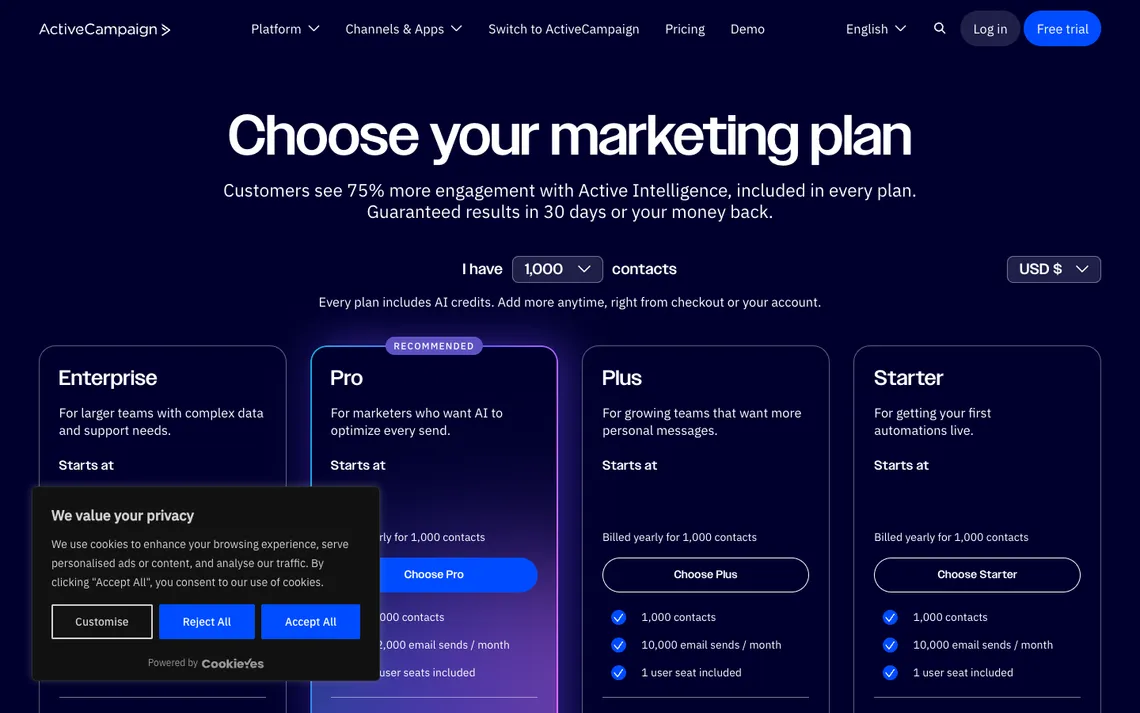
The Starter plan’s five-actions-per-automation limit changes how you design even a modest ActiveCampaign sequence. A welcome email, wait step, condition, second email and exit action can consume the space available for logic before somebody adds a special case. Rather than assume a tutorial’s automation will fit, count the actions in the actual workflow and compare them against ActiveCampaign’s current plan matrix. Plus and Professional should be evaluated for specific actions and controls, not because their screenshots show a larger canvas.
A branching diagram designed on Pro may not fit an entry tier, leading to wasted planning hours and compromised workflows. Always draft the workflow as an action inventory before selecting a plan to ensure your chosen tier matches your actual operational needs. This practical check saves your team from purchasing higher tiers prematurely or realizing too late that a crucial step requires an upgrade.
Plus versus Pro
Deciding when advanced personalization is worth upgrading from Plus to Pro depends entirely on your campaign volume and data complexity. As marketing teams mature, basic tagging often falls short of delivering the tailored experiences modern audiences expect from software communications. Evaluating the financial jump requires looking past marketing hype to see how specific tools impact your day-to-day workflow.
Predictive sending is available in higher ActiveCampaign tiers, but prediction should not replace a baseline. Suppose most trial customers open email during their first day. A personalised send-time suggestion may be less valuable than sending the setup instructions promptly after signup. Define which messages are time-critical and which could benefit from timing optimisation. Then compare outcomes in a controlled campaign rather than announcing that an AI-labelled feature improves revenue. The relevant upgrade question is whether the extra control is worth the subscription difference.
Before committing budget, identify the one paid-only feature that materially changes a campaign for your specific business model. If predictive sending or advanced attribution does not directly solve an existing bottleneck in your funnel, staying on a lower tier remains the wiser choice. Matching feature utility to real operational requirements ensures your software investment delivers measurable returns over time.
Behavioral segmentation
A business with free-trial users and paying customers needs more than a single email list. In ActiveCampaign, tags, custom fields and event history can distinguish these groups, but only if the team agrees on their meaning. ‘Trial started’ and ‘trial active’ are not necessarily the same condition. Check how fields are updated when a subscription expires, then see whether a saved segment includes the expected contacts before launching a promotion.
You can leverage tags, custom fields, events, consent tracking, and saved segments to group subscribers with high precision. These mechanisms allow you to isolate specific behaviors, such as feature usage or purchase history, ensuring your emails address the recipient’s exact context. Building these segments carefully transforms a noisy database into a structured, responsive subscriber base. Use ActiveCampaign automation examples as starting structures, then test them with your own consent and purchase events.
A contact-tier increase can change the ActiveCampaign invoice even when the number of people actively reading stays flat. Forecast the count after the next launch, but separately flag duplicates, bounced addresses and inactive subscribers rather than inflating the marketing list for appearance. Document whether the quoted rate assumes annual billing. If the sales team also needs deal ownership or one-to-one engagement, price the CRM add-on rather than assuming it is included with an email-marketing subscription. ActiveCampaign pricing plans should therefore be compared at the same contact count and billing interval.
Predictive sending
Delivering reminders based on a contact’s historical open pattern helps ensure your emails land when recipients are most likely to read them. ActiveCampaign offers tools designed to optimize delivery windows automatically, reducing the guesswork traditionally associated with broadcast scheduling. Instead of blasting your entire database at a single rigid hour, messages trickle out according to individual habit.
The vendor recalculates timing periodically when enabled, adjusting to shifts in how frequently a subscriber checks their inbox. This continuous background analysis aims to maximize visibility without requiring manual time-zone calculations from your campaign managers. Nevertheless, new subscribers may have too little behavioral history for the algorithm to make accurate delivery predictions initially. With ActiveCampaign marketing automation, event naming and conditional rules determine whether segmentation remains understandable.
The fastest way to uncover a brittle ActiveCampaign automation is to test a counterexample. Give one test person the expected download event and another a demo booking without the download. Send a third through the sequence twice to see whether entry rules prevent duplicate follow-ups. Examine the event history and the suppression behaviour instead of relying on the number of arrows visible in the editor. A buyer can run this small acceptance test before designing the rest of an elaborate lead-nurture programme. For ActiveCampaign email automation, a successful test also shows that a contact can leave the journey safely.
Conditional email content
Showing different offers to existing customers and prospects within the exact same email keeps your communication streamlined and relevant. ActiveCampaign makes this possible by allowing single templates to adapt dynamically based on who is opening the message. Rather than maintaining separate campaigns for every customer tier, your messaging morphs to fit the recipient’s status.
Content blocks can depend on contact rules, swapping out promotional banners or call-to-action buttons depending on stored profile data. This capability ensures trial users see upgrade prompts while active subscribers view loyalty perks or feature updates. Mastering this approach eliminates redundant newsletters and keeps your overall communication volume manageable. An ActiveCampaign split test is useful only when the compared messages share a meaningful audience and a predefined success measure.
Personalisation tokens should be treated as untrusted input in ActiveCampaign sequences. A prospect’s first name may be blank, a company field may contain an abbreviation, and the sender’s timezone may differ from the recipient’s. Draft the message so that it reads naturally without those tokens; use a greeting that does not expose an empty placeholder. Then send internal examples with a complete record, a missing name and an unusually long company name. This is copy quality control, not a technique for making automated messages appear individually researched.
Sales CRM relationship
Passing a qualified lead directly to a designated account executive requires careful navigation of ActiveCampaign’s tier structure, as pipeline management and sales engagement capabilities belong specifically to enhanced CRM options rather than baseline email tiers. Teams must verify license availability and review owner handoff protocols before implementation rather than assuming every subscription level natively includes deal tracking. This architectural distinction ensures that sales representatives receive timely notifications immediately following a qualification event without unexpected permission bottlenecks.
Integrating a sales add-on into an existing marketing workflow introduces financial considerations that extend beyond simple feature expansion. Because licensing fees for advanced pipeline features can occasionally exceed the cost of dedicated standalone CRM platforms, organizations must carefully evaluate whether consolidating tools within ActiveCampaign genuinely justifies the incremental expense. Stakeholders should weigh the convenience of unified contact histories against potential budget creep before committing to higher-tier sales packages. ActiveCampaign CRM pricing deserves separate attention when the organization needs deal stages rather than just email contacts.
For ActiveCampaign, separating a marketing unsubscribe from a transactional requirement is an implementation decision. Marketing emails must honour the relevant contact preferences, while purchase receipts and account notices may be handled through a separate transactional service such as the Postmark add-on. Do not try to bypass an opt-out by relabelling a promotional message. The proposed rollout checklist should contain the event source, consent status, sending domain and audit log for each category of message.
Ecommerce signals
A shop may pass purchase and checkout events to ActiveCampaign through an ecommerce integration. Those events can support different messages to browsers, customers and abandoned-cart visitors, but synchronization errors matter. A repeated purchase event could accidentally launch a second sequence, while a delayed event might send a discount after the customer has paid. Run a dummy order through the store and inspect the contact timeline before trusting the automation.
Technical anomalies such as duplicate or delayed webhook transmissions can occasionally cause synchronization errors, risking the incorrect retriggering of automated discount offers. When event payloads arrive out of sequence or fire multiple times due to network latency, customers may receive redundant promotional messages that undermine campaign credibility. Mitigating these edge cases requires thorough validation of test orders within the storefront alongside rigorous monitoring of the central contact activity timeline. For ActiveCampaign SMS automation, verify geographic availability, credits and documented opt-in before enabling messages.
An ecommerce trigger is only as reliable as the store event feeding ActiveCampaign. Imagine that an order’s payment status changes from pending to paid after the cart flow has already started. The team should decide which event cancels recovery reminders and inspect whether refunds create a new branch. Some integrations deliver updates with a delay, so a short wait before sending can be more useful than another layer of segmentation. These are data-model questions; an attractive workflow template does not settle them.
| Operational checkpoint | Evidence to request | What could go wrong |
|---|---|---|
| Input | commerce integrations can supply order and product events | Unreliable or incomplete inputs |
| Control | compare test orders in the store and contact timeline | No tested exception process |
| Owner | Named account or project administrator | No one can repair an unexpected change |
| Outcome | Repeatable result and documented limits | duplicate or late events may incorrectly retrigger a discount |
Email reputation and consent
Executing a seamless list migration while safeguarding email reputation requires strict adherence to authentication protocols and comprehensive engagement filtering. Organizations transitioning large subscriber bases must utilize robust suppression lists and verified sending domains to shield their infrastructure from sudden spikes in bounce rates and spam complaints. Establishing these technical foundations beforehand ensures that inbox placement remains stable as historical data is integrated into the new environment.
A critical vulnerability during large-scale platform migrations involves the accidental overwriting of historical suppression data, which can inadvertently re-engage previously unsubscribed contacts and trigger severe deliverability penalties. To prevent compliance failures, administrators must perform a controlled validation test using a known suppressed address prior to broadcasting any live campaigns. This precautionary step confirms that prior opt-out preferences are fully respected by the incoming import settings. ActiveCampaign email marketing has to be evaluated with the existing sender reputation, not an assumed deliverability guarantee.
A sales pipeline label such as ‘qualified’ needs an owner and a definition. If ActiveCampaign marketing tags and an external CRM both maintain lead status, a sync may overwrite a salesperson’s judgment or revive a closed opportunity. Pick a single source of truth for each field, then test one update from marketing and one from sales. Record which value wins and how conflicts surface. Without that agreement, expanding automation risks making the prospect record less trustworthy.
Reporting and attribution
A welcome email and a seasonal promotion should not be evaluated with the same assumptions. ActiveCampaign may record engagement and attributed sales, but an attribution window changes which orders appear in a campaign report. Compare the tracked purchase against the ecommerce system and note whether the contact received other messages before buying. Use the numbers to investigate a specific question, such as which part of the welcome sequence sends people back to the store.
Relying exclusively on last-click campaign reports introduces blind spots by omitting the preceding touchpoints that primed a contact for purchase. In a segmented seasonal push, a subscriber might interact with multiple educational emails before converting, meaning a simplistic attribution view will misattribute the total revenue credit. Documenting the specific attribution model in use ensures that revenue attribution reflects the full customer journey rather than just the final click. Check ActiveCampaign monthly pricing directly at checkout, since annual-equivalent advertisements can make comparisons misleading.
When reporting on ActiveCampaign’s influence, separate attributed orders from incremental orders. A purchase within an attribution window may have occurred after a paid search click, an existing contract renewal or a sales call. Choose a consistent cohort and examine the sequence of touches before treating campaign revenue as a causal result. A small marketing team may learn more by finding one failing onboarding step than by celebrating a large aggregate attributed-sales figure.
Team and account security
Managing access privileges within collaborative marketing environments requires balancing operational efficiency with rigorous administrative protection. Because seat allocation and granular permissions vary depending on the chosen service tier—while enterprise plans introduce advanced single sign-on options—organizations must deliberately structure user hierarchies. Allowing content editors the freedom to build and schedule campaigns while shielding backend integrations from accidental modification protects critical data pipelines.
Relying on shared credentials fundamentally undermines accountability by preventing reliable audit trails when configuration errors occur. Without individual user tracking, tracing an unauthorized modification or an accidental segmentation adjustment becomes virtually impossible during a security review. Enforcing unique logins paired with strict permission boundaries guarantees that every workflow adjustment can be accurately traced back to a specific team member.
Specifying minimum required roles for daily content updates alongside a formal departure procedure ensures continuity and protection when personnel transition out of the team. Administrators should immediately revoke access tokens and downgrade inactive seats to neutralize vulnerabilities before former staff members retain lingering permissions. This proactive governance preserves institutional security without bottlenecking creative content production cycles.
Migration complexity
Transitioning away from a fragmented array of disconnected drip campaigns demands a methodical architectural rebuild rather than a simple data copy. Consolidating disparate assets requires systematically reconstructing opt-in forms, multi-step sequences, granular tagging structures, and historical automation logic within the new environment. This comprehensive overhaul presents an opportunity to audit legacy messaging and eliminate redundant pathways that no longer serve current business objectives.
A platform migration inherently carries the risk of resetting behavior-dependent timing, potentially disrupting active customer journeys mid-stream if triggers re-evaluate subscriber eligibility incorrectly. When historical tracking data is lost or re-indexed during the transfer, automated delays can misfire and send untimely messages to newly imported contacts. Anticipating these chronological disruptions helps teams safeguard the subscriber experience against abrupt transition anomalies.
Staging imports in controlled batches while maintaining a temporary parallel audit trail provides a vital safety net during complex architectural switches. By running legacy systems alongside the newly configured environment for a designated testing period, administrators can cross-reference data integrity and verify automation triggers before fully cutting over. This cautious methodology minimizes operational downtime and preserves reliable historical continuity.
💰 ActiveCampaign Pricing, Plans and Real Cost
Current public plans are Starter, Plus, Pro and Enterprise. The pricing page dynamically calculates rates by contact tier and billing schedule; do not confuse an annual equivalent with monthly checkout. The official plan overview describes a 14-day trial and separately billed CRM, SMS and transactional email capabilities.
ActiveCampaign should be priced against the actions in a real automation: contact entry, branch conditions, a completed goal and the staff member who maintains it. Start with the Starter plan limitations rather than assuming that every illustrated workflow is available. Compare Plus and Pro only after identifying an actual requirement for conditional content, predictive scheduling or deeper reporting. A team that also wants sales-pipeline management must confirm which CRM capabilities and seats are separately billed. It is the combination of contact allowance, automation actions and additional tools that determines a meaningful annual budget.
| Decision item | Current evidence | Procurement check |
|---|---|---|
| Official pricing basis | Current official plan documentation linked in this review | Verify selected tier, country, billing and seat count |
| Free plan or trial | Refer to the vendor source; eligibility and quotas differ | Confirm sender, recipient, profile, crawl or credit limits |
| Operational add-ons | Some functions, usage or seats may be charged separately | List every required function before checkout |
| Migration and support | Data export, support and permissions vary | Test a sample import and rollback |
⚖️ ActiveCampaign vs Alternatives
| Product | Primary comparison angle | Important question |
|---|---|---|
| ActiveCampaign | Marketing teams needing conditional lead nurturing, auditable contact events and documented stop rules. | trace one lead through every branch including duplicate submissions |
| Brevo | Alternative scope and integration fit | Does Brevo provide the required sequence on its chosen automation tier? |
| HubSpot | Alternative scope and integration fit | Which HubSpot features would replace the email and sales handoff? |
| Klaviyo | Alternative scope and integration fit | Is Klaviyo’s ecommerce event model relevant to this lead-nurturing case? |
✅ Pros, Cons and Who Should Choose It
- Advantage: Detailed conditional automations and segmentation
- Advantage: Campaign and contact-event tracking
- Advantage: Higher tiers support predictive send timing
- Limitation: Automation governance becomes complex
- Limitation: Plan, seat and contact thresholds change cost
- Limitation: Enhanced CRM and channels may be add-ons
ActiveCampaign is worth trialling with a lead-nurturing sequence that has two branches and a definite stop condition. Give one test contact an ebook-download event but no demo booking; give another contact a booking event before the follow-up. Check the actual tag changes, message timing and whether the second contact exits cleanly. Document any automation actions that the Starter tier does not provide before considering Plus or Pro. If sales staff will use the same database, verify who owns the lead and whether the necessary CRM capabilities are included in the intended subscription.
🧪 Evaluation Method and Evidence Boundaries
ActiveCampaign’s official plan overview and product pages are the evidence for the listed automation concepts, not an independently operated account. This analysis distinguishes entry-level workflow actions from more advanced conditional content and sales capabilities. A private evaluation would need actual contacts, consent history and recorded automation events. Until that exists, the walkthroughs are specific tests a prospective customer can run, not measurements we claim to have collected.
To test ActiveCampaign responsibly, create two consented dummy contacts with different tags and trigger a short onboarding automation. Verify how each branch handles a missing field, a delayed purchase event and a contact who unsubscribes during a wait step. Record actual message delivery and event timestamps before drawing conclusions about conversion or ease of maintenance. A screenshot of the automation canvas alone is insufficient.
🏆 Final Verdict
ActiveCampaign is strongest when a marketing team already knows which contact events should start and stop a sequence. The platform can be overkill for a simple weekly newsletter, particularly if the desired CRM or channel features require add-ons. The right plan is the cheapest one that executes the documented automation without hidden action restrictions, while keeping staff permissions and list hygiene manageable.

Frequently Asked Questions
What is ActiveCampaign best suited for?
Marketing teams needing conditional lead nurturing, auditable contact events and documented stop rules.
Does ActiveCampaign offer a free plan?
ActiveCampaign offers a 14-day trial rather than a permanent, unrestricted free email-marketing plan. Verify the relevant automation limits before subscribing.
How does ActiveCampaign pricing work in 2026?
Budget the specific activity described under email reputation and consent, including relevant seats, usage and add-ons. See the pricing section for the plan structure checked for this review; verify current checkout currency, allowances and renewal terms with the provider.
Can small teams use ActiveCampaign?
Yes, for a focused first project. Start by checking whether your team can react to a lead who downloads a guide but does not book a demo, then confirm that the chosen plan covers the actions, permissions and expected volume.
Which ActiveCampaign features should I check first?
Prioritize starter automation boundaries, behavioral segmentation and conditional email content. Test whether the features operate as expected together rather than reading a feature grid as a promise of results.
What is the biggest limitation of ActiveCampaign?
The practical risk is that field naming drift can fragment an audience. A second concern is that last-click campaign reports omit other touchpoints. Those are reasons for explicit safeguards, not proof the product always fails.
How should I migrate data into ActiveCampaign?
Begin with a small, reversible sample. Preserve identifiers, consent or access records, and a rollback path. As a practical check, stage imports and keep a temporary parallel audit. Keep the original workflow available until the new system handles both normal and exceptional cases.
What should I compare against ActiveCampaign?
Compare Brevo, HubSpot, Klaviyo for the same specific job. Price, product scope, deployment effort and data ownership matter more than a broad generic feature count.
Is ActiveCampaign suitable for agencies?
It depends on whether separate client accounts, permission boundaries, exports and billing match the agency model. An agency should prototype a representative client instead of assuming that a single-workspace trial covers multi-client work.
How can I evaluate ActiveCampaign without a misleading test?
Choose one workflow, document its starting state and verify the expected output. For example, test a known suppressed address before the first campaign. Record what you can independently confirm and what is a vendor-documented claim.
Where can I verify the latest ActiveCampaign limits?
Use the official pricing page and vendor documentation. Screenshots in this review are dated and may not match a later checkout.
Primary sources: Official pricing · Product / plan documentation. Screenshots in this review are dated October 30, 2026.
EXPLORE NEXT ON DIGIOFFLY
🔍 Explore More on DigiOffly
Continue exploring published Growth software reviews and choose complementary tools for your workflow.
Explore categories
- Growth & Marketing — Browse email, SEO, outreach and retention tools
- Software Directory — Find related published software reviews
- Software Stacks — Choose a minimal set of complementary tools
- Brevo — Email sends, contacts and marketing automation
- Klaviyo — Ecommerce email, SMS and order-triggered flows
Compare your shortlist
- Compare Software — Compare documented features and plan differences
- AI Software Finder — Build a task-specific shortlist
- Cost Calculator — Separate per-seat and usage-based costs