

 VS

Compare private repository controls, CI/CD usage, seat prices and security for a small engineering team.
By Alex Wright, DigiOffly · Pricing and product details reviewed 12 November 2026 · Source-led editorial comparison. No claim of production pipeline testing.
Quick answer: Choose GitHub Team if your small team wants a hosted private repository, enforced code review and a modest per-developer bill. GitLab Free is worth testing for up to five users in a private GitLab.com top-level group when integrated CI/CD and basic branch protection matter. GitLab Premium makes more sense when advanced merge controls, planning and a larger hosted compute allowance replace work that your team would otherwise maintain elsewhere. For a team that must run its own Git service, GitLab Self-Managed Free is a distinct option. The right choice in GitLab vs GitHub depends on the review gate you must enforce and the cost of running your actual pipeline, not the number of features on a pricing page.
Research disclosure: We checked official vendor pricing and documentation on November 12, 2026. This is a source-led comparison with original worked examples, not a claim that we operated production repositories, executed these pipelines on either platform or benchmarked their speed. All sample workloads and costs below are illustrative. Verify current plan terms and feature availability before purchasing or migrating. Read our individual GitHub review and GitLab review for product-specific context.
GitLab vs GitHub at a glance
| Decision | GitHub | GitLab |
|---|---|---|
| Hosted free option | Public and private repositories; private-repo governance is limited | Private GitLab.com Free top-level groups limited to five users |
| Paid collaboration | Team, $4 per user/month listed | Premium, $29 per user/month billed annually |
| Hosted CI allowance | Free 2,000; Team 3,000 minutes/month | Free 400; Premium 10,000 compute minutes/month |
| Review vocabulary | Pull requests, repository rules, checks | Merge requests, protected branches, approval rules |
| Private branch protection | Team or another qualifying paid plan | Basic protected branches on Free; advanced approvals are tier-dependent |
| Self-hosting | Enterprise Server | Self-Managed Free, Premium or Ultimate |
| Security | Dependabot baseline; private advanced scanning depends on entitlement | Basic scanning options; advanced security governance depends on tier |
| Best starting point | Hosted private code and low seat cost | Integrated delivery or self-managed infrastructure |
The key distinction is whether the service helps you keep an engineering workflow consistent. Both platforms host Git repositories, track work and run automation. Neither makes a deployment safe just because you create an organization. GitHub Team supplies a low-priced route to enforced rules for private repositories. GitLab offers integrated project and delivery workflows, with more advanced team controls on Premium. For the plan figures, start with GitHub pricing and GitLab pricing. Check the date and your actual subscription terms before relying on a quote.
Do not compare GitHub Actions minutes and GitLab compute minutes as interchangeable tokens. The operating system, runner type, cost factor, job duration and billing account all affect consumption. We will use a simple model later in the article to show where an apparently generous allocation can run out.
What are you actually buying?
A repository is only the first layer of a development platform. A small company must decide who can read the code, who can approve a change, who can deploy it, and how the team can recover when a release fails. That is why a comparison based exclusively on the Git command line misses the more expensive part of the decision.
GitHub organizes code around repositories inside organizations. A pull request links a proposed branch to discussion, review and automated checks. GitHub Actions can run build or deployment jobs close to the repository. Teams can track work using Issues and Projects, or keep their existing tracker. The platform is attractive when developers already know its review conventions and the company does not need to consolidate every stage of delivery under one subscription.
GitLab organizes projects inside groups and subgroups. Merge requests, pipelines, issue tracking and deployment-related views can be managed in the same product. It is especially interesting if a company has many related services and wants to manage access or release conventions consistently across them. The benefit is not simply fewer tabs: it is a clearer record of how a change progresses from proposed code to a deployed artifact.
There are two separate GitLab decisions. GitLab.com is the managed SaaS offering; Self-Managed means the organization runs its own instance and handles infrastructure, updates and recovery. GitLab Dedicated is a separate managed offering for more demanding requirements. Do not assume a restriction from GitLab.com automatically applies to a self-managed instance. Conversely, no software license fee does not mean a self-hosted service costs nothing.
A useful GitLab version control evaluation should begin with a repository the company already understands. Choose a service with tests, a deployment target and at least two contributors. Document the current review rules and recreate them in both platforms. The platform that can enforce those rules with the least ongoing administration is usually more valuable than a longer checklist of optional features.
GitHub Team pricing vs GitLab Premium pricing
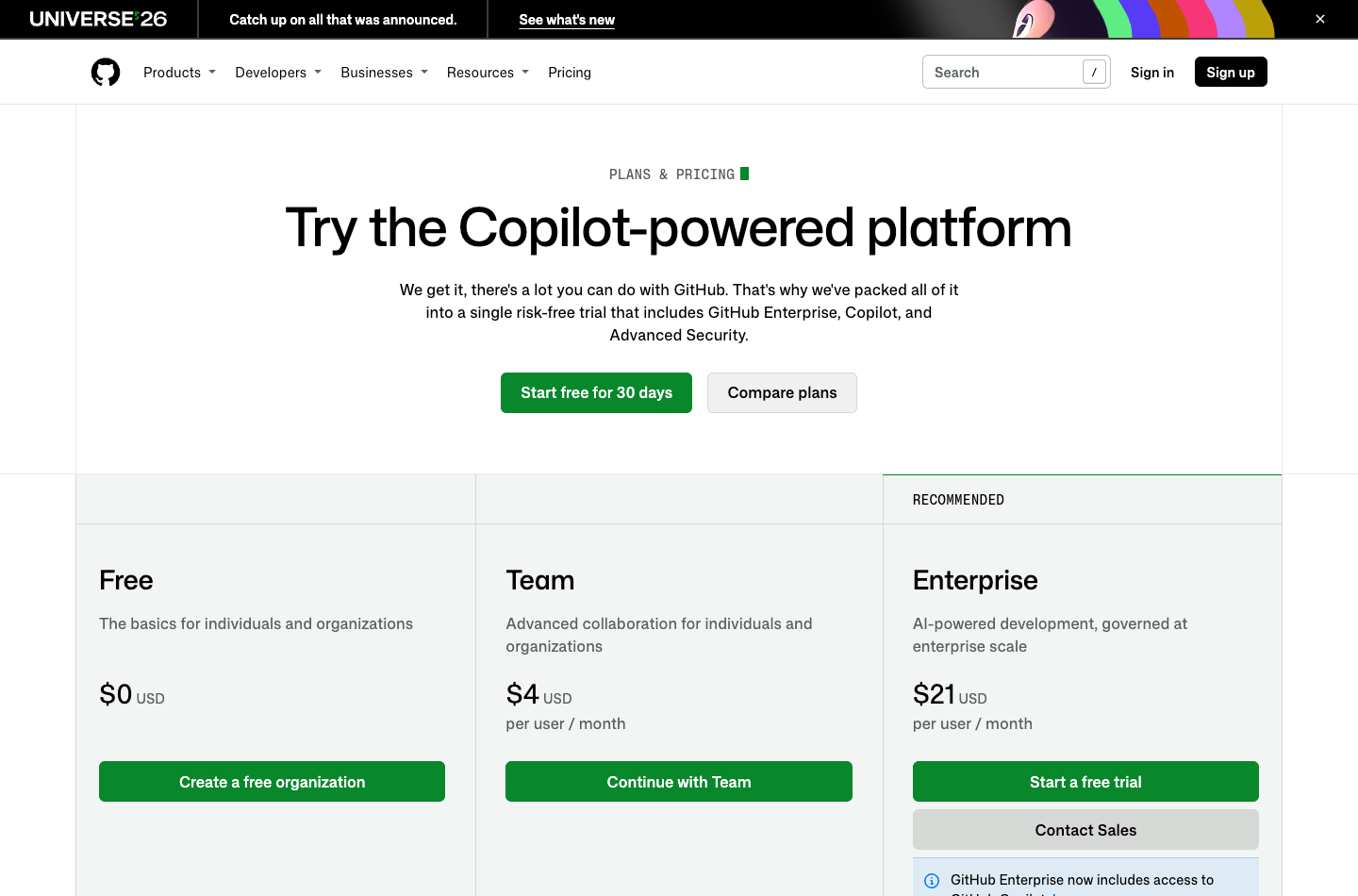
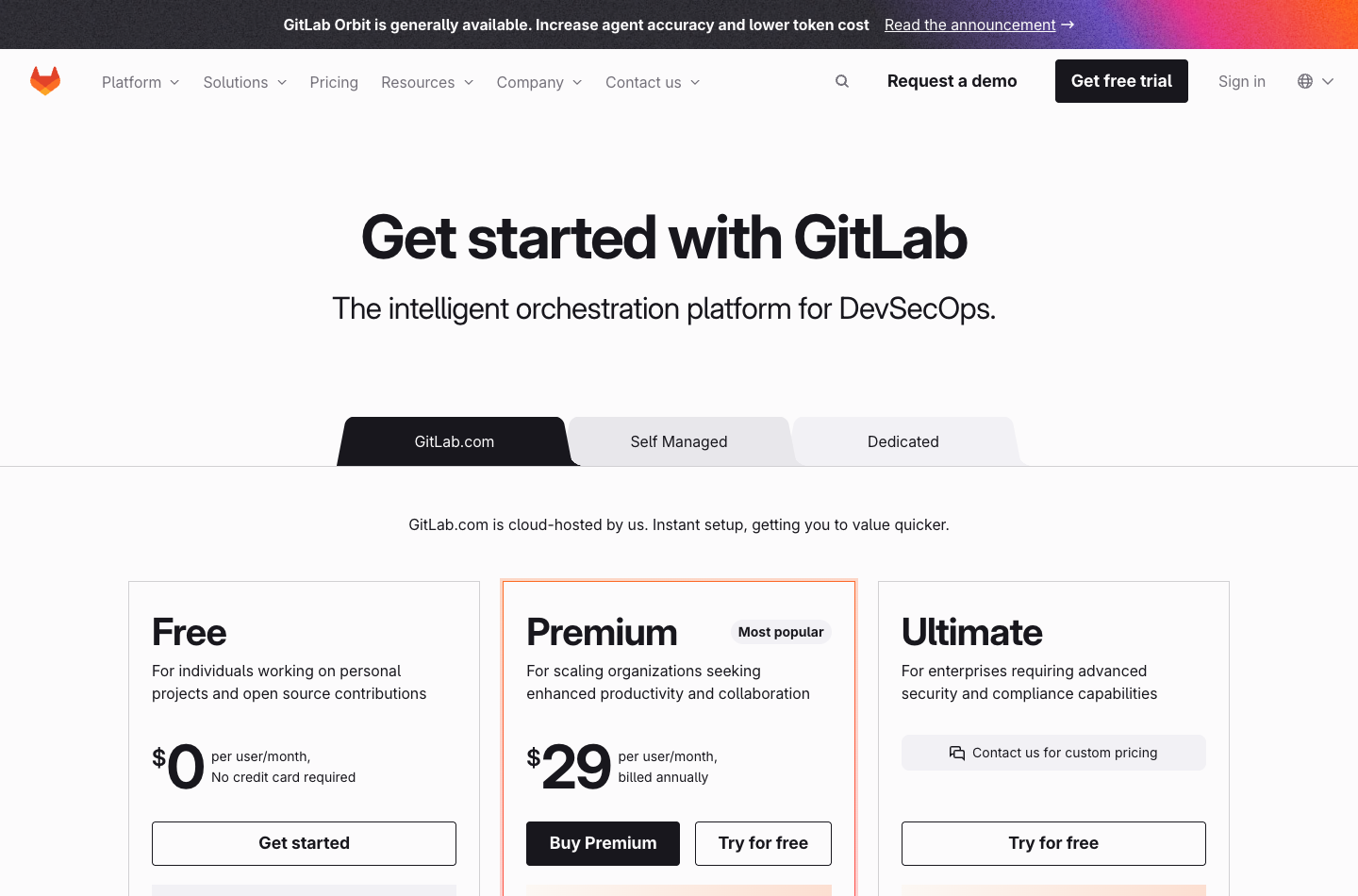
For a private-repository team that needs required review, the natural starting point in GitLab vs GitHub pricing is the cost of GitHub Team. The listed monthly rate is four dollars per user. GitLab Premium pricing is twenty-nine dollars per user per month, billed annually. These are different purchasing models: a monthly equivalent is not necessarily a monthly cancellation option. Ultimate uses custom pricing; request a quote rather than inventing a public per-seat amount.
Here is a seat-only budget for the same three team sizes. Assume each developer requires a paid seat, no taxes, no extra users, no additional security products, and no negotiated discount. The GitHub annual figures are twelve times the monthly example, not a claim that an annual checkout has those exact terms.
| Developers | GitHub Team monthly example | GitLab Premium monthly equivalent | Annualized GitHub Team | GitLab Premium annual example |
|---|---|---|---|---|
| 3 | $12 | $87 | $144 | $1,044 |
| 5 | $20 | $145 | $240 | $1,740 |
| 10 | $40 | $290 | $480 | $3,480 |
The five-developer case gives a $125 monthly-equivalent difference, or $1,500 over twelve months. That difference alone does not decide the purchase. If a Premium workflow eliminates recurring manual release work, a separate service or frequent incidents, it can justify the premium. If the team only needs private Git hosting and a required review, it may pay for capabilities it will never use.
At three developers, GitLab.com Free could be viable. At five, the team reaches the GitLab Free user limit for a private top-level group, so a sixth engineer or a new collaborator can create a purchasing decision. A team of ten cannot assume it can fit into one such Free group. GitHub Free permits private repositories and unlimited collaborators, but the private repository rules needed for mandatory review are not the same as the Free public-repository rules. When comparing GitHub Free vs Team, check the exact governance requirement rather than simply counting users.
When budgeting, include everyone who actually requires a seat, including contractors or collaborators covered by the billing rules. A five-person company with two outside contributors may have a different bill from the five-seat model. Confirm how users inherit access from a parent group or organization, and whether service identities or guest roles affect the plan. Never share a human account merely to avoid an additional seat.
GitHub Team cost per seat is not the total price of development. Hosted runner usage, storage, development environments and private security add-ons can add charges. In GitLab Free vs Premium, the larger compute allowance is one reason to upgrade; the organization may still need additional compute, storage or infrastructure. AI credits are a separate dimension; the vendor’s included credit allocation and eligible features should be checked for the subscription, not treated as unlimited automation.
Build a small budget sheet with five rows: seats, hosted compute, storage, extra security, and internal maintenance. Ask the engineering lead to estimate maintenance hours from actual incidents and pipeline upkeep. Then compare what would change if you adopted either platform. A low subscription price is less important than a bill your team can explain and control.
Private repositories, branch protection and review rules
The first meaningful test for private repositories is whether an ordinary developer can merge an unreviewed change into the default branch. If the answer is yes, the platform is not yet meeting a typical team review policy.
GitHub branch protection is available on Free for public repositories. For private repositories, GitHub documents qualifying paid plans including Team. The rule can require a successful status check and approving reviews. Code owners can identify responsible people or teams for sensitive paths. The configuration must cover the correct branch and contributors; administrators and bypass roles need explicit attention. See GitHub protected branches and GitHub code owners.
GitLab provides protected branches across its tiers. That is not the same as every advanced approval feature being available for free. In a Free project, maintainers can restrict who can push or merge, but a company must verify what its tier can require from reviewers before it calls the policy enforced. Premium and Ultimate add more advanced GitLab approval rules and code-owner workflows. Consult GitLab repository protection and GitLab merge request approvals.
Set the same test on both platforms. An ordinary contributor creates a feature branch and opens a pull request or merge request. The change intentionally fails a harmless test. Confirm that merging is blocked. Fix the test, but do not approve the change. Confirm that the required human review gate behaves as intended. Then review and merge it with an authorized identity. Repeat with a sensitive configuration file to test whether the intended code owner is involved.
Do not use a production repository for that exercise. A private throwaway repository containing synthetic code is sufficient. Record the rule configuration, the identity used for each attempt, and the observed result. A screenshot of a successful merge is much less useful than evidence that an unauthorized merge was blocked.
One subtle GitLab risk deserves attention: overlapping protected-branch patterns can have different precedence behavior. The GitLab protection rules documentation explains how multiple matching rules are combined. Test the actual default branch and wildcard matches rather than assuming a stricter-looking rule always wins.
For a small team, a sensible minimum is no direct pushes to the default branch, required passing tests, approval from someone other than the author, and narrowly controlled emergency bypass. A two-person team must plan for absences. A process that requires both engineers for every change can become a release bottleneck if one is unavailable.
GitHub Actions vs GitLab CI/CD: compare the same workload
GitHub Actions describes a workflow using YAML files in the repository. Workflows can respond to repository events, run jobs on hosted or self-hosted runners and use actions to assemble common tasks. GitLab CI/CD uses a pipeline configuration, normally .gitlab-ci.yml, with jobs, stages, rules and runner selection. Both can automate tests and build artifacts; both can also become expensive or insecure when poorly configured.
The important question in GitHub Actions vs GitLab CI/CD is how many jobs actually run. Suppose a private service has two jobs: a three-minute unit test and a seven-minute build. If the team opens twenty change requests and runs each workflow twice, it consumes forty runs times ten minutes, or 400 job-minutes. If the jobs run in parallel, the engineer might wait seven minutes rather than ten, but compute accounting still reflects both jobs.
For GitLab, a shared-runner job consumes minutes using duration and a runner cost factor. The compute minutes documentation explains the calculation. GitHub also accounts for runner type and job usage; use its hosted runner reference and usage documentation. To compare GitHub Actions free minutes with GitLab free compute minutes, the following model assumes standard Linux jobs, a one-to-one accounting factor, no rounding difference, and no other consumption. It is not a measured speed test.
| Example monthly workload | Runs × job-minutes | Modeled consumption | GitHub Free / Team allowance | GitLab Free / Premium allowance |
|---|---|---|---|---|
| Occasional maintenance | 20 × 10 | 200 | Within both | Within both |
| Active small service | 80 × 10 | 800 | Within both | Free exceeds; Premium within |
| Several active services | 240 × 12 | 2,880 | Free exceeds; Team within | Free exceeds; Premium within |
| Busy multi-service team | 600 × 12 | 7,200 | Both exceed | Free exceeds; Premium within |
A three-platform test matrix can triple the number of jobs when each runs the same test suite. A retry after a flaky test adds more time. Scheduled security scans run even when nobody opens a change request. Artifact uploads, cache misses, large packages and slow external dependencies can extend the time each job needs.
The table illustrates why GitLab CI/CD can become attractive for a larger workload even when GitLab Premium pricing is higher. It does not establish that Premium is cheaper at 7,200 minutes. You still need the incremental runner price on GitHub, actual machine specifications, any security products and the cost of managing the pipeline. The correct comparison is the cost of an equivalent successful build, not just the number of minutes.
Use a simple monthly worksheet. Record the last thirty days of runs, separate pull request tests from main-branch builds, count retries, list runner operating systems and record storage. Divide the number of successful deployments by the full bill to obtain a rough cost per successful release. That number is not a universal benchmark, but it helps a team compare its own workflow over time.
Self-hosted runners can avoid the hosted compute quota under the applicable current terms, but they transfer infrastructure responsibility to the team. An old server can have a negligible hosting bill and a large maintenance cost. A runner that executes untrusted contribution code must not have unrestricted access to internal systems or production secrets. Use isolated execution, short-lived credentials, restricted network access and a documented rebuild process.
Security, secrets and release governance
A small business needs a security baseline before it needs an expensive security dashboard. Require multi-factor authentication, use individual accounts, remove departed contributors promptly, keep deployment credentials out of repositories, and enforce review on sensitive changes. Both products can be part of that workflow. Neither removes the need for a responsible person to act on alerts.
GitHub includes dependency-management capabilities such as Dependabot updates in its baseline offering. Advanced private-repository code scanning and secret protection have separate entitlement and billing considerations. Public-repository security features should not be used as proof that every private repository receives the same service at no cost. Consult the GitHub pricing feature matrix and the GitHub security documentation.
GitLab provides a range of security scanning and reporting functions, with deeper security management and policy capabilities available on higher tiers. Basic scanner availability is different from centralized governance, enforced policies or the ability to track and resolve vulnerabilities across a portfolio. Review the GitLab application security documentation for each required feature.
For GitLab vs GitHub security, compare the evidence your customer or auditor expects. A customer may ask for proof that the default branch requires review, production deploys require authorized approval, vulnerabilities are triaged and access can be revoked. Map each requirement to the exact plan and feature. A product claiming compliance certifications does not automatically make your company’s application compliant.
Use a test with a deliberately invalid credential placeholder, not a real secret. Verify what the scanner flags, whether a finding is merely informational or blocks a merge, who can override it and how the exception is logged. If you need an actual security test, use a controlled fixture explicitly designed for the tool. Never commit a usable password to see whether a scanner will catch it.
For AI-assisted coding, retain the same policy. An automated agent may generate a pull request or a patch, but it is not an independent approver. Review its permissions, its access to credentials and the costs of its execution. Enable the smallest set of permissions needed and make budget limits part of the evaluation. Read our GitHub Copilot review for additional context; verify current AI entitlements separately.
Three small-team scenarios
Scenario 1: Three founders building a web application
The founders own two private repositories and deploy a web application several times per week. They need ordinary feature branches, tests and someone to review production changes. They already know GitHub from previous projects. The expected volume is 80 workflow runs of ten minutes each per month.
Start by comparing GitHub Team at the listed $12 per month with a GitLab.com Free test. GitHub’s Team allowance covers the simplified 800-minute workload. GitLab Free’s hosted allocation does not, assuming the one-to-one model. If the founders already have a well-maintained runner, the compute constraint can change; the team still has to verify its required review rules.
For these founders, GitHub Team is a strong starting point because the seat budget is small and private review enforcement is a stated requirement. GitLab could be preferable if the company already has an established GitLab workflow, or if its integration of build and release work removes meaningful maintenance. The company should test one representative change before committing either way.
Scenario 2: Five developers and a growing internal platform
Five people maintain an API, a dashboard and several scheduled workers. A sixth contractor will join next month. The team wants consistent merge checks, deployment records and predictable CI costs. It currently maintains separate scripts for project reporting and release coordination.
The five-user GitLab.com Free private-group limit makes growth a real concern. GitHub Team has a straightforward seat model in the sample budget; GitLab Premium costs more but offers a larger compute allowance and advanced collaboration. Run a two-week pilot using one service and a shared release checklist. Record the time spent coordinating releases, failed checks, artifact retention and how easily the contractor can be removed.
The recommendation changes if the larger GitLab workflow replaces work the team repeatedly performs manually. If the team has no measurable release coordination problem, it should not pay extra merely to centralize tools. GitHub Team may be sufficient; a separate project tracker can remain in place.
Scenario 3: Ten developers with a self-hosting requirement
A business customer requires that source code remain on infrastructure controlled by the company. The team has ten developers, an experienced platform engineer and a tested recovery process. It is evaluating GitLab Self-Managed Free against a commercial self-hosted offering.
GitLab Self-Managed is not subject to the GitLab.com Free private-group five-user restriction. That makes it a serious option, provided the required approval, audit and security controls exist at the selected tier. GitHub Enterprise Server is a commercial self-hosted option and should be evaluated against its specific agreement, not the GitHub Team price.
Compare the cost of virtual machines, storage, backup copies, monitoring and upgrades. Include incident response and an engineer’s time spent maintaining the instance. Define the recovery point and recovery time the customer requires, restore a disposable copy, and document the result. Schedule a restore rehearsal before a major upgrade so the team can measure recovery time rather than assume it.
If nobody can own the platform reliably, discuss a managed solution that satisfies the actual contractual requirement. Self-hosting is a decision about responsibility, not merely a privacy checkbox.
Migration and the decision checklist
Git repositories are portable, but development platforms contain more than commits. Pull requests, merge requests, review history, issues, branch rules, secrets, runner registrations, deployment environments and package registries can require separate migration work. An ordinary Git mirror is not a complete platform migration.
GitLab documents a GitHub importer. It can import supported project data, but organizations and groups are not automatically recreated, and reviewer or approval history has limitations depending on the migration method. Use a test project before transferring sensitive or business-critical repositories.
Start with a written inventory. List repositories, default branches, protected branch rules, open requests, issue counts, deployment jobs, secrets and external integrations. Assign an owner to each migration category. Recreate permissions and pipeline settings at the destination, use fresh credentials, and validate that the required review and deployment gates work.
Avoid an uncontrolled two-way sync while developers keep committing on both platforms. Define which repository is authoritative during the cutover. Freeze or coordinate writes during the final synchronization window, verify branches and tags, and keep the previous platform available according to your rollback policy. Inform contributors when the authoritative remote changes.
Run the same release acceptance test on the destination: a developer submits a change, a reviewer approves, automated tests succeed, an authorized deploy runs and the rollback procedure works. Check that a failed test and an unauthorized deploy are blocked. Keep the migration evidence separate from a vendor’s feature checklist.
| Before signing | Evidence to collect |
|---|---|
| Seats and collaborators | Count people and access roles; verify checkout terms |
| Private review rules | Failed-test and missing-review merge attempts are blocked |
| CI/CD | Measure a representative pipeline and monthly usage |
| Security | Map required alerts, blocking controls and tier entitlements |
| Migration | Compare branches, tags, issues, review history and settings |
| Recovery | Restore a disposable instance or repository and document recovery |
Final verdict: GitLab vs GitHub for small teams
For most hosted private-repository teams that need mandatory review and predictable seat costs, GitHub Team is a practical default. GitHub Team pricing is especially appealing when your current tracker and deployment process already work. It is not the right answer merely because GitHub is familiar, and it does not include every private security capability without additional consideration.
GitLab Free is worth evaluating for up to five users on GitLab.com if integrated delivery and branch protection fit the team’s needs. GitLab Premium is a stronger candidate when advanced approval controls, planning and higher included compute replace real operational work. For self-hosting, GitLab Self-Managed opens a separate path; evaluate the cost of operating it and any higher-tier requirements.
The best GitLab vs GitHub decision comes from a small repeatable pilot. Price the same team, run the same jobs, enforce the same review gate and record the same evidence. If the more expensive option cannot demonstrate an advantage in that experiment, keep the simpler one. If it does, you will have a reason to justify the investment.

Frequently Asked Questions
1. Which platform better fits a small engineering team: GitLab or GitHub?
GitHub Team is a sensible starting point for hosted private repositories and enforced review at a modest seat price. GitLab can fit teams that want integrated delivery, more hosted compute on Premium, or self-managed infrastructure. Test the same workflow before buying.
2. Is GitLab Free limited to five users?
The five-user limit applies to private top-level groups on GitLab.com Free. It does not apply in the same way to public top-level groups, paid tiers or GitLab Self-Managed Free. Check the official policy for your exact offering.
3. Does GitHub Free allow private repositories?
Yes. GitHub Free supports unlimited public and private repositories and collaborators. However, protected branches and code-owner requirements in private organization repositories generally require a qualifying paid plan.
4. Is GitHub Team pricing cheaper than GitLab Premium pricing?
At the listed seat rates, GitHub Team is $4 per user per month and GitLab Premium is $29 per user per month billed annually. Compute, security add-ons, storage and maintenance can change the total cost.
5. How many GitHub Actions minutes are included?
GitHub lists 2,000 monthly CI/CD minutes on Free and 3,000 on Team. These allowances apply under the relevant hosted-runner billing terms. Public repositories and different runner types have separate conditions.
6. How many GitLab compute minutes are free?
GitLab.com Free includes 400 compute minutes per month for the relevant namespace. Premium lists 10,000. Actual job duration and runner cost factors affect consumption.
7. Can GitLab Free enforce merge request approvals?
Free supports basic protected branch controls. Advanced mandatory approval rules and code-owner enforcement depend on tier and configuration. Consult the current approval documentation and test a blocked merge before relying on a policy.
8. Can I use self-hosted runners with GitHub and GitLab?
Both support runners managed by the user. The applicable hosted-compute charging rules and runner registration differ; infrastructure, isolation, patching and maintenance remain your responsibility.
9. Can I migrate GitHub repositories to GitLab?
Yes, GitLab offers a GitHub importer. Git history and supported project data can migrate, but review history, user mapping, organization structure, secrets and CI settings need separate verification.
10. Is GitLab Self-Managed Free suitable for ten developers?
Yes, if your required controls exist in the chosen edition and someone owns infrastructure and recovery. The hosted private-group limit is not a restriction of Self-Managed Free; the operational burden is the deciding factor.
11. Which platform is better for GitLab vs GitHub security?
The answer depends on the controls and tier your private repositories require. Compare access, branch rules, dependency scanning, secret protection, audit evidence and deployment approval in a controlled pilot.
How DigiOffly researched this comparison
We used official product pricing and technical documentation, then constructed equal-seat and equal-workload examples. We did not use synthetic benchmarks as measured platform results. Prices, quotas and security entitlements can change. Verify the current vendor documentation and contract before making a purchasing decision.
- GitHub plans and pricing
- GitLab plans and pricing
- GitHub protected branches
- GitLab repository protection
- GitLab compute usage
- GitHub hosted runner reference
- GitLab merge request approvals
- GitHub code security
- GitLab application security
- GitLab migration from GitHub
What to read next
Explore the products and the wider developer workflow before choosing a subscription.
Explore the two products in depth
- GitLab review — Source control, CI/CD and deployment options.
- GitHub review — Code hosting, Actions and collaboration.
Turn the research into a practical workflow
- GitHub Copilot review — AI-assisted development.
- Development & DevOps — Explore the wider engineering stack.
Compare related software before subscribing
- Software Finder — Discover tools by task.
- Interactive Compare — Compare the pair.