

PROJECT MANAGEMENT / DIGIOFFLY
Best Free Project Management Software 2026
Five continuing free plans, compared by the limits that end a free workflow.
How to choose free project management software
The best free project management software is not necessarily the one that advertises unlimited tasks. For a small team, the limiting factor might be the third user, the eleventh board, an attachment larger than the free allowance, or an access rule that does not fit a contractor. This guide compares five ongoing free project-management options, separates permanent free access from trials and explains when an upgrade becomes necessary. Our shortlist is based on official plan terms and realistic evaluation scenarios, not invented performance tests.
Free project management software: limits compared
| Software | Best fit | Entry plan and limits |
|---|---|---|
| ClickUp | Task-oriented teams that need many members | Free Forever: unlimited tasks and free-plan members; 60 MB storage |
| Trello | A simple board for up to ten collaborators | Free: 10 collaborators and 10 boards per Workspace |
| Asana | Personal projects or a two-person delivery team | Personal: 2 users; unlimited tasks and projects |
| Notion | Solo knowledge base with a task database | Free: unlimited blocks for an individual; 2+ members limited |
| monday.com | A visual board for one or two people | Free: 2 seats, 3 boards, 200 initial items |
Five free project management software options
ClickUp
Task-oriented teams that need many membersFree Forever: unlimited tasks and free-plan members; 60 MB storage
ClickUp’s published Free Forever plan is useful when a team needs task ownership, boards and collaborative documents without an immediate seat charge. Start with one workspace, a simple status structure and a small set of task types. The new paid pricing rollout does not make every older paid plan universally available.
Watch for: The 60 MB storage allowance can become restrictive for teams uploading media or large client files. Some views, automation, custom fields and administrative controls have limits. Verify plan-specific usage rather than assuming unlimited tasks means unlimited features.
Proposed pilot: Create a project with five owners, a blocked task, a document and a small attachment. Verify the actual roles, views, notifications and storage meter.
Trello
A simple board for up to ten collaboratorsFree: 10 collaborators and 10 boards per Workspace
Trello is a natural candidate for an editorial board, maintenance checklist or simple task pipeline. The official Free plan allows unlimited cards, up to ten boards and ten collaborators per Workspace, with 250 Workspace command runs per month and 10 MB per attachment.
Watch for: Complex dependencies, workload reporting and permission controls may require a different solution. A board per client can exhaust the Workspace board limit quickly; large attachments can hit the file limit. Third-party Power-Ups may have separate costs.
Proposed pilot: Create one board with a backlog, in-progress and review columns. Invite a test collaborator, move an assigned card and test one due-date reminder and an automation run.
Asana
Personal projects or a two-person delivery teamPersonal: 2 users; unlimited tasks and projects
Asana Personal now lists two users, unlimited tasks and projects, list/board/calendar views and storage with a 100 MB maximum per file. It suits an individual or pair who wants a structured project tracker. Do not rely on older articles that describe a larger free team.
Watch for: A third active user exceeds the stated Personal seat allowance. Advanced reporting, dependencies or other paid features need plan verification. Unlimited projects do not imply unlimited collaboration seats.
Proposed pilot: Build a project with dates, statuses and two owners. Check the calendar and a handoff, then decide whether adding a third member is unavoidable.
Notion
Solo knowledge base with a task databaseFree: unlimited blocks for an individual; 2+ members limited
Notion is useful for work that begins in documents and databases: a research tracker, editorial schedule or simple project wiki. The Free tier is a good individual starting point, with 5 MB file uploads and seven-day page history. Team collaboration with two or more members has a block limit.
Watch for: A database view is not the same as a full project dependency and resource-management system. A multi-member team can hit block limits; guests and members are distinct roles. Do not assume an unlimited personal workspace is an unlimited team workspace.
Proposed pilot: Create a task database linked to a brief, attach a small file and invite a permitted collaborator. Check permissions, block usage, exports and deadline visibility.
monday.com
A visual board for one or two peopleFree: 2 seats, 3 boards, 200 initial items
The free monday work-management offering is a candidate for a personal tracker or a two-person business that values visual boards. The vendor lists three boards and three Docs; its help article describes an initial 200-item account limit.
Watch for: The Free plan has no guests or viewers and is limited to two seats. More boards or items can force an upgrade or leave excess content view-only after downgrading. The free plan is not the same as a time-limited Pro trial.
Proposed pilot: Use a single board for actual tasks, add the second seat and check the item count. Verify whether the workflow needs guests, automation or an additional board before committing.
Best Free Project Management Software for Small Teams: compare the binding limit
A five-person team should first evaluate ClickUp Free or Trello Free because Asana Personal and monday Free list two users. Notion Free can be practical for an individual but its collaborative block rules matter. A small business should verify guest and member roles rather than treating a guest as a way to bypass a paid-seat requirement.
For a team with ten clients, Trello’s ten-board limit can become the constraint if every client receives a board. ClickUp’s 60 MB storage may matter more when large attachments are central to work. For each product, choose the most restrictive limit that the real workflow is likely to reach.
Best Free Project Management Tools: three realistic setups
A freelancer: keep a simple backlog, dates and notes for five active projects. Asana Personal or Notion Free may be sufficient; use Trello if a board is easier to maintain. Export one project before moving all records.
A five-person content team: test a shared board and an owner for every task. ClickUp or Trello can be candidates, but verify permissions, file requirements and the actual board or storage limits. Do not upload confidential client files into an unrestricted trial workspace.
A two-person shop: monday Free or Asana Personal can handle a small operations tracker. Use the same set of tasks and check the third-user requirement, guest access and item limits. If hiring is imminent, price the likely upgrade now.
When free task management software stops being free
The change usually happens when a growing team needs another member, more boards, permissions, automations, dependencies or reports. Record the exact upgrade trigger before a pilot. Do not evaluate a temporary paid trial as if every tested capability belongs to the continuing free plan.
For a paid comparison, Notion Plus is $12/member on monthly billing or $120/year prepaid at the US reference, while ClickUp is rolling out new packages with account-specific eligibility. Trello lists Standard at $6/user on monthly billing or $5/user/month billed annually. Check actual seat rules and commitment before calculating the total.
Best Free Project Management Software: a fair evaluation
Create the same project in two shortlisted tools using synthetic data. Include six tasks, two deadlines, a blocked deliverable, a comment, a restricted document and a change in ownership. Ask another person to find the current status and export the project. Count the manual work and note where a paid feature is required.
The best free project management software should have a predictable exit path. Verify whether exports retain dates, ownership, files and relationships. A successful CSV download is not necessarily a complete migration. Keep a small source-of-truth backup and avoid duplicating task status across a wiki and a delivery tool.
Our shortlist uses official vendor plan and help pages checked November 14, 2026. The scenarios are proposed evaluations, not a measured benchmark. We recommend a plan by team size and job, not a universal winner.
Free project management software for a growing team
Estimate the active members you will need over the next quarter, not just today. A free workspace with two seats can be ideal for a partnership but unsuitable after the first hire. Test access using the roles your team needs. Free project management software is useful only if the people responsible for tasks can actually update their work.
Free project management software and file storage
Keep a separate approved file store if attachments would consume the project tool allowance. Link a file from a properly permissioned location instead of duplicating copies across boards. Verify whether the task history, comments and links remain available in an export. The storage limit is often more important than a nominal unlimited-task claim.
A migration checklist for free project management software
Export a small sample project before committing your team. Check whether dates, assignees, labels, files and dependencies survive the move. A CSV can preserve the basic list without recreating comments or relationships. Record a rollback plan before making the new tool the only source of task status.
When free project management software needs a paid plan
Write down the first paid feature you expect to need: a third member, a restricted client workspace, more automation runs or deeper reporting. Compare the monthly cash cost and annual commitment for the actual number of seats. Do not assume that every guest is free or that a temporary trial represents the continuing free plan.
Free project management software: an interface example
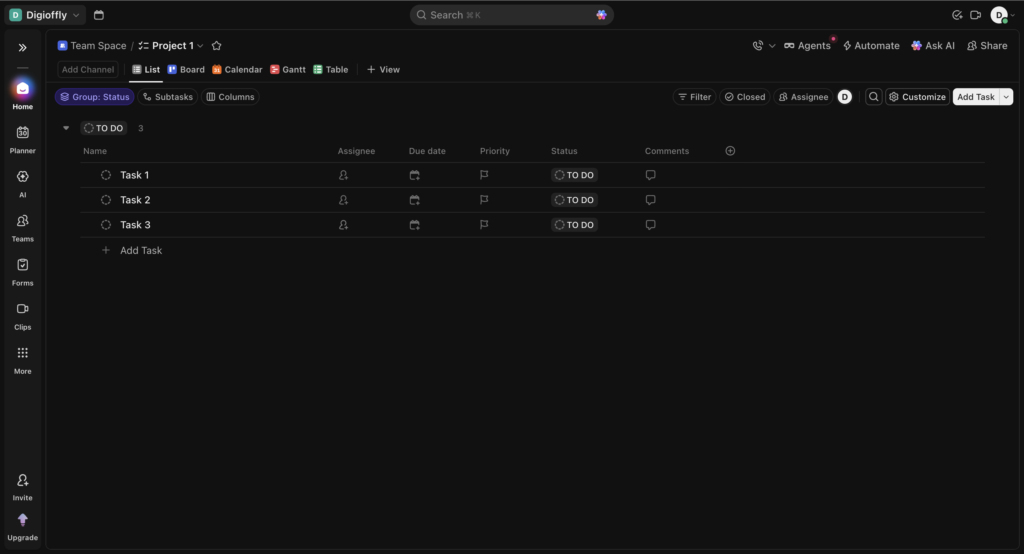
Free project management software: frequently asked questions
What is the best free project management software for small teams?
ClickUp and Trello are strong starting candidates for teams larger than two. Compare their actual limits, task model, storage and access requirements.
Which free project management software supports five people?
ClickUp Free Forever lists unlimited free-plan members; Trello Free supports up to ten collaborators per Workspace. Confirm the required permissions and usage limits.
Is Asana free project management software for more than two users?
The current Personal plan lists two users per project and team. Some legacy accounts may differ; a larger team should confirm its plan and paid options.
How many boards does Trello Free include?
Up to ten boards per Workspace, with up to ten collaborators and unlimited cards at the current published reference.
Does ClickUp free project management software have unlimited storage?
No. The published Free Forever plan lists 60 MB of storage even though tasks and free-plan members are unlimited.
Is Notion Free unlimited for teams?
No. Individual workspaces have unlimited blocks, while workspaces with two or more members have block limits. Free also has a 5 MB per-file upload limit.
What is included in monday.com Free?
Two seats, three boards and three Docs, with an initial 200-item limit documented in its help article; qualifying referrals can increase the allowance. Guest/viewer access is not included.
Can I use free project management software for client projects?
Possibly, if the access, retention, guest and file rules meet the actual client requirements. Test permissions with non-sensitive sample data.
Is a free trial the same as a free plan?
No. A trial expires and may expose paid capabilities. An ongoing free plan has continuing access subject to its own limits.
How should I compare upgrades from free project management software?
Use your actual member count, paid seat rules, monthly versus annual commitment and required features. Do not price every tool at one advertised seat.
Where can I compare Notion and ClickUp?
Read DigiOffly’s Notion vs ClickUp comparison and use Software Finder or the Cost Calculator to check the broader stack.
Pricing note: US public references checked 14 November 2026. Taxes, region, account eligibility and plan changes may affect the actual price. All pilots are proposed evaluation tasks, not measured paid-account tests.
Continue researching on DigiOffly
Software Finder · Cost Calculator · Compare Software · Best Software
EXPLORE NEXT ON DIGIOFFLY
Explore More on DigiOffly
Compare free project management software with the full reviews and budget tools.