

Lead Capture Automation with Make and HubSpot
Lead capture automation connects a website form to the sales process without forcing someone to copy every submission into a CRM. This guide builds a practical workflow using Tally, Make, HubSpot and Slack: a form creates an event, Make checks it, HubSpot records the contact, and the sales team receives a notification. The aim is one reliable record and a clear owner, not the largest possible number of automated steps.
By Alex Wright, DigiOffly · November 14, 2026 · Source-led implementation blueprint. We checked official connector and billing documentation; no paid-account integration or live automation benchmark is claimed.
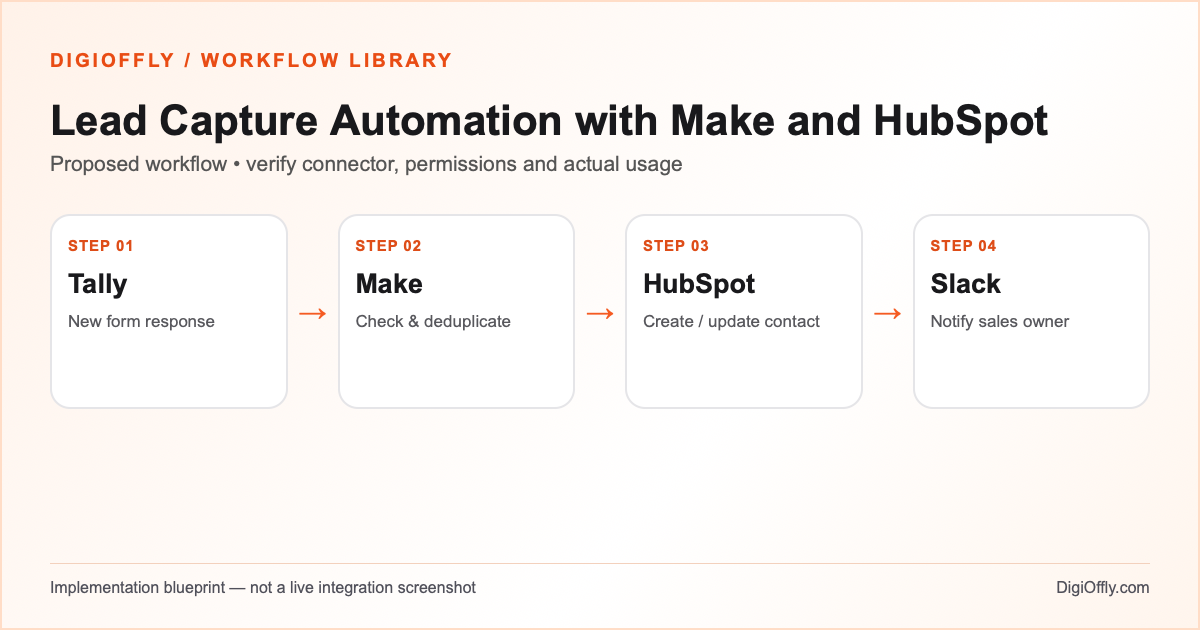
Lead capture automation: what you will build
A new, valid inquiry produces one CRM contact or an intentional update to an existing contact. The responsible team can open the record and follow up. A repeated submission does not create another contact or another uncontrolled alert.
Use this lead capture automation if a small sales team receives website inquiries and already has a CRM. If every inquiry needs extensive qualification, keep a human review step rather than automating assignment blindly. If HubSpot already receives the same form through a native integration, compare that simpler approach before paying for Make.
Decide when a lead becomes a sales task
A website form to CRM handoff should distinguish a new inquiry from a new person. For this lead capture automation, create a separate inquiry activity only when sales needs to track multiple requests from the same contact. Use the Tally form submission identifier to distinguish events, and map HubSpot contact properties only after the identity match is clear. If lead qualification is required, record the qualification result before the CRM write.
Before adding a second routing or enrichment tool, examine CRM deduplication and the lead capture automation error path. A team that receives ten inquiries each day may need a reliable fallback more than it needs a new scoring algorithm. Review the Slack notification with the sales owner; it should make the next action clear without revealing private information.
Software and prerequisites for lead capture automation
Tally
Lead capture
Make
Orchestration
HubSpot
Contact & deal records
Slack
Sales notification
Before connecting any production account, confirm access, the exact connector event and action, supported plan and test environment. Treat the following field names as your own design; adjust them to the actual source and destination schema.
Lead capture automation: data mapping
| Source | Destination | Mapping rule |
|---|---|---|
| Submission ID | Source event key in processing register | Stable key for replay and reconciliation; do not use a name as the key. |
| HubSpot contact email | Trim whitespace and validate; retain the original value where required. | |
| Name and company | Contact properties | Map optional fields separately; do not overwrite useful existing values with blanks. |
| Inquiry topic | Routing property or task note | Use a controlled list and a fallback route for unknown values. |
| Contact permission | Consent record / source timestamp | Keep sales inquiry and marketing permission distinct; do not infer consent. |
| CRM record ID | Restricted Slack message link | Use the confirmed record identifier; avoid full form payload in Slack. |
How to set up lead capture automation
1. Prepare the Tally form
Create a separate test form before connecting the live one. Use clear field labels and a required contact method. Add a topic such as sales, demo or existing customer, and write a concise privacy notice. Keep the actual form response identifier available to the scenario. Submit a synthetic record and inspect the returned fields rather than guessing labels. If using the Tally connector, its documented response-watching capability is the place to start.
2. Authorize the CRM and Slack
In Make, add the Tally connection and then the HubSpot CRM connection. HubSpot requires the relevant administrator to approve the Make app and any new scopes before authorization. Select a test CRM or test contacts and a restricted Slack channel. Use the least access needed for reading and writing contacts, not blanket administrative access. Never place connection tokens in form responses or in a public document.
3. Build the lead capture workflow
Choose the form-response trigger in a draft scenario and inspect a representative submission. Map the response ID and normalized email first. Filter invalid records into a review route. Search the CRM for a suitable existing contact; when the lookup is unambiguous, create or update according to your policy. If several records match, stop the automatic write and ask the sales owner to resolve it.
4. Prevent duplicate CRM contacts
Maintain a processing key based on the submission ID; record the destination contact ID and the last completed stage. Two different submissions from the same person may be legitimate inquiries, so do not confuse a duplicate event with a repeat customer. A lookup followed by a create can race when two executions overlap: serialize processing where appropriate or use a destination operation that safely enforces uniqueness. Test that behavior with repeated and near-simultaneous events.
5. Configure automated lead routing
Define a table from inquiry topic or territory to an owner or queue. A valid new contact can still lack a matching owner. Route that case to a monitored inbox rather than inventing an owner. Put the CRM link, short topic and routing outcome in the Slack message; keep the full message and personal details in the authorized CRM. Decide whether repeated genuine inquiries should create a task or update a separate activity.
6. Run a controlled pilot
Execute the draft scenario against synthetic submissions. Verify that the contact fields, owner, consent state and alert are correct. Check both the create and update paths. Compare a small set of real records only after the responsible person approves the test. Enable the live trigger with a defined event limit or observation window, and reconcile form responses against CRM results daily during the pilot.
Lead capture automation: test cases before launch
These are acceptance criteria for your pilot, not test results. Record the source event ID and the destination ID in each test. Compare the intended outcome with the actual one before enabling the scenario.
| Test case | Expected result |
|---|---|
| New valid inquiry | One contact or correct matching contact update; one notification. |
| Same response ID replayed | No second contact; recorded progress determines whether an alert still needs delivery. |
| Existing contact submits again | Existing record preserved; new inquiry recorded only if intended. |
| Invalid email or unknown owner | No unintended CRM write; item appears in a review queue. |
| Slack write fails after CRM write | Resume notification only; do not recreate the contact. |
| Two concurrent matching submissions | Uniqueness or serialized processing prevents duplicate creation. |
Lead capture automation: failure recovery
Separate contact creation from alert delivery. If the CRM succeeds but Slack is unavailable, persist the CRM ID and mark the notification pending. On recovery, retry only the unfinished stage. An invalid permission or property mapping is different from a temporary connection error: fix the configuration before replaying records. Make can retain incomplete executions when configured; monitor that queue and avoid enabling data loss for a sales-critical process without an explicit business decision.
Security and ownership in lead capture automation
Minimize contact information in logs, messages and the processing register. Access to the CRM must be narrower than access to a broad Slack channel. Obtain the required approvals for third-party processing and define how a deletion or correction request reaches downstream copies. Keep marketing opt-in as a separate field; an inquiry alone does not authorize a campaign. Document who owns the connections if an employee leaves.
Lead capture automation: usage and pricing
The example uses 1,000 incoming events, four estimated standard credits per event and a 20% buffer: 4,800 credits per month. A simple successful path might consist of a trigger, contact lookup, CRM write and Slack message. A processing-register write or additional qualification step adds operations; the four-credit example is not a guarantee. Inspect actual execution history, include empty polling checks and count extra branches before choosing a plan.
At 4,800 credits, the current calculator can evaluate the catalog’s Make Core reference. A five-person team still needs to choose applicable HubSpot, Tally and Slack plans: a CRM account may include different user allowances or charge by seats. Do not multiply every subscription by five. If your CRM already receives forms directly, compare the native route with the four-app approach.
Calculate lead capture automation cost
Illustrative workload, not measured consumption. Change each input for your design.
4,800 estimated credits / month
Calculate stack cost & optimizeMake normally charges ordinary module operations; some modules are exempt or use other rates. Polling, multiple bundles, AI and code can change demand. The calculator applies the catalog’s documented plans, not a vendor invoice.
Measure lead capture automation after rollout
Measure the percentage of valid inquiries assigned within your agreed response window, duplicates per 100 events, unassigned contacts and alerts that fail after a successful CRM write. Reconcile source response IDs against the CRM register. A reduction in copy-paste time is useful only if inquiries still reach the right owner.
Lead capture automation: frequently asked questions
What is lead capture automation?
It is a process that moves incoming inquiries into an organized sales workflow. Here a Tally submission is processed in Make, recorded in HubSpot and reported to the responsible team in Slack.
Can I connect Tally to HubSpot without code?
Make documents connectors for both products. Configure the response event, field mapping and contact action in your account, then test the exact event and access requirements. This guide is a blueprint, not an installed integration.
How does the Make HubSpot integration prevent duplicate contacts?
Search and match using a documented unique identifier, store the source response ID and use a safe create/update method. The connector alone does not guarantee that concurrent executions cannot race.
Is lead capture automation possible without Make?
Yes. If your form tool or CRM offers a suitable native integration, a shorter workflow may be easier to maintain. Compare supported fields, deduplication and alerts before adding another subscription.
Do I need a paid HubSpot plan?
It depends on the properties, permissions, automation and CRM features required by your design. Confirm the selected HubSpot plan and app scopes at checkout; a free tier is not a guarantee for this whole workflow.
How many Make credits does lead capture automation use?
The example estimates four credits per event, but actual consumption depends on module runs, returned bundles, polling, additional writes and retries. Enter measured usage in the calculator after a pilot.
Can I automatically send marketing emails to every lead?
Do not infer marketing permission from a form inquiry. Keep separate consent records and follow applicable privacy and marketing rules; the starter workflow sends internal notifications only.
What happens if Slack fails after a CRM update?
Save the destination ID and retry the alert independently. Replaying the entire scenario without checking completed stages risks duplicate writes.
How should automated lead routing handle missing owners?
Send the inquiry to a monitored fallback queue with a reason. Do not drop the lead or assign it randomly.
Can I use this lead capture workflow with Zapier?
You can design an equivalent workflow if the needed triggers and actions are available. Recalculate billable tasks rather than copying Make credits directly.
How can I calculate the complete cost?
Use the calculator below to import the proposed stack and credit demand, then select each applicable subscription and billing term. Verify unknown costs separately.
Official sources for lead capture automation
Vendor documentation checked on November 14, 2026. The workflow design, sample field mapping, acceptance tests and budget arithmetic are DigiOffly editorial examples. Verify your exact account entitlements, current modules and actual operation counts before enabling production. No automation has been installed or executed by this guide.
After lead capture automation: related workflow guides
- Workflow Library — compare all four practical blueprints.
- Shopify Order Automation with Make and Airtable
- Notion to ClickUp Automation with Make
- Zendesk Ticket Escalation Automation with Make
- Software Finder — choose tools for another workflow.
- Software Cost Calculator and Stack Optimizer — compare annual billing and alternatives.
- Make vs Zapier — compare the two automation platforms.
- Software Stacks — plan the rest of your business software.
- Google Sheets to HubSpot Automation with Make