

Zendesk Ticket Escalation Automation with Make
Zendesk ticket escalation automation helps support teams hand difficult cases to the right internal owner without losing the customer context. This guide uses Make, ClickUp and Slack to create a linked escalation task from a Zendesk ticket when an explicit rule requires a human decision. The workflow does not answer the customer, close the ticket or change customer rights automatically.
By Alex Wright, DigiOffly · November 14, 2026 · Source-led implementation blueprint. We checked official connector and billing documentation; no paid-account integration or live automation benchmark is claimed.
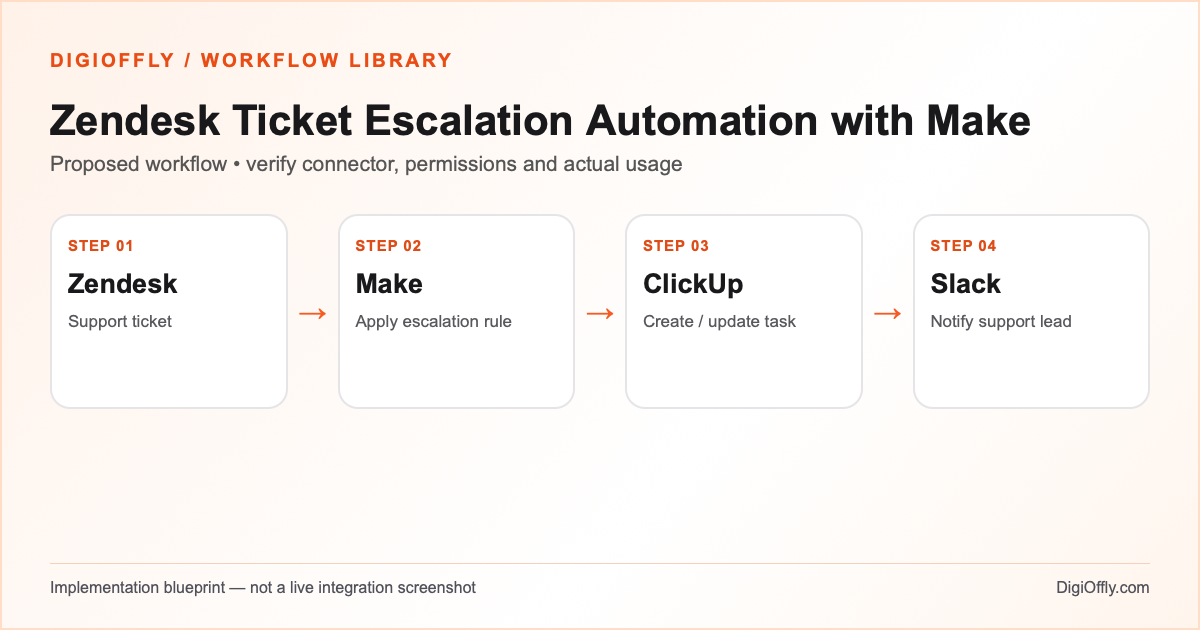
Zendesk ticket escalation: what you will build
An eligible support ticket creates one internal escalation task with the ticket link, reason and responsible team. An ordinary ticket stays in the support queue. A reopened or repeated ticket is handled according to a documented update rule rather than generating a flood of duplicates.
Use Zendesk ticket escalation when support and engineering work in different systems and a handoff needs a durable internal task. If your Zendesk queues and triggers already provide enough collaboration, avoid creating a second tracking system. Keep the source ticket authoritative for customer-facing communication.
Decide which escalation cycle is active
A Zendesk ticket escalation should distinguish a ticket from an escalation cycle. The Zendesk ticket ID identifies the customer issue, while an active escalation cycle identifies the internal assignment. Store both in the mapping register. If an agent reopens a case, use the ticket escalation policy to decide whether to update the existing ClickUp escalation task or create a new cycle.
For Zendesk ticket escalation, make the human queue visible before enabling the integration. If a ticket has ambiguous fields or a protected category, leave it in the support queue for review. An internal notification can contain a short escalation reason and the ticket link. A restricted Slack channel is not a substitute for Zendesk permission checks. A Zendesk ticket escalation is complete only when the responsible internal team can act on it.
Software and prerequisites for Zendesk ticket escalation
Zendesk
Support ticket source
Make
Orchestration
ClickUp
Escalation task queue
Slack
Internal notification
Before connecting any production account, confirm access, the exact connector event and action, supported plan and test environment. Treat the following field names as your own design; adjust them to the actual source and destination schema.
Zendesk ticket escalation: data mapping
| Source | Destination | Mapping rule |
|---|---|---|
| Zendesk account + ticket ID | External escalation key | Stable identity across accounts; do not use subject line as identity. |
| Priority and category | Controlled routing fields | Use explicit rules with a human fallback for unknown values. |
| Escalation reason | ClickUp task description summary | Copy a short structured reason, not the full conversation. |
| Assigned group | ClickUp list or responsible team | Map to an approved group; never guess a person from free text. |
| Ticket URL | Restricted task / Slack link | Use a link that requires proper account access. |
| Escalation state and timestamp | Mapping register / retry stage | Store task ID and completion stage to prevent repeated side effects. |
How to set up Zendesk ticket escalation
1. Define the escalation policy
Write a short matrix that states which tickets go to engineering, billing or a support lead. Use explicit categories and priority fields; define the threshold that requires escalation and what happens when data is missing. A ticket can be urgent without being appropriate for automation. Keep security-sensitive cases and ambiguous requests in a protected human queue. Record who owns the policy and how a reopened case is handled.
2. Connect a restricted support workspace
Make documents a Zendesk connector that can work with tickets and related objects. Create a connection to your Zendesk subdomain and authorize only the required actions for the selected event or polling module. Use test tickets that contain no real customer data. Connect ClickUp to a dedicated escalation list and Slack to a restricted support channel. Validate the account and group identifiers before building routing rules.
3. Build the Zendesk automation workflow
Read the chosen ticket event or scheduled set of tickets in a draft scenario. Apply the escalation policy using structured fields. Exclude ordinary tickets from the escalation branch. Store the ticket identity and lookup the corresponding task mapping. For an eligible record, create or update the internal ClickUp task with a concise reason, priority, responsible group and Zendesk link.
4. Handle ticket state changes
A reopened ticket does not necessarily need a second internal task. If an existing escalation is still active, update its relevant fields. If the previous escalation was resolved, follow the policy for reopening or creating a new cycle; use a cycle identifier if required. Do not let changes made by the integration trigger the same escalation indefinitely. A customer reply is not itself permission to change ticket priority or resolution.
5. Make notifications and failure recovery safe
Send Slack a short notification when an escalation needs action, not every time a ticket changes. If the task write succeeded but Slack delivery failed, retain the task ID and retry the alert only. If a ticket has no matching category, route it to the protected fallback queue. Use a failure record and incomplete execution handling to keep important events recoverable.
6. Test before enabling the live process
Use synthetic tickets for routine requests, high-priority incidents, unknown categories, repeated events and reopened cases. Compare ClickUp task ownership with the written escalation matrix. Confirm that every alert link is accessible only to the intended people. Review execution logs for excess data and test a deliberate connector permission failure. Run a limited pilot with agents monitoring the Zendesk queue before expanding.
Zendesk ticket escalation: test cases before launch
These are acceptance criteria for your pilot, not test results. Record the source event ID and the destination ID in each test. Compare the intended outcome with the actual one before enabling the scenario.
| Test case | Expected result |
|---|---|
| Routine ticket | No escalation task; ticket remains in the support queue. |
| Eligible urgent ticket | One task with correct reason, owner and link. |
| Duplicate event | Same escalation cycle; no new task or alert spam. |
| Reopened ticket | Existing task updated or new cycle created according to policy. |
| Unknown category or restricted ticket | Protected human review; no broad Slack notification. |
| Task created, Slack unavailable | Retry alert only; no customer-facing change. |
Zendesk ticket escalation: failure recovery
Keep a durable mapping of ticket ID, escalation cycle, task ID and notification stage. If a customer-related event cannot be processed because of a revoked token or invalid group, pause the affected route and notify the responsible administrator without exposing the ticket body. Reconcile Zendesk escalation candidates with ClickUp tasks so an incomplete execution does not hide a support issue.
Security and ownership in Zendesk ticket escalation
Protect ticket content and attachments; they may contain personal, financial or other sensitive data. Copy only the minimal structured fields needed for assignment. Restrict access to the ClickUp list and Slack channel, and ensure the destination link requires Zendesk authorization. Keep customer-facing responses, ticket closure and account decisions with authorized agents. Document retention and deletion handling across systems.
Zendesk ticket escalation: usage and pricing
The example uses 800 eligible ticket events, four estimated credits per event and a 20% reserve: 3,840 credits per month. The 3,840-credit example assumes only the 800 eligible events enter the scenario. If 2,000 inbound events instead enter and the other 1,200 each require one additional billable trigger check, add 1,200 credits before the reserve: (3,200 + 1,200) × 1.20 = 5,280 credits. A batched search can have different costs; use actual module operations rather than assuming one check per ticket in every design. Multiple updates per ticket, comments, repeated routing actions and retries can increase consumption. Model the actual event stream rather than equating ticket count with module executions.
The imported stack includes Zendesk, Make, ClickUp and Slack for a five-person planning example. Zendesk agent access and ClickUp collaboration may have different seat counts and entitlements. Some subscriptions may be incomplete in the catalog; verify checkout rather than adding unknown prices as zero. Measure the automation workload separately from the help desk license.
Calculate Zendesk ticket escalation cost
Illustrative workload, not measured consumption. Change each input for your design.
3,840 estimated credits / month
Calculate stack cost & optimizeMake normally charges ordinary module operations; some modules are exempt or use other rates. Polling, multiple bundles, AI and code can change demand. The calculator applies the catalog’s documented plans, not a vendor invoice.
Measure Zendesk ticket escalation after rollout
Measure time from escalation eligibility to assigned task, missed or duplicate escalations, incorrect routing, unresolved internal tasks and alert delivery failures. Audit a sample of ordinary tickets as well as escalated tickets to detect over-routing. A successful automation reduces handoff friction without changing customer rights or support quality.
Zendesk ticket escalation: frequently asked questions
What is Zendesk ticket escalation automation?
It is a controlled internal handoff from a Zendesk ticket to the team that must resolve an exception. This blueprint creates a linked ClickUp task and a restricted Slack alert.
Can Make connect Zendesk to ClickUp?
Make documents connectors for Zendesk and ClickUp. Verify the exact event, target list, authentication and workspace permissions before relying on the integration.
Which tickets should trigger support ticket routing?
Use an explicit policy based on reliable structured fields and a human fallback. Do not treat every new message or high-priority label as an automatic escalation.
How can Zendesk ClickUp integration avoid duplicate tasks?
Use the ticket ID and escalation cycle as an identity, persist the task mapping and test duplicate or concurrent events. A search followed by create does not by itself prevent simultaneous runs from both creating a task.
Can I send the whole ticket to Slack?
Avoid copying full conversations and attachments. Send a concise reason and a restricted ticket link, following the support team’s access policy.
Does customer support automation respond to customers?
This starter does not. It makes an internal task and notification; an authorized agent remains responsible for the customer response.
How many credits does Zendesk ticket escalation use?
The example is 3,840 credits for 800 eligible events with four credits each and 20% reserve. For 1,200 additional noneligible events consuming one credit each, the illustrative total rises to 5,280 with the same reserve. Count actual trigger checks, other actions and retries in the real model.
How should reopened tickets be handled?
Follow a documented cycle policy. Update an active escalation or create a new cycle only when the business rule requires it.
What happens when a connector fails?
Record the affected ticket and completed stage, resolve the error and replay only the necessary work. Use an approved human fallback for time-sensitive cases.
Can I use Zapier instead of Make?
Potentially. Verify that the same ticket and task actions are available and calculate successful billable tasks under the selected Zapier plan.
How do I estimate the full support software budget?
Open the calculator with the proposed stack and usage. Select plans that match real agents and collaborators, and verify any unresolved prices separately.
Official sources for Zendesk ticket escalation
Vendor documentation checked on November 14, 2026. The workflow design, sample field mapping, acceptance tests and budget arithmetic are DigiOffly editorial examples. Verify your exact account entitlements, current modules and actual operation counts before enabling production. No automation has been installed or executed by this guide.
After Zendesk ticket escalation: related workflow guides
- Workflow Library — compare all four practical blueprints.
- Lead Capture Automation with Make and HubSpot
- Shopify Order Automation with Make and Airtable
- Notion to ClickUp Automation with Make
- Software Finder — choose tools for another workflow.
- Software Cost Calculator and Stack Optimizer — compare annual billing and alternatives.
- Make vs Zapier — compare the two automation platforms.
- Software Stacks — plan the rest of your business software.
- AI Content Workflow Automation with Human Review