

Product and pricing research checked: October 23, 2026. United States prices before tax; availability and usage allowances may change.
Claude can write a useful first draft, but that is the least interesting thing about it now. Anthropic is trying to make Claude a workspace where the draft, the spreadsheet, the slide deck, the code and the connected files live closer together. That could save a team several handoffs. It could also leave the team paying for another AI subscription while still doing the verification, formatting and permissions work themselves.
Our 2026 review focuses on the purchase decision rather than the model hype: which plan covers the work, where Artifacts or Claude Code could save time, and what would justify an upgrade. Anthropic’s October changes are material: Claude Opus 5.5, Sonnet 5.5 and Haiku 5.5 are now in its model portfolio. Reviews written around the older 4.x models no longer describe the full current product.
Editorial scope: This is an independent, documentation-led review. Pricing and feature claims below were checked against Anthropic’s publicly accessible pages. Screenshots reproduce public Anthropic pricing, launch and support screens. We have not run a controlled benchmark, signed up for a new paid Team workspace, or proven any enterprise-only feature in a live organization. Worked examples are scenarios, not fabricated hands-on tests or real vendor invoices.
📊 Claude AI Review 2026: Key Findings
| Category | Editorial finding |
|---|---|
| Product | Claude, the AI assistant and workspace developed by Anthropic |
| 2026 model lineup | Claude Opus 5.5, Claude Sonnet 5.5 and Claude Haiku 5.5 |
| Free | $0, with usage limits and a defined feature set |
| Pro | $20/month, or $200 billed annually (approximately $16.67/month) |
| Max | $100/month for 5x, $200/month for 20x individual usage tiers |
| Team | Standard $25/seat monthly or $20/seat monthly-equivalent annually; Premium $125 or $100, minimum two seats |
| API billing | Separate from normal subscription use; qualifying Max and Team plans now include specifically defined monthly API credits |
| Strongest use cases | Editing long drafts, document workflows, coding tasks, project context and structured output |
| Main caution | Session and weekly limits, inaccurate outputs, connector permissions, and the upfront cost of annual commitments |
| Best first step | Try one repeatable task on Free or Pro and measure corrections and total elapsed time |
🎯 Who Claude Is For — and When Another Tool May Be Better
Solo writer or researcher: A user preparing client briefs, rewriting drafts and inspecting reference documents can often get value from Claude Pro. The question is whether Claude produces a verifiable, editable result with fewer rounds of correction than the existing writing process. A polished paragraph without trustworthy supporting documents is not a finished research task.
Developer or small technical team: Claude Code and Sonnet 5.5’s coding focus are worth examining for codebase explanations, test planning and bounded repairs. But sample outputs do not establish code quality in your own repository. Require tests, a pull-request review, permission boundaries and rollback procedures before giving an agent more autonomy.
Operations or finance team: Claude’s ability to create and revise Docs, Slides and spreadsheets can reduce formatting and summarization overhead. Yet the output still needs reconciliation with original figures, and files with payroll, client or payment information deserve a separate handling decision. The faster route is not always the authorized route.
Organization choosing a shared workspace: Team seats make more sense when administrators need centralized control, permissions and shared context. Two individuals with separate Pro subscriptions are not equivalent to a governed Team workspace, but a Team plan can also be overkill for a pair of casual writers. Treat rollout and account offboarding as costs, not footnotes.
Claude AI should not be the automatic choice for businesses mainly seeking a dedicated SEO rank tracker, CRM, invoicing system or analytics dashboard. It can explain a dataset or produce a report; it does not replace the underlying vendor-of-record system or the domain-specific controls those services provide.
💰 Claude Pricing 2026: Free, Pro, Max, Team and Enterprise
How much does Claude cost? The first mistake is comparing monthly-equivalent figures as though every plan is billed monthly. Anthropic lists Pro at $20 on monthly billing and $200 paid upfront for the year. Team annual figures are also monthly equivalents of an annual commitment. Taxes, local currencies, applicable discounts and billing-channel conditions can change the final invoice.
| Plan | Published US reference price | Actual first-year subscription cash | What the number means |
|---|---|---|---|
| Free | $0 | $0 | No paid subscription; feature availability and usage are restricted |
| Pro monthly | $20/month | $240 if kept 12 months | Monthly charges, subject to changes or cancellation |
| Pro annual | $200/year | $200 upfront | $16.67 monthly equivalent, not monthly collection |
| Max 5x | $100/month | $1,200 if kept 12 months | More included usage than Pro, not guaranteed unlimited use |
| Max 20x | $200/month | $2,400 if kept 12 months | Higher capacity for frequent users |
| Team Standard monthly | $25/seat/month | $300 per seat if held for 12 months | Minimum two seats; team administration |
| Team Standard annual | $20/seat/month equivalent | $240 per seat upfront | Annual billing commitment |
| Team Premium monthly | $125/seat/month | $1,500 per seat if held for 12 months | More usage for a heavier seat |
| Team Premium annual | $100/seat/month equivalent | $1,200 per seat upfront | Annual commitment; capacity differs from Standard |
| Enterprise | Custom commercial terms | Request an official quote | Seat and/or usage details depend on contract |
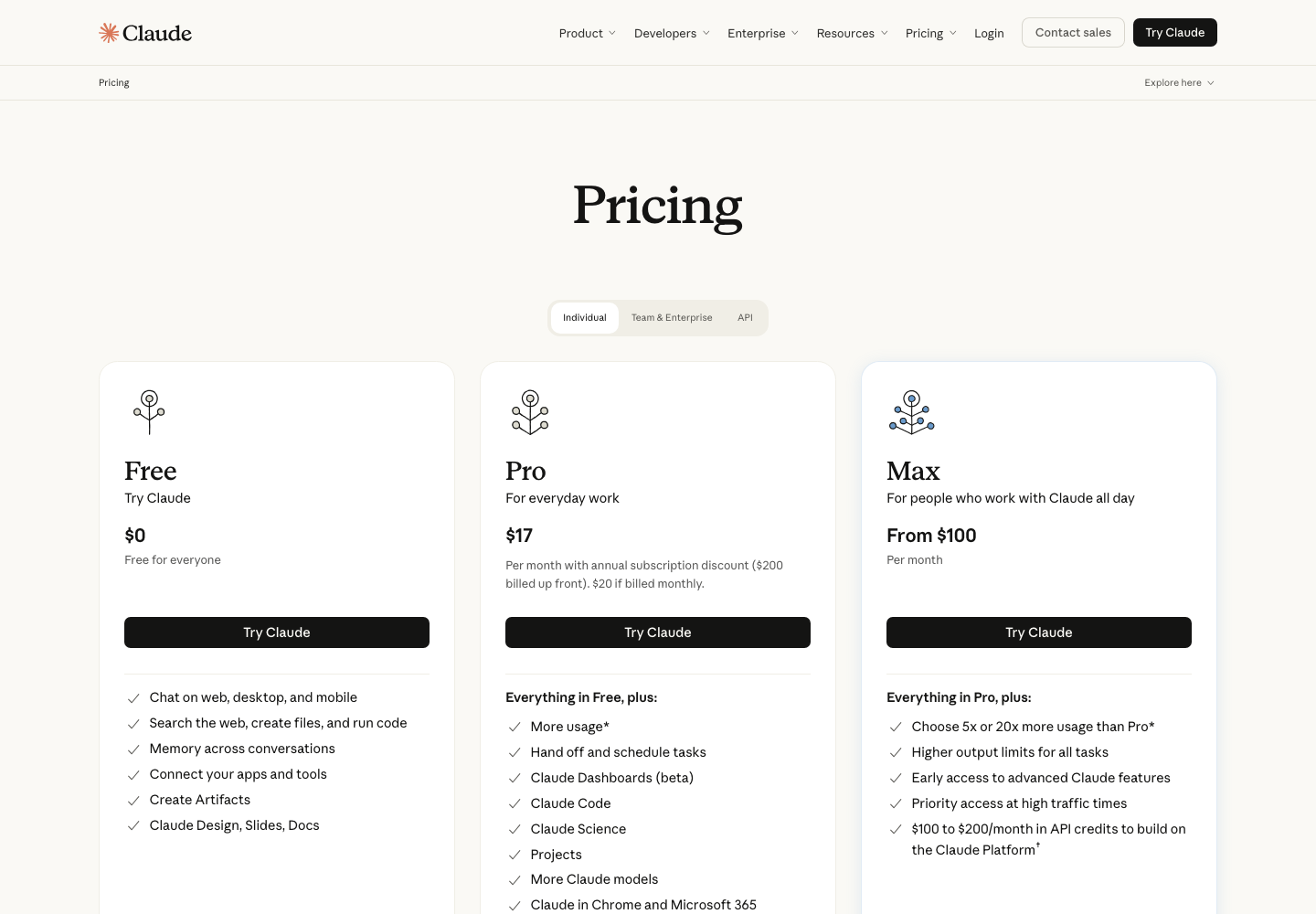
Reference: Claude official pricing and Anthropic’s Team plan explanation. The $200 Pro annual figure is rounded by the vendor to a $17/month marketing reference; actual $200/12 is approximately $16.67. First-year totals assume the same seats and prices for the stated period; they are arithmetic illustrations, not vendor quotes.
🆓 Claude Free vs Pro: what changes in practice?
The Claude free plan is not merely a static demonstration page. The official feature matrix lists chat, web search, file creation, Artifacts and several document-related options. Exact availability can depend on rollout, account settings and limits. Free is valuable for a small test of output quality, but not a reliable proxy for the amount of work you can do every day. The choice between Free and Pro should depend on a normal week’s work, not one impressive response.
Claude Pro adds broader access and more included usage, along with capabilities such as Claude Code and more advanced workspace features. At $20 monthly, a user should be able to describe the recurring workload that justifies the bill. For example, if a writer spends an extra hour every week manually checking Claude’s citations, a faster first draft may not save much overall time.
⚡ Claude Pro vs Max: buying capacity, not accuracy
Claude Pro vs Max is largely a question of frequency and throughput. The individual Max tiers are publicly listed at $100 and $200 per month, with advertised 5x or 20x relative session usage. Those multipliers are not a fixed count of messages, and they should not be read as a guarantee that every model will remain usable for the whole month. Anthropic also documents session limits, weekly limits and effects from long attached files.
Is Claude Max worth it for someone who only reaches the limit twice a month? Probably not; paying more for occasional capacity is hard to justify. If coding sessions or large documents routinely interrupt a paid workflow, record those interruptions over a normal week before upgrading to a Claude Max plan. The point is a threshold you can measure, not the appeal of the largest plan label.
👥 Claude Team pricing: Standard and Premium are different seats
Current Claude Team plan pricing describes a service supporting two to 150 seats, not the five-seat minimum repeated in older articles. A company can mix Standard and Premium seats, assign capacity where needed, and centralize access and billing. Standard seats are listed at $20 monthly equivalent on annual billing or $25 billed monthly; Premium seats are $100 annual monthly equivalent or $125 billed monthly.
A procurement review must distinguish the minimum number of seats, who actually needs Premium capacity, the price after renewal, unused-seat handling and optional usage credits. Extra seats do not retroactively make a feature or integration safe for sensitive data. Verify SSO, admin permissions and connector controls in the product rather than assuming every feature is available to every individual subscription.
🧮 Team Cost Example: Two, Five and Eight Seats
To make Claude Team vs Pro meaningful, compare the same contract period and type of access. The rows below are illustrative calculations from published list prices, not quotes from Anthropic and not proof that the plans perform identically.
| Team scenario | Monthly-billed cash per month | Actual first-year monthly-billed total | Annual contract cash due upfront |
|---|---|---|---|
| 2 Standard seats | $50 | $600 | $480 |
| 5 Standard seats | $125 | $1,500 | $1,200 |
| 8 Standard seats | $200 | $2,400 | $1,920 |
| 4 Standard + 1 Premium | $225 | $2,700 | $2,160 |
| 8 Premium seats | $1,000 | $12,000 | $9,600 |
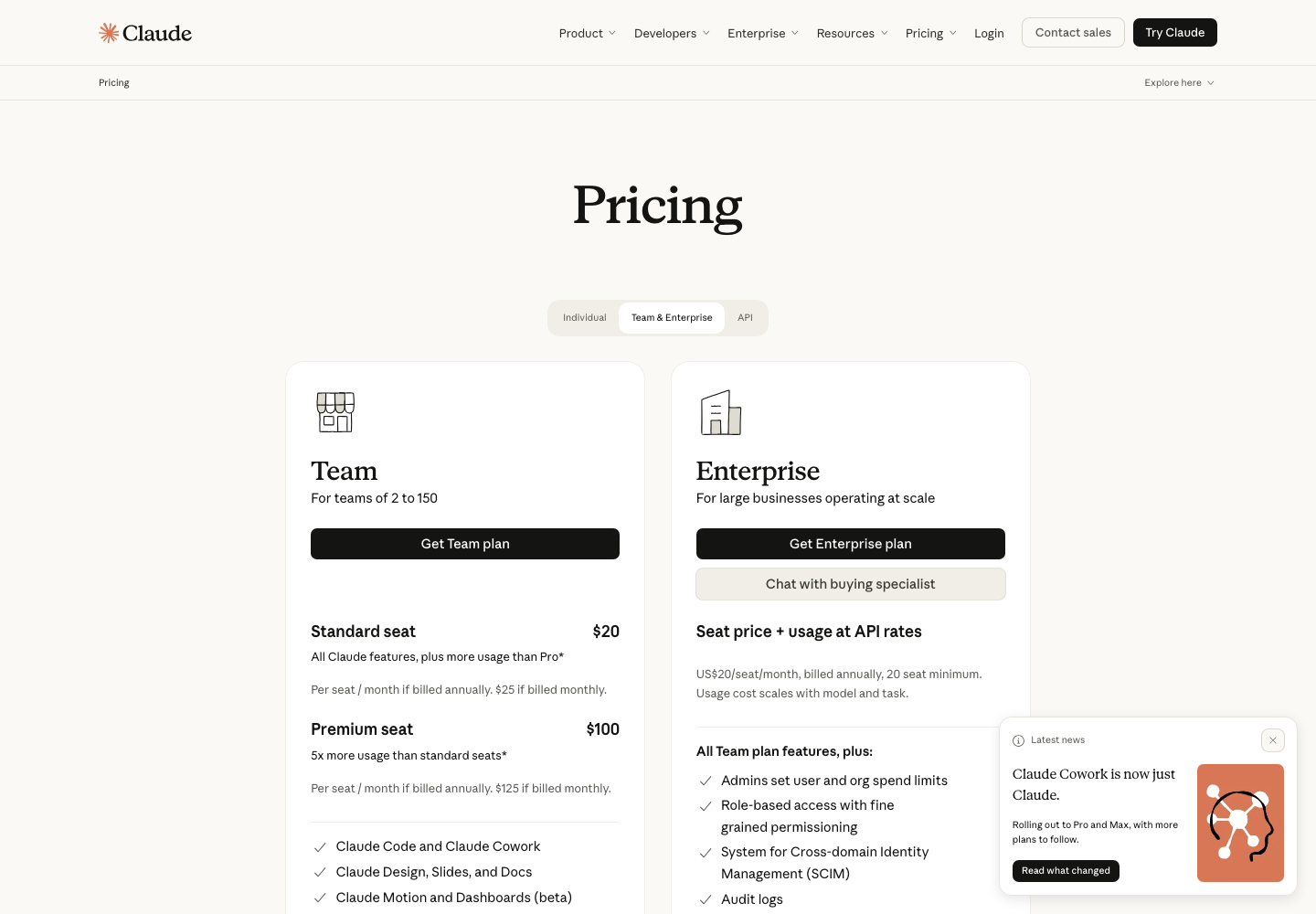
For an eight-person team, the difference between Standard monthly and annual list pricing is $480 across a full year. But the annual option ties cash to the contract earlier. The more useful question is how many people need managed access and whether at least one workflow benefits from a higher-capacity Premium seat. A per-seat discount does not compensate for unused licenses.
Anthropic has also introduced monthly API credits for qualifying Max and Team subscriptions. On Team, those credits are pooled and capped at $500 per month, rather than being unlimited inference access. Claude API billing remains distinct from the included chat subscription allowance. The credit program has eligibility rules and expiration details. Consult the official API credit documentation before including any such benefit in a budget.
🧠 Which Claude Model Is Current in October 2026?
Model names in a product review should correspond to Anthropic’s current documentation. The September and October 2026 releases make it misleading to describe Claude as a single model or to recommend a 4.x model by default. The platform and the model are separate: Claude is the user-facing product, while Opus, Sonnet and Haiku denote different model families and trade-offs.
| Model family | Current release | Anthropic’s positioning | Editorial decision rule |
|---|---|---|---|
| Opus | Claude Opus 5.5, September 22 | More difficult coding, open-ended reasoning and knowledge work | Try when the cost of errors is high and a complex task justifies more deliberate work |
| Sonnet | Claude Sonnet 5.5, September 28 | Strong all-round professional tasks, coding and document creation | Start here for many repeatable writing, software and office workflows |
| Haiku | Claude Haiku 5.5, October 7 | Lower-cost, faster, high-volume tasks | Evaluate for classification, quick extracts and simpler repeated jobs |
| Earlier 4.x models | Availability varies | Older reference points in historical reviews | Do not equate old benchmark articles with the newest default product |
According to Anthropic’s own release notes, Sonnet 5.5 runs more than 30% faster than Sonnet 5 under its stated evaluations and is designed for carefully scoped work. Haiku 5.5 is targeted at speed-sensitive and cost-sensitive operations; Opus 5.5 is positioned for more demanding judgment and agentic coding. These are vendor claims and evaluations, not DigiOffly benchmark results. A benchmark should never be used to promise that your own repository, spreadsheet or workflow will improve by the same percentage.
For a practical Claude AI model comparison, prepare three tasks. A Claude model comparison should ask which model completes each job with the fewest corrections: summarize a long but verifiable document, repair a reproducible bug and transform inconsistent data into a small report. Keep the inputs and acceptance criteria the same. Measure total output checking time, not only how fast the model starts answering. Model availability and selection controls can change with subscription and rollout.
🛠️ What Claude Can Actually Do
🖼️ 1. Artifacts, Claude Docs and Claude Slides
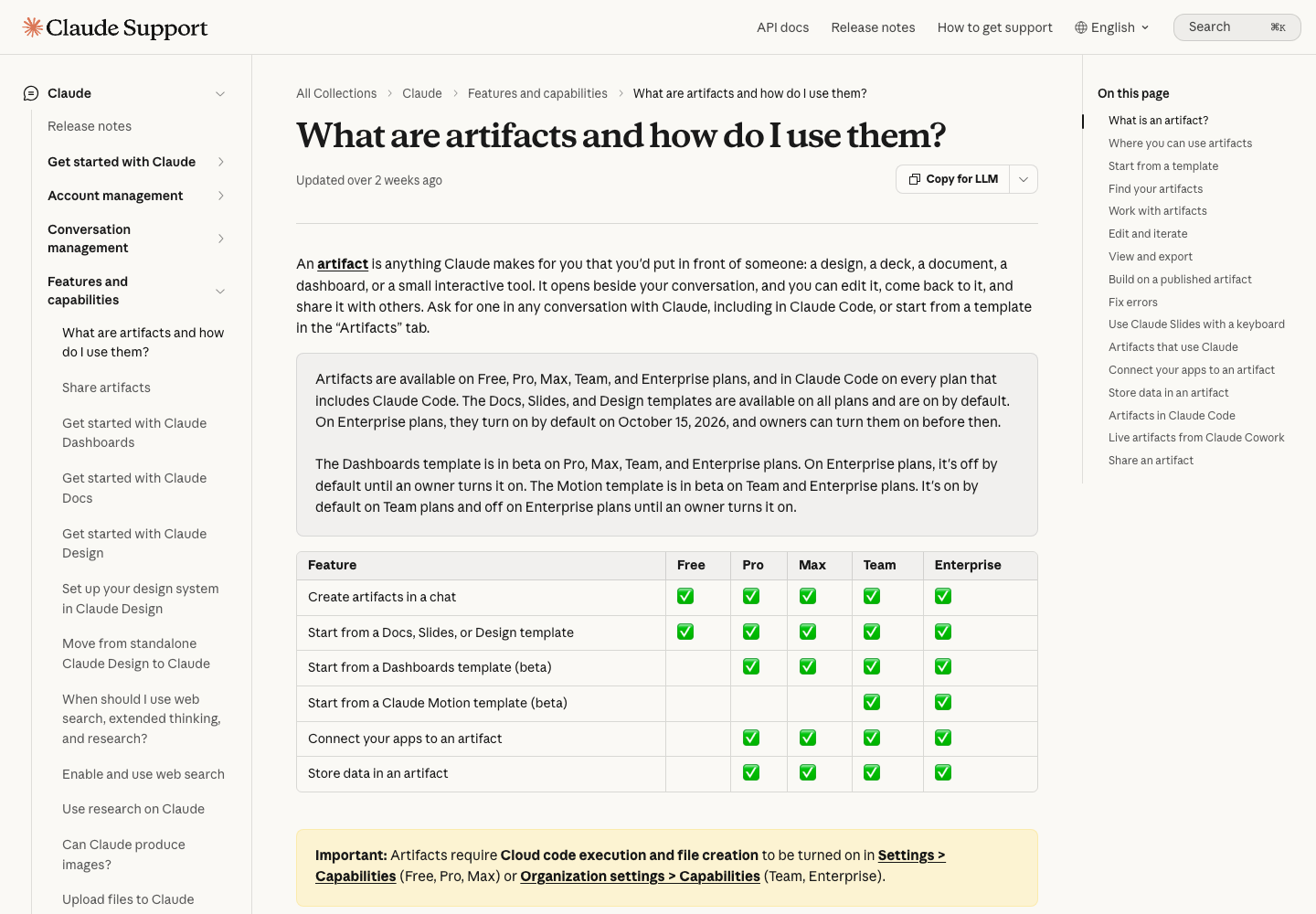
Claude Artifacts are intended to turn a conversation into something that can be edited and reused: a document, small interface, dashboard, design or deck. The public help center describes Artifacts on Free, Pro, Max, Team and Enterprise plans, with distinctions between templates and advanced connectors. A screenshot of a deck is not proof that the deck can be downloaded, edited by colleagues or used commercially without checking the specific format.
Claude Docs, Slides and Design evolved quickly during September and October 2026. A research brief is a useful demonstration: the brief may need a cited outline, a table of unresolved facts, a final document and a presentation for a team meeting. Each handoff is an opportunity to lose context. Claude’s combined workspace may reduce that friction, but it is still necessary to test export fidelity, speaker notes, version history and how edits made in the source document reach the slides.
The revealing Artifacts test happens after the demo: can a teammate open the file, find the assumptions, change a chart label and export something usable? Those steps expose weak tool fit long before the subscription renews.
📁 2. Claude Projects and long-document workflows
Claude Projects can organize reference material and related work over time. The free-plan pricing comparison currently lists up to five Projects, while broader project access sits in the paid lineup. Features do not remove a basic problem: long source material can still contain outdated, contradictory or irrelevant text. Project knowledge is useful only when someone maintains it.
When evaluating Claude for document analysis, use a full vendor packet: the pricing page, security documentation, legal terms and a few screenshots. Instead of asking for a universal conclusion, request an evidence table listing each claim and its exact source. Good analysis flags ambiguous clauses, cites the missing information and shows the date of the source document. Claude may help identify differences; it cannot turn an unread contract into a legally reviewed one.
Context capacity is not the same as usable memory. The supported window depends on the model and feature, while message budgets and attached-file processing can introduce further restrictions. Test the largest real file you plan to use, and compare a few ground-truth facts near its beginning and end.
💻 3. Claude Code for software teams
Claude Code works with software-development tasks and can help structure debugging, editing and review. It is attractive for teams that have already formalized a test suite, repository permissions and review process. Anthropic’s announcements emphasize improved agentic coding in the 5.5 family, but even a strong coding model can misunderstand local business rules and create a plausible regression.
Before paying for a Claude Code subscription, verify what an existing Pro or Team seat includes. To evaluate Claude Code for developers, start with one bounded repair, not a risky migration. First, supply a failing test and ask for a diagnosis without modifications. Second, review the proposed patch and run the test suite. Third, compare the diff to the acceptance criteria and inspect unrelated files for changes. Record how many changes you made after Claude’s first patch. That correction budget is more informative than a public leaderboard ranking.
An organization should not give an agent production credentials merely to accelerate an experiment. Begin with read-only or isolated workspaces, require approval for destructive actions, and do not assume a text description of a permission boundary enforces it.
🔗 4. Connected apps and Google Workspace
On October 6, 2026, Anthropic announced a Google Workspace add-on and beta Docs, Sheets and Slides connectors for paid Claude plans. These features bring Claude closer to the place where teams already write and calculate. They can reduce switching among browser tabs, but they also introduce permissions questions: which files can be read, what can be changed and which action requires confirmation?
For Claude Google Docs integration, test a harmless document before granting broad access to real client data. Ask Claude to edit one paragraph, add a clearly labeled suggestion and leave the source citations intact. Compare the resulting document to the original. The same principle applies to Sheets: confirm formula ranges, cell types and totals rather than accepting a plausible narrative summary as validation.
If your team uses Microsoft 365, Slack or GitHub, check the supported connector and plan details separately. A product page that lists a connector is not proof that a particular administrator enabled it or that it can perform every action in your environment.
🔎 5. Web search, research and checking claims
Claude can search and work across public information. That is useful for gathering a shortlist of references, not a substitute for opening the sources. Search results can be incomplete, announcements can postdate older pricing guides, and models can blend two distinct subscription periods into one confident answer.
For Claude research features, start with a small audit: provide two official sources that disagree in date, request the precise difference, and ask which claim remains unresolved. Evaluate whether the output exposes uncertainty or suppresses it. A well-formatted answer with incorrect dates or unsupported prices should fail the test regardless of how fluent its prose sounds.
📸 Screenshot Evidence and Editorial Method
The screenshots in this Claude review show official public Anthropic pages, not fabricated Claude conversations. We captured the live pricing screen and product documentation in October 2026. They can substantiate what the vendor displayed on the capture date, but they do not confirm how a logged-in subscription performs in daily use.
We have intentionally not described fictional Claude prompts as personal experiments. For the test ideas in this review, the expected evaluation method is provided so that readers can reproduce it in their own environment. Actual outcomes are not claimed until they have been measured. If a screenshot contains a published feature name, treat it as a vendor statement; if it shows a plan price, verify the amount again at checkout.
⚖️ Pros and Cons of Claude AI
Where Claude looks attractive
- Strong integration of writing, research, code and editable deliverables in a single workflow.
- A usable Free entry point and a clear $20 Pro monthly reference.
- Artifacts, Docs, Slides and Design that may reduce copy-and-paste handoffs.
- Regular model-family updates with differentiated speed and capacity positioning.
- Team administration and mixed seat types for organizations that need governance.
Where Claude deserves a second look
- Heavy use can encounter five-hour session and weekly limits even on paid plans.
- Max and Premium tiers raise subscription costs quickly without guaranteeing superior accuracy.
- Vendor pricing tables do not cover every regional tax, channel and renewal scenario.
- Connected-app permissions and generated files create governance and privacy obligations.
- Some features remain beta, plan-dependent or rollout-dependent; availability requires account-level verification.
- A polished response, spreadsheet or deck can still contain invented facts or wrong calculations.
🔍 Claude vs ChatGPT, Gemini and Perplexity
A useful Claude vs ChatGPT comparison should start with the work being purchased, not a general claim about which AI is ‘smarter.’ Model quality changes, plan names change, and the same product can be good at a research memo while disappointing at a spreadsheet handoff. Our comparison therefore emphasizes evaluation workflow rather than declaring a permanent winner.
| Product | Where to test first | Important purchasing check | What not to assume |
|---|---|---|---|
| Claude | Document work, editable Artifacts, code and connected workflows | Plan limits, file outputs, admin/connector controls | That Max capacity guarantees accuracy |
| ChatGPT | Broad chat, structured tasks, connected tools and mixed office work | The actual plan’s included features and usage caps | That a higher-priced model resolves every file or citation error |
| Gemini | Teams heavily invested in Google’s document ecosystem | Workspace entitlement, regional availability and edit permissions | That all account tiers have identical integrations |
| Perplexity | Source discovery and fast research starting points | Citation coverage, supported sources and plan differences | That every linked page substantiates the sentence next to it |
These are test directions, not a paid-tier benchmark. The linked <a href=”https://digioffly.com/chatgpt-review/”>ChatGPT review</a> covers OpenAI’s separate plan structure. For Gemini and Perplexity, verify current vendor terms rather than copying old pricing from secondary comparisons.
When to choose Claude instead of ChatGPT
Claude may be a better working fit if Artifacts and iterative document production match the deliverable you need. The relevant question is whether you can create, revise, export and reuse an artifact within your existing system. ChatGPT may suit a different combination of tools and tasks. Repeat the same evaluation with the same input files and score the finished deliverable, not the most convincing response.
When a specialized tool is still necessary
A general assistant can help draft a campaign brief, but it is not a replacement for a dedicated SEO rank tracker. It can explain a CRM export, but it is not automatically a secure customer-record system. It can model a hypothetical software budget, but it is not a purchase order or vendor invoice. Software buyers should pay for systems of record only when they need those systems’ data integrity, permissions and audit trails.
🧪 A Practical Claude Evaluation: Three Reproducible Workflows
A review should help someone run a meaningful trial, not simply read a list of capabilities. These three evaluation designs use hypothetical or non-sensitive inputs. The steps are editorial test protocols, not claims that DigiOffly completed the workflows in a paid account.
Workflow A: Research memo from several documents
Prepare three documents on one topic: an official pricing page, a security FAQ and a product release announcement. Ask Claude to produce a one-page buying memo with an evidence column and an unresolved-questions column. The success criteria are straightforward: every quoted price has a date, a link supports the exact claim beside it, unknown information stays unknown, and a second person can verify all material statements in five minutes.
Repeat the same task with another AI assistant and measure corrections. If Claude produces a smooth narrative but hides contradictory clauses, that is not an acceptable research result. A list of references cannot rescue a claim that its linked document does not support.
Workflow B: Software debugging without production access
Use a small sample repository or isolated test fixture. Supply one reproducible error and prohibit unrelated refactoring. Ask for a diagnosis, proposed patch and tests. Review all file modifications before running code. Count failing tests, unrelated edits, time to review and how much human repair is needed afterward.
This is a better Claude Code test than asking for an impressive demo application. It measures reliability under realistic constraints. It also respects the security boundary: no secrets, no production deployment, no unattended order or payment actions.
Workflow C: An editable management report
Provide a fictional eight-seat subscription budget, a short note about annual billing and a list of three tools with overlapping roles. Ask Claude to prepare an editable document plus a short slide deck that separates confirmed prices from assumptions. Before accepting the result, change one input number and check whether all dependent figures are updated consistently.
Track export quality, formatting corrections and how often you move content manually between formats. Compare that total effort to a conventional Docs-and-Slides workflow. A feature is valuable only if it removes work rather than merely relocating it.
🛡️ Security, Privacy and Data Handling
Claude’s organization products list identity and administration features, while individual accounts have their own settings and constraints. The practical question is not whether a marketing page says ‘secure.’ It is which account, connector, shared artifact and retention setting applies to the information you plan to use. Anthropic says Team content is not used for model training by default, but a buyer must still inspect the current applicable terms and organization settings.
For Claude privacy for business, use a classification checklist: public marketing material is different from confidential contracts, passwords, customer lists or medical records. Confirm who can open a shared artifact, whether connector permissions are read-only, how access is revoked when an employee leaves and what audit trail exists. A proof-of-concept with sanitized documents is often enough to expose a permission issue without uploading private records.
Generated code deserves the same review as human-written code. Draft legal or finance content needs qualified review when the stakes warrant it. Claude can help compare documents and surface questions; that is not the same as a certified compliance audit.
🏆 Is Claude Worth It in 2026?
For a light user, start with Free. For a regular individual with repeatable, document-heavy tasks, Pro is usually the more economical first paid experiment than Max. Max is rational only when a record of interrupted sessions shows that increased usage capacity outweighs its extra cost. For a company, compare Standard and Premium seats against actual roles; pay for management, permissions and sustained throughput rather than a vague promise of better AI.
Our editorial recommendation is to spend the first week documenting work before buying the upgrade. Capture three comparable tasks, measure final review time and identify the feature or usage limit that genuinely blocked you. Include annual cash commitment, integrations and offboarding work. If there is no measurable difference, there may be no reason to add another subscription.
The best Claude subscription is the one whose limitations you understand before assigning it sensitive work. Claude AI can be a capable assistant for serious projects, but the distinction between a fluent answer and a verified deliverable remains the central buying test.
📚 Official Sources and Verification Notes
The following primary sources support the factual statements in this review. Editorial judgments, illustrative totals and suggested test protocols are DigiOffly’s own analysis. Review date: October 23, 2026.
- Anthropic: Claude pricing, current plan and feature matrix — individual, Team and Enterprise reference terms.
- Anthropic Help Center: Team plan seat types and minimum — Standard and Premium prices, permissions, seat rules.
- Anthropic Help Center: Pro plan and usage limitations — five-hour and weekly usage limits.
- Anthropic: Claude Sonnet 5.5 — September 28, 2026 model announcement.
- Anthropic: Claude Haiku 5.5 — October 7, 2026 model announcement.
- Anthropic Help Center: Artifacts — current plan eligibility and capabilities.
- Anthropic Help Center: Monthly API credits — credits are plan-dependent and capped.
- Anthropic: Claude and Google Docs, Sheets, Slides — October 6 beta rollout.
- Anthropic: Claude Cowork and chat become one — September product transition.
Prices and feature descriptions are a dated snapshot, not a guarantee of availability or performance. There are no paid affiliate placements in the analysis; external product links should be interpreted as sources or navigation, not endorsements.

Claude AI Frequently Asked Questions
Is Claude AI free in 2026?
Yes. Claude has a Free plan at $0 with usage limits. Some features and advanced capacities vary by plan and rollout. Start with a non-sensitive trial before deciding whether paid access helps.
What is Claude Pro pricing in the US?
Claude Pro is listed at $20 per month on monthly billing or $200 billed annually. The $17/month annual marketing reference is rounded; the annual payment is due upfront.
How much do Claude Max plans cost?
Claude Max 5x costs $100 per month and Max 20x costs $200 per month in the US reference lineup. These are larger usage allowances, not unlimited usage or guaranteed accuracy.
What is the difference between Claude Pro vs Max?
Pro is a regular-use individual tier; Max 5x and Max 20x provide higher relative session capacity and additional limits. Choose Max only after measuring interruptions in your own workload.
How much does Claude Team cost in 2026?
Team Standard is $25 per seat monthly, or $20 per seat monthly equivalent billed annually. Premium is $125 monthly or $100 annual monthly equivalent. The current Team minimum is two seats.
Does Claude Team require five members?
No. Anthropic’s current Team plan documentation describes a two-seat minimum. Some older web pages cite five; verify the current checkout rules for your region and contract.
Can Claude create documents and slides?
Claude supports editable artifacts, including Docs, Slides and Design features. Feature availability, file export, connected apps and admin controls vary by plan and account.
Is Claude Code included with Pro?
Anthropic lists Claude Code among paid Pro capabilities. Included usage is subject to session and weekly limits; separate Console API usage and optional usage credits have different billing rules.
Are Claude API credits included with every subscription?
No. Anthropic currently documents qualifying monthly API credits for Max and Team, with stated amounts, eligibility and caps. Free and Pro do not include those monthly credits.
Can Claude replace ChatGPT for a small business?
It depends on the workflow. Compare the same document, research, file, coding and permission tasks in both products. A persuasive response is not proof that the result is correct or suitable for business use.
Does Claude use Team workspace data for model training by default?
Anthropic says it does not train models on Team content by default. Confirm the exact terms, privacy settings, connected-app permissions and retention policy before uploading confidential information.
EXPLORE NEXT ON DIGIOFFLY
Compare AI Software Before You Buy
Review alternatives to Claude, check your subscription math and build a sustainable software stack for your actual workflow.
Explore similar AI reviews
- ChatGPT Review — compare a different general-purpose AI workspace.
- AI & Tech Offers — browse the editorial category.
- Jasper AI Review — evaluate a content-focused alternative.
- Google Gemini Review — Compare Google integration, model access and subscription tiers.
- Perplexity Review — Evaluate web-grounded AI search and research workflows.
- Cursor review — See what repository-aware coding assistance adds.
- GitHub Copilot review — Compare GitHub-connected coding agents with general chat.
Evaluate the shortlist
- Compare Software — inspect product differences side by side.
- AI Software Finder — start with the work you need done.
- Best Value Advisor — check whether an upgrade is justified.
Calculate the commitment
- Software Cost Calculator — model seats and upfront payment.
- Ready-Made Stacks — avoid redundant subscriptions.
- Software Directory — browse all existing catalog products.