

Editorial research date: October 23, 2026. Prices are US reference prices before taxes, subject to account eligibility, region, introductory offers and billing changes.
The buying decision around Google Gemini is no longer a simple choice between a free chatbot and a $20 upgrade. Google now sells several consumer AI subscriptions, bundles them with storage and productivity features, and offers advanced Gemini models across the app, Search, Workspace and developer services. The plans share features, but their storage, model access and organizational controls differ enough to change the buying decision. If you only need occasional help with documents, try the free app first. Professionals already using Google’s workspace may get more from a paid tier. Teams must resolve data permissions before a wider rollout.
This Google Gemini review 2026 examines the practical choice: Gemini Free versus AI Plus, Pro and Ultra, how Gemini 4 Argon changes the model landscape, what Google Workspace integrations can and cannot do, and which upgrade is defensible for different workloads. We distinguish verified Google documentation from our own buying calculations. We do not pass hypothetical tasks off as hands-on tests.
Evidence and test disclosure: We inspected public Google pricing, Google Gemini Help and dated model announcements. The illustrations in this article are screenshots of those official sources, not evidence of a paid Gemini subscription or independently benchmarked model. We have not bought a Google AI Ultra subscription, tested a corporate Workspace deployment or verified every rollout flag in a user account. Numerical comparisons use explicitly stated assumptions.
📊 Google Gemini Review Summary
| Question | October 2026 finding |
|---|---|
| Product | Google Gemini — assistant and AI-powered workflows from Google |
| Latest frontier release | Gemini 4 Argon, available to eligible Google AI Pro and Ultra subscribers since October 13, 2026 |
| Free access | Available with standard Gemini usage limits; some features may be unavailable or restricted |
| Consumer paid tiers | Google AI Plus, Google AI Pro and Google AI Ultra with multiple Ultra capacity levels |
| Published US list prices | Google AI Plus (400 GB) $4.99/month; Google AI Pro (5 TB) $19.99/month. A separate 2 TB Plus option is listed at $9.99/month |
| Highest-tier pricing | Verify current Ultra 5x and 20x checkout prices and promotional eligibility rather than assuming one universal amount |
| Included cloud storage | Depends on tier and region; Google lists 5 TB for AI Pro on its current AI plans page |
| Context window | Google Help currently lists 32k without an AI plan, 128k for AI Plus, and 1 million tokens for AI Pro and Ultra |
| Strengths to test | Google app integration, file synthesis, research workflows, creative tools and long-context tasks |
| Core risks | Usage caps, model availability, factual mistakes, connected-app permissions and value lost to unused bundled benefits |
| Editorial recommendation | Test the workflow first; upgrade only when time saved or increased capacity justifies the actual invoice |
🎯 Who Should Use Google Gemini — and Who Should Not?
Casual user. Gemini Free can help outline an email, explain a public document and answer routine questions. The free plan is not proof of unlimited access, and results need checking. If you ask the assistant only a few questions weekly, paying for capacity you never use is hard to justify.
Google-first professional. Someone who lives in Gmail, Drive and Docs has the strongest reason to test a paid Gemini tier. The question is whether Gemini can work with the actual documents you use, with permissions your organization approves, and produce an output that colleagues can edit. A clean file that someone can edit directly in Drive can save more time than another round of polishing a reply in chat.
Research analyst or student. Gemini Deep Research and long-context document reading might compress the first pass through a reference packet. They cannot independently certify a source. A good research system displays citations, distinguishes the publication date from the event date, and clearly labels uncertainty. If those conditions fail, a polished research memo becomes a liability.
Creator. Google’s broader AI subscriptions combine access to Gemini with creative features and, depending on plan, additional tools such as Flow. A creator making one short clip a month should not judge value by the longest feature list. Instead, calculate the credits and usable exports needed for the next project, plus any separate media-tool restrictions.
Software team. Gemini 4 Argon and Google’s developer stack are worth evaluating for bounded coding, code explanation and long-horizon tasks. But Google AI subscription credits, Gemini API charges, Antigravity entitlements and Gemini app limits may be different. A consumer AI subscription is not an unlimited API license, a code security review or authorization for an agent to edit production systems.
Enterprise procurement. A Workspace administrator needs to know who can use which features, where content is stored, what happens when a worker leaves and whether Gemini’s actions require confirmation. Individual Google One AI plans should not be confused with the organizational licensing terms of Gemini in Workspace.
💰 Google Gemini Pricing 2026: Free, AI Plus, Pro and Ultra
Google AI plans are bundles, not just models. The official comparison combines Gemini limits with Drive storage, Docs/Gmail access and media tools. The $4.99/400 GB and $9.99/2 TB Plus options illustrate why storage can change the price without changing the plan family. Compare the features you’ll actually use against the amount due at checkout, not an old promotion.
Google’s US Gemini subscriptions page lists Google AI Plus (400 GB) at $4.99/month and Google AI Pro (5 TB) at $19.99/month. 9to5Google reported a 2 TB Plus bundle at $9.99/month in June 2026; treat it as a separately sourced storage option and confirm its current price in checkout. Ultra starts at $99.99/month in the US and has higher-capacity options; the correct tier depends on which limits you actually need. These are US reference prices as of October 23, 2026, not regional checkout quotes.
| Consumer option | Price reference | Gemini access and what to check | Buying interpretation |
|---|---|---|---|
| Gemini without an AI plan | Free | Standard limits and 32k context in Google’s help documentation | Validate whether the base experience covers the task |
| Google AI Plus (400 GB) | $4.99/month US list price | 2x standard limits, 128k context and included storage | Budget option for moderate use |
| Google AI Plus (2 TB) | $9.99/month reported by 9to5Google in June 2026 | More storage under the Plus tier; current checkout price should be verified | Mainly useful if extra storage is needed |
| Google AI Pro | $19.99/month US reference | 4x standard app limits, 1M context and access to Gemini 4 Argon where eligible | Sensible trial for professionals with demanding document or research work |
| Google AI Ultra 5x | Check checkout | 5x AI Pro usage reference; higher bundled benefits and storage | Need evidence of sustained usage beyond Pro |
| Google AI Ultra 20x | Check checkout | 20x AI Pro usage reference and highest listed capacity level | Only rational for high-throughput workflows with measurable limits |
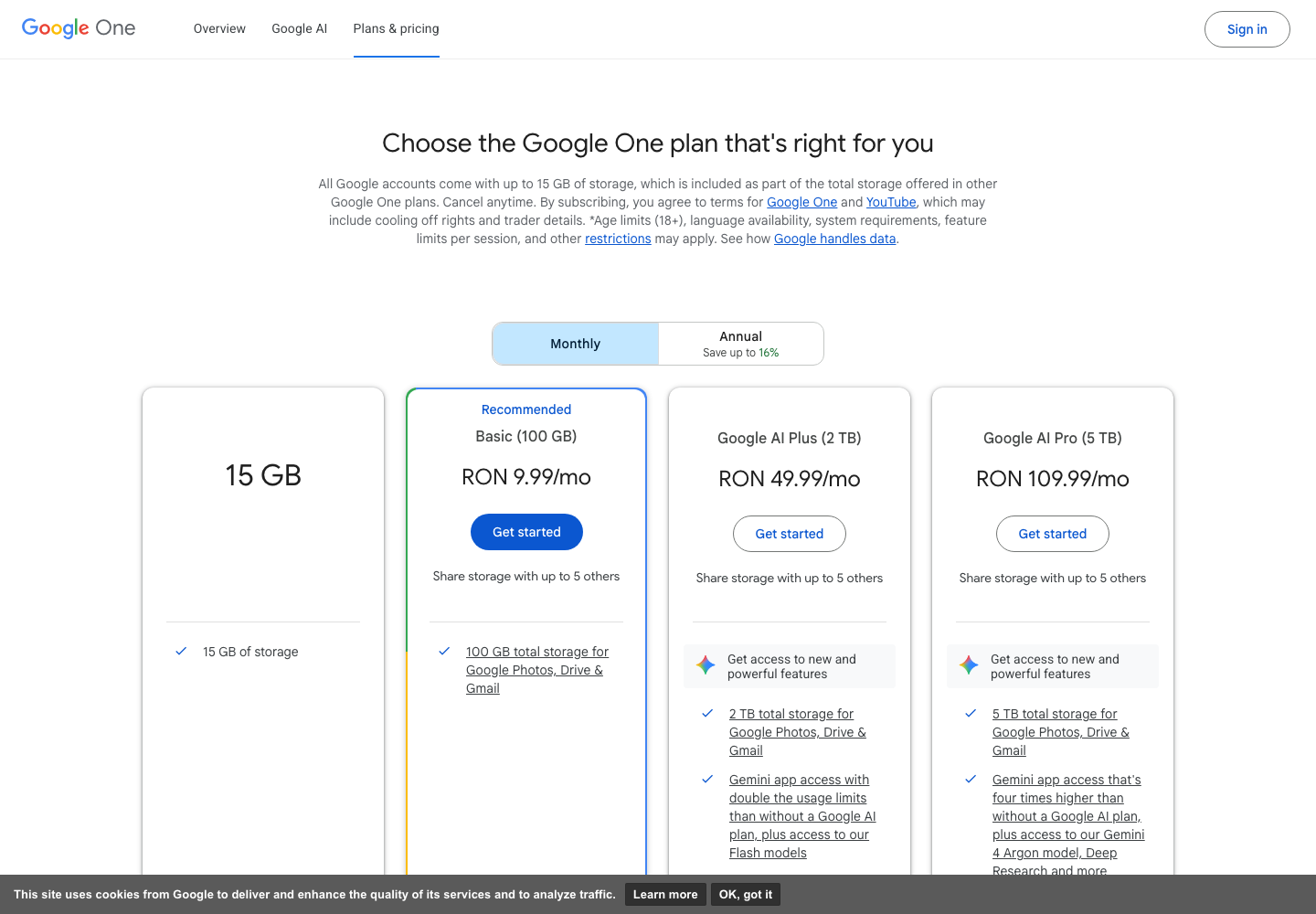
Sources: Google Gemini’s US subscription prices, Google One AI plan comparison, Gemini Apps limits, and 9to5Google’s June 2026 account of the $4.99/400 GB and $9.99/2 TB Plus options. Price references exclude taxes; plan combinations depend on region and account.
🆓 Gemini Free vs Google AI Plus
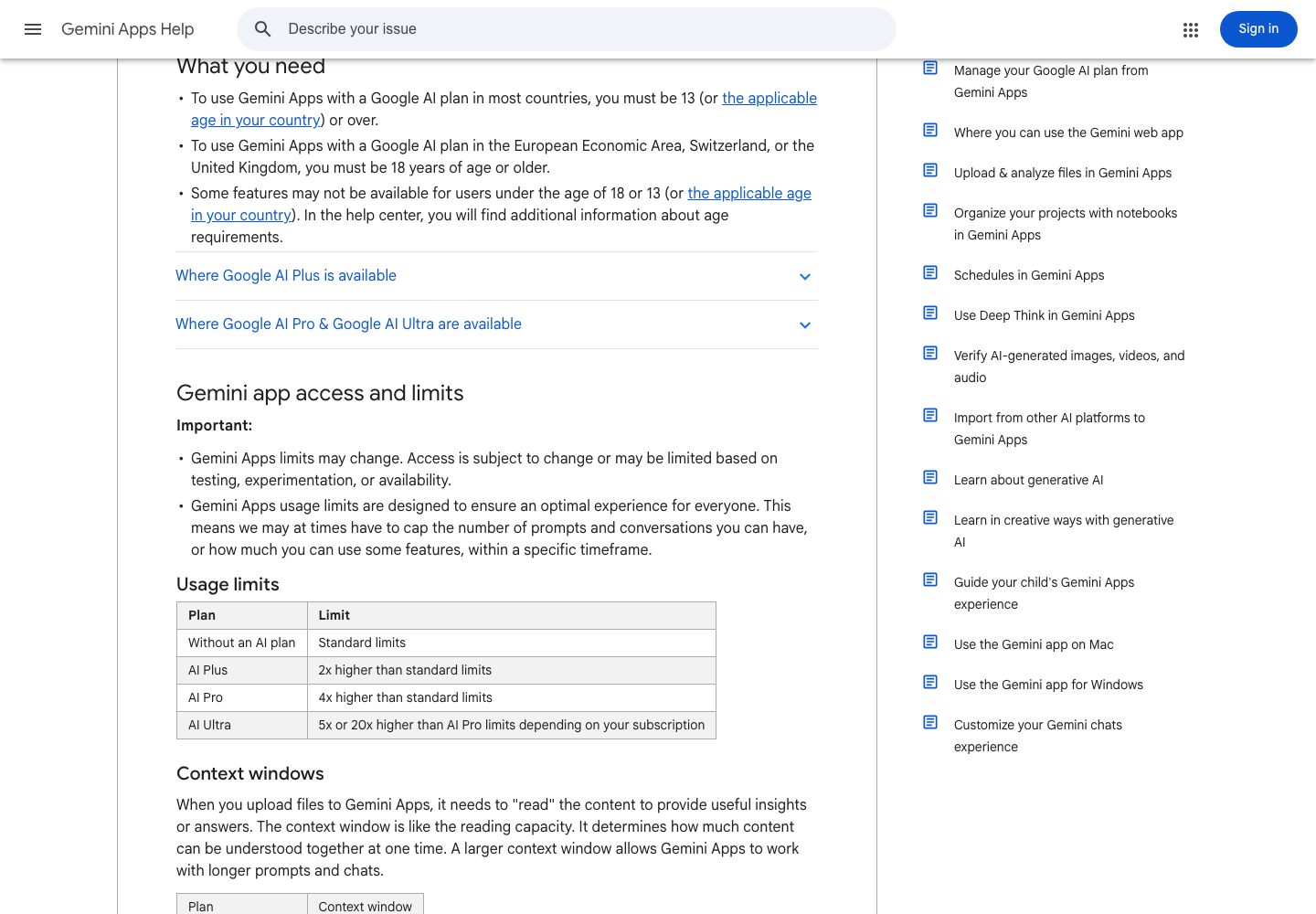
For a first-time user, the distinction is usage and bundle value rather than the right to ask a question. Google’s current Gemini Help lists standard limits without a subscription and 2x higher limits for Plus. Its context-window table lists 32k versus 128k tokens. Those numbers describe maximum working context, not a guarantee that every attached file will be understood correctly.
What does that mean in practice? If your task is to rewrite an announcement or summarize one short document, the free Gemini experience may already be adequate. If a larger research packet repeatedly exceeds the free context allowance, Plus deserves a controlled test. Do not upgrade on the assumption that 2x means precisely twice as many messages every day. Google’s help explains that limits vary with prompt complexity, available capacity and feature type.
⚡ Gemini AI Pro vs Plus: a meaningful upgrade?
AI Pro is listed at 4x the standard usage limit and a 1-million-token context window, compared with 2x and 128k on Plus. That is material for analysts examining long contracts, researchers synthesizing varied sources or users with extended sessions. It does not guarantee that every complex answer will be correct, nor does it mean that one 1M-token document can be verified without human spot-checking.
At US list prices, moving from the 400 GB AI Plus tier to Pro costs $15 more per month. A six-week project might justify that upgrade if the 128k context limit is getting in the way. Someone writing occasional short emails is unlikely to benefit. The 2 TB Plus option changes the storage comparison, not the underlying need for Pro’s higher usage ceiling.
👑 Google AI Pro vs Ultra: when higher capacity pays
The Ultra 5x and 20x labels describe higher access relative to Pro, not a promise that every feature will be used exactly five or twenty times as often. Google’s consumer help also notes limits on intensive features such as Deep Research and media generation. Some plans include different cloud storage quantities, while the list of supported features changes over time.
Before paying for Ultra, log an ordinary week of interruptions: Did work stop because of a Gemini cap? How many productive minutes were lost? Was it a Gemini app limit, a separate Flow credit limit or an API issue? If your delay comes from correcting documents rather than hitting a model limit, paying for Ultra won’t solve it.
🧮 First-Year Cost Example: What Does a Gemini Upgrade Actually Cost?
The following are illustrative calculations for US reference monthly list prices. They are not vendor offers, do not include tax, do not assume annual discounts and do not represent organizational licensing.
| Scenario | Monthly reference cash | First-year cost if kept 12 months | What to verify before choosing |
|---|---|---|---|
| Stay on Gemini Free | $0 | $0 | Whether the monthly workload fits the standard limits |
| One user on AI Plus (400 GB) | $4.99 | $59.88 | Whether 128k context and 2x use is enough |
| One user on AI Plus (2 TB) | $9.99 | $119.88 | Whether the extra storage justifies the higher Plus tier |
| One user on AI Pro | $19.99 | $239.88 | Whether long-context or Argon access creates tangible value |
| Two individuals on AI Pro | $39.98 | $479.76 | These are two personal plans, not a managed Workspace license |
| One AI Pro user for three months | $19.99 while active | $59.97 for three months | Check cancellation terms and whether any promotion changes month 1 |
A team of eight should not multiply a consumer Google One price and call that the cost of enterprise Gemini. Google Workspace entitlements, administration, seat billing and compliance are a separate buying decision. Teams should compare eligible business licensing with the same seat count, contract length and controls.
🧠 Gemini 4 Argon and Google’s Current Model Lineup
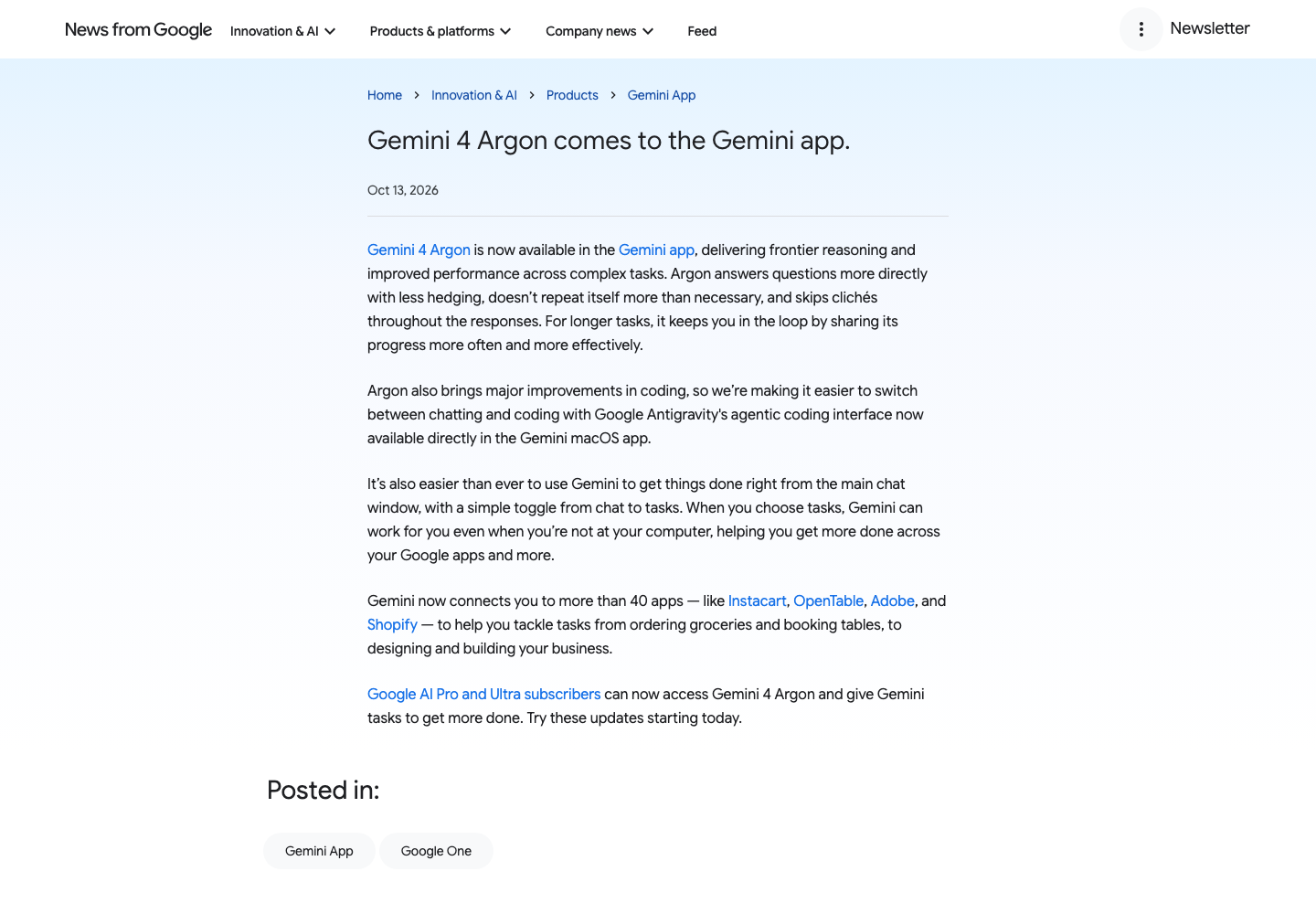
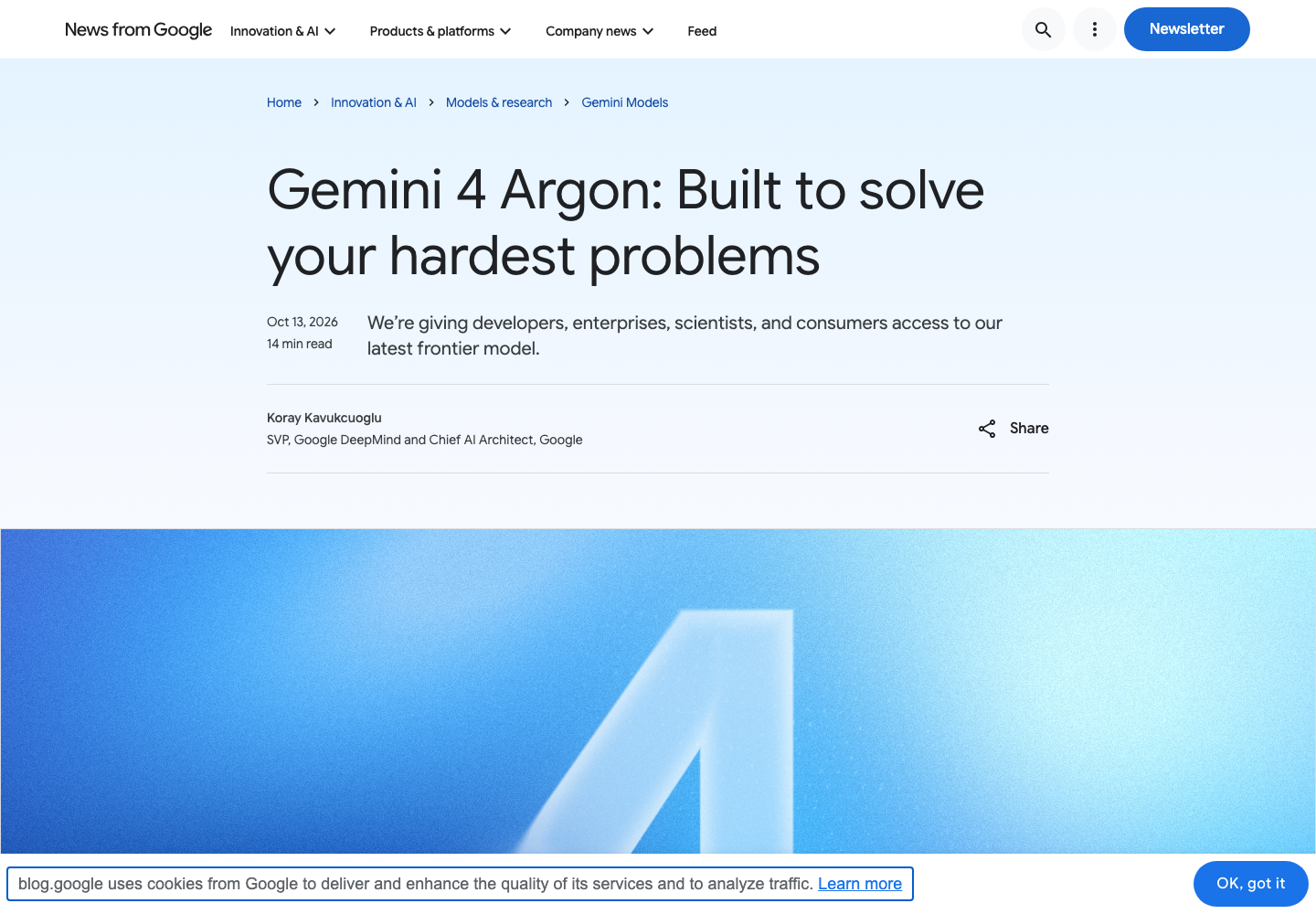
Google’s release calendar has moved quickly. Gemini 4 Argon was announced on September 30 and made available more broadly in the Gemini app and through developer channels on October 13, 2026. Google’s public announcement describes it as designed for complex, long-running professional tasks such as coding, finance, legal work and cybersecurity. These are vendor claims and benchmark results, not outcomes reproduced by DigiOffly.
The critical buying distinction is between model access and product entitlement. A developer calling the Gemini API may face usage-based token charges. An AI Pro subscriber using Argon inside the Gemini app is subject to product-specific model and usage limitations. A Workspace user may have yet another rollout or license state.
| Model or channel | Current positioning | Who should test it | Boundary to verify |
|---|---|---|---|
| Gemini 4 Argon | Frontier reasoning and multi-step professional work | Advanced research, carefully scoped code and complex analysis | Pro/Ultra app eligibility, API pricing, rate limits and account rollout |
| Gemini 3.8 Flash | More economical speed-oriented work | Quick summaries, classification and repetitive transformations | Quality on long or conflicting source material |
| Gemini 3.8 Live | Natural voice and real-time conversational assistance | Multimodal sessions and voice workflows | Device, region, language and session support |
| Gemini web app standard mode | Everyday tasks with plan-dependent model selection | General writing and research | Current selected model and standard/free caps |
| Gemini API in AI Studio | Developer access and programmatic integration | Prototypes, approved backend tasks and testing | Separate usage billing and production access policies |
A fair Gemini 4 Argon review should include one three-step task: reconcile conflicting source documents, propose a repair in a test repository, and revise the answer after a factual challenge. Record incorrect citations, edits needed and the minutes saved; that’s a clearer way to see whether Argon helped. A benchmark chart alone cannot tell a small business whether Argon will improve its processes.
💻 Gemini 4 Argon API price: a separate developer bill
Google’s Gemini API documentation lists introductory Argon prices through November 30, 2026: $2 per million input tokens and $10 per million output tokens. From December 1, those amounts rise to $4 and $20; cached input receives a separately defined discount. These are vendor-published token prices, not charges included with a personal AI Pro subscription. A developer should model input, generated output and repeated requests separately before estimating total cost.
🔬 Google Gemini model comparison: speed is not the same as quality
A faster Flash model may be preferable for processing many short records, while a frontier reasoning model may justify higher use for complex problems. Yet the slower, more capable model can still hallucinate a quote or mishandle a spreadsheet column. Choose the model your task needs and your budget can support, not simply Google’s most recent release.
Ask the same question with identical source files, judge factual support rather than fluency, and score the finished deliverable. Changes in default model selection or thinking settings can make results inconsistent, so save the model name and test date alongside the outcome.
🛠️ Gemini Features: What Matters Beyond the Chat Window
A list of AI features is useful only if it explains the work each feature replaces. Google Gemini spans consumer chat, workspace apps, research and generative media. Each area deserves a different trial, because success in one does not prove success in the next.
📄 Gemini in Gmail, Docs and Sheets
Gemini in Google Workspace is most useful when the result goes straight into a real Docs or Sheets workflow. Suppose a marketer receives a messy campaign update. They might ask Gemini to summarize the email thread, extract decisions, prepare a Docs brief and produce a Sheets checklist. That chain could be useful — but only if the right documents are accessible, the correct permissions are in place, and the resulting file can be revised without rebuilding it manually.
Test this with fictional data before uploading customer records. Prepare an example email, a two-page brief and a small table with intentional inconsistencies. Ask for an action list that references its sources. Then check every amount, name and date. Make a correction in the source document and see whether Gemini keeps its work in sync. If it does not, you may end up maintaining two sets of information.
A Gemini for Google Docs evaluation should include export and formatting. Check whether headings remain real headings, links point to the right files, and another colleague can use the output without access to your original conversation. For Sheets, verify formulas and cell types. A written calculation is not much use to a finance team if the corresponding Sheets formula is missing or broken.
Do not assume that buying Google AI Pro automatically gives every user in a managed Workspace organization unrestricted editing. Google distinguishes consumer subscriptions, organizational Workspace terms and administrator settings. Get the exact entitlement for the account doing the work.
🔎 Gemini Deep Research: sources before style
Gemini Deep Research can assist with gathering and organizing information from several steps of a research question. It is not a substitute for reading the underlying references. Deep Research can still cite the wrong supporting page, pick up an expired price, or mix dates from separate vendor announcements. This is especially risky when companies have changed their billing models within the last few months.
For a Gemini Deep Research review, use a narrow question with a verifiable outcome. For example, ask whether three vendors charge per seat, per project or per credit. Give the model a deadline for relevance and require an evidence table, direct sources and a column marked “not yet verified.” Open every official pricing link yourself. The extra time is worth it when the answer drives a purchasing decision.
Research tasks can consume a disproportionate amount of plan allowance. Google Help lists Deep Research among higher-cost features, but does not promise that all subscribers can run the same number of reports each month. Evaluate access limits on the actual account before relying on a weekly workflow.
📚 Gemini Notebook and long-context files
Google’s AI plan bundles include Gemini Notebook-related benefits, with different quantities and availability across plans. A research notebook is more useful when it keeps questions anchored to uploaded references rather than producing a generic response. For Gemini large file analysis, start with a packet of distinct sources and add a few intentionally contradictory facts. Ask Gemini to identify them and quote where they came from.
Google’s current help center lists context allowances of 32k tokens for non-subscribers, 128k for AI Plus and one million for AI Pro and Ultra. Context window size is not the same as accuracy, memory between projects or a guarantee that a particular PDF will upload. Supported file types, document length and other tool-specific restrictions still apply.
🎨 Images, video and creative tools
Gemini subscriptions can include greater access to image, music and video generation, subject to the product and plan. A user choosing Google AI Plus for creative work should not infer that Flow or every premium media model uses the same credits and limits as Gemini chat. Some creative benefits belong to separate products and have their own eligibility terms.
Evaluate a creative project in three stages. First specify an output with real acceptance criteria — dimensions, duration, license requirements and file format. Then generate several candidate assets and review the usable percentage. Finally, check which plan credits were consumed and whether an export or commercial usage restriction applies. For creative work, cost per usable export tells you more than the advertised monthly fee.
Creative-tool costs: what to measure. Count the credits spent and the images or clips you actually keep. Until those numbers are known, a monthly bundle price is not a trustworthy cost-per-export figure.
🔗 Connected apps and agent tasks
Gemini’s October release emphasizes app connections and a distinction between Chat Mode and Task Mode. Google says Gemini 4 Argon now supports complex tasks and can connect to a growing set of apps. This creates opportunity and a higher obligation to verify authorizations. A model that recommends an action is different from one able to carry it out.
A practical Gemini connected apps test should begin with read-only access to public or test data. Ask the assistant to locate a document and summarize its contents, then inspect the result. Introduce an action only when you know which exact account will perform it, which data it can reach and what confirmation step the app requires. Revoke the test connection afterward.
📸 Screenshots and What They Actually Prove
This review includes screenshots of Google’s official public pages — a region-localized Google One pricing screen, the October 13 Argon announcement, Gemini Help usage limits and the model article. These show what Google publicly documented on the captured date. They do not show an invented prompt result or imply that DigiOffly independently measured answer quality.
Official screenshots show what Google published on the capture date, not whether the same feature is active in every account. Screenshots of a price or release article are useful for auditing a claim, but they do not certify account-specific access. For example, the presence of Argon in a Google announcement does not establish that a free user can select it. Google’s October 13 announcement names paid AI Pro and Ultra access. Features may roll out gradually.
✅ Google Gemini Pros and Cons
Advantages worth testing
- Tight potential fit with Gmail, Drive, Docs, Sheets and the broader Google environment.
- Accessible free entry point for testing tasks before spending money.
- Meaningful paid context-window increases for large document work.
- Access to newer Gemini 4 Argon capabilities for eligible Pro and Ultra subscribers.
- Research, media and app-connection possibilities inside a broader ecosystem.
- Plan levels that allow some users to upgrade only when their workload grows.
Limitations and trade-offs
- Official consumer plans bundle benefits that may be irrelevant to the buyer, complicating real cost comparisons.
- Standard versus 2x/4x/5x/20x limits are not fixed counts of prompts available every day.
- The same named feature can vary between consumer Gemini, Workspace and API plans.
- Long context and polished research output do not guarantee correct citations or calculations.
- Connected apps introduce data access, privacy and approval questions.
- Premium creative generation can consume separate credits and may have regional restrictions.
- Ultra purchasing decisions may be dominated by promotions and account-specific checkout details, making simple price tables age quickly.
⚖️ Gemini vs ChatGPT, Claude and Perplexity
No single vendor demo establishes which assistant is best for your team’s files and workflow. The right comparison uses the same inputs, same acceptance criteria and similar account entitlements. A team drafting a presentation may value editable files and access controls; a developer may prioritize regression-free changes; a researcher may prioritize evidence tracing.
| Product | Workflow worth evaluating first | Important purchasing variable | Do not assume |
|---|---|---|---|
| Gemini | Native Gmail/Docs/Sheets assistance, 1M context on Pro and newer Argon access | Google One versus Workspace license; app limits differ from Gemini API pricing | That a consumer AI plan includes production API inference |
| ChatGPT | Mixed workflows spanning research, writing, code and connected tools | Available connectors, task actions, model choices and plan limits | That the same integrations are enabled on every account |
| Claude | Artifacts for editable deliverables, Claude Code and long-document work | Pro versus Max usage limits; Team roles and seats | That a larger usage tier guarantees more accurate documents |
| Perplexity | Web-source discovery with linked results and research follow-ups | Quality and recency of retrieved pages, research-mode access | That cited links always support the exact claim beside them |
Related reading: DigiOffly ChatGPT Review and DigiOffly Claude Review. These products can be used as comparison references, not as substitutes for a repeatable trial on your own materials.
Gemini vs ChatGPT for research and documents
Ask both systems to summarize the same three conflicting sources into a purchasing note. The winner of that test is the one that makes fewer factual mistakes after review, not the one that produces a more confident tone. Save the model name, subscription, prompt and source publication date. If one tool cannot access the same files because of account permissions, note the difference instead of inventing equivalence.
Gemini vs Claude for long-context work
A large context window makes it possible to supply more source material, but the useful question is whether the assistant finds contradictions and preserves exact references. For a Gemini vs Claude trial, place three relevant details in widely separated documents and verify that every detail appears in the conclusion with the right citation. Then ask both tools to revise an editable document and compare the resulting cleanup time.
Gemini vs Perplexity for source discovery
A research-oriented search product may be better suited to finding articles quickly, while Gemini may offer other advantages inside a Google workflow. Yet neither eliminates source verification. When a claim concerns pricing or a recent model launch, prefer the vendor’s current plan page and dated announcement over older commentary.
🧪 A Fair Testing Plan for Google Gemini
DigiOffly does not present the following hypothetical exercises as live tests. They are reproducible protocols a visitor can use before buying a subscription. The results should be recorded, not imagined.
Test 1: A real document with planted contradictions
Create a fictional contract comparison with three drafts and conflicting renewal dates. Ask Gemini to extract terms, identify disagreements and write a table of unresolved questions. Grade it on precise support, missed contradictions and time spent verifying the answer. Use a Google AI Plus or Pro trial only if permitted and available; do not upload private contracts for an initial test.
Test 2: A spreadsheet the team can audit
Build a fictional software budget for eight users with a $4.99/month plan, a $19.99/month plan and a flat-priced service. Ask Gemini to calculate monthly totals, first-year cash requirements and an upgrade scenario. Check the formula cells, not merely a chart or verbal summary. If the model only outputs text, explicitly note that it did not create a working spreadsheet.
Test 3: A low-risk multi-step app workflow
Use a test document that contains no customer information. Ask Gemini to find it, summarize it, prepare an action list and request confirmation before any outward-facing step. Score the experience on correct file selection, editability, permissions and the number of manual corrections. Do not send emails, purchase anything or grant broad account access merely to prove the demo works.
🔒 Privacy, Permissions and Workplace Governance
Gemini’s privacy and administrative implications depend on the product and contract. Google AI consumer plans and Google Workspace business subscriptions should be assessed separately. Buyers need to know whether a conversation is stored, what account or administrator can access it, which connector has permission to read files and whether sensitive content is used under the applicable product terms.
For Gemini privacy for business, start by classifying the data. Public marketing text, customer records, financial statements, employee information and credentials should not be treated as equivalent. Use synthetic or non-sensitive test files until the organization’s privacy review is complete. If a connected app supports broad Drive access, confirm whether the workflow can be done with a narrower permission instead.
Set rules for employee departure, shared files, logging and human approval of destructive actions. Do not rely on a general “secure AI” label when the organization needs a specific retention, residency or compliance commitment. Google’s applicable terms and administrator documentation are the authoritative sources for those details.
🏆 Is Gemini Worth Paying For in 2026?
Gemini Free is often enough to test the core idea: does the assistant understand your task and produce something useful? Google AI Plus is a measured step up for users with moderate demands. Google AI Pro makes sense when longer context, additional capacity, Argon access or Google ecosystem benefits regularly save work. Ultra should be treated as a throughput purchase that requires evidence of sustained limits and a verified checkout price. For alternatives that also offer free access, start with our free AI tools guide.
Our editorial recommendation is to trial one important workflow, compare the result against your current process, and document what still required manual review. Gemini is worth considering when it shortens a real workflow. You still need to check the finished document before colleagues depend on it.
📚 Official Sources and Verification Notes
The following public primary sources support the product facts and October 2026 timing in this review. The buying framework, arithmetic examples and test protocols above are DigiOffly editorial analysis rather than claims of firsthand paid testing.
- Google Gemini: US subscriptions and live list prices — $4.99 AI Plus, $19.99 AI Pro and US Ultra tiers, checked October 23, 2026.
- 9to5Google: June 2026 Plus price and storage changes — distinguishes $4.99/400 GB Plus from $9.99/2 TB Plus; consulted October 23, 2026.
- Google One: consumer AI plan comparison — Free/Plus/Pro/Ultra benefits, storage and usage limits; consulted October 23, 2026.
- Google Help: Gemini app access and limits — limits, context windows and features by tier.
- Google Blog: Gemini 4 Argon in the Gemini app, October 13, 2026 — paid access, Task Mode and connected apps.
- Google Blog: Gemini 4 Argon release details — release and vendor-described model capabilities; consulted October 23, 2026.
- Google AI for Developers: Gemini 4 Argon pricing — published token rates and November 30, 2026 introductory deadline; consulted October 23, 2026.
- Google Blog: Gemini 3.8 Live introduction — September 2026 voice model release.
- Google Blog: Gemini 3.7 Flash introduction — Flash family positioning.
No paid partner placement determines the recommendations. The availability, billing and model controls described here should be checked again when making a purchase, especially in countries outside the US.

Gemini AI Frequently Asked Questions
Is Google Gemini free in 2026?
Yes. You can use Gemini without a paid Google AI subscription, subject to standard usage limits and feature availability. Begin with a non-sensitive task and check which model your account is using.
What does Google AI Plus cost per month?
Google’s current US Gemini subscriptions page lists Google AI Plus (400 GB) at $4.99 per month. A separately offered 2 TB Plus bundle has been reported at $9.99 per month, but should not be mistaken for the standard 400 GB plan. Confirm storage, region and checkout price before purchase.
How much does Google AI Pro cost in 2026?
Google’s US plan page lists AI Pro at $19.99 per month as a reference price. Your first invoice, taxes, offers and renewal conditions can differ; confirm them at checkout.
Can Google AI Pro users access Gemini 4 Argon?
Yes, Google announced Gemini 4 Argon availability for eligible Google AI Pro and Ultra subscribers on October 13, 2026. Usage limits and access conditions still depend on the account.
Does the free Gemini plan include Gemini 4 Argon?
Google’s October 13 announcement specifically describes Gemini 4 Argon availability for Google AI Pro and Ultra subscribers. Do not assume the same frontier-model access in the free plan.
What is the difference between Gemini AI Plus and Pro?
Google’s current help describes 2x standard app limits and a 128k context window for Plus, versus 4x standard limits and a 1-million-token window for Pro. Feature and model availability also matter.
Are Google AI Ultra 5x and 20x unlimited?
No. Ultra’s 5x and 20x labels indicate higher capacity compared with Pro, not a guarantee of unlimited messages or unlimited use of every creative and research feature.
Can Gemini edit Gmail, Docs and Sheets?
Gemini can assist with workflows in Google apps when the necessary product feature, account entitlement and permissions are available. Consumer Google AI plans should not be assumed to replace Workspace business licenses.
Is the Gemini API included in a Google AI Pro subscription?
Gemini API pricing and developer access have separate billing and limits. Do not treat a consumer Gemini app subscription as an unlimited API or Google Cloud production entitlement.
Can Gemini reliably analyze a very large document?
Paid plans may offer large context windows, but context capacity does not guarantee correct extraction, citation or calculation. Test a real representative file and verify facts against the original.
Is Gemini better than ChatGPT or Claude?
That depends on your files, integrations, accuracy requirements and review costs. Compare the same task across accounts with equivalent permissions and assess the final verified deliverable rather than a general model ranking.
EXPLORE NEXT ON DIGIOFFLY
Find the Right AI Tools Without Overpaying
Compare Gemini against other assistants and estimate real subscription costs before deciding.
Compare AI assistants
- ChatGPT Review — evaluate another general-purpose assistant.
- Claude Review — compare documents, coding and limits.
- AI & Tech — explore the full editorial category.
- Perplexity Review — Evaluate web-grounded AI search and research workflows.
- Microsoft Copilot review — Compare enterprise productivity across Google and Microsoft.
Find the right workflow
- AI Software Finder — build a shortlist for real tasks.
- Compare Software — review differences side by side.
- Best Value Advisor — match needs with documented budgets.
Plan total subscription costs
- Software Cost Calculator — check the cost of upgrades.
- Ready-Made Stacks — avoid duplicate subscriptions.
- Software Directory — browse the complete software catalog.