

Editorial source check: Official Proton Pass pricing, product and support documentation reviewed October 28, 2026. Screenshots are captures of public vendor webpages, not authenticated private account tests. Check live vendor plans.
Proton Pass combines two problems that many password managers treat separately: protecting credentials and preventing the same personal email address from appearing on every website. The vault can store logins, cards, notes and passkeys, while hide-my-email aliases help separate identities across services. For a shopper who receives spam after signing up for a site, that second capability may matter as much as encryption.
This Proton Pass review looks at the distinction between the Free edition, Pass Plus, Pass Family and the wider Proton subscription ecosystem. It also covers the practical limits of aliases, vault sharing, integrated two-factor codes and account recovery. An alias offers little protection against account loss if its forwarding inbox cannot receive verification or recovery messages. High-value accounts therefore need a dependable delivery address.
📊 Proton Pass Review 2026: Summary
Editorial verdict: Proton Pass is a strong candidate for privacy-minded users who want an everyday vault and email-alias controls together. Its Free tier provides core credential storage and a limited number of aliases, while Pass Plus adds broader sharing and monitoring tools. Aliases offer a clear advantage to people who register frequently on unfamiliar stores or forums and prefer not to expose their main email address.
🏆 EDITORIAL FIT: A privacy-first vault with hide-my-email aliases and the wider Proton ecosystem
Best for: People who use email aliases frequently, want an encrypted open-source password manager and value Proton's privacy-centered services
Consider a different manager if: Organizations that need a different proprietary SSO ecosystem or users who do not want to manage aliases and recovery details
💰 Proton Pass Pricing and Plan Comparison
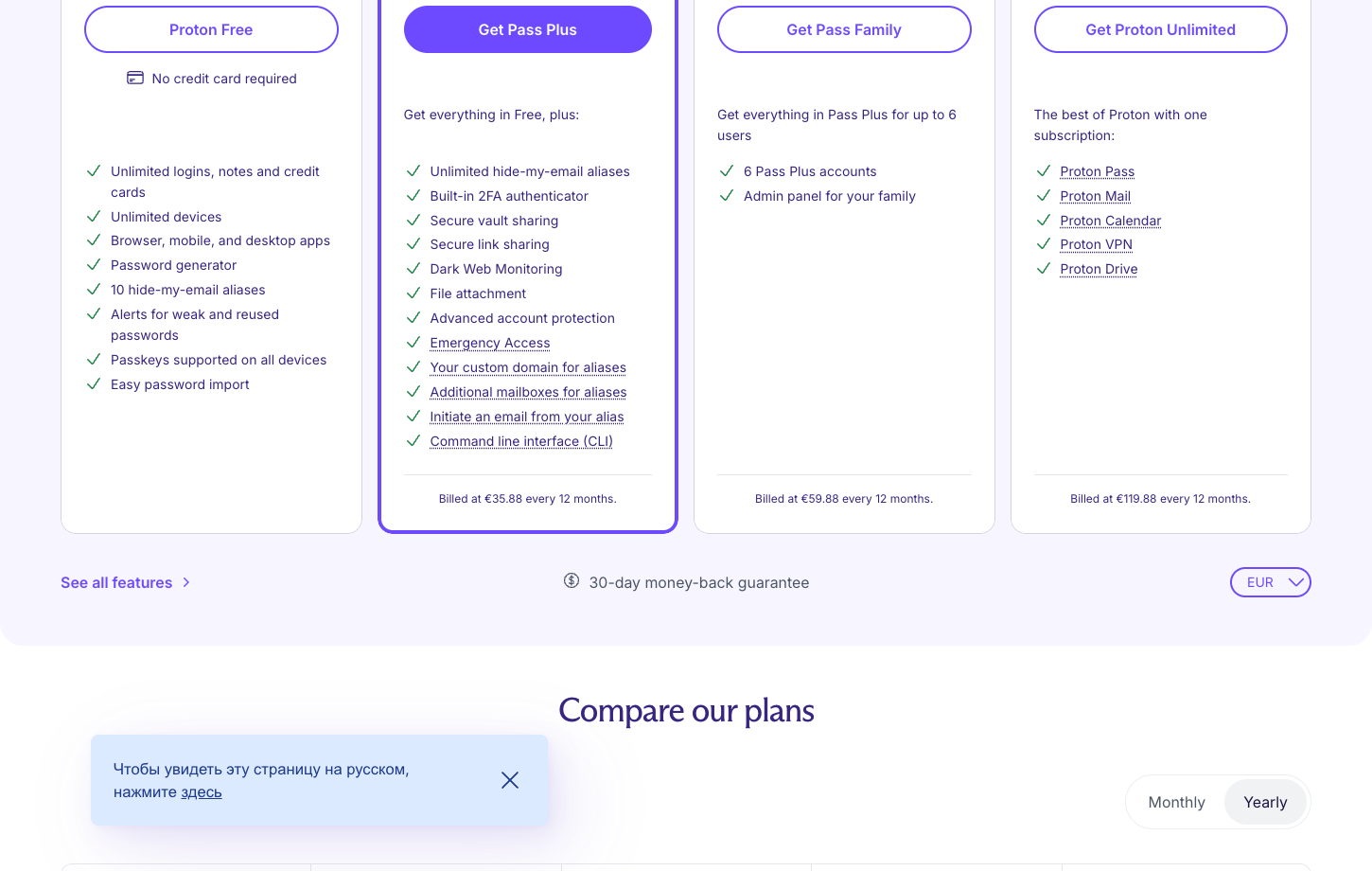
The official plan list includes Proton Free, Pass Plus, Pass Family for up to six users and Proton Unlimited with other Proton services. Check Proton’s current regional checkout for the annual charge, taxes and subscription term. The product page does confirm included feature differences; select the billing term and region in Proton's live checkout before using a numerical price in a budget. The table describes documented public plan positioning, not a tax-inclusive personal quote. Official pricing page. Proton Pass Plus pricing should be assessed against the number of aliases and shared vaults a buyer will actually use.
| Plan | Published reference | Who it is intended for | What to confirm |
|---|---|---|---|
| Proton Free | $0 | Unlimited logins and devices, ten email aliases | Shared vaults, integrated authenticator and monitoring may require upgrade |
| Pass Plus | Live Proton checkout | Unlimited aliases, secure sharing and integrated TOTP | Confirm current regional rate and the exact annual commitment |
| Pass Family | Live Proton checkout | Six Pass Plus accounts and a family admin panel | Check member roles, sharing and recovery options |
| Proton Unlimited | Live Proton checkout | Proton Pass plus Mail, VPN, Drive and Calendar | Judge the suite value based on services actually used |
| Pass Essentials / Professional | Business quote | Team vaults and optional SSO/SCIM controls | Minimum business seat requirements and edition differences |
✉️ Proton Pass password manager: why aliases matter
An email address is often as persistent as a username. Reusing it at every online store and forum makes different accounts easier to associate and provides one address for spam or targeted phishing. Proton Pass can generate hide-my-email aliases connected to saved logins, so the user does not have to reveal the same personal address for every registration. Proton Pass email aliases can separate the address used at each service, although they do not hide payment or device information.
An alias is not anonymity. Aliases hide a primary email address, not the rest of a customer’s digital footprint. They make it easier to isolate a breached or spam-heavy registration without changing every other account.
🔐 Proton Pass encryption and security claims
Proton markets Pass as an end-to-end encrypted password manager with publicly available code components. That provides a meaningful security model for storing credentials and notes, but no software makes an infected, unlocked device safe. Pass protects information in the vault; it cannot control everything a user does after copying a password to another application.
Read Proton's published security material for the exact scope of encrypted fields and metadata. Consider how the account is authenticated, where recovery information resides and which devices stay signed in. A phishing attack and a service-side encrypted-storage breach are different threats and require different precautions.
🖥️ Desktop app: three panes and vault structure
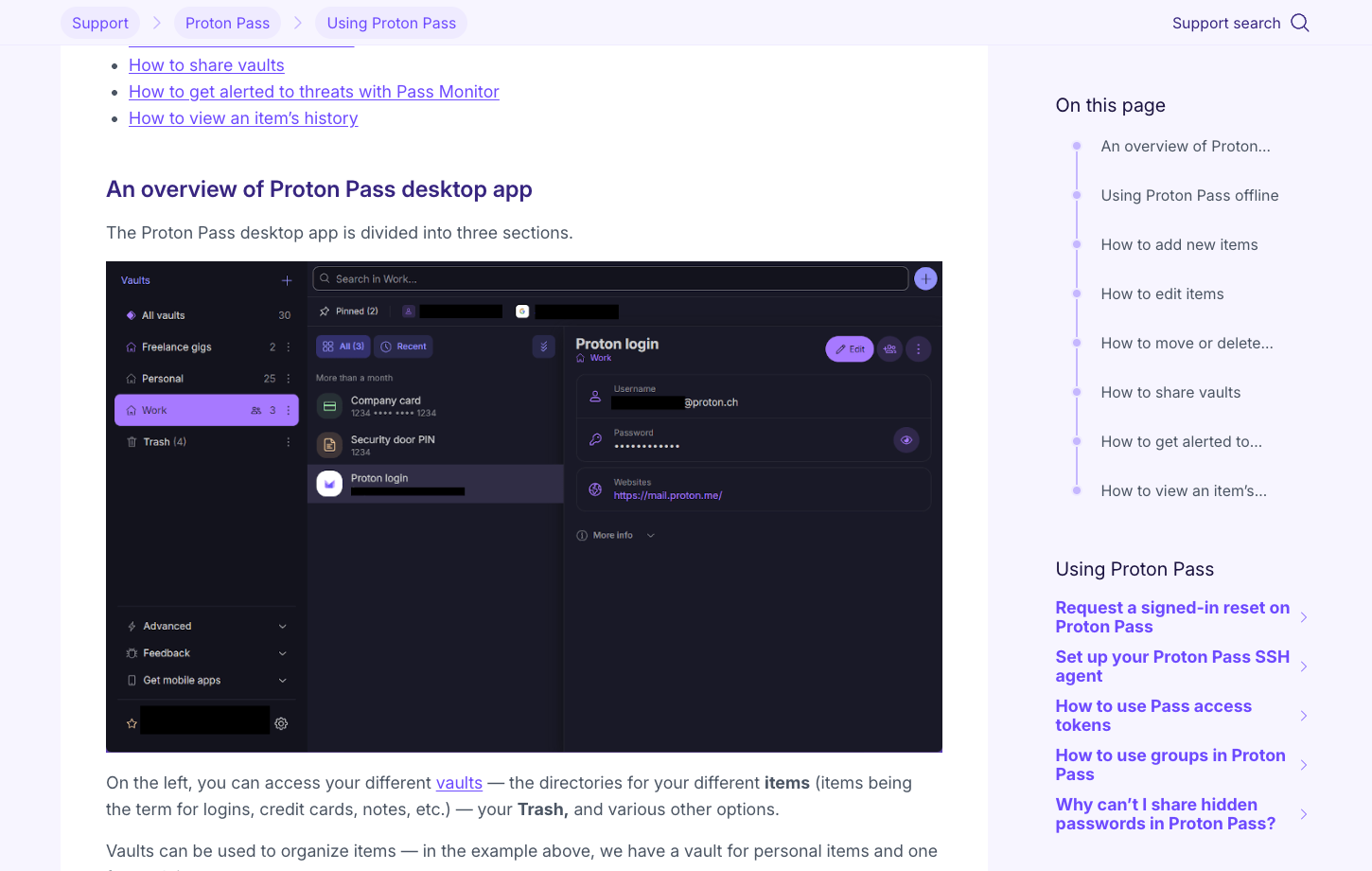
Proton's official desktop guidance describes a three-pane layout: vaults on the left, the selected vault's items in the middle and details on the right. The three-pane layout makes personal and work vaults easier to distinguish during migration from a basic browser password list. Proton Pass offline access should be verified against the exact client and subscription, especially for frequent travelers.
The three-pane desktop interface is easy to understand once vaults contain more than a handful of entries. Its offline behavior is a separate purchasing concern: Proton documents paid-user desktop offline access, so a buyer who travels without reliable connectivity should verify which features are available in the Free edition and which require an upgrade.
🧭 Web app versus browser extension
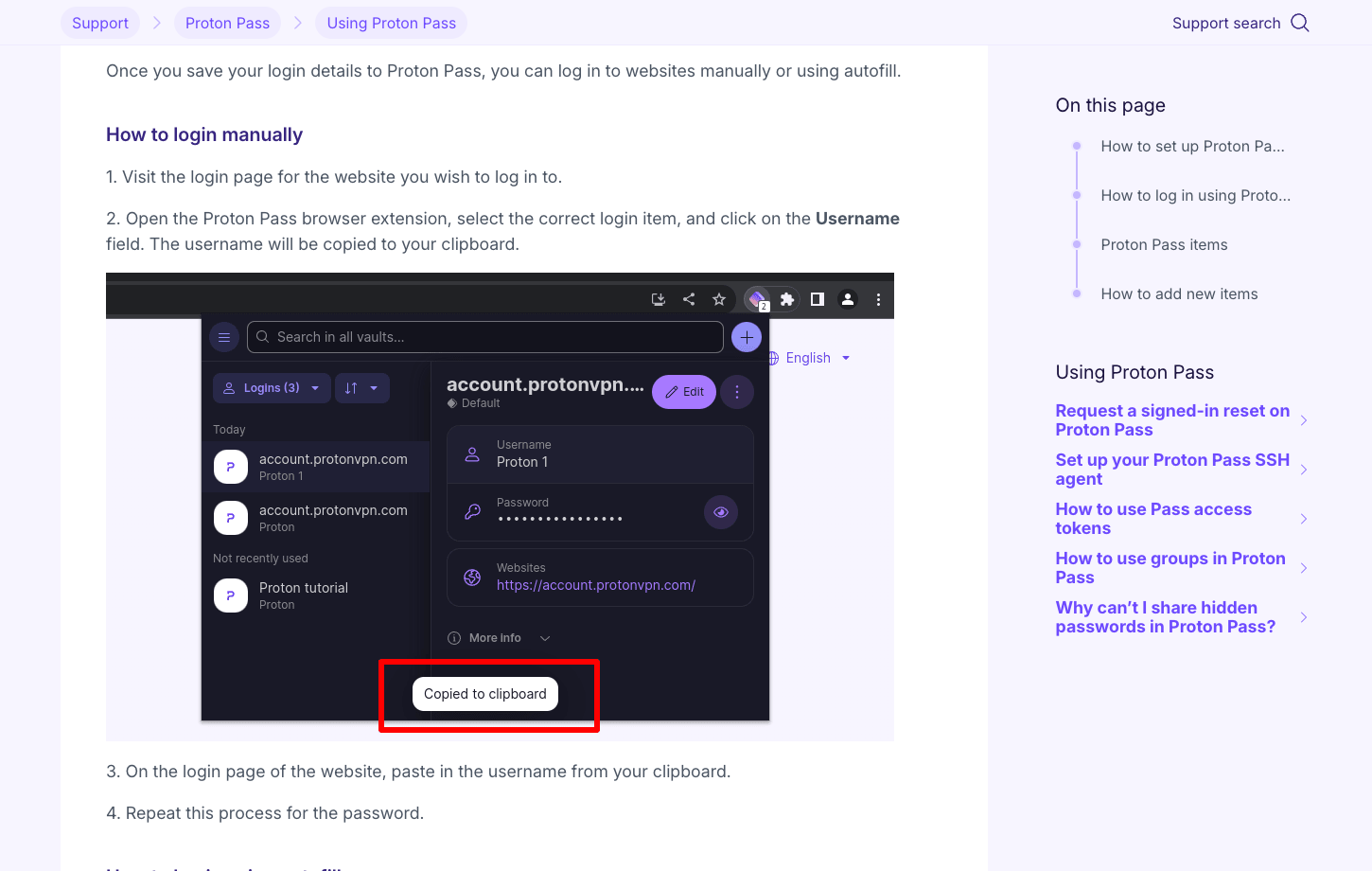
The browser extension is designed to save and fill logins in context, while the web app gives a broader overview of items and vaults. Proton Pass offers extensions for major browsers and a web interface within the Proton account environment. The extension handles routine sign-ins; the full web vault is more useful for reviewing aliases, shared items and security settings. The Proton Pass browser extension handles routine logins while the web interface offers a broader view of vault organization.
Try using two identities at one domain and a similar-looking test domain. Check whether the extension chooses the correct account and how the manual search behaves. Also consider the user's browser profile: a shared profile with an unlocked vault creates risk even if the password itself is never displayed.
🛂 Passkeys on supported devices
Proton Pass advertises passkey support on all devices in its current Free plan feature list. The exact experience still depends on websites, browsers and operating systems that support the relevant passkey workflow. A saved passkey is only as recoverable as the Proton account and device access protecting it; a lost recovery route can leave the website unreachable. Proton Pass passkeys should be tested on more than one device before replacing the recovery path for an important account.
A passkey should work on a second authorized device before it becomes the only way into a critical account; recovery and export support vary by service. Don't delete fallback access until you understand the recovery route.
🪪 Ten aliases on Free versus unlimited on Plus
Proton's Free plan explicitly lists ten hide-my-email aliases, while Pass Plus includes unlimited aliases. That creates an unusual upgrade question. A person with two or three important online identities may never reach the free cap, whereas someone signing up for many stores, newsletters and forums may appreciate an alias for every site. The Proton Pass free plan includes a limited alias allowance, which is often enough for a small number of high-value registrations.
Do not create hundreds of aliases without naming conventions and a way to search them. A useful system identifies the service, the signup date and the mailbox to which messages are forwarded. A disposable alias used for an account that later becomes financially important is a problem if the owner forgets how to receive password-reset mail.
📬 Alias forwarding and recoverability
An alias typically forwards incoming mail to a chosen real mailbox rather than creating a fully independent inbox. That protects the visible signup address but concentrates recovery messages in the forwarding destination. If that destination is lost, the user may struggle to receive service verification and reset links.
Test a fictional service that sends a confirmation email and a follow-up notification to the generated alias. Inspect the sender handling and how replies work under the chosen plan. Keep a secure record of which aliases are linked to high-value accounts so one accidental disable action does not strand a subscription.
🌐 Custom domains and paid privacy controls
Pass Plus includes custom-domain and additional mailbox-related alias capabilities according to Proton's current feature list. A custom domain can make aliases feel more personal and portable, but it comes with domain renewal, DNS configuration and an independent security responsibility. A missed domain renewal may affect recovery for accounts that depend on its addresses. A custom-domain alias stops being reliable if the domain expires or its DNS records break. Registrar access therefore belongs in the recovery plan.
If you consider a custom domain, document who owns it and the registrar recovery process. It should not be possible for a forgotten credit card to cause a domain to expire without warning. Email privacy is useful only if the underlying routing remains dependable.
🔑 Integrated TOTP and two-factor strategy
Paid Proton Pass plans include an integrated authenticator for time-based one-time codes. This simplifies the login workflow and can make strong second-factor habits more practical for ordinary accounts. It also puts the password and its corresponding one-time secret within the same protected vault, reducing the isolation that a separate authenticator would otherwise provide. A Proton Pass TOTP authenticator workflow is convenient, but some sensitive accounts still benefit from an independent factor.
For accounts with serious financial or administrative power, decide whether a hardware security key or independent authenticator is preferable. Keep recovery codes somewhere separate and secure. The integrated TOTP feature is neither universally unsafe nor an excuse to remove additional safeguards.
🗂️ Multiple vaults and sharing
Pass Plus offers secure vault and item sharing. Organizing entries into separate vaults helps a person avoid mixing unrelated identities, and a family can share a selected group of credentials without pooling all personal items in one account. Permissions, invitation rules and the ability to revoke access are more important than merely seeing a share icon. Proton Pass shared vaults should separate household credentials from private banking or work accounts.
Use two test accounts and a fictional household login. Confirm that the recipient sees only the intended collection, that a private note stays private and that an invitation can be withdrawn. A long-lived shared credential also needs a rotation plan when a member leaves.
👨👩👧 Pass Family: six separate accounts
Proton Pass Family is advertised as six Pass Plus accounts with an admin panel. For a household using Proton Mail or VPN, this may fit a wider subscription strategy. But family administration should not mean one shared master password. Each member needs an independent way to unlock their own vault.
Consider three family scenarios: a teenager joining, an adult changing devices and a relative losing access to their primary mailbox. The family organizer should understand supported recovery capabilities and which shared vaults can be accessed during the incident. Test before storing the only copy of an important document.
🧯 Emergency Access and account recovery
Proton Pass lists Emergency Access among Pass Plus features. Emergency arrangements can be important when a trusted contact needs access after an extended absence, but they are not a substitute for strong login protection. A user should confirm the current conditions and waiting period before making assumptions about what another person can recover. Proton Pass emergency access requires advance setup and a trusted contact whose own sign-in is protected.
Ask who can request access, what they will be able to see, and how a malicious or mistaken request is handled. The contact's own email and account security matter because the plan depends on their identity. Keep important bank and government-account procedures documented separately.
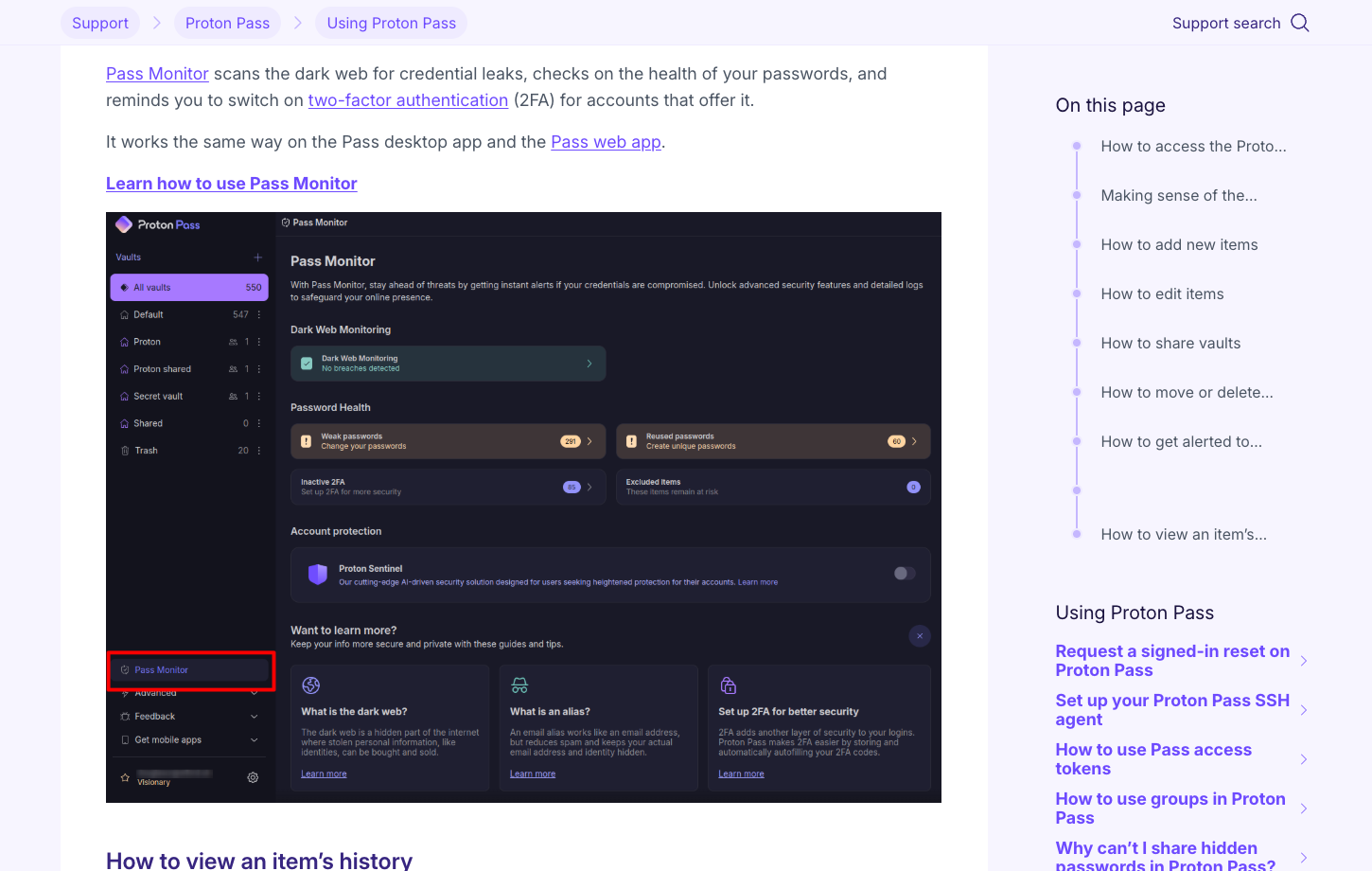
🌑 Pass Monitor and dark-web alerts
Paid Proton Pass editions include monitoring tools that can help identify exposed credentials and potentially risky password reuse. The feature is useful when it results in action: changing the relevant password, enabling a second factor or investigating an unfamiliar sign-in. It cannot prove that a credential is safe simply because no notification appears. A breach alert identifies credentials worth investigating; no alert cannot guarantee that older passwords were never exposed.
Review the available warning types and which ones apply to your subscription. Different alerts can point to password weakness, reused credentials or information discovered in breach datasets. Prioritize accounts that could cause wider harm rather than chasing a cosmetic dashboard score.
🧩 Proton ecosystem integration
Proton Pass can be subscribed to separately or as part of Proton Unlimited and certain business workspaces. For someone already paying for Proton Mail, VPN and Drive, combining subscriptions may lower administrative friction. It can also concentrate several important services under one account, increasing the consequences of a poorly planned account recovery process.
Make an inventory of what you actually use. If Pass is the only Proton service you need, the wider bundle may be unnecessary. If Mail is the destination for all your aliases, pay special attention to mailbox recovery and the ability to receive critical verification codes when a device is lost.
🏢 Business plans and their minimums
Proton's business Pass Essentials and Pass Professional editions offer organizational password management. The published business pricing page notes minimum user requirements for some plans, while Professional lists directory, logging and policy capabilities. These are not automatically included in a consumer Pass Plus subscription. Proton Pass business plans should be priced for actual seat minimums and required directory controls rather than assuming consumer features scale automatically.
For a small organization, evaluate the real minimum seat charge and who becomes administrator. Run a role-change scenario: a contractor is invited to one shared vault, works for a month and then leaves. The credentials should remain with the company and the access should end predictably.
🔄 SSO, SCIM and group sharing
Pass Professional includes features such as SSO and SCIM in the business feature matrix. Their value is operational: identity-provider changes should propagate to the account system without relying on a manager to remember every individual invitation. Group sharing and detailed activity logs can help larger teams manage access more consistently.
Trial a fictional employee moving departments. Can the group membership change without exposing previous project passwords? Do administrators have the reporting they need without seeing unrelated personal records? Ask which integrations are supported in your identity stack and what happens during an outage.
⌨️ CLI and developer-oriented features
Proton Pass's paid and business feature lists include a command-line interface and, on some business plans, related developer and SSH functionality. These tools can be useful for technical teams that need controlled credential access in local workflows. They also create the risk of scripts printing secrets into terminal history or build logs.
Begin with throwaway credentials and a restricted local environment. Verify which actions require approval, what information an automation can retrieve and whether logs capture sensitive material. A CLI is a powerful feature only when the surrounding operational practices are careful.
🛡️ Proton Pass security and open-source scrutiny
Proton emphasizes the openness of Pass source code and its encryption model. Public code allows external researchers to inspect some implementation details, but most buyers still depend on the quality of updates, independent assessments and their own device security. Open source does not mean that every site or extension is trustworthy.
Review the security documentation for what is encrypted, what is processed as account metadata and how bugs are reported. Separate the risk of a compromised endpoint from a leak of server-side ciphertext. There is no single trust badge that answers both questions.
📤 Importing and exporting identities safely
Proton Pass offers imports from other password managers and browsers. Credentials, card records, secure notes and some metadata may transfer, while attachments, sharing rules or passkeys can require additional checks. Use fictional examples before importing hundreds of sensitive entries. Pay attention to which email alias is associated with which website.
Exporting from the old manager may produce a plaintext CSV. Keep it out of shared download folders and ordinary email. After a successful import, validate critical accounts one at a time and securely remove temporary unencrypted files. Record the unsupported fields rather than quietly discarding them.
💵 Is Pass Plus worth the paid upgrade?
Pass Plus is most compelling for someone who uses aliases heavily and wants secure sharing, integrated TOTP, monitoring or attachments. A person whose needs are limited to storing logins across devices may find Proton Free sufficient. Paid Proton subscriptions can differ by billing term and region, so the current checkout amount is the relevant comparison.
Make a simple comparison of actual use: number of aliases needed, whether a family member must receive shared credentials, and whether the dark-web alerts will be reviewed. Aliases help only if their forwarding rules remain current and important recovery messages still reach a protected inbox.
⚠️ Alias overload and operational mistakes
Creating a new address for every account is easy; keeping track of them over years is harder. Users may forget which alias received a recovery email or disable a forwarding rule tied to an important service. An alias that once felt disposable can become the only route back into a paid account.
Choose a naming policy, tag important entries and periodically review unused aliases. For critical accounts, verify the forwarding destination and recovery path after changing mailboxes. Better privacy can coexist with simple administration if the lifecycle is planned.
🧪 A one-week Proton Pass evaluation
On day one, add a few fictional logins and create two aliases with different purposes. Then receive test messages through each alias and save a passkey on a low-risk site. Over the next days, compare the browser extension with the web app, confirm mobile autofill and share one vault item with a test member.
Finish by testing recovery, exporting the dataset and calculating the annual cost of the exact edition. The goal is to learn which controls you would actually maintain. Do not judge the product solely by the highest number of aliases or the longest feature list.
📌 Case study: separating retail accounts from a primary email
Imagine an individual who has used one personal email address for hundreds of online shops. After a data leak, phishing messages arrive in the same inbox used for work and banking. Proton Pass hide-my-email aliases can separate new registrations so that a compromised retail address is less useful as a general identifier. The user still receives messages through a forwarding mailbox, so careful organization matters as much as alias creation.
An alias trial is most revealing when each registration receives its own confirmation email, proving that forwarding still works before a critical account is moved. Disable only the least important alias and verify that the other accounts remain unaffected. This exercise reveals whether Proton Pass alias management fits the user's habits or would become a source of confusion.
📬 A high-value account is linked to a disposable alias
An address created for a newsletter may later become the recovery email for a paid account. Disabling its forwarding without checking that dependency can lock the owner out. The privacy improvement is real, but it comes with a new lifecycle responsibility. Users should classify aliases by importance rather than treating every address as permanently disposable.
Keep a list of the most important sites and their email recovery routes. Before changing a forwarding destination, send a test message to the alias and confirm receipt. If the user owns a custom domain, add registrar renewal and DNS access to the recovery plan. A custom domain can be useful, but only if somebody can continue to operate it through an account-loss incident.
👨👩👧 Family vaults without merging personal identities
Proton Pass Family provides six separate Plus accounts in its published feature matrix. That matters because password sharing between relatives should not require everybody to use the same master account. One person may need access to the home router, another to a streaming subscription, and neither should see private medical or financial credentials belonging to somebody else.
In a trial, create a household vault with fictional credentials and invite one family member. Confirm that personal entries stay private, then revoke access to a shared item. Also investigate how another trusted member could access critical information after the organizer loses a phone. A family password manager is only dependable when the least technical member can use the recovery procedure without improvising.
🧮 Free, Plus or a wider Proton subscription?
Proton Free may be enough for someone who wants a secure vault and ten aliases. Pass Plus adds unlimited aliases, TOTP, sharing and monitoring options; Proton Unlimited bundles the password manager with services such as Mail, VPN and Drive. The best choice depends on which subscriptions already exist. Paying for a bundle can simplify billing, but it also increases reliance on one account's recovery system.
Since the public pricing values were dynamically incomplete in this check, avoid a false precision comparison. Write down the live annual quote for Pass Plus and Proton Unlimited, count which bundled services are actually used and compare the price with separate alternatives. Do not assume a family member inherits the same access to every bundled feature unless the plan says so explicitly.
🏁 Proton Pass verdict
Proton Pass offers a useful combination of password storage, passkey support and email-alias management within a privacy-oriented product family. The free tier is unusually capable for a person who wants a basic vault and a handful of aliases. Paid plans become more relevant when sharing, TOTP, additional monitoring and broader alias controls matter.
Choose it when account compartmentalization is a habit you want to build. If your priority is broad enterprise administration or a different security ecosystem, compare the business-specific features of the other products before committing. The safest manager is the one whose recovery plan and everyday workflow you actually understand.
⚖️ Proton Pass vs Other Password Managers
| Product | Key differentiator | Best initial fit | Main question |
|---|---|---|---|
| Proton Pass | Aliases and Proton ecosystem integration | Privacy-first individual or family | Will you maintain the aliases you create? |
| Bitwarden | Open source and highly capable free plan | Flexible technical user | Are organizational and self-hosting needs stronger? |
| 1Password | Secret Key, Watchtower and guided vault sharing | Premium family or business | Do you prefer a polished recovery workflow? |
| Dashlane | Password-health and phishing extras | Security monitoring-focused user | Are the bundled protections used enough? |
Proton Pass stands apart because aliases are a central credential-management tool, not an external privacy afterthought. Bitwarden offers broad open-source flexibility and strong free vault management. 1Password emphasizes shared vaults and recovery materials; Dashlane emphasizes security prompts and monitoring. The useful comparison is a real identity workflow using fictional accounts: create, save, receive an alias message, rotate the password and later revoke the address. A focused Proton Pass vs Bitwarden comparison should also include device recovery, sharing boundaries and first-year cash cost.
🧪 Security and Recovery Acceptance Checklist
| Area | Acceptance test |
|---|---|
| Alias forwarding | Generate an alias, receive a verification email and confirm its destination before deactivating it |
| Free alias limit | Compare the ten free aliases with the number of distinct registrations you actually need |
| Custom-domain renewal | Check DNS ownership, registrar recovery and the consequence of an expired domain |
| Passkey fallback | Use a secondary device and inspect the original website's recovery process |
| Integrated TOTP | Decide which accounts may share a vault with a time-based code and which need separation |
| Vault export | Check whether account URLs, notes and alias identities survive a migration trial |
🔎 Sources, Method and Evidence Boundaries
Sources for this review: official product guidance, published prices and editions, and vendor security or help material. These sources describe Proton Pass plans, aliases and client support. Screenshots come from vendor pages; no private vault migration or laboratory passkey audit is claimed.

Frequently Asked Questions
Is Proton Pass free?
Proton Free includes unlimited logins and devices with a limited number of hide-my-email aliases. Verify current edition details before subscribing.
How many email aliases come with Proton Free?
The published feature list currently says ten hide-my-email aliases. Pass Plus adds unlimited aliases under its current offer.
How much does Proton Pass Plus cost?
Check Proton’s live checkout for the annual Pass Plus price and any local taxes; the comparison below deliberately avoids an unverified flat worldwide amount.
Does Proton Pass support passkeys?
Yes, the current feature matrix lists passkeys across devices, subject to website and platform compatibility.
Can Proton Pass replace SimpleLogin?
It integrates alias concepts and shares the Proton privacy ecosystem, but specific custom-domain and alias-management workflows should be checked before assuming full feature equivalence.
Can I share vaults with family?
Paid Proton Pass plans offer vault sharing, and Pass Family provides six Plus accounts with administration. Test who can view and revoke access.
Does Proton Pass have an authenticator?
Integrated TOTP is listed in paid plans. Separate authenticator or hardware-key protection may be appropriate for the most sensitive accounts.
Is Proton Pass end-to-end encrypted?
Proton describes end-to-end encryption and an open-source security approach for vault content. Endpoint security and reliable recovery remain important.
What happens if I disable an alias?
Messages may stop forwarding as expected. Before disabling, verify that no important account uses the alias for login or recovery.
Does Proton Pass work offline?
Proton documents offline access in desktop contexts, with paid-user requirements. Verify your own client and plan before depending on it during travel.
Is Proton Pass better than Bitwarden?
Proton Pass emphasizes aliases and the Proton suite; Bitwarden emphasizes free vault capability and deployment flexibility. Choose based on the workflow you will maintain.
📚 Related DigiOffly Guides and Selection Tools
Browse the Security & Privacy hub, explore VPN research and use our Software Cost Calculator to compare subscriptions. Related reviews are linked only after publication.
Email aliases help with account privacy, but they cannot remove malware or make an infected device safe. Read the separate Malwarebytes and Bitdefender reviews for that side of the decision.
EXPLORE NEXT ON DIGIOFFLY
Explore More on DigiOffly
Continue with related, already published software research.
Security reading
- Security & Privacy
- VPN Deals
- AI & Tech
- Hosting & Websites
- Bitwarden review — Compare free vault features and passkey support.
- 1Password review — Consider family sharing and business management.