

Pricing and product details checked October 16, 2026. Squarespace’s current website plans are Basic, Core, Plus and Advanced. The public US pricing page showed $19, $29, $49 and $99 per month equivalent on an annual commitment, compared with $25, $39, $65 and $139 on monthly billing. Regional currencies and offers can differ; our editorial screenshot displays a localized euro view rather than the US quotes used for the figures below. Official pricing · Current plan guide.
A beautiful homepage is only the beginning of a website. The harder questions arrive later: how quickly can a small business update its hours, add a product, publish a new collection, fix a booking link or figure out why checkout revenue changed? A platform that makes those jobs approachable can be worth more than a low hosting bill—provided the fees and restrictions are understood first.
Squarespace has long emphasized design, but its current product is more than a set of attractive templates. You can build a portfolio, run a service business, publish articles, sell physical products and create paid digital content. The trade-off is that these tools live inside a hosted system. That makes daily management easier while limiting how much of the finished site you can simply move elsewhere.
This Squarespace review 2026 explores Fluid Engine, template selection, ecommerce, the difference between regular and digital-product transaction fees, SEO features and content export. It also covers the current Basic, Core, Plus and Advanced tiers rather than mixing them with legacy subscription names. Our analysis is based on official documentation and public vendor pages; we have not bought a subscription or fabricated performance tests.
📊 Squarespace Review Summary
Squarespace is a hosted website builder that combines page design, templates, domain-related tools, publishing, commerce and a growing selection of business features. Its main appeal is an integrated workflow: nontechnical owners can spend their time arranging content and managing the site instead of maintaining a WordPress installation and a separate server.
Fluid Engine is the core drag-and-drop editing system for block sections on Squarespace version 7.1. It gives designers flexibility inside a grid-like visual workspace, with adjustments for desktop and mobile layouts. Blueprint AI Builder offers another way to start from a structured design direction, though it doesn’t replace editorial judgment or site-quality testing.
The strongest case for Squarespace is a design-led portfolio, a relatively straightforward business site or a store that can operate within the built-in commerce system. The weakest fit is an application demanding extensive server-level control, custom plugin architecture or a promise that every design component will be exported as a working WordPress theme.
Pricing also requires attention. Monthly equivalents on an annual contract are lower than true month-to-month pricing, and selling digital memberships carries different transaction-fee rules from selling ordinary products. A helpful review should make those differences visible before a buyer chooses a plan.
⚡ Quick Verdict: Is Squarespace Worth It in 2026?
Yes, for people who value polished visual design and an all-in-one publishing environment. Squarespace removes several tasks that would otherwise require separate hosting, CMS and theme-management decisions. Its integrated editor and commercial features can help small teams launch without employing a developer for every ordinary site update.
Basic can be suitable for a portfolio or small website that needs a custom domain and professional presentation. Core is more attractive when multiple contributors, custom code and zero Squarespace commerce transaction fees matter. Plus and Advanced deserve attention when an established business needs lower processor or digital-product transaction fees and more capable selling features.
Our reservation concerns platform dependence and the total operating cost. Squarespace can export selected content to WordPress XML, but many page types, designs and styles are not included. A business with hundreds of carefully designed pages and app-dependent functions should plan an exit strategy before committing to the ecosystem.
🏆 Squarespace Pros and Cons
The strengths that matter most are integrated site operations, appealing templates, a mature block editor and a coherent set of content and commerce capabilities. You can launch a brand page and later add products, newsletter signup or digital-content plans without necessarily rebuilding everything from scratch.
The weaknesses are less visible in a design gallery. Plan-level commercial fees differ; advanced code features and contributor privileges are tiered; digital-product commissions can be significant on Basic; and the format is not as portable as a standard self-hosted WordPress database plus theme. Those are structural trade-offs, not claims based on a paid hands-on test.
👍 What We Love
- ✅ Integrated web publishing: Design, hosting and site operations live in one platform.
- ✅ Fluid Engine editing: Modern block-based visual design on version 7.1 with mobile layout tools.
- ✅ Commerce and content: Shops, publishing and digital membership options cover several business models.
- ✅ Design-led templates: Curated starting points and Blueprint AI guidance support brand presentation.
👎 Where It Falls Short
- ❌ Limited full-site portability: WordPress XML exports omit important page types, styling and ecommerce content.
- ❌ Plan-specific features and fees: Commerce and digital-product charges vary across subscriptions.
- ❌ Additional services may cost extra: Domains at renewal, email and scheduling must be priced separately.
🏆 EDITORIAL VERDICT: STRONG FOR DESIGN-LED WEBSITES
Best for: visual portfolios, independent creators, small stores and local service businesses seeking integrated web publishing.
🧠 What Is Squarespace Website Builder?
Squarespace is a hosted content and website creation platform. You choose a template or use an assisted starting process, add pages and content, then publish through Squarespace’s own infrastructure. You don’t need to configure a Linux server or install WordPress to build a conventional Squarespace site.
The product spans portfolios, blogs, professional services, online stores, memberships and certain scheduling or marketing tools. It also offers domains and integrations. These are connected services, however, not always included in the same subscription. Buying a website plan does not guarantee every email, appointment, digital-product or third-party service comes at no extra charge.
Squarespace isn’t designed to replicate the control of a self-managed server. You can customize many visual and business settings and, on eligible plans, use code insertion or third-party integrations. But it remains a platform with defined data structures and supported behaviors. That is exactly why it appeals to some owners and frustrates others.

🖥️ Squarespace Editor: Fluid Engine and Templates
Fluid Engine is Squarespace’s primary visual editing environment for block sections on version 7.1 sites. Rather than editing raw markup, users arrange content inside a visual layout. Its current documentation explains how blocks can be placed and adjusted, including mobile organization and newer Finish Layer tools.
The benefit becomes clear when an owner needs to change a headline, add a testimonial or rearrange a gallery for a seasonal promotion. A designer can see the page in context and make meaningful decisions without navigating through multiple technical dashboards. It can also help maintain consistent typography, color choices and spacing if the site’s style system is established early.
Design freedom is not a guarantee of usability. A dramatic homepage can still hide a store category, bury contact details or overload mobile visitors with large images. During a trial, test long service descriptions, genuine images and the smallest screen widths that matter to your audience. Use the template as a framework, not a reason to skip basic information architecture.
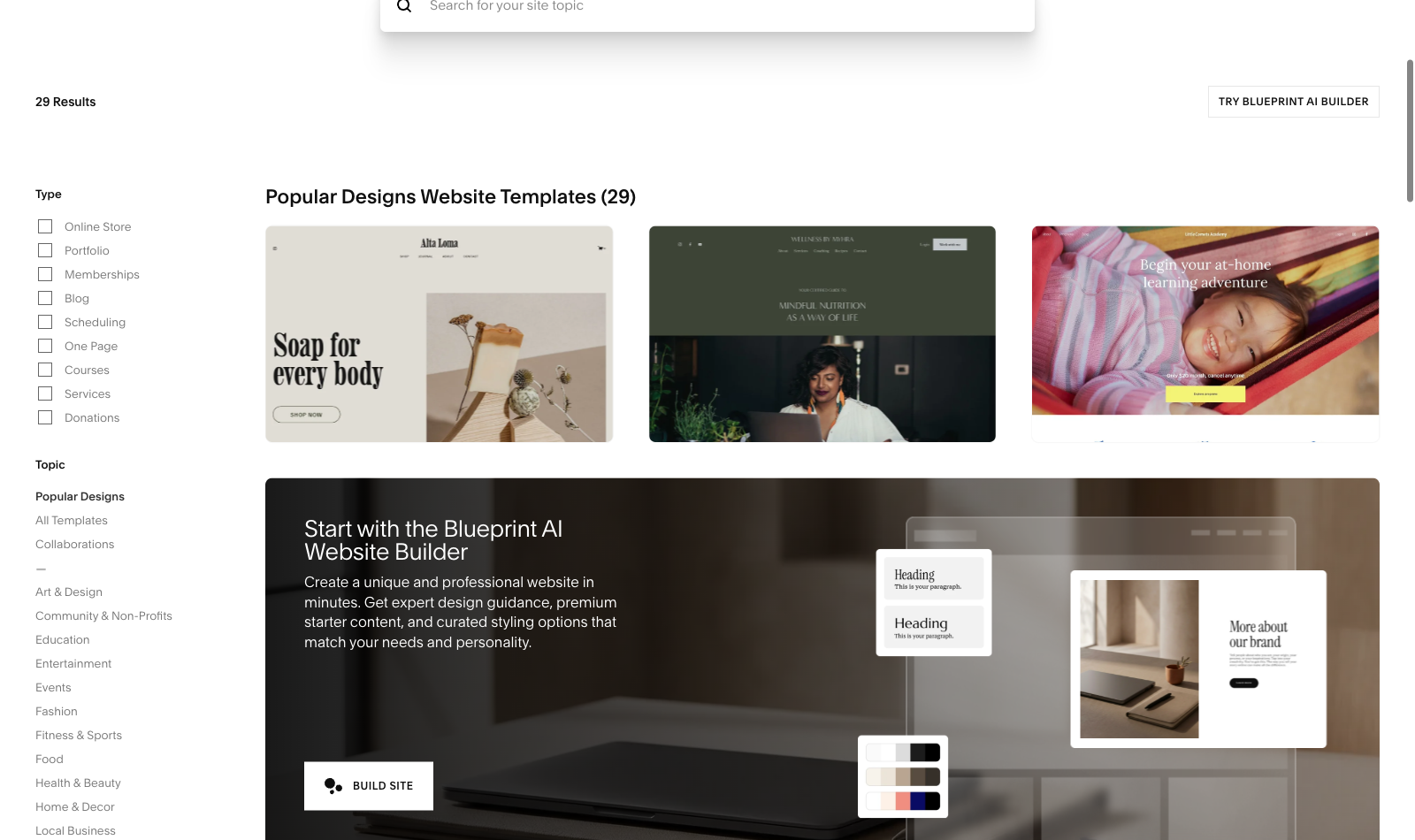
Blueprint AI Builder vs Templates
Squarespace’s Blueprint AI Builder offers a guided starting point for design and content structure. It can shorten the path from a blank canvas to a usable first draft, particularly when the buyer can articulate their business type and visual direction. The public template gallery remains valuable because it provides ready-made demonstrations of layout approaches.
Neither option can guarantee effective messaging. A portfolio needs compelling examples; a restaurant site needs a clear menu, hours and booking route; a consultant needs proof of expertise and an understandable contact path. AI-generated placeholder copy should be fact-checked, rewritten in the business’s actual voice and reviewed for accuracy before publication.
Use the 14-day trial to compare a template-led start with Blueprint if both appear relevant. That gives you practical evidence of the editing workflow. A screenshot of a vendor’s promotional page can illustrate its presentation but does not prove how fast a real production project will be completed.
🧭 How to Build a Squarespace Website
1. Start a Trial and Choose a Real Goal
Squarespace officially provides a 14-day free website trial without a required credit card. The trial expires; Squarespace does not offer an ongoing complimentary public website subscription. The trial is an opportunity to test the editor, template options and relevant premium features before paying. Some public-facing functions are restricted until an eligible subscription is activated.
Define your most important user action before picking a design. A local service provider may want appointment requests; a photographer may want a portfolio inquiry; a store needs a testable product-purchase path. A builder can help create pages, but the business must decide what success looks like.
2. Choose a Template or Use Blueprint
Select a starting design appropriate for your content instead of choosing the most visually impressive example. Confirm that the navigation can accommodate the pages you actually need, including contact, about, privacy and product or service information. Test mobile behavior early so major structural changes aren’t left until launch week.
3. Add Content and Configure Business Tools
Replace demonstration text with original descriptions, accurate pricing and legally appropriate policies. Add images you have permission to use, meaningful alt text and clear calls to action. Where customers book or pay online, configure the appropriate products, appointment service and payment processor supported in the business’s location.
4. Check SEO, Preview and Publish
Use Squarespace’s launch and SEO checklists, connect a domain and ensure the site is eligible for search indexing when it goes live. Test forms, order emails, links and important redirects. If replacing an existing site, preserve URL mappings and analytics tracking. A beautiful visual preview is only one part of a successful website launch.
🛠️ Squarespace Features That Matter After Launch
🛍️ Selling Products and Services
Squarespace supports several ways to make money from a website, including physical products, services, downloads and digital content. The commerce workflow is a strong reason to choose a higher tier, but the details deserve more attention than a simple check mark saying “online store.”
For physical goods, plan to configure inventory, tax, shipping rules, product imagery, returns and payment notifications. A professional-looking checkout is not a substitute for getting those settings right. For a service business, the booking or scheduling workflow may require Acuity Scheduling or another connected service with its own terms. Check that expense rather than assuming a website subscription automatically covers all appointment management.
The biggest pricing distinction is between commerce transaction fees and payment processing fees. Squarespace’s current Basic plan applies a 2% commerce transaction fee, while Core, Plus and Advanced show 0% Squarespace commerce transaction fee. That does not mean a zero-cost payment: card processors still charge according to payment method, region and plan. An owner assessing profit per sale should calculate both.
For example, if a store sells $5,000 in eligible physical products in a month, a 2% platform commerce fee represents $100 before processing fees. At that sales level, moving to Core may be worth consideration, but only after comparing the difference in plan subscription costs. A seller with occasional low-value orders might make a different choice. Fee structure should inform the plan rather than marketing labels.
🎓 Courses, Memberships and Digital Products
Selling a digital course, gated article series or members-only video has different economics from sending physical products. Squarespace’s September 2026 support documentation lists digital-product transaction fees of 7% on Basic, 5% on Core, 1% on Plus and 0% on Advanced. These fees are separate from applicable payment processing costs.
That distinction matters more as recurring membership revenue grows. Consider a creator generating $2,000 per month in eligible digital content sales. At the listed platform rates, the digital-product fee alone would be $140 on Basic, $100 on Core, $20 on Plus or zero on Advanced, before processing and subscription fees. This is illustrative arithmetic, not a promise of net profit or eligibility in every market.
The current product also ties video storage allowances to its tier structure. The help center lists 30 minutes on Basic, five hours on Core, 50 hours on Plus and unlimited video storage on Advanced under applicable terms. A small online class may be comfortably served by a lower tier, while a growing course library needs a more deliberate comparison.
Legacy Digital Products subscriptions are handled differently, and Squarespace’s July 2026 guidance says new signups for that standalone legacy product are no longer available. Don’t follow an old tutorial and assume the outdated digital-product add-on is still the default checkout option. Compare current plans instead.
🔎 SEO and Search Visibility
Squarespace publishes an SEO checklist covering site titles, descriptions, page organization, search indexing and related launch tasks. The system can provide technical foundations for search engines, but it cannot write a competitive service page or establish trust for your business on its own.
Start with search intent. A wedding photographer needs location and service details, a restaurant needs accurate menu information, and a course creator needs understandable syllabus and enrollment pages. Give important pages descriptive headings and original content. Use images that support the visitor’s decision instead of adding large files only for visual effect.
Squarespace also documents connecting Google Search Console and reviewing the search keywords that bring visitors to a site. Those reports are more useful than guessing which search queries must be working. If you migrate from an old website, verify canonical URLs, redirects, metadata and indexing after the change. A new template should not quietly erase years of useful search URLs.
The marketing pages increasingly mention AI-related search visibility. Treat that as an invitation to organize understandable content rather than as a guarantee that a particular site will appear in every AI-generated answer. Technical accessibility, accurate information and strong original material still matter.
📝 Blogging and Editorial Organization
Squarespace can host a blog alongside a portfolio, business or store. For a small company publishing occasional news, guides and thought pieces, an integrated blog may be easier to maintain than a separate CMS. Authors can keep visuals aligned with the rest of the website instead of switching between unrelated design systems.
Long-term publishing needs a different audit. Examine categories, archives, author attribution, search, internal links and how content can be exported. A blog with a dozen short posts is much easier to rebuild than a publication with several thousand indexed pages and elaborate custom elements. Plan the content structure before committing to dozens of unique page layouts.
If your editorial team has multiple contributors, Core and higher plans can be more relevant because the new plan family describes expanded contributor access and advanced features. Set permissions carefully. Even a hosted platform needs clear responsibility for factual corrections, publishing approvals and archived content.
🔐 Hosting, Security and Maintenance
With Squarespace, hosting is part of the website product. Owners don’t normally maintain an operating system or update a WordPress plugin directory. This helps people who have limited technical time and want a predictable editing workflow rather than full infrastructure responsibility.
However, account security, business data, collaborator permissions and external services remain the organization’s responsibility. Use individual accounts with appropriate permissions and multi-factor authentication where available. Record domain registrar details separately and protect access to payment systems. A hosted platform reduces some operational tasks, not all of them.
Before performing an extensive redesign, understand the platform’s duplication and content-management options. Keep independent copies of important business data, original photography, copy and product catalogs. For a commerce site, document what should happen to orders and customer accounts if the company eventually moves to another provider.
💳 Commerce Fees Are Not Payment Processing Fees
Squarespace Basic charges a 2% platform commerce fee on eligible product sales; Core, Plus and Advanced list 0% Squarespace commerce fee. Card-processing fees still apply.
Digital-content and membership transactions are different: Squarespace lists 7%, 5%, 1% and 0% platform digital-product fees from Basic to Advanced.
Check the country-specific card rate and actual business mix before choosing a plan. A lower subscription price may cost more after sales fees.
⚠️ Squarespace Limitations: Exports, Flexibility and Cost
One of the most important facts in this review is that Squarespace export is partial. The provider’s October 2026 documentation describes a WordPress-compatible XML export for certain page layouts, one blog page with posts, text and image blocks, and limited other content. It excludes several page types, store pages, portfolio pages, certain embedded blocks, styles, custom CSS and drafts.
This means “you can export to WordPress” should not be understood as “you can move the entire functioning website unchanged.” If you have a store, a detailed portfolio or custom interactive layout, rebuilding portions of the site may be unavoidable. The exact export capability also depends on the Squarespace version and page type.
This limitation is manageable when understood early. Keep copies of text, photography and business data outside the builder, control the domain registration, and maintain a URL inventory. If you ever leave, those assets make reconstruction easier. A business with unusual application requirements may be better served by WordPress or a specialized platform from the beginning.
Plan tiering is another restriction. Code injection, advanced analytics and many integrations require appropriate subscriptions. Fees for digital products can make a lower-priced site plan expensive for a creator with substantial membership revenue. Conversely, paying for Advanced when you sell nothing may be unnecessary. The right platform is the one that still makes sense once its real operating costs are visible.
💰 Squarespace Pricing 2026: Basic vs Core vs Plus vs Advanced
Squarespace’s official US pricing page checked on October 16, 2026 listed Basic at $19/month, Core at $29/month, Plus at $49/month and Advanced at $99/month when billed annually. That represents $228, $348, $588 and $1,188 in illustrative pre-tax twelve-month totals.
The corresponding month-to-month prices shown were $25, $39, $65 and $139, respectively. Those are genuinely different billing arrangements. A buyer who wants to cancel after a few weeks should not budget using the cheaper annual equivalent. Prices and currencies may vary geographically; our archived vendor screenshot is from a euro-localized page.
Basic supports the essential design and website workflow and allows up to two contributors under the current comparison. Core expands customization, contributor access and commerce benefits. Plus reduces specific payment and digital-content fees further. Advanced is aimed at more substantial online selling, including its lowest listed standard-card and digital-product fee tiers in the current US table.
The first-year custom-domain promotion deserves a separate note. An eligible annually billed Squarespace website plan may include a custom domain registration for one year, subject to extension and eligibility rules. The domain generally renews later at regular rates. Treat the promotional domain benefit as a one-year discount, not permanent free ownership.
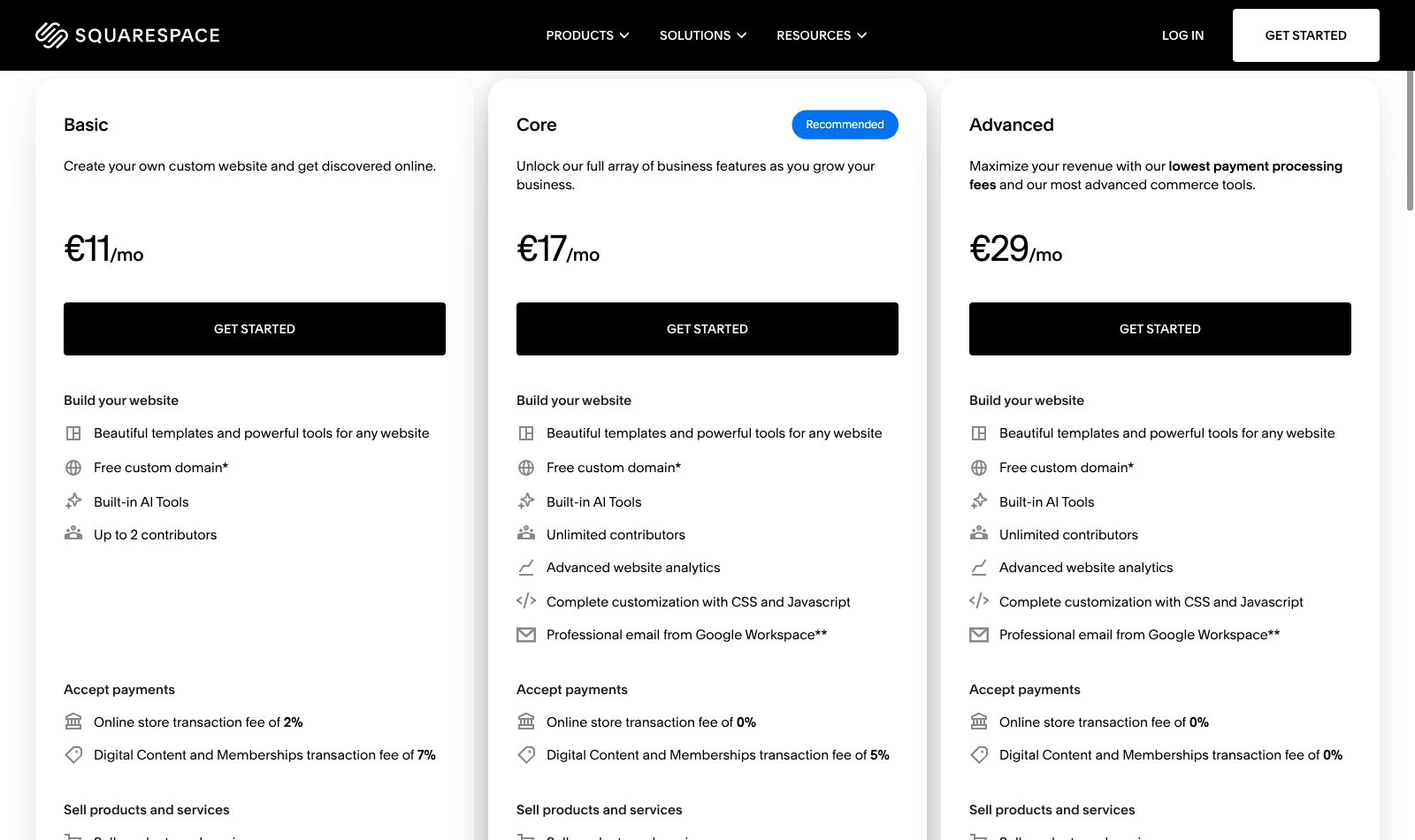
| Plan | Basic | Core | Plus | Advanced |
|---|---|---|---|---|
| US annual-billed equivalent | $19/mo | $29/mo | $49/mo | $99/mo |
| Illustrative prepaid year | $228 | $348 | $588 | $1,188 |
| Month-to-month US price | $25/mo | $39/mo | $65/mo | $139/mo |
| Commerce platform fee | 2% | 0% | 0% | 0% |
| Digital-product platform fee | 7% | 5% | 1% | 0% |
| US standard-card processing | 2.9% + $0.30 | 2.9% + $0.30 | 2.7% + $0.30 | 2.5% + $0.30 |
| Contributors | Up to 2 | Unlimited | Unlimited | Unlimited |
⚠️ Transaction Fees Can Matter More Than Plan Prices
Squarespace’s official fee documentation distinguishes three categories: platform fees for commerce transactions, platform fees for digital products, and payment processing rates. On current US Squarespace Payments standard cards, the processing schedules list 2.9% + $0.30 for Basic and Core, 2.7% + $0.30 for Plus and 2.5% + $0.30 for Advanced. International cards and alternative methods have separate rates.
These figures are not universal. A business selling in Europe, Canada or Australia may encounter different processing schedules, and third-party processors can have different conditions. Always check the relevant country and payment method. A transaction can have a zero Squarespace commerce fee while still incurring card processing costs.
A creator focused on digital memberships should also calculate the 7%, 5%, 1% or 0% digital-product platform fee separately. At meaningful sales volume, that difference could justify upgrading even if the editor looks identical. But for a hobby website without ecommerce, comparing processor rates is mostly irrelevant.
Build a two-year budget that includes subscriptions, domain renewal, professional email, connected scheduling tools, marketing services and any specialist extensions. Then price the alternatives based on the same workflow. Low headline costs are useful only when the products satisfy the same business requirements.
🎯 Who Should Choose Squarespace?
Designer, photographer or creative studio: Squarespace is a natural platform to trial when visual storytelling, portfolio galleries and a professional brand presence matter most. Its templates and Fluid Engine can help achieve that without maintaining a separate hosting stack. Verify gallery organization and mobile display before committing to many pages.
Local professional or service provider: A consultant, venue or small business may need a clear service page, testimonials, location information and contact route rather than complex development. Basic may be enough, while scheduling and connected tools should be priced separately based on actual requirements.
Small online store: Core, Plus or Advanced are better comparison points when sales volume changes the economics. Calculate Squarespace commerce fees, card-processing fees and any relevant shipping or tax functionality. The lowest annual site subscription isn’t necessarily the cheapest way to operate a store.
Course creator or membership publisher: Check digital-product platform fees and video storage on the exact tier. A creator with an established audience may save more on transaction fees by upgrading than the additional subscription costs, but this depends on revenue and payment mix.
Complex application or data-heavy publication: Consider a more portable CMS or a different application architecture if your team needs extensive server control, specialized plugins or low-friction migration of an unusually large set of custom pages. Squarespace can be an excellent site builder without being the right tool for every software project.
⚖️ Squarespace vs Wix, Webflow, Framer and WordPress
Squarespace and Wix both combine website creation with hosting, but their editing experiences and commercial packages differ. Our Wix review 2026 covers Wix Editor, Wix Studio, online payments and site portability. Try both with the same real business brief instead of comparing two unrelated showcase templates.
Webflow is frequently considered when designers want a sophisticated visual web-development workflow and structured CMS. Framer is appealing for highly visual marketing sites and interactive landing pages. Their pricing units, localization options, ecommerce choices and content-export rules differ. A designer may prefer one editing experience while an ecommerce operator chooses another for integrated payments.
Self-hosted WordPress is a different trade-off. You gain conventional access to site files, plugins and a database, plus freedom to select hosting, but you must handle more of the operating environment. Our SiteGround review, Cloudways review and Kinsta review discuss several hosting models for people who want that route.
The most useful comparison is a miniature real project. Build a homepage, an article, a product or booking page, and a mobile navigation layout in two candidate platforms. Then evaluate what it costs and how difficult it would be to maintain the design over two years. The result is more meaningful than declaring one vendor universally better because of its marketing gallery.
| Decision criterion | Squarespace | Wix | Webflow / Framer | Self-hosted WordPress |
|---|---|---|---|---|
| Primary model | Hosted visual website with commerce and content | Hosted website builder and apps | Visual design and publishing platforms | Independent CMS on chosen hosting |
| Editor strength | Fluid Engine and templates | Wix Editor / Wix Studio | Advanced visual and responsive approaches | Themes, plugins and developer control |
| Commerce diligence | Platform and digital-product fee tiers | Commerce plan and apps | Product availability and integrations | Plugins, payment providers and maintenance |
| Portability question | Partial WordPress XML export | Proprietary site design portability | Check current export limitations | Files and database can be migrated |
🧪 How We Evaluated Squarespace
Our review uses Squarespace’s public US pricing page, current Basic/Core/Plus/Advanced documentation, Fluid Engine support materials, export instructions, SEO checklist and transaction-fee tables checked on October 16, 2026. We captured official public Squarespace marketing screenshots for pricing, design and templates.
We did not purchase a paid Squarespace subscription, create a production store, send timed support requests or conduct an independent multi-month uptime benchmark. Vendor demonstrations show product capabilities and interface concepts; they cannot demonstrate our firsthand performance. We don’t claim otherwise or assign a fictional speed ranking.
Our editorial emphasis is on decision-making: what is included, which features cost more, which commercial fees affect real businesses, and which assets can be moved later. We also distinguish the current plan family from legacy Personal/Business/Commerce subscriptions, since mixing them would cause misleading advice.
For an important business site, a trial with real content and realistic forms, products and mobile layouts is a better test than accepting any single reviewer’s summary. Use the trial to investigate the questions that could be expensive to answer after launch.
🏆 Final Verdict: Is Squarespace Worth It in 2026?
Squarespace is a credible choice for design-focused businesses that want an integrated website platform. The combination of polished templates, Fluid Engine, publishing and commerce tools can reduce the amount of infrastructure and plugin maintenance required to run a site.
Start with the 14-day trial, then choose the lowest plan that accommodates your actual contributors, commercial functions and customization. Basic can suit a straightforward portfolio; Core is worth examining when you need zero Squarespace commerce transaction fees and expanded features; Plus and Advanced may be financially relevant when processing larger amounts of digital or card-based sales.
The central warning is about long-term ownership. Squarespace can export some pages and blog content into WordPress XML, but not the full site design and every product or page type. If you anticipate a future migration, plan for it from the beginning.
A hosted builder is valuable when it helps you publish and serve customers with less friction. As long as the subscription, commerce fees and portability limits suit the business, Squarespace belongs on the shortlist.

Frequently Asked Questions
Is Squarespace free to use in 2026?
Squarespace has a 14-day website trial, not a permanent free public hosting plan. You generally need a paid website subscription to publish the trial site publicly.
How much does Squarespace cost per month?
The public US October 2026 pricing page showed annual-prepaid monthly equivalents of $19 for Basic, $29 for Core, $49 for Plus and $99 for Advanced. Month-to-month rates and regional prices differ.
Does Squarespace charge ecommerce transaction fees?
The current Basic tier lists a 2% Squarespace commerce transaction fee, while Core, Plus and Advanced list 0% for eligible commerce sales. Payment-processing fees can still apply.
What are Squarespace digital-product fees?
Current plan documentation lists digital-content and membership fees of 7% on Basic, 5% on Core, 1% on Plus and 0% on Advanced, separate from applicable payment processing.
What is Squarespace Fluid Engine?
Fluid Engine is the visual block-layout editing experience for Squarespace 7.1 sections. It supports drag-and-drop design and desktop/mobile layout adjustments.
Can I export my entire Squarespace site to WordPress?
No. Squarespace exports certain pages, blog content and blocks as XML, but excludes many store or portfolio pages, styles, custom CSS and other components. Rebuilding can be necessary.
Is Squarespace good for SEO?
It includes technical SEO features and a published checklist, but search rankings still depend on content, competition, indexing and other external factors. No builder can guarantee search positions.
Can I run a blog or online course on Squarespace?
Yes, Squarespace supports blogs and digital content or membership sales. Check the selected plan’s digital-product fees and video allowances before launching a course.
Does Squarespace include a free domain?
Eligible annual site subscriptions offer one year of custom-domain registration under published conditions. Domain renewal is generally charged after the promotional period.
Is Squarespace better than Wix or Webflow?
There is no universal winner. Compare the editor, commerce costs, portability, integrations and the exact workflow you need before committing to a platform.
🔍 Explore More on DigiOffly
After this Squarespace review 2026, explore related website platforms and software for a smarter business setup:
Compare alternatives: Read our Wix review, or explore the Hosting & Websites guide if you prefer WordPress hosting.
- Hosting & Website Offers — Browse builders and WordPress hosting providers.
- Calculate Software Costs — Price renewal and commercial add-ons.
- Find Related Software — Choose useful tools for your workflow.
- Compare Platforms — Review costs and feature trade-offs.
- Explore Growth Tools — Plan SEO and customer acquisition.