

Prices and features checked October 16, 2026. Wix offers a free website-building tier and site subscriptions named Light, Core, Business and Business Elite. On its English-language US pricing view, the annual-prepaid monthly equivalents were approximately $17, $29, $39 and $159. Checkout currency, tax, term and discounts can differ by visitor. Wix Studio has separate plans. Official site plans · Official Wix support.
You can have a beautifully designed website without knowing how to maintain a server. That sounds like a simple proposition, but it changes almost every decision involved in running a site: where the pages live, which design tools are available, how payments and marketing connect, and what happens if you decide to leave the platform.
Wix puts the editor, templates, hosting, site management, and many business features together. You can explore the builder for free and only pay when you need a custom domain, ecommerce capabilities or other paid features. It may be exactly right for a small business or a creative portfolio, yet it is a different bargain from buying portable WordPress hosting.
This Wix review 2026 examines what the platform helps you create, how its standard editor differs from Wix Studio, where the paid plans become useful, and the limits that matter after launch. We used Wix’s public product pages and current help materials. We did not pretend to purchase a subscription or measure production performance.
📊 Wix Review Summary
Wix is an all-in-one website builder with integrated hosting and a large range of templates, publishing and commercial features. Its appeal is practical: an owner can create a polished public site, update its layout and manage several business tools without assembling a hosting account, a WordPress installation and a set of plugins.
The free tier lets you experiment with the editor and publish a Wix-branded website. Paid plans allow features such as connecting a custom domain and removing Wix advertising, with the appropriate tier providing payment functionality and additional storage. Wix Studio is a separate professional design environment with its own plan family; it should not be treated as an interchangeable version of Wix Editor.
Our overall assessment is positive for portfolios, service businesses, local brands, bookings and straightforward shops. The biggest caution is portability. Exporting a Wix-designed website for normal operation on another web host is not the same as moving a self-hosted WordPress database and theme. Pricing, commerce features and the long-term editing model deserve attention before a company builds hundreds of pages.
⚡ Quick Verdict: Is Wix Worth It in 2026?
Yes, when simplicity and visual editing matter more than infrastructure control. Wix reduces the need to choose a separate web server or work directly with PHP, databases and WordPress extensions. Its integrated approach can be an advantage for a small business that has no dedicated developer.
We would start on the free tier while testing layouts, mobile responsiveness and required integrations. A portfolio owner who only needs a custom domain should compare Light. A business accepting online payments should evaluate Core or higher based on the current checkout and eligible payment services. Wix Studio deserves its own investigation when an agency needs a more advanced, responsive design workflow.
Wix is a less natural fit when you must retain full source-code portability, need unusual server software or plan to move frequently between hosts. Advanced developers might appreciate parts of Wix’s platform, but access to its development tools does not convert a Wix website into a conventional, exportable WordPress installation.
🏆 Wix Pros and Cons
The platform’s most useful strengths are speed of visual iteration, a connected collection of website features and a low-risk way to explore design before paying. A business owner can test a homepage, adjust typography and evaluate a navigation structure without learning server administration.
The trade-offs are just as concrete. Different plan tiers unlock different commercial capabilities; storage limits vary; the site is tied to Wix’s hosting and editing ecosystem; and specialized agency design work requires understanding Wix Studio rather than assuming every editor feature is identical.
👍 What We Love
- ✅ Visual site creation: Drag-and-drop editing and templates shorten the path from a design concept to a website.
- ✅ Hosting included: Site infrastructure and publishing are handled inside the same platform.
- ✅ Business tools: Eligible plans add ecommerce, scheduling and marketing options without assembling a WordPress stack.
- ✅ Professional design path: Wix Studio offers more advanced responsive work for agencies and designers.
👎 Where It Falls Short
- ❌ Platform dependence: A Wix-designed site cannot simply be moved as a functioning WordPress theme to unrelated hosting.
- ❌ Feature tiering: Payments, collaboration, storage and other capabilities vary with the subscription.
- ❌ Extra costs: Domains after promotions, premium apps and some integrations increase long-term spending.
🏆 EDITORIAL VERDICT: GREAT FIT FOR VISUAL SITE BUILDING
Best for: local businesses, portfolios, independent creators and teams prioritizing integrated website editing over server control.
🧠 What Is Wix Website Builder?
Wix is a hosted website creation platform. Instead of purchasing a server and installing a content management system yourself, you design and publish through Wix’s own environment. Its offerings include traditional drag-and-drop editing, templates, business applications, ecommerce functions and the professional Wix Studio product.
The choice of editor matters. Wix Editor is approachable for people who want to place and adjust website elements visually. Wix Studio adds advanced responsive design and workspace facilities aimed at professionals and agencies. Wix also offers evolving AI-assisted creation experiences. The presence of an AI prompt or an automation feature does not mean you can avoid checking mobile layouts, content accuracy or business integrations.
Your domain name can remain yours, subject to registrar access and registration terms. But ownership of the domain should not be confused with portability of the full site design. A business can point a domain at another website later, yet recreating a proprietary layout, store settings or app integrations elsewhere may require a genuine rebuild.
🖥️ Wix Editor: What Does Building a Site Feel Like?
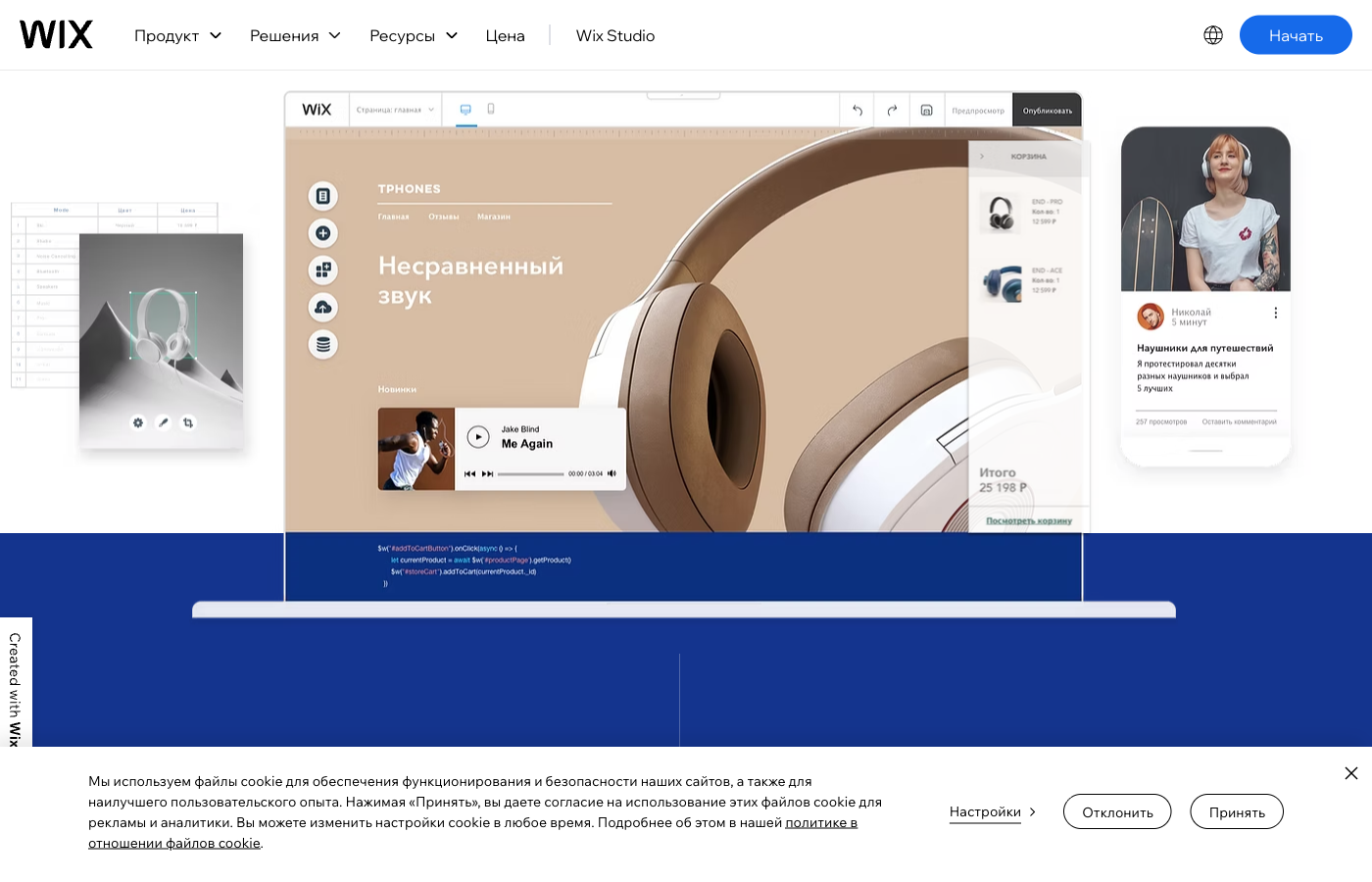
The official Wix website-builder page illustrates a visual editor with page controls, layout components, media and interactive elements. You can see the appeal: changes are made directly in the context of the page rather than through a collection of low-level files. Templates provide a starting structure, reducing the blank-page problem for a new business owner.
That convenience works best when the design brief is clear. Before choosing a template, list the navigation items, contact information, services, legal pages and calls to action the site needs. A site builder can help arrange those parts, but it cannot decide which information visitors need or verify whether a sales claim is correct.
The public editor screenshot demonstrates Wix’s product presentation. It isn’t a screenshot of our own paid account, and it doesn’t prove how the editor performs on a large complex project. We would judge a builder on editing speed, page consistency, mobile control and the ability to maintain the design six months later.
What About Wix Studio?
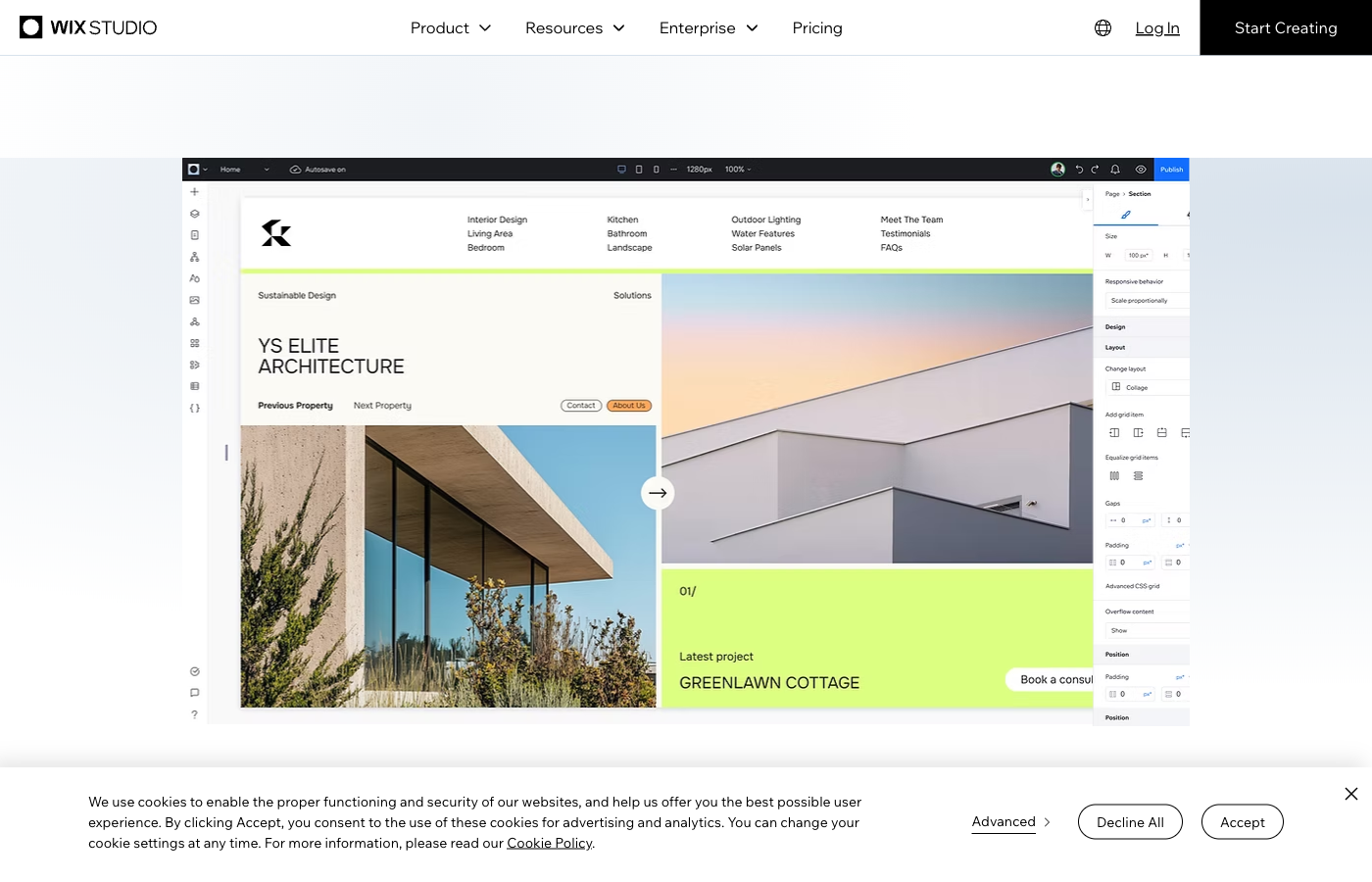
Wix Studio is positioned for designers, developers and teams that need more responsive layout control. It introduces a more advanced interface with grid-based work, breakpoint decisions and collaborative processes. A polished portfolio can be built in either environment, but Studio’s extra flexibility has a learning curve.
Wix’s help center confirms that Wix Editor and Studio use different premium plan types. Existing Editor sites aren’t automatically converted into Studio Editor sites just because a workspace changes. If you’re an agency, test the intended editor and its client-handoff process before making the subscription decision.
🧭 How to Build a Wix Website: A Practical Workflow
1. Decide What the Website Must Do
A brochure site, appointment-booking business, portfolio and ecommerce store require different tools. Define the main conversion: phone call, booking, purchase, newsletter signup or content discovery. Include the pages visitors expect, not just an attractive homepage.
2. Choose the Right Editor and Template
Try the regular Wix builder for a straightforward personal or business site. Consider Studio when advanced responsive control and agency collaboration justify it. Inspect templates at desktop and mobile widths and make sure their underlying navigation structure supports the content you’ll actually publish.
3. Add Real Content and Test Integrations
Replace stock copy and placeholder images. Write helpful service descriptions, add accurate contact details and set up business apps only if they serve a real need. If you plan to accept money, test payment methods, checkout rules, tax settings and order notifications using Wix’s supported testing procedures.
4. Preview Mobile, Connect a Domain and Launch
Test several screen widths and inspect image cropping, menu behavior and form validation. The free plan is useful for experimentation, but professional domain connection and removal of Wix branding require a paid site plan. Before switching DNS, check domain ownership, email records and the search-engine implications of the change.
🛠️ Wix Features That Matter Beyond the Homepage
🎨 Templates, Design Freedom and Consistency
A large template library is helpful when the goal is to launch with a credible design in a short time. But the best template is not necessarily the most animated or visually elaborate one. Choose a layout that makes services, prices, location and contact routes easy to find. A dramatic hero image cannot compensate for missing opening hours or a booking button that disappears on mobile.
Wix’s editor can make individual pages visually distinctive. That freedom also creates a design-management problem: when every page uses a different spacing system, visitors lose consistency. Establish type sizes, a limited color palette, image treatments and reusable sections before creating dozens of pages. Test new layouts on representative content lengths rather than only a short sample heading.
Wix Studio adds stronger layout controls for agencies comfortable thinking about breakpoints and grids. It can be attractive for designers who need more precision than a basic template provides. Yet those additional controls take time to learn. A bakery needing five pages should not feel obliged to pay for a professional workflow just because it looks impressive in demonstrations.
🛒 Online Stores, Payments and App Features
Wix includes business tools for selling products, accepting bookings, managing content and offering memberships or paid access. Those capabilities are often the decisive reason to move from Light to a more advanced plan. Wix’s public plan comparison identifies Core and Business as payment-enabled tiers, whereas Light focuses on a more basic professional site.
The details matter more than the label. An online shop needs payment methods supported in its country, appropriate shipping and tax handling, product variants, inventory rules and reliable customer notifications. A studio selling appointments needs calendar availability, reminders, cancellation policies and staff assignment. A platform can advertise ecommerce without including every specialized workflow a business wants.
Test a complete transaction path before committing. Create a sample product or service, use supported payment-testing tools, inspect confirmation emails and verify that mobile customers can finish their purchase. Budget for paid third-party apps when essential functions are not included. A simple site can become expensive if every missing feature requires another subscription.
🔎 Wix SEO: What It Helps With and What It Doesn’t
Wix’s SEO Setup Checklist guides users through fundamentals such as homepage titles, descriptions, keywords, mobile checks, domain connection and Google verification. Its SEO Assistant can surface issues and recommended actions. These are useful starting points for a small business without an in-house SEO specialist.
The important limitation is that a checklist isn’t an independent ranking guarantee. Completing every item won’t automatically earn a first-page search position. Search results depend on competition, relevance, content quality, technical accessibility, local signals where applicable and external factors beyond a website builder’s control.
Wix says its built-in Google Search Console connection through the checklist requires a premium site with a custom domain. Its own documentation notes that the checklist focuses mainly on the main site setup rather than analyzing every Wix Blog or Stores feature. A publisher with hundreds of articles still needs editorial organization, original content, links between related pages and monitoring of indexing outcomes.
Before migrating from another platform, map URLs and redirects. Preserve important page titles, descriptions and canonical logic where possible. Check that the new sitemap includes the right pages and that temporary development restrictions aren’t blocking crawlers after launch. Hosting and site-builder choice alone do not create SEO growth.
📝 Wix Blog, Memberships and Paid Content
Wix Blog offers an integrated route to publishing updates and editorial articles. It can serve a small business publishing announcements, short tutorials or project stories. Wix’s Pricing Plans app can also support membership access and subscriptions to selected blog content, subject to appropriate paid services and payment setup.
That functionality has real uses for creators. But a publication planning thousands of articles should test content organization, author workflow, categories, imports, exports, search and archival navigation first. Long-term editorial operations involve more than entering text into a rich editor. Check how easily editors can change a repeated layout without adjusting every existing post.
Memberships bring their own obligations. Confirm how subscribers receive access, what happens when payment fails, how data can be exported, and how a business would migrate its recurring customer relationships. The technical elegance of a paywall shouldn’t obscure billing and support responsibilities.
🔐 Hosting, Security and Operations
Wix manages the hosting environment for sites built on the platform. That reduces the need for customers to patch a Linux server, maintain a WordPress database or configure routine server caching. For many small business owners, this is a substantial reduction in day-to-day complexity.
It doesn’t remove every operating task. Owners still control collaborator permissions, domain access, payment provider relationships, published content and the business information customers submit. A compromised account or incorrect store setting can cause trouble on a managed platform just as it can on a self-hosted one.
The Wix Help Center documents site history and restoration features. Before making a major redesign, understand how to preserve a working version and what restoring a prior version may change. For revenue-generating sites, test important checkout and booking functions after alterations rather than assuming a successful publish action verifies every integration.
💰 Free Website Does Not Mean Free Business Features
Wix allows free site creation, but a custom domain and removing Wix ads require a paid plan. The free tier also has tighter storage limits.
Paid plans have different features and annual-prepaid price displays. Light is for simpler websites; commerce requirements generally move the comparison to Core or above.
Check domain renewal, professional email, premium apps, payment processing and future plan changes. Budget the actual business workflow, not the lowest advertised number.
⚠️ Wix Limitations: Portability, Control and Hidden Costs
The most strategic trade-off is vendor dependence. A Wix design is created inside Wix’s proprietary environment. You can move a domain and export certain types of content or data under available tools, but you generally can’t download the whole functioning Wix website and install it on an unrelated generic WordPress host. A full redesign might be necessary if you decide to move.
That risk grows with your investment. A five-page brochure site is easier to rebuild than a mature editorial publication with hundreds of interconnected pages, a shop, memberships and external workflows. Before committing, make a list of what must remain portable: domain, customer contacts, products, articles, media, URLs and analytics history. Check each export path while the site is still small.
Customization is another boundary. Wix includes development-oriented features, but you don’t control the complete hosting stack like you would on a VPS. Specialized back-end processes and unusual plugins may not be supported in the same way as on self-hosted WordPress. Some businesses are better served by a platform designed for that application architecture.
Finally, plan upgrades and apps can change the total cost. A business might start with Light, then discover it needs bookings or online payments, marketing automation, premium applications and paid domains. Those aren’t inherently unreasonable charges. The mistake is assessing the service from its lowest plan when the real workflow requires a significantly higher tier.
💰 Wix Pricing 2026: Free vs Light vs Core vs Business
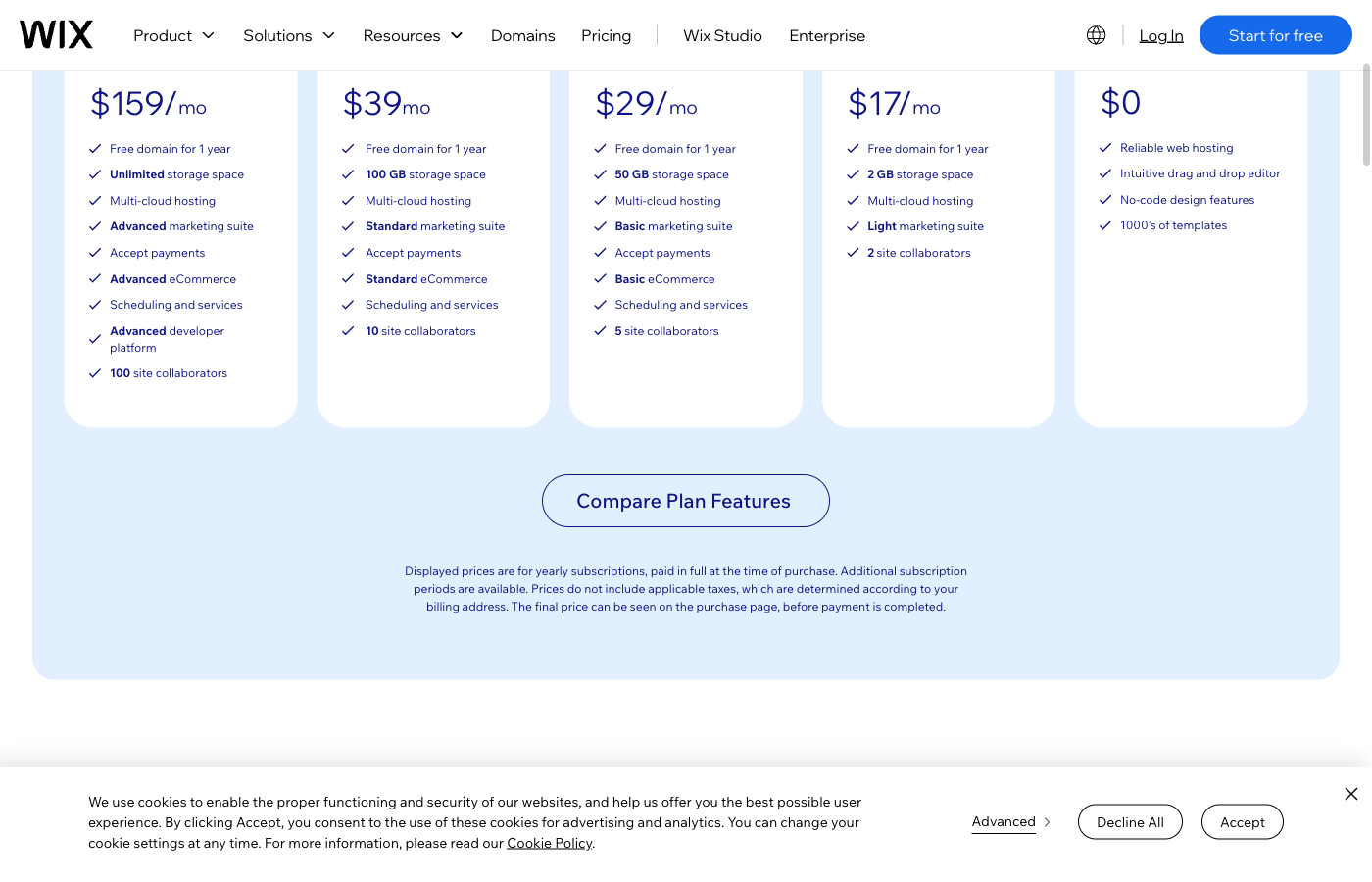
The public Wix pricing page checked on October 16, 2026 displayed a free option and US-dollar annual-prepaid equivalents of $17 per month for Light, $29 for Core, $39 for Business and $159 for Business Elite. In that configuration the pre-tax yearly equivalents are $204, $348, $468 and $1,908. These are dated public price examples, not guaranteed quotes across all locations, promotional offers and terms.
The comparison is more helpful when attached to capabilities. The free tier offers Wix-branded publishing and limited resources. Light allows a more professional simple site with a custom domain. Core adds commerce and a larger resource allocation. Business broadens ecommerce and marketing allowances. Business Elite targets more intensive business requirements.
Wix’s help documentation lists storage tiers of 2 GB for Light, 50 GB for Core, 100 GB for Business and unlimited storage for Business Elite, with plan qualifications and fair-use terms. The free tier is more restricted. Paid site tiers list unlimited bandwidth, but that shouldn’t be read as an unlimited promise about every external integration or service.
| Plan | Free | Light | Core | Business | Business Elite |
|---|---|---|---|---|---|
| US public annual-term equivalent | $0 | $17/mo | $29/mo | $39/mo | $159/mo |
| Illustrative first-year total | $0 | $204 | $348 | $468 | $1,908 |
| Storage (Wix help center) | Up to 500MB | 2 GB | 50 GB | 100 GB | Unlimited* |
| Custom domain / remove Wix ads | No | Yes | Yes | Yes | Yes |
| Accept online payments | No | Not in basic Light | Yes, eligible | Yes, eligible | Yes, eligible |
| Best fit | Try the builder | Brochure / portfolio | Small shops | Growing business | Advanced business |
⚠️ Annual Billing and Additional Costs
Wix explicitly states that displayed plan prices may use an annual subscription paid in full at purchase. A price shown as dollars per month may not be the amount charged monthly. Taxes are calculated according to the billing address, and discounts or other billing cycles can change the final checkout total.
Some plans advertise a free domain for one year on eligible annual purchases. That doesn’t mean a domain is free forever. Check the domain extension, any exclusions, renewal price and registrar ownership. Likewise, business email, specialized apps, enhanced automation or third-party payment services can create separate bills.
For a local business, calculate the cost of a normal operating year with its real features: the appropriate Wix tier, a domain after the first promotional period, professional email, booking or ecommerce applications, payment processing and occasional designer work. Compare that total against WordPress hosting plus the plugins and support needed to achieve the same user experience.
The best plan is the least costly tier that actually supports your workflows, not simply the first paid button on a pricing page. If you don’t accept payments, start by questioning whether a commerce plan is necessary. If your store is your primary revenue channel, don’t cut essential checkout features to save a few dollars on the subscription.
🎯 Who Should Use Wix in 2026?
Creative portfolio or freelancer: Wix makes it relatively straightforward to create a visually polished presence, display past work and publish contact details. Test Light when you need a custom domain but don’t plan to accept payments through the site.
Local service business: A café, consultant or salon can combine services, location, contact forms and booking tools in one environment. Check which apps and site plan actually cover your scheduling workflow before paying for a tier.
Small ecommerce brand: Core or Business is a better starting comparison than Light where accepting payment is essential. Test taxes, shipping, stock, checkout, customer communications and returns. A storefront is a business process, not only a collection of product cards.
Designer or agency: Explore Wix Studio separately. Its professional design approach and team workflows may matter more than the standard Wix Editor’s simplicity. Verify plan transfer rules and client ownership when delivering sites to paying customers.
Large publication or unusual application: Wix deserves more scrutiny when a team needs extensive code portability, a custom back end or a complex plugin ecosystem. Such projects may find WordPress or a more specialized hosting architecture better aligned with their long-term requirements.
⚖️ Wix vs Squarespace, Webflow, Framer and WordPress
Wix is one of several hosted visual website platforms. Squarespace is another all-in-one route often shortlisted for design-oriented businesses and portfolios. Webflow is known for a more advanced visual design and CMS workflow. Framer particularly attracts teams building highly visual marketing and portfolio sites. Their pricing units, editor capabilities, localization features and export paths differ, so they should be compared against the same project brief.
The biggest contrast is with WordPress. A self-hosted WordPress site gives the owner access to a conventional database, themes and plugins, though it also makes hosting maintenance and compatibility management the owner’s concern. Wix handles more of the underlying platform work while placing the editing and hosting experience in one ecosystem.
If you’re considering an independent WordPress host, our Hostinger review, SiteGround review and Kinsta review examine very different levels of WordPress hosting. Those are not interchangeable website builders, and the underlying decision is often whether your organization wants a platform that combines creation and hosting or owns a more portable WordPress implementation.
Don’t choose solely because one example site looks more beautiful. Take the same content, navigation and business requirements into two editors and see how much work each takes. Confirm total costs for the plan you’ll actually use and decide what data you must be able to move later.
| Decision criterion | Wix | Squarespace | Webflow | WordPress + hosting |
|---|---|---|---|---|
| Operating model | Hosted editor and business apps | Hosted visual site builder | Advanced visual design and hosted CMS | Self-hosted CMS, plugins and chosen host |
| Design workflow | Wix Editor or Studio | Template-oriented visual editing | Designer-oriented responsive controls | Theme or page builder, developer options |
| Portability | Vendor-specific layouts | Vendor-specific layouts | Check code/content export limitations | WordPress file and database migration |
| Budget detail | Plan tier, apps, domain | Commerce/marketing add-ons | Site and workspace plans | Hosting, plugin and maintenance fees |
🧪 How We Evaluated Wix
This is an editorial review based on Wix’s official public site-plan comparison, current website-builder and Wix Studio product presentations, and support documentation about storage, SEO, blogging and subscription features, checked October 16, 2026.
We captured screenshots from Wix’s public website and Studio pages. They show the product as presented by its developer, not a private paid account or our own months-long test of a production site. We did not run independent load testing, track uptime on a paid Wix account or measure support agents’ response times. Those outcomes are not reported as though they were observed.
Our judgments focus on practical buyer questions: which editor matches the user’s experience, whether required payment and booking features fit the chosen tier, what happens after launch, and how costly it may be to migrate. We distinguish documented functionality from assumptions about the speed or business results a particular site will achieve.
For a high-stakes purchase, we recommend creating a representative demo site and testing the most important workflow end to end before committing. The results of that trial should inform the final decision more than a generic ranking.
🏆 Final Verdict: Should You Build Your Website With Wix?
Wix is a strong choice when you need a visually editable, hosted business website without taking on routine server administration. Its templates, editor, integrated publishing tools and commercial capabilities offer a coherent path from an idea to a live site.
We would begin free, test the important mobile layouts and business actions, then choose the lowest paid plan that covers the actual requirements. Light is relevant for a simple branded site; Core and Business deserve attention for shops and other payment-enabled projects. Studio is a distinct professional path rather than an automatic upgrade for every user.
The limitation is long-term flexibility. Before investing in an extensive store or publication, understand how domain ownership, data export and website portability work. If avoiding a proprietary design environment matters more than reducing maintenance, a portable WordPress stack might be the wiser starting point.
Wix earns consideration because it makes launching and updating websites accessible. Whether that accessibility is worth the subscription comes down to the site you’re building, the people maintaining it and the degree of control you’ll need in three years.

Frequently Asked Questions
Is Wix free to use in 2026?
Wix has a free site-building tier with Wix-branded publishing and restricted resources. A custom domain and removal of Wix ads require an eligible paid plan.
How much does Wix cost per month?
The October 2026 US annual-prepaid display showed about $17 for Light, $29 for Core, $39 for Business and $159 for Business Elite per month equivalent. Actual checkout offers, regions and taxes vary.
Which Wix plan accepts online payments?
Wix’s standard plan comparison identifies Core and higher business-oriented plans as offering payment features. Confirm eligibility and payment methods for your country and specific checkout.
Does Wix include hosting?
Yes. Wix is a hosted website builder, so ordinary Wix sites don’t require a separate WordPress web-hosting subscription.
What is the difference between Wix Editor and Wix Studio?
Wix Editor offers approachable visual site editing; Wix Studio provides advanced responsive design and agency-oriented tools. They have different premium plans and are not directly interchangeable.
Is Wix good for SEO?
Wix includes SEO setup and optimization tools, but no builder can guarantee rankings. Search performance still depends on content, competition, technical accessibility and promotion.
Can I move my Wix website to WordPress?
You can move a domain and may export certain content or data, but a proprietary Wix design generally cannot be transferred as a functioning WordPress theme automatically. Rebuilding pages may be necessary.
Can I sell memberships or paid blog content on Wix?
Wix offers Pricing Plans and membership-related features with eligible payment setup. The specific apps and paid tier required depend on the workflow.
Does Wix have unlimited bandwidth?
Wix documents unlimited bandwidth for its paid site plans, subject to applicable policies; storage and other resource allowances vary by tier.
Is Wix better than Squarespace or Webflow?
That depends on the editing workflow, design requirements, commerce integrations and future portability. Compare the same real project rather than selecting a universal winner.
🔍 Explore More on DigiOffly
After this Wix review 2026, compare website platforms and complementary software before building your next site:
Want an alternative? Compare our Hosting & Websites shortlist or read our Kinsta review if you prefer a portable self-hosted WordPress project.
- Explore Hosting & Websites — Compare builders and hosting services.
- Calculate Your Software Budget — Estimate renewals and paid site apps.
- Find More Software — Build the right stack around your website.
- Compare Other Services — Evaluate similar workflows before buying.
- Grow Your Website — Research SEO and marketing software.