

Pricing and specifications checked 2026-11-22 against vendor primary sources. Conditions, billing cycles and regions may change.
An impressive profit screenshot is rarely enough to tell whether a trading method works. It might omit losing trades, position sizing, fees, withdrawals, or the effect of changing market conditions. For someone taking trading seriously, the larger task is building a complete record: what happened, why a position was entered, what risk was planned, what actually happened in the market, and what can be improved without chasing yesterday's performance. That is the job TradeZella attempts to address. It combines a trading journal, analytical reports, broker imports, historical practice, trade replay, strategies, and AI-based feedback. This TradeZella review looks at who may benefit from the bundle, how its July 2026 pricing changes affect the choice, which parts of the workflow deserve testing before paying, and where a simpler alternative is more sensible. Our analysis is based on vendor documentation captured in November 2026.
DigiOffly currently uses direct non-affiliate product links. Vendor claims are distinguished from independently observed tests. No investment or trading advice is provided.
📊 TradeZella Review Summary
TradeZella is a paid trading journal and practice platform. The most important question is not how many features appear in the marketing comparison but whether it can produce an accurate, repeatable record of your actual trades and decisions. Automatic imports are useful only when supported for the specific broker, account type and instruments you use. Replay and automated backtesting can help separate preparation from hindsight, but neither proves that a strategy will work tomorrow. The Essential, Pro and Ultra plans start at $35, $59 and $99 per month on monthly billing. Annual contracts are cheaper on a monthly-equivalent basis, but they require a larger upfront commitment.
⚡ Quick Verdict: Is TradeZella Worth It?
TradeZella merits consideration for active traders who want imports, structured journaling, historical practice and coaching-oriented analysis in one workspace. Pro is the first tier to inspect if replay and broader AI usage are essential. Essential may be enough for a disciplined single-account journal. Ultra only makes sense when higher account counts, AI credits and automated backtesting runs directly match a documented workflow.
A buyer who simply needs a free, transparent trade log should also compare TradesViz and other alternatives. AI commentary and polished dashboards do not eliminate biased tagging or inaccurate import data. The best trading journal is the one a trader will use consistently, with results that can be independently reconciled.
🏆 VERIFIED PRODUCT OVERVIEW — TradeZella
TradeZella trading journal and analytics: a practical look at imports, AI feedback, backtesting, replay, pricing, and alternatives.
Best for: Active day traders who want consistent journal reviews, backtests and broker history analysis
🧠 What Is TradeZella?
TradeZella positions itself as a web-based trading journal and AI trading partner. The product includes automated trade imports, analytics, a Strategy section, Notebook and progress tracking, historical backtesting, replay tools, and Zella AI features. The vendor publicly claims more than 500 broker and prop firm integrations and more than 300 analytical reports. Those numbers are vendor claims, not counts independently tested by DigiOffly. Why does the distinction matter? A trading journal starts with data integrity. A broker connection may support one account model but not another; a CSV importer may treat partial fills differently; a futures trader can have fees, contract multipliers and currency conversion assumptions that a simple win-loss chart misses. If the imported record is incomplete, an attractive performance report can be misleading. Before looking at AI interpretations, verify that the trades actually reconcile with the broker's records. TradeZella attempts to organize that data into a broader review loop. Each trade can be associated with notes, tags, strategy labels, and screenshots; grouped activity can then be analyzed by time, instrument, setup or behavior. Historical practice is meant to provide a place to test processes without risking real capital. Replay makes it possible to revisit decisions in their market context. AI features summarize patterns, but their quality depends on the completeness and consistency of the inputs. A description of a recurring problem is not proof of a causal trading edge.
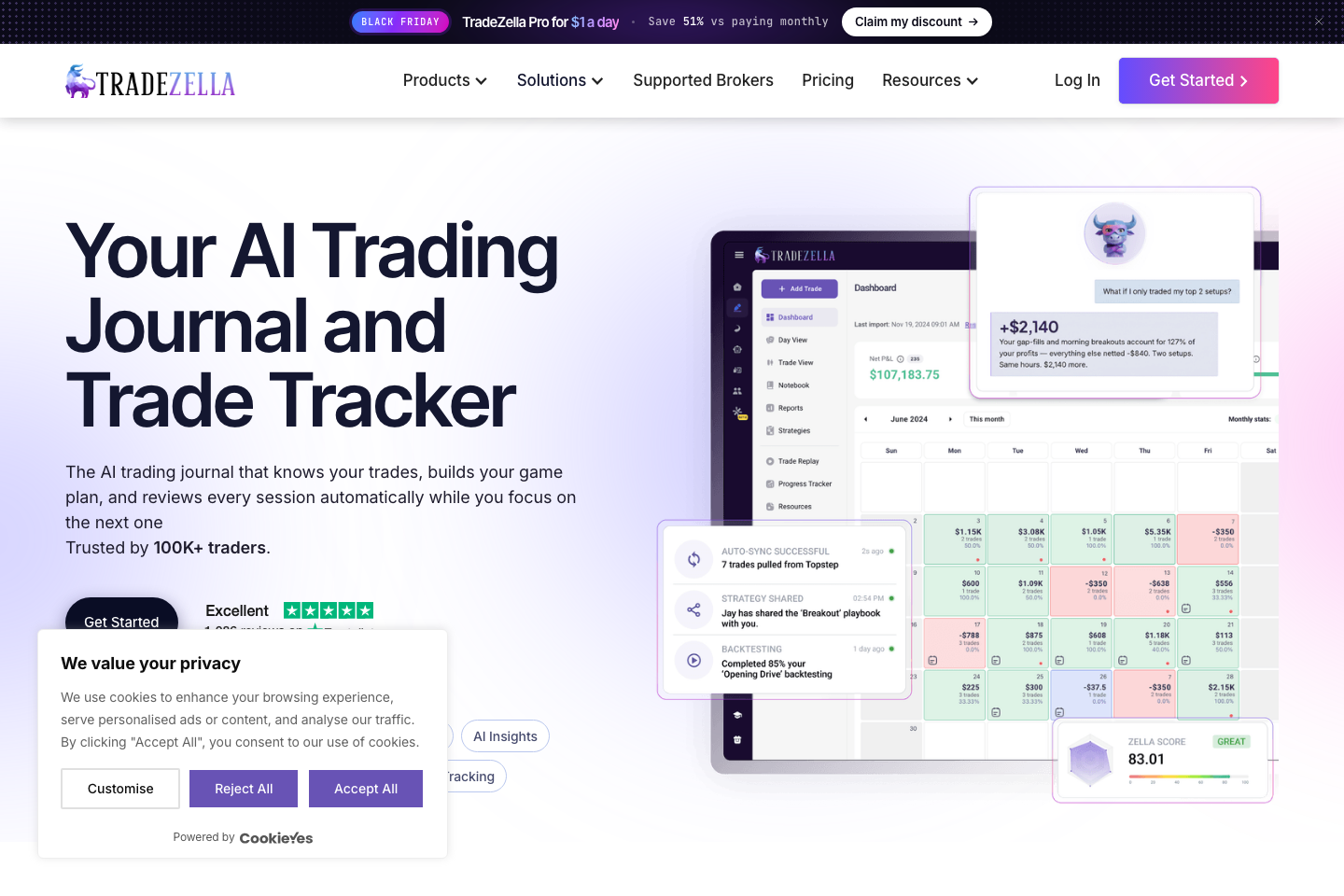
🖥️ Ease of Use & The User Interface
The public TradeZella site shows account analytics, strategy tracking and a broad practice suite. The Getting Started instructions walk a new user through importing trades, organizing sessions, defining strategies and reviewing results. Those published steps suggest a reasonable onboarding sequence, but they cannot demonstrate that a particular broker login is painless or that the current logged-in interface will perform well on every device. A useful first usability test should be small. Import a handful of settled trades with known commissions, inspect open and closed position treatment, add one tag and one note, then see whether the journal correctly reproduces the broker's realized result. Next, look for a report that answers one precise question: perhaps whether a setup actually performs differently at certain times, or how unplanned risk changes average loss.
🧭 How to Use TradeZella for Beginners
The following procedure is a reproducible evaluation plan informed by official TradeZella documentation. It is not a claim that DigiOffly completed these tasks in a paid account.
1. Confirm the account and instrument coverage
Write down the broker, asset types, account currency and whether the trading history includes partial fills, commissions, swaps or prop-firm challenges. Check the exact integration supported by TradeZella instead of relying only on its 500+ broker marketing total. A web trading journal app can accept data in several ways, including broker sync and file upload, but those routes may behave differently for multi-leg options trades, futures and imported forex history. Before connecting credentials, check whether the integration uses an official read-only account authorization or requires a third-party credential. Review the vendor's permissions and privacy conditions.
2. Reconcile a small trade sample
Choose five to ten trades for which you already have account statements. Include at least one partial exit and a trade with noticeable commissions. Compare quantities, timestamps, entry and exit prices, fees and realized profit with the source records. Decide how the journal treats deposits and withdrawals; these cash flows should never be mistaken for a trading result.
If the data does not reconcile, stop before importing a year of history. Document the mismatch, the date, the instrument and the import route, then resolve that issue before using performance statistics or AI comments. Reconciliation is an essential prerequisite for credible strategy analysis.
3. Define tags and hypotheses before interpreting charts
Create a few setup tags, such as planned continuation, planned reversal, late entry and rule violation. Make them observable rather than emotionally loaded. Decide what qualifies as an error before seeing whether the trade won or lost. The purpose of a trading journal is to reveal process differences, not to relabel a winning trade as smart after the outcome is known. Test one claim at a time. For example, compare average realized loss for trades that followed the predefined stop with those that changed the stop intraday. Check sample size and market regimes.
4. Separate backtesting from live journal evidence
TradeZella offers historical manual testing and vendor-described no-code automated backtesting. Treat these outcomes as simulations, not broker-confirmed realized returns. Confirm the historical market, symbol mapping, data granularity, commission assumptions and strategy definitions before interpreting an apparent edge. For fast trading, even a small difference in fill assumptions can radically change a result.
Keep test dates and parameter changes documented. Use a separate holdout period if possible; repeatedly changing rules to optimize the same sample creates hindsight bias. An AI-generated strategy rule should be reviewed for ambiguous entry conditions before being accepted as executable logic.
5. Review the actual limit before choosing a paid tier
List how many active accounts, monthly AI requests, automated backtest runs and replay sessions you truly need. Compare the free-looking demo experience with the paid subscription requirements: TradeZella does not currently list an ongoing free plan. The July 2026 pricing help article and current pricing page give different answers on Essential replay, so do not assume that entitlement without checking the live plan selection. Start with the lowest tier that can complete your recurring task, then measure whether more features save review time or improve data quality. If annual billing looks attractive, confirm the full charge and renewal terms before payment.
🛠️ Key Features That Actually Matter
TradeZella's feature bundle is easiest to understand by separating record-keeping, interpretation and simulated practice. These three categories answer different questions: did the imported trades happen as displayed, what behaviors appear in the data, and what could be practiced under historical conditions? Combining them may reduce app switching, but it also creates a risk of mistaking a simulated result or AI-generated explanation for a verified trading record.
Automated brokerage and prop-firm trade imports
TradeZella promotes broker and prop-firm integrations, with a public claim of 500-plus supported sources. It also describes file upload and manual trade entry. This breadth is promising for people managing several accounts, but an integration list is only the starting point. Ask whether the exact broker, trade instrument and account type appear, whether the route is native or CSV-based, and how often synchronization occurs. A partially closed position can be split into several executions. Some platforms report the resulting trade as multiple rows and others group fills into a single position. The choice affects trade count, win rate and average outcome.
Analytics dashboards, performance breakdowns and filters
The vendor lists more than 300 analytical reports. Reports can be useful when they let a trader filter by setup, time of day, instrument, strategy or result rather than make decisions from one headline profit figure. A good analysis asks whether the observation would survive changes in date range and classification. Many apparent advantages come from a few outliers or a set of trades chosen after the fact. Consider a claim that the first hour of a session is consistently better than the afternoon. Instead of comparing raw dollars alone, evaluate sample count, risk units, commissions, volatility and opportunities missed. A trader who sizes positions differently during those windows cannot interpret the dollar chart as a clean session effect.
Zella AI, automatic tagging and session feedback
Zella AI is presented as a way to discuss journal patterns and produce structured reviews. The vendor's feature list includes automatic trade tagging, session review agents and market-sentiment summaries on applicable tiers. These capabilities can turn repetitive note-taking into a more consistent habit, particularly for traders who already record the context of their setups. The important distinction is that the model is interpreting information it receives. If a losing trade was imported with the wrong time zone or tagged with an inconsistent strategy, a confident summary can be confidently wrong. Ask which fields an observation used.
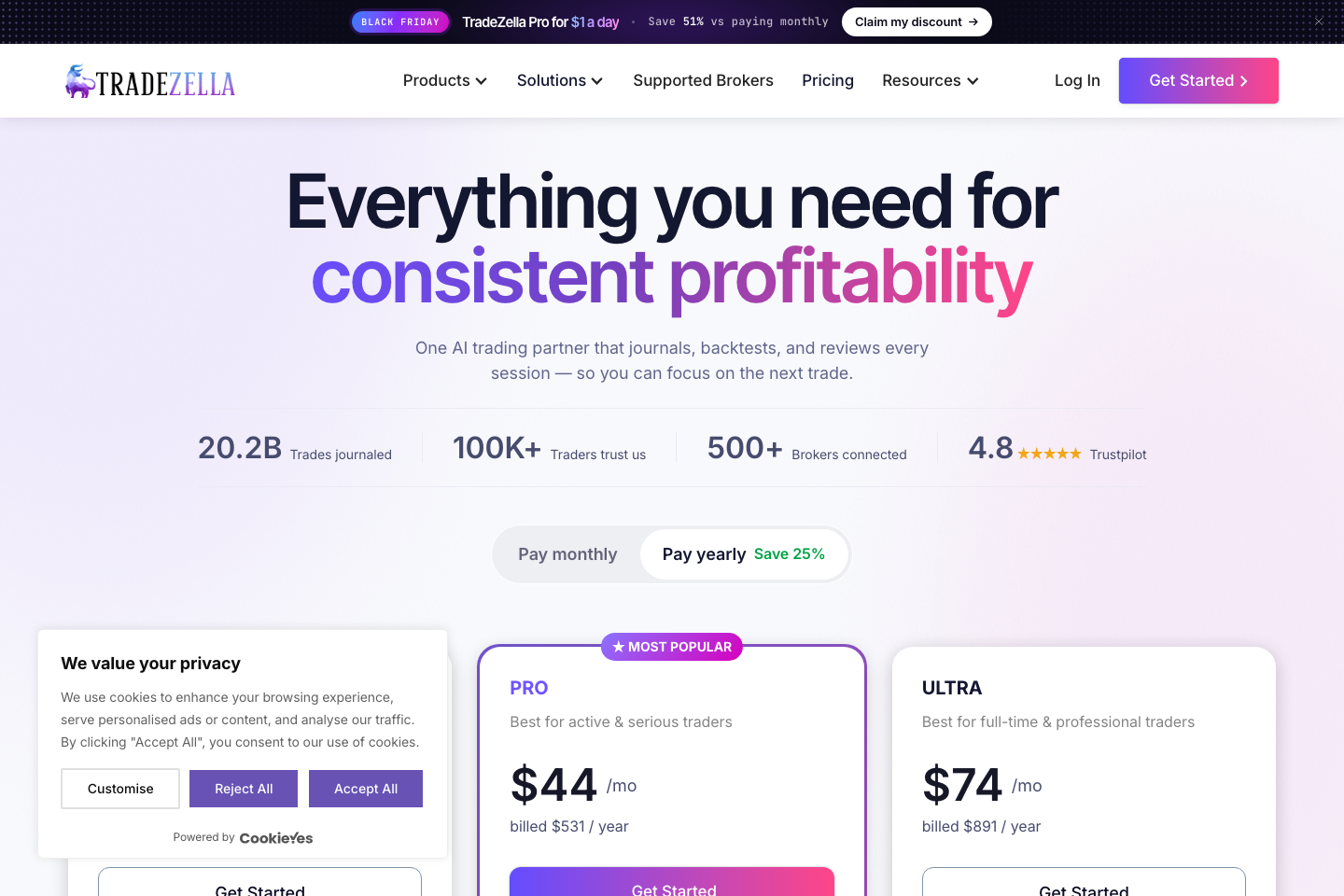
Manual backtesting and historical bar replay
Manual backtesting is a rehearsal environment. A trader moves through historical candles, applies entries and exits, and records whether the predefined process was followed. TradeZella advertises more than a decade of historical data for supported markets, with saved strategies and sessions. It can help users practice consistent execution, but a market with unavailable data or a different contract specification may not match a broker account. The most common analytical error is designing rules around a chart the researcher already knows. Hindsight makes ideal support levels and trend changes look obvious. To reduce bias, choose the rules first, hide future candles, record costs and avoid changing definitions midway through the sample.
Automated no-code backtesting and strategy definitions
TradeZella also markets automated historical tests from natural-language strategy descriptions. This is convenient for a trader who has clear rules but no coding experience. The platform can translate a request into a backtest, generate statistics and allow further review. The workflow deserves careful scrutiny because plain-English instructions can hide ambiguity: 'enter after a strong breakout' is not a precise condition unless strength, timing and order placement are specified. A useful input defines the instrument, tested period, time frame, entry trigger, stop placement, position sizing, exit criteria and transaction costs. It also describes what happens when conditions overlap or an order is unfilled. When the software generates a rule, inspect the actual interpretation before accepting the performance summary.
Trade Replay and decision-focused review
Trade Replay is different from constructing an entirely hypothetical strategy backtest. Its purpose is to revisit a specific trade or session and understand the market context around entries, exits and decision points. That can help a trader identify where a plan was respected, which signals were available in real time and whether a mistake was visible before the outcome. Replay can also provide a useful training exercise for discussing difficult decisions with a coach. The vendor's subscription descriptions require special care. A July 2026 help article lists ten monthly replays in Essential, while the current public pricing view describes Trade Replay as not included for that tier.
Prop Firm Sync, strategy notes and collaborative spaces
The product's wider environment includes prop-firm account workflows, the Strategies area, a Notebook, progress tracking and spaces for collaboration or mentorship. These functions may appeal to users managing challenge accounts or reviewing trades with an instructor. A centralized workspace can make it easier to keep the plan, the outcome and feedback together, rather than search for separate screenshots and chat comments. However, a prop firm's evaluation rules are not interchangeable with standard realized returns. Daily loss rules, maximum drawdown and funded-account reset policies can depend on the challenge provider. Confirm that any imported prop account maps its rules accurately, and avoid interpreting a reset or payout as a normal trade result.
✅ Pros & Cons of TradeZella
Pros
- Connected journal, analytics, manual backtesting and strategy notes can reduce tool switching
- Published support for broker sync, CSV imports and manual trade entry
- Clear separation of Essential, Pro and Ultra account and AI-credit ceilings
- Documented workflow for reviewing and annotating individual trading decisions
- Advanced tiers add substantially more AI usage, automation runs and replay access
Cons
- No ongoing free subscription tier; Essential starts at $35/month on monthly billing
- Vendor documents disagree about whether Essential includes Trade Replay
- Import accuracy and exact broker support must be validated for your accounts
- AI-generated explanations and backtests cannot independently verify strategy profitability
- Annual-billing equivalents may obscure the actual upfront charge
👾 Limitations & Reality Check
The most consequential limitation is not a missing feature but the reliability of the trading history. A review platform can only analyze the entries it receives. An import may miss closed trades, group partial fills incorrectly or fail to bring over financing costs. If journal numbers differ from the broker statement, do not treat the journal's statistics as an independent source of truth. Fix the underlying record first. A journal can also encode hindsight. A trader might tag losing trades as rule violations and winning trades as textbook setups, turning the retrospective classification into a self-fulfilling result. Write rules for tagging before measuring outcomes; examine all trades in a period; and use consistent position-size normalization. Repeat the analysis on later samples rather than assuming the first appealing chart identifies a lasting edge. Historical simulations present different risks. TradeZella's no-code automated backtesting is vendor-documented, but a generated strategy can interpret ambiguous language differently from a trader. Results can be sensitive to transaction costs, intrabar fills, survivorship bias and the choice of training dates. Manual replay offers a chance to practice discipline, yet replaying known historical winners is not the same as trading an unknown future market.
💰 Pricing Plans & Real Costs
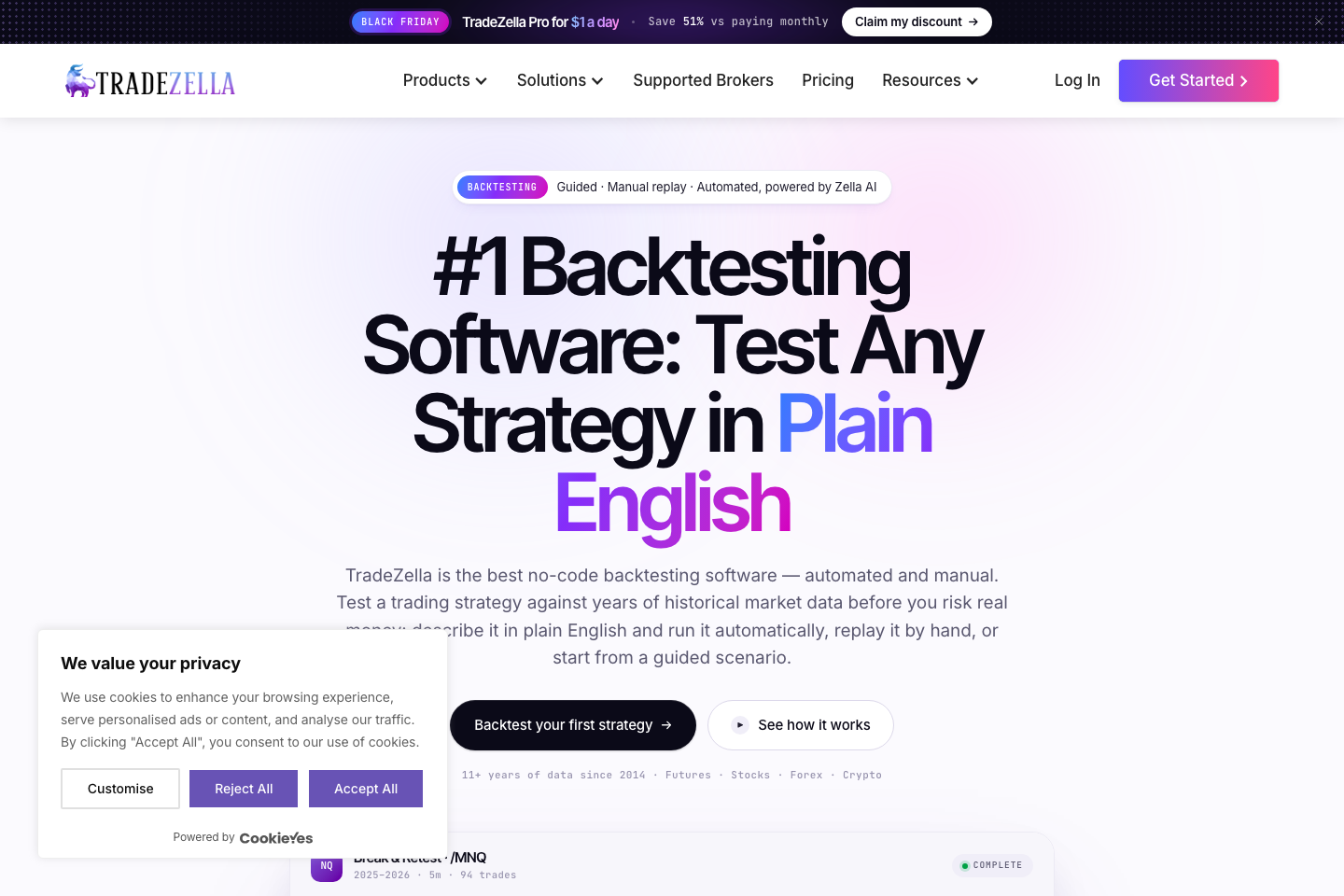
TradeZella's official July 2026 pricing introduced three paid tiers: Essential, Pro and Ultra. Monthly billing is listed at $35, $59 and $99 respectively. The company also advertises annual billing at approximately $26, $44 and $74 per month equivalent. Its published full-year charges are $315 for Essential, $531 for Pro and $891 for Ultra. Those monthly equivalents are rounded display figures; multiplying them by twelve produces a slightly different number from the listed annual checkout total. Compare actual upfront charges, not only the badge showing a monthly savings figure. Essential offers one active trading account, up to ten saved strategies and 500 Zella AI credits per month according to the vendor's current plan descriptions. The public pricing page describes one automated backtesting run monthly. This is a meaningful entry point for a single-account trader who wants to establish a journaling habit, but it is not free. If a reader needs a no-cost ongoing journal, the TradeZella cost structure makes competing products worth considering before committing. Pro is listed at $59 on monthly billing or $531 on an annual contract. The vendor describes up to fifty active accounts, 1,500 monthly Zella AI credits, ten automated backtesting runs and unlimited strategy creation. Replay and 1-second features are presented in the current pricing details. A Pro subscription may make sense for traders who actually work through replay sessions or multiple accounts; the existence of a feature alone does not prove that it improves results.
| Plan | Cost / billing model | Region / billing period | Vendor source checked |
| Essential · monthly | $35/month; monthly billing | US reference; month-to-month | https://www.tradezella.com/pricing (2026-11-22) |
| Essential · annual | $315/year (about $26/month equivalent) | US reference; annual prepaid; rounded monthly equivalent | https://www.tradezella.com/pricing (2026-11-22) |
| Pro · monthly | $59/month; monthly billing | US reference; month-to-month | https://www.tradezella.com/pricing (2026-11-22) |
| Pro · annual | $531/year (about $44/month equivalent) | US reference; annual prepaid; rounded monthly equivalent | https://www.tradezella.com/pricing (2026-11-22) |
| Ultra · monthly | $99/month; monthly billing | US reference; month-to-month | https://www.tradezella.com/pricing (2026-11-22) |
| Ultra · annual | $891/year (about $74/month equivalent) | US reference; annual prepaid; rounded monthly equivalent | https://www.tradezella.com/pricing (2026-11-22) |
🎯 Who Should Use TradeZella?
TradeZella is well suited to a trader who makes enough decisions to justify systematic review and has a clear framework for labeling entries, exits, risk and setup quality. Someone trading one account may value the ability to connect trades, attach screenshots and compare planned versus actual behavior. Pro may be relevant if historical replay and AI-assisted summaries are part of the weekly routine. A coach or multi-account operator may have a genuine reason to evaluate higher account and collaboration allowances. Forex traders should check whether their broker supports the exact import method, how swaps and spread costs appear, and whether multi-currency reports are handled correctly. A forex trading journal is only valuable when trades and financing costs reconcile with the statement. For futures, review contracts, tick value and commissions. For options, confirm that multi-leg strategies and expirations are represented properly. A general options trading journal with strong analytics may outperform an all-in-one suite if its import mapping is more accurate. TradeZella is less compelling if the user merely needs a free, basic trade log, rarely reviews transactions or lacks a repeatable decision process.
⚖️ TradeZella Alternatives
TradeZella competes with tools that solve some—but not necessarily all—of the same problems. The following job-based comparison focuses on documented capabilities and existing DigiOffly reviews. It is not a controlled benchmark or a claim that every product supports the same brokers, backtesting feed or AI model.
TradesViz vs TradeZella
TradesViz is worth comparing when quantitative trade statistics and flexible reporting matter more than an integrated coach-like experience. It offers a published free tier alongside paid analytics plans, unlike TradeZella's currently paid-only subscription structure. Import support, specialized reports and review depth vary by plan and asset class. A trader who wants to reconstruct results across accounts should compare each product's fill handling, fees, tags and export routes. The phrase tradesviz vs tradezella is best answered with a concrete workflow: import the same five historical trades, measure reconciliation and locate the report needed for a decision. More charts are not automatically better.
TraderSync vs TradeZella
TraderSync focuses on trade journaling, analytics and training features, with plan-dependent tools and broker integration coverage. It belongs on a shortlist for traders who want a dedicated journal and a different balance between performance reporting, replay and coaching. Compare exact limits and current pricing through the vendor before buying, because integration lists and product tiers change.
If automatic synchronization is the primary reason to pay, the best test is whether the exact account imports correctly and whether partial fills, options structures or closed trades are handled. A strong marketing feature list cannot compensate for incomplete historical records. Our separate TraderSync review covers that product rather than declaring an unsupported winner.
FX Blue vs TradeZella
FX Blue provides trading-account reporting and simulation tools, particularly relevant to MetaTrader environments. It offers a different mix of services from TradeZella. A forex trader who needs public account performance reporting may be satisfied with FX Blue's existing tools, while another who wants an integrated strategy notebook, journal process and AI-assisted review might prefer TradeZella.
Before comparing them, separate free performance analytics from a paid journaling subscription and distinguish a simulator from actual broker execution. An FX Blue report is not by itself an independent audit of a strategy. The decision should be grounded in the exact statement, platform connection and account workflow being analyzed.
Myfxbook vs TradeZella
Myfxbook is centered on broker account tracking, published statistics and verification conventions rather than a direct replacement for a combined TradeZella strategy journal and AI backtesting suite. It may be useful for viewing externally reported account history and measuring drawdown, but the interpretation of performance still depends on completeness, account control and verification method.
Someone seeking independent visibility into existing trades has a different need from a trader trying to improve individual decisions with tags and replay. These tools can be complementary rather than substitutes. Check the limits of any public profile before treating its return as a clean measure of trading skill. Our Myfxbook review explains its separate role.
Comparison: TradeZella vs Alternatives
The matrix describes intended research and trading-review jobs, not a quantified ranking of execution quality or future profitability. All features and prices should be confirmed directly before purchase.
| Consideration | TradeZella | Alternatives |
| Primary job | Paid journal + AI review + historical practice | TradesViz journal analytics; FX Blue account reports; Myfxbook reporting |
| Trade import | Vendor claims 500+ broker/prop integrations; validate exact account | Coverage varies by competitor and import type |
| Manual backtesting and replay | Documented by TradeZella; tier-specific access needs checking | FX Blue simulator or competitor tier-specific training tools |
| AI-assisted review | Zella AI and Agents with monthly credit limits | Different coaching/report features; verify actual availability |
| Free subscription | No standing free TradeZella plan currently advertised | TradesViz has published Free tier; other access may be different |
| Price | Essential $35; Pro $59; Ultra $99 monthly | Check each vendor’s current standalone plan and instrument support |
🧮 Calculate the real journal cost before subscribing
A subscription becomes expensive when the team pays for features it does not use. Begin with the listed annual invoice, not a rounded monthly-equivalent badge, then add any relevant taxes and the labor required to reconcile imports. Essential's published $315 annual charge is a very different cash decision from $35 charged month by month. When asking how much is TradeZella, distinguish Essential, Pro and Ultra, as well as account limits and AI usage. The TradeZella cost for a solo trader should also include whether the subscription helps produce a genuinely better review process.
📊 A weekly trading journal review that avoids hindsight
A useful review does not start with the highest return. Start with a complete sample of trades from a fixed week and reconcile it with the broker statement. Classify process errors according to rules written before seeing the outcomes. Compare planned risk with realized risk and separate deposits, withdrawals and externally reported returns from trading performance. Then identify one narrow behavior to improve. If average loss increases when a trader moves a stop, that is a hypothesis to monitor, not definitive evidence of cause. Keep the tag definitions constant for the next period and check whether the pattern repeats.
🔐 Trade-account privacy and trustworthy records
Importing a complete trade log can expose sensitive financial history, instrument preferences and behavioral patterns. Verify the provider's data-access requirements and who can see shared journal spaces. Read broker permissions carefully, especially if a connection requests credentials rather than providing an official authorization flow. Never place a trading password or wallet recovery phrase in a notebook or AI prompt. A trading journal app should also have clear export and retention options. Ask whether you can preserve records if a subscription ends and whether historical fees and timestamps remain available.
🧭 Translate search questions into specific product checks
People looking for a TradeZella review may be trying to answer very different questions. Searchers asking what is TradeZella generally need to know whether it is a brokerage, signal service or journaling tool. It is principally a paid journal and practice suite, not a broker. Someone searching is TradeZella free needs the standing-plan answer: the vendor does not advertise an ongoing free subscription. TradeZella free trial and TradeZella trial searches deserve a separate check. Promotions, coupons or onboarding offers can change, and a discounted first payment must not be portrayed as a free tier.
🧪 How We Evaluated TradeZella
This is documentary software research prepared from official TradeZella product, billing, help and pricing pages, including the vendor's July 2026 plan change. We captured genuine public-page screenshots and an official logo. We did not buy a TradeZella subscription, connect an account, import private trades, complete backtests, evaluate AI credit consumption or measure broker synchronization speed. Performance and feature totals reported by the vendor are labeled accordingly. The overlapping research questions and competitors were selected for US search demand using real sourced keyword estimates; these are advertising-derived search volumes, not independently measured organic ranking difficulty.
Method: documentation-based analysis of published vendor sources; no independent product access or benchmark is claimed.
🏆 Final Verdict: TradeZella Review
TradeZella's value comes from connecting a full trading record to a repeatable process of review and historical practice. It is worth considering when the same trader or team already takes the time to reconcile transactions, tag setups and test one specific hypothesis at a time. Pro may be justified for active replay and AI workflows; Ultra is primarily a capacity decision. Essential can support a smaller journal, but its Replay entitlement needs vendor clarification because current official documents disagree. If the primary requirement is simply a free journal or transparent performance reporting, compare TradesViz, FX Blue and Myfxbook before paying.

Frequently Asked Questions
What is TradeZella used for?
TradeZella is a paid trading journal and analytics platform with broker imports, strategy tracking, backtesting, replay and Zella AI features. It is not a broker or an audited return certification.
Is TradeZella free?
The vendor currently advertises Essential, Pro and Ultra paid subscriptions, rather than a standing Free plan. Pricing and temporary promotional offers should be checked separately.
How much is TradeZella per month in 2026?
Essential is $35 monthly, Pro $59 monthly and Ultra $99 monthly in the current vendor pricing. Annual billing is advertised at $315, $531 and $891 respectively, before applicable taxes.
Does TradeZella offer a free trial?
The published standing pricing has no Free plan. Any TradeZella free trial, coupon or limited promotion should be verified directly from the official checkout terms before assuming eligibility.
Does the TradeZella app work with MetaTrader and forex brokers?
The vendor advertises more than 500 broker and prop-firm integrations, but verify the exact MetaTrader broker, account type and sync method. Trading history and commissions should be reconciled to the statement.
Can TradeZella automatically import trades?
The vendor documents automatic imports, CSV uploads and manual entry. The best trading journal for options must reconcile multi-leg orders, expirations and fees against broker statements; verify TradeZella’s mapping before trusting it.
Is TradeZella the best day trading journal app for beginners?
It may help a beginner structure reviews, but paid access only makes sense if the user maintains a consistent journal and understands the limitations of historical statistics.
What is included in TradeZella Pro?
The official Pro plan describes up to 50 active accounts, 1,500 monthly AI credits, ten automated backtesting runs, strategy tools and replay features. Confirm live entitlements before paying.
Does Essential include Trade Replay?
The July 2026 vendor help page lists ten replays monthly, but the current public pricing page says Trade Replay is not included for Essential. Check checkout and ask TradeZella support to clarify.
How does TradesViz vs TradeZella compare?
TradesViz offers a documented Free tier and analytics-focused journals. TradeZella provides a broader integrated practice and AI suite on paid tiers. Compare import accuracy, fees, instrument coverage and actual usage needs.
Did DigiOffly independently test a paid TradeZella account?
No. This review uses vendor documentation and genuine public-site screenshots. DigiOffly did not purchase a subscription, import real trades, benchmark the platform or submit trading orders.
EXPLORE NEXT ON DIGIOFFLY
🔍 Explore More on DigiOffly
TradesViz Review
Compare a reporting-heavy trade journal with the TradeZella workflow
Read TradesViz reviewTrading & Market Analysis Software
Browse the Backtesting & Trading Journals section
Explore trading softwarePrimary sources and verification dates
- TradeZella official product — verified 2026-11-22
- Current monthly and annual pricing — verified 2026-11-22
- July 2026 pricing help and limits — verified 2026-11-22
- Official features — verified 2026-11-22
- TradeZella no-code and manual backtesting — verified 2026-11-22
- Trade Replay versus backtesting — verified 2026-11-22
- Getting Started — verified 2026-11-22
- Billing, upgrades and prorating — verified 2026-11-22
- Vendor legal terms — verified 2026-11-22