

Vendor information reviewed 2 November 2026. Plan details and known add-on charges are explained in the pricing section, with a direct link to the source. Current vendor pricing.
Editorial disclosure: This is a software and pricing research draft based on the linked vendor documentation, not a claim of a completed personal product benchmark or trading outcome. We do not provide investment, financial or tax advice.
TraderSync starts with trade records rather than market predictions. A trader who cannot reconcile raw executions, commissions and partial fills will not obtain reliable statistics by installing a more elaborate dashboard. The platform's value lies in making that history searchable, reviewable and comparable across sessions and accounts. Its results depend on the records it receives.
Our examination of TraderSync's plans is source-based and not a claim that we imported a broker's private statement ourselves. The official matrix lists replay, analytics, tagging and a Cypher assistant with different tier limits. Where the vendor's own account-limit descriptions disagree, the review identifies the discrepancy rather than inventing a single definitive allowance.
📊 TraderSync Review Summary
Best-fit use: Backtesting & Trading Journals. Pricing model: paid plans and potential additional data or usage charges. Check the full pricing breakdown below.
A subscription makes more sense for someone who trades regularly and reviews decisions with consistent setup tags. A beginner with a handful of fills may need only a simple spreadsheet, while an active multi-account trader could benefit from automatic imports and deeper reports. Replay resolution and AI assistant access should not distract from verifying P&L calculations first.
⚡ Quick Verdict: Is TraderSync Worth It?
The practical distinction for TraderSync is between broker-data imports, consistent setup labels and performance reports and what a user can validate from the selected plan. The decisive caveat is broker import methods and completeness vary. Compare that with TradeZella before making an annual commitment.
TraderSync is a natural candidate for post-trade analysis; FX Replay targets historical practice, while other journals such as TradeZella may suit different review routines. A genuine comparison must reconcile the same broker file under the same trade-grouping and fee assumptions. More impressive charts do not establish better accounting accuracy.
🧠 What Is TraderSync?
TraderSync is a platform in the Backtesting & Trading Journals software category. Its relevant published capabilities include broker-data imports, consistent setup labels and performance reports; journal review and custom filters across supported assets; replay and market-simulation tiers for review sessions; multiple account support and ai-based report features. This makes it part of the broader trading-software stack, but it should not be confused with a guarantee of successful trades, a regulated investment recommendation or a substitute for evaluating market-data licensing.
A suitable TraderSync buyer has a defined task: import a small CSV and reconcile exact P&L with trade records. A person needing replay and market-simulation tiers for review sessions may face a different licensing decision from someone who only reads weekly research. Name the instrument, expected export and budget before choosing a subscription tier. This avoids comparing products with different purposes as though their feature lists were directly interchangeable.
🖥️ Interface, Data and Day-to-Day Workflow
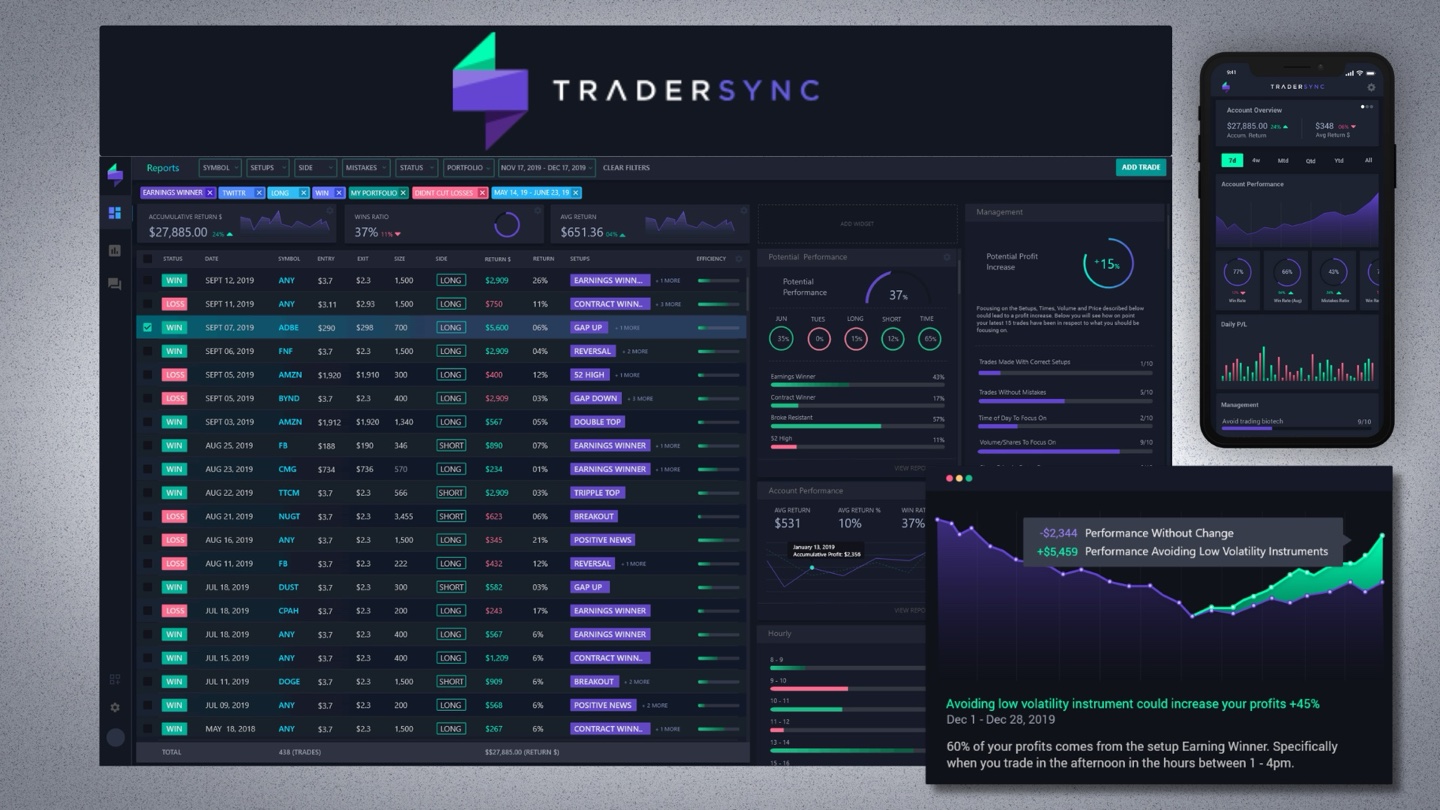
Follow the TraderSync workflow from the input to the reported result. Start with classify trades by setup and compare the weekly results; then record whether the output makes use of broker-data imports, consistent setup labels and performance reports. If the data comes from another exchange, wallet or account, note that dependency explicitly. A screenshot can help explain the screen but does not independently verify the accuracy of every value it contains.
For TraderSync, start with a constrained project: Import a small CSV and reconcile exact P&L with trade records. Then classify trades by setup and compare the weekly results. Treat that as a repeatable acceptance test, not as a trading system. If the result depends on a feed, exchange or report format that is absent from your plan, do not infer that the paid tier will fix it without verifying the entitlement.
🧭 How to Evaluate TraderSync Before Subscribing
1. Import a small CSV and reconcile exact P&L with trade records
Evaluation note: Before starting this check, record the chosen instrument and session zone. Inspect whether saved settings remain consistent when the platform is reopened. Any mismatch should be described with an exact timestamp rather than dismissed as user error.
2. Tag trades by setup and compare filters across weeks
Evaluation note: Run this check against a defined sample and record the limits of the account tier. If the feature is unavailable, note the subscription level rather than treating it as a software malfunction.
3. Assess whether broker sync handles partial closes and fees
Evaluation note: Keep a dated copy of the source input and the result. When external exchange or wallet data is involved, document that dependency so the same exercise can be attempted again.
4. Export a report and check retention after changing tiers
Evaluation note: Compare the output with a second method or a manually checked subset. Explain any disagreement before using the result in a recommendation; a successful screenshot alone does not establish data accuracy.
🛠️ Key Features and Real-World Fit
✓ Trade imports, strategy tags and performance breakdowns
broker-data imports, consistent setup labels and performance reports: the practical question for TraderSync is whether a user can import a small CSV and reconcile exact P&L with trade records. Compare the documented output with TradeZella where appropriate, and check broker import methods and completeness vary before treating the feature as a subscription benefit.
✓ Journal review and custom filters across supported assets
Journal review and custom filters across supported assets: the practical question for TraderSync is whether a user can classify trades by setup and compare the weekly results. Compare the documented output with FX Replay where appropriate, and check depth of replay, alerts and account limits differ by tier before treating the feature as a subscription benefit.
✓ Replay and market-simulation tiers for review sessions
Replay and market-simulation tiers for review sessions: the practical question for TraderSync is whether a user can assess whether broker sync handles partial closes and fees. Compare the documented output with Edgewonk where appropriate, and check journal statistics depend on accurate fee and trade records before treating the feature as a subscription benefit.
✓ Multiple account support and AI-based report features
Multiple account support and AI-based report features: the practical question for TraderSync is whether a user can export a report and check retention after changing tiers. Compare the documented output with TradeZella where appropriate, and check broker import methods and completeness vary before treating the feature as a subscription benefit.
⚠️ Limitations and Accuracy Risks
- Broker import methods and completeness vary
- Depth of replay, alerts and account limits differ by tier
- Journal statistics depend on accurate fee and trade records
For TraderSync, the warning about depth of replay, alerts and account limits differ by tier deserves a concrete example before publication. Check assess whether broker sync handles partial closes and fees. If this fails, identify whether the cause is a missing plan entitlement, incompatible input or out-of-date documentation. Do not substitute a generalized claim that all platforms are unreliable, because the specific limitation is what helps a buyer.
💰 TraderSync Pricing and Total Ownership Cost
TraderSync plans: documented differences and an account-limit discrepancy
On the official TraderSync pricing page, Pro is listed at $29.95 per month ($269.52 annually), Premium at $49.95 ($449.52 annually), and Elite at $79.95 ($719.52 annually). Monthly figures shown beside annual totals are effective monthly rates, not monthly cancellation terms. The product lists Market Replay resolution at one-minute bars for Pro, one-second updates for Premium and 250-millisecond updates for Elite. Cypher Assistant limits are shown as 5, 15 and 60 messages per day respectively. Market Replay and Trade Replay are different features and should not be conflated.
One item needs clarification before purchase: the pricing cards describe account access as five accounts on Pro and unlimited on Premium and Elite, while a detail paragraph within the comparison table describes Premium as 20 and Elite as 50 accounts. The visible comparison values also say unlimited. We cannot reconcile these vendor statements from the public documentation alone. Users with more than a handful of brokerage accounts should confirm the contractual limit with TraderSync support.
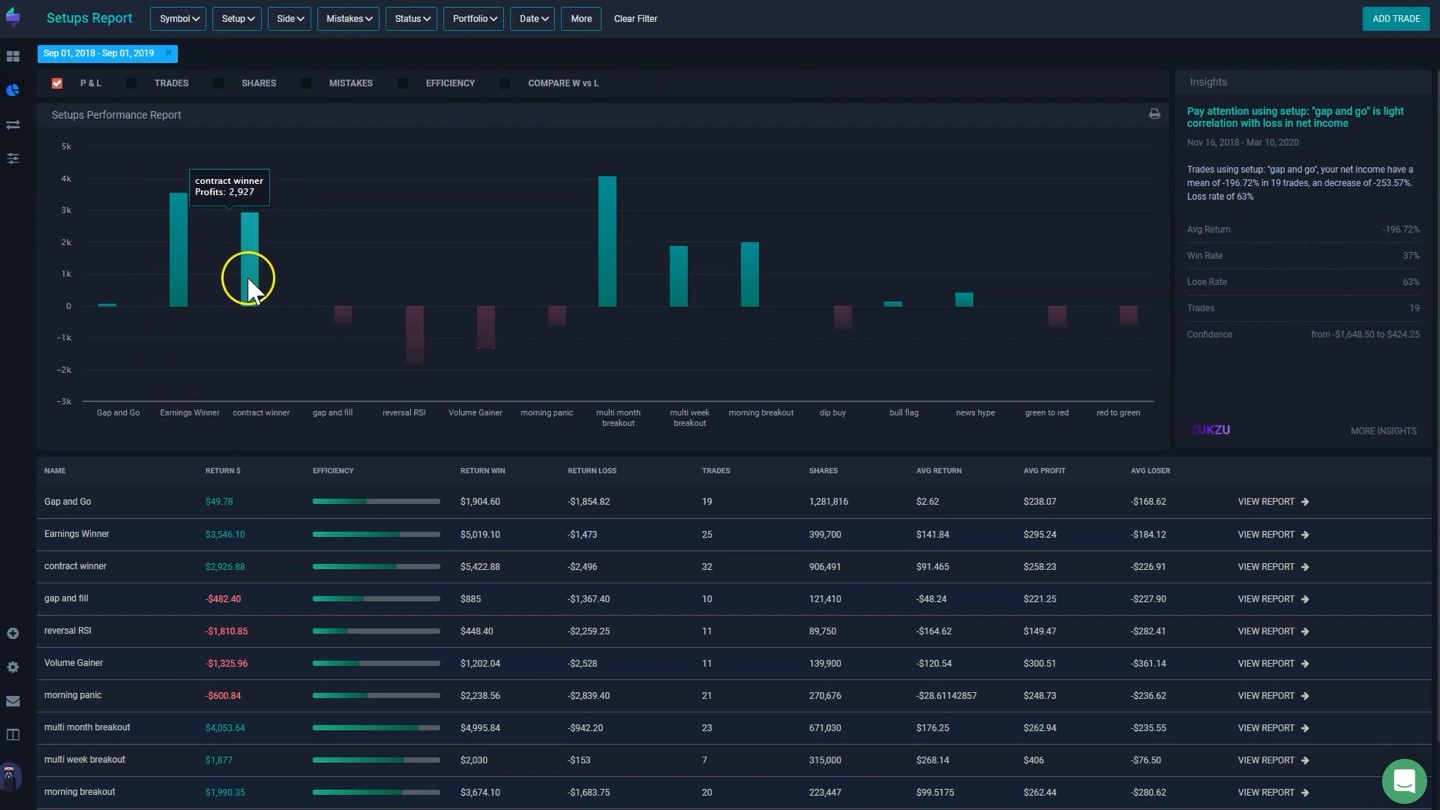
TraderSync currently presents Pro, Premium and Elite tiers. Published monthly reference prices are $29.95, $49.95 and $79.95 respectively; annual-billing effective monthly prices are lower, and the site advertises a seven-day trial. Confirm the current offer and feature matrix before checkout.
Build the TraderSync budget from the vendor’s current plan page, the required feature broker-data imports, consistent setup labels and performance reports and any data or report limits connected to broker import methods and completeness vary. Compare the actual monthly checkout against the yearly amount paid up front. Where an API or third-party licence is required, treat that as a separate cost rather than an included benefit. Set a calendar reminder for renewal, but do not assume a discounted first year will repeat.
| Cost question | What to verify | Why it matters |
| Billing cycle | Monthly and annual checkout totals | Effective monthly rates can require a year of commitment |
| Data access | Asset coverage, exchange entitlements and history | A missing feed may invalidate your workflow |
| Usage caps | Charts, alerts, exports, API calls or transaction counts | Limits can interrupt an otherwise useful test |
| Commercial rights | Personal, team or commercial data usage | A personal plan may not permit publishing or redistribution |
| Cancellation | Trial conversion and renewal date | Avoid paying for an unused tool |
🎯 Who Should Use TraderSync?
The strongest potential fit is someone actively working on backtesting & trading journals, with enough regular use to justify the subscription. That person should be able to identify a specific recurring problem, choose a success metric and confirm access to the correct data and export format.
TraderSync is less attractive when a buyer does not regularly use journal review and custom filters across supported assets or cannot explain the information needed from import a small csv and reconcile exact p&l with trade records. The interface may be extensive without producing a useful record. In that situation, a free chart, a spreadsheet or a narrower competing product can be sufficient. The useful comparison is actual work completed against total annual cost, not the number of dashboards.
⚖️ TraderSync Alternatives and Comparisons
| Platform | Primary decision dimension | What to check |
| TraderSync | Backtesting & Trading Journals | Vendor plan features, data coverage and total cost |
| TradeZella | Different approach to the same task | Workflow and data comparability |
| FX Replay | Specialised research or journal tools | Integration and output needs |
| Edgewonk | Complementary tool or workflow | Whether it replaces or supplements the stack |
Compare TraderSync against TradeZella with the same instrument, historical window and output requirement. A second candidate such as FX Replay may solve only one part of the process. If the job is classify trades by setup and compare the weekly results, record which product completes it with fewer undocumented assumptions. Comparing a journal to a screener simply because both concern markets does not establish that one is superior.
🔎 TraderSync in Practice: Detailed Research Notes
A realistic research session
A TraderSync evaluation can start with a narrow reconciliation exercise: select ten trades from a broker statement, including at least one partial close, one losing trade and one trade with several fees. Import them through a supported route or CSV and calculate net P&L independently. Compare timestamps, units, position direction and commissions. If the journal reports a different amount, identify the exact record responsible. A journal that creates attractive charts but misstates costs is not suitable for performance review. Once the numbers match, add the setup tag you would actually use during weekly analysis.
Which features change the work?
TraderSync is intended to collect executions, organize notes and tags, and turn trading history into questions about behavior. Its analytics can distinguish patterns by setup, asset, time window and rule compliance if the underlying data is sound. The difference between its subscription tiers matters: Pro covers core journaling, Premium adds higher-end analysis and replay, and Elite expands features such as market depth and AI-assisted workflows. A chart of win rate is only a starting point. A disciplined review should compare risk-adjusted outcomes, drawdowns and adherence to entries rather than rewarding a higher percentage of winning trades alone.
Market data, definitions and timing
Broker integrations are a key part of the product promise but cannot be assumed to be identical for every broker, contract type or platform version. An options spread, a futures rollover and a spot FX position may create different import edge cases. Transaction fees, commission currency and partial fills can also change calculated performance. Check whether the journal merges executions as intended, and preserve the original broker export before correcting an import. Any metrics derived from the file inherit its weaknesses. For multi-account users, confirm that positions cannot be accidentally pooled across accounts with different base currencies or risk limits.
The subscription decision
TraderSync advertises Pro, Premium and Elite with regular monthly reference prices of $29.95, $49.95 and $79.95, and lower effective monthly rates on annual billing. The vendor also advertises a seven-day trial. Before upgrading, determine whether trade replay, extra accounts, market simulation or AI assistant messages solve a recurring problem. A journal that is opened once every few months may not justify an expensive annual subscription. On the other hand, someone maintaining several active accounts may value a reliable import and export process more than cosmetic features. Compare renewal terms and the exact tier matrix at checkout.
How it compares with alternatives
FX Replay is naturally evaluated as a historical decision simulator, while TraderSync should first prove that it is a reliable record of actual trades. TradeZella and Edgewonk are alternatives worth checking for workflow differences, including how they handle tags and review templates. A useful comparison imports the same broker file into each journal and asks whether the outputs agree. Add the same transaction fees and position grouping rules. If one dashboard reports a higher profit factor but treats partial closes differently, the result is a data-model difference, not an improvement in trading skill.
Where an attractive dashboard can mislead
The biggest operational danger is allowing the dashboard to become a second, inaccurate source of truth. A missed execution can turn a losing trade into a winner; two wallet or account currencies can be merged improperly; a fee omitted from hundreds of small trades can distort expectancy. Review imports after any broker or API change and keep raw exports. Do not let AI coaching invent the reason for a trade you never documented. If the journal suggests a pattern, check sample size and market regime before changing strategy rules. The software organizes evidence, but it does not create evidence that was never collected.
🔍 Related TraderSync Questions Worth Checking
The TraderSync Pro vs Premium question is about workflow, not a universal tier recommendation: start with the features needed to reconcile and review a broker file. A TraderSync Elite review should describe the additional replay and assistant functions accurately, rather than imply that a higher subscription improves trading outcomes. The appropriate trading journal software is the one whose records match the source statement.
A TraderSync broker sync test should use real export examples with costs, currencies and partial fills. TraderSync trade replay is a different capability from monitoring a live brokerage account. Check whether the selected plan offers the resolution and controls relevant to that task before interpreting simulated results as an execution record.
For TraderSync trading analytics, compute net P&L independently and compare groupings by strategy tag and date. A TraderSync forex journal also needs careful currency conversion and timestamp settings. These checks can reveal data-entry problems, but they do not establish that the software makes any particular trading strategy profitable.
A test of TraderSync CSV import should include a canceled order, a partial close and fee adjustments wherever supported. Check the terms of the TraderSync free trial before promising that export and replay functions are available without restrictions. The comparison TraderSync vs TradeZella should use the same input file and identical accounting conventions.
An TraderSync stock trading journal should reflect corporate actions and position grouping consistently. TraderSync trade tagging is valuable only when tags are applied according to a stable written definition. For anyone considering TraderSync analytics, the strongest evidence is a reconciled sample, not a higher displayed win rate or an attractive dashboard.
🔬 TraderSync — Practical Product Analysis
Trade imports and a reconciled P&L
TraderSync should first prove that it can reproduce numbers from a brokerage statement. Import a small collection of executions containing a partial close, multiple commissions and at least one trade in a different account currency. Compare gross P&L, net P&L, open positions and fees with an independently calculated worksheet. If the journal merges multiple fills into one trade, determine whether the grouping corresponds to the method the user actually follows. Broker connections and CSV formats differ, so a seamless import for one platform cannot be assumed for every supported account. A chart of profit factor means little until the raw transaction records are reconciled.
Tags can expose behavior patterns only when they are applied consistently. Define what qualifies as a breakout, pullback, late entry or rule violation before examining the results. Then compare the tag against a selection of original trade notes and timestamps. Without a stable labeling rule, a journal can make a weak strategy look strong simply because losing trades are categorized differently. The important output is a reviewable history that connects the decision, execution and realized cost. AI-generated explanations should be treated as hypotheses when the user has not provided evidence of why a trade was taken.
Market Replay is not the same as Trade Replay
The pricing page distinguishes a simulator for market scenarios from replaying actual trades. Pro currently lists one-minute market replay precision, Premium one-second, and Elite a higher-resolution 250-millisecond level; feature access varies in other ways as well. A fast intraday trader may benefit from more detailed playback, whereas a position trader examining multi-hour setups may not. Even detailed replay does not guarantee that the available depth matched the user's live order size. Check whether a particular asset class, such as options, is included before treating the higher tier as a universally better research environment.
TraderSync also advertises an AI assistant branded Cypher with tier-specific message allowances. Such a feature may summarize patterns, but an automated observation about risk or consistency is only as reliable as the imported dataset and tags. Compare a suggested conclusion with independently computed figures and original trade screenshots. If the source record is missing a commission or duplicates a closing fill, an AI summary will reproduce or magnify that accounting error. A useful review separates the value of assisted navigation from any unsupported promise that a subscription can generate a profitable strategy.
Plans, conflicting account limits and the buyer
The vendor's regular monthly reference prices are $29.95 for Pro, $49.95 for Premium and $79.95 for Elite, with annual-billing equivalents and occasional promotions. The current pricing page contains a discrepancy: prominent cards describe Premium and Elite account access as unlimited, while one explanatory line in the comparison section mentions 20 and 50 accounts. A reader managing many accounts should obtain written clarification instead of relying on an ambiguous product table. The source should be linked directly and the discrepancy preserved in our editorial record. A time-limited promotion does not necessarily represent the normal renewal price.
TraderSync is most compelling for an active trader with a real collection of transactions to analyze. FX Replay is a different purchase when the main goal is practicing hypothetical decisions; TradeZella and Edgewonk deserve comparison when another journal's workflow is more suitable. The buyer should test the same export in two products, including partial fills, base-currency conversion and fees, before comparing charts. If the numbers do not match, resolve the accounting discrepancy first. Extra dashboards have little value when the fundamental trading history is not trustworthy.
Further decision considerations
A simple numerical example exposes why account reconciliation matters. Suppose a trader buys two units, sells one at a partial profit and closes the remaining unit at a loss. A journal that interprets the two exits as separate independent trades can display different hit rates and average trade outcomes than one that groups both under the original position. Neither number is inherently useful without a disclosed grouping policy. The reviewer should compare performance calculations with a direct manual summary and say whether fees are assigned to individual fills or to a grouped round trip. This is the foundation for an honest comparison with another journal.
🧪 How DigiOffly Evaluates This Software
- Import a small CSV and reconcile exact P&L with trade records
- Tag trades by setup and compare filters across weeks
- Assess whether broker sync handles partial closes and fees
- Export a report and check retention after changing tiers
For TraderSync, our proposed test log includes the plan used, the date, the evidence for assess whether broker sync handles partial closes and fees, and any constraint from journal statistics depend on accurate fee and trade records. These are proposed checks; our current documentation does not establish the results of an independent benchmark. A legitimate revision should link the screenshot, the source record and a clear description of what was and was not verified.
🏆 Final Verdict: TraderSync Software Review
TraderSync deserves consideration when its specific features address a documented research or workflow requirement. The main decision remains practical: can you reproduce the result with the data and access included in the plan, and is the recurring cost lower than the time and errors the software can reasonably prevent? TraderSync is best judged as a performance-accounting workflow rather than an alpha generator. A useful journal makes it easier to distinguish a broken strategy from inconsistent execution. The reviewer should reconcile 10 sample trades manually, including partial fills, costs and time-zone issues, before relying on its analytics.

Frequently Asked Questions
What does TraderSync do?
TraderSync is designed around backtesting & trading journals. Its primary use depends on the features and data you activate.
Is TraderSync free?
Review the current trial and free-access conditions on TraderSync’s official site. Do not assume that a marketing preview includes all paid datasets or that a trial will remain free indefinitely.
How much does TraderSync cost in 2026?
Regular monthly references are $29.95 for Pro, $49.95 for Premium and $79.95 for Elite. Annual billing changes the effective monthly amount. Check the pricing source linked above for the current region, billing cycle and conditions.
Is TraderSync suitable for beginners?
A beginner can start with one narrow workflow, but should verify terminology, plan restrictions and whether a free alternative meets the need.
Does TraderSync guarantee profitable trading?
No. Research, charting, journals and backtests cannot guarantee financial outcomes; hypothetical results have important limitations.
What market data does TraderSync include?
Coverage and history are product- and tier-specific. Check the exact instrument, venue, time interval, licence and data-refresh terms.
Can I use TraderSync for crypto, forex or stocks?
Check the official supported markets and feature matrix. Product support may differ from the availability of paid real-time exchange feeds.
Can I export my research from TraderSync?
Review the export, API, CSV and reporting entitlements of the chosen plan. Data licences may limit redistribution.
What are the biggest limitations of TraderSync?
Broker import methods and completeness vary; Depth of replay, alerts and account limits differ by tier; Journal statistics depend on accurate fee and trade records.
What are alternatives to TraderSync?
Start with TradeZella, FX Replay, Edgewonk and compare a consistent task, current pricing and market coverage.
What should I verify before paying for TraderSync?
Confirm data entitlements, annual versus monthly billing, taxes, usage caps, cancellation and the outputs you actually need.
EXPLORE NEXT ON DIGIOFFLY
🔍 Explore More on DigiOffly
After the TraderSync review: Trading-journal value depends on accurate imports and trade grouping. Plan the software stack around reconciled records, rather than adding a premium dashboard first.
Compare the right tools
- Software Finder — Find a workflow for trade history, analytics and repeatable review.
- Compare Software — Compare imports, analytics and reporting with other software tasks.
- Software directory — Explore published research and software resources.
Plan your software budget
- Software Cost Calculator — Estimate monthly versus annual journal costs across account tiers.
- Software Stacks — Separate broker data, journaling, replay and reporting tools.
- Verified software deals — Check eligibility of trial offers and the eventual renewal price.
Read related guides
- Wave Accounting review — Explore accounting records and reconciliation in a separate business context.
- Bitwarden review — Secure imported account records and sensitive logins.
- Editorial Standards — See how editorial reviews treat incomplete data and conflicting vendor limits.
- Trading & Market Analysis — See the wider trading-software category
- FX Replay review — Contrast broker-import journals with historical trade practice
- Koinly review — Explore a separate crypto transaction-accounting workflow